Camerafarm product archive #42259
| Image |
Date |
Product description |
Price |
Buy |
|
14/09
|
QNAP Systems LIC-CAM-NAS-4CH 4 Licence Activation Keys - For Qnap Surveillance Station ProLIC-CAM-NAS-4CH 4 Licence Activation Keys - For Qnap Surveillance Station Pro
|


|
|
|
14/09
|
QNAP Systems LIC-CAM-NAS-2CH 2 License Activation Keys - For Qnap Surveillance Station ProLIC-CAM-NAS-2CH 2 License Activation Keys - For Qnap Surveillance Station Pro
|
|
|
|
14/09
|
QNAP Systems LIC-CAM-NAS-1CH 1 License Activation Key - For Qnap Surveillance Station ProLIC-CAM-NAS-1CH 1 License Activation Key - For Qnap Surveillance Station Pro
|
|
|
|
14/09
|
QNAP Systems S-12156U-RP Pro+ Network Video Recorder - 2U Rackmount
- 12x 3.5" SATA HDD, RAID 0,1,5 ,5+ Hot Spare, 6,6+ Hot Spare,10,10+ Hot Spare, Single, JBOD/Linear, 56 Channel, USB3.0, 4xGigLAN VS-12156U-RP Pro+
Ultra-high performance 12-bay NVR server for Enterprise
Features
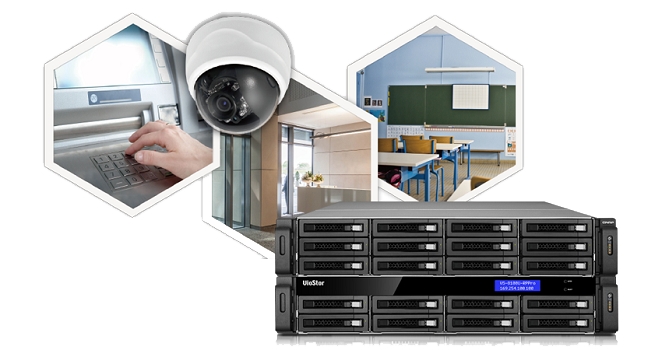
The QNAP VS-12156U-RP Pro+ VioStor NVR is an enterprise-grade; high-end 2U chassis network surveillance server that supports high quality real-time video/audio monitoring, megapixel recording (up to 10 megapixels), and playback from multiple IP cameras. The VioStor VS-12156U-RP Pro+ is a dependable NVR to safeguard your precious property and assets.
- 450 Mbps for recording and playback from multiple megapixel cameras
- HDMI output delivers up to 300fps Full HD local display
- Simultaneously handles inputs from up to 56 megapixel cameras
- Large capacity to ensure continuous high-resolution video recording
- Install free QSCM Lite from App Center to enjoy advanced CMS features
Ultra high performance
Powered by Quad-core Intel Core i5 processor and 8GB DDR3 memory, the VS-12156U-RP Pro+ is capable of recording videos from up to 56 IP cameras, delivering exceptional performance with up to 450 Mbps throughput to ensure stable recording of multiple megapixel IP cameras.
Turn your NVR into a CMS server
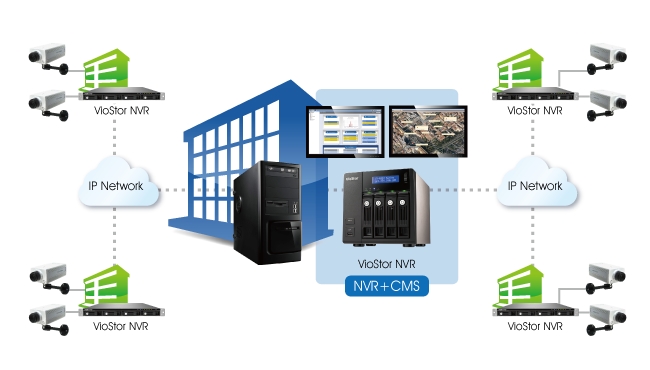
QSCM Lite is a free app provided by QVR that allows you to easily deploy up to 16 QNAP NVRs and 256 cameras and conduct central monitoring, playback, and management. With no extra server hardware required, QSCM Lite can easily turn the VS-12156U-RP Pro+ into a CMS server. The powerful and pioneering QSCM Lite can be freely downloaded from the integrated NVR App Center.
Anytime anywhere surveillance with a mobile app
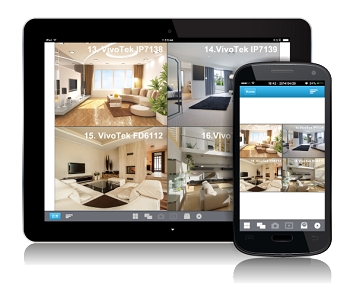
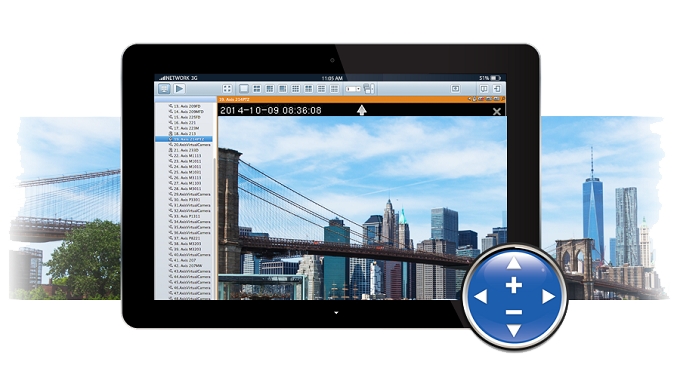
Vmobile is an official mobile app that enables you to monitor QVR anytime, anywhere. Using iOS and Android devices, Vmobile provides camera live-view, PTZ control, instant event notifications, video snapshot, video playback, and searching for videos by date and time. Another mobile app, Vcam, allows you to turn your mobile device into a network camera and to directly save recordings to your VioStor NVR for portable surveillance options.
PC-less network surveillance by full HD local display via HDMI connector
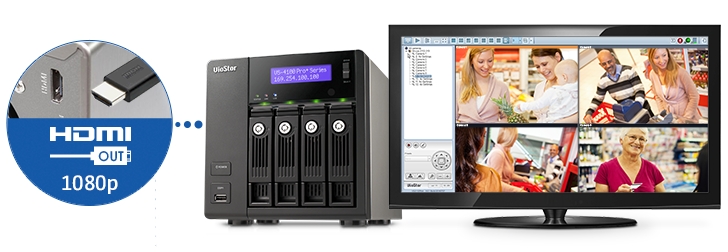
Even without a PC, the VS-12156U-RP Pro+ can be configured and perform monitoring tasks with the local display technology by connecting a USB mouse, USB keyboard and HDMI monitor to deliver lag-free live video monitoring in Full HD (1920x1080) resolution. QNAP local display technology provides a straightforward way to reduce the total costs in your business environment.
Intuitive, zero learning
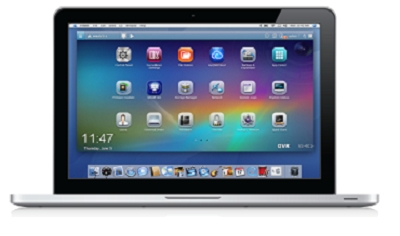
Unlike traditional NVR software that can be hard to use, QVR 5.0 is free from complicated options and terminology, offering an innovative desktop design to compliment smooth working efficiency. The multi-window design allows concurrent multi-tasking, and enables administrators to easily switch between tasks to increase their productivity.
Multiple IP camera management comes easy
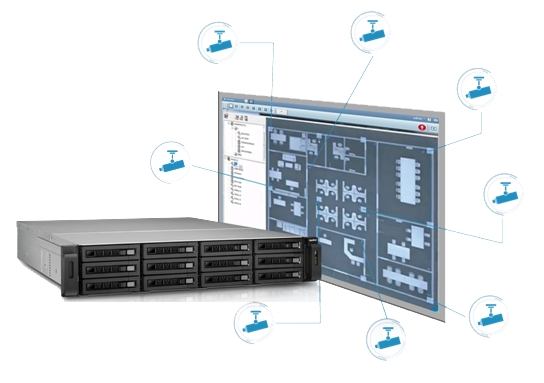
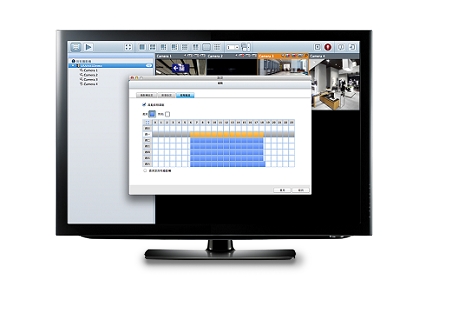
You can directly configure IP camera recording schedules when needed without leaving the Live-view page, maintain a seamless monitoring so you wont miss any suspicious events. You can also visualize IP camera deployment with the E-map function. Just upload the pictures of the monitored locations, drag and drop the IP camera icons to the right place on the E-map, and you can easily monitor your surveillance deployment at a glance.
Cruise for wider areas, zoom in for greater detail
With QVR system, users can easily manage & monitor multiple IP cameras in a real-time basis using web browsers, and attain the first-hand status of monitored corners. You can directly adjust the PTZ (Pan/Tilt/Zoom) functions of supported cameras, flexibly monitoring every desired corner and detail. Auto-cruising is also supported to allow you to define preset positions for PTZ cameras to automatically adjust their monitoring angles to preset positions by the time interval.
Find out the critical recordings without the hassle
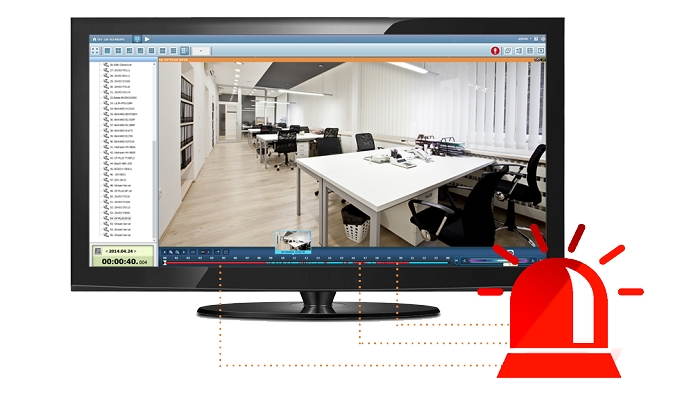
How to find suspicious alarm recordings from huge amount of recordings can be a challenge. QVR 5.0 provides an intuitive playback interface to you to easily distinguish between regular and alarm recordings in the timeline bar. For greater efficiency, you can also enable Intelligent Video Analytics (IVA) to quickly search videos corresponding to particular modes (includes motion detection, foreign/ missing object, out of focus, and camera occlusion) to screen for critical recordings.
Optimize your video watching experience with video transcoding
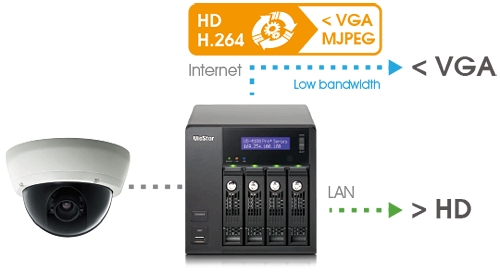
The transcoding capabilities of the VS-12156U-RP Pro+ allows users a practical solution for watching videos stored in centralized locations via the Internet when they have low-bandwidth connections. This feature adapts to bandwidth limits and/ or devices that lack the hardware or codecs to play video files by converting a video file to a lower resolution before transferring it across the Internet. The original high definition video is still retained without any changes being made to it, balancing the whole surveillance system for local recordings and remote playback.
Flexible recording functions
QVR 5.0 provides flexible options to set up IP camera recording, including manual recording and scheduled recording. What can be even more convenient, you can set up the system to only record when motion is detected or other events occur. The smart recording function can also automatically switch the recording detail to a higher resolution when alarms are triggered. This greatly saves the cost spent on hard drives.
Economical expansion options
By installing the Storage Expansion app on a QNAP Turbo NAS, you can connect the VioStor NVR with the Turbo NAS via network to flexibly enlarge the total storage capacity of the VioStor NVR. If the expanded storage is not enough, QNAP REXP expansion enclosures can be used to expand the storage space on the connected Turbo NAS to support hundreds-of-terabytes raw capacity.
Availability: The storage expansion solution is available for VioStor NVR Pro(+) series with firmware v4.1.1 or newer and the Turbo NAS TS-x51, TS-x53, TS-x53U, TS-x63, TS-x70U, TVS-x71, TVS-x71U, TVS-ECx80, TVS-ECx80U series with QTS operating system v4.1.2.
High stability, Built to last
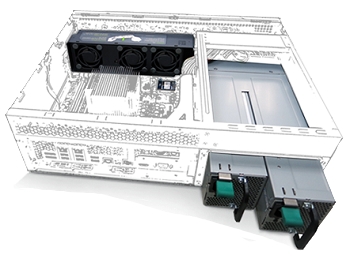
The VS-12156U-RP Pro+ serves as a business-ready system, providing 24/7 operation and services. The dual OS embedded on the DOM architecture in the VS-12156U-RP Pro+ ensures that the system boots up and operates stably. The expertly-designed smart fan delivers great system heat dissipation with minimum vibration, and is easily replaceable without interrupting system operations. The VS-12156U-RP Pro+ also features a redundant power supply to ensure maximum system uptime.
High efficiency with multiple LAN support
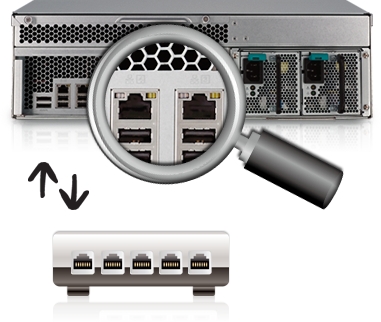
The VS-12156U-RP Pro+ supports multiple port-trunking modes, enabling IT administrators to set up link aggregation to increase total data transmission capability. Failover is also supported to ensure continuous system operations. The supported port-trunking modes include: Balance-rr (Round-Robin), Active Backup, Balance XOR, Broadcast, IEEE 802.3ad, Balance-tlb (Adaptive Transmit Load Balancing) and Balance-alb (Adaptive Load Balancing).
High reliability
The VS-12156U-RP Pro+ supports comprehensive RAID configurations and hot-swapping to allow replacing hard drives without interrupting system operations. QNAPs advanced RAID recovery technology also assists if any healthy drives are accidentally removed from a degraded RAID volume. The system can be recovered to degraded mode by reinserting the wrongly removed hard drives so the data can still be accessible. The Global Hot Spare function also allows a drive to automatically replace a failed drive in a RAID volume, preventing data from being lost.
Software Spec.
| Recording Performance |
| Max. number of HDD supported |
12 |
| Number of channels Supported |
Up to 56
* Max. 64CH for camera license expansion |
| Recording Performance |
Up to 30 fps at 1080P, 720P, VGA for each channel
* Real performance may vary by environment |
| Recording Throughput |
450 Mbps
* Real performance may vary by environment |
|
| QVR Desktop |
| Multi-task Support |
Multiple tasks run on QVR desktop |
| Default Applications |
Control Panel (for system configuration), Surveillance Settings, File Station, myQNAPcloud, Backup & Expansion, App Center |
|
| Central Management System (QSCM Lite App) |
| QSCM Lite |
Download and install for free from the QVR App Center to turn your NVR into CMS server |
| Central Management |
Supports up to 256 channels and 16 servers |
| Dashboard |
An interface that shows the current status and historical trends of key information |
| Apply-to-All Configuration |
Some server settings can be synchronized by grouping identical NVR models, saving configuration time
Some recording settings can be synchronized by grouping identical camera models, saving configuration time |
| Event Management |
Centrally receive events from multiple NVRs |
| View Layout |
Centrally configure the view, adding the cameras from multiple NVRs |
| Multi-layer E-map |
Centrally setup unlimited-layer E-maps for multiple NVRs
Easily find out the event location
Easily see the ongoing event status
Manage multiple e-maps by hyperlink |
| User Management |
QSCM Lite users can be created and assigned to different user groups.
Each user group can have different permissions. |
| Quad-monitor Mode |
Primary monitor: Select to show the live view, E-map, playback, and configuration page
Sub monitor: Select to show the live view and E-map |
| View Content |
Flexibly view content from mixed camera videos and E-maps |
| Bookmark |
Place a vertical thin bar and text details on video footage for easier event investigation |
| Multi Web Browsers Support |
Supports Google Chrome, Internet Explorer, Mozilla Firefox on Windows |
|
| Full HD Local Display |
| Max. Resolution of HW Decode Supported per Ch. |
Resolution up to Full HD (1920x1080) per channel (H.264) |
| Local Display Performance |
Full HD 1080P 300FPS |
| Display Mode |
Local monitoring: Multi-channel, sequential and full screen display modes
Local playback: Multi-channel and full screen display modes |
| Max. Channel Supported per Page |
Local monitoring: Up to 36 channels per page
Local playback: Up to 4 channels per page |
| On-screen Event Alert |
Yes |
| Local Monitoring Control |
Dewarping function for fisheye cameras and Panomorph lens Manual recording, (two-way) audio*, PTZ control (including optical zoom, focus control and preset position control), digital zoom |
| Joystick Support |
Joystick support for PTZ and preset position control |
| Search Mode |
By date & time, timeline, and event |
| Local Playback Control |
Dewarping function for fisheye cameras and Panomorph lens Play, pause, rewind, fast forward, slow motion, frame by frame search, audio, digital zoom |
| Recordings Export |
Export multiple recordings to external USB storage as standard AVI files, optimized QNAP AVI files, QNAP encrypted AVI files |
| Local Configuration |
Quick configuration Can modify administration password, network settings, time settings, disk volume configuration, camera settings |
|
| Remote Monitoring (Windows) |
| Multi-server Monitoring |
QVR Client: Supports max. 128 channels |
| Display Mode |
Multi-channel, sequential and full screen display modes
dual display mode |
| Max. Channel Supported per Page |
Up to 64 channels per page |
| E-map |
Setup Multi-layer E-maps for multiple NVRs
Options to see the ongoing event status on QVR monitoring page (for dual display mode) or new window |
| On-screen Event Alert |
Yes |
| Interactive Control Buttons |
Manual recording, video snapshot, (two-way) audio*, dewarping function for fisheye cameras and Panomorph lens, PTZ mode (including click & go, PTZ control, and auto cruising by preset position), preset position control, digital zoom, instant playback, same-screen IP camera configurations, camera information |
| Options |
Video window highlight when an event is triggered |
| Joystick Support |
Joystick support for PTZ and preset position control |
|
| Remote Playback (Windows) |
| Multi-channel Playback |
Multi-channel, sequential display modes |
| Max. Channel Supported per Page |
Up to 16 channels per page |
| Search Mode |
By date & time, timeline, event, and intelligent video analytics (IVA) |
| On-screen Event Alert |
Yes |
| Playback and Speed Control with Shuttle Bar |
Play, pause, rewind, fast forward, slow motion, frame by frame search |
| Interactive Control Buttons |
Audio, low bandwidth mode, video snapshot, IVA settings, dewarping function for fisheye cameras and Panomorph lens, PTZ mode (including click & go, PTZ control, and auto cruising by preset position), digital zoom, averagely time-divided playback, camera information |
| Intelligent Video analytics (IVA) |
Motion detection, missing object, foreign object, out of focus, and camera occlusion |
| Control |
Preview videos with thumbnails
Drag an area on the video window to zoom in to see details |
| Recordings Export |
Export multiple recordings to a client PC or NVR as standard AVI/ MP4 file, different exporting resolutions supported |
| Options |
Add a digital watermark to exported recordings |
|
| QVR Client for Mac |
| QVR Client for Mac |
Free download from the QNAP Download Center and Mac App Store |
| Display Mode |
Monitoring: Multi-channel, sequential and full screen display modes
Playback: Single-channel and full screen display modes |
| Max. Channel Supported per Page |
Local monitoring: Up to 16 channels per page
Local playback: Single channel per page |
| On-screen Event Alert |
Yes |
| Monitoring Control |
Audio, PTZ control (including optical zoom, focus control and preset position control), digital zoom |
| Search Mode |
By date & time, timeline, and event |
| Playback Control |
Play, pause, rewind, different speed control, audio, digital zoom |
| Recordings Export |
Export multiple recordings to Mac |
| Configuration |
Open an additional browser window for configuration |
|
| Mobile Surveillance |
| Vmobile |
Free download from the App Center (iOS) and Google Play (Android) |
| NVR Search |
Yes, NVRs on the LAN can be easily searched |
| Display Mode |
Mobile Monitoring: Multi-channel, sequential display mode
Mobile Playback: Single-channel display mode |
| Mobile Monitoring Control |
PTZ control, digital zoom, pause, snapshot, stream selection, image share (ex. Mail, Facebook) |
| Event Notification |
Yes, event notifications will be sent from Multiple NVRs |
| Mobile Playback Control |
Digital zoom, snapshot Play, pause, fast forward, go to previous file, go to next file |
| Audio |
Yes |
|
| Recording |
| Supported Models |
- IP cameras
- Generic cameras
- Vcam App to turn your mobile phone into an IP camera
|
| Video Compression |
H.264/ MPEG-4/ M-JPEG/ MxPEG (depending on the camera models) |
| Recording Mode |
- Continuous/ scheduled/ manual recording
- Alarm recording by multiple events
- Pre-alarm (up to 300 sec) and post-alarm (up to 300 sec) recording
- Round-the-clock recording and smart recording when user-defined stream is supported on the camera model
- Edge recording
- Auto snapshot
|
| Megapixel Recording |
Supports megapixel cameras (up to 40-megapixel) |
| File Format |
AVI (QNAP codec is required for playback) |
| Recording Enhancement |
Real-time digital watermarking |
| Download & Export |
Download recordings via the QVR File Station, FTP, SMB/CIFS Recordings export on local playback and remote playback (Windows and Mac) |
|
| Advanced Event Management |
| Events |
Motion detection, alarm input, connection failure, recording failure, and user-defined event |
| Actions |
Video recording, email alert, SMS alert, buzzer, PTZ camera control, alarm output, and user-defined action |
|
| Backup & Expansion |
| External Backup |
Copy recordings from the local disk volume to an external storage device |
| One Touch Video Backup |
Press the One Touch Video Backup button to backup recordings from external storage to USB storage |
| Remote Replication |
Schedule video data backup to a NAS on the local network |
| Storage Expansion |
Connect the VioStor NVR to a Turbo NAS via network to enlarge the total storage capacity of the VioStor NVR |
| Cloud Backup |
Easily upload the data from the NVR to Amazon S3 or download the data from Amazon S3 to the NVR |
|
| Easy Configuration and Management |
| QVR Desktop |
- Multi-window, multi-tasking
- Intelligent desktop
Main menu, smart dashboard, drag-and-drop icons
|
| File Station |
- Access files using web browsers, anytime and anywhere
- Securely share files by URL
- Upload large files
|
| myQNAPcloud |
- Unique host name for VioStor NVR
- Automatic port forwarding on a UPnP router
- Cloud Backup
|
| App Center |
Download numerous free on-demand apps |
| License Upgrade |
Flexibly expand the number of channels to meet your demands by purchasing additional licenses
https://license.qnap.com/ModelBrowse.html?cid=93 |
|
| Security Management |
| User Privilege Management |
Different user types and rights can be assigned to different QVR users |
| Network Access Protection |
Specify the connections to be allowed and denied to access the VioStor NVR |
| Auto Logoff |
Automatic user logoff from idling on configuration pages |
| Log System |
System event logs, system connection logs, online users |
| Digital Watermarking |
Can be used to authenticate videos and snapshots |
|
| Disk Management |
| RAID |
RAID 0, RAID 1, RAID 5 , RAID 5+ Hot spare , RAID 6 , RAID 6+ Hot spare , RAID 10 , RAID 10+ Hot spare
Single, JBOD/ Linear |
| RAID Features |
Online RAID Capacity Expansion, Online RAID Level Migration |
| HDD Utility |
HDD S.M.A.R.T., bad blocks scan |
|
| Reliability |
| Operation System |
Linux-embedded system, free from PC crash and virus attack |
| Intelligent Automatic System Startup When Power Recovery |
Yes |
| USB UPS device |
APC/ CyberPower/ Epson/ MGE/ YEC |
|
| Network Service |
| Protocol |
Support HTTP, HTTPS, TCP/IP, DHCP, Static IP, DNS, DDNS, UPnP, FTP, NTP, and SMTP |
| Built-in DHCP Server |
Yes |
| Multiple Gigabit LAN |
Failover, load-balancing, multi-IP settings |
| File Services |
Web, FTP, SMB/CIFS |
|
| Language Support |
| Language |
Czech/ Danish/ Dutch/ English/ French/ Finnish/ German/ Hungarian/ Italian/ Japanese/ Korean/ Norwegian/ Polish/ Portuguese/ Russian/ Spanish/ Swedish/ Simplified Chinese/ Traditional Chinese/ Turkish/ Greek/ Romanian/ Thai |
|
| Client PC Requirement (Suggested system requirement for better video performance) |
| CPU |
- M-JPEG format (up to 64 channels ):
Quad core CPU 2.33GHz or above
- MPEG-4/ H.264/ MxPEG format (up to 64 channels ):
Core i7 CPU 2.8GHz or above
* * For higher surveillance performance, please select more advanced PC models.
|
| Memory |
4 GB or above |
| Operation System |
Microsoft Windows 7/ 8 or Mac OS X 10.7.x, 10.8.x, 10.9.x, 10.10.x |
| Web Browser |
Microsoft Internet Explorer 10/11 (Windows PC, desktop mode, 32-bit)
Google Chrome 38.0.2125.104 m (Windows PC)
Mozilla Firefox 33.0 (Windows PC) |
| Network Interface |
10/100/1000 Mbps |
| Display Resolution |
1280 x 800 pixels or higher for better user experience |
| Client |
QVR Client for Windows
QVR Client for Mac |
|
| Switch Requirement |
| Switch |
A gigabit switch is highly recommended |
|
| Utility |
| QNAP QFinder |
The client application to discovery and quick setup of the VioStor NVR |
| QNAP QVR Client For Windows |
The client application used to remotely access QNAP NVR servers for performing video monitoring and playback functions on client PC.
*Watermark proof (Installed with QVR Client): Check if the exported videos and snapshots were modified |
| QNAP QVR Client For Mac |
The client application used to remotely access QNAP NVR servers for performing video monitoring and playback functions on Mac.
Please note that multi-server monitoring and fisheye dewarping functions and QSCM Lite App are not supported |
| QNAP Codec |
The video codec to play the recording files on Windows Media Player (Windows PC, desktop mode, 32-bit). |
|
Hardware Spec.
| Processor |
Quad Core Intel Core i5 3.7GHz Processor |
| DRAM |
8GB DDR3 RAM |
| HDD Capacity |
12 x 3.5 SATA 6Gb/s, SATA 3Gb/s hard drive
NOTE:
- The system is shipped without HDD.
- For the HDD compatibility list, please visit here
|
| HDD Tray |
12 x hot-swappable and lockable tray |
| LAN Port |
4 x Gigabit RJ-45 Ethernet port |
| LED Indicators |
Status, 10 GbE, LAN, eSATA, hard drives
*10 GbE (reserved), eSATA (reserved) |
| USB |
2 x USB 3.0 port (rear)
4 x USB 2.0 port (rear)
Support USB pen drive, USB hub, and USB UPS etc. |
| Buttons |
System: Power button, reset button |
| Alarm Buzzer |
System warning |
| Form Factor |
2U, Rackmount |
| Dimensions |
88(H) x 439(W) x 520(D) mm
3.46(H) x 17.28(W) x 20.47(D) inch |
| Weight |
Net weight: 15.88 kg (35.01 lb)
Gross weight: 25.60 kg (56.44 lb) |
| Operation Environment |
Temperature 0~40C/ 32~104F
Humidity 5~95% RH non-condensing, wet bulb: 27C. |
| Power Supply |
Input: 100-240V AC, 50/60Hz, Output: 600W |
| Power Consumption |
167W Write/Read (with 12 x 2TB HDD installed) |
| Expansion Slot |
2 (reserved for network and storage expansion) |
| Video Output |
1x HDMI
1x VGA |
| Fan |
3 x 6 cm smart cooling fan |
| Certification |
CE, FCC, VCCI, BSMI, LVD |
|
Remark:
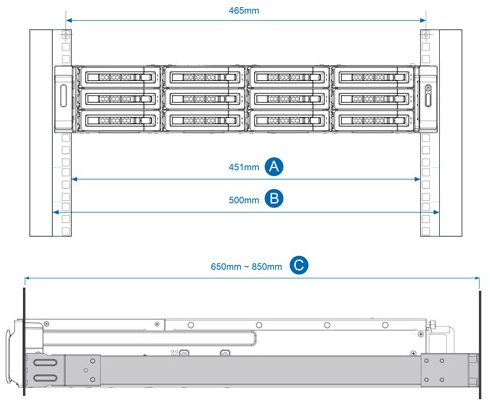
The VS-12100U-RP Pro+ rack mount series comply with ANSI/EIA-RS-310-D rack mounting standards. Before purchasing the server racks for these models, please make sure the server racks conform to the following criteria:
1. Rack size
A. Mounting post width: 451mm
B . Panel width: 500mm
C. Mounting post depth: 650mm~850mm
2. The rack kits for the VS-12100U-RP Pro rack mount series are only compatible with square-hole server racks.
|
|

|
|
|
14/09
|
QNAP Systems VS-12148U-RP Pro+ Network Video Recorder - 2U Rackmount
- 12x3.5"SATA HDD, RAID 0,1,5 ,5+ Hot Spare,6,6+ Hot Spare,10,10+ Hot Spare, Single,JBOD,Linear, 48 Channel, USB3.0, 4xGigLAN VS-12148U-RP Pro+
Ultra-high performance 12-bay NVR server for Enterprise
Features
The QNAP VS-12148U-RP Pro+ VioStor NVR is an enterprise-grade; high-end 2U chassis network surveillance server that supports high quality real-time video/audio monitoring, megapixel recording (up to 10 megapixels), and playback from multiple IP cameras. The VioStor VS-12148U-RP Pro+ is a dependable NVR to safeguard your precious property and assets.
- 450 Mbps for recording and playback from multiple megapixel cameras
- HDMI output delivers up to 300fps Full HD local display
- Simultaneously handles inputs from up to 48 megapixel cameras
- Large capacity to ensure continuous high-resolution video recording
- Install free QSCM Lite from App Center to enjoy advanced CMS features
Ultra high performance
Powered by Quad-core Intel Core i5 processor and 8GB DDR3 memory, the VS-12148U-RP Pro+ is capable of recording videos from up to 48 IP cameras, delivering exceptional performance with up to 450 Mbps throughput to ensure stable recording of multiple megapixel IP cameras.
Turn your NVR into a CMS server
QSCM Lite is a free app provided by QVR that allows you to easily deploy up to 16 QNAP NVRs and 256 cameras and conduct central monitoring, playback, and management. With no extra server hardware required, QSCM Lite can easily turn the VS-12148U-RP Pro+ into a CMS server. The powerful and pioneering QSCM Lite can be freely downloaded from the integrated NVR App Center.
Anytime anywhere surveillance with a mobile app
Vmobile is an official mobile app that enables you to monitor QVR anytime, anywhere. Using iOS and Android devices, Vmobile provides camera live-view, PTZ control, instant event notifications, video snapshot, video playback, and searching for videos by date and time. Another mobile app, Vcam, allows you to turn your mobile device into a network camera and to directly save recordings to your VioStor NVR for portable surveillance options.
PC-less network surveillance by full HD local display via HDMI connector
Even without a PC, the VS-12148U-RP Pro+ can be configured and perform monitoring tasks with the local display technology by connecting a USB mouse, USB keyboard and HDMI monitor to deliver lag-free live video monitoring in Full HD (1920x1080) resolution. QNAP local display technology provides a straightforward way to reduce the total costs in your business environment.
Intuitive, zero learning
Unlike traditional NVR software that can be hard to use, QVR 5.0 is free from complicated options and terminology, offering an innovative desktop design to compliment smooth working efficiency. The multi-window design allows concurrent multi-tasking, and enables administrators to easily switch between tasks to increase their productivity.
Multiple IP camera management comes easy
You can directly configure IP camera recording schedules when needed without leaving the Live-view page, maintain a seamless monitoring so you wont miss any suspicious events. You can also visualize IP camera deployment with the E-map function. Just upload the pictures of the monitored locations, drag and drop the IP camera icons to the right place on the E-map, and you can easily monitor your surveillance deployment at a glance.
Cruise for wider areas, zoom in for greater detail
With QVR system, users can easily manage & monitor multiple IP cameras in a real-time basis using web browsers, and attain the first-hand status of monitored corners. You can directly adjust the PTZ (Pan/Tilt/Zoom) functions of supported cameras, flexibly monitoring every desired corner and detail. Auto-cruising is also supported to allow you to define preset positions for PTZ cameras to automatically adjust their monitoring angles to preset positions by the time interval.
Find out the critical recordings without the hassle
How to find suspicious alarm recordings from huge amount of recordings can be a challenge. QVR 5.0 provides an intuitive playback interface to you to easily distinguish between regular and alarm recordings in the timeline bar. For greater efficiency, you can also enable Intelligent Video Analytics (IVA) to quickly search videos corresponding to particular modes (includes motion detection, foreign/ missing object, out of focus, and camera occlusion) to screen for critical recordings.
Optimize your video watching experience with video transcoding
The transcoding capabilities of the VS-12148U-RP Pro+ allows users a practical solution for watching videos stored in centralized locations via the Internet when they have low-bandwidth connections. This feature adapts to bandwidth limits and/ or devices that lack the hardware or codecs to play video files by converting a video file to a lower resolution before transferring it across the Internet. The original high definition video is still retained without any changes being made to it, balancing the whole surveillance system for local recordings and remote playback.
Flexible recording functions
QVR 5.0 provides flexible options to set up IP camera recording, including manual recording and scheduled recording. What can be even more convenient, you can set up the system to only record when motion is detected or other events occur. The smart recording function can also automatically switch the recording detail to a higher resolution when alarms are triggered. This greatly saves the cost spent on hard drives.
Economical expansion options
By installing the Storage Expansion app on a QNAP Turbo NAS, you can connect the VioStor NVR with the Turbo NAS via network to flexibly enlarge the total storage capacity of the VioStor NVR. If the expanded storage is not enough, QNAP REXP expansion enclosures can be used to expand the storage space on the connected Turbo NAS to support hundreds-of-terabytes raw capacity.
Availability: The storage expansion solution is available for VioStor NVR Pro(+) series with firmware v4.1.1 or newer and the Turbo NAS TS-x51, TS-x53, TS-x53U, TS-x63, TS-x70U, TVS-x71, TVS-x71U, TVS-ECx80, TVS-ECx80U series with QTS operating system v4.1.2.
High stability, Built to last
The VS-12148U-RP Pro+ serves as a business-ready system, providing 24/7 operation and services. The dual OS embedded on the DOM architecture in the VS-12148U-RP Pro+ ensures that the system boots up and operates stably. The expertly-designed smart fan delivers great system heat dissipation with minimum vibration, and is easily replaceable without interrupting system operations. The VS-12148U-RP Pro+ also features a redundant power supply to ensure maximum system uptime.
High efficiency with multiple LAN support
The VS-12148U-RP Pro+ supports multiple port-trunking modes, enabling IT administrators to set up link aggregation to increase total data transmission capability. Failover is also supported to ensure continuous system operations. The supported port-trunking modes include: Balance-rr (Round-Robin), Active Backup, Balance XOR, Broadcast, IEEE 802.3ad, Balance-tlb (Adaptive Transmit Load Balancing) and Balance-alb (Adaptive Load Balancing).
High reliability
The VS-12148U-RP Pro+ supports comprehensive RAID configurations and hot-swapping to allow replacing hard drives without interrupting system operations. QNAPs advanced RAID recovery technology also assists if any healthy drives are accidentally removed from a degraded RAID volume. The system can be recovered to degraded mode by reinserting the wrongly removed hard drives so the data can still be accessible. The Global Hot Spare function also allows a drive to automatically replace a failed drive in a RAID volume, preventing data from being lost.
Software Spec.
| Recording Performance |
| Max. number of HDD supported |
12 |
| Number of channels Supported |
Up to 48
* Max. 64CH for camera license expansion |
| Recording Performance |
Up to 30 fps at 1080P, 720P, VGA for each channel
* Real performance may vary by environment |
| Recording Throughput |
450 Mbps
* Real performance may vary by environment |
|
| QVR Desktop |
| Multi-task Support |
Multiple tasks run on QVR desktop |
| Default Applications |
Control Panel (for system configuration), Surveillance Settings, File Station, myQNAPcloud, Backup & Expansion, App Center |
|
| Central Management System (QSCM Lite App) |
| QSCM Lite |
Download and install for free from the QVR App Center to turn your NVR into CMS server |
| Central Management |
Supports up to 256 channels and 16 servers |
| Dashboard |
An interface that shows the current status and historical trends of key information |
| Apply-to-All Configuration |
Some server settings can be synchronized by grouping identical NVR models, saving configuration time
Some recording settings can be synchronized by grouping identical camera models, saving configuration time |
| Event Management |
Centrally receive events from multiple NVRs |
| View Layout |
Centrally configure the view, adding the cameras from multiple NVRs |
| Multi-layer E-map |
Centrally setup unlimited-layer E-maps for multiple NVRs
Easily find out the event location
Easily see the ongoing event status
Manage multiple e-maps by hyperlink |
| User Management |
QSCM Lite users can be created and assigned to different user groups.
Each user group can have different permissions. |
| Quad-monitor Mode |
Primary monitor: Select to show the live view, E-map, playback, and configuration page
Sub monitor: Select to show the live view and E-map |
| View Content |
Flexibly view content from mixed camera videos and E-maps |
| Bookmark |
Place a vertical thin bar and text details on video footage for easier event investigation |
| Multi Web Browsers Support |
Supports Google Chrome, Internet Explorer, Mozilla Firefox on Windows |
|
| Full HD Local Display |
| Max. Resolution of HW Decode Supported per Ch. |
Resolution up to Full HD (1920x1080) per channel (H.264) |
| Local Display Performance |
Full HD 1080P 300FPS |
| Display Mode |
Local monitoring: Multi-channel, sequential and full screen display modes
Local playback: Multi-channel and full screen display modes |
| Max. Channel Supported per Page |
Local monitoring: Up to 36 channels per page
Local playback: Up to 4 channels per page |
| On-screen Event Alert |
Yes |
| Local Monitoring Control |
Dewarping function for fisheye cameras and Panomorph lens Manual recording, (two-way) audio*, PTZ control (including optical zoom, focus control and preset position control), digital zoom |
| Joystick Support |
Joystick support for PTZ and preset position control |
| Search Mode |
By date & time, timeline, and event |
| Local Playback Control |
Dewarping function for fisheye cameras and Panomorph lens Play, pause, rewind, fast forward, slow motion, frame by frame search, audio, digital zoom |
| Recordings Export |
Export multiple recordings to external USB storage as standard AVI files, optimized QNAP AVI files, QNAP encrypted AVI files |
| Local Configuration |
Quick configuration Can modify administration password, network settings, time settings, disk volume configuration, camera settings |
|
| Remote Monitoring (Windows) |
| Multi-server Monitoring |
QVR Client: Supports max. 128 channels |
| Display Mode |
Multi-channel, sequential and full screen display modes
dual display mode |
| Max. Channel Supported per Page |
Up to 64 channels per page |
| E-map |
Setup Multi-layer E-maps for multiple NVRs
Options to see the ongoing event status on QVR monitoring page (for dual display mode) or new window |
| On-screen Event Alert |
Yes |
| Interactive Control Buttons |
Manual recording, video snapshot, (two-way) audio*, dewarping function for fisheye cameras and Panomorph lens, PTZ mode (including click & go, PTZ control, and auto cruising by preset position), preset position control, digital zoom, instant playback, same-screen IP camera configurations, camera information |
| Options |
Video window highlight when an event is triggered |
| Joystick Support |
Joystick support for PTZ and preset position control |
|
| Remote Playback (Windows) |
| Multi-channel Playback |
Multi-channel, sequential display modes |
| Max. Channel Supported per Page |
Up to 16 channels per page |
| Search Mode |
By date & time, timeline, event, and intelligent video analytics (IVA) |
| On-screen Event Alert |
Yes |
| Playback and Speed Control with Shuttle Bar |
Play, pause, rewind, fast forward, slow motion, frame by frame search |
| Interactive Control Buttons |
Audio, low bandwidth mode, video snapshot, IVA settings, dewarping function for fisheye cameras and Panomorph lens, PTZ mode (including click & go, PTZ control, and auto cruising by preset position), digital zoom, averagely time-divided playback, camera information |
| Intelligent Video analytics (IVA) |
Motion detection, missing object, foreign object, out of focus, and camera occlusion |
| Control |
Preview videos with thumbnails
Drag an area on the video window to zoom in to see details |
| Recordings Export |
Export multiple recordings to a client PC or NVR as standard AVI/ MP4 file, different exporting resolutions supported |
| Options |
Add a digital watermark to exported recordings |
|
| QVR Client for Mac |
| QVR Client for Mac |
Free download from the QNAP Download Center and Mac App Store |
| Display Mode |
Monitoring: Multi-channel, sequential and full screen display modes
Playback: Single-channel and full screen display modes |
| Max. Channel Supported per Page |
Local monitoring: Up to 16 channels per page
Local playback: Single channel per page |
| On-screen Event Alert |
Yes |
| Monitoring Control |
Audio, PTZ control (including optical zoom, focus control and preset position control), digital zoom |
| Search Mode |
By date & time, timeline, and event |
| Playback Control |
Play, pause, rewind, different speed control, audio, digital zoom |
| Recordings Export |
Export multiple recordings to Mac |
| Configuration |
Open an additional browser window for configuration |
|
| Mobile Surveillance |
| Vmobile |
Free download from the App Center (iOS) and Google Play (Android) |
| NVR Search |
Yes, NVRs on the LAN can be easily searched |
| Display Mode |
Mobile Monitoring: Multi-channel, sequential display mode
Mobile Playback: Single-channel display mode |
| Mobile Monitoring Control |
PTZ control, digital zoom, pause, snapshot, stream selection, image share (ex. Mail, Facebook) |
| Event Notification |
Yes, event notifications will be sent from Multiple NVRs |
| Mobile Playback Control |
Digital zoom, snapshot Play, pause, fast forward, go to previous file, go to next file |
| Audio |
Yes |
|
| Recording |
| Supported Models |
- IP cameras
- Generic cameras
- Vcam App to turn your mobile phone into an IP camera
|
| Video Compression |
H.264/ MPEG-4/ M-JPEG/ MxPEG (depending on the camera models) |
| Recording Mode |
- Continuous/ scheduled/ manual recording
- Alarm recording by multiple events
- Pre-alarm (up to 300 sec) and post-alarm (up to 300 sec) recording
- Round-the-clock recording and smart recording when user-defined stream is supported on the camera model
- Edge recording
- Auto snapshot
|
| Megapixel Recording |
Supports megapixel cameras (up to 40-megapixel) |
| File Format |
AVI (QNAP codec is required for playback) |
| Recording Enhancement |
Real-time digital watermarking |
| Download & Export |
Download recordings via the QVR File Station, FTP, SMB/CIFS Recordings export on local playback and remote playback (Windows and Mac) |
|
| Advanced Event Management |
| Events |
Motion detection, alarm input, connection failure, recording failure, and user-defined event |
| Actions |
Video recording, email alert, SMS alert, buzzer, PTZ camera control, alarm output, and user-defined action |
|
| Backup & Expansion |
| External Backup |
Copy recordings from the local disk volume to an external storage device |
| One Touch Video Backup |
Press the One Touch Video Backup button to backup recordings from external storage to USB storage |
| Remote Replication |
Schedule video data backup to a NAS on the local network |
| Storage Expansion |
Connect the VioStor NVR to a Turbo NAS via network to enlarge the total storage capacity of the VioStor NVR |
| Cloud Backup |
Easily upload the data from the NVR to Amazon S3 or download the data from Amazon S3 to the NVR |
|
| Easy Configuration and Management |
| QVR Desktop |
- Multi-window, multi-tasking
- Intelligent desktop
Main menu, smart dashboard, drag-and-drop icons
|
| File Station |
- Access files using web browsers, anytime and anywhere
- Securely share files by URL
- Upload large files
|
| myQNAPcloud |
- Unique host name for VioStor NVR
- Automatic port forwarding on a UPnP router
- Cloud Backup
|
| App Center |
Download numerous free on-demand apps |
| License Upgrade |
Flexibly expand the number of channels to meet your demands by purchasing additional licenses
https://license.qnap.com/ModelBrowse.html?cid=93 |
|
| Security Management |
| User Privilege Management |
Different user types and rights can be assigned to different QVR users |
| Network Access Protection |
Specify the connections to be allowed and denied to access the VioStor NVR |
| Auto Logoff |
Automatic user logoff from idling on configuration pages |
| Log System |
System event logs, system connection logs, online users |
| Digital Watermarking |
Can be used to authenticate videos and snapshots |
|
| Disk Management |
| RAID |
RAID 0, RAID 1, RAID 5 , RAID 5+ Hot spare , RAID 6 , RAID 6+ Hot spare , RAID 10 , RAID 10+ Hot spare
Single, JBOD/ Linear |
| RAID Features |
Online RAID Capacity Expansion, Online RAID Level Migration |
| HDD Utility |
HDD S.M.A.R.T., bad blocks scan |
|
| Reliability |
| Operation System |
Linux-embedded system, free from PC crash and virus attack |
| Intelligent Automatic System Startup When Power Recovery |
Yes |
| USB UPS device |
APC/ CyberPower/ Epson/ MGE/ YEC |
|
| Network Service |
| Protocol |
Support HTTP, HTTPS, TCP/IP, DHCP, Static IP, DNS, DDNS, UPnP, FTP, NTP, and SMTP |
| Built-in DHCP Server |
Yes |
| Multiple Gigabit LAN |
Failover, load-balancing, multi-IP settings |
| File Services |
Web, FTP, SMB/CIFS |
|
| Language Support |
| Language |
Czech/ Danish/ Dutch/ English/ French/ Finnish/ German/ Hungarian/ Italian/ Japanese/ Korean/ Norwegian/ Polish/ Portuguese/ Russian/ Spanish/ Swedish/ Simplified Chinese/ Traditional Chinese/ Turkish/ Greek/ Romanian/ Thai |
|
| Client PC Requirement (Suggested system requirement for better video performance) |
| CPU |
- M-JPEG format (up to 64 channels ):
Quad core CPU 2.33GHz or above
- MPEG-4/ H.264/ MxPEG format (up to 64 channels ):
Core i7 CPU 2.8GHz or above
* * For higher surveillance performance, please select more advanced PC models.
|
| Memory |
4 GB or above |
| Operation System |
Microsoft Windows 7/ 8 or Mac OS X 10.7.x, 10.8.x, 10.9.x, 10.10.x |
| Web Browser |
Microsoft Internet Explorer 10/11 (Windows PC, desktop mode, 32-bit)
Google Chrome 38.0.2125.104 m (Windows PC)
Mozilla Firefox 33.0 (Windows PC) |
| Network Interface |
10/100/1000 Mbps |
| Display Resolution |
1280 x 800 pixels or higher for better user experience |
| Client |
QVR Client for Windows
QVR Client for Mac |
|
| Switch Requirement |
| Switch |
A gigabit switch is highly recommended |
|
| Utility |
| QNAP QFinder |
The client application to discovery and quick setup of the VioStor NVR |
| QNAP QVR Client For Windows |
The client application used to remotely access QNAP NVR servers for performing video monitoring and playback functions on client PC.
*Watermark proof (Installed with QVR Client): Check if the exported videos and snapshots were modified |
| QNAP QVR Client For Mac |
The client application used to remotely access QNAP NVR servers for performing video monitoring and playback functions on Mac.
Please note that multi-server monitoring and fisheye dewarping functions and QSCM Lite App are not supported |
| QNAP Codec |
The video codec to play the recording files on Windows Media Player (Windows PC, desktop mode, 32-bit). |
|
Hardware Spec.
| Processor |
Quad Core Intel Core i5 3.7GHz Processor |
| DRAM |
8GB DDR3 RAM |
| HDD Capacity |
12 x 3.5 SATA 6Gb/s, SATA 3Gb/s hard drive
NOTE:
- The system is shipped without HDD.
- For the HDD compatibility list, please visit here
|
| HDD Tray |
12 x hot-swappable and lockable tray |
| LAN Port |
4 x Gigabit RJ-45 Ethernet port |
| LED Indicators |
Status, 10 GbE, LAN, eSATA, hard drives
*10 GbE (reserved), eSATA (reserved) |
| USB |
2 x USB 3.0 port (rear)
4 x USB 2.0 port (rear)
Support USB pen drive, USB hub, and USB UPS etc. |
| Buttons |
System: Power button, reset button |
| Alarm Buzzer |
System warning |
| Form Factor |
2U, Rackmount |
| Dimensions |
88(H) x 439(W) x 520(D) mm
3.46(H) x 17.28(W) x 20.47(D) inch |
| Weight |
Net weight: 15.88 kg (35.01 lb)
Gross weight: 25.60 kg (56.44 lb) |
| Operation Environment |
Temperature 0~40C/ 32~104F
Humidity 5~95% RH non-condensing, wet bulb: 27C. |
| Power Supply |
Input: 100-240V AC, 50/60Hz, Output: 600W |
| Power Consumption |
167W Write/Read (with 12 x 2TB HDD installed) |
| Expansion Slot |
2 (reserved for network and storage expansion) |
| Video Output |
1x HDMI
1x VGA |
| Fan |
3 x 6 cm smart cooling fan |
| Certification |
CE, FCC, VCCI, BSMI, LVD |
|
Remark:
The VS-12100U-RP Pro+ rack mount series comply with ANSI/EIA-RS-310-D rack mounting standards. Before purchasing the server racks for these models, please make sure the server racks conform to the following criteria:
1. Rack size
A. Mounting post width: 451mm
B . Panel width: 500mm
C. Mounting post depth: 650mm~850mm
2. The rack kits for the VS-12100U-RP Pro rack mount series are only compatible with square-hole server racks.
|
|
|
|
|
14/09
|
QNAP Systems VS-12140U-RP Pro+ Network Video Recorder - 2U Rackmount
- 12x3.5" SATA HDD, RAID 0,1,5,5+ Hot Spare,6,6+ Hot Spare,10,10+ Hot Spare, Single, JBOD/Linear, 40 Channel, USB3.0, 4xGigLAN VS-12140U-RP Pro+
Ultra-high performance 12-bay NVR server for Enterprise
Features
The QNAP VS-12140U-RP Pro+ VioStor NVR is an enterprise-grade; high-end 2U chassis network surveillance server that supports high quality real-time video/audio monitoring, megapixel recording (up to 10 megapixels), and playback from multiple IP cameras. The VioStor VS-12140U-RP Pro+ is a dependable NVR to safeguard your precious property and assets.
- 450 Mbps for recording and playback from multiple megapixel cameras
- HDMI output delivers up to 300fps Full HD local display
- Simultaneously handles inputs from up to 40 megapixel cameras
- Large capacity to ensure continuous high-resolution video recording
- Install free QSCM Lite from App Center to enjoy advanced CMS features
Ultra high performance
Powered by Quad-core Intel Core i5 processor and 8GB DDR3 memory, the VS-12140U-RP Pro+ is capable of recording videos from up to 40 IP cameras, delivering exceptional performance with up to 450 Mbps throughput to ensure stable recording of multiple megapixel IP cameras.
Turn your NVR into a CMS server
QSCM Lite is a free app provided by QVR that allows you to easily deploy up to 16 QNAP NVRs and 256 cameras and conduct central monitoring, playback, and management. With no extra server hardware required, QSCM Lite can easily turn the VS-12140U-RP Pro+ into a CMS server. The powerful and pioneering QSCM Lite can be freely downloaded from the integrated NVR App Center.
Anytime anywhere surveillance with a mobile app
Vmobile is an official mobile app that enables you to monitor QVR anytime, anywhere. Using iOS and Android devices, Vmobile provides camera live-view, PTZ control, instant event notifications, video snapshot, video playback, and searching for videos by date and time. Another mobile app, Vcam, allows you to turn your mobile device into a network camera and to directly save recordings to your VioStor NVR for portable surveillance options.
PC-less network surveillance by full HD local display via HDMI connector
Even without a PC, the VS-12140U-RP Pro+ can be configured and perform monitoring tasks with the local display technology by connecting a USB mouse, USB keyboard and HDMI monitor to deliver lag-free live video monitoring in Full HD (1920x1080) resolution. QNAP local display technology provides a straightforward way to reduce the total costs in your business environment.
Intuitive, zero learning
Unlike traditional NVR software that can be hard to use, QVR 5.0 is free from complicated options and terminology, offering an innovative desktop design to compliment smooth working efficiency. The multi-window design allows concurrent multi-tasking, and enables administrators to easily switch between tasks to increase their productivity.
Multiple IP camera management comes easy
You can directly configure IP camera recording schedules when needed without leaving the Live-view page, maintain a seamless monitoring so you wont miss any suspicious events. You can also visualize IP camera deployment with the E-map function. Just upload the pictures of the monitored locations, drag and drop the IP camera icons to the right place on the E-map, and you can easily monitor your surveillance deployment at a glance.
Cruise for wider areas, zoom in for greater detail
With QVR system, users can easily manage & monitor multiple IP cameras in a real-time basis using web browsers, and attain the first-hand status of monitored corners. You can directly adjust the PTZ (Pan/Tilt/Zoom) functions of supported cameras, flexibly monitoring every desired corner and detail. Auto-cruising is also supported to allow you to define preset positions for PTZ cameras to automatically adjust their monitoring angles to preset positions by the time interval.
Find out the critical recordings without the hassle
How to find suspicious alarm recordings from huge amount of recordings can be a challenge. QVR 5.0 provides an intuitive playback interface to you to easily distinguish between regular and alarm recordings in the timeline bar. For greater efficiency, you can also enable Intelligent Video Analytics (IVA) to quickly search videos corresponding to particular modes (includes motion detection, foreign/ missing object, out of focus, and camera occlusion) to screen for critical recordings.
Optimize your video watching experience with video transcoding
The transcoding capabilities of the VS-12140U-RP Pro+ allows users a practical solution for watching videos stored in centralized locations via the Internet when they have low-bandwidth connections. This feature adapts to bandwidth limits and/ or devices that lack the hardware or codecs to play video files by converting a video file to a lower resolution before transferring it across the Internet. The original high definition video is still retained without any changes being made to it, balancing the whole surveillance system for local recordings and remote playback.

Economical expansion options
By installing the Storage Expansion app on a QNAP Turbo NAS, you can connect the VioStor NVR with the Turbo NAS via network to flexibly enlarge the total storage capacity of the VioStor NVR. If the expanded storage is not enough, QNAP REXP expansion enclosures can be used to expand the storage space on the connected Turbo NAS to support hundreds-of-terabytes raw capacity.
Availability: The storage expansion solution is available for VioStor NVR Pro(+) series with firmware v4.1.1 or newer and the Turbo NAS TS-x51, TS-x53, TS-x53U, TS-x63, TS-x70U, TVS-x71, TVS-x71U, TVS-ECx80, TVS-ECx80U series with QTS operating system v4.1.2.
High stability, Built to last
The VS-12140U-RP Pro+ serves as a business-ready system, providing 24/7 operation and services. The dual OS embedded on the DOM architecture in the VS-12140U-RP Pro+ ensures that the system boots up and operates stably. The expertly-designed smart fan delivers great system heat dissipation with minimum vibration, and is easily replaceable without interrupting system operations. The VS-12140U-RP Pro+ also features a redundant power supply to ensure maximum system uptime.
High efficiency with multiple LAN support
The VS-12140U-RP Pro+ supports multiple port-trunking modes, enabling IT administrators to set up link aggregation to increase total data transmission capability. Failover is also supported to ensure continuous system operations. The supported port-trunking modes include: Balance-rr (Round-Robin), Active Backup, Balance XOR, Broadcast, IEEE 802.3ad, Balance-tlb (Adaptive Transmit Load Balancing) and Balance-alb (Adaptive Load Balancing).
High reliability
The VS-12140U-RP Pro+ supports comprehensive RAID configurations and hot-swapping to allow replacing hard drives without interrupting system operations. QNAPs advanced RAID recovery technology also assists if any healthy drives are accidentally removed from a degraded RAID volume. The system can be recovered to degraded mode by reinserting the wrongly removed hard drives so the data can still be accessible. The Global Hot Spare function also allows a drive to automatically replace a failed drive in a RAID volume, preventing data from being lost.
Software Spec.
|
Recording Performance
|
| Max. number of HDD supported |
12 |
| Number of channels Supported |
Up to 40
* Max. 64CH for camera license expansion |
| Recording Performance |
Up to 30 fps at 1080P, 720P, VGA for each channel
* Real performance may vary by environment |
| Recording Throughput |
450 Mbps
* Real performance may vary by environment |
|
| QVR Desktop |
| Multi-task Support |
Multiple tasks run on QVR desktop |
| Default Applications |
Control Panel (for system configuration), Surveillance Settings, File Station, myQNAPcloud, Backup & Expansion, App Center |
|
| Central Management System (QSCM Lite App) |
| QSCM Lite |
Download and install for free from the QVR App Center to turn your NVR into CMS server |
| Central Management |
Supports up to 256 channels and 16 servers |
| Dashboard |
An interface that shows the current status and historical trends of key information |
| Apply-to-All Configuration |
Some server settings can be synchronized by grouping identical NVR models, saving configuration time
Some recording settings can be synchronized by grouping identical camera models, saving configuration time |
| Event Management |
Centrally receive events from multiple NVRs |
| View Layout |
Centrally configure the view, adding the cameras from multiple NVRs |
| Multi-layer E-map |
Centrally setup unlimited-layer E-maps for multiple NVRs
Easily find out the event location
Easily see the ongoing event status
Manage multiple e-maps by hyperlink |
| User Management |
QSCM Lite users can be created and assigned to different user groups.
Each user group can have different permissions. |
| Quad-monitor Mode |
Primary monitor: Select to show the live view, E-map, playback, and configuration page
Sub monitor: Select to show the live view and E-map |
| View Content |
Flexibly view content from mixed camera videos and E-maps |
| Bookmark |
Place a vertical thin bar and text details on video footage for easier event investigation |
| Multi Web Browsers Support |
Supports Google Chrome, Internet Explorer, Mozilla Firefox on Windows |
|
| Full HD Local Display |
| Max. Resolution of HW Decode Supported per Ch. |
Resolution up to Full HD (1920x1080) per channel (H.264) |
| Local Display Performance |
Full HD 1080P 300FPS |
| Display Mode |
Local monitoring: Multi-channel, sequential and full screen display modes
Local playback: Multi-channel and full screen display modes |
| Max. Channel Supported per Page |
Local monitoring: Up to 36 channels per page
Local playback: Up to 4 channels per page |
| On-screen Event Alert |
Yes |
| Local Monitoring Control |
Dewarping function for fisheye cameras and Panomorph lens Manual recording, (two-way) audio*, PTZ control (including optical zoom, focus control and preset position control), digital zoom |
| Joystick Support |
Joystick support for PTZ and preset position control |
| Search Mode |
By date & time, timeline, and event |
| Local Playback Control |
Dewarping function for fisheye cameras and Panomorph lens Play, pause, rewind, fast forward, slow motion, frame by frame search, audio, digital zoom |
| Recordings Export |
Export multiple recordings to external USB storage as standard AVI files, optimized QNAP AVI files, QNAP encrypted AVI files |
| Local Configuration |
Quick configuration Can modify administration password, network settings, time settings, disk volume configuration, camera settings |
|
| Remote Monitoring (Windows) |
| Multi-server Monitoring |
QVR Client: Supports max. 128 channels |
| Display Mode |
Multi-channel, sequential and full screen display modes
dual display mode |
| Max. Channel Supported per Page |
Up to 64 channels per page |
| E-map |
Setup Multi-layer E-maps for multiple NVRs
Options to see the ongoing event status on QVR monitoring page (for dual display mode) or new window |
| On-screen Event Alert |
Yes |
| Interactive Control Buttons |
Manual recording, video snapshot, (two-way) audio*, dewarping function for fisheye cameras and Panomorph lens, PTZ mode (including click & go, PTZ control, and auto cruising by preset position), preset position control, digital zoom, instant playback, same-screen IP camera configurations, camera information |
| Options |
Video window highlight when an event is triggered |
| Joystick Support |
Joystick support for PTZ and preset position control |
|
| Remote Playback (Windows) |
| Multi-channel Playback |
Multi-channel, sequential display modes |
| Max. Channel Supported per Page |
Up to 16 channels per page |
| Search Mode |
By date & time, timeline, event, and intelligent video analytics (IVA) |
| On-screen Event Alert |
Yes |
| Playback and Speed Control with Shuttle Bar |
Play, pause, rewind, fast forward, slow motion, frame by frame search |
| Interactive Control Buttons |
Audio, low bandwidth mode, video snapshot, IVA settings, dewarping function for fisheye cameras and Panomorph lens, PTZ mode (including click & go, PTZ control, and auto cruising by preset position), digital zoom, averagely time-divided playback, camera information |
| Intelligent Video analytics (IVA) |
Motion detection, missing object, foreign object, out of focus, and camera occlusion |
| Control |
Preview videos with thumbnails
Drag an area on the video window to zoom in to see details |
| Recordings Export |
Export multiple recordings to a client PC or NVR as standard AVI/ MP4 file, different exporting resolutions supported |
| Options |
Add a digital watermark to exported recordings |
|
| QVR Client for Mac |
| QVR Client for Mac |
Free download from the QNAP Download Center and Mac App Store |
| Display Mode |
Monitoring: Multi-channel, sequential and full screen display modes
Playback: Single-channel and full screen display modes |
| Max. Channel Supported per Page |
Local monitoring: Up to 16 channels per page
Local playback: Single channel per page |
| On-screen Event Alert |
Yes |
| Monitoring Control |
Audio, PTZ control (including optical zoom, focus control and preset position control), digital zoom |
| Search Mode |
By date & time, timeline, and event |
| Playback Control |
Play, pause, rewind, different speed control, audio, digital zoom |
| Recordings Export |
Export multiple recordings to Mac |
| Configuration |
Open an additional browser window for configuration |
|
| Mobile Surveillance |
| Vmobile |
Free download from the App Center (iOS) and Google Play (Android) |
| NVR Search |
Yes, NVRs on the LAN can be easily searched |
| Display Mode |
Mobile Monitoring: Multi-channel, sequential display mode
Mobile Playback: Single-channel display mode |
| Mobile Monitoring Control |
PTZ control, digital zoom, pause, snapshot, stream selection, image share (ex. Mail, Facebook) |
| Event Notification |
Yes, event notifications will be sent from Multiple NVRs |
| Mobile Playback Control |
Digital zoom, snapshot Play, pause, fast forward, go to previous file, go to next file |
| Audio |
Yes |
|
| Recording |
| Supported Models |
- IP cameras
- Generic cameras
- Vcam App to turn your mobile phone into an IP camera
|
| Video Compression |
H.264/ MPEG-4/ M-JPEG/ MxPEG (depending on the camera models) |
| Recording Mode |
- Continuous/ scheduled/ manual recording
- Alarm recording by multiple events
- Pre-alarm (up to 300 sec) and post-alarm (up to 300 sec) recording
- Round-the-clock recording and smart recording when user-defined stream is supported on the camera model
- Edge recording
- Auto snapshot
|
| Megapixel Recording |
Supports megapixel cameras (up to 40-megapixel) |
| File Format |
AVI (QNAP codec is required for playback) |
| Recording Enhancement |
Real-time digital watermarking |
| Download & Export |
Download recordings via the QVR File Station, FTP, SMB/CIFS Recordings export on local playback and remote playback (Windows and Mac) |
|
| Advanced Event Management |
| Events |
Motion detection, alarm input, connection failure, recording failure, and user-defined event |
| Actions |
Video recording, email alert, SMS alert, buzzer, PTZ camera control, alarm output, and user-defined action |
|
| Backup & Expansion |
| External Backup |
Copy recordings from the local disk volume to an external storage device |
| One Touch Video Backup |
Press the One Touch Video Backup button to backup recordings from external storage to USB storage |
| Remote Replication |
Schedule video data backup to a NAS on the local network |
| Storage Expansion |
Connect the VioStor NVR to a Turbo NAS via network to enlarge the total storage capacity of the VioStor NVR |
| Cloud Backup |
Easily upload the data from the NVR to Amazon S3 or download the data from Amazon S3 to the NVR |
|
| Easy Configuration and Management |
| QVR Desktop |
- Multi-window, multi-tasking
- Intelligent desktop
Main menu, smart dashboard, drag-and-drop icons
|
| File Station |
- Access files using web browsers, anytime and anywhere
- Securely share files by URL
- Upload large files
|
| myQNAPcloud |
- Unique host name for VioStor NVR
- Automatic port forwarding on a UPnP router
- Cloud Backup
|
| App Center |
Download numerous free on-demand apps |
| License Upgrade |
Flexibly expand the number of channels to meet your demands by purchasing additional licenses
https://license.qnap.com/ModelBrowse.html?cid=93 |
|
| Security Management |
| User Privilege Management |
Different user types and rights can be assigned to different QVR users |
| Network Access Protection |
Specify the connections to be allowed and denied to access the VioStor NVR |
| Auto Logoff |
Automatic user logoff from idling on configuration pages |
| Log System |
System event logs, system connection logs, online users |
| Digital Watermarking |
Can be used to authenticate videos and snapshots |
|
| Disk Management |
| RAID |
RAID 0, RAID 1, RAID 5 , RAID 5+ Hot spare , RAID 6 , RAID 6+ Hot spare , RAID 10 , RAID 10+ Hot spare
Single, JBOD/ Linear |
| RAID Features |
Online RAID Capacity Expansion, Online RAID Level Migration |
| HDD Utility |
HDD S.M.A.R.T., bad blocks scan |
|
| Reliability |
| Operation System |
Linux-embedded system, free from PC crash and virus attack |
| Intelligent Automatic System Startup When Power Recovery |
Yes |
| USB UPS device |
APC/ CyberPower/ Epson/ MGE/ YEC |
|
| Network Service |
| Protocol |
Support HTTP, HTTPS, TCP/IP, DHCP, Static IP, DNS, DDNS, UPnP, FTP, NTP, and SMTP |
| Built-in DHCP Server |
Yes |
| Multiple Gigabit LAN |
Failover, load-balancing, multi-IP settings |
| File Services |
Web, FTP, SMB/CIFS |
|
| Language Support |
| Language |
Czech/ Danish/ Dutch/ English/ French/ Finnish/ German/ Hungarian/ Italian/ Japanese/ Korean/ Norwegian/ Polish/ Portuguese/ Russian/ Spanish/ Swedish/ Simplified Chinese/ Traditional Chinese/ Turkish/ Greek/ Romanian/ Thai |
|
| Client PC Requirement (Suggested system requirement for better video performance) |
| CPU |
- M-JPEG format (up to 64 channels ):
Quad core CPU 2.33GHz or above
- MPEG-4/ H.264/ MxPEG format (up to 64 channels ):
Core i7 CPU 2.8GHz or above
* * For higher surveillance performance, please select more advanced PC models.
|
| Memory |
4 GB or above |
| Operation System |
Microsoft Windows 7/ 8 or Mac OS X 10.7.x, 10.8.x, 10.9.x, 10.10.x |
| Web Browser |
Microsoft Internet Explorer 10/11 (Windows PC, desktop mode, 32-bit)
Google Chrome 38.0.2125.104 m (Windows PC)
Mozilla Firefox 33.0 (Windows PC) |
| Network Interface |
10/100/1000 Mbps |
| Display Resolution |
1280 x 800 pixels or higher for better user experience |
| Client |
QVR Client for Windows
QVR Client for Mac |
|
| Switch Requirement |
| Switch |
A gigabit switch is highly recommended |
|
| Utility |
| QNAP QFinder |
The client application to discovery and quick setup of the VioStor NVR |
| QNAP QVR Client For Windows |
The client application used to remotely access QNAP NVR servers for performing video monitoring and playback functions on client PC.
*Watermark proof (Installed with QVR Client): Check if the exported videos and snapshots were modified |
| QNAP QVR Client For Mac |
The client application used to remotely access QNAP NVR servers for performing video monitoring and playback functions on Mac.
Please note that multi-server monitoring and fisheye dewarping functions and QSCM Lite App are not supported |
| QNAP Codec |
The video codec to play the recording files on Windows Media Player (Windows PC, desktop mode, 32-bit). |
|
Hardware Spec.
| Processor |
Quad Core Intel Core i5 3.7GHz Processor |
| DRAM |
8GB DDR3 RAM |
| HDD Capacity |
12 x 3.5 SATA 6Gb/s, SATA 3Gb/s hard drive
NOTE:
- The system is shipped without HDD.
- For the HDD compatibility list, please visit here
|
| HDD Tray |
12 x hot-swappable and lockable tray |
| LAN Port |
4 x Gigabit RJ-45 Ethernet port |
| LED Indicators |
Status, 10 GbE, LAN, eSATA, hard drives
*10 GbE (reserved), eSATA (reserved) |
| USB |
2 x USB 3.0 port (rear)
4 x USB 2.0 port (rear)
Support USB pen drive, USB hub, and USB UPS etc. |
| Buttons |
System: Power button, reset button |
| Alarm Buzzer |
System warning |
| Form Factor |
2U, Rackmount |
| Dimensions |
88(H) x 439(W) x 520(D) mm
3.46(H) x 17.28(W) x 20.47(D) inch |
| Weight |
Net weight: 15.88 kg (35.01 lb)
Gross weight: 25.60 kg (56.44 lb) |
| Operation Environment |
Temperature 0~40C/ 32~104F
Humidity 5~95% RH non-condensing, wet bulb: 27C. |
| Power Supply |
Input: 100-240V AC, 50/60Hz, Output: 600W |
| Power Consumption |
167W Write/Read (with 12 x 2TB HDD installed) |
| Expansion Slot |
2 (reserved for network and storage expansion) |
| Video Output |
1x HDMI
1x VGA |
| Fan |
3 x 6 cm smart cooling fan |
| Certification |
CE, FCC, VCCI, BSMI, LVD |
|
Remark:
The VS-12100U-RP Pro+ rack mount series comply with ANSI/EIA-RS-310-D rack mounting standards. Before purchasing the server racks for these models, please make sure the server racks conform to the following criteria:
1. Rack size
A. Mounting post width: 451mm
B . Panel width: 500mm
C. Mounting post depth: 650mm~850mm
2. The rack kits for the VS-12100U-RP Pro rack mount series are only compatible with square-hole server racks.
|
|
|
|
|
14/09
|
QNAP Systems VS-8148U-RP Pro+ Network Video Recorder - 2U Rackmount
- 8x3.5" SATA HDD, RAID 0,1,5,5+,6,6+,10,10+,Hot-Spare, Single,JBOD,Linear, 48 Channel, VGA, HDMI, USB3.0, 4xGigLAN VS-8148U-RP Pro+
Ultra-high performance 8-bay NVR server for Enterprise
Features
The QNAP VS-8148U-RP Pro+ VioStor NVR is an enterprise-grade; high-end 2U chassis network surveillance server that supports high quality real-time video/audio monitoring, megapixel recording (up to 10 megapixels), and playback from multiple IP cameras. The VioStor VS-8148U-RP Pro+ is a dependable NVR to safeguard your precious property and assets.
- 400 Mbps for recording and playback from multiple megapixel cameras
- HDMI output delivers up to 300fps Full HD local display
- Simultaneously handles inputs from up to 48 megapixel cameras
- Large capacity to ensure continuous high-resolution video recording
- Install free QSCM Lite from App Center to enjoy advanced CMS features
Ultra high performance
Powered by Dual-core Intel Core i3 processor and 4GB of DDR3 memory, the VS-8148U-RP Pro+ is capable of recording videos from up to 48 IP cameras, delivering exceptional performance with up to 400 Mbps throughput to ensure stable recording of multiple megapixel IP cameras.
Turn your NVR into a CMS server
QSCM Lite is a free app provided by QVR that allows you to easily deploy up to 16 QNAP NVRs and 256 cameras and conduct central monitoring, playback, and management. With no extra server hardware required, QSCM Lite can easily turn the VS-8148U-RP Pro+ into a CMS server. The powerful and pioneering QSCM Lite can be freely downloaded from the integrated NVR App Center.
Anytime anywhere surveillance with a mobile app
Vmobile is an official mobile app that enables you to monitor QVR anytime, anywhere. Using iOS and Android devices, Vmobile provides camera live-view, PTZ control, instant event notifications, video snapshot, video playback, and searching for videos by date and time. Another mobile app, Vcam, allows you to turn your mobile device into a network camera and to directly save recordings to your VioStor NVR for portable surveillance options.
PC-less network surveillance by full HD local display via HDMI connector
Even without a PC, the VS-8148U-RP Pro+ can be configured and perform monitoring tasks with the local display technology by connecting a USB mouse, USB keyboard and HDMI monitor to deliver lag-free live video monitoring in Full HD (1920x1080) resolution. QNAP local display technology provides a straightforward way to reduce the total costs in your business environment.
Intuitive, zero learning
Unlike traditional NVR software that can be hard to use, QVR 5.0 is free from complicated options and terminology, offering an innovative desktop design to compliment smooth working efficiency. The multi-window design allows concurrent multi-tasking, and enables administrators to easily switch between tasks to increase their productivity.
Multiple IP camera management comes easy
You can directly configure IP camera recording schedules when needed without leaving the Live-view page, maintain a seamless monitoring so you wont miss any suspicious events. You can also visualize IP camera deployment with the E-map function. Just upload the pictures of the monitored locations, drag and drop the IP camera icons to the right place on the E-map, and you can easily monitor your surveillance deployment at a glance.
Cruise for wider areas, zoom in for greater detail
With QVR system, users can easily manage & monitor multiple IP cameras in a real-time basis using web browsers, and attain the first-hand status of monitored corners. You can directly adjust the PTZ (Pan/Tilt/Zoom) functions of supported cameras, flexibly monitoring every desired corner and detail. Auto-cruising is also supported to allow you to define preset positions for PTZ cameras to automatically adjust their monitoring angles to preset positions by the time interval.
Find out the critical recordings without the hassle
How to find suspicious alarm recordings from huge amount of recordings can be a challenge. QVR 5.0 provides an intuitive playback interface to you to easily distinguish between regular and alarm recordings in the timeline bar. For greater efficiency, you can also enable Intelligent Video Analytics (IVA) to quickly search videos corresponding to particular modes (includes motion detection, foreign/ missing object, out of focus, and camera occlusion) to screen for critical recordings.
Optimize your video watching experience with video transcoding
The transcoding capabilities of the VS-8148U-RP Pro+ allows users a practical solution for watching videos stored in centralized locations via the Internet when they have low-bandwidth connections. This feature adapts to bandwidth limits and/ or devices that lack the hardware or codecs to play video files by converting a video file to a lower resolution before transferring it across the Internet. The original high definition video is still retained without any changes being made to it, balancing the whole surveillance system for local recordings and remote playback.
Flexible recording functions
QVR 5.0 provides flexible options to set up IP camera recording, including manual recording and scheduled recording. What can be even more convenient, you can set up the system to only record when motion is detected or other events occur. The smart recording function can also automatically switch the recording detail to a higher resolution when alarms are triggered. This greatly saves the cost spent on hard drives.
Economical expansion options
By installing the Storage Expansion app on a QNAP Turbo NAS, you can connect the VioStor NVR with the Turbo NAS via network to flexibly enlarge the total storage capacity of the VioStor NVR. If the expanded storage is not enough, QNAP REXP expansion enclosures can be used to expand the storage space on the connected Turbo NAS to support hundreds-of-terabytes raw capacity.
Availability: The storage expansion solution is available for VioStor NVR Pro(+) series with firmware v4.1.1 or newer and the Turbo NAS TS-x51, TS-x53, TS-x53U, TS-x63, TS-x70U, TVS-x71, TVS-x71U, TVS-ECx80, TVS-ECx80U series with QTS operating system v4.1.2.
High stability, Built to last
The VS-8148U-RP Pro+ serves as a business-ready system, providing 24/7 operation and services. The dual OS embedded on the DOM architecture in the VS-8148U-RP Pro+ ensures that the system boots up and operates stably. The expertly-designed smart fan delivers great system heat dissipation with minimum vibration, and is easily replaceable without interrupting system operations. The VS-8148U-RP Pro+ also features a redundant power supply to ensure maximum system uptime.
High efficiency with multiple LAN support
The VS-8148U-RP Pro+ supports multiple port-trunking modes, enabling IT administrators to set up link aggregation to increase total data transmission capability. Failover is also supported to ensure continuous system operations. The supported port-trunking modes include: Balance-rr (Round-Robin), Active Backup, Balance XOR, Broadcast, IEEE 802.3ad, Balance-tlb (Adaptive Transmit Load Balancing) and Balance-alb (Adaptive Load Balancing).

High reliability
The VS-8148U-RP Pro+ supports comprehensive RAID configurations and hot-swapping to allow replacing hard drives without interrupting system operations. QNAPs advanced RAID recovery technology also assists if any healthy drives are accidentally removed from a degraded RAID volume. The system can be recovered to degraded mode by reinserting the wrongly removed hard drives so the data can still be accessible. The Global Hot Spare function also allows a drive to automatically replace a failed drive in a RAID volume, preventing data from being lost.
Specifications
Software Spec.
| Recording Performance |
| Max. number of HDD supported |
8 |
| Number of channels Supported |
Up to 48 |
| Recording Performance |
Up to 30 fps at 1080P, 720P, VGA for each channel
* Real performance may vary by environment |
| Recording Throughput |
450 Mbps
* Real performance may vary by environment |
|
| QVR Desktop |
| Multi-task Support |
Multiple tasks run on QVR desktop |
| Default Applications |
Control Panel (for system configuration), Surveillance Settings, File Station, myQNAPcloud, Backup & Expansion, App Center |
|
| Central Management System (QSCM Lite App) |
| QSCM Lite |
Download and install for free from the QVR App Center to turn your NVR into CMS server |
| Central Management |
Supports up to 256 channels and 16 servers |
| Dashboard |
An interface that shows the current status and historical trends of key information |
| Apply-to-All Configuration |
Some server settings can be synchronized by grouping identical NVR models, saving configuration time
Some recording settings can be synchronized by grouping identical camera models, saving configuration time |
| Event Management |
Centrally receive events from multiple NVRs |
| View Layout |
Centrally configure the view, adding the cameras from multiple NVRs |
| Multi-layer E-map |
Centrally setup unlimited-layer E-maps for multiple NVRs
Easily find out the event location
Easily see the ongoing event status
Manage multiple e-maps by hyperlink |
| User Management |
QSCM Lite users can be created and assigned to different user groups.
Each user group can have different permissions. |
| Quad-monitor Mode |
Primary monitor: Select to show the live view, E-map, playback, and configuration page
Sub monitor: Select to show the live view and E-map |
| View Content |
Flexibly view content from mixed camera videos and E-maps |
| Bookmark |
Place a vertical thin bar and text details on video footage for easier event investigation |
| Multi Web Browsers Support |
Supports Google Chrome, Internet Explorer, Mozilla Firefox on Windows |
|
| Full HD Local Display |
| Max. Resolution of HW Decode Supported per Ch. |
Resolution up to Full HD (1920x1080) per channel (H.264) |
| Local Display Performance |
Full HD 1080P 300FPS |
| Display Mode |
Local monitoring: Multi-channel, sequential and full screen display modes
Local playback: Multi-channel and full screen display modes |
| Max. Channel Supported per Page |
Local monitoring: Up to 36 channels per page
Local playback: Up to 4 channels per page |
| On-screen Event Alert |
Yes |
| Local Monitoring Control |
Dewarping function for fisheye cameras and Panomorph lens Manual recording, (two-way) audio*, PTZ control (including optical zoom, focus control and preset position control), digital zoom |
| Joystick Support |
Joystick support for PTZ and preset position control |
| Search Mode |
By date & time, timeline, and event |
| Local Playback Control |
Dewarping function for fisheye cameras and Panomorph lens Play, pause, rewind, fast forward, slow motion, frame by frame search, audio, digital zoom |
| Recordings Export |
Export multiple recordings to external USB storage as standard AVI files, optimized QNAP AVI files, QNAP encrypted AVI files |
| Local Configuration |
Quick configuration Can modify administration password, network settings, time settings, disk volume configuration, camera settings |
|
| Remote Monitoring (Windows) |
| Multi-server Monitoring |
QVR Client: Supports max. 128 channels |
| Display Mode |
Multi-channel, sequential and full screen display modes
dual display mode |
| Max. Channel Supported per Page |
Up to 64 channels per page |
| E-map |
Setup Multi-layer E-maps for multiple NVRs
Options to see the ongoing event status on QVR monitoring page (for dual display mode) or new window |
| On-screen Event Alert |
Yes |
| Interactive Control Buttons |
Manual recording, video snapshot, (two-way) audio*, dewarping function for fisheye cameras and Panomorph lens, PTZ mode (including click & go, PTZ control, and auto cruising by preset position), preset position control, digital zoom, instant playback, same-screen IP camera configurations, camera information |
| Options |
Video window highlight when an event is triggered |
| Joystick Support |
Joystick support for PTZ and preset position control |
|
| Remote Playback (Windows) |
| Multi-channel Playback |
Multi-channel, sequential display modes |
| Max. Channel Supported per Page |
Up to 16 channels per page |
| Search Mode |
By date & time, timeline, event, and intelligent video analytics (IVA) |
| On-screen Event Alert |
Yes |
| Playback and Speed Control with Shuttle Bar |
Play, pause, rewind, fast forward, slow motion, frame by frame search |
| Interactive Control Buttons |
Audio, low bandwidth mode, video snapshot, IVA settings, dewarping function for fisheye cameras and Panomorph lens, PTZ mode (including click & go, PTZ control, and auto cruising by preset position), digital zoom, averagely time-divided playback, camera information |
| Intelligent Video analytics (IVA) |
Motion detection, missing object, foreign object, out of focus, and camera occlusion |
| Control |
Preview videos with thumbnails
Drag an area on the video window to zoom in to see details |
| Recordings Export |
Export multiple recordings to a client PC or NVR as standard AVI/ MP4 file, different exporting resolutions supported |
| Options |
Add a digital watermark to exported recordings |
|
| QVR Client for Mac |
| QVR Client for Mac |
Free download from the QNAP Download Center and Mac App Store |
| Display Mode |
Monitoring: Multi-channel, sequential and full screen display modes
Playback: Single-channel and full screen display modes |
| Max. Channel Supported per Page |
Local monitoring: Up to 16 channels per page
Local playback: Single channel per page |
| On-screen Event Alert |
Yes |
| Monitoring Control |
Audio, PTZ control (including optical zoom, focus control and preset position control), digital zoom |
| Search Mode |
By date & time, timeline, and event |
| Playback Control |
Play, pause, rewind, different speed control, audio, digital zoom |
| Recordings Export |
Export multiple recordings to Mac |
| Configuration |
Open an additional browser window for configuration |
|
| Mobile Surveillance |
| Vmobile |
Free download from the App Center (iOS) and Google Play (Android) |
| NVR Search |
Yes, NVRs on the LAN can be easily searched |
| Display Mode |
Mobile Monitoring: Multi-channel, sequential display mode
Mobile Playback: Single-channel display mode |
| Mobile Monitoring Control |
PTZ control, digital zoom, pause, snapshot, stream selection, image share (ex. Mail, Facebook) |
| Event Notification |
Yes, event notifications will be sent from Multiple NVRs |
| Mobile Playback Control |
Digital zoom, snapshot Play, pause, fast forward, go to previous file, go to next file |
| Audio |
Yes |
|
| Recording |
| Supported Models |
- IP cameras
- Generic cameras
- Vcam App to turn your mobile phone into an IP camera
|
| Video Compression |
H.264/ MPEG-4/ M-JPEG/ MxPEG (depending on the camera models) |
| Recording Mode |
- Continuous/ scheduled/ manual recording
- Alarm recording by multiple events
- Pre-alarm (up to 300 sec) and post-alarm (up to 300 sec) recording
- Round-the-clock recording and smart recording when user-defined stream is supported on the camera model
- Edge recording
- Auto snapshot
|
| Megapixel Recording |
Supports megapixel cameras (up to 40-megapixel) |
| File Format |
AVI (QNAP codec is required for playback) |
| Recording Enhancement |
Real-time digital watermarking |
| Download & Export |
Download recordings via the QVR File Station, FTP, SMB/CIFS Recordings export on local playback and remote playback (Windows and Mac) |
|
| Advanced Event Management |
| Events |
Motion detection, alarm input, connection failure, recording failure, and user-defined event |
| Actions |
Video recording, email alert, SMS alert, buzzer, PTZ camera control, alarm output, and user-defined action |
|
| Backup & Expansion |
| External Backup |
Copy recordings from the local disk volume to an external storage device |
| One Touch Video Backup |
Press the One Touch Video Backup button to backup recordings from external storage to USB storage |
| Remote Replication |
Schedule video data backup to a NAS on the local network |
| Storage Expansion |
Connect the VioStor NVR to a Turbo NAS via network to enlarge the total storage capacity of the VioStor NVR |
| Cloud Backup |
Easily upload the data from the NVR to Amazon S3 or download the data from Amazon S3 to the NVR |
|
| Easy Configuration and Management |
| QVR Desktop |
- Multi-window, multi-tasking
- Intelligent desktop
Main menu, smart dashboard, drag-and-drop icons
|
| File Station |
- Access files using web browsers, anytime and anywhere
- Securely share files by URL
- Upload large files
|
| myQNAPcloud |
- Unique host name for VioStor NVR
- Automatic port forwarding on a UPnP router
- Cloud Backup
|
| App Center |
Download numerous free on-demand apps |
| License Upgrade |
Flexibly expand the number of channels to meet your demands by purchasing additional licenses
https://license.qnap.com/ModelBrowse.html?cid=93 |
|
| Security Management |
| User Privilege Management |
Different user types and rights can be assigned to different QVR users |
| Network Access Protection |
Specify the connections to be allowed and denied to access the VioStor NVR |
| Auto Logoff |
Automatic user logoff from idling on configuration pages |
| Log System |
System event logs, system connection logs, online users |
| Digital Watermarking |
Can be used to authenticate videos and snapshots |
|
| Disk Management |
| RAID |
RAID 0, RAID 1, RAID 5 , RAID 5+ Hot spare , RAID 6 , RAID 6+ Hot spare , RAID 10 , RAID 10+ Hot spare
Single, JBOD/ Linear |
| RAID Features |
Online RAID Capacity Expansion, Online RAID Level Migration |
| HDD Utility |
HDD S.M.A.R.T., bad blocks scan |
|
| Reliability |
| Operation System |
Linux-embedded system, free from PC crash and virus attack |
| Intelligent Automatic System Startup When Power Recovery |
Yes |
| USB UPS device |
APC/ CyberPower/ Epson/ MGE/ YEC |
|
| Network Service |
| Protocol |
Support HTTP, HTTPS, TCP/IP, DHCP, Static IP, DNS, DDNS, UPnP, FTP, NTP, and SMTP |
| Built-in DHCP Server |
Yes |
| Multiple Gigabit LAN |
Failover, load-balancing, multi-IP settings |
| File Services |
Web, FTP, SMB/CIFS |
|
| Language Support |
| Language |
Czech/ Danish/ Dutch/ English/ French/ Finnish/ German/ Hungarian/ Italian/ Japanese/ Korean/ Norwegian/ Polish/ Portuguese/ Russian/ Spanish/ Swedish/ Simplified Chinese/ Traditional Chinese/ Turkish/ Greek/ Romanian/ Thai |
|
| Client PC Requirement (Suggested system requirement for better video performance) |
| CPU |
- M-JPEG format (up to 48 channels ):
Quad core CPU 2.33GHz or above
- MPEG-4/ H.264/ MxPEG format (up to 48 channels ):
Core i7 CPU 2.8GHz or above
* * For higher surveillance performance, please select more advanced PC models.
|
| Memory |
4 GB or above |
| Operation System |
Microsoft Windows 7/ 8 or Mac OS X 10.7.x, 10.8.x, 10.9.x, 10.10.x |
| Web Browser |
Microsoft Internet Explorer 10/11 (Windows PC, desktop mode, 32-bit)
Google Chrome 38.0.2125.104 m (Windows PC)
Mozilla Firefox 33.0 (Windows PC) |
| Network Interface |
10/100/1000 Mbps |
| Display Resolution |
1280 x 800 pixels or higher for better user experience |
| Client |
QVR Client for Windows
QVR Client for Mac |
|
| Switch Requirement |
| Switch |
A gigabit switch is highly recommended |
|
| Utility |
| QNAP QFinder |
The client application to discovery and quick setup of the VioStor NVR |
| QNAP QVR Client For Windows |
The client application used to remotely access QNAP NVR servers for performing video monitoring and playback functions on client PC.
*Watermark proof (Installed with QVR Client): Check if the exported videos and snapshots were modified |
| QNAP QVR Client For Mac |
The client application used to remotely access QNAP NVR servers for performing video monitoring and playback functions on Mac.
Please note that multi-server monitoring and fisheye dewarping functions and QSCM Lite App are not supported |
| QNAP Codec |
The video codec to play the recording files on Windows Media Player (Windows PC, desktop mode, 32-bit). |
|
Specifications
| Processor |
Dual Core Intel Core i3 3.3GHz Processor |
| DRAM |
4GB DDR3 RAM |
| HDD Capacity |
8 x 3.5 SATA 6Gb/s, SATA 3Gb/s hard drive
NOTE:
- The system is shipped without HDD.
- For the HDD compatibility list, please visit here
|
| HDD Tray |
8 x hot-swappable and lockable tray |
| LAN Port |
4 x Gigabit RJ-45 Ethernet port |
| LED Indicators |
10 GbE(reserved), Status, LAN, eSATA(reserved), hard drives |
| USB |
2 x USB 3.0 port (rear)
4 x USB 2.0 port (rear)
Support USB pen drive, USB hub, and USB UPS etc. |
| Buttons |
System: Power button, reset button |
| LCD Panel |
Mono-LCD display with backlight
Enter button, Select button for configuration |
| Alarm Buzzer |
System warning |
| Form Factor |
2U, Rackmount |
| Dimensions |
88(H) x 439(W) x 520(D) mm
3.46(H) x 17.28(W) x 20.47(D) inch |
| Weight |
Net weight: 12.52 kg (27.61 lb)
Gross weight: 23.42 kg (51.63 lb) |
| Operation Environment |
Temperature 0~40C/ 32~104F
Humidity 5~95% RH non-condensing, wet bulb: 27C. |
| Power Supply |
Input: 100-240V AC, 47-63Hz, Output: 300W |
| Power Consumption |
130W Write/Read (with 8 x 1TB HDD installed) |
| Expansion Slot |
2 (reserved for network and storage expansion) |
| Video Output |
1x HDMI
1x VGA |
| Fan |
3 x 6 cm smart cooling fan |
| Certification |
CE, FCC, VCCI, BSMI, LVD |
|
Remark:
The VS-8100U-RP Pro+ rack mount series comply with ANSI/EIA-RS-310-D rack mounting standards. Before purchasing the server racks for these models, please make sure the server racks conform to the following
criteria:
1. Rack size
A. Mounting post width: 451mm
B . Panel width: 500mm
C. Mounting post depth: 650mm~850mm
2. The rack kits for the VS-8100U-RP Pro rack mount series are only compatible with square-hole server racks.
|
|
|
|
|
14/09
|
AXIS 0756-001 P5515 50HZ Compact PTZ Camera - Day/Night 360 Degree Pan, 12x Optical Zoom, 1080p @ 25fps, H.264/MJPEG, PoE
AXIS COMMUNICATIONS | 0756-001 | P5515 50HZ COMPACT PTZ CAM D/N360-DEG PAN 12X 1080P@25FPS H264/MJPEG, POE
Manufacturer # 0756-001 | P5515 50HZ
Specifications
| Compression Type: |
MULTIPLE COMPRESSION TYPES |
| Environment: |
INDOOR |
| Lens Type: |
VARI-FOCAL |
| PoE: |
YES |
| Position Type: |
PAN-TILT ZOOM |
| Resolution: |
HDTV 720P |
| Signal Process: |
IP |
|
|
|
|
14/09
|
AXIS 0755-001 Compact Outdoor PTZ Camera - 12x Optical Zoom, Auto-Iris, Automatic Day/Night And Auto Focus Zoom Lens, Up to 720P (1280x720)COMPACT OUTDOOR PTZ CAMERA 360deg PAN WITH AUTO-FLIP HDTV CAMERA INCLUDING 12X OPTICAL ZOOM AUTO-IRIS AUTOMATIC DAY/NIGHT AND AUTOFOCUS ZOOM LENS. UP TO 720P (1280X720) RESOLUTION AT 50 FPS FRAME RATE
|
|
|
|
14/09
|
AXIS 0754-001 Compact PTZ Camera - 360 Degree Pan With Auto-Flip, 12x Optical Zoom, Auto-Iris, Automatic Day/Night, HDTV 720P @ 25FPS, H.264/MJPEG, Standard IEEE 802.3af PoE - White AXIS COMMUNICATIONS | 0754-001 | Compact PTZ Camera, 360-deg Pan With Auto-flip, 12x Optical Zoom, Auto-Iris, Automatic Day/Night, HDTV 720P At 25 fps, H.264/MJPEG, Standard IEEE 802.3af PoE
Manufacturer # 0754-001 | P5514 50HZ
Specifications
| Compression Type: |
MULTIPLE COMPRESSION TYPES |
| Environment: |
INDOOR |
| Lens Type: |
VARI-FOCAL |
| PoE: |
YES |
| Position Type: |
PAN-TILT ZOOM |
| Resolution: |
HDTV 720P |
| Signal Process: |
IP |
|
|
|
|
14/09
|
AXIS 0752-001 Q1775-E IP Camera - 10x Zoom, Auto Focus, Day/Night, Max, HDTV 1080p at 50/60FPS, Auto Rotation, Shock Detection, Built-In Microphone, External Microphone Or Line Input, Line Output - White
AXIS COMMUNICATIONS | 0752-001 | Q1775-E IP Camera with 10x Zoom, Auto Focus, Day/Night, Max. HDTV 1080p at 50/60 fps
Description
Outdoor, IP66- and NEMA 4X-rated, 1080p HDTV camera with 10x zoom, auto focus and day/night mode. Complying with SMPTE standards for HDTV 1080p/720p. Multiple, individually configurable H.264 and Motion JPEG streams; max. HDTV 1080p resolution at 50/60 fps. WDR-Dynamic Capture (130dB@ 30 fps and 90dB@ 60 fps). Video motion detection, Gatekeeper functionality and active tampering alarm. Two way audio in 48KHz, I/O and serial port for RS485/RS422 communication. SD/SDHC/SDXC memory card slot for optional local video storage. Arctic Temperature Control, operation in -30C to 50C (-22F to 122F) when powered by IEEE 802.3afmidspan or -40C to 50C (-40F to 122F) with PoE+ Midspan. Includes a removable sunshield and wall bracket. Midspan not included.
Features
- WDR-Dynamic Capture
- HDTV/1080p in 50/60fps
- SD/SDHC/SDXC memory card slot
- Auto rotation, shock detection
- Built-in microphone, external microphone or line input, line output
- Day/Night capability with automatic IR-cut filter
- Outdoor-ready with IK10, IP66 and NEMA 4X (AXIS Q1755-E)
Specifications
| Compression Type: |
MULTIPLE COMPRESSION TYPES |
| Environment: |
OUTDOOR |
| Lens Type: |
VARI-FOCAL/ZOOM |
| PoE: |
YES |
| Position Type: |
FIXED |
| Resolution: |
HDTV 1080P |
| Signal Process: |
IP |
|
|
|
|
14/09
|
AXIS 0751-001 Q1775 IP Camera - 10x Zoom, Auto Focus, Day/Night, Max, HDTV 1080p @ 50/60FPS, Auto Rotation, Shock Detection, Built-In Microphone, External Microphone Or Line Input, Line Output - Black AXIS COMMUNICATIONS | 0751-001 | Q1775 IP Camera with 10x Zoom, Auto Focus, Day/Night , Max. HDTV 1080p at 50/60 fps
Manufacturer # 0751-001 | Q1775
Description
1080p HDTV camera with 10x zoom, auto focus and day/night mode. Complying with SMPTE standards for HDTV 1080p/720p. Multiple, individually configurable H.264 and Motion JPEG streams; max. HDTV 1080p resolution at 50/60 fps. WDR-Dynamic Capture (130dB@ 30 fps and 90dB@ 60 fps). Video motion detection, Gatekeeper functionality and active tampering alarm. Two way audio in 48KHz, I/O and serial port for RS485/RS422 communication. SDHC/SDXC memory card slot for optional local video storage. Operation in 0C to +50C. Powered by PoE (IEEE 802-3af), 8-28 V DC or 20-24 V AC. Includes stand for wall or ceiling mount. Power supply not included.
Features
- WDR-Dynamic Capture
- HDTV/1080p in 50/60fps
- SD/SDHC/SDXC memory card slot
- Auto rotation, shock detection
- Built-in microphone, external microphone or line input, line output
- Day/Night capability with automatic IR-cut filter
- Outdoor-ready with IK10, IP66 and NEMA 4X (AXIS Q1755-E)
Specifications
| Compression Type: |
MULTIPLE COMPRESSION TYPES |
| Environment: |
INDOOR |
| Lens Type: |
VARI-FOCAL/ZOOM |
| PoE: |
YES |
| Position Type: |
FIXED |
| Resolution: |
HDTV 1080P |
| Signal Process: |
IP |
|
|
|
|
14/09
|
AXIS 0548-001 M3037-PVE IP Camera - 5 Megapixel @ 12FPS, Compact, Day/Night, Fixed mini Dome, Outdoor/Indoor, Built-In Weather Proof Speaker And Microphone - White
AXIS COMMUNICATIONS | 0548-001 | M3037-PVE IP Camera, Compact, day/night, fixed Mini Dome, Outdoor/Indoor, Panoramic, 5 MP at 12 fps
Manufacturer # 0548-001 | M3037-PVE
Description
Compact, day/night fixed mini dome in a vandal-resistant casing for outdoor or indoor installation, offering 360/270/180 panoramic views as well as quad and digital PTZ views. Multiple, individually configurable H.264 and Motion JPEG streams in up to 5MP resolution at 12 fps. Two-way, echo-free audio communication with builtin microphone and speaker. SIP support for IP phone system integration. Memory card slot for optional local video storage. Video motion detection, active tampering alarm and I/O for alarm/event handling. Comes with a 2 m (6.6 ft.) cable with a male RJ-45 network connector and is powered using Power over Ethernet. Midspan not included.
Features
- Enhanced video analytics capabilities
- Panoramic 360, 270, 180 views
- Built-in weather proof speaker and microphone
- Echo-free two-way audio communication
- Support for Session Initiation Protocol (SIP) for IP phone system integration
Specification
| Compression Type: |
MULTIPLE COMPRESSION TYPES |
| Dome Color: |
CLEAR |
| Environment: |
INDOOR / OUTDOOR |
| Form Factor: |
MINIDOME |
| Lens Type: |
VARI-FOCAL/ZOOM |
| PoE: |
YES |
| Position Type: |
FIXED |
| Resolution: |
5 MEGAPIXELS |
| Signal Process: |
IP |
|
|
|
|
14/09
|
Sony FDRX1000V 4K Ultra HD Action Cam - White
- Memory Stick Micro (Mark 2), Micro SD/SDHC/SDXC Memory Card (Class 4 or Higher), 4K UHD, Exmor R CMOS Sensor, SteadyShot, WiFi 4K Ultra HD Action Cam
Model: FDRX1000V
Features
- Shoot professional-quality 4K movies at a high bit rate of 30p 100Mbps*1, and record in XAVC S*2 format for crisp, sharp videos
- Capture beautifully detailed images with the Exmor R back-illuminated CMOS Sensor, which makes intricate, high-resolution images possible, even in dimly-lit environments
- Capture the feeling of being there with the ZEISS Tessar F2.8 Lens, offering an ultra-wide 170 degree angle so you don't miss a thing
- Indulge in stunning, stabilised videos when recording on the move either on foot or in a vehicle with the Advanced Electronic SteadyShot*3, approximately 3 times better at suppressing low-amplitude vibrations, so you can enjoy maximum video quality
- Playback and delete your movies with ease even from a distance when you connect using the Wi-Fi Live-View Remote RM-LVR2*4 and PlayMemories Mobile app
- The Splashproof (IPX4), Shockproof*, and Dustproof*5 body allows for carefree, lightweight shooting in a myriad of conditions, so you'll never have to worry, even in adverse conditions
- 3840 x 2160
- SDXC (Micro SDXC) Class 10 or higher is required for XAVC S recording. SDXC (Micro SDXC) UHS-I U3 or higher is required for 4K 100Mbps recording.
- Not supported when shooting in 4K
- As FDR-X1000V comes with built-in GPS, the LVR2 does not include the GPS Function
- Shockproof and Dustproof when used with Waterproof Case SPK-X1
Overview
Shoot Crisp, Sharp Videos In XAVC S Format
Make ultra-high-precision action movies with a striking sense of vivid realism. This 4K Action Cam supports XAVC S format with high-quality movie recording of high bit rate data transfer at class-leading 100/60/50Mbps*1. This suppresses block noise even when shooting scenes in motion and heightens 4K Ultra HD image precision.
SDXC (Micro SDXC) Class 10 or higher is required for XAVC S recording. SDXC (Micro SDXC) UHS-I U3 or higher is required for 4K 100Mbps recording.
28 Mbps
Rough-textured image with block noise
100 Mbps
Smooth and high quality image
Capture Beautiful Detail Even In Low Light
Beautifully detailed movies can be yours with the Exmor R back-illuminated CMOS Sensor. The improved technology behind the sensor allows for more efficient light capture, making for vastly improved sensitivity and remarkably low noise. Now, you can always shoot intricate, high-resolution images, even in dimly lit environments.
Shoot Spectacular Scenery With Ultra Wide-Angle Lens

Capture breathtaking views with the ZEISS Tessar F2.8 Lens. The ultra-wide 170*2 angle capture allows for maximum impact when shooting dramatic landscapes, while the ZEISS lenses provide intense contrast and sharpness, with advanced multilayer coating preventing glare and reflection. Take home memories of your favourite sun-drenched sea view, as if you were still there.
When SteadyShot is OFF. 120 When SteadyShot is ON.
Advanced SteadyShot Beats Bumps And Blur

From the rockiest trail to exciting cycling - you want to shoot crisp, clear video your audience will actually enjoy watching. And better yet, Advanced SteadyShot*3 is more effective against low-amplitude vibration such as that from radio-controlled helicopters. So now you can get amazing panoramic shots from your drone with shake-free clarity.
Not supported when shooting in 4K.
Wi-Fi Live-View Remote For Convenient Camera Control
Playback and delete your movies with ease even from a distance when you connect using the Wi-Fi Live-View Remote LVR2 and PlayMemories Mobile app. Plus, sharing has never been simpler with the "One-touch Remote" feature - you can transfer data to your smartphone or tablet with ease and upload instantly to social media.
Full Command With Live-View Remote
It's like having an entire camera crew - on your wrist.
LVR2 lets you make use of on-site playback*4 and footage checking, and delete unnecessary footage to optimise recording capacity.
No sound while playing back on this accessory.
Multi Camera Control
Capture the action from many angles.
Use up to five cameras*5 to get exciting ground-up or head-down shots. And control them all effortlessly with the optional Live-View wrist remote and smartphone with the PlayMemories Mobile app.
Explore PlayMemories Mobile App
Android OS only (up to 4 cams for iOS).
Requires smartphone with PlayMemories Mobile ver. 5.2 (scheduled for release Spring 2015) or later.
Splashproof And Shockproof Body For Carefree Filming
Shooting movies at the beach or at the pool? No worries about surf splashback or gritty sand. The Splashproof (IPX4), Shockproof*7, and Dustproof*7 body of the FDR-X1000V has an IPX4-class rating that allows for carefree, lightweight shooting in a myriad of locations. For challenging shoots, protect it up to 10m deep with supplied Waterproof Case for waterside fun like surfing. (Not suitable for focus underwater. Requires optional Dive Door AKA-DDX1 for shooting underwater.) You'll never have to worry, even in adverse conditions.
Shockproof and Dustproof when used with Waterproof Case SPK-X1.
Full Pixel Readout Without Pixel Binning
The sensor of the FDR-X1000V utilises every pixel for full pixel read-out without pixel binning, capturing active scenes with high-precision, true-to-life resolution and colour. This new system delivers improved image resolution free from aliasing, moire and false colour artefacts for outstanding, higher-quality movies.
High Frame-Rate Recording At 120p/240p
Your footage will feature smooth, high-quality images thanks to the high-bit rate 4K, Full HD 120p, HD 240p/100Mbps*8 and Full HD/50Mbps shooting capability.
3840 x 2160.
Stereo Microphones For Clearer Audio
Make a great movie better with great audio; built-in stereo microphone allows you to capture the sounds of your adventure naturally, while the Wind Noise Reduction feature reduces the harsh sound of gushing winds for better clarity.
Loop Recording
Don't worry about missing the perfect moment with loop recording. Loop overwrite shooting can be chosen with duration options of 5, 20, 60, 120 minutes, or "unlimited". Use it to capture the decisive moment without worrying about running out of capacity.
Live Streaming
Share rock climbs, killer waves (and wipeouts) in real time. Stream scenes as they happen with high-quality picture and sound.
Action Cam Movie Creator
The Action Cam Movie Creator allows you to create a movie complete with speed and GPS overlays in your footage, as well as to combine separate video footage together. It also allows you to make impressive playback speed of a selected portion slower (x1/2, x1/4, x1/8) or faster (x2, x4, x8, x16).
Interval Shooting (Still Image)
Capture subtle movement with detail and precision. Interval recording takes a still photo every 5, 10, 30 or 60 seconds, so they can be stitched together into a time-lapse video. This is especially useful for continuous recording over a prolonged period.
Tally Lights
For added convenience, the Action Cam features a second tally light on top of the camera, in addition to the light on the back of the unit. This allows you to easily check the recording status from various angles.
Manual Settings
Explore sophisticated shooting features for pro-style movies. Use advanced manual settings like white balance and AE shift, and optimise brightness and hue to match images from other camcorders for easier movie editing.
Upside-Down Flip Capture
The Upside-down Flip function is especially useful when the Action Cam is shooting from an inverted position. Select a special setting prior to operation so the camera will capture footage in standard orientation.
Expand Shooting Enjoyment With Optional Accessories
Expand your world with optional accessories. Explore stress-free shooting, thanks to wearable and attachable accessories.
Specifications
| HD Video Codec |
MPEG-4 AVC/H.264 |
| Media Storage Type |
Memory Stick Micro (Mark 2), Micro SD/SDHC/SDXC Memory Card(Class 4 or Higher) |
| Image Sensor |
1/2.3 type(7.76mm) back-illuminated "Exmor R" CMOS Sensor |
| Lens / Filter Diameter |
BIONZ X |
| Audio Format |
MP4/MPEG-4 AAC-LC 2ch, XAVC S/LPCM 2ch |
| Maximum Still Image Resolution (Photo Mode) |
Approx. 8.8 Megapixels |
| Inbuilt GPS |
Yes |
| Backlight Compensation |
Yes(Auto) |
| BRAVIA Sync |
Yes |
| HDMI Terminal |
Yes (HDMI micro) |
| USB Terminal |
Yes |
| Dimensions (W x H x D) |
Approx. 24.4 x 51.7 x 88.9 mm |
| Mass (main unit only) |
Approx. 89g |
| Mass (total) |
Approx. 114g (NP-BX1(supplied battery)) |
Supplied Accessories
| Accessories |
Rechargeable Battery Pack(NP-BX1) (1), micro USB Cable (1), "Startup Guide"(1), Waterproof Case(SPK-X1)(1), Adhesive Mount(VCT-AM1)(1) |
Other
| Water Proof |
Yes (In use with Waterproof Case (SPK-X1)) |
| Underwater Shooting |
Yes (In use with optional Dive Door (AKA-DDX1)) |
| Shock Proof |
Yes (In use with Waterproof Case (SPK-X1))*6 |
| Dust Proof |
Yes (In use with Waterproof Case (SPK-X1))*6 *7 |
Features and specifications are subject to change without notice.
*6 As for dust-proof/shock-proof performance, there is no guarantee that the camcorder will not become scratched or dented.
*7 Meeting to MIL-STD 810F Method 516.5-Shock standards, this product has passed the required tests when dropped from a height of 1.5 m above a 5 cm thick plywood board (with the LCD screen closed, facing toward the camcorder body)* (toward the camcorder body)*
* Depending on use conditions and circumstances, no guarantee is made regarding damage to, malfunction of, or the water-proof performance of this camcorder. As for dust-proof/shock-proof performance, there is no guarantee that the camcorder will not become scratched or dented.
|
|
|
|
14/09
|
HP C1Q51A #842B Ink Cartridge - Magenta, 775ML - For HP PageWide XL 8000 Printer C1Q51A #842B Ink Cartridge - Magenta, 775ML - For HP PageWide XL 8000 Printer
|
General Information
|
| Brand Name: |
HP |
| Manufacturer Part Number: |
C1Q51A |
| Manufacturer Website Address: |
http://www.hp.com |
| Manufacturer: |
HP Inc. |
| Product Model: |
842B |
| Product Name: |
842B 775-ml Magenta PageWide XL Ink Cartridge |
| Product Type: |
Ink Cartridge |
|
Miscellaneous
|
| Compatibility: |
HP PageWide XL 8000 Printer |
|
Technical Information
|
| Print Colour: |
Magenta |
| Print Technology: |
Inkjet |
|
|
|
|
14/09
|
HP C1Q50A #842B Ink Cartridge - Cyan, 775ML - For HP PageWide XL 8000 Printer C1Q50A #842B Ink Cartridge - Cyan, 775ML - For HP PageWide XL 8000 Printer
Specifications
|
General Information
|
| Brand Name: |
HP |
| Manufacturer Part Number: |
C1Q50A |
| Manufacturer Website Address: |
http://www.hp.com |
| Manufacturer: |
HP Inc. |
| Product Model: |
842B |
| Product Name: |
842B 775-ml Cyan PageWide XL Ink Cartridge |
| Product Type: |
Ink Cartridge |
|
Miscellaneous
|
| Compatibility: |
HP PageWide XL 8000 Printer |
|
Technical Information
|
| Print Colour: |
Cyan |
| Print Technology: |
Inkjet |
|
|
|
|
Previous Page
|
Next Page
|
|