Camerafarm product archive #42072
| Image |
Date |
Product description |
Price |
Buy |
|
11/03
|
Digiever DS-4220 Pro+ Network Video Recorder - 20 Channels, Up To 8 Megapixel, Up To 1000FPS, 4 Bays, VGA, HDMI
DS-4220 Pro+
All-in-one Features of DIGIEVER NVR (Network Video Recorder)
DS-4220 Pro+ DIGIEVER NVR, a true PC-less and 4-bay standalone NVR, provides a complete network surveillance system with local display and remote browser monitoring with 4K UHD, 4MP(200FPS),Full HD(480FPS),HD(720FPS)and D1(1000FPS) outstanding monitoring
DS-4220 Pro+is a4-bay Linux-embedded standalone NVR, powered by Intel Dual Core High Performance CPU and performs excellent network surveillance of multiple IP cameras up to20channelsof single server and up to144 channelsof multiple servers. DIGIEVER NVR supports hardware decode local display of 4K2K(8MP) quality, remote browser monitoring, multi-layer dynamic E-Map, multi-megapixel recording and smart search playback. The monitoring demands can be satisfied anywhere and anytime by local display monitoring, remote browser monitoring, iOS and Android mobile monitoring.
With intuitive Quick Configuration, users can finish trouble free installation in only five steps on local display or remote browsers. The Linux-embedded NVR supports event/schedule recording, automatic recovery, threshold of recorded videos and video clip. Through event and action management, DIGIEVER NVR lets user set various events and actions for instant alert. For emergent need of video duplication, DIGIEVER NVR is equipped with diverse backup methods so that users can freely backup recorded videos to USB dongle, NAS, Dropbox, etc. In terms of security control, user privilege management and log system offer user detailed information for security control. All these essential features can be configured quickly on DIGIEVER NVR local display and remote browser interface.
DIGIEVER NVR Powerful Network Surveillance Features
Brilliant Hardware Decode Local Display
DS-4220 Pro+DIGIEVER NVR shows perfect monitoring via local display
- Support H/W Decode 4K2K per Channel
- H/W Decode Maximum FPS per Page: 4MP @ 200FPS, Full HD @ 480FPS, HD @ 720FPS, D1 @ 1000FPS
- Up to 64 Channel Display Mode per Page
- Various Display Modes
- Convenient Control of PTZ and Speed Dome Cameras
DS-4220 Pro+offers 1/4/9/12/16/20/25/30/36/49/56/64 & 5+1-channel & sequential and full screen display modes. DIGIEVER NVR supports video output via either HDMI or VGA connector for high image quality local display. With hardware decode technology, users can have an ultra-clarity surveillance environment to view 4K2K(8MP) local display performance and solidly guard your region. Also, users can control the pan, tilt and optical zoom of IP camera on local display interface. Both monitoring and configuration can be accessed on local display.
Frame rate on local display is based on camera's compression format H.264.
The max. FPS might be varied from different environments.
Real-time Remote Monitoring
DS-4220 Pro+DIGIEVER NVR offers instant monitoring via remote IE browser anytime, anywhere
- Mini-CMS Server Monitoring
- Various Web browsers
- Various Monitoring Modes
- Convenient Control of PTZ and Speed Dome Cameras
- Digital Zoom in/ Zoom out
DIGIEVER NVR lets users monitor remotely via five main browsers in Windows, including IE, Chrome, Firefox, Safari and Opera browser. In remote browser interface, offers 1/4/8/9/10/12/16/20/25/30/36/42/49/56/64 & 5+1/12+1 channel & sequential and full screen display modes and supports up to channels. DIGIEVER NVR can be a mini-CMS server to connect other DIGIEVER NVR and select a maximum of 144 channels as well as simultaneously monitor other remote NVR sites without installing any extra VMS software. Also, remote monitoring offers control of PTZ camera and lets users view all preset positions of the IP camera.
Quick Navigation with Dynamic E-Map
- Multi-layer Maps
- Pop-out Event Window
- Event Log History
  
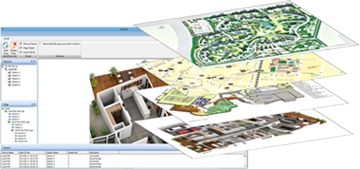
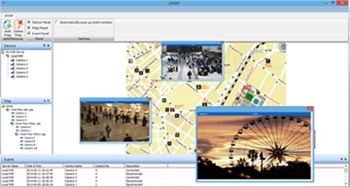
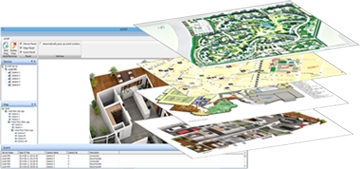
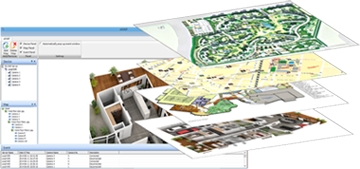
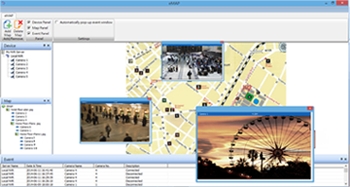
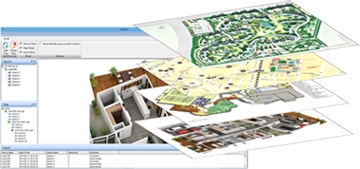
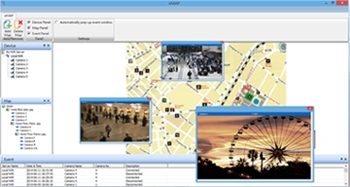
Dynamic E-Map on liveview monitoring as a quick navigation can indicate the physical location of cameras. Users can expand multi-layer maps in different perspectives and deploy cameras on the maps. When an event is triggered, a window will pop out to notify user and display recording video to users; therefore, users can quickly locate event site and take appropriate actions to minimize event lose and damage. Furthermore, event log history offers a detailed and latest list of event history to make users easily control the event situation with zero error possibility.
Excellent Video Recording
Smart and scheduled recording
- Various Compression Formats
- Various Recording Modes
- Flexible Threshold of Recorded Videos
- Multi-stream for Monitoring & Recording
- Flexible Recording Stream Setting
- Flexible Recording Format Setting
DIGIEVER NVR gives users high performance megapixel recording and supports MJPEG, MPEG-4 and H.264 formats. Users can configure different recording schedules such as continuous, schedule, event and audio recording for each camera in high megapixel recording. Users can also set recording percentage or days for keeping videos to overwrite the oldest video files automatically. Furthermore, DIGIEVER NVR supports multi-stream to let users set video format, frame rate, resolution and other features in different conditions to save bandwidth for monitoring and recording.Furthermore, with flexible recording stream setting, users can also decide to record videos either in higher resolution to view more detailed information or in lower resolution to save more HDDs capacity. Finally, to satisfy diverse surveillance requirements of recording video, DIGIEVER provides two recording formats for different safety concerns.For higher security concern users can only view videos via NVRPlayer while for normal security concern users can view videos via general video player such as Windows Media Player, VLC, including NVRPlayer to easily view recorded videos.
Efficient Event Management
Diversified events and corresponding trigger actions
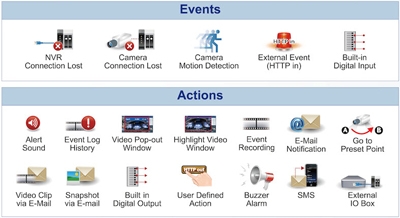
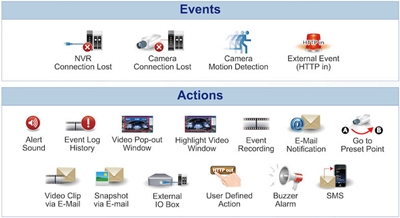
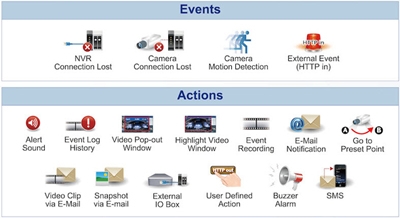
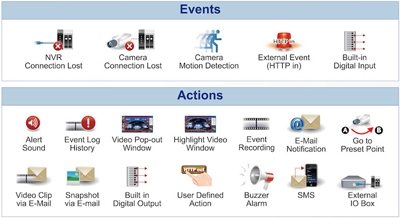
- Events: Camera connection lost,NVR connection lost,intelligent motion detection, external event(HTTP in)and user-defined digital input
- Actions: Alert sound, event log history, video pop-out window,highlight video window, event triggered recording, E-Mail Notification,video clip/ snapshot via E-Mail, buzzer alarm,SMS,go to pre-set point, extrenal IO box, user-defined digital output, and Built-in digital output
DIGIEVER NVR can support up to 14 types of action to inform users at the very first time and to mininize event lose and damage when an event is triggered.
When an event is triggered, such as motion detection or digital input, DIGIEVER NVR can take various actions such as recording video in the server and sending a video clip instantly to users by E-mail. In addition, buzzer can be enabled to sound up to 60 seconds as abnormal events occur. Users can also define digital output actions by themselves, such as fire alarm system.
Intuitive Multi-channel Playback
Intuitive playback and clear interface to view recorded video
- User-friendly Video Search by Date, Time,Channel,Normal Record, Event and Recovered File
- Frame by Frame Playback
- Exporting Recordings
- Taking a Snapshot
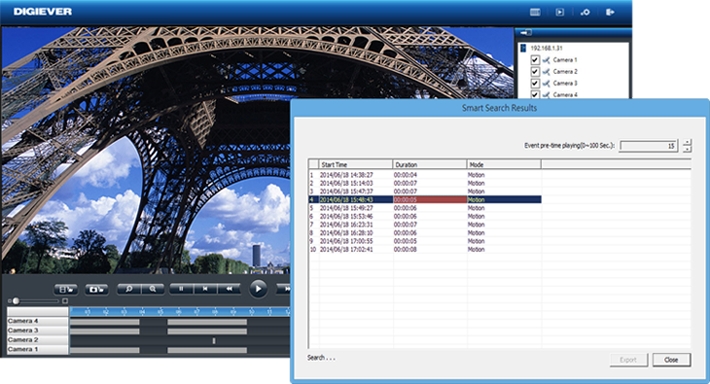
DIGIEVER NVR lets users search the recorded video by selecting date, time, channel number,normal record, event and recovered file. Users can select display modes with more flexibility from 1/4/9/16 for playback to have an intuitive checking on recording file. Frame by frame playback and rewind features help users to locate needed video image.
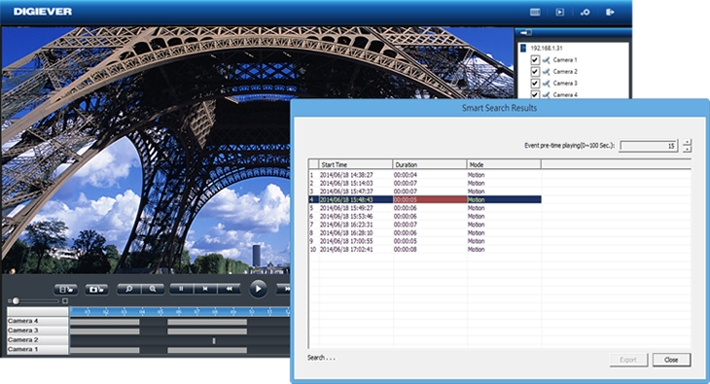
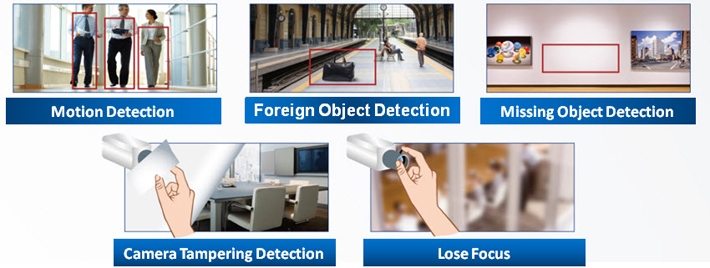
Smart Search
- Motion Detection
- Foreign Object Detection
- Missing Bbject Detection
- Camera Tampering Detection
- Lose focus
|
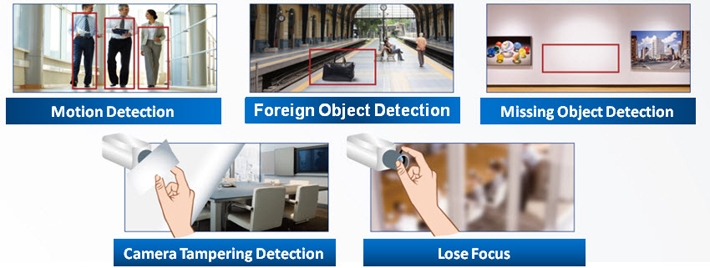
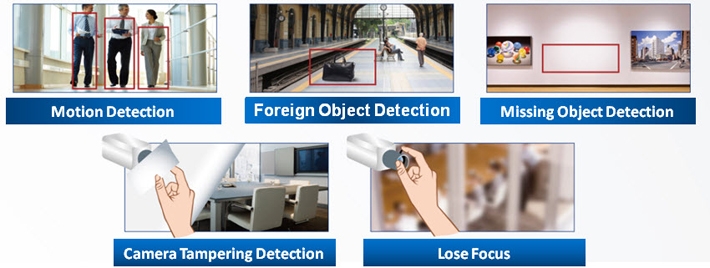
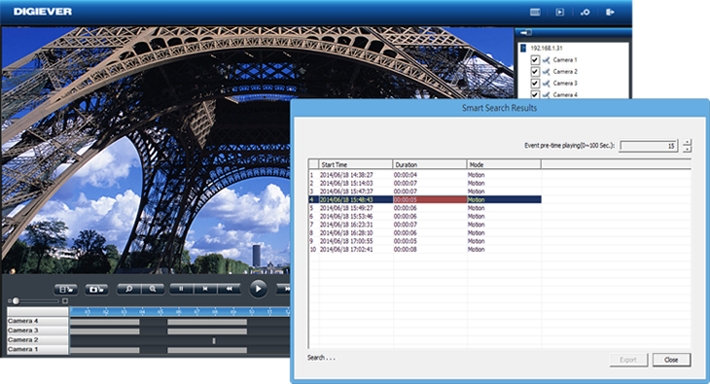
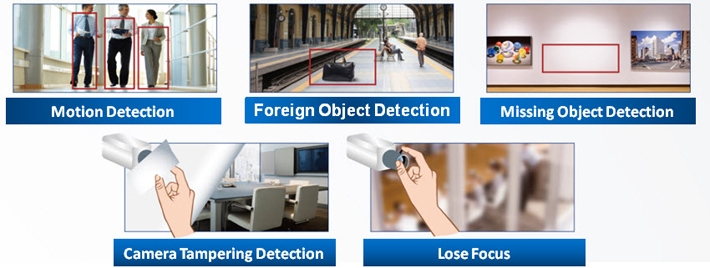
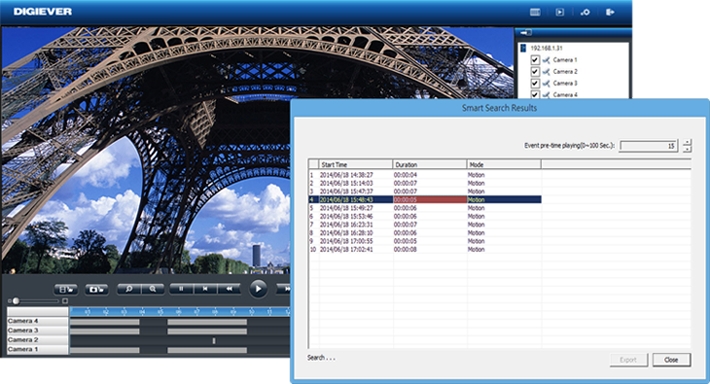
To make surveillance more intuitive and easily, DIGIEVER creates a new feature named Smart Search to help users quickly find out key video at the specific moment with five detection modes, includingMotion Detection, Foreign Object Detection, Camera Tampering Detection, Lose FocusandMissing Object Detection.
Advanced and Reliable Security System
Reliable security choices in DIGIEVER NVR
- Stable and Secure Linux-embedded System
- Detailed Log Information
- User Privilege Management
- Flexible Permission and Prohibition of IP Range for Controlling the Access
DIGIEVER NVR is a Linux-embedded operating system which is efficient to avoid virus attack and hacker intrusion. Compared with PC, Linux-embedded system offers more green and power saving.With over six clear log systems, users can do quick trouble shooting and security control of DIGIEVER NVR.As for privilege management, administrator can add multiple user groups like power user and user to configure live view and playback access. Besides, users can specify IP address or network segment to permit or prohibit specific IP address as white or black list from live view or playback access.
Dual IP Application
Advanced network system and data pretection solution
- High Security and Data Protection
- Flexible Network Environment Management
- Maximize Network Efficiency and Bandwidth Stability
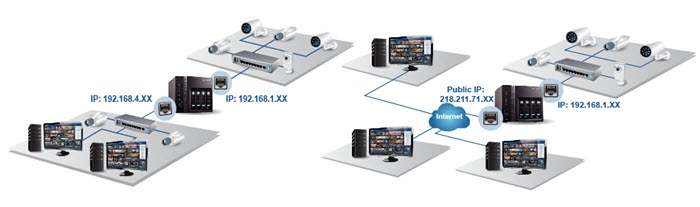
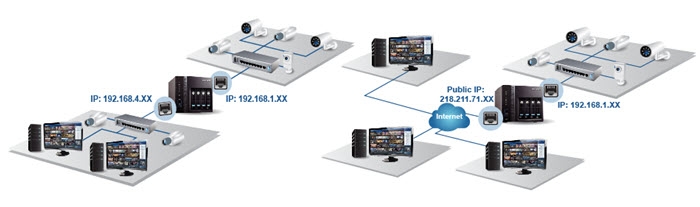
DIGIEVER NVR provides a flexible network configuration as proxy function to connect different network segments, even one in WAN, one in LAN. Dual IP application allows users to maximize network efficiency and bandwidth stability for various purposes such as daily operation and surveillance usage. Dual IP application largely increases the resistibility of unauthorized data theft and the unavailability of accessing to cameras.
Smart, Simple and Mobile Enhancement
Smart enhancement brings you more convenience
- Monitoring Everywhere via iPhone and Android Operating System
- Intelligent EZ Search of NVR
- Trouble Free Installation in 5 Steps
- Easy to Use by USB Mouse and Keyboard
matter where you are, you can monitor live view through iPhone or Android phone and control PTZ camera. Besides, with EZ Search, users can quickly find NVR in the network and connect to web-based interface. In only 5 steps, users can finish Quick Configuration in local display or web-based interface. When users connect to local display, user can manage live view and configuration easily by a USB mouse and keyboard.
Diverse Built-in Backup Methods
Configuration in advance save time for backup in convenience
- USB Backup and USB Type DVD Backup
- Backup with Day, Hour, Minutes and Channel Preset
- Efficient Hardware USB Backup Button
- Remote Backup
- Cloud Backup with Dropbox
- Export file on Playback
To ensure the security of confidential videos, DIGIEVER NVR provides diverse built-in backup methods to back up vital recorded videos in different situations.USB backup and USB Type DVD Backupprovide users a quick backup solution for emergency situation.Users can set a maximum of days, hours and minutes to backup the latest video files and configure the specific channels for duplication in advance. After setting the time and channels, users just need to press USB BACKUP button on the NVR and then export the video files to external USB device or USB type DVD burner. When an urgent need arises, video files are backed up efficiently and quickly.For daily backup, Users can routinely backup videos withRemote Backup to NAS serverto storage confidential videos for a longer time. When users wants to share some videos to friends or colleagues,Cloud Backup with Dropboxis an useful method to drag the specific video on Dropbox.
Superior Hardware Design
DIGIEVER NVRs excellent hardware performance truly enhances your efficiency
- High Network Throughput for High Megapixel Recording
- Supports up to 6TB Storage Capacity per Hard Disk Drive
- Built-in Advanced RAID Configuration with Hot Swap Design
- Automatic Recovery from DIGIEVER NVR Power Outage
- Built-in GPIO: 4 in 2 out
DIGIEVER NVR is powered by Intel CPU for excellent megapixel recording and provides network throughput up to360Mbps. DIGIEVER NVR also supports each hard disk drive up to 6TB. Through DIGIEVER NVR, users can configure JBOD, RAID0, RAID1, RAID10 and RAID5 in local display or web-based interface; hot swap design allows users to replace failed HDD without turning off the server. DIGIEVER NVR will also automatically recover when power resumes after an outage and recover missing file caused from power outage. On the other hand, DIGIEVER NVR supports built-in General Purpose I/O for both choices of setting digital input and output.
Various Network Services
Simple and functional complement of network video recorder
- DDNS Service
- NTP Server
- Static IP or DHCP
- Built-in DHCP
- Quick UPnP Search for Connecting Camera
- Windows Networking and FTP Service
Users can register a domain name from a dynamic DNS (DDNS) provider and enable DDNS in DIGIEVER NVR. DIGIEVER NVR supports NTP (Network Time Protocol) by selecting time zone for synchronizing the date and time. Users can set either static IP or DHCP on DIGIEVER NVR. With no need of router connection, DIGIEVER NVR supports built-in DHCP server to assign local IP addresses to other device in a local area network (LAN), which makes installation become much easier. Besides, users can add camera via quick UPnP search in LAN. With Windows networking and FTP service, DIGIEVER NVR allows users quickly access the video files.
|


|
|
|
11/03
|
Digiever DS-1116 Pro+ Network Video Recorder - 16 Channels, Up To 8 Megapixel, Up To 1000FPS, 1 Bay, VGA, HDMI DS-1116 Pro+
All-in-one Features of DIGIEVER NVR (Network Video Recorder)
DS-1116 Pro+ DIGIEVER NVR, a true PC-less and 1-bay standalone NVR, provides a complete network surveillance system with local display and remote browser monitoring with 4K UHD, 4MP(200FPS), Full HD(480FPS), HD(720FPS)and D1(1000FPS) outstanding monitoring.
DS-1116 Pro+is a1-bay Linux-embedded standalone NVR, powered by Intel Dual Core High Performance CPU and performs excellent network surveillance of multiple IP cameras up to16channelsof single server and up to144 channelsof multiple servers. DIGIEVER NVR supports local display of Full HD quality, remote monitoring, megapixel recording and playback. The monitoring demands can be satisfied anywhere and anytime by local display monitoring, remote web browser monitoring, iOS and Android mobile monitoring.
With intuitive Quick Configuration, users can finish trouble free installation in only five steps in local display or web-based interface of IE browser. The Linux-embedded NVR supports schedule recording, automatic recovery, threshold of recorded videos, and video clip. Through event management, DIGIEVER NVR lets user set diversified events and actions for instant alert. Moreover, with user-friendly USB backup function, DIGIEVER NVR saves time in data duplication for emergent needs. In terms of security control, user privilege management and log system offer user detailed information for security control. All these essential features can be configured quickly in DIGIEVER NVR local display and web-based interface.
DIGIEVER NVR Powerful Network Surveillance Features
BrilliantHardware DecodeLocal Display
DS-1116 Pro+ DIGIEVER NVR shows perfect monitoring via local display
- Support H/W Decode 4K Ultra HD per Channel
- H/W Decode Maximum FPS per Page: 4MP@200FPS, Full HD@480FPS, HD@720FPS, D1@1000FPS
- Up to 64 Channel Display Mode per Page
- Various Display Modes
- Convenient Control of PTZ and Speed Dome Cameras
DS-1116 Pro+offers 1/4/9/12/16/20/25/30/36/49/56/64 & 5+1-channel & sequential and full screen display modes. DIGIEVER NVR supports video output via either HDMI or VGA connector for high image quality local display. With hardware decode technology, users can have an ultra-clarity surveillance environment to view 4K2K(8MP) local display performance and solidly guard your region. Also, users can control the pan, tilt and optical zoom of IP camera on local display interface. Both monitoring and configuration can be accessed on local display.
Frame rate on local display is based on camera's compression format H.264.
The max. FPS might be varied from different environments.
Real-time Remote Monitoring
DS-1116 Pro+DIGIEVER NVR offers instant monitoring via remote IE browser anytime, anywhere
- Mini-CMS Server Monitoring
- Various Web browsers
- Various Monitoring Modes
- Convenient Control of PTZ and Speed Dome Cameras
- Digital Zoom in/ Zoom out
DIGIEVER NVR lets users monitor remotely via five main browsers in Windows, including IE, Chrome, Firefox, Safari and Opera browser. In remote browser interface, offers 1/4/8/9/10/12/16/20/25/30/36/42/49/56/64 & 5+1/12+1-channel & sequential and full screen display modes and supports up to channels. DIGIEVER NVR can be a mini-CMS server to connect other DIGIEVER NVR and select a maximum of 144 channels as well as simultaneously monitor other remote NVR sites without installing any extra VMS software. Also, remote monitoring offers control of PTZ camera and lets users view all preset positions of the IP camera.
Quick Navigation with Dynamic E-Map
- Multi-layer Maps
- Pop-out Event Window
- Event Log History
Dynamic E-Map on liveview monitoring as a quick navigation can indicate the physical location of cameras. Users can expand multi-layer maps in different perspectives and deploy cameras on the maps. When an event is triggered, a window will pop out to notify user and display recording video to users; therefore, users can quickly locate event site and take appropriate actions to minimize event lose and damage. Furthermore, event log history offers a detailed and latest list of event history to make users easily control the event situation with zero error possibility.
Excellent Video Recording
Smart and scheduled recording
- Various Compression Formats
- Various Recording Modes
- Flexible Threshold of Recorded Videos
- Multi-stream for Monitoring & Recording
- Flexible Recording Stream Setting
- Flexible Recording Format Setting
DIGIEVER NVR gives users high performance megapixel recording and supports MJPEG, MPEG-4 and H.264 formats. Users can configure different recording schedules such as continuous, schedule, event and audio recording for each camera in high megapixel recording. Users can also set recording percentage or days for keeping videos to overwrite the oldest video files automatically. Furthermore, DIGIEVER NVR supports multi-stream to let users set video format, frame rate, resolution and other features in different conditions to save bandwidth for monitoring and recording.Furthermore, with flexible recording stream setting, users can also decide to record videos either in higher resolution to view more detailed information or in lower resolution to save more HDDs capacity. Finally, to satisfy diverse surveillance requirements of recording video, DIGIEVER provides two recording formats for different safety concerns. For higher security concern users can only view videos via NVRPlayer while for normal security concern users can view videos via general video player such as Windows Media Player, VLC, including NVRPlayer to easily view recorded videos.
Efficient Event Management
Diversified events and corresponding trigger actions
Events: Camera connection lost,NVR connection lost,intelligent motion detection, and external event(HTTP in)
Actions: Alert sound, event log history, video pop-out window,highlight video window, event triggered recording, E-Mail Notification,video clip/ snapshot via E-Mail, buzzer alarm,SMS,go to pre-set point, extrenal IO box and user-defined digital output
DIGIEVER NVR can support up to 13 types of action to inform users at the very first time and to mininize event lose and damage when an event is triggered.
When an event is triggered, such as motion detection or camera connection lost, DIGIEVER NVR can take various actions such as recording video in the server and sending a video clip instantly to users by E-mail. In addition, buzzer can be enabled to sound up to 60 seconds as abnormal events occur.
Intuitive Multi-channel Playback
Intuitive playback and clear interface to view recorded video
- User-friendly Video Search by Date, Time,Channel,Normal Record, Event and Recovered File
- Frame by Frame Playback
- Exporting Recordings
- Taking a Snapshot
DIGIEVER NVR lets users search the recorded video by selecting date, time, channel number,normal record, event and recovered file. Users can select display modes with more flexibility from 1/4/9/16 for playback to have an intuitive checking on recording file. Frame by frame playback and rewind features help users to locate needed video image.
Smart Search
- Motion Detection
- Foreign Object Detection
- Missing Bbject Detection
- Camera Tampering Detection
- Lose focus
To make surveillance more intuitive and easily, DIGIEVER creates a new feature named Smart Search to help users quickly find out key video at the specific moment without wasting extra effort and energy.
Advanced and Reliable Security System
Reliable security choices in DIGIEVER NVR
- Stable and Secure Linux-embedded System
- Detailed Log Information
- User Privilege Management
- Flexible Permission and Prohibition of IP Range for Controlling the Access
DIGIEVER NVR is a Linux-embedded operating system which is efficient to avoid virus attack and hacker intrusion. Compared with PC, Linux-embedded system offers more green and power saving.With over six clear log systems, users can do quick trouble shooting and security control of DIGIEVER NVR.As for privilege management, administrator can add multiple user groups like power user and user to configure live view and playback access. Besides, users can specify IP address or network segment to permit or prohibit specific IP address as white or black list from live view or playback access.
Smart, Simple and Mobile Enhancement
Smart enhancement brings you more convenience
- Monitoring Everywhere via iPhone and Android Operating System
- Intelligent EZ Search of NVR
- Trouble Free Installation in 5 Steps
- Easy to Use by USB Mouse and Keyboard
No matter where you are, you can monitor live view through iPhone or Android phone and control PTZ camera. Besides, with EZ Search, users can quickly find NVR in the network and connect to web-based interface. In only 5 steps, users can finish Quick Configuration in local display or web-based interface. When users connect to local display, user can manage live view and configuration easily by a USB mouse and keyboard.
Diverse Built-in Backup Methods
Configuration in advance save time for backup in convenience
- USB Backup and USB Type DVD Backup
- Backup with Day, Hour, Minutes and Channel Preset
- Efficient Software USB BACKUP Virtual Button
- Remote Backup
- Cloud Backup with Dropbox
- Export file on Playback
To ensure the security of confidential videos, DIGIEVER NVR provides diverse built-in backup methods to back up vital recorded videos in different situations.USB backup and USB Type DVD Backupprovide users a quick backup solution for emergency situation.Users can set a maximum of days, hours and minutes to backup the latest video files and configure the specific channels for duplication in advance. After setting the time and channels, users just need to press software USB BACKUP virtual button on the NVR and then export the video files to external USB device or USB type DVD burner. When an urgent need arises, video files are backed up efficiently and quickly. For daily backup, Users can routinely backup videos withRemote Backup to NAS serverto storage confidential videos for a longer time. When users wants to share some videos to friends or colleagues,Cloud Backup with Dropboxis an useful method to drag the specific video on Dropbox.
Superior Hardware Design
DIGIEVER NVRs excellent hardware performance truly enhances your efficiency
- High Network Throughput for High Megapixel Recording
- Supports up to 6TB Storage Capacity per Hard Disk Drive
- Automatic Recovery from DIGIEVER NVR Power Outage
DIGIEVER NVR is powered by Intel CPU for excellent megapixel recording and provides network throughput up to360Mbps. DIGIEVER NVR also supports each hard disk drive up to 6TB. Through DIGIEVER NVR, users can configure Single in local display or web-based interface. DIGIEVER NVR will also automatically recover when power resumes after an outage and recover missing file caused from power outage.
Various Network Services
Simple and functional complement of network video recorder
- DDNS Service
- NTP Server
- Static IP or DHCP
- Quick UPnP Search for Connecting Camera
- Windows Networking and FTP Service
Users can register a domain name from a dynamic DNS (DDNS) provider and enable DDNS in DIGIEVER NVR. DIGIEVER NVR supports NTP (Network Time Protocol) by selecting time zone for synchronizing the date and time. Users can flexibly set static IP or DHCP server to enter the network video recorder. Besides, users can add camera via quick UPnP search in LAN. With Windows networking and FTP service, DIGIEVER NVR allows users quickly access the video files.
|
|
|
|
11/03
|
Epson 5YWEBG6050W 2 Additional Years Giving A Total Of 5 Years Warranty - For Epson EB-G6050W Projector5YWEBG6050W 2 Additional Years Giving A Total Of 5 Years Warranty - For Epson EB-G6050W Projector
|

|
|
|
11/03
|
Digiever DS-1109 Pro+ Network Video Recorder - 9 Channels, Up To 8 Megapixel, Up To 1000 FPS, 1 Bay, VGA, HDMI
DS-1109 Pro+
All-in-one Features of DIGIEVER NVR (Network Video Recorder)
DS-1109 Pro+ DIGIEVER NVR, a true PC-less and 1-bay standalone NVR, provides a complete network surveillance system with local display and remote browser monitoring with 4K UHD, 4MP(200FPS), Full HD(480FPS), HD(720FPS)and D1(1000FPS) outstanding monitoring.
DS-1109 Pro+is a1-bay Linux-embedded standalone NVR, powered by Intel Dual Core High Performance CPU and performs excellent network surveillance of multiple IP cameras up to9channelsof single server and up to144 channelsof multiple servers. DIGIEVER NVR supports local display of Full HD quality, remote monitoring, megapixel recording and playback. The monitoring demands can be satisfied anywhere and anytime by local display monitoring, remote web browser monitoring, iOS and Android mobile monitoring.
With intuitive Quick Configuration, users can finish trouble free installation in only five steps in local display or web-based interface of IE browser. The Linux-embedded NVR supports schedule recording, automatic recovery, threshold of recorded videos, and video clip. Through event management, DIGIEVER NVR lets user set diversified events and actions for instant alert. Moreover, with user-friendly USB backup function, DIGIEVER NVR saves time in data duplication for emergent needs. In terms of security control, user privilege management and log system offer user detailed information for security control. All these essential features can be configured quickly in DIGIEVER NVR local display and web-based interface.
DIGIEVER NVR Powerful Network Surveillance Features
Brilliant Hardware DecodeLocal Display
DS-1109 Pro+DIGIEVER NVR shows perfect monitoring via local display
- Support H/W Decode 4K Ultra HD per Channel
- H/W Decode Maximum FPS per Page: 4MP@200FPS, Full HD@480FPS, HD@720FPS, D1@1000FPS
- Up to 64 Channel Display Mode per Page
- Various Display Modes
- Convenient Control of PTZ and Speed Dome Cameras
DS-1109 Pro+offers 1/4/9/12/16/20/25/30/36/49/56/64 & 5+1-channel & sequential and full screen display modes. DIGIEVER NVR supports video output via either HDMI or VGA connector for high image quality local display. With hardware decode technology, users can have an ultra-clarity surveillance environment to view 4K2K(8MP) local display performance and solidly guard your region. Also, users can control the pan, tilt and optical zoom of IP camera on local display interface. Both monitoring and configuration can be accessed on local display.
Frame rate on local display is based on camera's compression format H.264.
The max. FPS might be varied from different environments.
Real-time Remote Monitoring
DS-1109 Pro+DIGIEVER NVR offers instant monitoring via remote IE browser anytime, anywhere
- Mini-CMS Server Monitoring
- Various Web browsers
- Various Monitoring Modes
- Convenient Control of PTZ and Speed Dome Cameras
- Digital Zoom in/ Zoom out
  
DIGIEVER NVR lets users monitor remotely via five main browsers in Windows, including IE, Chrome, Firefox, Safari and Opera browser. In remote browser interface, offers 1/4/8/9/10/12/16/20/25/30/36/42/49/56/64 & 5+1/12+1-channel & sequential and full screen display modes and supports up to channels. DIGIEVER NVR can be a mini-CMS server to connect other DIGIEVER NVR and select a maximum of 144 channels as well as simultaneously monitor other remote NVR sites without installing any extra VMS software. Also, remote monitoring offers control of PTZ camera and lets users view all preset positions of the IP camera.
Quick Navigation with Dynamic E-Map
- Multi-layer Maps
- Pop-out Event Window
- Event Log History
Dynamic E-Map on liveview monitoring as a quick navigation can indicate the physical location of cameras. Users can expand multi-layer maps in different perspectives and deploy cameras on the maps. When an event is triggered, a window will pop out to notify user and display recording video to users; therefore, users can quickly locate event site and take appropriate actions to minimize event lose and damage. Furthermore, event log history offers a detailed and latest list of event history to make users easily control the event situation with zero error possibility.
Excellent Video Recording
Smart and scheduled recording
- Various Compression Formats
- Various Recording Modes
- Flexible Threshold of Recorded Videos
- Multi-stream for Monitoring & Recording
- Flexible Recording Stream Setting
- Flexible Recording Format Setting
DIGIEVER NVR gives users high performance megapixel recording and supports MJPEG, MPEG-4 and H.264 formats. Users can configure different recording schedules such as continuous, schedule, event and audio recording for each camera in high megapixel recording. Users can also set recording percentage or days for keeping videos to overwrite the oldest video files automatically. Furthermore, DIGIEVER NVR supports multi-stream to let users set video format, frame rate, resolution and other features in different conditions to save bandwidth for monitoring and recording.Furthermore, with flexible recording stream setting, users can also decide to record videos either in higher resolution to view more detailed information or in lower resolution to save more HDDs capacity. Finally, to satisfy diverse surveillance requirements of recording video, DIGIEVER provides two recording formats for different safety concerns. For higher security concern users can only view videos via NVRPlayer while for normal security concern users can view videos via general video player such as Windows Media Player, VLC, including NVRPlayer to easily view recorded videos.
Efficient Event Management
Diversified events and corresponding trigger actions
Events: Camera connection lost,NVR connection lost,intelligent motion detection, and external event(HTTP in)
Actions: Alert sound, event log history, video pop-out window,highlight video window, event triggered recording, E-Mail Notification,video clip/ snapshot via E-Mail, buzzer alarm,SMS,go to pre-set point, extrenal IO box and user-defined digital output
DIGIEVER NVR can support up to 13 types of action to inform users at the very first time and to mininize event lose and damage when an event is triggered.
When an event is triggered, such as motion detection or camera connection lost, DIGIEVER NVR can take various actions such as recording video in the server and sending a video clip instantly to users by E-mail. In addition, buzzer can be enabled to sound up to 60 seconds as abnormal events occur.
Intuitive Multi-channel Playback
Intuitive playback and clear interface to view recorded video
- User-friendly Video Search by Date, Time,Channel,Normal Record, Event and Recovered File
- Frame by Frame Playback
- Exporting Recordings
- Taking a Snapshot
DIGIEVER NVR lets users search the recorded video by selecting date, time, channel number,normal record, event and recovered file. Users can select display modes with more flexibility from 1/4/9/16 for playback to have an intuitive checking on recording file. Frame by frame playback and rewind features help users to locate needed video image.
Smart Search
- Motion Detection
- Foreign Object Detection
- Missing Bbject Detection
- Camera Tampering Detection
- Lose focus
|
To make surveillance more intuitive and easily, DIGIEVER creates a new feature named Smart Search to help users quickly find out key video at the specific moment without wasting extra effort and energy.
Advanced and Reliable Security System
Reliable security choices in DIGIEVER NVR
- Stable and Secure Linux-embedded System
- Detailed Log Information
- User Privilege Management
- Flexible Permission and Prohibition of IP Range for Controlling the Access
DIGIEVER NVR is a Linux-embedded operating system which is efficient to avoid virus attack and hacker intrusion. Compared with PC, Linux-embedded system offers more green and power saving.With over six clear log systems, users can do quick trouble shooting and security control of DIGIEVER NVR.As for privilege management, administrator can add multiple user groups like power user and user to configure live view and playback access. Besides, users can specify IP address or network segment to permit or prohibit specific IP address as white or black list from live view or playback access.
Smart, Simple and Mobile Enhancement
Smart enhancement brings you more convenience
- Monitoring Everywhere via iPhone and Android Operating System
- Intelligent EZ Search of NVR
- Trouble Free Installation in 5 Steps
- Easy to Use by USB Mouse and Keyboard
No matter where you are, you can monitor live view through iPhone or Android phone and control PTZ camera. Besides, with EZ Search, users can quickly find NVR in the network and connect to web-based interface. In only 5 steps, users can finish Quick Configuration in local display or web-based interface. When users connect to local display, user can manage live view and configuration easily by a USB mouse and keyboard.
Diverse Built-in Backup Methods
Configuration in advance save time for backup in convenience
- USB Backup and USB Type DVD Backup
- Backup with Day, Hour, Minutes and Channel Preset
- Efficient Software USB BACKUP Virtual Button
- Remote Backup
- Cloud Backup with Dropbox
- Export file on Playback
To ensure the security of confidential videos, DIGIEVER NVR provides diverse built-in backup methods to back up vital recorded videos in different situations.USB backup and USB Type DVD Backupprovide users a quick backup solution for emergency situation.Users can set a maximum of days, hours and minutes to backup the latest video files and configure the specific channels for duplication in advance. After setting the time and channels, users just need to press software USB BACKUP virtual button on the NVR and then export the video files to external USB device or USB type DVD burner. When an urgent need arises, video files are backed up efficiently and quickly. For daily backup, Users can routinely backup videos withRemote Backup to NAS serverto storage confidential videos for a longer time. When users wants to share some videos to friends or colleagues,Cloud Backup with Dropboxis an useful method to drag the specific video on Dropbox.
Superior Hardware Design
DIGIEVER NVR’s excellent hardware performance truly enhances your efficiency
- High Network Throughput for High Megapixel Recording
- Supports up to 6TB Storage Capacity per Hard Disk Drive
- Automatic Recovery from DIGIEVER NVR Power Outage
DIGIEVER NVR is powered by Intel CPU for excellent megapixel recording and provides network throughput up to360Mbps. DIGIEVER NVR also supports each hard disk drive up to 6TB. Through DIGIEVER NVR, users can configure Single in local display or web-based interface. DIGIEVER NVR will also automatically recover when power resumes after an outage and recover missing file caused from power outage.
Various Network Services
Simple and functional complement of network video recorder
- DDNS Service
- NTP Server
- Static IP or DHCP
- Quick UPnP Search for Connecting Camera
- Windows Networking and FTP Service
Users can register a domain name from a dynamic DNS (DDNS) provider and enable DDNS in DIGIEVER NVR. DIGIEVER NVR supports NTP (Network Time Protocol) by selecting time zone for synchronizing the date and time. Users can flexibly set static IP or DHCP server to enter the network video recorder. Besides, users can add camera via quick UPnP search in LAN. With Windows networking and FTP service, DIGIEVER NVR allows users quickly access the video files.
|
|
|
|
11/03
|
IVSEC NC514A Mini Dome IP Camera - 2 Megapixel @ 25 FPS, Sony Sensor, 2.8mm Lens, PoE, Vandal Resistant, IP65NC514A Mini Dome IP Camera - 2 Megapixel @ 25 FPS, Sony Sensor, 2.8mm Lens, PoE, Vandal Resistant, IP65
|
|
|
|
11/03
|
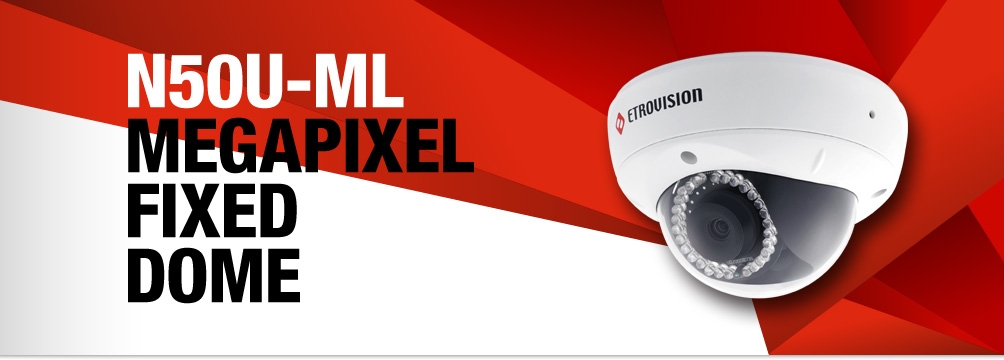
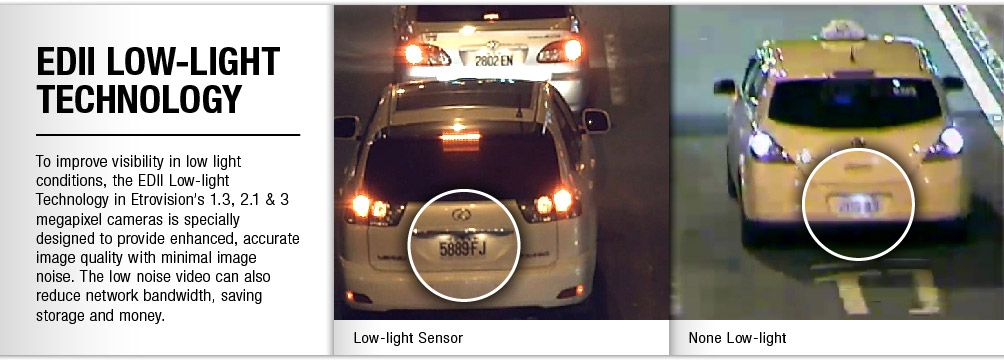
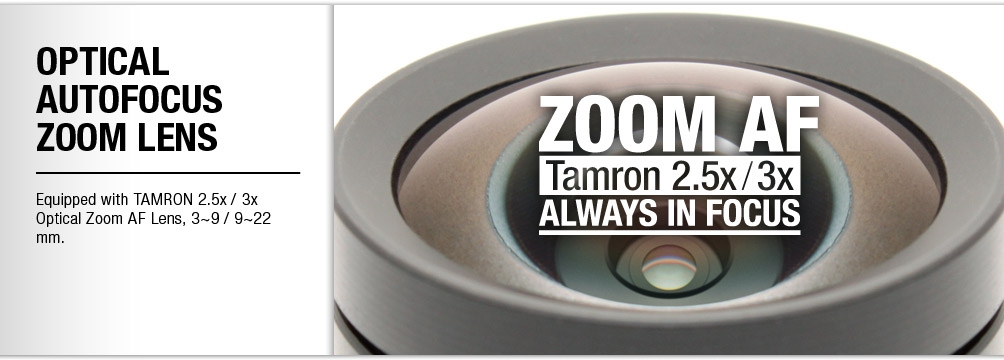
Etrovision N50U-ML Dome IP Camera - 2 Megapixel @ 30 FPS, 3-9mm Tamron Lens, Zoom & Auto-Focus, PoE, Vandal Resistant, IP67, IR, ICR - White
|
|
|
|
11/03
|
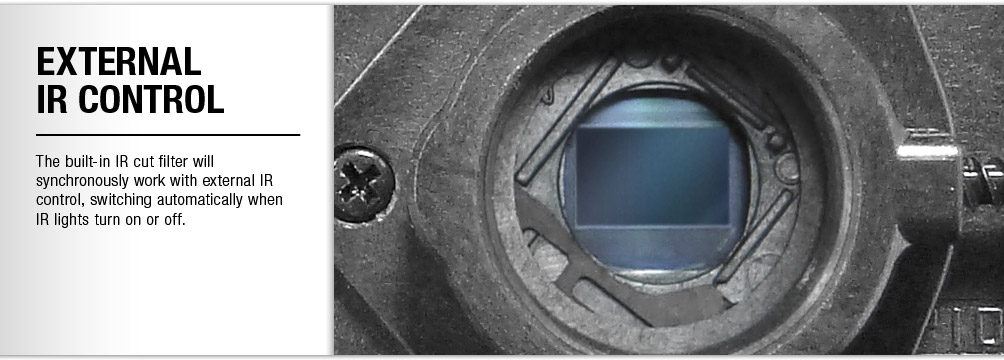
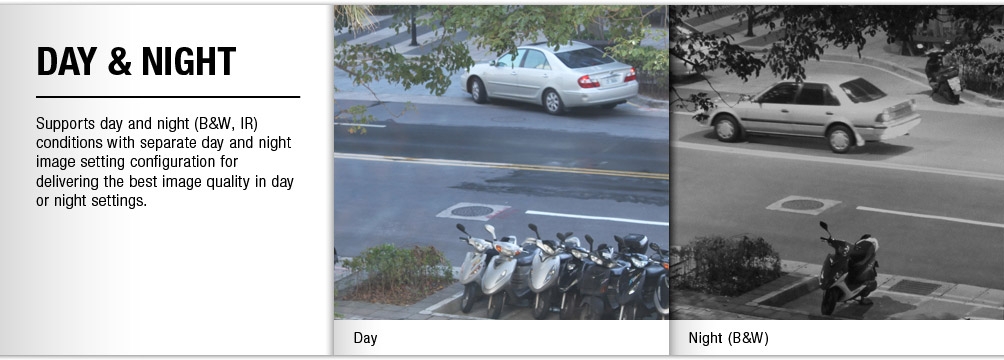
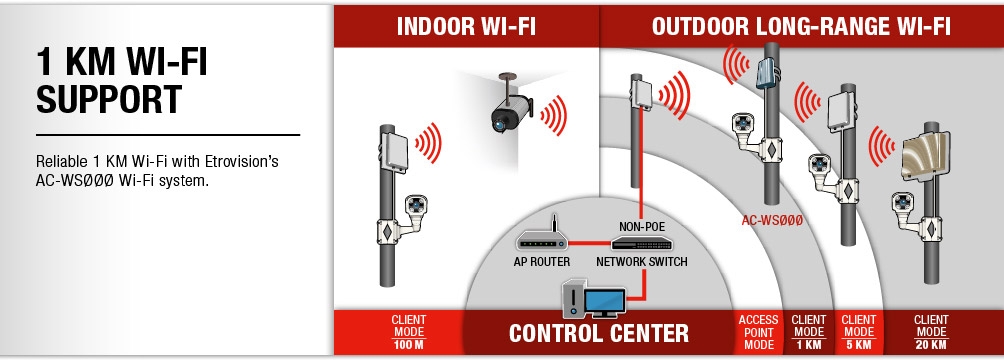
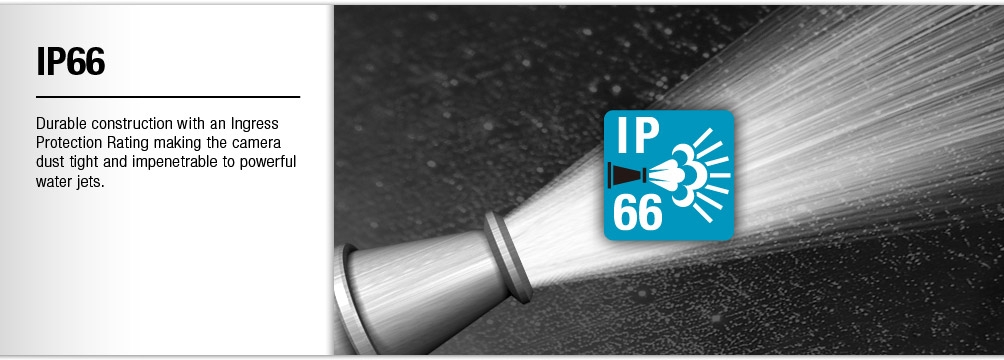
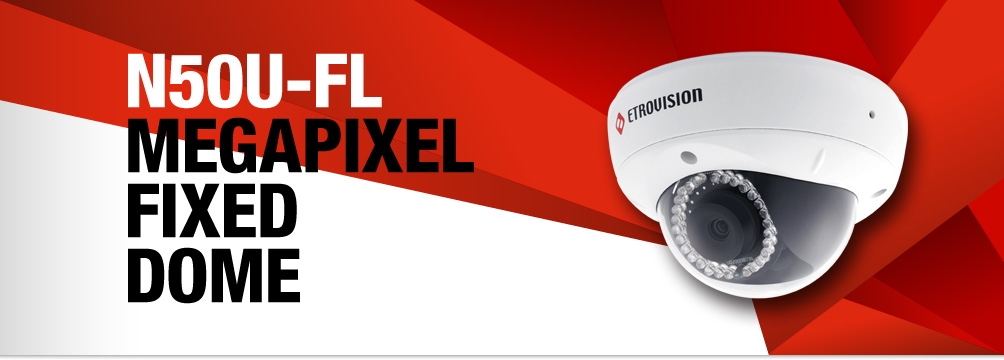
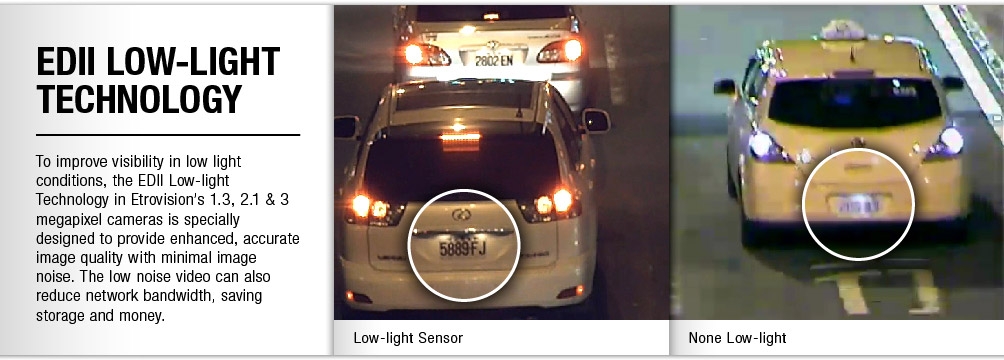
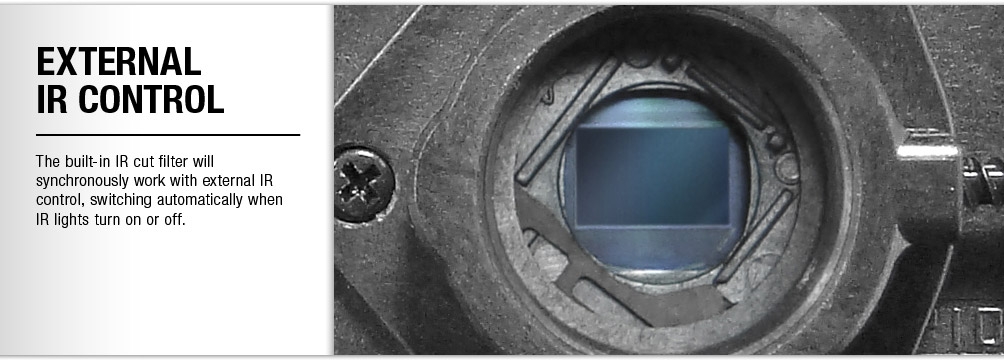
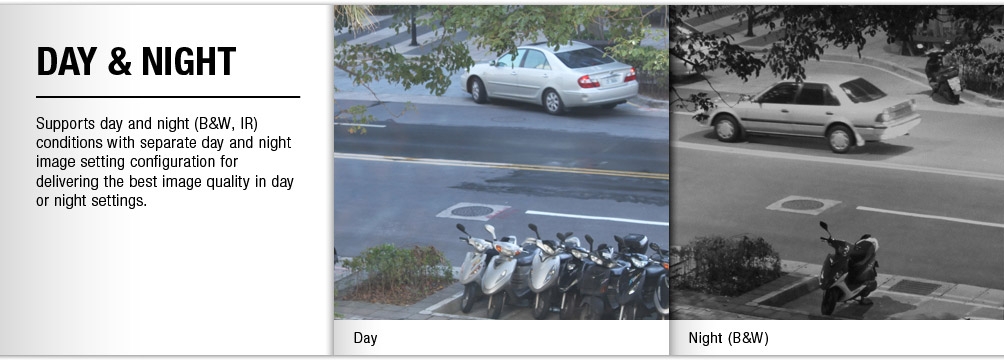
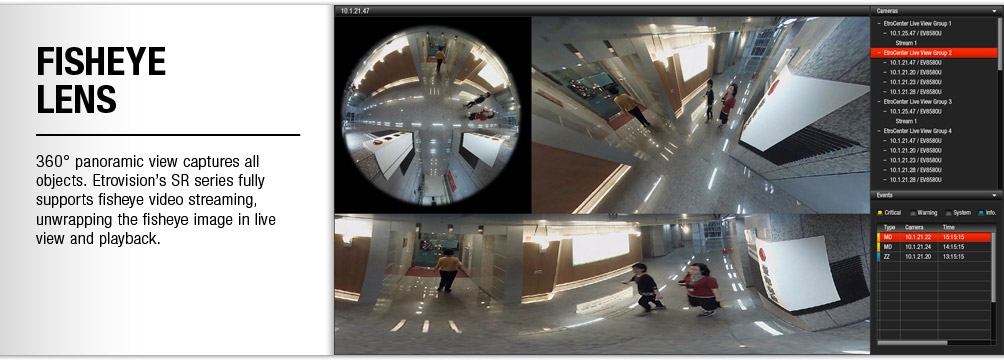
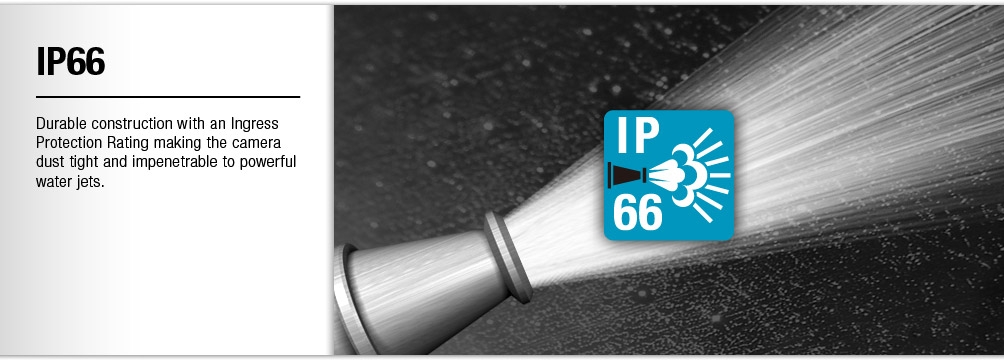
Etrovision N50U-FL Dome IP Camera - 2 Megapixel, @ 30FPS 1.37mm Fisheye Lens, PoE, Low-Lux, Vandal Resistant, IP66, ICR - White N50U-FL
Features
Specifications
| Features |
N50Q-MD |
N50U-ML |
N50A-ML |
N50F-B/C |
N50Q-BD/CD |
N50U-BL/CL |
N50U-B/C |
N50A-BL/CL |
N50A-B/C |
N50F-F |
N50U-FL |
| Max Video Resolution |
2048 x 1536 |
1920 x 1080 |
1280 x 1024 |
2592 x 1920 |
2048 x 1536 |
1920 x 1080 |
1920 x 1080 |
1280 x 1024 |
1280 x 1024 |
2592 x 1920 |
1920 x 1080 |
| Dual-shutter WDR |
v |
|
|
|
v |
|
|
|
|
|
|
| Optical Zoom |
3x |
3x, 2.5x |
3x, 2.5x |
|
|
|
|
|
|
|
|
| Fixed Lens |
|
|
|
N50F-B |
N50Q-BD |
N50U-BL |
N50U-B |
N50A-BL |
N50A-B |
Fisheye Lens |
Fisheye Lens |
| Varifocal Lens |
|
|
|
N50F-C |
N50Q-CD |
N50U-CL |
N50U-C |
N50A-CL |
N50A-C |
|
|
| Min Illumination |
0.1 lux |
0.05 lux |
0.05 lux |
0.1 lux |
0.1 lux |
0.05 lux |
0.1 lux |
0.05 lux |
0.1 lux |
0.1 lux |
0.05 lux |
| Day/Night |
v |
v |
v |
v |
v |
v |
v |
v |
v |
v |
v |
| Built-in ICR |
v |
v |
v |
v |
v |
v |
v |
v |
v |
v |
v |
| Built-in Microphone |
v |
v |
v |
v |
v |
v |
v |
v |
v |
v |
v |
| Two-way Audio |
v |
v |
v |
v |
v |
v |
v |
v |
v |
v |
v |
| Memory Card Slot |
v |
v |
v |
v |
v |
v |
v |
v |
v |
v |
v |
| Casing |
IP66, Vandal-proof |
IP66, Vandal-proof |
IP66, Vandal-proof |
IP66, Vandal-proof |
IP66, Vandal-proof |
IP66, Vandal-proof |
IP66, Vandal-proof |
IP66, Vandal-proof |
IP66, Vandal-proof |
IP66, Vandal-proof |
IP66, Vandal-proof |
| PoE |
v |
v |
v |
v |
v |
v |
v |
v |
v |
v |
v |
| Wireless Supoort |
v |
v |
v |
v |
v |
v |
v |
v |
v |
v |
v |
| IR Illumination Distance |
15 m |
15 m |
15 m |
15 m |
15 m |
15 m |
15 m |
15 m |
15 m |
|
|
|
|
|
11/03
|
Canon BCI-3EBK Ink Cartridge - Black - For Canon Pixma IP5000 Printer Ink Cartridge Black
BCI-3EBK
Econimical and convenient, the individual BCI-3EBK photo inkjet cartridge produces rich black tones for your printed photos. Remember, you just need to keep the cartridge and replace the color.
|
|
|
|
11/03
|
Digiever DS-4216 Pro+ Network Video Recorder - 16 Channel, Up To 8MP, Up To 1000FPS, 4 Bay, VGA, HDMI DS-4216 Pro+
All-in-one Features of DIGIEVER NVR (Network Video Recorder)
DS-4216 Pro+ DIGIEVER NVR, a true PC-less and 4-bay standalone NVR, provides a complete network surveillance system with local display and remote browser monitoring with 4K UHD,(200FPS),Full HD(480FPS),HD(720FPS)and D1(1000FPS) outstanding monitoring.
DS-4216 Pro+is a4-bay Linux-embedded standalone NVR, powered by Intel Dual Core High Performance CPU and performs excellent network surveillance of multiple IP cameras up to16channelsof single server and up to144 channelsof multiple servers. DIGIEVER NVR supports hardware decode local display of 4K2K(8MP) quality, remote browser monitoring, multi-layer dynamic E-Map, multi-megapixel recording and smart search playback. The monitoring demands can be satisfied anywhere and anytime by local display monitoring, remote browser monitoring, iOS and Android mobile monitoring.
With intuitive Quick Configuration, users can finish trouble free installation in only five steps on local display or remote browsers. The Linux-embedded NVR supports event/schedule recording, automatic recovery, threshold of recorded videos and video clip. Through event and action management, DIGIEVER NVR lets user set various events and actions for instant alert. For emergent need of video duplication, DIGIEVER NVR is equipped with diverse backup methods so that users can freely backup recorded videos to USB dongle, NAS, Dropbox, etc. In terms of security control, user privilege management and log system offer user detailed information for security control. All these essential features can be configured quickly on DIGIEVER NVR local display and remote browser interface.
DIGIEVER NVR Powerful Network Surveillance Features
Brilliant Hardware Decode Local Display
DS-4216 Pro+ DIGIEVER NVR shows perfect monitoring via local display
- Support H/W Decode 4K2K per Channel
- H/W Decode Maximum FPS per Page: 4MP @ 200FPS, Full HD @ 480FPS, HD @ 720FPS, D1 @ 1000FPS
- Up to 64 Channel Display Mode per Page
- Various Display Modes
- Convenient Control of PTZ and Speed Dome Cameras
DS-4216 Pro+offers 1/4/9/12/16/20/25/30/36/49/56/64 & 5+1-channel & sequential and full screen display modes. DIGIEVER NVR supports video output via either HDMI or VGA connector for high image quality local display. With hardware decode technology, users can have an ultra-clarity surveillance environment to view 4K2K(8MP) local display performance and solidly guard your region. Also, users can control the pan, tilt and optical zoom of IP camera on local display interface. Both monitoring and configuration can be accessed on local display.
Frame rate on local display is based on camera's compression format H.264.
The max. FPS might be varied from different environments.
Real-time Remote Monitoring
DS-4216 Pro+ DIGIEVER NVR offers instant monitoring via remote IE browser anytime, anywhere
- Mini-CMS Server Monitoring
- Various Web browsers
- Various Monitoring Modes
- Convenient Control of PTZ and Speed Dome Cameras
- Digital Zoom in/ Zoom out
DIGIEVER NVR lets users monitor remotely via five main browsers in Windows, including IE, Chrome, Firefox, Safari and Opera browser. In remote browser interface, offers 1/4/8/9/10/12/16/20/25/30/36/42/49/56/64 & 5+1/12+1 channel & sequential and full screen display modes and supports up to channels. DIGIEVER NVR can be a mini-CMS server to connect other DIGIEVER NVR and select a maximum of 144 channels as well as simultaneously monitor other remote NVR sites without installing any extra VMS software. Also, remote monitoring offers control of PTZ camera and lets users view all preset positions of the IP camera.
Quick Navigation with Dynamic E-Map
- Multi-layer Maps
- Pop-out Event Window
- Event Log History
Dynamic E-Map on liveview monitoring as a quick navigation can indicate the physical location of cameras. Users can expand multi-layer maps in different perspectives and deploy cameras on the maps. When an event is triggered, a window will pop out to notify user and display recording video to users; therefore, users can quickly locate event site and take appropriate actions to minimize event lose and damage. Furthermore, event log history offers a detailed and latest list of event history to make users easily control the event situation with zero error possibility.
Excellent Video Recording
Smart and scheduled recording
- Various Compression Formats
- Various Recording Modes
- Flexible Threshold of Recorded Videos
- Multi-stream for Monitoring & Recording
- Flexible Recording Stream Setting
- Flexible Recording Format Setting
DIGIEVER NVR gives users high performance megapixel recording and supports MJPEG, MPEG-4 and H.264 formats. Users can configure different recording schedules such as continuous, schedule, event and audio recording for each camera in high megapixel recording. Users can also set recording percentage or days for keeping videos to overwrite the oldest video files automatically. Furthermore, DIGIEVER NVR supports multi-stream to let users set video format, frame rate, resolution and other features in different conditions to save bandwidth for monitoring and recording.Furthermore, with flexible recording stream setting, users can also decide to record videos either in higher resolution to view more detailed information or in lower resolution to save more HDDs capacity. Finally, to satisfy diverse surveillance requirements of recording video, DIGIEVER provides two recording formats for different safety concerns.For higher security concern users can only view videos via NVRPlayer while for normal security concern users can view videos via general video player such as Windows Media Player, VLC, including NVRPlayer to easily view recorded videos.
Efficient Event Management
Diversified events and corresponding trigger actions
- Events: Camera connection lost,NVR connection lost,intelligent motion detection, external event(HTTP in)and user-defined digital input
- Actions: Alert sound, event log history, video pop-out window,highlight video window, event triggered recording, E-Mail Notification,video clip/ snapshot via E-Mail, buzzer alarm,SMS,go to pre-set point, extrenal IO box, user-defined digital output, and Built-in digital output
DIGIEVER NVR can support up to 14 types of action to inform users at the very first time and to mininize event lose and damage when an event is triggered.
When an event is triggered, such as motion detection or digital input, DIGIEVER NVR can take various actions such as recording video in the server and sending a video clip instantly to users by E-mail. In addition, buzzer can be enabled to sound up to 60 seconds as abnormal events occur. Users can also define digital output actions by themselves, such as fire alarm system.
Intuitive Multi-channel Playback
Intuitive playback and clear interface to view recorded video
User-friendly Video Search by Date, Time,Channel,Normal Record, Event and Recovered File
Frame by Frame Playback
Exporting Recordings
Taking a Snapshot
DIGIEVER NVR lets users search the recorded video by selecting date, time, channel number,normal record, event and recovered file. Users can select display modes with more flexibility from 1/4/9/16 for playback to have an intuitive checking on recording file. Frame by frame playback and rewind features help users to locate needed video image.
Smart Search
- Motion Detection
- Foreign Object Detection
- Missing Bbject Detection
- Camera Tampering Detection
- Lose focus
To make surveillance more intuitive and easily, DIGIEVER creates a new feature named Smart Search to help users quickly find out key video at the specific moment with five detection modes, includingMotion Detection, Foreign Object Detection, Camera Tampering Detection, Lose FocusandMissing Object Detection.
Advanced and Reliable Security System
Reliable security choices in DIGIEVER NVR
- Stable and Secure Linux-embedded System
- Detailed Log Information
- User Privilege Management
- Flexible Permission and Prohibition of IP Range for Controlling the Access
DIGIEVER NVR is a Linux-embedded operating system which is efficient to avoid virus attack and hacker intrusion. Compared with PC, Linux-embedded system offers more green and power saving.With over six clear log systems, users can do quick trouble shooting and security control of DIGIEVER NVR.As for privilege management, administrator can add multiple user groups like power user and user to configure live view and playback access. Besides, users can specify IP address or network segment to permit or prohibit specific IP address as white or black list from live view or playback access.
Dual IP Application
Advanced network system and data pretection solution
- High Security and Data Protection
- Flexible Network Environment Management
- Maximize Network Efficiency and Bandwidth Stability
DIGIEVER NVR provides a flexible network configuration as proxy function to connect different network segments, even one in WAN, one in LAN. Dual IP application allows users to maximize network efficiency and bandwidth stability for various purposes such as daily operation and surveillance usage. Dual IP application largely increases the resistibility of unauthorized data theft and the unavailability of accessing to cameras.
Smart, Simple and Mobile Enhancement
Smart enhancement brings you more convenience
- Monitoring Everywhere via iPhone and Android Operating System
- Intelligent EZ Search of NVR
- Trouble Free Installation in 5 Steps
- Easy to Use by USB Mouse and Keyboard
Diverse Built-in Backup Methods
Configuration in advance save time for backup in convenience
- USB Backup and USB Type DVD Backup
- Backup with Day, Hour, Minutes and Channel Preset
- Efficient Hardware USB Backup Button
- Remote Backup
- Cloud Backup with Dropbox
- Export file on Playback
To ensure the security of confidential videos, DIGIEVER NVR provides diverse built-in backup methods to back up vital recorded videos in different situations.USB backup and USB Type DVD Backupprovide users a quick backup solution for emergency situation.Users can set a maximum of days, hours and minutes to backup the latest video files and configure the specific channels for duplication in advance. After setting the time and channels, users just need to press USB BACKUP button on the NVR and then export the video files to external USB device or USB type DVD burner. When an urgent need arises, video files are backed up efficiently and quickly.For daily backup, Users can routinely backup videos withRemote Backup to NAS serverto storage confidential videos for a longer time. When users wants to share some videos to friends or colleagues,Cloud Backup with Dropboxis an useful method to drag the specific video on Dropbox.
Superior Hardware Design
DIGIEVER NVRs excellent hardware performance truly enhances your efficiency
- High Network Throughput for High Megapixel Recording
- Supports up to 6TB Storage Capacity per Hard Disk Drive
- Built-in Advanced RAID Configuration with Hot Swap Design
- Automatic Recovery from DIGIEVER NVR Power Outage
- Built-in GPIO: 4 in 2 out
DIGIEVER NVR is powered by Intel CPU for excellent megapixel recording and provides network throughput up to360Mbps. DIGIEVER NVR also supports each hard disk drive up to 6TB. Through DIGIEVER NVR, users can configure JBOD, RAID0, RAID1, RAID10 and RAID5 in local display or web-based interface; hot swap design allows users to replace failed HDD without turning off the server. DIGIEVER NVR will also automatically recover when power resumes after an outage and recover missing file caused from power outage. On the other hand, DIGIEVER NVR supports built-in General Purpose I/O for both choices of setting digital input and output.
Various Network Services
Simple and functional complement of network video recorder
- DDNS Service
- NTP Server
- Static IP or DHCP
- Built-in DHCP
- Quick UPnP Search for Connecting Camera
- Windows Networking and FTP Service
Users can register a domain name from a dynamic DNS (DDNS) provider and enable DDNS in DIGIEVER NVR. DIGIEVER NVR supports NTP (Network Time Protocol) by selecting time zone for synchronizing the date and time. Users can set either static IP or DHCP on DIGIEVER NVR. With no need of router connection, DIGIEVER NVR supports built-in DHCP server to assign local IP addresses to other device in a local area network (LAN), which makes installation become much easier. Besides, users can add camera via quick UPnP search in LAN. With Windows networking and FTP service, DIGIEVER NVR allows users quickly access the video files.
|
|
|
|
11/03
|
Sony VPL-VW500ES 4K Home Cinema Projector - 4096x2160, 1700 Lumens, 200,000;1, HDMI, RS-232C, RJ45 VPL-VW500ES
4K Home Cinema projector with 200,000:1 contrast ratio
Overview
4K more than 4x the quality of Full HD
4K is the very best the big screen can deliver. The VPL-VW500ES gives you that very same, fully immersive cinema experience, at home.
Incredible 4096 x 2160 resolution pictures and an exceptionally high dynamic contrast ratio of 200,000:1 produce details so stunning, you may never leave the house to see a movie again.
2D and 3D upscaled to 4K
While more and more native 4K material is becoming available, our Reality Creation technology means you can enjoy your current 2D and 3D discs, upscaled for an incredible 4K experience. Youll get the very best from your favourite movies and notice even more detail than before even in 3D.
Features
4K native resolution: over 4x better than Full HD
No compromises: the VPL-VW500ES provides 4096 x 2160 4K resolution (the DCI standard in digital cinemas). We used our professional cinema expertise to develop 4K SXRD panels and produce a 4K native picture with no artificial enhancement of pixels.
Ultra high contrast ratio and brightnes
Drawing on optical technology developed for the VPL-VW1000ES, weve achieved both high brightness (1,700 ANSI lumens) and high contrast (200,000:1 dynamic contrast ratio) in the VPL-VW500ES. So, youll see crystal-clear, bright, detail-packed images even in well-lit rooms.
Advanced SXRD panels
4K digital drive panels minimise the space between pixels in every frame with an incredible response rate of 2.5-milliseconds. Thats much faster, and more stable, than an LCD TV and produces ultra-smooth, dot-free pictures with natural, fluid movement whatever the action
Triluminos Display
The VPL-VW500s optical engine and SXRD panels incorporate our Triluminous Display technology to produce a much broader colour range, reproducing more tones and textures than a standard projector system. The result is greater purity, depth and realism.
New Motionflow
Weve enhanced our Motionflow technology. Combination mode uses our Film Projection and Motion Enhancer, adding frames to reduce blur and maintain brightness in thrilling, fast-moving scenes. Cinema purists can choose True Cinema to retain the original 24 frames per second.
Industry standard RF 3D compatible
A built-in RF transmitter synchronises with any RF 3D glasses for wider coverage, greater stability, and theres no need for a cable.
Reality Creation: upscales your movies to 4K
As well as native 4K material, you can see your current Full HD Blu-ray or DVD movie collection upscaled for a 4K experience. Reality Creation is a Super Resolution technology that radically enhances Full HD content, even upscaling 3D movies for 4K.
Compatible with Mastered in 4K Blu-ray discs
Drawing on the same technology used to downscale 4K material for Full HD, the VPL-VW500ES gives you a near native 4K experience with discs Mastered in 4K. Its as close as you can get to the 4K-pixel resolution and expanded colour range of the original.
New 4K standard: 60 frames per second
The VPL-VW500ES can show up to 60 frames per second in 4K (at colour signal YUV 4:2:0). Its the new 4K industry standard and is much higher than the earlier 24p. The result is a smoother image with superior colour and realism.
Compact design
A smaller optical engine means the VPL-VW500ES is approximately 18cm shorter in length than our leading projector, the VPL-VW1000ES, so theres greater flexibility for installation.
Front-facing fan
Because the fan is positioned at the front, you don't need to worry about wall space and room for air inhale/exhaust when you install. This helps maximize the throw distance for bigger projected images.
Wider zoom and shift lens
A 2.06 motorised zoom lens and wide lens shift range of 85% vertical and 31% horizontal gives greater installation flexibility even when the ceiling is very high.
Suitable for home automation
The VPL-VW500ES is compatible with many home automation systems. It has an RS232 interface, RJ45 control, and IR-IN terminal.
Auto calibration
After extended periods, colour can be automatically calibrated to the original factory condition. Theres no need for extra calibration equipment or cameras; a built-in colour sensor stores all the necessary information.
Manual HSV Colour Correction
A correction tool allows you to adjust the hue, saturation, and brightness of each colour to get exactly the picture you want.
Picture Position Memory
This feature remembers the position of the zoom lens. You can match it to a movies aspect ratio (including 16:9 and Cinemascope) and store the settings for a future viewing.
Electronic panel alignment
Ensures the red and blue elements in each pixel are precisely positioned against green. Adjustments can be made by as little as 0.1 pixels for optimum clarity.
USB updates
To get the best from your projector, the VPL-VW500ES has a USB port for the latest firmware updates.
Specifications
Technical Specifications
General
| Display system |
High Frame Rate SXRD panel |
| Light Output |
1700 lm |
| Contrast ratio |
200,000:1 (Dynamic Contrast) |
Display elements
Effective display size |
0.74 x 3 |
Display elements
Effective pixels |
4K (4096 x 2160) x3 / 26,542,080 pixels |
Projection lens
Zoom / Focus |
Electric (Approx. 2.06 x) / Electric |
Projection lens
Lens shift |
Electric, V +85% / -80% H:+/-31% |
| Light source |
Ultra High-pressure lamp 265W type |
| Screen size |
60 to 300 |
| Reality Creation |
YES (4K Reality Creation) |
| Compatible with "Mastered in 4K " Blu-ray |
YES |
| 4K 60P (YUV420/8bit:YCbCr4:2:0/8 bit) |
YES |
| X.V colour |
YES |
| 3D capability |
YES |
| 3D emitter |
Built-in RF emitter |
| 3D glasses |
TDG-BT500A (Optional) |
| Auto Calibration |
YES |
| Manual Calibration |
HSV Colour Correction |
| Picture Position Memory |
YES |
| Wireless HDMI compatibility |
IFU-WH1 (Optional) |
| Advanced Iris |
Ver 3 |
| Picture modes |
9 modes |
| Gamma modes |
11 modes |
| Panel Alignment |
Yes (Shift / Zone) |
| Input/Output - HDMI (2 inputs) |
Digital RGB/Y Pb/Cb Pr/Cr |
| Input/Output - Remote |
RS-232C |
| Input/Output - LAN |
RJ45, 10BASE-T/100BASE-TX |
| Input/Output - IR IN |
Mini Jack |
| Input/Output - TRIGGER |
Minijack, DC 12V Max. 100m A |
| Input/Output - USB |
DC 5V. MAX. 500mA |
| Acoustic noise |
26dB |
| Power requirement |
AC100V to 240V,4.0A to 1.7A,50/60Hz |
| Power consumption |
375 W |
| Power Consumption (Standby Mode) - AC 100 V to 120 V |
0.3W (when Remote Start is set to Off) |
| Power Consumption (Standby Mode) - AC 220 V to 240 V |
0.3W (when Remote Start is set to Off) |
| Power Consumption (Networked Standby Mode) - AC 100 V to 120 V |
1.0 W (LAN) (when "Remote Start" is set to "On") |
| Power Consumption (Networked Standby Mode) - AC 220 V to 240 V |
1.0 W (LAN) (when "Remote Start" is set to "On") |
| Standby Mode/Network Standby Mode Activated |
After about 10 minutes |
| Body Colour |
Black |
| Standard outside dimensions |
W 495.6 x H 195.3 x D 463.6 mm |
| Weight |
Approx. 14 kg |
| Supplied Accessories |
Remote Control RM-PJ24
Size AA (R6) manganese batteries (2)
AC Power Cord for projector (1)
Quick reference manual (1)
Operating Instructions (CD-ROM) (1) |
|
|
|
|
11/03
|
Sony VPL-VW300ES 4K Home Cinema Projector - 4096x2160, 1500 Lumens, SXRD, HDMI, RS232C, RJ45 VPL-VW300ES
1,500 lumens cost-effective 4K Home Cinema projector
Overview
Bring incredible 4K detail to your favourite movies with this affordable Home Cinema projector
Imagine bringing the truly cinematic quality of 4K to your own home. Now you can make it a reality with our VPL-VW300ES Home Cinema projector. Its our most affordable 4K model yet, producing a native 4096 x 2160 resolution picture thats over four times the quality of Full HD. Designed for your Home Cinema room, the VPL-VW300ES delivers stunning, detail-packed images and incredibly lifelike colour, like never before. And with 1,500 lumens brightness, youre guaranteed an exceptional picture, even in well-lit rooms.
Features
Real-life clarity with cinematic 4K: over four times the detail of Full HD
With more than four times the resolution of Full HD, 4K offers 8.8 million pixels for a picture thats so incredibly lifelike, its like looking at the real thing. Every detail is perfectly clear, with less jagged edges and visible pixels than on a conventional Full HD projector.
High brightness 1,500 lumens
Drawing on optical technology developed for the VPL-VW1000ES, weve achieved high brightness (1,500 lumens) in the VPL-VW300ES. So, youll see crystal-clear, bright, detail-packed images even in well-lit rooms.
Advanced SXRD panels
4K digital drive panels minimise the space between pixels in every frame with an incredible response rate of 2.5-milliseconds. Thats much faster, and more stable, than an LCD TV and produces ultra-smooth, dot-free pictures with natural, fluid movement whatever the action.
TRILUMINOS display
The VPL-VW300ESs optical engine and SXRD panels incorporate our TRILUMINOS Display technology to produce a much broader colour range, reproducing more tones and textures than a standard projector system. The result is greater purity, depth and realism.
The latest 4K/60p HDMI standard: 60 frames per second
The VPL-VW300ES can show up to 60 frames per second (fps) in 4K (at colour signal YCbCr 4:2:0 / 8 bit). Its the new 4K industry standard and is much higher than the earlier 24p. The result is a smoother image with superior colour and realism.
Reality Creation up-scales your movies to 4K
As well as native 4K material, you can see your current Full HD Blu-ray or DVD movie collection up-scaled for a 4K experience. Reality Creation is a Super Resolution technology that radically enhances Full HD content, even up-scaling 3D movies for 4K
Compatible with Mastered in 4K Blu-ray Discs
Drawing on the same technology used to downscale 4K material for Full HD, the VPL-VW300ES gives you a near native 4K experience with discs Mastered in 4K. Its as close as you can get to the 4K-pixel resolution and expanded colour range of the original.
Advanced Motionflow
Weve simplified our Motionflow category. Combination mode uses our Film Projection and Motion Enhancer, adding frames to reduce blur and maintain brightness in thrilling, fast-moving scenes. Cinema purists can choose True Cinema to retain the original 24 frames per second.
Compact and functional design
A smaller optical engine means the VPL-VW300ES is approximately 18 cm shorter in length than our leading projector, the VPL-VW1100ES, so theres greater flexibility for installation.
Front-facing fan
Because the fan is positioned at the front, you dont need to worry about wall space and room for air inhale/exhaust when you install. This helps maximise the throw distance for bigger projected images.
Wider zoom and shift lens
The VPL-VW300ES offers a 2.06 zoom powered lens to provide maximum flexibility for home installations, including high ceiling mounting.
Low Latency Mode
A new feature for gamers. Experience our fastest ever response time between your controller and the screen for ultimate gaming action.
Manual HSV colour correction
A correction tool allows you to adjust the hue, saturation, and brightness of each colour to get exactly the picture you want.
Industry standard RF 3D compatible
A built-in RF transmitter synchronises with any RF 3D glasses for wider coverage, greater stability, and theres no need for an external transmitter.
Technical Specifications
Specifications
| Display system |
SXRD panel |
| Light Output |
1500 lm |
| Display elements - Effective display size |
0.74 x 3 |
| Display elements - Effective pixels |
4K (4096 x 2160) x3 / 26,542,080 pixels |
| Projection lens - Zoom / Focus |
Powered (Approx. 2.06 x) / Powered |
| Projection lens - Lens shift |
Powered, V +85% / -80% H:+/-31% |
| Light source |
Ultra High-pressure lamp 230W type |
| Screen size |
60 to 300 |
| Reality Creation |
YES (4K Reality Creation) |
| Compatible with "Mastered in 4K " Blu-ray |
YES |
| 4K 60P YCbCr 4:2:0 / 8 bit |
YES |
| Triluminos Display |
YES |
| 3D capability |
YES |
| 3D emitter |
Built-in RF emitter |
| 3D glasses |
TDG-BT500A (Optional) |
| Manual Calibration |
HSV Colour Correction |
| HDCP 2.2 Compliance |
YES* |
| Wireless HDMI compatibility |
IFU-WH1 (Optional) |
| Low latency mode |
YES |
| Picture modes |
9 modes |
| Gamma modes |
11 modes |
| Panel Alignment |
Yes (Shift / Zone) |
| Input/Output |
HDMI (2 inputs): Digital RGB/Y Pb/Cb Pr/Cr
Remote: RS-232C
LAN: RJ45, 10BASE-T/100BASE-TX
IR IN: Mini Jack
TRIGGER: Minijack, DC 12V Max. 100m A
USB: DC 5V. MAX. 500mA |
| Acoustic noise |
26dB |
| Power requirement |
AC100V to 240V,4.0A to 1.7A,50/60Hz |
| Power consumption |
340W |
| Power Consumption (Standby Mode) - AC 100 V to 120 V |
0.3W (when Remote Start is set to Off) |
| Power Consumption (Standby Mode) - AC 220 V to 240 V |
0.3W (when Remote Start is set to Off) |
| Power Consumption (Networked Standby Mode) - AC 100 V to 120 V |
1.0 W (LAN) (when "Remote Start" is set to "On") |
| Power Consumption (Networked Standby Mode) - AC 220 V to 240 V |
1.0 W (LAN) (when "Remote Start" is set to "On") |
| Standby Mode/Network Standby Mode Activated |
After about 10 minutes |
| Body Colour |
Black |
| Standard outside dimensions |
W 495.6 x H 195.3 x D 463.6 mm |
| Weight |
Approx. 14 kg |
| Supplied Accessories |
Remote Control RM-PJ28
Size AA (R6) manganese batteries (2)
AC Power Cord for projector (1)
Quick reference manual (1)
Operating Instructions (CD-ROM) (1) |
| * |
HDMI Input 2 is compatible with HDCP2.2 |
|
|
|
|
11/03
|
Sony VPL-HW55ES Full HD 3D Home Cinema Projector - 1920x1080, 1700 Lumens, 120,000;1, VGA, HDMI, RS232C VPL-HW55ES
Full HD 3D home cinema projector with Reality Creation, SXRD panels, Bright Cinema and TV modes
Overview
An outstanding cinematic experience
The VPL-HW55ES is a fantastic option for movie lovers who want an incredible cinematic experience at home, far beyond the reach of TV. Its packed with our latest technology, including Reality Creation and advanced SXRD panels for an incredibly sharp, crystal clear picture.
High brightness and contrast ratio
With 1,700 lumens colour brightness and a contrast ratio of 120,000:1, you can enjoy your favourite films at their best, in 3D or 2D. Bright Cinema and Bright TV modes also ensure optimum brightness and superb, rich colour quality.
Features
Reality Creation Super Resolution function
Developed for our leading 4K home cinema projector (VPL-VW1000ES), Reality Creation reproduces colours and textures that are lost when movies are packaged to disc. It gives you crisper, sharper Full HD pictures, much closer to the 1080p original.
1,700 lumens brightness with faithful colour reproduction
Thanks to an improved optical engine, the VPL-HW55ES is much brighter than our previous standard home cinema projectors. At 1,700 lumens, it produces clearer images and faithful colours, even in well-lit rooms.
Bright Cinema and Bright TV modes
Conventional home cinema projectors sacrifice some colour accuracy by increasing greens to improve brightness. With Bright Cinema and Bright TV modes, the VPL-HW55ES retains true colour and contrast, even in a bright environment.
Dynamic contrast now 120,000:1
Optical engine improvements and advanced Iris 3 technology mean weve achieved an incredible dynamic contrast ratio of 120,000:1. It maximises blacks and whites without diminishing brightness so you wont miss a detail, even in dark scenes.
Long lasting lamp
You can expect a longer lamp replacement time from the VPL-HW55ES: up to 5,000 hours (roughly 60% longer than our standard home cinema projectors). This lowers your running costs and total cost of ownership.
Contrast Enhancer and advanced Iris3
Automatically adjusts contrast for optimum viewing by analyzing dark and light areas in every scene, without diminishing colour.
Motionflow
See every detail, even in fast-moving action scenes or sports. Motionflow technology shows twice as many pictures per second by creating extra images between the original frames. The result is smoother, sharper motion with less blur.
SXRD panel technology
Our SXRD panels reduce pixel gaps and reproduce up to 240 frames per seconds for super-sharp images. Because our 3D glasses have a synchronised shutter speed, youll enjoy incredible high-definition 3D with minimal crosstalk.
Dynamic Lamp Control
When each of the shutters of your 3D glasses opens, Dynamic Lamp Control boosts the brightness by three times: this maximises picture impact as well as lamp efficiency.
Built-in IR 3D transmitter
No set-up time or cables, just synchronise the VPL-HW55ES with your IR 3D glasses via the built-in transmitter.
2D and 3D modes
The VPL-HW55ES automatically recognises 2D or 3D content and allows you to pre-select Standard, Dynamic, Cinema, Game and Photo modes.
Extremely low fan noise
Our advanced cooling system means fan noise is reduced to a whisper-quiet 21db.
Gamma adjustment
Fine tune image brightness according to the light in the room or the on-screen picture. There are 11 modes to select from.
Wider lens shift range
A wider vertical range than our standard home cinema projectors allows more options for placement and installation, without reducing image quality.
Perfect panel alignment
Electronic panel alignment ensures precise colour and clarity. Any colour gaps are corrected by shifting the blue and red areas of each pixel into perfect alignment with green.
Real Colour Processing (RCP Version 2)
Adjust the colour and hue using a target on the projected picture. RCP Version 2 also allows you to adjust brightness at the same time.
Technical Specifications
General
| Display system |
High Frame Rate SXRD panel |
| Light Output |
1700 lm |
| Contrast ratio |
120,000:1 (Dynamic Contrast) |
| Display elements - Effective display size |
0.61 x 3 |
| Display elements - Effective pixels |
Full HD(1920x1080)x3 6,220,800 pixels |
| Projection lens - Zoom / Focus |
Manual (Approx. 1.6 x) / Manual |
| Projection lens - Lens shift |
Manual, V:+/-71% / H:+/-25% |
| Light source |
Ultra High-pressure lamp 200W type |
| Screen size |
40 to 300' |
| Reality Creation |
YES ( FullHD Reality Creation ) |
| Compatible with 4K mastered Blu-ray |
No |
| 4K 60P (YUV420/8bit:YCbCr4:2:0/8 bit) |
No |
| 3D capability |
YES |
| 3D emitter |
Built-in IR emitter ( Compatible with RF external emitter ) |
| 3D glasses |
TDG-PJ1 ( IR type : Bundled ) / TDG-BT500A (RF type : Optional) |
| Auto Caliblation |
No |
| Manual Caliblation |
RCP |
| Picture Position Memory |
No |
| Wireless HDMI compatibility |
IFU-WH1 ( Optional ) |
| Advanced Iris |
Ver 3 |
| Picture modes |
9 modes |
| Gamma modes |
11 modes |
| Panel Alignment |
Yes (Shift / Zone) |
| Input/Output - HDMI (2 inputs) |
Digital RGB/Y Pb/Cb Pr/Cr |
| Input/Output - Y Pb/Cb Pr/Cr |
Component: phono type |
| Input/Output - INPUT A |
Mini D-sub 15-pin (RGB) |
| Input/Output - Remote |
RS-232C, D-sub 9-pin (female) |
| Input/Output - IR IN |
Mini Jack |
| Input/Output - 3D Sync |
Built-in IR Transmitter or via RJ-45 ( External IR transmitter TMR-PJ2 or RF transmitter ) |
| Acoustic noise* |
21dB |
| Power requirement |
AC 100 V to 240 V, 3.0 A to 1.3 A,50/60 Hz |
| Power consumption |
Max. 300 W |
| Power Consumption (Standby Mode) - AC 100 V to 120 V |
0.4W (when Standby mode is set to Low) |
| Power Consumption (Standby Mode) - AC 220 V to 240 V |
0.4W (when Standby mode is set to Low) |
| Power Consumption (Networked Standby Mode) - AC 100 V to 120 V |
6.0 W (HDMI) (when "Standby Mode" is set to "Standard") |
| Power Consumption (Networked Standby Mode) - AC 220 V to 240 V |
6.0 W (HDMI) (when "Standby Mode" is set to "Standard") |
| Standby Mode/Network Standby Mode Activated |
After about 10 minutes |
| Body Color |
Black / White |
| Standard outside dimensions |
W 407.4 x H 179.2 x D 463.9 mm |
| Weight |
Approx. 9.6 kg |
| Supplied Accessories |
Size AA (R6) manganese batteries (2)
AC Power Cord for projector (1)
3D glasses (TDG-PJ1 x 2)
Pouch for the 3D glasses (2)
Operating Instructions(1) |
|
|
|
|
Previous Page
|
Next Page
|
|