Camerafarm product archive #41104
| Image |
Date |
Product description |
Price |
Buy |
|
16/07
|
D-Link DNR-322L Network Video Recorder
- 2x SATA HDD, RAID 0,1,JBOD, 9 Channels DNR-322L SECURECENTER™ 2-BAY NETWORK VIDEO RECORDER
Overview
Access Your Recorded Video Footage Anywhere Anytime With mydlink Network Video Recorder
Features:
- Camera & HDD Compatibility List
- 2-bay Network Video Recorder, uses inexpensive 3.5” SATA drives
- mydlink™ enabled for the easiest way to monitor your home, from your iPad, iPhone or Android devices
- Record simultaneously from up to 9 cameras
- Simultaneous recording and playback
- Gigabit connectivity for fast transmission speeds
- User/group quotas for security and confidentiality
- RAID 1 technology to automatically mirror the contents of one Hard Drive to another
- D-Link Green™ energy-saving design
Description
The mydlink Network Video Recorder is a standalone storage device that can record video simultaneously from up to nine network cameras without requiring users to turn on their PC. This device not only supports mydlink cameras but can be used to record footage from a range of D Link business cameras, which makes it an ideal DIY security solution for both homes and small businesses. With mydlink technology, the DNR-322L can be accessed remotely via a web browser from any computer connected to the Internet, just by logging into your mydlink account. Once connected, you can watch live video from any of your cameras, or playback recorded footage with the intuitive on-screen controls. With no set up fees or subscription costs, home and business users have the most flexible way to ensure their properties are secure.
The easiest way to home monitoring
With the mydlink Network Video Recorder it has never been easier to create a complete monitoring system for your home or small business. Unlike other solutions that require users to change their network settings to access their NVR from the Internet, the DNR-322L is simple to manage and access. Simply run the installation CD, assign your NVR to your mydlink account or if you are a first time user, set one up, and you are ready to go. The DNR-322L will even automatically discover your D-Link cameras in your network for you.
A complete and flexible security solution
The DNR-322L is the perfect solution for small businesses or people that travel and need to leave their properties unattended for long periods of time. With 2 bays for standard 3.5 inch, inexpensive Hard Drives, you can choose the recording capacity that best suits your needs. For example, two 3TB hard drives can store high-quality audio and video from four DCS-942L cameras for up to 6 weeks. The DNR-322L can be set up to record only during certain periods of time (for example, at night or during the weekends), or based on events, like on motion detection, so the recording capacity can be extended much longer.
Versatile Monitoring
Users have a variety of options for viewing and organising camera footage on-screen. If multiple cameras have been set up in a property, users can simply drag and drop video from selected cameras to the viewing area. Camera names and recording statuses are clearly displayed for easy reference. Users can control pan/tilt/zoom (PTZ) functions from within the interface or by directly clicking on the video.
Secure Storage
User accounts can be set up to limit access to the NVR or assign different access privileges for users by specifying the cameras they are allowed to access. For added security (for example to protect business premises) the recorded footage can be backed up to external storage on a different location. The NVR also includes the option to protect data using a RAID 1 configuration, which duplicates recorded video onto two separate hard drives. So your video is safe even if one of the Hard Drives fails.
Extensive Recording Functionality
The mydlink Network Video Recorders interface allows for straightforward configuration including compression, resolution, and frame rate for all connected cameras. Once the cameras have been set up, recordings can be made continuously, or according to a user-defined schedule. The NVR also provides event recording based on specific triggers such as when motion is detected.
D-Link Green
The Network Video Recorder with mydlink is part of D-Link Green, D-Links programme for providing eco-friendly alternatives without compromising performance: if the Hard Drives are not used in a configurable period of time, or data is not being transmitted, the DNR-322L will enter stand-by mode to save power. Also, the silent fan will adapt its speed depending on the Hard Drives temperature.
Technical Specifications:
firmware Specifications
oS
linux
Supported cameras
Supports all d-link network cameras. includes support for auto-discovery, and up to 3 megapixel resolution
Recording performance
max. capacity
(nVr mode only):
H.264 1080p (bitrate): 90 mbps
H.264 720p (bitrate): 90 mbps
mjpeg 1080p (frame rate): 90 fps
mjpeg 720p (frame rate): 192 fps
max. capacity (nVr+file Server mode):
H.264 1080p (bitrate): 68 mbps
H.264 720p (bitrate): 68 mbps
mjpeg 1080p (frame rate): 70 fps
mjpeg 720p (frame rate):150 fps
Camera Search
upnp
Audio & Video recording
Synchronized audio & video recording
compression format
H.264, mpeg-4, m-jpeg (for supported cameras)
Video Settings
Resolution, quality, frame rate, enable audio, go to camera interface
Recording type
record by schedule, manual, and event-based recording
motion-triggered recording
Remote live View
Supported via ie explorer (max. 9 simultaneous channels)
Supports mydlink portal (max. 1 simultaneous channel)
Remote live View control
live view, preset/go, patrol, focus, ptZ functions, snapshot, full screen, digital zoom, e-map, multiple view (1/4/6/9/16/25/36/48) with duplicated carrier
Remote playback control
Playback with normal, fast forward/rewind and step forward/rewind
Remote playback
Supported via ie and nVr client
playback system with timeline gui, search by event, area, cameras, date and time
internet explorer and nVr client support 1-channel playback
digital zoom
Overwrite recording
Auto recycling when disk storage is full
file export
export videos to aVi or aSf file
export images to bmp or jpg file
user account
additional accounts can be created to allow user access to the system, and specify authorization for camera channels, ptZ, etc
System time
Set the system time (d-link ntp, input time, sync with computer, daylight Saving time)
ddnS
d-link ddnS server support
remote backup
remote software can backup raw data to redundant storage
auto backup of previous day’s video to ftp server
SyStem StatuS
camera status, System status
Still picture emap support
Network Service protocols
ipV4, arp, tcp, udp, icmp
dHcp client
ntp client (d-link)
dnS client
ddnS client (d-link)
Smtp client
Http Server
pppoe
upnp
ip filtering
User interface
mydlink web portal - internet explorer 7 or newer
Http web browser - internet explorer 7 or newer (32 bit oS only)
nVr Search utility
tecHnical SpecificationS
Hardware SpecificationS
StandardS
ieee 802.3/u/z
auto mdi/mdi-x
Sata i, ii
Hard disk
Hard disk control & management via pc
reformat disk
raid 0
raid 1
jbod
two reSet modeS
reset firmware gui button
Hw reset button (hold for 5 seconds)
flaSH rom
128 mb
ram
256 mb ddr ii
network interface
gigabit ethernet lan port (10/100/1000 mbps)
i/o portS
rj45 port
dc-in jack
uSb port for upS status update (optional)
power adapter
dc 12V/4 a
reset button
reset to factory default
Dimension (w x d x H)
115 x 146.4 x 178.5 mm
(4.53 x 5.76 x 7.03 inches)
weigHt
0.875 kg (1.93 lbs)
Operating temperature
0° to 55° c (32° to 131° f)
Storage temperature
-20 to 70 °c (-4 to 158 °f)
Humidity
Operating: 5% to 90% (non-condensing)
Certifications
ce
fcc
roHS
Package contents
dnr-322l 2-bay mydlink nVr
power adapter
ethernet cable
Quick installation guide
power cable Holder
cd-rom with:
Software
product documentation
|


|
|
|
16/07
|
D-Link DNR-326 Network Video Recorder for IP Cameras
- 2x SATA HDD, RAID 0,1,JBOD, 9 Channel DNR-326 2-BAY NETWORK VIDEO RECORDER FOR IP CAMERAS
Overview
Network Video Recorder with 2 SATA bays. Supports live view, recording and playback from up to 9 Network Cameras. Offers easy configuration of multiple actions on events, remote access.
Features:
- Record live video from up to nine IP cameras directly to NVR
- View live video or recorded footage from any PC
- Range of camera models supported (see below)
- Two hard drive bays with RAID data protection
- UPS connectivity support via USB
- Theft proof housing
- Continuous, scheduled, on-event and manual recording
- Various actions on security events
- Built-in intelligent analysis of recorded footage
- Video export and backup tools
- Centralized view from multiple NVRs (up to 128 cameras)
- For list of supported cameras click here
- Advance Warranty Replacement (24 Hour Cross-shipment)
Description
The answer to expensive, outdated analogue CCTV surveillance systems has arrived. When coupled with D-Link’s high-resolution and feature-rich network cameras or those of other brands, the DNR-326 2-Bay Professional Network Video Recorder (NVR) offers a comprehensive video display, storage, and management solution. D- Link’s DNR-326 NVR provides reliable high-quality remote monitoring functionality at a fraction of the cost of conventional surveillance systems.
Instant Live View
D-Link’s intuitive GUI interface simplifies viewing live and recorded video from the NVR. The camera status page shows connection and recording status, along with frame rate and bit rate information for each camera. The total available recording time for the system is also clearly displayed for each NVR.
Live Monitoring & Camera Adjustment
Users are provided with a variety of options for viewing and organizing camera footage on-screen. For a system with multiple channels, users can simply drag and drop selected cameras to the viewing area. Camera names and recording status are displayed via OSD to aid in identification. Presets from within the interface can be set to instantly restore a previously saved view. A single camera may be viewed full-screen with optional two-way audio. Users can control pan/tilt/zoom (PTZ) functions from within the interface using the provided interface buttons or by directly clicking on the video.
Extensive Recording Functionality
A clear single-page interface assists with configuration including compression, resolution and frame rate for all connected cameras. The NVR records video from up to nine local and remote network cameras. Once cameras have been set up, a highly configurable scheduling system allows for continuous recording or recording during specifically allotted timeframes. Each camera can be set to record independently at preset intervals. The NVR also provides event recording based on specific triggers such as when motion is detected. The NVR can be configured to overwrite the oldest data automatically when HDD space runs out, allowing for continuous and uninterrupted recording. Users can specify the number of days the recording should be kept (within the limits of the HDD capacity).
Powerful Event Management
The NVR centrally controls the digital output, e-mail notifications, and recording for all the connected cameras. Input triggers from camera motion detection or digital input interfaces can additionally be monitored. These events will be logged, with optional notifications via e-mail or output devices. Users can set up multiple contact lists for event notification. A straightforward logging system organizes events by date for easy recall.
Intelligent Playback
Searching through recorded data can be tedious and frustrating. However, the NVR’s smart search function makes detecting notable events effortless. By selecting a target area on the video and setting search sensitivity, the smart search will traverse the video database based on specified search criteria to locate noteworthy events. Search criteria include options such as motion detection, missing or foreign objects, lost focus, or camera occlusion.
During playback, if a user uncovers video that needs to be exported, two formats are available. The AVI and ASF file formats will transpose a timestamp on the exported video.
Recorded data is stored in a secure database. This recorded data can be backed up to additional storage locations periodically or whenever needed. The NVR also includes the option to protect data using a RAID 1 configuration. RAID 1 duplicates the recordings database onto two separate drives. In the event of an HDD failure, data integrity is maintained on the secondary HDD.
D-ViewCam NVR Software
The D-ViewCam NVR software bundled with the D-Link NVR consists of five main components: Playback Manager, Backup and File Manager, Verification Tool, NVR Search, and Multi-NVR Viewer. The Multi-NVR Viewer supports simultaneous display of up to 128 channels. Easily organize the view by directly dragging and dropping video onto the display window. Cameras managed by the NVR can be viewed as individual sites or categorized into groups. The Playback Manager includes a clean and simple web GUI interface that allows users to play, search, or export video. The Backup and File Manager is a flexible backup utility that simplifies the process of backing up video data from the NVR to external storage. The Verification Tool verifies whether data created by the system has been tampered with by adding a digital signature to each recorded video frame. NVR Search allows you to search for NVR devices in the local area network.
Technical Specifications
General
Standards
IEEE 802.3/u/z
Auto MDI/MDI-X
SATA I, II
HDD
HDD control & manage via PC
Reformat Disk
RAID 0, 1
JBOD
Security
Cover lock
Security lock
Performance
Flash ROM
128 MB
RAM
256 MB DDR II
Network Interface
Gigabit Ethernet LAN port
(10/100/1000 Mbps)
I/O Ports
RJ-45 port
DC-in jack
USB port for UPS status update
Power Adapter
DC 12 V/4 A
Physical & Environment
Maximum Power Consumption
25.20 W
Standby State Maximum Power Consumption
0.234 W
Operating Temperature
0 to 55 °C (32 to 131 °F)
Storage Temperature
-20 to 70 °C (-4 to 158 °F)
Humidity
5 to 90% (non-condensing)
Dimensions
115 x 146.4 x 178.5 mm
(4.52 x 5.76 x 7.03 inches)
Weight
0.875 kg (1.92 lbs)
Certifications
CE
FCC
RoHS
Software Features
OS
Linux
SUPPORTED CAMERAS
Supports all D-Link network cameras. Includes support for auto-discovery and megapixel resolution
Supports known-brand network cameras including D-Link, Axis, Panasonic, Sony, Mobotix, Arecont Vision, IQinVision, Cisco, and Acti
RECORDING PERFORMANCE
Max. capacity
(NVR mode only):
H.264 1080P (bitrate): 90 Mbps
H.264 720P (bitrate): 90 Mbps
MJPEG 1080P (frame rate): 90 fps
MJPEG 720P (frame rate): 192 fps
Max. capacity (NVR+File Server mode):
H.264 1080P (bitrate): 68 Mbps
H.264 720P (bitrate): 68 Mbps
MJPEG 1080P (frame rate): 70 fps
MJPEG 720P (frame rate): 150 fps
CAMERA SEARCH
UPnP
AUDIO & VIDEO RECORDING
Synchronized audio & video recording
COMPRESSION FORMAT
H.264, MPEG-4, M-JPEG
(for supported cameras)
VIDEO SETTING
Resolution, quality, frame rate, enable audio, go to camera interface
RECORDING TyPE
Recording by schedule, manual and event (DI trigger, motion detection from camera)
REMOTE LIVE VIEW
Supported via IE remote live viewer
Maximum 9 simultaneous channels
REMOTE LIVE VIEW CONTROL
Live view, preset/go, patrol, focus, PTZ functions, snapshot, full screen, digital zoom
REMOTE PLAyBACk CONTROL
Playback with normal, fast forward/rewind and step forward/rewind
Smart Search Intelligent detection function:
General Motion, Missing Object, Foreign Object,Camera
Occlusion, Lose Focus
REMOTE PLAyBACk
Supported via IE and NVR client
Playback system with timeline GUI, search by event, area, cameras, date, and time
IE & NVR client support four channel simultaneous playback
OVERWRITE RECORDING
Auto recycling when disk storage is full
FILE ExPORT
Export videos to AVI or ASF file
Export images to BMP or JPG file
USER ACCOUNT
Additional accounts can be created to allow user access to the system and specify authorization for camera channels, PTZ, etc.
DDNS
D-Link DDNS server support
TWO RESET MODES
Reset firmware GUI button
HW reset button (hold for 5 seconds)
SySTEM TIME
Set the system time (D-Link NTP, input time, sync with computer, Daylight Saving Time)
REMOTE BACkUP
Remote software can backup raw data to redundant storage
Backup recorded data to remote FTP site by daily schedule
SYSTEM STATUS
Camera status
System status
NETWORk SERVICE PROTOCOLS
IPV4, ARP, TCP, UDP, ICMP
DHCP Server
DHCP Client
NTP Client (D-Link)
DNS Client
DDNS Client (D-Link)
SMTP Client
HTTP Server
PPPoE
UPnP
IP filtering
Samba Server
USER INTERFACE
HTTP Web browser
Internet Explorer 7 or later
NVR Search utility
Multiple Language GUI
PACkAGE CONTENTS
2-Bay NVR
Power Adapter
Ethernet Cable
Quick Installation Guide
Power Cable Holder
CD-ROM with:
Software
Product Documentation
|
|
|
|
16/07
|
Compro WL165 Wireless Upgrade 802.11b/g/n, USB2.0 - For Compro 2 Megapixel Cameras, CS80, IP90P, IP550P - Black Compro WL165 802.11 b/g/n USB Wireless Upgrade for 2MP Cameras Include CS80, IP90P& IP550P - Black
WL165
Features:
- Wireless upgrade for Compro 2-MP IP cameras and Compro CS series IP cameras
- Complies with IEEE 802.11b, IEEE 802.11g, and IEEE 802.11n standard
- High data transfer rate – up to 300Mbps
- Supports 64/128-bit WEP, WPA,WPA2 for enhanced data security
- Small and compact size
Specifications:
- Standard IEEE 80211b, 802.11g, IEEE 802.11n
- Interface USB 2.0
- RF Frequency 2.4~2.4835 GHz
- Data Rate • 11b: 1/2/5.5/11Mbps • 11g: 6/9/12/24/36/48/54Mbps • 11n (20MHz): MCS0-15 (Up to 144Mbps) • 11n (40MHz): MCS0-15 (Up to 300Mbps)
- Security WEP 64/128, WPA, WPA2 and IEEE 802.1x
- Antenna Internal Antenna (2T2R)
- Output Power • 11b: 16±1.5dBm • 11g: 14±1.5dBm • 11n: 13±1.5dBm
- LED Indicator Link / Activity
- Dimensions 9.1(H) x 17.8(W) x 35.8(D) mm
- Operating Conditions • Temperature: 32~104°F (0 ~ 40°C) • Relative humidity: 10-95% (non-condensing)
- Certification FCC, CE
- Color White (WL160) and Black (WL165)
- Compatibility Compatible with Compro IP90, IP550, CS60, CS80 network camera
|
|
|
|
16/07
|
Compro WL160 Wireless Upgrade 802.11b/g/n, USB2.0 - For Compro 2-Megapixel Cameras, CS80, IP90P, IP550P - White Compro WL160 802.11 b/g/n USB Wireless Upgrade for 2MP Cameras Include CS80, IP90P& IP550P - White
Features:
- Wireless upgrade for Compro2-MP IP cameras and Compro CSseries IP cameras
- Complies with IEEE 802.11b, IEEE802.11g, and IEEE 802.11n standard
- High data transfer rate up to 300Mbps
- Supports 64/128-bit WEP, WPA,WPA2 for enhanced data security
- Small and compact size
Specifications:
- Standard IEEE 80211b, 802.11g, IEEE 802.11n
- Interface USB 2.0
- RF Frequency 2.4~2.4835 GHz
- Data Rate • 11b: 1/2/5.5/11Mbps • 11g: 6/9/12/24/36/48/54Mbps • 11n (20MHz): MCS0-15 (Up to 144Mbps) • 11n (40MHz): MCS0-15 (Up to 300Mbps)
- Security WEP 64/128, WPA, WPA2 and IEEE 802.1x
- Antenna Internal Antenna (2T2R)
- Output Power • 11b: 16±1.5dBm • 11g: 14±1.5dBm • 11n: 13±1.5dBm
- LED Indicator Link / Activity
- Dimensions 9.1(H) x 17.8(W) x 35.8(D) mm
- Operating Conditions • Temperature: 32~104°F (0 ~ 40°C) • Relative humidity: 10-95% (non-condensing)
- Certification FCC, CE
- Color White (WL160) and Black (WL165)
- Compatibility Compatible with Compro IP90, IP550, CS60, CS80 network camera
|
|
|
|
16/07
|
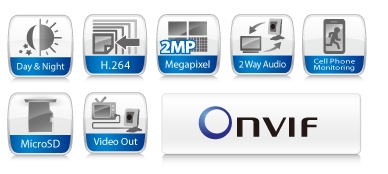
Compro IP90P 2-Megapixel Day & Night Cube Network Camera - 1/3" Progressive Scan CMOS, H.264, 2-Way Audio, MicroSD, Video Out, Cell Phone Monitoring, Built-In IR LEDs, Built-In Microphone - Black
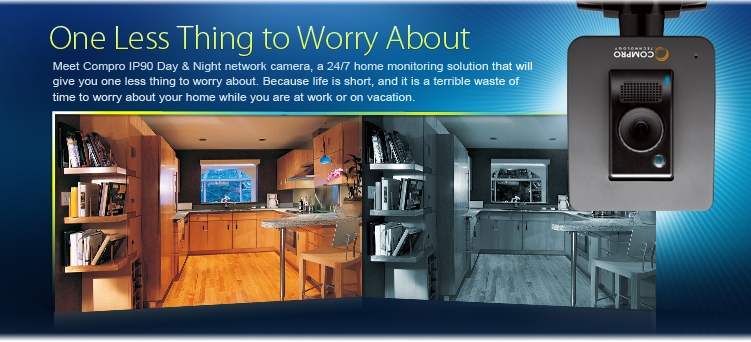
Compro IP90 Day/Night network camera with its clear and sharp video quality can help put your mind at ease. Compro IP90 is endowed with a slew of professional surveillance features, including superb night vision, motion detection, alarm and sensor control, bi-directional audio, etc., all of which make the camera an ideal choice for securing homes, offices, shops, or restaurants.
Features Highlights
Wide Coverage with 2 Megapixel Resolution
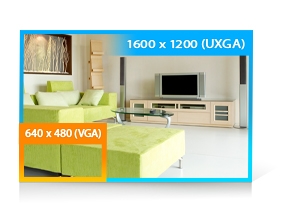
The 2 megapixel/HD resolution the camera offers lets you view details and identify people and objects at least four times better than on a conventional CCTV camera. The maximum 1600 by 1200 resolution allows you to capture video from a wide area, and effectively reduces the number of cameras required in a surveillance network.
Day & Night Functionality with Built-in IR LEDs
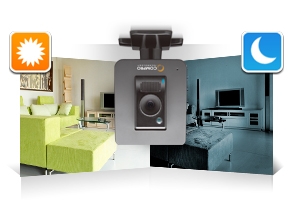
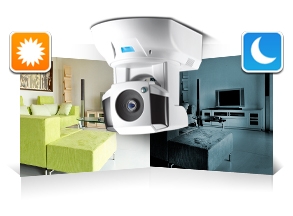
The camera is equipped with 6 IR LEDs and an ambient light sensor that detects environmental lighting conditions. When low-light conditions are detected, the built-in IR LEDs are automatically switched on to provide additional infrared light that helps deliver clear night-time image.
Mechanical IR-Cut Filter
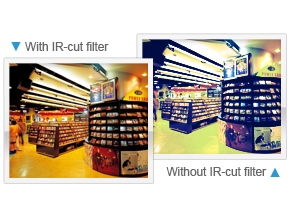
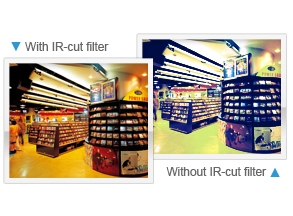
A built-in mechanical IR-cut filter placed in front of the camera's image sensor can filter out infrared light in the daytime, producing better color reproduction. At nighttime or when the camera's light sensor detects low-light conditions, IR-cut filter can be automatically removed to allow infrared light to reach the image sensor, thus achieving better low-light sensitivity.
Infrared-Corrected Lens
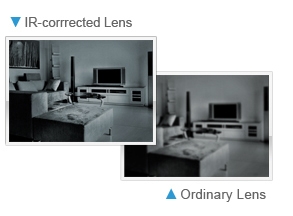
Infrared light and visible light have different wavelength and therefore focus at a different point after passing through an ordinary lens, resulting in out-of-focus image. This camera has an IR-corrected lens which can correct the focal point difference and make both infrared light and visible light focus on the same point. As a result, the camera is able to deliver clear, sharp images in various lighting environments.
ONVIF Support
ONVIF support makes the camera interoperable with all sorts of ONVIF-conformant IP security products, such as an ONVIF-conformant recording system. ONVIF support also means users can use equipment from different manufacturers to build a surveillance system that best meets their needs and preferences.
Plug-n-Play Functionality
Unlike other network cameras, installing this camera does not require any networking expertise. Nor is any sort of router configuration required - simply plug in the cables, install the camera software, and then your Compro camera is ready to be viewed and shared on the Internet.
Composite Video Output
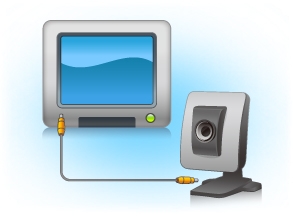
The composite video output allows users to view live camera video on a large TV screen, rather than a small computer monitor.
microSDHC Card Slot
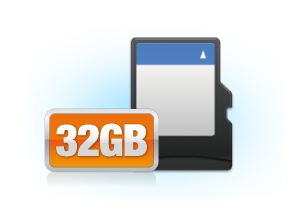
The built-in microSDHC card slot allows the storage of event snapshots and event recordings to the memory card. The stored data can be accessed from a remote viewing PC. The camera also can automatically take snapshots or record video when it detects unusual events in the monitored area.
Two-way Audio Communication
The camera is capable of providing full-duplex and bi-directional audio communication through a built-in microphone, speaker and audio in/out port. The audio communication feature allows you to eavesdrop on the monitored area or broadcast your voice to intruders.
Support for Alarms and Sensors
The camera's integrated digital input and output ports enable it to connect with external sensors or alarms. The camera can record video or take snapshots when external sensors are triggered, or when events are detected, automatically trigger alarms or alerts. IP90 additionally integrates a RS-485 port for controlling Pan/Tilt system.
Video Motion Detection and Audio Detection
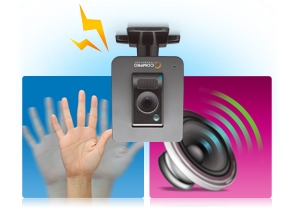
Provided with three individually configurable motion detection zones, the camera can record video or trigger alarms or alerts when motion is detected in user-specified areas of the camera image. Also, the camera's built-in microphone enables it to hear what the video cannot see and to trigger the audio detection alarm when sounds like screams, glass breaking, etc., are detected.
SMS & Email Event Notification
The SMS & Email event notification feature enables the camera to send an alert message to specified recipients when it detects unusual events. The SMS notification service does not impose any monthly subscription fees, and the Email notification service supports popular webmail platforms.
Applications
Specifications:
| CAMERA |
| Image Sensor |
1/3" progressive scan CMOS 2 megapixel |
| Lens |
Focal Length: 4.0 mm
Max Aperture Ratio: F1.5
Fixed iris, IR-corrected, adjustable focus |
| Zoom |
10x digital zoom |
| Angle of View |
60 horizontal |
| Focusing Range |
0.5 m ~ INF |
| Min. Illumination |
IR Mode: 0 lux with built-in IR LEDs on (6 LEDs in total; effective distance up to 8m)
Color Mode: 1.0 lux
|
| Shutter Time |
1/5 ~ 1/16000 sec. |
| VIDEO |
| Video Compression |
H.264 ( MPEG-4 Part 10)
Motion JPEG
MPEG-4 Part 2
|
| Resolution |
160 x 120, 320 x 240, 640 x 480, 1280 x 720, 1280 x 1024, 1600x 1200 |
| Frame Rate |
Up to 30 FPS at 1280 x 720 (720P)
Up to 15 FPS at 1600 x 1200 (UXGA) |
| Video Streaming |
Dual video streaming, H.264 or MJPEG/MPEG-4 |
| Image Settings |
Adjustable image size and quality
AGC, AWB, AES
Configurable brightness, saturation and sharpness |
| AUDIO |
| Audio Communi- cation |
Two-way audio with built-in MIC (S/N ratio 58 dB, 50-10000hz ) and speaker (660mv) |
| Audio compression |
G.711 PCM 64Kbit/sec |
| Audio input / output |
MIC input / Audio out |
| NETWORK |
| Security |
User ID / Password protection |
| Supported Protocols |
TCP/IP, HTTP, UDP, FTP, ICMP, ARP, DHCP, NTP, DDNS, DynDNS, UPnP, RTP, RTSP, RTCP, SMTP, IGMP, 3GPP, IPv4 |
| FIRMWARE |
| Firmware |
Support UPnP
Support online firmware update |
| SOFTWARE |
| ComproView |
Multi-channel management (32-channels)
Fast and intuitive camera setup
Search and playback recordings by event types
Scheduled and event-based management
Smart motion and audio detection
|
| WEB BROWSER |
| Internet Explorer (ActiveX) |
Remotely view and configure camera on Internet Explorer
Record video and capture snapshots on PC; download recordings from microSD card
Alarm and event management: FTP, I/O alarm, server notification, SMS/Email alert
|
| Supported Devices |
PC, laptop, tablet, nettop, MID with IE8
iPhone/iPad, BlackBerry, Android, WM, PDA, or cell phones with web browser (MJPEG mode)
|
| MOBILE PHONE |
| Smartphone App |
View H.264/MPEG-4 video on iPhone/Android phone |
| MJPEG Mode |
View live image on mobile web browser |
| 3GPP Mode |
View live video on 3G cell phone (3GPP Streaming) |
| GENERAL |
| Operating Condition |
5 C ~ 40 C |
| Power Supply |
IP90: DC 5V/2A
IP90P: DC 5V/2A or PoE (IEEE 802.3af Class 3) |
| System Requirements |
Computer with 1.7GHz processor and 512 MB memory or above
Supported Operating Systems: Windows XP SP3, Vista SP1, Windows 7, Mac OS X 10.6 (viewing only)
|
| Dimensions |
84 x 124.5 x 91.5 mm (including bracket) |
|
|
|
|
16/07
|
Compro IP550P 2-Megapixel HD Day & Night PTZ Network Camera - 1/3" Progressive Scan CMOS Sensor, H.264, 2-Way Audio, MicroSD, Pan/Tilt, Cell Phone Monitoring, Built-In Microphone - White/Black IP550P
Overview
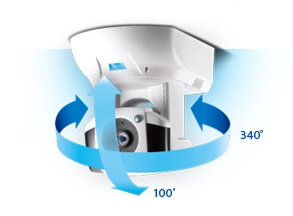
Compro IP550 series Day/Night network cameras will give you one less thing to worry about when you are on vacation - your home security. The camera's 2-megapixel resolution lets you monitor your home in razor-sharp detail. A 340-degree pan and 100-degree tilt mechanical design coupled with advanced IR technology lets you monitor and follow people or objects in your home or office at all hours of the day and night.
Feature Highlights
Wide Coverage with 2 Megapixel Resolution
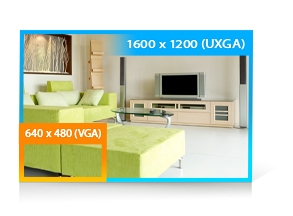
The 2 megapixel/HD resolution the camera offers lets you view details and identify people and objects at least four times better than on a conventional CCTV camera. The maximum 1600 by 1200 resolution allows you to capture video from a wide area, and effectively reduces the number of cameras required in a surveillance network.
Day & Night Functionality with Built-in IR LEDs
The camera is equipped with 12 IR LEDs and an ambient light sensor that detects environmental lighting conditions. When low-light conditions are detected, the built-in IR LEDs are automatically switched on to provide additional infrared light that helps deliver clear night-time image.
Mechanical IR-Cut Filter
A built-in mechanical IR-cut filter placed in front of the camera's image sensor can filter out infrared light in the daytime, producing better color reproduction. At nighttime or when the camera's light sensor detects low-light conditions, IR-cut filter can be automatically removed to allow infrared light to reach the image sensor, thus achieving better low-light sensitivity.
Motorized Pan / Tilt
The camera is able to provide flexible viewing angle thanks to its advanced 340-degree pan and 100-degree tilt mechanical design. And its maximum panning speed of 90 degrees per second is on par with that of a professional-grade PTZ camera on the market.
ONVIF Support
ONVIF support makes the camera interoperable with all sorts of ONVIF-conformant IP security products, such as an ONVIF-conformant recording system. ONVIF support also means users can use equipment from different manufacturers to build a surveillance system that best meets their needs and preferences.
Plug-n-Play Functionality
Unlike other network cameras, installing this Compro camera does not require any networking expertise. Nor is any sort of router configuration required - simply plug in the cables, install the camera software, and then your Compro camera is ready to be viewed and shared on the Internet.
microSDHC Card Slot
The built-in microSDHC card slot allows the storage of event snapshots and event recordings to the memory card. The stored data can be accessed from a remote viewing PC. The camera also can automatically take snapshots or record video when it detects unusual events in the monitored area.
Two-way Audio Communication
The camera is capable of providing full-duplex and bi-directional audio communication through a built-in microphone and audio in/out port. The audio communication feature allows you to eavesdrop on the monitored area or broadcast your voice to intruders.
Support for Alarms and Sensors
Through an optional digital I/O expansion box, the camera offers 3 sensor input ports and 3 alarm output ports. With them, the camera can initiate video recording, take snapshots, etc., when sensors are triggered. Or when events are detected, activate alarms or take other response actions.
Video Motion Detection and Audio Detection
Provided with three individually configurable motion detection zones, the camera can record video or trigger alarms or alerts when motion is detected in user-specified areas of the camera image. Also, the camera's built-in microphone enables it to hear what the video cannot see and to trigger the audio detection alarm when sounds like screams, glass breaking, etc., are detected.
Friendly Wall Mount Design
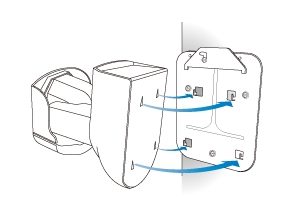
This PTZ camera comes with a wall mount plate friendly designed to allow for the fast and easy mounting and dismounting of the camera. Once secured on the wall or ceiling, the camera can then be easily configured via the setup wizard or remote viewer to rotate its image by 180°.
Applications
Specifications:
| VIDEO |
| Sensor |
1/3" progressive scan 2MP CMOS sensor |
| Video Standard |
Tri-codec M-JPEG, MPEG-4, H.264; dual streams supported |
| Data Rate |
Streaming 1 and 2 multi-level configurable |
| Video Quality |
6 Levels selectable |
| System |
60 / 50 Hz |
| Resolution |
160x120, 320x240, 640x480, 1280x720, 1280x1024, 1600x1200
|
| Frame Rate |
Up to 15 FPS at 1600 x 1200 (UXGA)
Up to 30 FPS at 1280 x 720 (720P) |
| Day & Night Illumination |
12 x IR LED, mechanical ICR controlled, 850 nm, effective 10 m, multi-level configurable
|
| Color |
1.0 Lux minimum |
| Night Mode |
0 Lux when IR on
|
| Channel |
1Ch or 4Ch division, 16 x multi-IP channels per WebVUer; sequential scan supported |
| IMAGING |
| Image Settings |
Brightness, saturation, sharpness, multi-level configurable
|
| White Balance |
5 scenarios selectable |
| Electronic Shutter |
Auto, manual (1/5~1/16000 sec, 16 levels selectable) |
| Flickerless |
60, 50 Hz selectable |
| Low-Light Mode |
Specially enhanced |
| Orientation |
Flip |
| PAN / TILT / ZOOM |
| Panning |
-170 ~ +170, max 90 /sec |
| Tilting |
-10 ~ +90, max 70 /sec |
| Zoom |
10x digital zoom |
| Controlling |
30 preset points, configurable patrol tour |
| AUDIO |
| Compression Format |
G.711 PCM 64Kbit/sec, two-way audio supported |
| Microphone |
1 x built-in, S/N ratio more than 58 dB, sensitivity 50~10,000 Hz |
| Audio Line Input / Output |
1 x in, 1 x out, 3.5 mm phone jack |
| SYSTEM INTEGRATION |
| Sensor In / Alarm Out |
3 x in, 3 x relay out (external & optional) |
| Triggering Event |
Video motion detection (multiple zones and sensitivity levels), audio detection (multi-sensitivity), schedule, I/O |
| Triggering Reaction |
Snapshot, e-mail, FTP, alarm out, ComproView notification |
| SDK |
Available |
| NETWORK |
| Protocols |
TCP/IP, HTTP, UDP, FTP, ICMP, ARP, DHCP, NTP, DDNS, DynDNS, UPnP, RTP, RTSP, RTCP, SMTP, IGMP, 3GPP, IPv4
|
| Ethernet |
10/100 Base-T, auto sensing, RJ-45, front LED indicator |
| Wireless |
IEEE 802.11 b/g/n compliant (external & optional adapter) |
| User Group |
3 levels, unlimited users, max 10 users simultaneously |
| Encryption |
WEP, WPA-PSK, WPA2-PSK (when Wireless becomes available) |
| Diagnostics |
Auto connectivity detection, iWizard, iDoctor |
| LOCAL STORAGE |
| Storage |
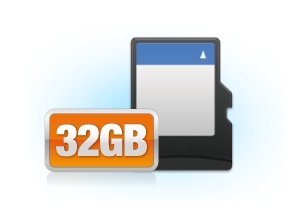
microSD/SDHC slot, up to 32GB (card not incl)
|
| Format |
JPEG, file name format configurable
|
| Control |
Playback by event types
|
| REMOTE SURVEILLANCE |
| Mobile Surveillance |
M-JPEG or 3GPP streaming over major platforms such as Android, BlackBerry, iPhone, Windows Mobile; exclusive iPhone/Android app |
| Web Surveillance |
WebVUer 16Ch over Internet Explorer, Chrome, Firefox, Safari; features varied |
| Advanced Surveillance |
ComproView 32-CH surveillance system freely bundled |
| GENERAL |
| Unit Configuration |
Reboot, factory default, date/time synchronization |
| User Authentication |
ID, Password |
| Firmware |
HTTP mode, remote update
|
| OSD |
Text or image on-screen overlay |
| Language |
Multi-lingual support |
| System Log |
Listing, cleaning |
| Regulatory |
CE, FCC |
| MECHANICAL |
| Lens Type & Mounting |
f 4.0 mm, F1.5, fixed iris, FOV 60, focus range 0.5 m ~ inf |
| Casing |
PTZ, indoor, white |
| Dimension (HxWxD) |
105 x 125.5 x 128.6 mm |
| ENVIRONMENTAL |
| Operating Temperature |
5~40 C |
| Humidity |
20 ~ 80% RH non-condensing |
| BROWSING REQUIREMENT |
| OS |
Windows XP SP3, Vista SP1, Windows 7, Mac OS X 10.6 (viewing only) |
| Processor |
Intel 1.7 GHz, 512 MB RAM |
| Web Browser |
Microsoft Internet Explorer 6.0 or above, non-IE browsers require third-party plug-in |
|
|
|
|
16/07
|
Compro CS80 2-Megapixel Network Camera - 1/3" Progressive Scan CMOS Sensor, H.264, 10x Zoom, 1-Way Audio, SMS Alert, Motion Detection, Cell Phone Monitoring, Built-in Microphone - White CS80
World's Smallest 2-Megapixel Network Camera
Introducing Compro CS80, the world's smallest 2-megapixel network camera. Compro CS80 is small and easy to use, yet embedded with slew of practical surveillance features, meant for those with a discerning aye.
2MP - Megapixel, H.264, 10x Zoom, SMS Alert, Motion Detection, Cell Phone Monitoring.
The small and ultra-compact Compro CS80 network camera offers vividly clear image quality and a bounty of practical surveillance features. Installation and remote viewing setup on CS80 are as simple as 1-2-3. Multiple H.264 video streams are available to accommodate different monitoring and recording needs. Courtesy of its small size, CS80 is ideal for installation in homes, restaurants, small offices, or any place where space is limited.
Features Highlights
World's Smallest 2MP Network Camera
CS80 is the ultra-compact, name card size network camera designed to fit in any home, office or shop environment. The camera body measures just 3.1 x 2 x 1.5 inches (80 x 52 x 38 mm). Despite being the smallest of its class, this camera delivers clear and vibrant video and offers a slew of surveillance features.
Wide Coverage with 2 Megapixel Resolution
The 2 megapixel/HD resolution the camera offers lets you view details and identify people and objects at least four times better than on a conventional CCTV camera. The maximum 1600 by 1200 resolution allows you to capture video from a wide area, and effectively reduces the number of cameras required in a surveillance network.
H.264 Compression
The camera utilizes the cutting-edge H.264 video compression technology. Compared with the MPEG-4 format, the H.264 technology has higher compression efficiency, which means it can accomplish high image quality while reducing bandwidth requirement and saving storage cost.
10x Digital Zoom
The 10x digital zoom allows users to zoom into details in the live video and to clearly identify suspicious objects or people in the monitored area before engaging with them.
Plug-n-Play Functionality
Unlike other network cameras, installing this camera does not require any networking expertise. Nor is any sort of router setup required - simply plug in the cable, install the camera software, and then your Compro camera is ready to be viewed and shared on the Internet.
Feature-Rich Camera Viewer App
The camera offers an exclusive and feature-rich camera viewer app that allows you to view and manage your Compro cameras on the iPhone or Android phone. The camera mobile app also lets you securely share camera video with your friends and families on your Friends list.
Cross Platform Accessibility
The camera is easily accessible across various platforms and web browsers. So long as the camera is connected to the Internet, you can monitor its live video from PC, Mac, laptop, tablet, mobile phone, or any other Internet-connected device with a built-in web browser.
Friendly Browser Interface
You can view the live video and manage your camera from anywhere and at anytime on your web browser. The camera's browser interface, WebVUer, is so easy to use that there is virtually no learning time required.
Motion Detection
The camera offers three individually configurable motion detection zones. The camera can be configured to automatically take snapshots or send out Email or SMS alert messages in response to any motion detected in user-defined areas.
SMS & Email Event Notification
The SMS & Email event notification feature enables the camera to send an alert message to specified recipients when it detects unusual events. The SMS notification service does not impose any monthly subscription fees, and the Email notification service supports popular webmail platforms.
Built-in Microphone
Gone will be the days when you could not hear what is really going on in your home. This camera's built-in microphone allows it to stream not only live video, but also live audio, to your PC or smartphone. With this camera, you will be empowered to hear what the video cannot see, such as screams, glass breaking, baby's crying, etc.
Easy Mounting Design
Wall mounting and angle adjustment for this camera is easy and effortless. The camera's friendly mounting design allows it to be placed in the most ideal location. Once secured on the wall or ceiling, the camera can then be easily configured via the setup wizard or browser interface to rotate its image by 180°.
Wireless connectivity for the camera requires a Compro USB wireless adapter (sold separately) and a LAN network with 802.11/b/g/n access point. SMS and Email notification requires signing up to a 3rd-party service.
* Features and specifications are subject to change without prior notice.
* Seedonk and Seedonk Messenger are registered trademarks of Seedonk Inc. Mac and the Mac logo are trademarks of Apple Inc., registered in the U.S. and other countries. Other names and marks are trademarks of their respective owners.
Specifications:
| CAMERA |
| Image Sensor |
1/3" progressive scan 2MP CMOS sensor |
| Lens |
Focal length: 3.75 mm
Max aperture ratio: F3.0
Fixed iris, adjustable focus
|
| Zoom |
10x digital zoom |
| Angle of View |
60 horizontal |
| Focusing Range |
0.5 m ~ INF |
| Minimum Illumination |
1.0 lux
|
| Shutter Time |
1/5 ~ 1/16000 sec. |
| VIDEO |
| Image Settings |
M-JPEG, H.264 (MPEG-4 Part 10)
|
| Resolution & Frame Rate |
160x120, 320x240, 640x480, 1280x720, 1280x1024, 1600x1200 |
| Frame Rate |
Up to 30 FPS at 1280x720 (720P)
Up to 15 FPS at 1600 x 1200 |
| Video Streaming |
Dual streaming supported |
| Image Settings |
Adjustable image size and quality
AGC, AWB, AES
Configurable brightness, contrast, saturation and sharpness |
| AUDIO |
|
Audio Communication
|
One-way audio with built-in microphone |
| Audio Compression |
G.711 PCM 64Kbit/sec |
| NETWORK |
| Protocols |
TCP/IP, HTTP, UDP, FTP, ICMP, ARP, DHCP, NTP, DDNS, UPnP, RTP, RTSP, RTCP, SMTP, IGMP, 3GPP, IPv4 |
| Ethernet |
10/100 Base-T, autosensing, RJ-45 |
| FIRMWARE |
| Firmware |
Support UPnP
Support online firmware update |
| WEB BROWSER |
| Internet Explorer (ActiveX) |
Remotely view and configure camera on Internet Explorer
Record video and capture snapshots on PC
Alarm and event management: FTP and SMS/Email alert messaging
|
| Supported Viewing Devices |
PC, laptop, tablet, nettop, MID with IE8
iPhone/iPad, BlackBerry, Android, WM, PDA, or cell phones with web browser (MJPEG mode) |
| MOBILE SURVEILLANCE |
| Smartphone App |
View live video on iPhone/Android phone
|
| MJPEG Mode |
View live image on mobile web browser
|
| 3GPP Mode |
View live video on 3G cell phone (3GPP Streaming)
|
| GENERAL |
| Operating Condition |
5 C ~ 40 C |
| Power Supply |
DC 5V/2A |
| Viewing System Requirements |
Computer with 2.8GHz dual-core processor and 2GB memory or above
Operating system: Windows XP SP3, Vista SP1, Windows 7Internet browser: Internet Explorer 8.0 or later; non-IE browsers require 3rd-party VLC plug-in
|
| Dimensions |
64 x 86.9 x 110 mm (including bracket) |
| Optional Accessory |
USB Wireless N adapter |
|
|
|
|
Previous Page
|
Next Page
|
|