Camerafarm product archive #41035
| Image |
Date |
Product description |
Price |
Buy |
|
08/05
|
Addonics 1;10 CFast Duplicator Pro - Support Up to 300MB/s, LCD Display With Functional Control Panel CFASTD10-2S
1:10 CFast Duplicator PRO
Overview
The Addonics CF or CFast Duplicator is a family of fast and economical equipment for making copies of CF or CFast media. Choose from an array of models that allows you to duplicate 4, 5 or even 10 media at a time. The CF/CFast Duplicator is also easy to operate. Simply insert the source media into the source slot and target media with equal or larger capacity into the destination slots, then push the copy button to start the copying process. There is no complicated software to run.
About this model
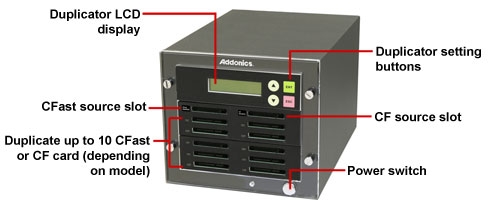
This 1:10 CFast Duplicator PRO model allows you to copy from one CFast or CF card onto as many as ten CFast cards at one time. It is a perfect equipment for content distribution using CFast media or for transferring content from CF card to CFast card.
Diagram illustrating duplicator features
Front view
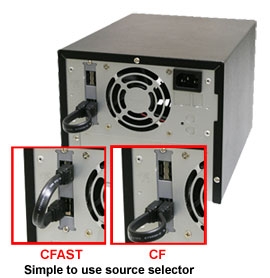
Rear view
(Dual sources feature is available in PRO model only)
Support flash media copying options
|
CFAST Duplicator
|
| Model |
Product name |
Source |
Destination |
|
CFASTD5
|
1:5 CFast Duplicator |
CFast card |
from 1 to 5 CFast cards |
|
CFASTD4-2S
|
1:4 CFast Duplicator PRO |
CF card (type I or II) or CFast card |
from 1 to 4 CFast cards |
|
CFASTD10-2S
|
1:10 CFast Duplicator PRO |
CF card (type I or II) or CFast card |
from 1 to 10 CFast cards |
Features:
- Make copy from any type of CFast or CF card
- Duplicate from one up to ten CFast cards at one time
- CF slot is compatible with CF-I, CF-II and Micro Drive
- Completely standalone with no additional hardware or software required
- Copy speed up to 300 MB/sec depending on the performance of the media
- OS independent
- LCM control module provides a rich set of robust advanced configuration options(clickFull LCD console feature list in this duplicator)
- Green LED for both source and destination slots to indicate media access
Specifications:
- Writing mode : Sector to Sector
- Support up to 300 MB/sec transferring rate (actual transfer rate depends on the speed of flash media in the source and the destination slot)
- Sturdy metal frame construction
- One CFast and one CF source slots
- Ten CFast target slots
- CF slot supports Compact Flash Type I (CF-I), Compact Flash Type II (CF-II), Micro DriveTM
- LCD display with functional control panel
- Well ventilated for efficient air flow.
- Low noise high CFM ball bearing cooling fan
- Integrated 80W 110/240 auto-sense power supply
- Compact size - 7.48 x 10.63 x 6.5 inch (190 x 270 x 16.5 mm) (W x D x H)
- Weight:9.52 lb (4.32 Kg)
- Operating environment: 0 - 60 degree C, 15% - 90% RH
- Storage environment: -40 - 90 degree C, 0% - 95% RH non-condensing
- 1 year warranty
|


|
|
|
08/05
|
Adobe Fireworks CS6 - Mac, 1 User, Retail
Adobe Fireworks CS6
Overview
What is Fireworks?
Adobe Fireworks CS6 software helps you create beautiful designs for websites and mobile apps in a snap, without coding. Deliver vector and bitmap images, mockups, 3D graphics, and interactive content for popular tablets and smartphones.
See the top new features in Fireworks CS6
Find out more about new jQuery mobile themes, improved CSS support, quicker access to color, and other features introduced in this latest version of the leading software for creating beautiful designs for websites and mobile apps.
Simplify your workflow for standards-based websites and apps
Extract clean CSS3 code from your designs with the CSS Properties panel. Smooth integration with Adobe Photoshop, Illustrator, and Dreamweaver software simplifies your work.
Produce better screen graphics, faster
Enhance your productivity with better redraw performance for Mac OS and improved memory management for 64-bit Windows systems to support file sizes up to four times larger. Change colors more quickly with an improved color swatch.
Features
Quickly design prototypes for mobile and tablet apps
Create and optimize vector and bitmap images, content, comps, wireframes, mock-ups, and designs for smartphones and tablets with Adobe Fireworks CS6. Keep designs crisp on screens of virtually any size with pixel-precise rendering. Smooth integration with Adobe Photoshop, Illustrator, and Dreamweaver as well as other Adobe solutions help you efficiently achieve your vision.
Improved CSS support
Extract CSS code with the Properties panel and create CSS sprites from design comps. Mock up complete web pages and export layouts with external style sheets in one step.
New jQuery mobile theme skinning support
Create, modify, or update jQuery themes for mobile websites and apps, including CSS sprite images.
Easy-to-use screen-based design tools
Quickly create, edit, and optimize your designs, web and mobile mock-ups, and more with easy-to-use vector and bitmap graphics tools.
Intelligent integration
Import and export to Photoshop and Illustrator. Copy and paste from Fireworks to Dreamweaver. Work faster thanks to tight Integration with other Adobe solutions.
Templates and styles
Save time, boost productivity, and increase standardization with templates for mobile apps, web content, and designs. Add customized styles to your library.
Pixel-precise rendering
Keep designs crisp on destination screens with advanced rendering. Vector and bitmap objects appear sharper, even when converted from one mode to the other.
Common Library
Mock up designs and themes with templates, symbols, and design components from the Common Library.
Simplify your workflow
Quickly and cleanly translate your designs for websites, smartphones, and tablets with CSS3 code extraction tools in the CSS Properties panel. Produce mobile themes with new jQuery support, and add CSS sprites from design comps.
Sophisticated prototyping
Design interactive layouts for websites and mobile apps without writing code. Export multipage, clickable comps as CSS3-based layouts.
CSS and HTML export
Design complete web pages in a robust graphic environment, and then export standards-compliant, CSS-based layouts with external style sheets in one step.
Photoshop and Illustrator file import
Import native Illustrator and Photoshop files, maintaining color matching, element fidelity, and editing capability in Fireworks.
Quicker access to color
Quickly switch between solid, gradient, and pattern color effects. Apply opacity control separately to Fill and Stroke dialog boxes to achieve better control and precision. Change colors more quickly with the improved color swatch.
Efficient client collaboration
Use Fireworks to generate interactive PDF or HTML comps for review, complete with clickable links.
Photoshop and Illustrator file export
Export from Fireworks to Photoshop and Illustrator as well as a full range of Adobe solutions.
Adobe Swatch Exchange
Match colors precisely with designs from other Adobe graphics software via Adobe Swatch Exchange (ASE). Import an ASE file from Photoshop, Illustrator, or Adobe Kuler software.
Efficiently produce better screen graphics
Speed up your design process with faster redraw, improved memory management, and an improved user interface. Mock up designs quickly with symbols and templates from the Common Library.
Improved performance
Work smarter in a responsive environment with faster redraw in Mac OS. Improved memory management supports files up to four times larger on 64-bit Windows systems.
Developer productivity tools
Save development time with batch processing. Create commands in the History panel. Hand-code using JavaScript. Create assets and quickly optimize them for multiple projects.
API access
Access the API to generate extensions. Benefit from community-driven extensions.
Easy-to-use optimization, scaling tools
Optimize graphics for a wide range of screen types with preview, selective JPEG compression, and export controls. Intelligently scale text, buttons, and symbols with 9-slice scaling.
Mac OS
- Multicore Intel processor
- Mac OS X v10.6 or v10.7
- 1GB of RAM (2GB recommended)
- 1GB of available hard-disk space for installation; additional free space required during installation (cannot install on a volume that uses a case-sensitive file system or on removable flash storage devices)
- 1280x1024 display with 16-bit video card
- DVD-ROM drive
- This software will not operate without activation. Broadband Internet connection and registration are required for software activation, validation of subscriptions, and access to online services.* Phone activation is not available.
|
|
|
|
08/05
|
Adobe Fireworks CS6 - Windows, 1 User, Retail
Adobe Fireworks CS6
Overview
What is Fireworks?
Adobe Fireworks CS6 software helps you create beautiful designs for websites and mobile apps in a snap, without coding. Deliver vector and bitmap images, mockups, 3D graphics, and interactive content for popular tablets and smartphones.
See the top new features in Fireworks CS6
Find out more about new jQuery mobile themes, improved CSS support, quicker access to color, and other features introduced in this latest version of the leading software for creating beautiful designs for websites and mobile apps.
Simplify your workflow for standards-based websites and apps
Extract clean CSS3 code from your designs with the CSS Properties panel. Smooth integration with Adobe Photoshop, Illustrator, and Dreamweaver software simplifies your work.
Produce better screen graphics, faster
Enhance your productivity with better redraw performance for Mac OS and improved memory management for 64-bit Windows systems to support file sizes up to four times larger. Change colors more quickly with an improved color swatch.
Features
Quickly design prototypes for mobile and tablet apps
Create and optimize vector and bitmap images, content, comps, wireframes, mock-ups, and designs for smartphones and tablets with Adobe Fireworks CS6. Keep designs crisp on screens of virtually any size with pixel-precise rendering. Smooth integration with Adobe Photoshop, Illustrator, and Dreamweaver as well as other Adobe solutions help you efficiently achieve your vision.
Improved CSS support
Extract CSS code with the Properties panel and create CSS sprites from design comps. Mock up complete web pages and export layouts with external style sheets in one step.
New jQuery mobile theme skinning support
Create, modify, or update jQuery themes for mobile websites and apps, including CSS sprite images.
Easy-to-use screen-based design tools
Quickly create, edit, and optimize your designs, web and mobile mock-ups, and more with easy-to-use vector and bitmap graphics tools.
Intelligent integration
Import and export to Photoshop and Illustrator. Copy and paste from Fireworks to Dreamweaver. Work faster thanks to tight Integration with other Adobe solutions.
Templates and styles
Save time, boost productivity, and increase standardization with templates for mobile apps, web content, and designs. Add customized styles to your library.
Pixel-precise rendering
Keep designs crisp on destination screens with advanced rendering. Vector and bitmap objects appear sharper, even when converted from one mode to the other.
Common Library
Mock up designs and themes with templates, symbols, and design components from the Common Library.
Simplify your workflow
Quickly and cleanly translate your designs for websites, smartphones, and tablets with CSS3 code extraction tools in the CSS Properties panel. Produce mobile themes with new jQuery support, and add CSS sprites from design comps.
Sophisticated prototyping
Design interactive layouts for websites and mobile apps without writing code. Export multipage, clickable comps as CSS3-based layouts.
CSS and HTML export
Design complete web pages in a robust graphic environment, and then export standards-compliant, CSS-based layouts with external style sheets in one step.
Photoshop and Illustrator file import
Import native Illustrator and Photoshop files, maintaining color matching, element fidelity, and editing capability in Fireworks.
Quicker access to color
Quickly switch between solid, gradient, and pattern color effects. Apply opacity control separately to Fill and Stroke dialog boxes to achieve better control and precision. Change colors more quickly with the improved color swatch.
Efficient client collaboration
Use Fireworks to generate interactive PDF or HTML comps for review, complete with clickable links.
Photoshop and Illustrator file export
Export from Fireworks to Photoshop and Illustrator as well as a full range of Adobe solutions.
Adobe Swatch Exchange
Match colors precisely with designs from other Adobe graphics software via Adobe Swatch Exchange (ASE). Import an ASE file from Photoshop, Illustrator, or Adobe Kuler software.
Efficiently produce better screen graphics
Speed up your design process with faster redraw, improved memory management, and an improved user interface. Mock up designs quickly with symbols and templates from the Common Library.
Improved performance
Work smarter in a responsive environment with faster redraw in Mac OS. Improved memory management supports files up to four times larger on 64-bit Windows systems.
Developer productivity tools
Save development time with batch processing. Create commands in the History panel. Hand-code using JavaScript. Create assets and quickly optimize them for multiple projects.
API access
Access the API to generate extensions. Benefit from community-driven extensions.
Easy-to-use optimization, scaling tools
Optimize graphics for a wide range of screen types with preview, selective JPEG compression, and export controls. Intelligently scale text, buttons, and symbols with 9-slice scaling.
System requirements
Windows
|
|
|
|
08/05
|
Adobe Photoshop CS5 12 - 1 User, MacPhotoshop CS5 12; Macintosh; ESD; 1 USER; Doc and Media
|

|
|
|
08/05
|
Adobe SpeedGrade CS6 - Mac, Media Only
- No Licence Included
Please Note: Media Only - No Licence Included
|
|
|
|
08/05
|
Adobe SpeedGrade CS6 - Windows, Media Only
- No Licence Included
Please Note: Media Only - No Licence Included
|
|
|
|
Previous Page
|
Next Page
|
|