Camerafarm product archive #40992
| Image |
Date |
Product description |
Price |
Buy |
|
26/03
|
Transcend 32GB Micro SDHC Card - Class 10 Transcend 32GB microSDHC (Class 10)
Todays advanced smartphones and tablets are fast and powerful, with memory-hungry Apps and Full-HD recording capabilities that perform best with high-speed storage media. Transcends "Ultimate" series Class 10 microSDHC cards offer extra storage capacity with superior read/write speeds that keep pace with your mobile lifestyle.
Key Features
Ultra-fast data access and write speeds
Up to 20MB/s read and 17MB/s write
Great compatibility with mobile devices
Compatible with cell phones, eBook readers, tablet PCs, and more
Comes with full-size SD/SDHC adapter
Allows the microSDHC card to be used in full-size SD or SDHC card slots
Features
- Fully compatible with SD 3.0 Standards
- Class 10 compliant
- A minimum read/write speed of 10MB/s
- 4~16GB High Capacity
- Easy to use, plug-and-play operation
- Built-in Error Correcting Code (ECC) to detect and correct transfer errors
- Allows In System Programming (ISP) for updating firmware
- Supports auto-standby, power-off and sleep modes
- Mechanical write-protection switch
- RoHS compliant
- Limited Lifetime Warranty*
Specifications
| Size |
11mm x 15mm x 1.0mm |
| Op. Voltage |
2.7V~3.6V |
| Op. Temperature |
-25C(-13F) to 85C(185F) |
| Durability |
10,000 insertion/removal cycles |
| Weight |
0.4g |
| Compatibility |
Ideal for mobile phones and digital cameras |
|


|
|
|
26/03
|
Autodesk Building Design Suite Premium - 1 Year Subscription
Autodesk Building Design Suite Premium
Intelligent 3D Model-Based Design
Autodesk Building Design Suite Premium 2012 software provides architects and engineers with an optimised set of tools in a single, economical and convenient package. This premium building design suite supports Building Information Modelling (BIM) workflows, efficient documentation and the creation of compelling visualisations.
- Create better buildings with intelligent 3D model-based design.
- Produce compelling visualisations to market ideas more successfully.
- Use integrated analysis to inform design and construction decisions.
Optimise Your Autodesk Building Design Suite Investment
Adding Autodesk Subscription to your Autodesk Building Design Suite purchase will help increase your productivity:
Adding Autodesk Subscription to your Autodesk Building Design Suite purchase will help increase your productivity:
- SoftwareGet automatic upgrades and flexible licensing privileges.
- LearningAccess exclusive training videos, podcasts and e-Learning courses, plus Autodesk University courseware.
- SupportGet either basic (web) or Gold (phone) support directly from Autodesk.
Includes:
AutoCAD
AutoCAD Architecture
AutoCAD MEP
AutoCAD Structural Detailing
Autodesk Showcase
Autodesk SketchBook Designer
Autodesk Revit Architecture
Autodesk Revit MEP
Autodesk Revit Structure
Autodesk 3ds Max Design
|
|
|
|
26/03
|
Corel CorelDRAW Graphics Suite X6 - Hard Back Book CorelDRAW Graphics Suite X6
Professional Graphic Design Software
- Superior vector illustration & page layout
- Versatile drawing and tracing tools
- Professional photo editing-capabilities
- Powerful website design software
Please Note:
- Download versions are available immediately.
- Boxed products are available for pre-order and shipping will begin end of March!
Your credit card will not be charged until your product ships.
Overview
Versatile and powerful graphic design software
Whether youre an aspiring artist or an experienced designer, CorelDRAW Graphics Suite X6 is your trusted graphic design software solution. With its content-rich environment and professional graphic design, photo-editing and website design software, you have everything you need to express your style and creativity with endless possibilities.
Quickly feel at home with built-in help, training videos and professionally designed templates. Then, create with confidenceeverything from distinctive logos and signs to custom websites, web graphics, billboards, car wraps, flyers and more!
Show your true design style!
Set up and start smoothly
Enrich your designs with extensive built-in learning tools, allowing you to start quickly and design with confidence. Gain new knowledge from valuable video tutorials and tips, insights from experts and an inspiring guidebook.
Create layouts with ease
Give your projects a high-quality look with over 1,000 premium fonts, 1,000 professional, high-resolution digital photos, 10,000 versatile clipart and 350 professional templates. Efficiently organize your design assets with Corel CONNECT X6, a content finder that instantly locates content on your computer, local network and websites.
Design with style and creativity
Create beautiful designs for print and web with a complete set of drawing, bitmap-to-vector tracing, photo- editing and web graphics tools. Manage styles and colors easily with property dockers and convenient features, such as Style Sets and Color Harmonies.
Work faster and more efficiently
Save time and money with all of the powerful applications in one complete graphic design suite. Plus, enjoy the speed of multi-core processing and native 64-bit support, allowing you to quickly process larger files and images.
Easy sharing with market-leading compatibility
Output to a broad variety of mediafrom signs and flyers, to business cards, car wraps, web graphics and much more. Re-purpose and share your creations with support for over 100 file formats, including AI, PSD, PDF, JPG, PNG, EPS, TIFF, DOCX and PPT.
CorelDRAW Graphics Suite X6 is your trusted graphic design software.
What's New
This is the upgrade youve been waiting for! CorelDRAW Graphics Suite X6 makes everyday tasks faster and easier, delivering new time-savers that help you create with confidence. So many features worth waiting for! CorelDRAW Graphics Suite X6 offers the tools, the features and the power to enhance all of your design needs.
Take a closer look at the 10 most important reasons to upgrade your graphics software:
New! Advanced OpenType support
Create beautiful text with advanced OpenType typography features, such as contextual and stylistic alternates, ligatures, ornaments, small caps, swash variants and more. Ideal for cross-platform design work, OpenType offers comprehensive language support, allowing you to customize characters to suit the language youre working with. Control all your OpenType options from a centralized menu and make contextual changes with interactive OpenType features.
New! Custom-built Color Harmonies
Easily create a complementary color palette for your design. The new Color Harmonies tool, accessed from the Color Styles docker, combines Color Styles into a Harmony, allowing you to modify colors collectively. It also analyzes colors and hues to deliver complementary color schemesa great way for you to satisfy clients with variety!
New! Multiple trays in Corel CONNECT X6
Instantly find images on your local network and search iStockPhoto, Fotolia and Flickr websites. Easily access your content, using the multiple trays now available within Corel CONNECT. And organize content by type or project in trays that are shared between CorelDRAW, Corel PHOTO-PAINT and Corel CONNECT for maximum efficiency.
New! Creative vector shaping tools
Creatively add effects to your vector artwork! CorelDRAW X6 introduces four shaping tools that provide new creative options for refining your vector objects. The new Smear tool lets you shape an object by pulling extensions or making indents along its outline. The new Twirl tool lets you apply twirl effects to objects. And you can use the new Attract and Repel tools to shape curves by attracting or separating nodes.
New! Document styles
Manage styles and colors easily! The new Object Styles docker centralizes style creation and management, featuring all the tools you need in one location. Create and apply Outline, Fill, Paragraph, Character and Text Frame styles to your objects. Group your favorite styles together in Style Sets, allowing you to format many objects at once for speed and consistency. Or let Default Style Sets remove the guesswork and save time.
New! Page layout tools
Reserve a place for text or graphics using new empty PowerClip frames. Use the new Placeholder Text command to mock up a page layout and get a good sense of how the text will look. Plus, easily add page numbers with the Insert Page Number command.
Enhanced! Complex script support
Guarantee the proper typesetting and appearance of Asian and Middle Eastern languages. Complex script support acts the same way as OpenType fonts, modifying characters as you type to deliver contextual accuracy.
New! Website design software
Effortlessly build professional-looking websites, design web pages and manage web content with Corel Website Creator X6. Its Site Wizard, templates, drag-and-drop functionality and seamless integration with XHTML, CSS, JavaScript and XML make website design easy! (A Corel account is required to download the application).
Enhanced Speed! Native 64-bit and multi-core support
Enjoy the speed of multi-core processing power and native 64-bit support. The enhanced speed allows you to quickly process larger files and images. Plus, your system will be more responsive when running several applications simultaneously.
New! Bitmap and vector pattern fills
New support for transparent backgrounds in vector pattern fills! We've introduced a collection of fills, including new bitmap fills and, for the first time ever, vector pattern fills with transparent backgrounds.
Features
Embrace the design power of CorelDRAW Graphics Suite X6, offering you content-rich images and fonts, professional graphic design tools, photo-editing capabilities and website design software. Plus, the enhanced speed of 64-bit support allows you to quickly process larger files and images. Show your true design style!
What's Included
-
CorelDRAW X6Intuitive vector illustration and page-layout application
-
Corel PHOTO-PAINT X6Professional image-editing application
-
Corel PowerTRACE X6Accurate bitmap-to-vector tracing tool
-
Corel Website Creator X6*Powerful do-it-yourself website design software
-
Corel CAPTURE X6Simple one-click screen capture utility
-
Corel CONNECT X6Instant content finder
-
PhotoZoom Pro 2**Convenient PHOTO-PAINT plug-in to enlarge digital images
-
ConceptShareInteractive online collaboration tool
Content
- 10,000 high quality clipart and digital images
- 1,000 professional, high-resolution digital photos
- 1,000 OpenType fonts, including premium fonts such as Helvetica
- 350 professionally designed templates
- 2,000 vehicle templates
- 800 frames and patterns
*Corel.com account required to download this application
**Registration required
Supporting applications
Barcode wizard, Duplexing wizard and Bitstream Font Navigator
Training
Over 2 hours of training videos (internet connection required)
Documentation
Online guidebook with expert design tips and insights (hard cover, full-color, printed Guidebook available with the box version), Quick-reference card (printed version available with the box version), Help files
Set up and start smoothly
Get a jump-start on your projects with an array of built-in learning tools and tutorials, plus start your designs off right with professionally designed templates, quality clipart, royalty-free photos and premium fonts. Whether youre an accomplished designer or a budding artist, theres always something new to learn.

New Features! Corel CONNECT X6
Speed up your workflow with Corel CONNECT, a built-in content search tool that helps you find graphics, templates, fonts and images instantly on your computer.
-
New! Multiple trays allow you to work with several trays concurrently; giving you increased flexibility for organizing assets for multiple projects. These time-saving trays will help you efficiently gather content photos, graphics or bitmap icons from various folders or online sources, and share them between CorelDRAW, Corel PHOTO-PAINT, and Corel CONNECT.
-
New! Search capability allows you to extract images instantly from a clients web site by simply typing a web address in the Search box. Corel CONNECT immediately gathers all the defined images with an HTML <img> tag from the website. Based on search terms or a folder path, Corel CONNECT can also scour your PC, network, or other online resources for content.
-
New! Relevant learning resources
Discover all the enriching learning tools you need to start smoothly and design with confidence, including valuable video tutorials, a hints docker with videos and tips, insights from experts and an inspiring guidebook.
-
New & Enhanced! High-value digital content
Design with valuable content, including 10,000 clipart images, 1,000 high-quality, royalty-free photos, 1,000 professional fonts, 1,000 OpenType fonts, including premium fonts such as Helvetica, 350 professional design templates, 2,000 vehicle templates, and 800 frames and patterns.
-
Enhanced! Hints docker
View interactive hints, including video tips, that will help you get you started quickly and provide step-by-step instruction on the suite's powerful tools.
-
Professionally designed templates
Choose from 350 professionally designed templates, plus 2,000 vehicle templates that give you a head start on all types of creative deliverables, from business cards and flyers to web graphics and sales collateral.
Design with style and creativity
With its rebuilt styles engine, new Object Styles docker, new Color Styles implementation, new Color Harmony functionality, and content-ready picture frames, CorelDRAW Graphics Suite X6 helps you focus on bringing your unique sense of style and creativity to your designs.
-
New! Styles engine and docker
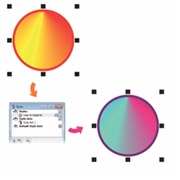
The revised styles engine offers a new Object Styles docker that simplifies the creation, application, and management of styles. Take advantage of Style Sets that make it easier to apply consistent formatting across multiple objects, produce iterative versions, and implement formatting with speed and consistency. 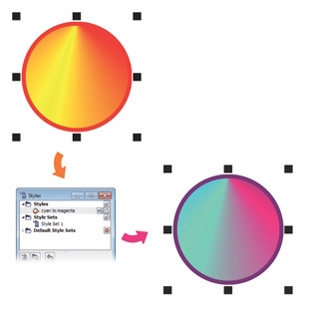
You can use Style Sets to quickly modify objects that share formatting attributes.
-
New! Color Styles
Add the colors used in a document as color styles, making it easier than ever to implement a color change throughout a project. Create a color style and have the color instantly applied to all objects linked to it.
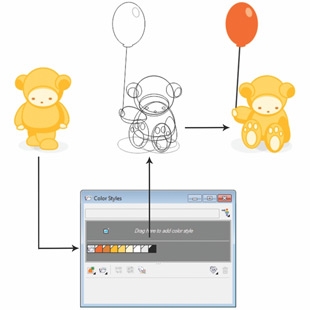
The new Color Styles docker makes it easy to manage the colors used in a document.
-
New! Color Harmonies
Group a documents color styles together so that you can quickly and easily produce recurring designs with varying color schemes. Combine two or more color styles into a harmony to link the colors into a hue-based relationship, which you can then modify collectively or individually.
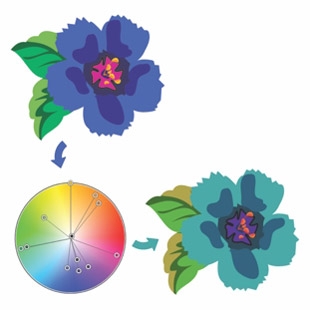
Color harmonies make it easy to change combinations of colors.
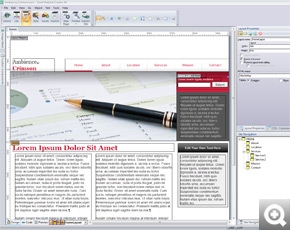
New! Corel Website Creator X6
With Corel Website Creator and its dozens of templates and Site Styles, you can easily design, build, and maintain a web presence without having to learn how to code.
-
New! Interactive websites
With a collection of Asynchronous JavaScript and XML (AJAX) widgets, Corel Website Creator X6 makes it easy to design websites that feature dynamic user interactivity. You can instantly add customizable page elements, such as accordions, tabbed panels, and toggle panes, which provide a more interactive experience for website visitors.
-
New! Integrated web development
The website workspace supports a wide range of the latest web development technologies, such as RSS feeds, CSS, XHTML, PHP, ASP.NET, ColdFusion, and JSP. Take advantage of a WYSIWYG design environment that offers the simplicity of wizards along with advanced HTML object and CSS inspectors.
-
New! Drag-and-drop web design
Corel Website Creator X6 provides drag-and-drop design capability. Place images, text, or other page elements exactly where you want them.
-
Enhanced! Timeline Editor
Within the website creator, there is a Timeline Editor that helps you give life to static website content, such as text, photos, graphics, and video. You can easily create sophisticated animations using the familiar drag-and-drop editing environment.
Create layouts with ease
With new and improved Master Layer functionality, new temporary Alignment Guides, new advanced OpenType support, and enhanced complex script support for working with foreign language text, CorelDRAW Graphics Suite X6 makes it easier than ever before to lay out your project.
-
New and Enhanced! Master Layers
Create page-specific designs for your multi-page documents with the new and improved Master Layers. Its now a breeze to incorporate page-specific headers, footers, and page numbers for brochures or flyers.
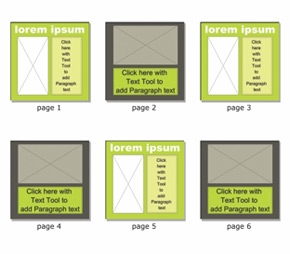
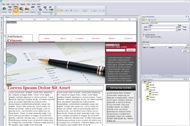
CorelDRAW X6 page layouts with differing odd- and even-page master layers.
-
New! Alignment Guides
Position objects more quickly with suggested alignments to the existing artwork on your page. The temporary guidelines appear when you create, resize, or move objects in relation to the center or edges of other nearby objects. Plus, the guides interactively connect the centers and the edges of objects. 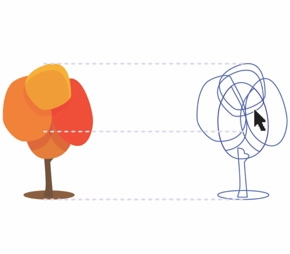
The new Alignment Guides appear as you move an object, helping you position objects more quickly.
-
New! Placeholder Text
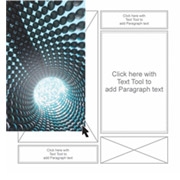
Quickly populate any text frame with the new Insert Placeholder Text command, making it easier to view the appearance of your document before finalizing its content. For convenience and flexibility, you can also use custom placeholder text in any language supported by CorelDRAW.
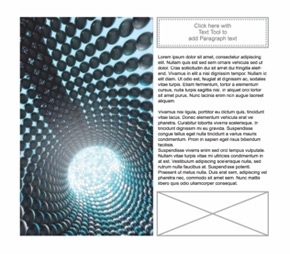
You can instantly add placeholder text to preview layouts before finalizing content.

Support for complex scripts ensures that multilingualglyphs display correctly in your documents
New! Page numbering
Instantly add page numbers on all pages of a document, starting on a specific page, or starting with a particular number. Choose from alphabetic, numeric, or roman formats. Display page numbers in lower or uppercase lettering and the numbers are automatically updated when you add or delete pages in your document.
New! Interactive frames
Efficiently generate mock-ups of design ideas with interactive frames. The new empty PowerClip and text frame functionality let you populate your designs with placeholder PowerClip and text frames, making it easier to preview a layout before finalizing its individual content components.
New! Advanced OpenType support
A reengineered text engine lets you take advantage of advanced OpenType typography features, letting you choose alternative appearances for individual characters, or glyphs, to suit your stylistic preference, provided that the font supports advanced OpenType.
Enhanced! Complex script support
Now its easier to work with foreign language text, so you can create layouts that resonate and engage your audience no matter where they reside.
Interactive table tool
Create and import organized tables to provide a structured framework for text and graphics.
Work faster and more efficiently
From organizing project assets and accessing the suites vast collection of content anywhere that you have an internet connection, to more quickly identifying available formatting options and removing unwanted areas in photos, CorelDRAW Graphics Suite X6 offers several workflow innovations that help you be more efficient and productive.
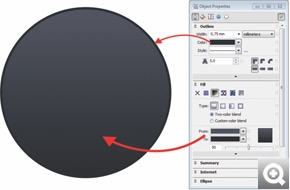
The redesigned Object Properties docker groups all object settings in one location.

The new Smart Carver makes it easy to remove unwanted areas and adjust the photos aspect ratio.
New! Object Properties docker
The redesigned Object Properties docker offers object-dependent formatting options and properties. By grouping all object settings in one location, this time-saving docker helps you fine-tune your designs faster than ever before.
New! Native 64-bit support
Provides full support for 64-bit processors, which lets you work faster than ever before with large files in CorelDRAW and large images in Corel PHOTO-PAINT.
Enhanced! Corel PHOTO-PAINT X6
Enrich your photos with a powerful photo editing tool that provides exciting photos effects such as Vibrance, Grayscale and Photo Filter, plus this editing tool supports RAW format for over 300 types of cameras, giving you improved flexibility and greater artistic control over your final photos.
Corel PHOTO-PAINT X6 also includes:
- New! Smart Carver tool slice away unwanted areas from a photo
- Image Adjustment Lab adjust and control all photos options in one lab
- Photo Touch-up - remove flaws in images and see the improved photo in real time
- Histogram Feedback - preview changes and instantly compare the results as you adjust image tones, apply effects or process RAW camera files
- Spot Color Channels create and modify images that contain spot colors
- Cut Out Lab - eliminate pieces of a picture from its background and maintain fine details
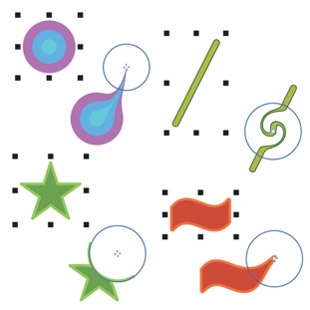
The new shaping tools provide creative options for refining vector objects; for example, smearing an object, adding a twirl effect, using the attract tool, and using the repel tool.
New! Shape tools
Introducing four additional shaping tools that provide new creative options for refining your vector objects. The new Smear tool lets you shape an object by dragging its outline, the Twirl tool lets you apply twirl effects to objects, and the Attract and Repel tools shape curves by attracting or pushing nodes away.
New! Freehand Pick tool
This new tool helps you save time by giving you greater control over object selection and transformation. Especially useful for selecting curved objects and non-linear shapes, the Freehand Pick tool lets you drag a freehand marquee around the objects or shapes you want to select.
New! Create clip mask
Apply a clip mask on a group of objects without modifying the individual objects within the group.
New! Pass through merge mode
Gain more control when applying a lens or effect to groups in Corel PHOTO-PAINT X6.
Prepare for output with confidence
After putting the finishing touches on your designs, the next step is to output your projects, upload your files to a printer or share your files. CorelDRAW Graphics Suite X6 provides extensive media and file support options so you can literally send your work anywhere.
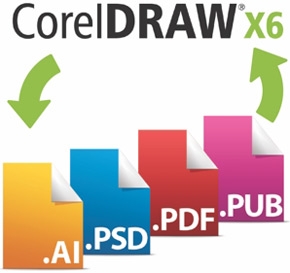
Expanded! Application compatibility
Spread the reach of your projects, knowing your designs will be compatible with the latest versions of Adobe Illustrator, Adobe Photoshop and Adobe Acrobat files.
Collect for Output option
Simply gather your project assetsfonts, color profiles, and other file information with the Collect for Output option that makes it a snap to share your work with a print service provider
File sharing and support
Re-purpose and share your creations anywhere with support for more than 100 file formats, including AI, PSD, PDF, JPG, PNG, EPS, TIFF, DOCX and PPT
Export Dialog box
Use the Export Dialog box to customize color profiles, file types and file sizes for print or web export
Media options
Output to a wide variety of media, including signs, flyers, business cards, web banners, websites, print ads, brochures, billboards, digital signs and web graphics and so much more!
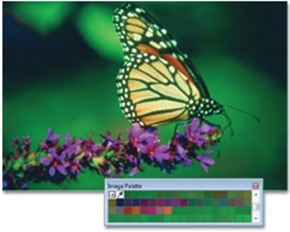
A custom color palette is created on the fly for each project.
Color Management engine
Control color consistency across different media and generate a distinct color palette for each document. The Color Management engine introduces greater color accuracy, plus support for new color profiles from PANTONE. Minimize your ecological footprint and reduce costly reprints by knowing that your colors are accurate before you print.
- Custom Color Palettes - access previously used colors in order to create and save for a new design
- Primary Color Mode - control the default color mode of a document on export, including the default palette colors (RGB or CMYK)
- Document Color Settings - adjust color settings that apply only to the current document
- PANTONE Color Profiles - view accurate, step-by-step color representation with the latest color profiles from PANTONE, including Fashion+Home and the PANTONE Goe system
- Hex Color Support - choose colors by using their hexadecimal (hex) value and view hex color values from multiple locations
Specifications:
System Requirements
- Microsoft Windows 7 (32-bit or 64-bit Editions) , Windows Vista (32-bit or 64-bit Editions), or Windows XP (32-bit), all with latest service packs installed
- Intel Pentium 4, AMD Athlon 64 or AMD Opteron
- 1GB RAM
- 1.5GB hard disk space (for typical installation without content - additional disk space is required during installation)
- Mouse or tablet
- 1024 x 768 screen resolution
- DVD drive
- Microsoft Internet Explorer 7 or higher
|
|
|
|
26/03
|
Corel WinDVD Pro 11 WinDVD Pro 11
Bringing Hollywood Home
- #1 DVD and Blu-ray player software
- New Blu-ray 3D support & 3D glasses included with box version
- New online movie search engine
- New 2D to 3D video conversion
Overview
Leading Blu-ray 3D player software
Welcome to the future of video playback! Corel WinDVD Pro 11 is advanced 2D and Blu-ray 3D player software that supports Blu-ray 3D, AVCHD, DVD playback and all the latest video formats. With over 250 million copies sold, WinDVD is one of the worlds most recognized products. This newest version is stacked with features such as 3D playback technology, 2D to 3D conversion, HD upscaling, superior sound and more! Plus, WinDVD Pro 11 uniquely includes a premium online movie search engine (Corel FlixFinder) that finds your favorite movies at the lowest price from popular websites. Bring Hollywood home with WinDVD Pro 11!
#1 DVD and Blu-ray player software
WinDVD Pro 11 is one of the worlds most recognized products with leading Blu-ray 3D player technology and over 250 million copies sold. Play all popular formats, including Blu-ray Disc, BDXL, MP4, WMV-HD, DVD and AVCHD.
Blu-ray 3D support & 3D glasses included
Immerse yourself in a high-octane DVD playback experience with advanced 3D technology that includes support for Blu-ray 3D, NVIDIA 3D Vision Shutter Glasses and XpanD Polarized Glasses. Plus, anaglyph 3D glasses are included with the box version.
Integrated online movie search engine
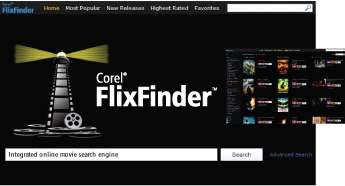
Quickly search online video sites and find your favourite movies at the best prices with the new Corel FlixFinder. Browse videos by category, compare prices, and bookmark and select your favorites, all from one convenient search screen!
2D to 3D video conversion
Convert and enjoy your movies in full 3D definition for the most lifelike viewing experience! 2D to 3D conversion is supported for DVD-Video, and standard and high-definition video files.
What's New
New Blu-ray 3D player support
Now get even more out of your 3D DVD playback experience. This latest Blu-ray 3D player has new 3D support that includes Blu-ray 3D and BDXL formats, accommodates side-by-side playback, and lets you watch 3D video files from any Fujifilm 3D camera or new 3D camcorder. Play high-definition Blu-ray and Blu-ray 3D movies with stunning 1080p sharpness and next-generation surround sound.
Enhanced! 3D playback with new 3D glasses included!
Experience 3D your way! With leading 3D technologies such as Frame Sequential and Polarization 3D playback, plus support for NVIDIA 3D Vision Shutter Glasses and XpanD Polarized Glasses, you have many different ways to watch 3D movies. The box version includes a free pair of anaglyph glasses.
New 2D to 3D conversion
Convert and enjoy 2D movies in full 3D definition for the most lifelike viewing experience! This Blu-ray player software now supports 2D to 3D conversion for DVD-Video, and standard and HD video files.
Enhanced! interface (best in industry!)
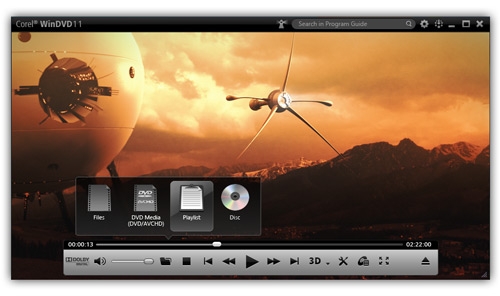
Enjoy an easy-to-use, feature-rich interface that serves up all the controls you need in a simple menu. This latest version makes it easier for you to optimize your experience with new controls, which include new Playlist tools.
New! file support
Take advantage of new file support for FLV, MKV and MP4, increasing the extensive format support already available.
Enhanced! DVD playback
Enhance your video quality with new anti-shake and frame rate upconversion features, plus enjoy enhanced picture upscaling and saturation adjustment. Weve also introduced new playlists for continuous movie playback.
Enhanced! Speed and performance
When it comes to video, faster is better. Thanks to optimization for new CPUs and GPUs from NVIDIA, Intel and AMD, this latest version of Corels popular DVD playback and Blu-ray player software is faster than ever before. Plus, extended power-saving capabilities for Microsoft Windows 7 and Windows Vista laptops give you more life from your laptop.
Features
What's included
- Corel WinDVD 11 - Pro or Standard
- Corel FlixFinder - premium online movie search engine
- 3D glasses (box version only)
- Getting Started Guide - hard copy with box version, PDF with download version
Outstanding Blu-ray 3D and DVD playback in WinDVD Pro 11
#1 DVD player software
WinDVD Pro 11 is one of the worlds most recognized products with leading Blu-ray 3D player technology and over 250 million copies sold. Play all popular formats, including Blu-ray Disc, BDXL, MP4, WMV-HD, DVD and AVCHD.
New! 3D Blu-ray technology with 3D glasses included!
Enjoy high-definition Blu-ray and Blu-ray 3D movies with stunning 1080p sharpness and next-generation surround sound. With leading 3D technologies such as Frame Sequential and Polarization 3D playback, plus support for NVIDIA 3D Vision Shutter Glasses and XpanD Polarized Glasses, you can experience 3D playback your way.
Supported screen types include NVIDIA 3D Vision, Full HD 3D TV (with Frame Sequential, Checkerboard and Row-interleaved Display technologies), HDML1.4, and 3D Ready DLP TV. Plus, the box version of WinDVD Pro 11 comes with a free pair of Anaglyph glasses.
New! 2D to 3D video conversion
Convert and enjoy your movies in full 3D definition for the most lifelike viewing experience! WinDVD Pro 11 analyzes the color, position and motion characteristics in 2D video to render stereoscopic 3D views during video playback. 2D to 3D conversion is supported for DVD-Video, and standard and HD video files.
New! BDXL support
Access extra movie content from your internet-connected Blu-ray player, using BD-Live. Plus, WinDVD Pro 11 now plays BDXL formats, the latest Blu-ray format, which lets you create 100 GB rewriteable files.
New! Optimized 3D mode
Do you have a NVIDIA graphic card with NVIDIA 3D Vision support on your computer or laptop? WinDVD Pro 11 automatically enters Exclusive mode to play high-definition video files in 3D mode, greatly optimizing your 3D playback experience.
Integrated online movie search engine
New Corel FlixFinder
Quickly search for premium online movies at the lowest price with the new Corel FlixFinder. This online movie search engine, conveniently integrated within WinDVD Pro 11, lets you:
- enjoy premium access to popular online movie sites*
- download or stream the latest movie releases
- browse videos by category, compare prices and bookmark your favorites
- view detailed disc information for a movie
- submit ratings and comments for the movie
- post your movie reviews to Facebook directly from FlixFinder
- feel secure knowing you are watching legal content
*For North American customers, the searchable movie sites are NetFlix, Crunchyroll, Hulu and others (subject to change). For customers elsewhere in the world, the searchable movie sites will be determined by availability in your country.
Rich playback experience
Video playback enchancements
Enhanced! Feature-rich interface
Enjoy an easy-to-use, feature-rich interface that serves up all the controls you need in a simple menu. This latest version makes it easier for you to optimize your experience with new controls, including new Playlist tools. For a detailed overview of the controls, see the Reviewers Guide.
New! Playlists tools
Create playlists for continuous movie playback.
Enhanced performance and extended battery life
When it comes to video, faster is better. Thanks to optimization for new CPUs and GPUs from NVIDIA, Intel and AMD, this latest version of Corel's popular DVD playback and Blu-ray player software is faster than ever before. Plus, extended power-saving capabilities for Microsoft Windows 7 and Windows Vista laptops give you more life from your laptop.
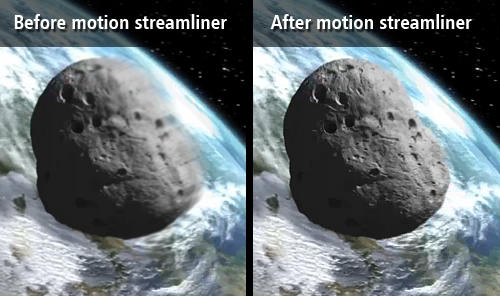
Motion streamliner
Increase frame rate and interpolate frames to remove the jitters from fast motion video.
Anti-shake (Video Stabilization)
Stabilize excess camera motion in handheld home videos to make your footage look slick.
Standard to HD video upscaling
Experience Corel's proven upscaling technology that delivers near-HD quality video from standard DVDs. The GPU-accelerated upscaling works across different platforms.
Bookmarks
Mark your favorite scenes in a movie for future access. You can add bookmarks when playing DVD-Video, DVD+VR and DVD-VR files. You can also open existing bookmarks in movies.
Color correction and lighting controls
Achieve the best picture quality by adjusting the color and lighting.
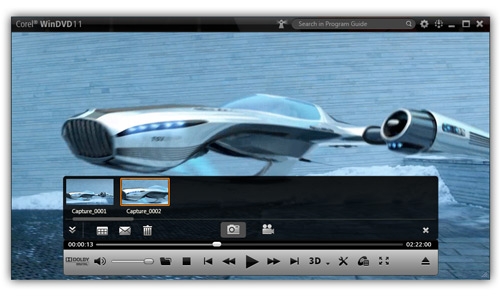
QuickClip
Easily capture a favorite movie scene as a still picture or animated clip, and then share it with your friends by email.
Zoom, crop and stretch
Use these handy controls to take a closer look at your favorite scenes.
Time Stretch
Specify the duration of your movie with this handy speed control, which makes it possible to watch your entire movie in the time you have available.
Broadest video and audio format support
New! File format support
Enjoy crisp, vivid playback of all popular file formats, including Blu-ray 3D, BD-Live, BDXL, AVCREC, DivX for Windows 7, FLV, QuickTime, Windows Media (WMV), DVD-Video, MPEG, MTS, M2TS, MKV, MP4, 3GP and much more!
Cinematic surround sound
Blow yourself away with cinematic surround sound, supported by Dolby Headphone, Dolby Pro Logic IIx, Dolby Virtual Speaker and DTS Neo:6 technologies. WinDVD Pro 11 offers a broad range of support for the most powerful audio technologies available in Blu-ray player software. Plus, karaoke is now supported!
Special audio effects
Choose from an ambient array of listening environments.
- Normal boosts the audio level and reduces the dynamic range for more comfortable listening
- Noisy enhances the audio range in a noisy environment
- Theater Effect preserves the original dynamic range of the movie to deliver theater-quality sound
Customizable region settings
Change the region settings of your optical drive to match the region requirements of your discs.
3D Video
Take a video tour of WinDVD Pro 11
See 2D-3D conversion in action
Set up your 3D home theater environment
Specifications:
Minimum System Requirements
For Blu-ray and HD file playback:
- Intel Core 2 Duo T2400 1.83 GHz (or higher), or AMD Athlon 64 X2 3800+ 2.0 GHz (or higher) recommended
- Microsoft Windows 7, Windows Vista or Windows XP, with the latest service packs installed
- NVIDIA GeForce 8/9/10 series, GTX series or newer VGA; AMD M7x and above; Intel GM45/G45 series and above (Windows Vista/Windows 7), or Intel Core Processor families
- 1 GB of RAM
- Minimum 128 MB VRAM; 256 MB VRAM recommended
- 330 MB of free disk space
- Windows-compatible sound card
- Windows-compatible optical drive for DVD/AVCHD playback
- Windows-compatible Blu-ray drive for Blu-ray playback
- Internet connection required for online features (BD-Live)
For Blu-ray 3D playback:
- Windows 7
- VGA (MVC decoder support required for Blu-ray 3D playback):
- NVIDIA GeForce 500/400/300/200 or newer
- AMD Radeon HD 6000 series or newer
- Intel H55 and Intel Core processor families
- Intel Core 2 Duo T2400 1.83 GHz, or AMD Athlon 64 X2 3800+ 2.0 GHz, or higher recommended
- 1 GB of RAM minimum
- 3D display requirements:
- for Frame Sequential, Polarization and Anaglyph 3D playback:
- Frame Sequential/Polarization-supported monitor
- VGA card + updated drivers for NVIDIA GeForce 500/400/300/200/100/9 series/8 series or newer
- AMD Radeon HD 6000 series or newer
- Intel H55 series or newer
- when using the HDMI 1.4-compatible panel for 3D playback:
- HDMI 1.4-compatible TV/monitor
- VGA card + updated drivers for NVIDIA GeForce 500/400/300/200/100/9 series/8 series or newer
- AMD Radeon HD 6000 series or newer
- Intel H5x series or newer
- using NVIDIA 3D Vision for 3D playback (Frame Sequential display):
- 120Hz supported PC monitor through DVI-D link
- NVIDIA 3D Vision device
- VGA card + updated drivers for NVIDIA GeForce 500/400/300/200/100/9 series/8 series or newer
- outputting through eDP (internal LCD, Frame Sequential display):
- 2nd Generation Intel Core processor or newer and latest VGA driver
Compatibility
|
|
|
|
Previous Page
|
Next Page
|
|