Camerafarm product archive #40772
| Image |
Date |
Product description |
Price |
Buy |
|
19/08
|
Lexar Media 8GB SDHC Card - Class 4 Lexar Secure Digital High Capacity (SDHC) 8GB Card Class 4
PRODUCT HIGHLIGHTS
- Reliably captures and stores photos, music, and more
- Designed for use in SDHC-enabled digital cameras and devices
- Built-in erasure prevention switch keeps data safe
- Speed-rated at Class 4
- Five-year limited warranty
Reliable, High-Capacity Storage for Photos and More
Lexar offers a comprehensive line of award-winning memory cards in various speeds, formats, and capacities. With so many options, it's easy to find the right Lexar memory card to fit your needs and lifestyle.
The Lexar Secure Digital High Capacity (SDHC) card greatly increases the storage capacity of your SDHC-enabled point-and-shoot digital camera or other device. The standard Lexar SDHC card is available in 4GB, 8GB, 16GB, and 32GB capacities.
Do More with Your Digital Device
Enhance Your Digital Experience. Designed for use with SDHC digital cameras or other SDHC-compatible devices, the Lexar SDHC card gives you the capacity and power to capture more of what matters, allowing you to save and store your vacation photos, favorite songs, and video clips from last weekends soccer game. For photo enthusiasts and those interested in safely storing precious memories, using a high-capacity Lexar SDHC card means you always have the extra storage capacity to capture that perfect moment.
The Brand Trusted by Professionals. Lexar is the brand trusted by professional photographers. This means you can snap and store photos with confidence, knowing your Lexar memory card is delivering the performance and reliability your memories deserve. The card also has a built-in erasure prevention switch to ensure that your files can't be accidentally deleted or overwritten. Complete with reliable high-capacity storage, the Lexar SDHC card is an excellent solution to your storage needs.
Lexar Performance, Quality, Compatibility, and Reliability. All Lexar memory card, card reader, and USB flash drive product designs undergo extensive testing in the Lexar Quality Labs, facilities with more than 800 digital devices, to ensure performance, quality, compatibility, and reliability. This provides customers with a high level of confidence when using Lexar products to capture, manage, move, and store the memories that matter.
Lexar offers a comprehensive line of innovative, award-winning memory products in several categories, including memory cards, card readers, DRAM, USB flash drives, and portable backup drives. With so many options, its easy to find the right Lexar solution to fit your needs.
Lexar. When Memory Matters.
Some of the listed storage capacity is used for formatting and other purposes and is not available for data storage. 1GB equals 1 billion bytes. For more information, go to www.lexar.com/capacity.
|


|
|
|
19/08
|
Lexar Media 4GB SDHC Card - Class 4 Lexar Secure Digital High Capacity (SDHC) 4GB Card Class4
PRODUCT HIGHLIGHTS
- Reliably captures and stores photos, music, and more
- Designed for use in SDHC-enabled digital cameras and devices
- Built-in erasure prevention switch keeps data safe
- Speed-rated at Class 4
- Five-year limited warranty
Reliable, High-Capacity Storage for Photos and More
Lexar offers a comprehensive line of award-winning memory cards in various speeds, formats, and capacities. With so many options, it's easy to find the right Lexar memory card to fit your needs and lifestyle.
The Lexar Secure Digital High Capacity (SDHC) card greatly increases the storage capacity of your SDHC-enabled point-and-shoot digital camera or other device. The standard Lexar SDHC card is available in 4GB, 8GB, 16GB, and 32GB capacities.
Do More with Your Digital Device
Enhance Your Digital Experience. Designed for use with SDHC digital cameras or other SDHC-compatible devices, the Lexar SDHC card gives you the capacity and power to capture more of what matters, allowing you to save and store your vacation photos, favorite songs, and video clips from last weekends soccer game. For photo enthusiasts and those interested in safely storing precious memories, using a high-capacity Lexar SDHC card means you always have the extra storage capacity to capture that perfect moment.
The Brand Trusted by Professionals. Lexar is the brand trusted by professional photographers. This means you can snap and store photos with confidence, knowing your Lexar memory card is delivering the performance and reliability your memories deserve. The card also has a built-in erasure prevention switch to ensure that your files can't be accidentally deleted or overwritten. Complete with reliable high-capacity storage, the Lexar SDHC card is an excellent solution to your storage needs.
Lexar Performance, Quality, Compatibility, and Reliability. All Lexar memory card, card reader, and USB flash drive product designs undergo extensive testing in the Lexar Quality Labs, facilities with more than 800 digital devices, to ensure performance, quality, compatibility, and reliability. This provides customers with a high level of confidence when using Lexar products to capture, manage, move, and store the memories that matter.
Lexar offers a comprehensive line of innovative, award-winning memory products in several categories, including memory cards, card readers, DRAM, USB flash drives, and portable backup drives. With so many options, its easy to find the right Lexar solution to fit your needs.
Lexar. When Memory Matters.
Some of the listed storage capacity is used for formatting and other purposes and is not available for data storage. 1GB equals 1 billion bytes. For more information, go to www.lexar.com/capacity.
|
|
|
|
19/08
|
PNY 8GB LT1 Flash Drive - Ultra-Slim And Light, Compact Size and Incredible Design, USB2.0 - White PNY 8GB USB 2.0 LT1 High Speed Flash Drive
PRODUCT DESCRIPTION
This ultra small PNY USB Flash Drive comes in a slim design with an unbelievable 8GB capacity. Great for people on the go, strore, transport and share homework, images, music and more. Extremely lightweight and portable, this slim USB flash drive has a capless design and is easy to use and carry.
FEATURES
- 4GB Storage
- PNY LT1 USB Flash Disk
- High Speed Transfer
- View, Copy and Edit Images Photos/Data/Music Directly
- Plug and Play
- No External Power Required
- Compact Size and Incredible Design
- Ultra Slim and Light
- Durable Quality
- Compatible with Windows 2000 / XP / Vista
SPECIFICATIONS
- Interface Standard USB 2.0
- Capacity 8GB
- Dimensions (L x W) 5.3 cm x 2.1 cm
|
|
|
|
19/08
|
PNY 4GB LT1 Flash Drive - Ultra-Slim And Light, Compact Size and Incredible Design, USB2.0 - White 4GB USB 2.0 LT1 High Speed Flash Drive
PRODUCT DESCRIPTION
This ultra small PNY USB Flash Drive comes in a slim design with an unbelievable 4GB capacity. Great for people on the go, strore, transport and share homework, images, music and more. Extremely lightweight and portable, this slim USB flash drive has a capless design and is easy to use and carry.
Features
- 4GB Storage
- PNY LT1 USB Flash Disk
- High Speed Transfer
- View, Copy and Edit Images Photos/Data/Music Directly
- Plug and Play
- No External Power Required
- Compact Size and Incredible Design
- Ultra Slim and Light
- Durable Quality
- Compatible with Windows 2000 / XP / Vista
Specifications
- Interface - Standard USB 2.0
- Capacity - 4GB
- Dimensions (L x W) - 5.3 cm x 2.1 cm
|
|
|
|
19/08
|
PNY 16GB Hook Attache Flash Drive - Read 32MB/s, Write 24MB/s, Ultra Compact Design with a Durable Metal Housing, USB2.0 16GB USB Flash Drive HOOK
Hook Attache
Features
-
Ultra compact design with a durable metal housing.
-
Unique elastic hook design make it securely attaches to keys, backpacks, etc.
-
Store, transport and share your favorite documents, photos,music, videos and more.
Specifications
|
Weight
|
11.5g
|
|
Size
|
H 5.0mm x W 15.80mm x L 48.6mm
|
|
Capacity
|
16GB
|
|
Performance
|
4G : up to 6.5MB/sec write , 24MB/sec read
8G,16G, 32G: up to 28MB/sec write , 32MB/sec read
|
|
Operating Voltage
|
Operating Temperature: 0C to 60C
Storage Temperature: -25C to 8C
Vcc Power: 4.5~5.5 VDC
|
|
System
|
Windows 2000, Windows XP, Windows Vista, Windows 7, Mac OS: 10.3 and above
|
|
Warranty
|
5 years from the date of purchase
|
|
|
|
|
19/08
|
Cisco VM300 Advanced Video Monitoring System (VMS) - Up to 64 Cameras Please Note: Product Activation Key via e-Delivery
The Cisco Advanced Video Monitoring System (AVMS) is intelligent, enterprise-quality video surveillance software for small businesses. It offers:
Advanced discovery and management of up to 64 Cisco Small Business Video Surveillance cameras and supported third-party cameras
Support for remote and mobile viewing and playback of live and recorded video over a variety of devices
Multiple viewing and video formats to match user and storage requirements
Multifunction playback system that supports intelligent search
Ability to integrate with business applications such as point-of-sale (POS) equipment using optional adapter for additional business intelligence
Real-time digital enhancement during playback, allowing adjustment of video visibility, sharpness, brightness, contrast, and grayscale
Multilanguage user interface for configuration in 22 languages, including English, French, German, Italian, Chinese (simplified and traditional), Japanese, Spanish, and more
Product Overview
The Cisco AVMS solution is an ideal way to improve your company's operations, safety, and security (Figure 1). For organizations that need more robust, intelligent surveillance solutions, it delivers enterprise-class features at a price you can afford.
Cisco AVMS software lets you view and control your video surveillance cameras inside or outside the office, while providing flexibility to meet changing business needs. Cisco Small Business Video Surveillance cameras all support remote and mobile viewing through an Internet browser. For more advanced operations, Cisco AVMS software scales to easily monitor, record, and control up to 64 cameras using an intuitive graphical user interface.
Playback is fast and simple, with intelligent search support and real-time video-enhancement features. Intelligent event monitoring lets you watch an area of interest and track objects that disappear, or monitor for unsupervised objects left in a controlled area.
You can tailor Cisco AVMS to meet your specific needs, adjusting recorded or remote streamed video quality for your bandwidth or storage requirements. Optional software licenses let you add functions or integrate the solution with business systems such as POS equipment.
With the affordable flexibility and scalability of the Cisco Advanced Video Monitoring System, you can build a complete surveillance solution to meet your needs.
Usage Scenarios
The Cisco Advanced Video Monitoring System is designed to integrate smoothly with business systems you use every day. This flexible solution lets you take advantage of the power of the network to tailor your solution to meet a variety of surveillance needs:
Automated surveillance: Configure your Cisco Small Business Video Surveillance solution as an unmanned security solution, using the Cisco AVMS for scheduled and alert-based recording. Advanced analytics help prevent false alarms, and powerful search capabilities make it easy to retrieve video events.
Advanced surveillance: Use integrated intelligent analytics to build a more flexible, responsive surveillance system. Configure the solution to locate events using a popup e-map, or automatically reposition pan/tilt/zoom (PTZ) cameras based on events. Combining alerts with remote transcoding lets you alert and display to mobile security professionals.
Remote surveillance: Cisco AVMS provides full support for remote and mobile monitoring, to give you peace of mind when you are away from the office. Enjoy mobile and remote access to live video using Windows mobile clients, a remote desktop, or any browser-based viewer. Event alerts can find you at all times.
Point of sale: Cisco AVMS lets you integrate your surveillance solution with POS systems for better insight into your business activities. You can record video based on POS events to track voided sales, returns, or sale of high-value items. Or with an optional module you can play back specific video based on POS transaction data.
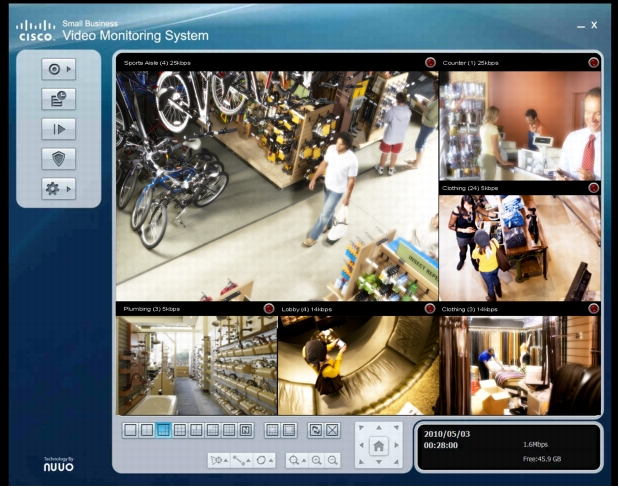
Figure 1. Cisco Advanced Video Monitoring System main console showing 5+1 camera monitoring viewer configuration.
Features
The Cisco Advanced Video Monitoring System:
Allows simultaneous onscreen monitoring, recording, and playback of video from up to 64 Cisco Small Business Video Surveillance cameras and supported third-party cameras
Records up to 30 frames per second (fps) per camera
Offers business intelligence, including integration with business tools such as POS systems
Supports MPEG-4 and MJPEG video compression formats
Supports unlimited two-way audio (on cameras that support this feature), G.711, and G.726
Provides advanced analytics with six event-detection alerts
Provides image-enhancement capabilities (visibility, sharpness, brightness, contrast, and grayscale)
With a verification tool, supports digital signature "watermark" to authenticate video
Specifications
Table 1 lists the specifications and requirements for Cisco AVMS.
Table 1. Product Specifications, Package Contents, and Requirements
|
Specifications
|
|
Standards
|
MPEG
|
|
Standards protocols
|
TCP/IP, HTTP, HTTPS, User Datagram Protocol (UDP), Real-Time Protocol (RTP)/Real-Time Streaming Protocol (RTSP)
|
|
Configuration
|
|
Save and load
|
System configurations can be exported and imported to provide recovery points before making configuration changes, backup for archival and system recovery, and templates for configuration of new PCs for AVMS use.
|
|
Copy settings
|
Ability to copy schedules from one camera to another
|
|
Installation
|
Automatic camera discovery
|
|
Management
|
|
Settings
|
General, camera, input/output, PTZ, account, and address book
|
|
Logging
|
System log, event log, counting log, POS transaction log, and resource report
|
|
Security
|
Password-protected user accounts with variable access settings
|
|
Backup location
|
CD-ROM, hard disk, network drive, and Cisco Small Business Network Storage System (NSS)
|
|
Divided screen
|
Ability to view up to 64 cameras onscreen at once
|
|
Viewing formats
|
Ten on-screen viewing formats (1, 4, 5+1, 9, 12+1, 16+1, 8+2, 12+1, 16, and user defined); support for 10 definable areas of detection and quick search and playback for areas where motion was detected
|
|
Language support
|
Chinese (Simplified & Traditional), Czech, Danish, English, Farsi, Finnish, French, German, Greek, Hebrew, Hungarian, Italian, Japanese, Korean, Portuguese (Brazilian and European), Russian, Slovak, Spanish, Thai and Turkish
|
|
Onscreen status
|
Free hard disk space report
|
|
Video
|
|
Video format
|
Audio Video Interleave (AVI) and Advanced Systems Format (ASF)
|
|
Export video
|
Ability to save video in standard format
|
|
Compression
|
MPEG-4 and MJPEG
|
|
Recording frame rate
|
Up to 30 frames per second per camera
|
|
Audio
|
Unlimited two-way audio (on cameras that support this feature), G.711, and G.726
|
|
Analytics
|
Signal Lost, General Motion, Foreign Object, Missing Object, Focus Lost, and Camera Occlusion
|
|
Backup database
|
Ability to back up video database by user-selectable time windows for playback on any AVMS system
|
|
Recording modes
|
Continuous, motion, scheduled, and manual, all with audio
|
|
Playback speeds
|
Forward and backward speeds variable in 1x, 2x, 4x, 8x, and 16x
|
|
Digital zoom
|
64x digital zoom on playback
|
|
Playback timeline
|
Ability to view recording activity in a simple-to-understand timeline; ability to magnify timeline as needed
|
|
PTZ camera control
|
Support for PTZ camera control, including auto-patrol of preset locations (on cameras that include this feature)
|
|
Schedule recordings
|
Ability to customize camera recording schedules: Two modes of customization (week and day)
|
|
Video enhancement
|
Ability to digitally enhance each view in real time during playback (visibility, sharpness, brightness, contrast, and grayscale)
|
|
Business intelligence
|
Integrated counting tool that lets organizations track customers and traffic, collecting marketing and business data to make operations more efficient
|
|
Pictures
|
|
Format
|
BMP and JPG
|
|
Printing
|
Ability to print images directly from the playback interface
|
|
Minimum Requirements for up to 64-Camera Viewing
|
|
CPU
|
Intel Core i7
|
|
RAM
|
3 GB
|
|
Motherboard
|
Intel 55 or 57 chip or later; Intel chipset recommended
|
|
Video card
|
Dedicated display adaptor with 512 MB internal memory required.
ATI Radeon 4650, nVIDIA GeForce GF-9600, or above (ATI recommended)
|
|
Ethernet
|
100BASE-T or later; Gigabit LAN recommended
|
|
Hard disk
|
250 GB or larger
|
|
Operating system
|
Microsoft Windows XP Pro SP3 (32-bit) or Microsoft Vista (32-bit)
|
|
Minimum Requirements for up to 40-Camera Viewing
|
|
CPU
|
Intel Core i5
|
|
RAM
|
3 GB
|
|
Motherboard
|
Intel 55 or 57 chip or later; Intel chipset recommended
|
|
Video card
|
Dedicated display adaptor with 512 MB internal memory required.
ATI Radeon 4650, nVIDIA GeForce GF-9600, or above (ATI recommended)
|
|
Ethernet
|
100BASE-T or later; Gigabit LAN recommended
|
|
Hard disk
|
250 GB or larger
|
|
Operating system
|
Microsoft Windows XP Pro SP3 (32-bit) or Microsoft Vista (32-bit)
|
|
Minimum Requirements for up to 32-Camera Viewing
|
|
CPU
|
Intel Core 2 Quad Q9400
|
|
RAM
|
2 GB
|
|
Motherboard
|
Intel 33 or 35 chip or later; Intel chipset recommended
|
|
Video card
|
Dedicated display adaptor with 512 MB internal memory required.
ATI Radeon 4650, nVIDIA GeForce GF-9600, or above (ATI recommended)
|
|
Ethernet
|
100BASE-T or later; Gigabit LAN recommended
|
|
Hard disk
|
250 GB or larger
|
|
Operating system
|
Microsoft Windows XP Pro SP3 (32-bit) or Microsoft Vista (32-bit)
|
|
Minimum Requirements for up to 16-Camera Viewing
|
|
CPU
|
Intel Core 2 Duo E5300
|
|
RAM
|
1 GB
|
|
Motherboard
|
Intel 33 or 35 chip or later; Intel chipset recommended
|
|
Video card
|
Dedicated display adaptor with 512 MB internal memory required.
ATI Radeon 4650, nVIDIA GeForce GF-9600, or above (ATI recommended)
|
|
Ethernet
|
100BASE-T or later; Gigabit LAN recommended
|
|
Hard disk
|
250 GB or larger
|
|
Operating system
|
Microsoft Windows XP Pro SP3 (32-bit) or Microsoft Vista (32-bit)
|
|
Camera Hardware Requirements
|
|
Supported Cisco Small Business cameras
|
Cisco PVC 300, Cisco VC 220, Cisco VC 240, Cisco PVC 2300, Cisco WVC 210, and Cisco WVC 2300
|
|
Supported third-party camera vendors
|
Axis, Arecont, Cisco, IQeye, JVC, Cisco Linksys , LevelOne, Lorex, Lumenera, Mobotix, Panasonic, Samsung, Sony, and Toshiba
|
Ordering Information
Table 2 gives ordering information for the Cisco AVMS, which is licensed-based. The license is activated through e-delivery.
Table 2. Ordering Information
|
Part Number
|
Product Description
|
|
L-VM300-64
|
Advanced Video Monitoring System (AVMS) supporting up to 64 cameras
|
|
L-VM300-32
|
Advanced Video Monitoring System (AVMS) supporting up to 32 cameras
|
|
L-VM300-16
|
Advanced Video Monitoring System (AVMS) supporting up to 16 cameras
|
|
L-VM300-08
|
Advanced Video Monitoring System (AVMS) supporting up to 8 cameras
|
|
L-VM300-04
|
Advanced Video Monitoring System (AVMS) supporting up to 4 cameras
|
|
L-VM200-32
|
Basic Plus Video Monitoring System (VMS) supporting up to 32 cameras
|
|
|
|
|
19/08
|
Cisco VM300 Advanced Video Monitoring System (VMS) - Up to 32 Cameras Please Note: Product Activation Key via e-Delivery
The Cisco Advanced Video Monitoring System (AVMS) is intelligent, enterprise-quality video surveillance software for small businesses. It offers:
Advanced discovery and management of up to 64 Cisco Small Business Video Surveillance cameras and supported third-party cameras
Support for remote and mobile viewing and playback of live and recorded video over a variety of devices
Multiple viewing and video formats to match user and storage requirements
Multifunction playback system that supports intelligent search
Ability to integrate with business applications such as point-of-sale (POS) equipment using optional adapter for additional business intelligence
Real-time digital enhancement during playback, allowing adjustment of video visibility, sharpness, brightness, contrast, and grayscale
Multilanguage user interface for configuration in 22 languages, including English, French, German, Italian, Chinese (simplified and traditional), Japanese, Spanish, and more
Product Overview
The Cisco AVMS solution is an ideal way to improve your company's operations, safety, and security (Figure 1). For organizations that need more robust, intelligent surveillance solutions, it delivers enterprise-class features at a price you can afford.
Cisco AVMS software lets you view and control your video surveillance cameras inside or outside the office, while providing flexibility to meet changing business needs. Cisco Small Business Video Surveillance cameras all support remote and mobile viewing through an Internet browser. For more advanced operations, Cisco AVMS software scales to easily monitor, record, and control up to 64 cameras using an intuitive graphical user interface.
Playback is fast and simple, with intelligent search support and real-time video-enhancement features. Intelligent event monitoring lets you watch an area of interest and track objects that disappear, or monitor for unsupervised objects left in a controlled area.
You can tailor Cisco AVMS to meet your specific needs, adjusting recorded or remote streamed video quality for your bandwidth or storage requirements. Optional software licenses let you add functions or integrate the solution with business systems such as POS equipment.
With the affordable flexibility and scalability of the Cisco Advanced Video Monitoring System, you can build a complete surveillance solution to meet your needs.
Usage Scenarios
The Cisco Advanced Video Monitoring System is designed to integrate smoothly with business systems you use every day. This flexible solution lets you take advantage of the power of the network to tailor your solution to meet a variety of surveillance needs:
Automated surveillance: Configure your Cisco Small Business Video Surveillance solution as an unmanned security solution, using the Cisco AVMS for scheduled and alert-based recording. Advanced analytics help prevent false alarms, and powerful search capabilities make it easy to retrieve video events.
Advanced surveillance: Use integrated intelligent analytics to build a more flexible, responsive surveillance system. Configure the solution to locate events using a popup e-map, or automatically reposition pan/tilt/zoom (PTZ) cameras based on events. Combining alerts with remote transcoding lets you alert and display to mobile security professionals.
Remote surveillance: Cisco AVMS provides full support for remote and mobile monitoring, to give you peace of mind when you are away from the office. Enjoy mobile and remote access to live video using Windows mobile clients, a remote desktop, or any browser-based viewer. Event alerts can find you at all times.
Point of sale: Cisco AVMS lets you integrate your surveillance solution with POS systems for better insight into your business activities. You can record video based on POS events to track voided sales, returns, or sale of high-value items. Or with an optional module you can play back specific video based on POS transaction data.
Figure 1. Cisco Advanced Video Monitoring System main console showing 5+1 camera monitoring viewer configuration.
Features
The Cisco Advanced Video Monitoring System:
Allows simultaneous onscreen monitoring, recording, and playback of video from up to 64 Cisco Small Business Video Surveillance cameras and supported third-party cameras
Records up to 30 frames per second (fps) per camera
Offers business intelligence, including integration with business tools such as POS systems
Supports MPEG-4 and MJPEG video compression formats
Supports unlimited two-way audio (on cameras that support this feature), G.711, and G.726
Provides advanced analytics with six event-detection alerts
Provides image-enhancement capabilities (visibility, sharpness, brightness, contrast, and grayscale)
With a verification tool, supports digital signature "watermark" to authenticate video
Specifications
Table 1 lists the specifications and requirements for Cisco AVMS.
Table 1. Product Specifications, Package Contents, and Requirements
|
Specifications
|
|
Standards
|
MPEG
|
|
Standards protocols
|
TCP/IP, HTTP, HTTPS, User Datagram Protocol (UDP), Real-Time Protocol (RTP)/Real-Time Streaming Protocol (RTSP)
|
|
Configuration
|
|
Save and load
|
System configurations can be exported and imported to provide recovery points before making configuration changes, backup for archival and system recovery, and templates for configuration of new PCs for AVMS use.
|
|
Copy settings
|
Ability to copy schedules from one camera to another
|
|
Installation
|
Automatic camera discovery
|
|
Management
|
|
Settings
|
General, camera, input/output, PTZ, account, and address book
|
|
Logging
|
System log, event log, counting log, POS transaction log, and resource report
|
|
Security
|
Password-protected user accounts with variable access settings
|
|
Backup location
|
CD-ROM, hard disk, network drive, and Cisco Small Business Network Storage System (NSS)
|
|
Divided screen
|
Ability to view up to 64 cameras onscreen at once
|
|
Viewing formats
|
Ten on-screen viewing formats (1, 4, 5+1, 9, 12+1, 16+1, 8+2, 12+1, 16, and user defined); support for 10 definable areas of detection and quick search and playback for areas where motion was detected
|
|
Language support
|
Chinese (Simplified & Traditional), Czech, Danish, English, Farsi, Finnish, French, German, Greek, Hebrew, Hungarian, Italian, Japanese, Korean, Portuguese (Brazilian and European), Russian, Slovak, Spanish, Thai and Turkish
|
|
Onscreen status
|
Free hard disk space report
|
|
Video
|
|
Video format
|
Audio Video Interleave (AVI) and Advanced Systems Format (ASF)
|
|
Export video
|
Ability to save video in standard format
|
|
Compression
|
MPEG-4 and MJPEG
|
|
Recording frame rate
|
Up to 30 frames per second per camera
|
|
Audio
|
Unlimited two-way audio (on cameras that support this feature), G.711, and G.726
|
|
Analytics
|
Signal Lost, General Motion, Foreign Object, Missing Object, Focus Lost, and Camera Occlusion
|
|
Backup database
|
Ability to back up video database by user-selectable time windows for playback on any AVMS system
|
|
Recording modes
|
Continuous, motion, scheduled, and manual, all with audio
|
|
Playback speeds
|
Forward and backward speeds variable in 1x, 2x, 4x, 8x, and 16x
|
|
Digital zoom
|
64x digital zoom on playback
|
|
Playback timeline
|
Ability to view recording activity in a simple-to-understand timeline; ability to magnify timeline as needed
|
|
PTZ camera control
|
Support for PTZ camera control, including auto-patrol of preset locations (on cameras that include this feature)
|
|
Schedule recordings
|
Ability to customize camera recording schedules: Two modes of customization (week and day)
|
|
Video enhancement
|
Ability to digitally enhance each view in real time during playback (visibility, sharpness, brightness, contrast, and grayscale)
|
|
Business intelligence
|
Integrated counting tool that lets organizations track customers and traffic, collecting marketing and business data to make operations more efficient
|
|
Pictures
|
|
Format
|
BMP and JPG
|
|
Printing
|
Ability to print images directly from the playback interface
|
|
Minimum Requirements for up to 64-Camera Viewing
|
|
CPU
|
Intel Core i7
|
|
RAM
|
3 GB
|
|
Motherboard
|
Intel 55 or 57 chip or later; Intel chipset recommended
|
|
Video card
|
Dedicated display adaptor with 512 MB internal memory required.
ATI Radeon 4650, nVIDIA GeForce GF-9600, or above (ATI recommended)
|
|
Ethernet
|
100BASE-T or later; Gigabit LAN recommended
|
|
Hard disk
|
250 GB or larger
|
|
Operating system
|
Microsoft Windows XP Pro SP3 (32-bit) or Microsoft Vista (32-bit)
|
|
Minimum Requirements for up to 40-Camera Viewing
|
|
CPU
|
Intel Core i5
|
|
RAM
|
3 GB
|
|
Motherboard
|
Intel 55 or 57 chip or later; Intel chipset recommended
|
|
Video card
|
Dedicated display adaptor with 512 MB internal memory required.
ATI Radeon 4650, nVIDIA GeForce GF-9600, or above (ATI recommended)
|
|
Ethernet
|
100BASE-T or later; Gigabit LAN recommended
|
|
Hard disk
|
250 GB or larger
|
|
Operating system
|
Microsoft Windows XP Pro SP3 (32-bit) or Microsoft Vista (32-bit)
|
|
Minimum Requirements for up to 32-Camera Viewing
|
|
CPU
|
Intel Core 2 Quad Q9400
|
|
RAM
|
2 GB
|
|
Motherboard
|
Intel 33 or 35 chip or later; Intel chipset recommended
|
|
Video card
|
Dedicated display adaptor with 512 MB internal memory required.
ATI Radeon 4650, nVIDIA GeForce GF-9600, or above (ATI recommended)
|
|
Ethernet
|
100BASE-T or later; Gigabit LAN recommended
|
|
Hard disk
|
250 GB or larger
|
|
Operating system
|
Microsoft Windows XP Pro SP3 (32-bit) or Microsoft Vista (32-bit)
|
|
Minimum Requirements for up to 16-Camera Viewing
|
|
CPU
|
Intel Core 2 Duo E5300
|
|
RAM
|
1 GB
|
|
Motherboard
|
Intel 33 or 35 chip or later; Intel chipset recommended
|
|
Video card
|
Dedicated display adaptor with 512 MB internal memory required.
ATI Radeon 4650, nVIDIA GeForce GF-9600, or above (ATI recommended)
|
|
Ethernet
|
100BASE-T or later; Gigabit LAN recommended
|
|
Hard disk
|
250 GB or larger
|
|
Operating system
|
Microsoft Windows XP Pro SP3 (32-bit) or Microsoft Vista (32-bit)
|
|
Camera Hardware Requirements
|
|
Supported Cisco Small Business cameras
|
Cisco PVC 300, Cisco VC 220, Cisco VC 240, Cisco PVC 2300, Cisco WVC 210, and Cisco WVC 2300
|
|
Supported third-party camera vendors
|
Axis, Arecont, Cisco, IQeye, JVC, Cisco Linksys , LevelOne, Lorex, Lumenera, Mobotix, Panasonic, Samsung, Sony, and Toshiba
|
Ordering Information
Table 2 gives ordering information for the Cisco AVMS, which is licensed-based. The license is activated through e-delivery.
Table 2. Ordering Information
|
Part Number
|
Product Description
|
|
L-VM300-64
|
Advanced Video Monitoring System (AVMS) supporting up to 64 cameras
|
|
L-VM300-32
|
Advanced Video Monitoring System (AVMS) supporting up to 32 cameras
|
|
L-VM300-16
|
Advanced Video Monitoring System (AVMS) supporting up to 16 cameras
|
|
L-VM300-08
|
Advanced Video Monitoring System (AVMS) supporting up to 8 cameras
|
|
L-VM300-04
|
Advanced Video Monitoring System (AVMS) supporting up to 4 cameras
|
|
L-VM200-32
|
Basic Plus Video Monitoring System (VMS) supporting up to 32 cameras
|
|
|
|
|
19/08
|
Cisco VM300 Advanced Video Monitoring System (VMS) - Up to 16 Cameras Please Note: Product Activation Key via e-Delivery
The Cisco Advanced Video Monitoring System (AVMS) is intelligent, enterprise-quality video surveillance software for small businesses. It offers:
Advanced discovery and management of up to 64 Cisco Small Business Video Surveillance cameras and supported third-party cameras
Support for remote and mobile viewing and playback of live and recorded video over a variety of devices
Multiple viewing and video formats to match user and storage requirements
Multifunction playback system that supports intelligent search
Ability to integrate with business applications such as point-of-sale (POS) equipment using optional adapter for additional business intelligence
Real-time digital enhancement during playback, allowing adjustment of video visibility, sharpness, brightness, contrast, and grayscale
Multilanguage user interface for configuration in 22 languages, including English, French, German, Italian, Chinese (simplified and traditional), Japanese, Spanish, and more
Product Overview
The Cisco AVMS solution is an ideal way to improve your company's operations, safety, and security (Figure 1). For organizations that need more robust, intelligent surveillance solutions, it delivers enterprise-class features at a price you can afford.
Cisco AVMS software lets you view and control your video surveillance cameras inside or outside the office, while providing flexibility to meet changing business needs. Cisco Small Business Video Surveillance cameras all support remote and mobile viewing through an Internet browser. For more advanced operations, Cisco AVMS software scales to easily monitor, record, and control up to 64 cameras using an intuitive graphical user interface.
Playback is fast and simple, with intelligent search support and real-time video-enhancement features. Intelligent event monitoring lets you watch an area of interest and track objects that disappear, or monitor for unsupervised objects left in a controlled area.
You can tailor Cisco AVMS to meet your specific needs, adjusting recorded or remote streamed video quality for your bandwidth or storage requirements. Optional software licenses let you add functions or integrate the solution with business systems such as POS equipment.
With the affordable flexibility and scalability of the Cisco Advanced Video Monitoring System, you can build a complete surveillance solution to meet your needs.
Usage Scenarios
The Cisco Advanced Video Monitoring System is designed to integrate smoothly with business systems you use every day. This flexible solution lets you take advantage of the power of the network to tailor your solution to meet a variety of surveillance needs:
Automated surveillance: Configure your Cisco Small Business Video Surveillance solution as an unmanned security solution, using the Cisco AVMS for scheduled and alert-based recording. Advanced analytics help prevent false alarms, and powerful search capabilities make it easy to retrieve video events.
Advanced surveillance: Use integrated intelligent analytics to build a more flexible, responsive surveillance system. Configure the solution to locate events using a popup e-map, or automatically reposition pan/tilt/zoom (PTZ) cameras based on events. Combining alerts with remote transcoding lets you alert and display to mobile security professionals.
Remote surveillance: Cisco AVMS provides full support for remote and mobile monitoring, to give you peace of mind when you are away from the office. Enjoy mobile and remote access to live video using Windows mobile clients, a remote desktop, or any browser-based viewer. Event alerts can find you at all times.
Point of sale: Cisco AVMS lets you integrate your surveillance solution with POS systems for better insight into your business activities. You can record video based on POS events to track voided sales, returns, or sale of high-value items. Or with an optional module you can play back specific video based on POS transaction data.
Figure 1. Cisco Advanced Video Monitoring System main console showing 5+1 camera monitoring viewer configuration.
Features
The Cisco Advanced Video Monitoring System:
Allows simultaneous onscreen monitoring, recording, and playback of video from up to 64 Cisco Small Business Video Surveillance cameras and supported third-party cameras
Records up to 30 frames per second (fps) per camera
Offers business intelligence, including integration with business tools such as POS systems
Supports MPEG-4 and MJPEG video compression formats
Supports unlimited two-way audio (on cameras that support this feature), G.711, and G.726
Provides advanced analytics with six event-detection alerts
Provides image-enhancement capabilities (visibility, sharpness, brightness, contrast, and grayscale)
With a verification tool, supports digital signature "watermark" to authenticate video
Specifications
Table 1 lists the specifications and requirements for Cisco AVMS.
Table 1. Product Specifications, Package Contents, and Requirements
|
Specifications
|
|
Standards
|
MPEG
|
|
Standards protocols
|
TCP/IP, HTTP, HTTPS, User Datagram Protocol (UDP), Real-Time Protocol (RTP)/Real-Time Streaming Protocol (RTSP)
|
|
Configuration
|
|
Save and load
|
System configurations can be exported and imported to provide recovery points before making configuration changes, backup for archival and system recovery, and templates for configuration of new PCs for AVMS use.
|
|
Copy settings
|
Ability to copy schedules from one camera to another
|
|
Installation
|
Automatic camera discovery
|
|
Management
|
|
Settings
|
General, camera, input/output, PTZ, account, and address book
|
|
Logging
|
System log, event log, counting log, POS transaction log, and resource report
|
|
Security
|
Password-protected user accounts with variable access settings
|
|
Backup location
|
CD-ROM, hard disk, network drive, and Cisco Small Business Network Storage System (NSS)
|
|
Divided screen
|
Ability to view up to 64 cameras onscreen at once
|
|
Viewing formats
|
Ten on-screen viewing formats (1, 4, 5+1, 9, 12+1, 16+1, 8+2, 12+1, 16, and user defined); support for 10 definable areas of detection and quick search and playback for areas where motion was detected
|
|
Language support
|
Chinese (Simplified & Traditional), Czech, Danish, English, Farsi, Finnish, French, German, Greek, Hebrew, Hungarian, Italian, Japanese, Korean, Portuguese (Brazilian and European), Russian, Slovak, Spanish, Thai and Turkish
|
|
Onscreen status
|
Free hard disk space report
|
|
Video
|
|
Video format
|
Audio Video Interleave (AVI) and Advanced Systems Format (ASF)
|
|
Export video
|
Ability to save video in standard format
|
|
Compression
|
MPEG-4 and MJPEG
|
|
Recording frame rate
|
Up to 30 frames per second per camera
|
|
Audio
|
Unlimited two-way audio (on cameras that support this feature), G.711, and G.726
|
|
Analytics
|
Signal Lost, General Motion, Foreign Object, Missing Object, Focus Lost, and Camera Occlusion
|
|
Backup database
|
Ability to back up video database by user-selectable time windows for playback on any AVMS system
|
|
Recording modes
|
Continuous, motion, scheduled, and manual, all with audio
|
|
Playback speeds
|
Forward and backward speeds variable in 1x, 2x, 4x, 8x, and 16x
|
|
Digital zoom
|
64x digital zoom on playback
|
|
Playback timeline
|
Ability to view recording activity in a simple-to-understand timeline; ability to magnify timeline as needed
|
|
PTZ camera control
|
Support for PTZ camera control, including auto-patrol of preset locations (on cameras that include this feature)
|
|
Schedule recordings
|
Ability to customize camera recording schedules: Two modes of customization (week and day)
|
|
Video enhancement
|
Ability to digitally enhance each view in real time during playback (visibility, sharpness, brightness, contrast, and grayscale)
|
|
Business intelligence
|
Integrated counting tool that lets organizations track customers and traffic, collecting marketing and business data to make operations more efficient
|
|
Pictures
|
|
Format
|
BMP and JPG
|
|
Printing
|
Ability to print images directly from the playback interface
|
|
Minimum Requirements for up to 64-Camera Viewing
|
|
CPU
|
Intel Core i7
|
|
RAM
|
3 GB
|
|
Motherboard
|
Intel 55 or 57 chip or later; Intel chipset recommended
|
|
Video card
|
Dedicated display adaptor with 512 MB internal memory required.
ATI Radeon 4650, nVIDIA GeForce GF-9600, or above (ATI recommended)
|
|
Ethernet
|
100BASE-T or later; Gigabit LAN recommended
|
|
Hard disk
|
250 GB or larger
|
|
Operating system
|
Microsoft Windows XP Pro SP3 (32-bit) or Microsoft Vista (32-bit)
|
|
Minimum Requirements for up to 40-Camera Viewing
|
|
CPU
|
Intel Core i5
|
|
RAM
|
3 GB
|
|
Motherboard
|
Intel 55 or 57 chip or later; Intel chipset recommended
|
|
Video card
|
Dedicated display adaptor with 512 MB internal memory required.
ATI Radeon 4650, nVIDIA GeForce GF-9600, or above (ATI recommended)
|
|
Ethernet
|
100BASE-T or later; Gigabit LAN recommended
|
|
Hard disk
|
250 GB or larger
|
|
Operating system
|
Microsoft Windows XP Pro SP3 (32-bit) or Microsoft Vista (32-bit)
|
|
Minimum Requirements for up to 32-Camera Viewing
|
|
CPU
|
Intel Core 2 Quad Q9400
|
|
RAM
|
2 GB
|
|
Motherboard
|
Intel 33 or 35 chip or later; Intel chipset recommended
|
|
Video card
|
Dedicated display adaptor with 512 MB internal memory required.
ATI Radeon 4650, nVIDIA GeForce GF-9600, or above (ATI recommended)
|
|
Ethernet
|
100BASE-T or later; Gigabit LAN recommended
|
|
Hard disk
|
250 GB or larger
|
|
Operating system
|
Microsoft Windows XP Pro SP3 (32-bit) or Microsoft Vista (32-bit)
|
|
Minimum Requirements for up to 16-Camera Viewing
|
|
CPU
|
Intel Core 2 Duo E5300
|
|
RAM
|
1 GB
|
|
Motherboard
|
Intel 33 or 35 chip or later; Intel chipset recommended
|
|
Video card
|
Dedicated display adaptor with 512 MB internal memory required.
ATI Radeon 4650, nVIDIA GeForce GF-9600, or above (ATI recommended)
|
|
Ethernet
|
100BASE-T or later; Gigabit LAN recommended
|
|
Hard disk
|
250 GB or larger
|
|
Operating system
|
Microsoft Windows XP Pro SP3 (32-bit) or Microsoft Vista (32-bit)
|
|
Camera Hardware Requirements
|
|
Supported Cisco Small Business cameras
|
Cisco PVC 300, Cisco VC 220, Cisco VC 240, Cisco PVC 2300, Cisco WVC 210, and Cisco WVC 2300
|
|
Supported third-party camera vendors
|
Axis, Arecont, Cisco, IQeye, JVC, Cisco Linksys , LevelOne, Lorex, Lumenera, Mobotix, Panasonic, Samsung, Sony, and Toshiba
|
Ordering Information
Table 2 gives ordering information for the Cisco AVMS, which is licensed-based. The license is activated through e-delivery.
Table 2. Ordering Information
|
Part Number
|
Product Description
|
|
L-VM300-64
|
Advanced Video Monitoring System (AVMS) supporting up to 64 cameras
|
|
L-VM300-32
|
Advanced Video Monitoring System (AVMS) supporting up to 32 cameras
|
|
L-VM300-16
|
Advanced Video Monitoring System (AVMS) supporting up to 16 cameras
|
|
L-VM300-08
|
Advanced Video Monitoring System (AVMS) supporting up to 8 cameras
|
|
L-VM300-04
|
Advanced Video Monitoring System (AVMS) supporting up to 4 cameras
|
|
L-VM200-32
|
Basic Plus Video Monitoring System (VMS) supporting up to 32 cameras
|
|
|
|
|
19/08
|
Cisco VM300 Advanced Video Monitoring System (VMS) - Up to 8 Cameras Please Note: Product Activation Key via e-Delivery
The Cisco Advanced Video Monitoring System (AVMS) is intelligent, enterprise-quality video surveillance software for small businesses. It offers:
Advanced discovery and management of up to 64 Cisco Small Business Video Surveillance cameras and supported third-party cameras
Support for remote and mobile viewing and playback of live and recorded video over a variety of devices
Multiple viewing and video formats to match user and storage requirements
Multifunction playback system that supports intelligent search
Ability to integrate with business applications such as point-of-sale (POS) equipment using optional adapter for additional business intelligence
Real-time digital enhancement during playback, allowing adjustment of video visibility, sharpness, brightness, contrast, and grayscale
Multilanguage user interface for configuration in 22 languages, including English, French, German, Italian, Chinese (simplified and traditional), Japanese, Spanish, and more
Product Overview
The Cisco AVMS solution is an ideal way to improve your company's operations, safety, and security (Figure 1). For organizations that need more robust, intelligent surveillance solutions, it delivers enterprise-class features at a price you can afford.
Cisco AVMS software lets you view and control your video surveillance cameras inside or outside the office, while providing flexibility to meet changing business needs. Cisco Small Business Video Surveillance cameras all support remote and mobile viewing through an Internet browser. For more advanced operations, Cisco AVMS software scales to easily monitor, record, and control up to 64 cameras using an intuitive graphical user interface.
Playback is fast and simple, with intelligent search support and real-time video-enhancement features. Intelligent event monitoring lets you watch an area of interest and track objects that disappear, or monitor for unsupervised objects left in a controlled area.
You can tailor Cisco AVMS to meet your specific needs, adjusting recorded or remote streamed video quality for your bandwidth or storage requirements. Optional software licenses let you add functions or integrate the solution with business systems such as POS equipment.
With the affordable flexibility and scalability of the Cisco Advanced Video Monitoring System, you can build a complete surveillance solution to meet your needs.
Usage Scenarios
The Cisco Advanced Video Monitoring System is designed to integrate smoothly with business systems you use every day. This flexible solution lets you take advantage of the power of the network to tailor your solution to meet a variety of surveillance needs:
Automated surveillance: Configure your Cisco Small Business Video Surveillance solution as an unmanned security solution, using the Cisco AVMS for scheduled and alert-based recording. Advanced analytics help prevent false alarms, and powerful search capabilities make it easy to retrieve video events.
Advanced surveillance: Use integrated intelligent analytics to build a more flexible, responsive surveillance system. Configure the solution to locate events using a popup e-map, or automatically reposition pan/tilt/zoom (PTZ) cameras based on events. Combining alerts with remote transcoding lets you alert and display to mobile security professionals.
Remote surveillance: Cisco AVMS provides full support for remote and mobile monitoring, to give you peace of mind when you are away from the office. Enjoy mobile and remote access to live video using Windows mobile clients, a remote desktop, or any browser-based viewer. Event alerts can find you at all times.
Point of sale: Cisco AVMS lets you integrate your surveillance solution with POS systems for better insight into your business activities. You can record video based on POS events to track voided sales, returns, or sale of high-value items. Or with an optional module you can play back specific video based on POS transaction data.
Figure 1. Cisco Advanced Video Monitoring System main console showing 5+1 camera monitoring viewer configuration.
Features
The Cisco Advanced Video Monitoring System:
Allows simultaneous onscreen monitoring, recording, and playback of video from up to 64 Cisco Small Business Video Surveillance cameras and supported third-party cameras
Records up to 30 frames per second (fps) per camera
Offers business intelligence, including integration with business tools such as POS systems
Supports MPEG-4 and MJPEG video compression formats
Supports unlimited two-way audio (on cameras that support this feature), G.711, and G.726
Provides advanced analytics with six event-detection alerts
Provides image-enhancement capabilities (visibility, sharpness, brightness, contrast, and grayscale)
With a verification tool, supports digital signature "watermark" to authenticate video
Specifications
Table 1 lists the specifications and requirements for Cisco AVMS.
Table 1. Product Specifications, Package Contents, and Requirements
|
Specifications
|
|
Standards
|
MPEG
|
|
Standards protocols
|
TCP/IP, HTTP, HTTPS, User Datagram Protocol (UDP), Real-Time Protocol (RTP)/Real-Time Streaming Protocol (RTSP)
|
|
Configuration
|
|
Save and load
|
System configurations can be exported and imported to provide recovery points before making configuration changes, backup for archival and system recovery, and templates for configuration of new PCs for AVMS use.
|
|
Copy settings
|
Ability to copy schedules from one camera to another
|
|
Installation
|
Automatic camera discovery
|
|
Management
|
|
Settings
|
General, camera, input/output, PTZ, account, and address book
|
|
Logging
|
System log, event log, counting log, POS transaction log, and resource report
|
|
Security
|
Password-protected user accounts with variable access settings
|
|
Backup location
|
CD-ROM, hard disk, network drive, and Cisco Small Business Network Storage System (NSS)
|
|
Divided screen
|
Ability to view up to 64 cameras onscreen at once
|
|
Viewing formats
|
Ten on-screen viewing formats (1, 4, 5+1, 9, 12+1, 16+1, 8+2, 12+1, 16, and user defined); support for 10 definable areas of detection and quick search and playback for areas where motion was detected
|
|
Language support
|
Chinese (Simplified & Traditional), Czech, Danish, English, Farsi, Finnish, French, German, Greek, Hebrew, Hungarian, Italian, Japanese, Korean, Portuguese (Brazilian and European), Russian, Slovak, Spanish, Thai and Turkish
|
|
Onscreen status
|
Free hard disk space report
|
|
Video
|
|
Video format
|
Audio Video Interleave (AVI) and Advanced Systems Format (ASF)
|
|
Export video
|
Ability to save video in standard format
|
|
Compression
|
MPEG-4 and MJPEG
|
|
Recording frame rate
|
Up to 30 frames per second per camera
|
|
Audio
|
Unlimited two-way audio (on cameras that support this feature), G.711, and G.726
|
|
Analytics
|
Signal Lost, General Motion, Foreign Object, Missing Object, Focus Lost, and Camera Occlusion
|
|
Backup database
|
Ability to back up video database by user-selectable time windows for playback on any AVMS system
|
|
Recording modes
|
Continuous, motion, scheduled, and manual, all with audio
|
|
Playback speeds
|
Forward and backward speeds variable in 1x, 2x, 4x, 8x, and 16x
|
|
Digital zoom
|
64x digital zoom on playback
|
|
Playback timeline
|
Ability to view recording activity in a simple-to-understand timeline; ability to magnify timeline as needed
|
|
PTZ camera control
|
Support for PTZ camera control, including auto-patrol of preset locations (on cameras that include this feature)
|
|
Schedule recordings
|
Ability to customize camera recording schedules: Two modes of customization (week and day)
|
|
Video enhancement
|
Ability to digitally enhance each view in real time during playback (visibility, sharpness, brightness, contrast, and grayscale)
|
|
Business intelligence
|
Integrated counting tool that lets organizations track customers and traffic, collecting marketing and business data to make operations more efficient
|
|
Pictures
|
|
Format
|
BMP and JPG
|
|
Printing
|
Ability to print images directly from the playback interface
|
|
Minimum Requirements for up to 64-Camera Viewing
|
|
CPU
|
Intel Core i7
|
|
RAM
|
3 GB
|
|
Motherboard
|
Intel 55 or 57 chip or later; Intel chipset recommended
|
|
Video card
|
Dedicated display adaptor with 512 MB internal memory required.
ATI Radeon 4650, nVIDIA GeForce GF-9600, or above (ATI recommended)
|
|
Ethernet
|
100BASE-T or later; Gigabit LAN recommended
|
|
Hard disk
|
250 GB or larger
|
|
Operating system
|
Microsoft Windows XP Pro SP3 (32-bit) or Microsoft Vista (32-bit)
|
|
Minimum Requirements for up to 40-Camera Viewing
|
|
CPU
|
Intel Core i5
|
|
RAM
|
3 GB
|
|
Motherboard
|
Intel 55 or 57 chip or later; Intel chipset recommended
|
|
Video card
|
Dedicated display adaptor with 512 MB internal memory required.
ATI Radeon 4650, nVIDIA GeForce GF-9600, or above (ATI recommended)
|
|
Ethernet
|
100BASE-T or later; Gigabit LAN recommended
|
|
Hard disk
|
250 GB or larger
|
|
Operating system
|
Microsoft Windows XP Pro SP3 (32-bit) or Microsoft Vista (32-bit)
|
|
Minimum Requirements for up to 32-Camera Viewing
|
|
CPU
|
Intel Core 2 Quad Q9400
|
|
RAM
|
2 GB
|
|
Motherboard
|
Intel 33 or 35 chip or later; Intel chipset recommended
|
|
Video card
|
Dedicated display adaptor with 512 MB internal memory required.
ATI Radeon 4650, nVIDIA GeForce GF-9600, or above (ATI recommended)
|
|
Ethernet
|
100BASE-T or later; Gigabit LAN recommended
|
|
Hard disk
|
250 GB or larger
|
|
Operating system
|
Microsoft Windows XP Pro SP3 (32-bit) or Microsoft Vista (32-bit)
|
|
Minimum Requirements for up to 16-Camera Viewing
|
|
CPU
|
Intel Core 2 Duo E5300
|
|
RAM
|
1 GB
|
|
Motherboard
|
Intel 33 or 35 chip or later; Intel chipset recommended
|
|
Video card
|
Dedicated display adaptor with 512 MB internal memory required.
ATI Radeon 4650, nVIDIA GeForce GF-9600, or above (ATI recommended)
|
|
Ethernet
|
100BASE-T or later; Gigabit LAN recommended
|
|
Hard disk
|
250 GB or larger
|
|
Operating system
|
Microsoft Windows XP Pro SP3 (32-bit) or Microsoft Vista (32-bit)
|
|
Camera Hardware Requirements
|
|
Supported Cisco Small Business cameras
|
Cisco PVC 300, Cisco VC 220, Cisco VC 240, Cisco PVC 2300, Cisco WVC 210, and Cisco WVC 2300
|
|
Supported third-party camera vendors
|
Axis, Arecont, Cisco, IQeye, JVC, Cisco Linksys , LevelOne, Lorex, Lumenera, Mobotix, Panasonic, Samsung, Sony, and Toshiba
|
Ordering Information
Table 2 gives ordering information for the Cisco AVMS, which is licensed-based. The license is activated through e-delivery.
Table 2. Ordering Information
|
Part Number
|
Product Description
|
|
L-VM300-64
|
Advanced Video Monitoring System (AVMS) supporting up to 64 cameras
|
|
L-VM300-32
|
Advanced Video Monitoring System (AVMS) supporting up to 32 cameras
|
|
L-VM300-16
|
Advanced Video Monitoring System (AVMS) supporting up to 16 cameras
|
|
L-VM300-08
|
Advanced Video Monitoring System (AVMS) supporting up to 8 cameras
|
|
L-VM300-04
|
Advanced Video Monitoring System (AVMS) supporting up to 4 cameras
|
|
L-VM200-32
|
Basic Plus Video Monitoring System (VMS) supporting up to 32 cameras
|
|
|
|
|
19/08
|
Cisco VM300 Advanced Video Monitoring System (VMS) - Up to 4 Cameras Please Note: Product Activation Key via e-Delivery
The Cisco Advanced Video Monitoring System (AVMS) is intelligent, enterprise-quality video surveillance software for small businesses. It offers:
Advanced discovery and management of up to 64 Cisco Small Business Video Surveillance cameras and supported third-party cameras
Support for remote and mobile viewing and playback of live and recorded video over a variety of devices
Multiple viewing and video formats to match user and storage requirements
Multifunction playback system that supports intelligent search
Ability to integrate with business applications such as point-of-sale (POS) equipment using optional adapter for additional business intelligence
Real-time digital enhancement during playback, allowing adjustment of video visibility, sharpness, brightness, contrast, and grayscale
Multilanguage user interface for configuration in 22 languages, including English, French, German, Italian, Chinese (simplified and traditional), Japanese, Spanish, and more
Product Overview
The Cisco AVMS solution is an ideal way to improve your company's operations, safety, and security (Figure 1). For organizations that need more robust, intelligent surveillance solutions, it delivers enterprise-class features at a price you can afford.
Cisco AVMS software lets you view and control your video surveillance cameras inside or outside the office, while providing flexibility to meet changing business needs. Cisco Small Business Video Surveillance cameras all support remote and mobile viewing through an Internet browser. For more advanced operations, Cisco AVMS software scales to easily monitor, record, and control up to 64 cameras using an intuitive graphical user interface.
Playback is fast and simple, with intelligent search support and real-time video-enhancement features. Intelligent event monitoring lets you watch an area of interest and track objects that disappear, or monitor for unsupervised objects left in a controlled area.
You can tailor Cisco AVMS to meet your specific needs, adjusting recorded or remote streamed video quality for your bandwidth or storage requirements. Optional software licenses let you add functions or integrate the solution with business systems such as POS equipment.
With the affordable flexibility and scalability of the Cisco Advanced Video Monitoring System, you can build a complete surveillance solution to meet your needs.
Usage Scenarios
The Cisco Advanced Video Monitoring System is designed to integrate smoothly with business systems you use every day. This flexible solution lets you take advantage of the power of the network to tailor your solution to meet a variety of surveillance needs:
Automated surveillance: Configure your Cisco Small Business Video Surveillance solution as an unmanned security solution, using the Cisco AVMS for scheduled and alert-based recording. Advanced analytics help prevent false alarms, and powerful search capabilities make it easy to retrieve video events.
Advanced surveillance: Use integrated intelligent analytics to build a more flexible, responsive surveillance system. Configure the solution to locate events using a popup e-map, or automatically reposition pan/tilt/zoom (PTZ) cameras based on events. Combining alerts with remote transcoding lets you alert and display to mobile security professionals.
Remote surveillance: Cisco AVMS provides full support for remote and mobile monitoring, to give you peace of mind when you are away from the office. Enjoy mobile and remote access to live video using Windows mobile clients, a remote desktop, or any browser-based viewer. Event alerts can find you at all times.
Point of sale: Cisco AVMS lets you integrate your surveillance solution with POS systems for better insight into your business activities. You can record video based on POS events to track voided sales, returns, or sale of high-value items. Or with an optional module you can play back specific video based on POS transaction data.
Figure 1. Cisco Advanced Video Monitoring System main console showing 5+1 camera monitoring viewer configuration.
Features
The Cisco Advanced Video Monitoring System:
Allows simultaneous onscreen monitoring, recording, and playback of video from up to 64 Cisco Small Business Video Surveillance cameras and supported third-party cameras
Records up to 30 frames per second (fps) per camera
Offers business intelligence, including integration with business tools such as POS systems
Supports MPEG-4 and MJPEG video compression formats
Supports unlimited two-way audio (on cameras that support this feature), G.711, and G.726
Provides advanced analytics with six event-detection alerts
Provides image-enhancement capabilities (visibility, sharpness, brightness, contrast, and grayscale)
With a verification tool, supports digital signature "watermark" to authenticate video
Specifications
Table 1 lists the specifications and requirements for Cisco AVMS.
Table 1. Product Specifications, Package Contents, and Requirements
|
Specifications
|
|
Standards
|
MPEG
|
|
Standards protocols
|
TCP/IP, HTTP, HTTPS, User Datagram Protocol (UDP), Real-Time Protocol (RTP)/Real-Time Streaming Protocol (RTSP)
|
|
Configuration
|
|
Save and load
|
System configurations can be exported and imported to provide recovery points before making configuration changes, backup for archival and system recovery, and templates for configuration of new PCs for AVMS use.
|
|
Copy settings
|
Ability to copy schedules from one camera to another
|
|
Installation
|
Automatic camera discovery
|
|
Management
|
|
Settings
|
General, camera, input/output, PTZ, account, and address book
|
|
Logging
|
System log, event log, counting log, POS transaction log, and resource report
|
|
Security
|
Password-protected user accounts with variable access settings
|
|
Backup location
|
CD-ROM, hard disk, network drive, and Cisco Small Business Network Storage System (NSS)
|
|
Divided screen
|
Ability to view up to 64 cameras onscreen at once
|
|
Viewing formats
|
Ten on-screen viewing formats (1, 4, 5+1, 9, 12+1, 16+1, 8+2, 12+1, 16, and user defined); support for 10 definable areas of detection and quick search and playback for areas where motion was detected
|
|
Language support
|
Chinese (Simplified & Traditional), Czech, Danish, English, Farsi, Finnish, French, German, Greek, Hebrew, Hungarian, Italian, Japanese, Korean, Portuguese (Brazilian and European), Russian, Slovak, Spanish, Thai and Turkish
|
|
Onscreen status
|
Free hard disk space report
|
|
Video
|
|
Video format
|
Audio Video Interleave (AVI) and Advanced Systems Format (ASF)
|
|
Export video
|
Ability to save video in standard format
|
|
Compression
|
MPEG-4 and MJPEG
|
|
Recording frame rate
|
Up to 30 frames per second per camera
|
|
Audio
|
Unlimited two-way audio (on cameras that support this feature), G.711, and G.726
|
|
Analytics
|
Signal Lost, General Motion, Foreign Object, Missing Object, Focus Lost, and Camera Occlusion
|
|
Backup database
|
Ability to back up video database by user-selectable time windows for playback on any AVMS system
|
|
Recording modes
|
Continuous, motion, scheduled, and manual, all with audio
|
|
Playback speeds
|
Forward and backward speeds variable in 1x, 2x, 4x, 8x, and 16x
|
|
Digital zoom
|
64x digital zoom on playback
|
|
Playback timeline
|
Ability to view recording activity in a simple-to-understand timeline; ability to magnify timeline as needed
|
|
PTZ camera control
|
Support for PTZ camera control, including auto-patrol of preset locations (on cameras that include this feature)
|
|
Schedule recordings
|
Ability to customize camera recording schedules: Two modes of customization (week and day)
|
|
Video enhancement
|
Ability to digitally enhance each view in real time during playback (visibility, sharpness, brightness, contrast, and grayscale)
|
|
Business intelligence
|
Integrated counting tool that lets organizations track customers and traffic, collecting marketing and business data to make operations more efficient
|
|
Pictures
|
|
Format
|
BMP and JPG
|
|
Printing
|
Ability to print images directly from the playback interface
|
|
Minimum Requirements for up to 64-Camera Viewing
|
|
CPU
|
Intel Core i7
|
|
RAM
|
3 GB
|
|
Motherboard
|
Intel 55 or 57 chip or later; Intel chipset recommended
|
|
Video card
|
Dedicated display adaptor with 512 MB internal memory required.
ATI Radeon 4650, nVIDIA GeForce GF-9600, or above (ATI recommended)
|
|
Ethernet
|
100BASE-T or later; Gigabit LAN recommended
|
|
Hard disk
|
250 GB or larger
|
|
Operating system
|
Microsoft Windows XP Pro SP3 (32-bit) or Microsoft Vista (32-bit)
|
|
Minimum Requirements for up to 40-Camera Viewing
|
|
CPU
|
Intel Core i5
|
|
RAM
|
3 GB
|
|
Motherboard
|
Intel 55 or 57 chip or later; Intel chipset recommended
|
|
Video card
|
Dedicated display adaptor with 512 MB internal memory required.
ATI Radeon 4650, nVIDIA GeForce GF-9600, or above (ATI recommended)
|
|
Ethernet
|
100BASE-T or later; Gigabit LAN recommended
|
|
Hard disk
|
250 GB or larger
|
|
Operating system
|
Microsoft Windows XP Pro SP3 (32-bit) or Microsoft Vista (32-bit)
|
|
Minimum Requirements for up to 32-Camera Viewing
|
|
CPU
|
Intel Core 2 Quad Q9400
|
|
RAM
|
2 GB
|
|
Motherboard
|
Intel 33 or 35 chip or later; Intel chipset recommended
|
|
Video card
|
Dedicated display adaptor with 512 MB internal memory required.
ATI Radeon 4650, nVIDIA GeForce GF-9600, or above (ATI recommended)
|
|
Ethernet
|
100BASE-T or later; Gigabit LAN recommended
|
|
Hard disk
|
250 GB or larger
|
|
Operating system
|
Microsoft Windows XP Pro SP3 (32-bit) or Microsoft Vista (32-bit)
|
|
Minimum Requirements for up to 16-Camera Viewing
|
|
CPU
|
Intel Core 2 Duo E5300
|
|
RAM
|
1 GB
|
|
Motherboard
|
Intel 33 or 35 chip or later; Intel chipset recommended
|
|
Video card
|
Dedicated display adaptor with 512 MB internal memory required.
ATI Radeon 4650, nVIDIA GeForce GF-9600, or above (ATI recommended)
|
|
Ethernet
|
100BASE-T or later; Gigabit LAN recommended
|
|
Hard disk
|
250 GB or larger
|
|
Operating system
|
Microsoft Windows XP Pro SP3 (32-bit) or Microsoft Vista (32-bit)
|
|
Camera Hardware Requirements
|
|
Supported Cisco Small Business cameras
|
Cisco PVC 300, Cisco VC 220, Cisco VC 240, Cisco PVC 2300, Cisco WVC 210, and Cisco WVC 2300
|
|
Supported third-party camera vendors
|
Axis, Arecont, Cisco, IQeye, JVC, Cisco Linksys , LevelOne, Lorex, Lumenera, Mobotix, Panasonic, Samsung, Sony, and Toshiba
|
Ordering Information
Table 2 gives ordering information for the Cisco AVMS, which is licensed-based. The license is activated through e-delivery.
Table 2. Ordering Information
|
Part Number
|
Product Description
|
|
L-VM300-64
|
Advanced Video Monitoring System (AVMS) supporting up to 64 cameras
|
|
L-VM300-32
|
Advanced Video Monitoring System (AVMS) supporting up to 32 cameras
|
|
L-VM300-16
|
Advanced Video Monitoring System (AVMS) supporting up to 16 cameras
|
|
L-VM300-08
|
Advanced Video Monitoring System (AVMS) supporting up to 8 cameras
|
|
L-VM300-04
|
Advanced Video Monitoring System (AVMS) supporting up to 4 cameras
|
|
L-VM200-32
|
Basic Plus Video Monitoring System (VMS) supporting up to 32 cameras
|
|
|
|
|
19/08
|
Cisco VM200 Basic Plus Video Monitoring System (VMS) - Up to 32 Cameras Please Note: Product Activation Key via e-Delivery
The Cisco Advanced Video Monitoring System (AVMS) is intelligent, enterprise-quality video surveillance software for small businesses. It offers:
Advanced discovery and management of up to 64 Cisco Small Business Video Surveillance cameras and supported third-party cameras
Support for remote and mobile viewing and playback of live and recorded video over a variety of devices
Multiple viewing and video formats to match user and storage requirements
Multifunction playback system that supports intelligent search
Ability to integrate with business applications such as point-of-sale (POS) equipment using optional adapter for additional business intelligence
Real-time digital enhancement during playback, allowing adjustment of video visibility, sharpness, brightness, contrast, and grayscale
Multilanguage user interface for configuration in 22 languages, including English, French, German, Italian, Chinese (simplified and traditional), Japanese, Spanish, and more
Product Overview
The Cisco AVMS solution is an ideal way to improve your company's operations, safety, and security (Figure 1). For organizations that need more robust, intelligent surveillance solutions, it delivers enterprise-class features at a price you can afford.
Cisco AVMS software lets you view and control your video surveillance cameras inside or outside the office, while providing flexibility to meet changing business needs. Cisco Small Business Video Surveillance cameras all support remote and mobile viewing through an Internet browser. For more advanced operations, Cisco AVMS software scales to easily monitor, record, and control up to 64 cameras using an intuitive graphical user interface.
Playback is fast and simple, with intelligent search support and real-time video-enhancement features. Intelligent event monitoring lets you watch an area of interest and track objects that disappear, or monitor for unsupervised objects left in a controlled area.
You can tailor Cisco AVMS to meet your specific needs, adjusting recorded or remote streamed video quality for your bandwidth or storage requirements. Optional software licenses let you add functions or integrate the solution with business systems such as POS equipment.
With the affordable flexibility and scalability of the Cisco Advanced Video Monitoring System, you can build a complete surveillance solution to meet your needs.
Usage Scenarios
The Cisco Advanced Video Monitoring System is designed to integrate smoothly with business systems you use every day. This flexible solution lets you take advantage of the power of the network to tailor your solution to meet a variety of surveillance needs:
Automated surveillance: Configure your Cisco Small Business Video Surveillance solution as an unmanned security solution, using the Cisco AVMS for scheduled and alert-based recording. Advanced analytics help prevent false alarms, and powerful search capabilities make it easy to retrieve video events.
Advanced surveillance: Use integrated intelligent analytics to build a more flexible, responsive surveillance system. Configure the solution to locate events using a popup e-map, or automatically reposition pan/tilt/zoom (PTZ) cameras based on events. Combining alerts with remote transcoding lets you alert and display to mobile security professionals.
Remote surveillance: Cisco AVMS provides full support for remote and mobile monitoring, to give you peace of mind when you are away from the office. Enjoy mobile and remote access to live video using Windows mobile clients, a remote desktop, or any browser-based viewer. Event alerts can find you at all times.
Point of sale: Cisco AVMS lets you integrate your surveillance solution with POS systems for better insight into your business activities. You can record video based on POS events to track voided sales, returns, or sale of high-value items. Or with an optional module you can play back specific video based on POS transaction data.
Figure 1. Cisco Advanced Video Monitoring System main console showing 5+1 camera monitoring viewer configuration.
Features
The Cisco Advanced Video Monitoring System:
Allows simultaneous onscreen monitoring, recording, and playback of video from up to 64 Cisco Small Business Video Surveillance cameras and supported third-party cameras
Records up to 30 frames per second (fps) per camera
Offers business intelligence, including integration with business tools such as POS systems
Supports MPEG-4 and MJPEG video compression formats
Supports unlimited two-way audio (on cameras that support this feature), G.711, and G.726
Provides advanced analytics with six event-detection alerts
Provides image-enhancement capabilities (visibility, sharpness, brightness, contrast, and grayscale)
With a verification tool, supports digital signature "watermark" to authenticate video
Specifications
Table 1 lists the specifications and requirements for Cisco AVMS.
Table 1. Product Specifications, Package Contents, and Requirements
|
Specifications
|
|
Standards
|
MPEG
|
|
Standards protocols
|
TCP/IP, HTTP, HTTPS, User Datagram Protocol (UDP), Real-Time Protocol (RTP)/Real-Time Streaming Protocol (RTSP)
|
|
Configuration
|
|
Save and load
|
System configurations can be exported and imported to provide recovery points before making configuration changes, backup for archival and system recovery, and templates for configuration of new PCs for AVMS use.
|
|
Copy settings
|
Ability to copy schedules from one camera to another
|
|
Installation
|
Automatic camera discovery
|
|
Management
|
|
Settings
|
General, camera, input/output, PTZ, account, and address book
|
|
Logging
|
System log, event log, counting log, POS transaction log, and resource report
|
|
Security
|
Password-protected user accounts with variable access settings
|
|
Backup location
|
CD-ROM, hard disk, network drive, and Cisco Small Business Network Storage System (NSS)
|
|
Divided screen
|
Ability to view up to 64 cameras onscreen at once
|
|
Viewing formats
|
Ten on-screen viewing formats (1, 4, 5+1, 9, 12+1, 16+1, 8+2, 12+1, 16, and user defined); support for 10 definable areas of detection and quick search and playback for areas where motion was detected
|
|
Language support
|
Chinese (Simplified & Traditional), Czech, Danish, English, Farsi, Finnish, French, German, Greek, Hebrew, Hungarian, Italian, Japanese, Korean, Portuguese (Brazilian and European), Russian, Slovak, Spanish, Thai and Turkish
|
|
Onscreen status
|
Free hard disk space report
|
|
Video
|
|
Video format
|
Audio Video Interleave (AVI) and Advanced Systems Format (ASF)
|
|
Export video
|
Ability to save video in standard format
|
|
Compression
|
MPEG-4 and MJPEG
|
|
Recording frame rate
|
Up to 30 frames per second per camera
|
|
Audio
|
Unlimited two-way audio (on cameras that support this feature), G.711, and G.726
|
|
Analytics
|
Signal Lost, General Motion, Foreign Object, Missing Object, Focus Lost, and Camera Occlusion
|
|
Backup database
|
Ability to back up video database by user-selectable time windows for playback on any AVMS system
|
|
Recording modes
|
Continuous, motion, scheduled, and manual, all with audio
|
|
Playback speeds
|
Forward and backward speeds variable in 1x, 2x, 4x, 8x, and 16x
|
|
Digital zoom
|
64x digital zoom on playback
|
|
Playback timeline
|
Ability to view recording activity in a simple-to-understand timeline; ability to magnify timeline as needed
|
|
PTZ camera control
|
Support for PTZ camera control, including auto-patrol of preset locations (on cameras that include this feature)
|
|
Schedule recordings
|
Ability to customize camera recording schedules: Two modes of customization (week and day)
|
|
Video enhancement
|
Ability to digitally enhance each view in real time during playback (visibility, sharpness, brightness, contrast, and grayscale)
|
|
Business intelligence
|
Integrated counting tool that lets organizations track customers and traffic, collecting marketing and business data to make operations more efficient
|
|
Pictures
|
|
Format
|
BMP and JPG
|
|
Printing
|
Ability to print images directly from the playback interface
|
|
Minimum Requirements for up to 64-Camera Viewing
|
|
CPU
|
Intel Core i7
|
|
RAM
|
3 GB
|
|
Motherboard
|
Intel 55 or 57 chip or later; Intel chipset recommended
|
|
Video card
|
Dedicated display adaptor with 512 MB internal memory required.
ATI Radeon 4650, nVIDIA GeForce GF-9600, or above (ATI recommended)
|
|
Ethernet
|
100BASE-T or later; Gigabit LAN recommended
|
|
Hard disk
|
250 GB or larger
|
|
Operating system
|
Microsoft Windows XP Pro SP3 (32-bit) or Microsoft Vista (32-bit)
|
|
Minimum Requirements for up to 40-Camera Viewing
|
|
CPU
|
Intel Core i5
|
|
RAM
|
3 GB
|
|
Motherboard
|
Intel 55 or 57 chip or later; Intel chipset recommended
|
|
Video card
|
Dedicated display adaptor with 512 MB internal memory required.
ATI Radeon 4650, nVIDIA GeForce GF-9600, or above (ATI recommended)
|
|
Ethernet
|
100BASE-T or later; Gigabit LAN recommended
|
|
Hard disk
|
250 GB or larger
|
|
Operating system
|
Microsoft Windows XP Pro SP3 (32-bit) or Microsoft Vista (32-bit)
|
|
Minimum Requirements for up to 32-Camera Viewing
|
|
CPU
|
Intel Core 2 Quad Q9400
|
|
RAM
|
2 GB
|
|
Motherboard
|
Intel 33 or 35 chip or later; Intel chipset recommended
|
|
Video card
|
Dedicated display adaptor with 512 MB internal memory required.
ATI Radeon 4650, nVIDIA GeForce GF-9600, or above (ATI recommended)
|
|
Ethernet
|
100BASE-T or later; Gigabit LAN recommended
|
|
Hard disk
|
250 GB or larger
|
|
Operating system
|
Microsoft Windows XP Pro SP3 (32-bit) or Microsoft Vista (32-bit)
|
|
Minimum Requirements for up to 16-Camera Viewing
|
|
CPU
|
Intel Core 2 Duo E5300
|
|
RAM
|
1 GB
|
|
Motherboard
|
Intel 33 or 35 chip or later; Intel chipset recommended
|
|
Video card
|
Dedicated display adaptor with 512 MB internal memory required.
ATI Radeon 4650, nVIDIA GeForce GF-9600, or above (ATI recommended)
|
|
Ethernet
|
100BASE-T or later; Gigabit LAN recommended
|
|
Hard disk
|
250 GB or larger
|
|
Operating system
|
Microsoft Windows XP Pro SP3 (32-bit) or Microsoft Vista (32-bit)
|
|
Camera Hardware Requirements
|
|
Supported Cisco Small Business cameras
|
Cisco PVC 300, Cisco VC 220, Cisco VC 240, Cisco PVC 2300, Cisco WVC 210, and Cisco WVC 2300
|
|
Supported third-party camera vendors
|
Axis, Arecont, Cisco, IQeye, JVC, Cisco Linksys , LevelOne, Lorex, Lumenera, Mobotix, Panasonic, Samsung, Sony, and Toshiba
|
Ordering Information
Table 2 gives ordering information for the Cisco AVMS, which is licensed-based. The license is activated through e-delivery.
Table 2. Ordering Information
|
Part Number
|
Product Description
|
|
L-VM300-64
|
Advanced Video Monitoring System (AVMS) supporting up to 64 cameras
|
|
L-VM300-32
|
Advanced Video Monitoring System (AVMS) supporting up to 32 cameras
|
|
L-VM300-16
|
Advanced Video Monitoring System (AVMS) supporting up to 16 cameras
|
|
L-VM300-08
|
Advanced Video Monitoring System (AVMS) supporting up to 8 cameras
|
|
L-VM300-04
|
Advanced Video Monitoring System (AVMS) supporting up to 4 cameras
|
|
L-VM200-32
|
Basic Plus Video Monitoring System (VMS) supporting up to 32 cameras
|
|
|
|
|
19/08
|
Cisco Computar Wide-Angle 2.3mm Manual Iris - CS Mount
Cisco CAMLWA Camera CS-Mount Lens 1/3 in 2.3 mm Wide Angle Manual Iris Product Specifications
|
Model
|
CAMLWA
|
|
Lens
|
1/3 in. 2.3 mm f1.4, made in Japan
|
|
Manufacturer
|
Computar
|
|
Viewing angle
|
Diagonal = 88.7 degrees, horizontal = 76.1 degrees, vertical= 60.8 degrees
|
|
Focal length
|
2.3 mm
|
|
Focusing range
|
0.2 m ~ infinity
|
|
Mount type
|
CS mount
|
|
Imager size
|
1/3 inch
|
|
Operation
|
Manual focus with lock, manual iris
|
|
Operating temperature
|
-10 to 50C
|
|
Storage temperature
|
-20 to 60C
|
|
Operating humidity
|
80% relative humidity noncondensing
|
|
Storage humidity
|
90% relative humidity noncondensing
|
|
|
|
|
19/08
|
Cisco VC020 Camera Enclosure Exterior Box - Dust Tight/Powerful Water Jet Protection (IP55), Aluminum Housing
VC020 Camera Enclosure Specifications
|
Model
|
VC020
|
|
Pan/tilt
|
No
|
|
Physical rating
|
IEC IP55
|
|
Particle protection
|
Dust protected (IP55): Ingress of dust is not entirely prevented and dust deposits are permitted but dust entry should not be in sufficient quantity to interfere with the function of the camera.
|
|
Water protection
|
Water jet protected (IP55): Water projected by a low pressure nozzle against enclosure from any direction shall allow limited ingress with no harmful effects to the camera.
|
|
Defroster
|
Turns on at 18C +/-3C (64.4F +/-5F)
Turns off at 28C +/-3C (82.4F +/-5F)
|
|
Blower
|
Turns on at 35C +/-3C (95F +/-5F)
Turns off at 25C +/-3C (77F +/-5F)
|
|
Power
|
80 to 240 VAC
|
|
Power cord
|
Terminal block
|
|
Inner space for camera
|
W x H x D
105 mm x 80 mm x 250 mm
4.13 in. x 3.15 in. x 9.84 in.
|
|
Enclosure material
|
Aluminum housing
|
|
Window color
|
Transparent
|
|
Compatibility
|
Cisco PVC2300 Business Internet Video Camera
|
|
Device dimensions
|
Width
|
Height
|
Depth
|
Weight
|
|
Metric
|
135 mm
|
140 mm
|
450 mm
|
0.76 kg
|
|
English
|
5.31 in.
|
5.51 in.
|
17.72 in.
|
1.68 lb
(26.81 0z)
|
|
Power
|
Single power source for heater, blower, and camera
|
|
Certifications
|
CE, IP55, FCC, UL
|
|
Operating temperature
|
-20 to 50C (-4 to 122F)
|
|
Storage temperature
|
-20 to 50C (-4 to 122F)
|
|
Operating humidity
|
0% to 95% relative humidity, noncondensing
|
|
Storage humidity
|
0% to 95% relative humidity, noncondensing
|
|
|
|
|
19/08
|
Cisco PVC300 Small Business Series Internet Video Camera - 1/4"CCD, Pan, Tilt, Zoom Camera, 4xDigital Zoom, 2.6xOptical Zoom
No one can be everywhere at once. But for a small business owner, knowing what's happening in your storefront, warehouse, or parking lot at all times can make a difference in your company's physical and financial security. Whether you need to monitor your premises entrance, view employees as they work, guard against theft and vandalism during off-hours, or simply protect your business in the event of a workplace accident, you need effective remote video surveillance.
The Cisco Small Business PVC300 Pan Tilt Optical Zoom Internet Camera
The Cisco Small Business PVC300 Pan Tilt Optical Zoom Internet Camera provides a feature-rich, highly flexible video solution for your business. It provides full pan, tilt, and optical zoom capabilities (Figure 1) to let you monitor any aspect of your business operations and virtually manage multiple sites from a central location. As an intelligent IP solution, the Cisco PVC300 also offers a wealth of advanced security, monitoring, and alerting capabilities that go far beyond what conventional closed-circuit television (CCTV) systems can provide. The Cisco Small Business PVC300 Internet camera lets you:
Integrate alarms, door sensors, motion detectors, and other business and security systems into your video solution
View live video of your business from anywhere, using an Internet-enabled PC or mobile phone
Receive automatic alerts (including video clips or still images) whenever motion is detected on your premises after hours
Locate specific dates, times, or incidents in your video archives in seconds, instead of having to manually pore over hours of analog video
Easily and cost-effectively add new cameras, video storage, and security applications as your business evolves
Figure 1. PVC300 Pan Tilt Optical Zoom Internet Camera
None of these capabilities are possible with conventional CCTV systems that rely on analog video technology and proprietary, self-contained networks. The Cisco PVC300 Internet camera delivers all of them over the IP network you already have in place. With complete video monitoring and management software included, the Cisco PVC300 provides a complete state-of-the-art video solution, at a price small businesses can afford.
Features and Benefits
The Cisco Small Business PVC300 Pan Tilt Optical Zoom Internet Camera provides:
Optimal camera control: The Cisco PVC300 features 2.6x optical zoom and a Sony progressive-scan charge-coupled device (CCD) sensor that provides exceptional image quality even in low light. With full pan, tilt, and zoom capabilities, you can remotely monitor your business from virtually any angle, providing a cost-effective alternative to deploying multiple fixed cameras.
Remote accessibility: With an IP surveillance solution, you can access real-time video from any Internet-connected PC or mobile phone, and virtually manage your business's security and operational efficiency from anywhere.
Advanced application support: The Cisco PVC300 features an integrated speaker output and microphone for two-way audio, as well as input/output ports to support a variety of applications. You can link your PVC300 video surveillance system with door sensors, motion sensors, alarms, lighting systems, phone systems, or virtually any other business system.
Easy installation: The Cisco PVC300 includes easy-to-install ceiling brackets and Power-over-Ethernet (PoE) support, so you can power and control the camera with a single cable. The intuitive graphical user interface in the included video software makes it easy to deploy cameras and sensor systems and set up intelligent alerts.
Included video monitoring software: Other IP surveillance systems require separate video monitoring software that can cost as much as $1500. The Cisco PVC300 includes a complete monitoring suite at no extra cost that lets you easily configure and control up to 16 cameras.
A complete surveillance solution: The Cisco PVC300 is part of a growing family of IP surveillance cameras designed as a fully integrated component of your Cisco Small Business network. With a full portfolio of small business routing and switching, data storage, and telephony technologies, Cisco can provide a comprehensive video, voice, and data solution for your business.
Product Specifications
Table 1 gives the features and specifications of the Cisco Small Business PVC300 Internet camera.
Table 1. Cisco PVC300 Features and Specifications
|
Features
|
|
Pan, tilt, zoom camera with 2.6x optical zoom
IPv6 support, Samba client
1/4-inch, progressive-scan CCD sensor delivers high-quality video
Low light sensitivity with high-quality lens and sensor
Audio input/output for external microphone and/or speaker
I/O ports facilitate alarm triggers, power lights on/off, etc.
PoE allows for flexible installation
Dual codecs (MPEG-4 and MJPEG) supported simultaneously
IP multicast support
Real-Time Streaming Protocol (RTSP) video/audio streaming to unicast and multicast clients
4x digital zoom and 2.6x optical zoom
Third-Generation Partnership Project (3GPP) allows viewing of video on a mobile device
Motion detection with event notifications to an email
Account or alarm log in the monitoring software
JPEG snapshots at multiple resolutions that can be sent to an FTP server
Real-Time video recording from the Web interface directly with one button recording
PC-less event recording directly to Network Attached Storage via integrated Samba client
|
|
Specifications
|
|
Standards
|
IEEE 802.3, IEEE 802.3af, IEEE 802.3u, IEEE 802.1p (QoS priority), IEEE 802.1Q (VLAN)
|
|
Protocols supported
|
TCP/IP, HTTP, Dynamic Host Configuration Protocol (DHCP), Simple Mail Transfer Protocol (SMTP), FTP, Network Time Protocol (NTP), Domain Name System (DNS), Universal Plug and Play (UPnP), Real-Time Protocol (RTP), Real-Time Streaming Protocol (RTSP), Dynamic DNS (DDNS), dual-stack IPv4 and IPv6, Session Initiation Protocol (SIP), Bonjour
|
|
Ports
|
Ethernet w/PoE, Microphone IN, Speaker OUT, Power (12V, 1A), general-purpose I/O
|
|
Buttons
|
Reset
|
|
Cabling type
|
Unshielded twisted pair (UTP) Category 5
|
|
LEDs
|
Power, Network
|
|
Camera type
|
Pan, tilt, zoom with 2.6x optical zoom
|
|
I/O ports
|
1 input control (2 pins) and 1 output control (2 pins)
|
|
Lens
|
|
Sensor
|
1/4-in. Sony progressive CCD sensor
|
|
Illumination
|
1 lux at F1.9
|
|
Lens type
|
2.8 to 7.3-mm fixed iris
|
|
Focal length
|
0.6 m ~ infinity
|
|
Pan
|
-175 to +175 degrees
|
|
Tilt
|
-35 to 90 degrees
|
|
Zoom
|
2.6x optical zoom
|
|
Field of view
|
Horizontal: 73.4 to 28.7 degrees; vertical: 54.7 to 21.6 degrees
|
|
Video resolution
|
640 x 480 (Video Graphics Array [VGA]), 320 x 240 (Quarter VGA [QVGA]), 160 x 120 (Quarter-QVGA [QQVGA])
|
|
Frame rate
|
1 to 30 frames per second (fps) (selectable)
|
|
Setup, Configuration, and Management
|
|
Web user interface
|
Built-in web user interface for easy browser-based configuration (HTTP)
|
|
Web browser
|
Internet Explorer version 5 or later with ActiveX support for viewing, recording, playback, and setting motion detection. Limited support for Safari and Firefox (no motion detection).
|
|
Event logging
|
Syslog
|
|
Web firmware upgrade
|
Firmware upgradable through web browser
|
|
Installation Wizard
|
Windows application for discovery and configuration of cameras
|
|
Video
|
|
Dual codec
|
MPEG-4 simple profile, MJPEG, and simultaneous dual-stream
|
|
Snapshot
|
JPEG
|
|
Modulation
|
NTSC and PAL
|
|
Image settings
|
Brightness, Auto White Balance, Hue, and Saturation
|
|
Zoom
|
4x digital zoom
|
|
Video controls
|
Auto white-balance (AWB), auto-exposure (AE), Auto-Focus (AF)
|
|
Image control
|
Select video by quality, bandwidth, frame rate, variable bit rate, and constant bit rate
|
|
Format
|
3GPP for use with 3G phones
|
|
Included Video Monitoring System Software (SWVMS16)
|
|
Monitoring/recording software
|
Monitoring, recording, and playback for up to 16 cameras
Advanced search histogram or by time and date
Recording set up to record by motion trigger, manual, or schedule
|
|
Audio
|
|
Summary
|
2-way audio, built-in microphone: 6 mm, -40 db + 3 db
Microphone input: 3.5-mm phone jack
Speaker output: 3.5-mm phone jack
|
|
Compression
|
G.726: 16 Kb; G.711: A-law and -law AAC, and GSM-AMR
|
|
Sampling rate
|
8 kHz
|
|
Default bit rate
|
16 Kbps
|
|
Alerts
|
|
Motion detection
|
4 detection areas with individual sensitivity
|
|
Email alert
|
3 email addresses
|
|
FTP uploading
|
FTP server address and login settings
|
|
Schedule
|
Schedule by day or time
|
|
Triggers
|
Inputs 1, motion detection
|
|
Actions
|
Outputs 1, messaging, email, FTP
|
|
Security
|
|
User list
|
User rights list to view video and/or control camera functions; Multi-level permissions (Administrator, Operator, and Viewer)
|
|
Username/password
|
Login authentication
|
|
Network
|
|
Bonjour
|
Allow auto-discovery of the camera by other Bonjour devices
|
|
RTP/RTSP
|
RTP and RTSP allow for viewing from any client that supports these protocols, such as 3G phones or QuickTime clients
|
|
NTP
|
NTP keeps time of camera in sync with your network
|
|
SMTP
|
SMTP client allows video clips to be emailed
|
|
FTP
|
FTP client facilitates scheduling transfer of images to an FTP server
|
|
DDNS
|
DDNS facilitates accessing the camera by name, regardless of the camera's IP address
|
|
UPnP
|
Allows auto-discovery of the camera by other UPnP devices
|
|
IP filtering
|
Allow or disallow access by IP address
|
|
IPv6
|
Allow for next-generation IP addressing
|
|
Samba client
|
Increased compatibility with NetBIOS over TCP/IP, SMB, CIFS, etc.
|
|
Power
|
|
Power options
|
IEEE 802.3af PoE: 48V/0.3A
|
|
Power consumption
|
7.2W
|
|
Environmental
|
|
Dimensions
|
5.65 x 6.19 x 5.47 in. (143.5 x 157.1 x 139 mm)
|
|
Weight
|
1.15 lb (0.68 kg)
|
|
Power
|
External power adapter 12 V DC 1A 110~120V AC/ 60 Hz switching or PoE 48V/0.3A
|
|
Certification
|
FCC Part 15C Class B, CE, UL, EMC/EMI Part 15B Class B for U.S.
|
|
Operating temperature
|
0 to 115F (0 to 50C)
|
|
Storage temperature
|
-2 to 130F (-10 to 60C)
|
|
Operating humidity
|
20% to 85%, noncondensing
|
|
Storage humidity
|
0% to 90%, noncondensing
|
|
Package Contents
|
|
Cisco Small Business PVC300 Pan Tilt Optical Zoom Internet Camera
Ceiling mount brackets
Power supply (12V 1A)
6-foot Ethernet cable
Quick installation guide
CD including setup wizard and user guide
|
|
Minimum Requirements (Camera)
|
|
Wired Ethernet network
Network adapter with Ethernet network cable and TCP/IP installed per PC
Switch/router to support multiple connection points
Internet Explorer version 6 or later with ActiveX support for viewing. (Limited support for Safari and Firefox.)
2-GHz Pentium 4, or AMD Athlon Class CPU with 512 MB RAM
128-MB AGP video adapter
Windows XP/Vista required for Installation Wizard
|
|
Minimum Video Monitoring System Requirements (4-Camera Viewing)
|
|
CPU - Intel Pentium 4, 2.4 GHz
RAM - 512 MB
Motherboard - Intel 945 or 965 chip or above; Intel chipset recommended
Video card - ATI Radeon 9200, NVIDIA GeForce FX-5200, or Intel 945G/965G or later; ATI recommended
Ethernet - 100 BASE-T or above; Gigabit LAN recommended
Hard disk - 80 GB or more
Operating system - Microsoft Windows XP Pro Service Pack 2, or Microsoft Vista
|
|
Product Warranty
|
|
3-year limited hardware warranty with return to factory replacement and 90-day limited software warranty.
|
Ordering information for the Cisco Small Business Network Storage System
To order, find a Cisco Partner near you: http://www.cisco.com/go/partnerlocator.
Table 2. Ordering Information
|
Part Number
|
Description
|
|
PVC300
|
Business Pan Tilt2.6x OpticalZoomInternet Camera with audio and POE
|
|
|
|
|
19/08
|
Cisco VC033 Pole Mount Adapter - To Suit Cisco VC030 Camera Enclosure
|
|
|
|
19/08
|
Cisco VC032 Corner Mount Adapter - To Suit Cisco VC030 Camera Enclosure
|
|
|
|
19/08
|
Cisco VC031 Pendant Mount Adapter - To Suit Cisco VC030 Camera Enclosure
|
|
|
|
19/08
|
Cisco VC030 Camera Enclosure with Exterior Pan Tilt - Dust Tight/Powerful Water Jet Protection (IP66), Aluminum Alloy
Camera Enclosure Specifications
|
Model
|
VC030
|
|
Pan/tilt
|
Yes
|
|
Physical rating
|
IEC IP66
|
|
Particle protection
|
Dust tight (IP66): No ingress of dust and complete protection against contact with camera.
|
|
Water protection
|
Powerful water jet (IP66): High pressure water jets from any direction against the enclosure will have limited ingress and have no harmful effects on the camera.
|
|
Heater/defroster
|
Turns on at 5C +/-5C (41F +/-9F)
|
|
Blower
|
Turns on at 40C +/-5C (104F +/-9F)
|
|
Power
|
12 VDC/3A
|
|
Power cord
|
Available separately
|
|
Inner space for camera
|
105 mm (4.13 in.) wide, 80 mm (3.15 in.) high, 250 mm (9.84 in.) deep
|
|
Enclosure material
|
Aluminum alloy, white
|
|
Bubble color
|
Transparent
|
|
Compatibility
|
Cisco PVC300 Pan Tilt Optical Zoom Internet Camera
|
|
Device dimensions
|
Width
|
Height
|
Depth
|
Weight
|
|
Metric
|
220 mm
|
260.3 mm
|
220 mm
|
4.9 kg
|
|
English
|
8.66 in.
|
10.25 in.
|
8.66 in.
|
10.80 lb (172.84 oz)
|
|
Power
|
NA
|
|
Certifications
|
CE, IP66, FCC, UL
|
|
Operating temperature
|
-20 to 50C (-4 to 122F)
|
|
Storage temperature
|
-20 to 50C (-4 to 122F)
|
|
Operating humidity
|
0% to 95% relative humidity, noncondensing
|
|
Storage humidity
|
0% to 95% relative humidity, noncondensing
|
|
|
|
|
Previous Page
|
Next Page
|
|