Today's small businesses are increasingly focused on protecting their offices, employees, and customers from theft, vandalism, unauthorized access, and other threats. With the right video surveillance solution, you can keep a close eye on your company-day and night, from any location.
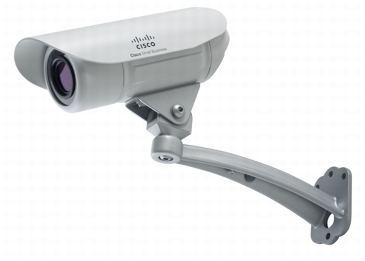
Created specifically for small businesses, the affordable Cisco VC240 Bullet Network Camera delivers superb video quality and rich monitoring features in a bullet form factor (Figure 1). It features an industry-standard dust- and moisture-resistant enclosure that is ideal for indoor and outdoor environments and places where moisture or dust might be of concern, such as manufacturing shop floors. The Cisco VC240 offers a wide dynamic range (WDR), so you can use just one camera in many situations for day and night surveillance. It works smoothly with your existing network to provide local and remote video monitoring. As part of a complete IP solution, this versatile camera can help your business see more ways to improve operations, safety, and security. The Cisco VC240 lets you:
View live video and audio of your business from anywhere, regardless of light level day or night, using an Internet-connected PC or mobile phone
Integrate alarms, door sensors, motion detectors, and other business systems into your video solution
Receive automatic alerts, including video clips or still images, whenever motion is detected on your premises
Mount the rugged indoor/outdoor camera on a ceiling or wall
Rapidly search video archives, and configure and control your camera with the included video monitoring software
Figure 1. Cisco VC240 Bullet Network Camera
Features and Benefits
The Cisco VC240 Bullet Network Camera provides:
Superior camera quality and control: The Cisco VC240 features a WDR complementary metal-oxide semiconductor (CMOS) sensor and built-in infrared (IR) LEDs and IR cut filter for optimal image quality, regardless of light level day or night. Its bullet form factor lets you focus on a specific area of your business, such as a door or cash register, to safeguard sensitive locations or to perform analytics such as counting the number of people coming in and out of your business, and at what times.
Remote monitoring: The Cisco VC240 lets you access real-time video and audio from any Internet-connected PC, mobile phone, or Universal Plug and Play (UPnP) audio/video (AV) client. Its remote accessibility lets you enjoy peace of mind when you are away from the office.
Protective enclosure: The Cisco VC240 features a rugged enclosure suitable for challenging indoor and outdoor environments such as a manufacturing floor. With an Ingress Protection rating of IP66, the camera offers robust protection against dust and moisture.
Rich application support: The Cisco VC240 supports two-way audio and input/output ports to support a variety of applications. You can link the camera surveillance system to door and motion sensors, alarms, lighting systems, or phone systems. In addition, you can add the Cisco Advanced Video Monitoring System (AVMS) software to integrate the solution with business systems such as point-of-sale (POS) equipment, perform count and analyze activities, search POS data, and retrieve video for particular transactions.
Fast, simple installation: The Cisco VC240 is easy to install on a wall or ceiling. It features Power-over-Ethernet (PoE) support, so you can power and control the camera with just one network cable. Easy to set up, an intuitive graphical user interface in the included video software makes it easy to deploy cameras and sensor systems and set up intelligent alerts.
Included video monitoring software: Other IP surveillance systems require costly video monitoring software. The Cisco VC240 includes-at no extra charge-a complete monitoring suite that lets you easily configure and control up to 16 cameras at once.
A complete surveillance solution: The Cisco VC240 is part of a growing family of IP surveillance cameras designed as a fully integrated component of your Cisco Small Business network. With a broad portfolio of small business routing and switching, data storage, and telephony technologies, Cisco offers a comprehensive video, voice, and data solution for your business.
A summary of camera features follows:
The bullet form factor of the camera supports flexible installation on ceilings or walls.
A 1-/3.3-inch WDR sensor delivers high-quality video.
The camera has a 3.3- to 12-mm varifocal board lens with auto-iris (3.6x optical zoom + 4x digital zoom).
Built-in IR LEDs with an IR cut filter offer complete day and night functions.
The camera has an audio input/output port for an external microphone or speaker.
The rugged enclosure provides an IP66 Ingress Protection rating.
I/O ports facilitate alarm triggers and facilitate turning on and off lights, etc.
PoE allows for single-cable installation.
The camera supports two codecs: MPEG-4 and MJPEG.
IP Multicast is supported.
The camera supports Real Time Streaming Protocol (RTSP) video and audio streaming to IP Unicast and IP Multicast clients.
Third-Generation Partnership Project (3GPP) support allows viewing of video on a mobile device.
When motion is detected an Event Notifications is sent to an email account or alarm log in the monitoring software.
Privacy mask available to block certain areas of image from being viewed.
RS-485 port for Pan Tilt base control.
JPEG snapshots taken at multiple resolutions can be sent to an FTP server.
The camera offers overlay text and time stamps.
A configurable intraframe setting saves bandwidth.
The camera supports up to 10 IP Unicast users and an unlimited number of IP Multicast users.
The camera supports up to a 20-user local database for access management.
The camera has a built-in web server for remote access over IP.
Management is secure, over Secure HTTP (HTTPS).
The camera housing is moisture- and dust-resistant.
Software for monitoring and recording up to 16 cameras simultaneously is included.
Specifications
Table 1 gives the specifications, package contents, and minimum requirements for the Cisco VC240 Bullet Network Camera, and Table 2 gives ordering information.
Table 1. Product Specifications, Package Contents, and Requirements
|
Specifications
|
|
Standards
|
IEEE 802.3, IEEE 802.3u, IEEE 802.1p (quality of service [QoS] Priority), IEEE 802.1q (VLAN), and IEEE 802.3af
|
|
Protocols supported
|
TCP/IP, HTTP, HTTPS, Dynamic Host Configuration Protocol (DHCP), Simple Mail Transfer Protocol (SMTP), FTP, Network Time Protocol (NTP), Domain Name System (DNS), UPnP, Real-Time Transport Protocol (RTP), Real Time Streaming Protocol (RTSP), Dynamic DNS (DDNS), Bonjour, and Jabber
|
|
Ports
|
Ethernet with PoE, microphone IN, speaker OUT, power (12V, 1A), general-purpose I/O (GPIO)
|
|
Buttons
|
Reset
|
|
Cabling type
|
Unshielded twisted pair (UTP) Category 5
|
|
LEDs
|
Power and Network
|
|
Camera type
|
Fixed bullet
|
|
I/O ports
|
Input control x 1 (2 pins)
Output control x 1 (2 pins)
|
|
Lens
|
|
Sensor
|
1-/3.3-inch WDR sensor
|
|
Illumination
|
0.4 lux @ F1.7 in day mode, 0 lux in night mode
|
|
Lens type
|
Board-mount lens, varifocal
|
|
Focal length
|
500 mm to ~infinity (for included lens)
|
|
Field of view
|
23.9 to ~89.9
|
|
Video resolution
|
640 x 480 (VGA), 320 x 240 (QVGA), and 176 x 144 (QCIF for mobile client)
|
|
Frame rate
|
Selectable 1 to 30 frames per second (fps), dual streams, and 3rd generation (3G) mobile stream
|
|
Iris
|
Fixed iris
|
|
Setup, Configuration, and Management
|
|
Web user interface
|
Built-in web user interface for easy browser-based configuration (HTTP)
|
|
Management
|
|
Web browser
|
Internet Explorer 6.0 or later and limited support for Firefox 3.0
|
|
Event logging
|
Event logging (syslog)
|
|
Web firmware upgrade
|
Firmware upgradable through web browser
|
|
Video Compression
|
|
Dual codec
|
MPEG-4 simple profile
MJPEG
Simultaneous dual stream
|
|
Snapshot
|
JPEG
|
|
Image settings
|
Brightness and contrast
|
|
Zoom
|
4x digital zoom
|
|
Night vision
|
Automatic IR filter switching for no or low light
|
|
Video controls
|
Auto-white balance (AWB) and auto-electric shutter (AES)
|
|
Image control
|
Select video by quality (variable bit rate [VBR]), bandwidth (constant bit rate [CBR]), and frame rate
|
|
Mobile Format
|
3GPP for use with 3G phones
|
|
Alerts
|
|
Motion detection
|
Three detection areas with individual sensitivity
|
|
Email alert
|
One email address per event setting
|
|
FTP uploading
|
FTP server address and login settings
|
|
Instant messaging
|
Jabber client support
|
|
Scheduled
|
Schedule by day or time
|
|
Triggers
|
Motion detection, periodic trigger by configurable minutes, digital input (1), PIR sensor, and system boot
|
|
Actions
|
GPIO Output messaging, email, and FTP
|
|
Audio
|
|
Summary
|
2-way audio (simplex) and 1-way audio
|
|
Built-in microphone
|
6 mm, -33 dB, and + 21 dB
|
|
Microphone input
|
3.5-mm phone jack
|
|
Speaker output
|
3.5-mm phone jack
|
|
Compression
|
Advanced Audio Coding (AAC) and Global System for Mobile Communications-Adaptive Multi-rate (GSM-AMR)
|
|
Sampling rate
|
8 kHz
|
|
Included Cisco Video Monitoring System Software (SWVMS16)
|
|
Monitoring and recording software
|
Monitoring and recording for up to 16 cameras
Advanced search histogram or by time and date
Recording set up to record by motion trigger, manual, or schedule recording and playback
|
|
Security
|
|
User privilege
|
Provides user rights list to view video or to control camera functions
|
|
Username and password
|
Authenticates login with optional minimum password strength
|
|
Privacy mask
|
Block specific areas of image from being viewed and recorded
|
|
Network
|
|
RTP and RTSP
|
Allow for viewing from any client supporting these protocols, such as 3G phones or Apple QuickTime client
|
|
NTP
|
Keeps time of camera in sync with your network
|
|
SMTP
|
Allows video clips to be emailed
|
|
FTP client
|
Facilitates scheduling transfer of images to an FTP server
|
|
DDNS
|
Facilitates reaching the camera by a name irrespective of IP address of camera; supports DynDNS and TZO Dynamic DNS services
|
|
UPnP
|
Allows autodiscovery of the camera by other UPnP devices
|
|
IP filtering
|
Allows or denies access by IP address
|
|
Power
|
|
Power options
|
IEEE 802.3af Power over Ethernet (PoE): 48V, 0.3A
12 VDC: Common AC wall adapter (optional)
24 VAC: Common security voltage (optional)
|
|
Power consumption
|
10W
|
|
Environmental
|
|
Dimensions (H x D)
|
4.17" x 5.63"
|
|
Unit weight
|
2.76 lb (1.25 kg)
|
|
Power
|
PoE 48V, 0.3A or optional power adapter; 12 or 24 VDC, 1A 110 to 240 VAC, 60-Hz switching
|
|
Certification
|
FCC part 15C class B, CE, UL, EMC/EMI part 15B class B for US, GOST-R
|
|
Operating temperature
|
-4 to 140 degrees F (-20 to 60 degrees C)
|
|
Storage temperature
|
-40 to 158 degrees F (-40 to 70 degrees C)
|
|
Operating humidity
|
20 to 80%
|
|
Storage humidity
|
0 to 90%
|
|
Package Contents
|
|
Cisco VC240 Bullet Network Camera
Wall and ceiling mount arm
Mounting accessories (ceiling-mount anchors and screws, terminal connectors)
6-foot (1.83m) weatherproofed cable bundle (includes connections for Ethernet, 12v 1A external power supply, microphone input, audio output, 24VAC, IO port, RS-485 port, LED and ground wire)
Quick installation guide
CD with discovery tool, Cisco Video Monitoring System software, and user documentation
|
|
Minimum Requirements (Computer with 1-Camera Viewing via browser)
|
|
Wired Ethernet network
Wired or wireless PC with TCP/IP protocol installed
Switch or router to support multiple connection points
Internet Explorer Version 6 or later with ActiveX support for viewing
Microsoft Windows Vista, or XP
2-GHz Pentium 4, or AMD Athlon Class CPU with 512-MB RAM
Video adapter with 128-MB memory
|
|
Minimum Video Monitoring System Requirements (4-Camera Viewing)
|
|
CPU: Intel Pentium 4; 2.4 GHz
RAM: 512 MB
Motherboard: Intel 945 or 965 chip or later; Intel chipset recommended
Video card: ATI Radeon 9200, NVIDIA GeForce FX-5200, or Intel 945G/965G or later; ATI recommended
Ethernet: 100BASE-T or later; Gigabit LAN recommended
Hard disk: 80 GB or more
Operating system: Microsoft Windows XP Pro Service Pack 2, or Microsoft Vista
|
Table 2. Ordering Information
|
Part Number
|
Description
|
|
VC240-K9
|
Cisco VC240 Bullet Network Camera
|