Camerafarm product archive #40719
| Image |
Date |
Product description |
Price |
Buy |
|
27/06
|
HP SD741A #564 Photo Storage Box Value Pack Ink Cartridge - 1xCyan, 1xMagenta, 1xYellow + 80xSheets 10x15cm SD741A
HP 564 Series Photosmart Value Pack-85 sht/4 x 6 in with Photo Storage Box
3 ink cartridges (cyan, magenta, yellow); 85 sheeets of 4 x 6-in paper; Photo Storage Box
Print beautiful photos and save 20%,[5] with enough ink and paper to print lab-quality photos at homeall in a limited edition package that doubles as a unique storage and display box.[1] This photo value pack includes 85 sheets of 4 x 6-inch HP Advanced Photo Paper and Original HP 564 Cyan, Magenta and Yellow ink cartridgesdesigned to work together for brilliant results. Water-resistant photos will last for generations to come.
| Media handling |
| Paper film dimensions |
|
| Media dimensions (single sheet) |
|
| Media finish |
|
| Media sheets per package |
|
| Shelf life |
|
| Print material weight |
|
| Print material weight |
|
| Printing |
| Colour(s) of print cartridges |
|
| Print cartridge volume delivered |
|
| Ink drop |
|
| Compatible ink types |
|
| Page yield (colour) |
|
| Print head nozzles |
| 336 HDW, 336 LDW (per cartridge) |
|
| Printhead swath (inch) |
|
| Retail only flag |
|
| Resolution technology |
|
| Print technology |
|
| Environmental information |
| Operating temperature range |
41 to 104 F |
| Storage humidity |
5 to 80% RH |
| Count of carton in pallet |
50 |
| Case weight (case or master carton) |
5.34 kg |
| Product count per unit |
1 |
| Package dimensions |
7.25 x 5.38 x 2.5 in |
| Quantity per pallet |
400 |
| Case or master carton quantity |
8 |
|


|
|
|
27/06
|
Canon Speedlite 320EX Speedlite 320EX
Your route into creative flash photography
The 320EX Speedlite is the perfect entry level speedlite. It allows you to bounce light off ceilings vertically and horizontally for greater control of low light situations, ideal for portrait shots. Utilise the built-in LED light to control lighting situations when filming video.
High power, compact design
Despite being lightweight and portable, the Speedlite 320EX has a Guide Number of 32 (m, ISO 100) giving it enough has enough power to illuminate large areas and distant subjects.
Bounce,
swivel and zoom flash head
The Speedlite 320EXs flash head can be raised by 90 degrees and rotated left and right allowing flash to be bounced off walls and ceilings for a softer, shadow-free look. The angle of illumination may be zoomed to match the angle of view of a 24 or 50mm lens.
Integrated
LED
video light
With a built-in continuous LED light source, the Speedlite 320EX is as useful for low-light video shooting as it is in still photography.
Easy to
use
off-camera flash
Canons Wireless Slave functionality makes ensures the Speedlite 320EX is as easy to use in off-camera as it is in the hotshoe, opening up countless creative lighting opportunities.
Remote
shooting
Experiment with different lighting positions quickly and easily by using the Remote Release button to trigger the camera remotely from up to 5m away, whilst you adjust the lighting.
Fast silent operation
Four AA/LR6 batteries power the Speedlite 320EX, enabling it to recycle silently after a full-power discharge in just 2.3 seconds.
Technical Specifications
Max Guide Number (ISO 100, in metres/feet) - 24/79 (24mm) / 32/105 (50mm) Manually change
Effective Flash Range - 0.7 – 22.9m
Min Recycling time - Approx 0.1 – 2.3 sec (normal)
Silent Recycling - Yes
Custom Functions - 4
Power source - 4 x AA/LR6 alkaline batteries (AA/LR6 Ni-MH & lithium batteries also usable)
Battery Life - 180-1000 flashes
Dimensions (W x H x D) - 70 x 115 x 78.4 mm
Weight - Approx 264g
|
|
|
|
27/06
|
Canon Speedlite 270EX II Speedlite 270EX II
A Powerful and versatile flashgun that you can take anywhere.
The 270EX II Speedlite is the perfect speedlite for the entry level DSLR photographer. It allows you to control your lighting situations easily to capture high quality photos. Ideal for travel and everyday photography.
Features
compact
design
The Canon Speedlite 270EX II weighs just 155g (without batteries) and its compact design means it will find a space even in the smallest of kit bags.
High
power
output
Despite its diminutive size, the Speedlite 270EX II has plenty of power, with a guide number of 27 (m, ISO100) allowing long-range flash photography. E-TTL II metering with compatible cameras gives accurate flash exposure in all situations, even when bouncing light from a wall or ceiling.
Bounce
flash head
A bounce head allows the Speedlite 270EX IIs flash output to be bounced off the ceiling for soft, shadowless lighting.
Easy
to use off-camera flash
The Speedlite 270EX II can be triggered remotely by a compatible camera or Speedlite flash and is as easy to use in off-camera mode as it is in the hotshoe, opening up countless creative lighting opportunities.
Remote
shooting
Experiment with different lighting positions quickly and easily by using the Remote Release button to trigger the camera remotely from up to 5m away, whilst you adjust the lighting.
Zoom
head
Match the coverage of the Speedlite 270EX IIs output to a lens angle of view by adjusting its zoom head to either the 28mm or 50mm setting.
Fast silent recycling
Two AA/LR6 batteries power the Speedlite 270EX II enabling it to recharge silently from a full-power discharge in 3.9sec.
Technical Specifications
Max Guide Number (ISO100, in metres/feet) - 22/72 (28mm) / 27/89 (50mm) Manually change
Effective Flash Range - 0.7 – 19.3m
Min Recycling time - Approx 0.1 – 3.9sec (normal)
Silent Recycling - Yes
Custom Functions - 4
Power source - 2 x AA/LR6 alkaline batteries (AA/LR6 Ni-MH & lithium batteries also usable)
Battery Life - 100-680 flashes
Dimensions W x H x D) - 65.8 x 65.2 x 77 mm
Weight - Approx 155g
|
|
|
|
27/06
|
Canon EF-S 18-55mm f/3.5-5.6 IS II, AF (DC Motor), With Manual Focus Option, Zoom Lens EF-S 18-55mm f/3.5-5.6 IS II
Standard Zoom
Overview
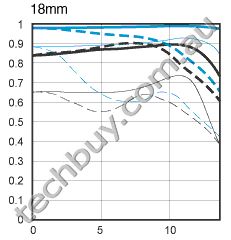
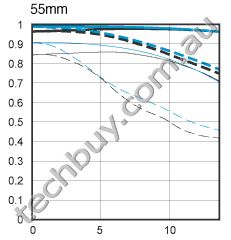
In response to demands of photographers, this standard zoom lens is designed with Canon's Optical Image Stabilizer technology while retaining the compactness and lightness of previous models. Its stabilization allows sharp hand-held shots at shutter speeds up to four stops slower than otherwise possible. It consists of 11 elements in 9 groups and uses an Aspherical lens element to correct aberration for excellent image quality throughout the zoom range and a circular aperture for exquisite rendering of out-of-focus backgrounds. Without a lot of size, weight or cost, this lens expands picture-taking possibilities any time slow shutter speeds are needed.
Specifications
Main Unit Spec
| Focal Length & Maximum Aperture |
18-55mm f/3.5-5.6 |
| Lens Construction |
11 elements in 9 groups |
| Diagonal Angle of View |
74 20' - 27 50' |
| Focus Adjustment |
AF (DC motor), with manual focus option |
| Closest Focusing Distance |
9.8 in./0.25m |
| Filter Size |
58mm, P=0.75mm/1 filter |
| Max. Diameter x Length, Weight |
2.7 in. x 3.33 in./68.5mm x 84.5mm (maximum lens length), 7.1 oz. (200g) |
|
|
|
|
27/06
|
Lenovo 32GB Essential Flash Drive - USB2.0 - Black Lenovo USB 2.0 Essential Memory Key - 32GB
Part number: 45K1258
Overview
The Lenovo USB 2.0 Essential Memory Key 32GB flash storage device lets you share data between any notebook or desktop system with a functional USB port without a diskette drive. The storage capacity can be used for your text, presentations, spreadsheets, multimedia files, or other storage needs. The Lenovo USB 2.0 Essential Memory Key 32GB memory key is plug-and-play ready and does not require software drivers for operation.
Features and Benefits:
- Extremely lightweight
- Large 32 GB capacity for additional storage or back-up
- Very low failure rates due to no mechanical parts
- Compatible with USB 1.1 and USB 2.0 ports
- Easily share data between desktops, workstations, docks, and laptops
- Plug-and-play ready
- Does not require software drivers for operation
Specifications
| General |
Part number |
45K1258 |
| Description |
Lenovo USB 2.0 Essential Memory Key - 32GB |
| Limited warranty[7] |
Limited warranty period |
One year |
| Environmental Information |
Maximum Operating YYYY |
80 % |
| Maximum Operating Temperature |
50 C |
| Minimum Operating HumidityXXX |
20 % |
| Minimum Operating Temperature |
0 C |
| Architecture |
Depth Metric |
20.0 mm |
| Height Metric |
8.3 mm |
| Height US |
3.3 in |
| Weight Metric[2] |
0.0155 Kg |
| Weight US[2] |
0.034 lbs |
| Width Metric |
96.3 mm |
| Width US |
37.9 in |
|
|
|
|
27/06
|
Lenovo 41N3040 Gemalto GemPC USB Smart Card Reader - Black Gemalto GemPC USB Card Smart Card Reader from Lenovo
Part number: 41N3040
Overview
Add Smart Card security technology to your ThinkPad notebook or ThinkCentre desktop system. The Gemplus GemPC USB Smart Card Reader from Lenovo offers an ideal interface between a computer and a smart card, to control access to databases or corporate computer networks.
Features & Benefits:
Easily connects to an available USB port on a ThinkPad notebook or ThinkCentre desktop system
Includes drivers and software for Microsoft Windows 2000 and Windows XP to help get you up and running quickly
Backed by Lenovo's limited warranty with renowned Service and Support available from IBM
Note: Reader hardware only. Does not include blank smart cards.
Specifications
| General |
Part number |
41N3040 |
| Description |
Gemalto GemPC USB Card Smart Card Reader from Lenovo |
| Limited warranty |
Limited warranty period |
One year |
| Environmental Information |
Maximum Operating Temperature |
55 C |
| Minimum Operating Temperature |
5 C |
| Architecture |
Depth Metric |
15 mm |
| Height Metric |
98 mm |
| Height US |
3.85 in |
| Weight Metric[2] |
0.076 Kg |
| Weight US[2] |
0.16 lbs |
| Width Metric |
70 mm |
| Width US |
2.7 in |
|
|
|
|
27/06
|
Techbuy eBay PamphleteBay Pamphlet
|

|
|
|
27/06
|
Adobe FreeHand MX 11 - Mac, Retail FreeHand MX
Mac, Retail, English
Create illustration and layout for print and web
Use FreeHand MX for creative design, storyboarding, document production, and editing with an unparalleled set of creative design tools. Easily repurpose your designs for print, the Internet, or Adobe Flash.
Adobe and the Future of FreeHand
No updates to FreeHand have been made for over four years, and Adobe has no plans to initiate development to add new features or to support Intel-based Macs and Windows Vista.
Note: Freehand does not work with Mac OS X 10.6 or higher.
To support customer workflows, we will continue to sell FreeHand and offer technical and customer support in accordance with our policies.
While we recognize FreeHand has a loyal customer base, we encourage users to migrate to the new Adobe Illustrator CS5 software which supports both PowerPC and Intel-based Macs and Microsoft Windows XP and Windows Vista.
Illustrator CS5 offers powerful new features, including functionality designed to appeal to FreeHand users, such as multiple artboards, the Blob Brush tool and transparency in gradients.
FreeHand customers can switch to Illustrator CS5 for US$199 (volume licensing also available), and access complimentary resources to ease the transition. For additional information, please visit www.adobe.com/illustrator.
The creative design solution for print, Internet, and Adobe Flash
Realize your creative vision with an unparalleled set of creative design tools. Only FreeHand MX has everything you need to move seamlessly from concept through design, production, and publishing in a streamlined graphics environment all while working with a single document. Use FreeHand MX for storyboarding, creative design, multipage document production, and editing. Whether you're designing for print, the Internet, or Adobe Flash, you can repurpose your FreeHand MX projects across multiple mediums quickly and efficiently.
Easy
Quickly go from concept to design and publishing in print, Internet, and Flash projects. FreeHand MX provides a streamlined, easy-to-learn graphics environment for designing illustrations, organizing information, laying out storyboards, and developing click-through presentations.
Enhance productivity with a highly customizable workspace. The Object panel eliminates the need to move between multiple panels to inspect and change object, text, and style properties. Tools panel organization and a streamlined workflow make FreeHand MX easy to learn and use.
Quickly organize and map navigation, content, components, and data flows. Drag and drop to build persistent relationships between objects while providing complete editability of stroke styles with the Connector Lines tool. Achieve maximum editability and reduce production and revision times using master pages and backgrounds, Symbol libraries of data types and navigation components, and the graphics-based Find & Replace panel.
Produce immersive presentations and click-throughs for proof-of-concept proposals and client approvals. Drag and drop interactivity between objects and pages with the Action tool. Assign ActionScript commands in the easy-to-use Navigation panel. Quickly publish to SWF format for easy distribution.
Powerful
Rapidly create and edit visually rich designs and illustrations that provide maximum impact. FreeHand MX includes a powerful and flexible set of vector-based tools for designing print layouts, animations in Flash, or application interfaces.
Layer complex visual appearances on individual vector objects. With multiple attributes you can apply and organize an unlimited number of strokes, fills, and effects on a single object, from a single panel eliminating the need to keep up with and edit multiple copies of an object for the same visual appearance.
Easily build rich graphical components for ads, interface objects, and attention-grabbing headlines. Apply path manipulation effects such as bend and transform while maintaining editability of the original shape with live vector effects. Provide high-resolution, realistic appearances such as drop shadow and bevel with live raster effects. Create 3D appearances with the Extrude tool.
Quickly reshape graphic primitives while maintaining editability. Round rectangle corners, turn ovals into arcs, and change the number of points on stars all within the workspace.
Open
Design, lay out, and animate SWF movies in a familiar design environment. Place existing SWF components and applications directly into your FreeHand MX layouts, maintaining complex ActionScript programming. Drag and drop advanced ActionScript commands for navigation, printing, or interaction with external SWF movies. Animate blends and assign persistent background elements in a familiar multipage layout metaphor.
Easily preview and export optimized SWF movies. Preview SWF movies in the design environment using the built-in SWF Controller. Set up SWF export with the redesigned, easier-to-understand Movie Settings button. Export SWF movies that are smartly optimized for minimum file size using automatic symbol assignments and the latest Flash compression.
FreeHand MX Top Features
Multiple Attributes
Apply unlimited stroke, fill, and effect attributes to a single vector or text object.
Action Tool
Drag and drop complex Macromedia Flash actions between objects, symbols, and pages.
Connector Lines Tool
Quickly map information architecture, data flows, and site maps.
- More new features
- Top 10 FreeHand MX features
- System requirements
- FAQ

Multiple Attributes
FreeHand MX in Action
See FreeHand MX in Action
Do even more with your designs with new FreeHand MX multipublishing features
Multiple Attributes
Add more visual punch to your designs and illustrationsapply unlimited stroke, fill, and effect attributes to a single vector or text object. Multiple attributes eliminate the need to stack duplicates of an object to create a particular appearance, making updates easier, faster, and leaving fewer objects to manage.
Object Panel
Now you can quickly inspect and change object and text propertiessuch as stroke, fill, font, or effectin one centralized location. In addition, the Object panel provides localized stacking control of multiple attributes for unlimited and unique visual appearances. You can also drag and drop between the Object and Styles panels to create, edit, and redefine graphic and text styles.
Live Effects
Maximize creative expression with live effects, which apply complex distortions and effects without altering the original object. FreeHand MX includes vector effects (such as bend, sketch, and transform) and raster effects (like bevel, drop shadow, and gradient transparency). The complete control of ordering provided in the Object panel allows you to apply effects in any order, to all or selected attributes of the object.
Live-Edit Graphic Primitives
Quickly and easily reshape rectangles, ellipses, and polygons while maintaining the control and editability of FreeHand MX graphic primitives. Easily round rectangle corners and mix concave or convex, convert ellipses to arcs, or change polygons to stars with editable numbers of points.
Macromedia Flash Integration
Increase productivity and streamline development of Macromedia Flash projects. Plan, layout and design entire projects in single document. Now you can even import more complex Macromedia Flash movies (SWFs) into your FreeHand MX document and integrate them into your designs before exporting back out to SWF with improved efficiency. Placed SWFs can be edited using launch and edit in Macromedia Flash functionality. Macromedia Flash can also open and import FreeHand MX files.
Action Tool
Drag and drop complex Macromedia Flash actions between objects, symbols, and pages. Assign simple actions like Go To and Play, or Go To and Stop, as well as more complex behaviors such as Get URL or Load External Movie.
Connector Lines Tool
Quickly map information architecture, data flows, and site maps with the Connector Lines tool. Just drag the tool to assign persistent relationships between objects. Connector Line styles let you completely customize the appearance of connectors and quickly apply them.
Creative Capabilities
Realize your creative vision with a collection of enhanced tools and functionality. Create exciting 3D appearances with the Extrude tool, which gives complete live control over extrude attributes, including 3D rotations, lighting, and shared vanishing points. Drag and drop the Blend tool to create and modify live blends, or use the Eraser tool to modify paths in an, organic way. Additionally, FreeHand MX now provides alpha channel support for imported bitmaps.
Fireworks Integration
Streamline your graphics development workflow with enhanced Fireworks integration. Launch and edit imported bitmap images with a single click in the FreeHand MX Object panel, make your changes in Fireworks, then click back in FreeHand MX your image is now updated, without losing any effects or transformations applied to the original FreeHand MX image. You can also open or import FreeHand MX files directly in Fireworks, with improved vector and text reliability and editability.
System Requirements
FreeHand MX 11.0
Macintosh
- PowerPC G3 500MHz processor
- Mac OS X 10.2.6 through 10.3
- 64MB of RAM (128MB recommended)
- 70MB of available hard-disk space
|
|
|
|
27/06
|
Adobe Director 11.5 - Windows, Retail Adobe Director 11.5
Windows, Retail
Introducing Director 11.5
All-new Audio Engine Plus Enhanced Video and 3D Support.
Explore new dimensions in rich multimedia authoring
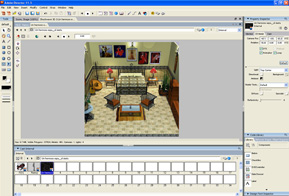
Adobe Director 11.5 and Adobe Shockwave Player software help you create and publish compelling interactive games, demos, prototypes, simulations, and eLearning courses for the web, Mac and Windows desktops, DVDs, and CDs. Integrate virtually any major file format, including FLV and native 3D content, for the greatest return on your creativity.
What's new
Play game: Cybershock - Panic Station
Experience the new demo game developed using Director 11.5
Play the game
Play game: GoKartGo!Turbo!
Experience the new demo game developed using Director 11.5
Play the game
See Demo: Director 11.5 Audio capability
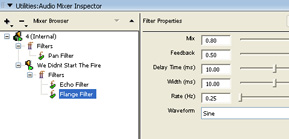
A fully functional Audio Mixer to experience the power of Director 11.5 Audio
Play game: aquo-thon Mountain Bike Extreme Race
Experience the new features of Director 11.5 in the aquo-thon Mountain Bike Extreme Race, or try it in demo mode to learn more.
Play the game
Shockwave Player
Download the latest version of Shockwave Player to experience high-performance multimedia created in Director.
Case study: Maid Marian Entertainment
Independent game developer embraces Adobe Director and Shockwave Player to deliver immersive 3D MMO games online
Director Showcase
See exciting apps developed in Director 11.5 by the prerelease community.
Serious Games: Online Games for Learning
Find out how learning designers and game developers are collaborating to provide leading organizations with powerful new learning experiences.
Top features
Support for more than 40 video, audio, and image file formats
Incorporate content in virtually every major format, including SWF, DVD-Video, and other video formats, as well as the broadest range of audio and graphics formats, including bitmaps, vectors, text, and 3D.
Strong video capabilities
Create an enhanced multimedia experience using H.264-video integration that lets you play full-screen, high-definition video in your multimedia applications and games. Stream audio and video over the Internet using Real Time Messaging Protocol (RTMP) support.
Enriched audio capabilities
Make your multimedia applications and games sound as real as they look with state-of-the-art audio capabilities that include 5.1 channel surround sound, 16-channel sound mixing, and advanced filters.
Powerful 3D support
Incorporate 3D to deliver more engaging experiences. Rapidly create rich 3D environments using millions of ready-made 3D models available via Google SketchUp, and take advantage of DirectX 9 support for native 3D rendering.
Advanced physics with NVIDIA PhysX support
Build games with realistic collisions and create simulations that model real-world gravity and other forces. The NVIDIA PhysX physics engine delivers advanced dynamic motion and interaction.
Support for Adobe Flash 9 software and video created with Flash technology
Expand your creative options by seamlessly importing content created with Adobe Flash 9 software into your applications. Launch Flash (version 8 or earlier) from within Adobe Director software and have your changes saved automatically.
Unicode support
Easily localize your games, applications, demos, training courses, and prototypes for international markets with Unicode support.
Enhanced text rendering engine
Display smooth, crisp text in your demos, courses, games, and other applications with a more powerful text engine that improves font rendering.
New datatype
Access and manipulate binary data using ByteArray datatype.
Enhanced Script Browser
Save time working with script-sensitive movies using the enhanced Script Browser, which provides click-and-script convenience; easy access to information about functions, events, keywords, and commands; and a complete Lingo and JavaScript dictionary.
Bitmap filters
Achieve an even wider variety of rich visual effects, including blur, drop shadow, bevel, glow, and more, with bitmap filters that you can apply through the user interface or scripting.
Xtra plug-ins
Extend your authoring environment, as well as the playback engine, with an ever-expanding ecosystem of third-party Xtras.
Easy multiversion output
Broaden your market reach by authoring once and publishing across platforms and technologies with output that is customer-ready for virtually all computers, kiosks, DVDs, CDs, and the web.
System Requirements
Adobe Director 11.5: Authoring
Windows
- Intel Pentium 4 processor
- Microsoft Windows XP with Service Pack 2 or Windows Vista
- 512MB of available RAM
- 500MB of available hard-disk space
Director Projector and Shockwave Player: Playback
Windows
- Intel Pentium 4 processor
- Microsoft Windows XP with Service Pack 2 or Windows Vista
- 512MB of RAM
- Microsoft Internet Explorer 6.0 or 7.0 or Firefox 2.0
Language versions
This product is available in the following languages:
- English
- French
- German
- Japanese
|
|
|
|
27/06
|
Adobe Director 11.5 - Mac, Retail Adobe Director 11.5
Mac, Retail
Introducing Director 11.5
All-new audio engine plus enhanced video and 3D support.
Explore new dimensions in rich multimedia authoring
Adobe Director 11.5 and Adobe Shockwave Player software help you create and publish compelling interactive games, demos, prototypes, simulations, and eLearning courses for the web, Mac and Windows desktops, DVDs, and CDs. Integrate virtually any major file format, including FLV and native 3D content, for the greatest return on your creativity.
What's new
Play game: Cybershock - Panic Station
Experience the new demo game developed using Director 11.5
Play the game
Play game: GoKartGo!Turbo!
Experience the new demo game developed using Director 11.5
Play the game
Director 11.5 Audio capability
A fully functional Audio Mixer to experience the power of Director 11.5 Audio

Play game: aquo-thon Mountain Bike Extreme Race
Experience the new features of Director 11.5 in the aquo-thon Mountain Bike Extreme Race, or try it in demo mode to learn more.
Play the game
Shockwave Player
Download the latest version of Shockwave Player to experience high-performance multimedia created in Director.
Case study: Maid Marian Entertainment
Independent game developer embraces Adobe Director and Shockwave Player to deliver immersive 3D MMO games online.
Director Showcase
See exciting apps developed in Director 11.5 by the prerelease community.
Serious Games: Online Games for Learning
Find out how learning designers and game developers are collaborating to provide leading organizations with powerful new learning experiences.
Top features
Support for more than 40 video, audio, and image file formats
Incorporate content in virtually every major format, including SWF, DVD-Video, and other video formats, as well as the broadest range of audio and graphics formats, including bitmaps, vectors, text, and 3D.
Strong video capabilities
Create an enhanced multimedia experience using H.264-video integration that lets you play full-screen, high-definition video in your multimedia applications and games. Stream audio and video over the Internet using Real Time Messaging Protocol (RTMP) support.
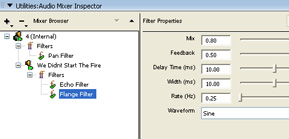
Enriched audio capabilities
Enriched audio capabilities
Make your multimedia applications and games sound as real as they look with state-of-the-art audio capabilities that include 5.1 channel surround sound, 16-channel sound mixing, and advanced filters.
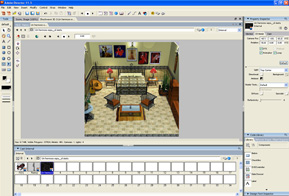
Powerful 3D support
Powerful 3D support
Incorporate 3D to deliver more engaging experiences. Rapidly create rich 3D environments using millions of ready-made 3D models available via Google SketchUp, and take advantage of DirectX 9 support for native 3D rendering.
Advanced physics with NVIDIA PhysX support
Build games with realistic collisions and create simulations that model real-world gravity and other forces. The NVIDIA PhysX physics engine delivers advanced dynamic motion and interaction.
Support for Adobe Flash 9 software and video created with Flash technology
Expand your creative options by seamlessly importing content created with Adobe Flash 9 software into your applications. Launch Flash (version 8 or earlier) from within Adobe Director software and have your changes saved automatically.
Unicode support
Easily localize your games, applications, demos, training courses, and prototypes for international markets with Unicode support.
Enhanced text rendering engine
Display smooth, crisp text in your demos, courses, games, and other applications with a more powerful text engine that improves font rendering.
New datatype
Access and manipulate binary data using ByteArray datatype.
Enhanced Script Browser
Save time working with script-sensitive movies using the enhanced Script Browser, which provides click-and-script convenience; easy access to information about functions, events, keywords, and commands; and a complete Lingo and JavaScript dictionary.
Bitmap filters
Achieve an even wider variety of rich visual effects, including blur, drop shadow, bevel, glow, and more, with bitmap filters that you can apply through the user interface or scripting.
Xtra plug-ins
Extend your authoring environment, as well as the playback engine, with an ever-expanding ecosystem of third-party Xtras.
Easy multiversion output
Broaden your market reach by authoring once and publishing across platforms and technologies with output that is customer-ready for virtually all computers, kiosks, DVDs, CDs, and the web.
Multimedia authors
Easily create and publish interactive CD-ROM discs, kiosks, and rich Internet applications (RIAs). Realize the greatest return on your creativity with cross-platform authoring and playback.
Game developers
Develop engaging experiences with state-of-the-art audio capabilities, native 2D/3D rendering, and enhanced built-in physics with NVIDIA PhysX technology.
eLearning application authors
Engage learners by adding new dimensions to your training and simulation applications.
System Requirements
Mac OS
- Multicore Intel processor
- Mac OS X v10.4
- 512MB of available RAM (1GB recommended)
- 500MB of available hard-disk space
|
|
|
|
Previous Page
|
Next Page
|
|