|
09/06
|
Sony Vegas Movie Studio HD Platinum 11 - Windows, Retail
Professional-Level Power for Your Home Studio
Vegas Movie Studio Platinum Edition software has everything needed to produce spectacular HD movies. You can edit video in nearly any format including HDV and AVCHD. Included are innovative stereoscopic 3D tools, powerful features for video compositing, color correction, and soundtrack creation for feature-film results in your home studio. Use the surround sound mixing tools to create 5.1 soundtracks. Choose from hundreds of professional 2D and 3D video effects, titles, and filters. Upload movies to YouTube, burn to Blu-ray Disc, or author DVDs using beautifully designed themes or create custom menus and graphics. Exclusive Sony Show Me How interactive tutorials help you get started fast.
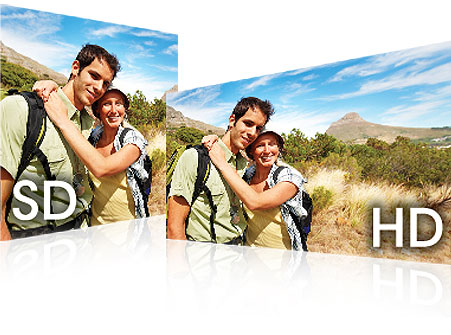
Standard or high definition
Edit video in nearly any format including HDV and AVCHD. Work simultaneously with standard definition and high definition in the same project.
More about video editing
Simple DVD and Blu-ray Disc creation
DVD Architect Studio software is included so you can easily create and burn professional-looking DVD and
Blu-ray Disc projects with custom menus, buttons, backgrounds, and navigation. 56 easy-to-use themes are included to get you started.
More about DVD and Blu-ray Disc authoring
New! Stereoscopic 3D editing
Create stereoscopic 3D projects as easy as 2D projects, with no additional tools needed. In addition to consumer level delivery formats, Vegas Movie Studio HD Platinum 11 can preview and deliver an anaglyphic project providing customers, without an expensive 3D monitor, the ability to create a 3D project with only a pair of inexpensive red/cyan glasses.
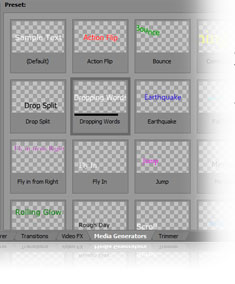
New! Titles & Text plug-in
Spice up your text events with animations and interesting effects. The Titles & Text plug-in incorporates some of the options of the Pro Type Titler (Vegas Pro), but has an intuitive and easy-to-use interface.
New! Transport Controls for Trimmer and Video Preview
Transport Controls provide more intuitive and immediate command over editing, as well as improve the overall workflow, productivity, and editing experience.
Enhance and stabilize
Choose from hundreds of professional 2D and 3D video effects, titles and filters. Automated and advanced color-correction tools enhance washed-out footage. Quickly salvage shaky media with video stabilization.
More about video editing and stabilization
Device Explorer
Use the new Device Explorer window to quickly browse the contents of AVCHD, hard disc and Memory Stick devices. Quickly view media on the device and import the files into the software, maximizing workflow speed by only importing the files needed without conversion.
Customizable window layouts
Organize and save the Vegas Movie Studio HD Platinum 11 editing environments to fit the way you work. You can dock floating windows together and reorganize the interface to suit your needs. Create, save, and recall multiple interface layouts for various editing tasks.
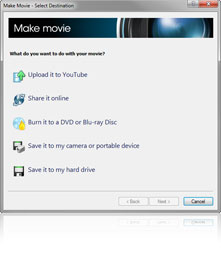
New! Render, Project, and Make Movie dialogs
These new and improved dialog boxes make it easier for users of any skill level to create new projects, export completed projects, or burn existing projects to a DVD or Blu-Ray Disc.
Share your creations
CD, DVD and Blu-ray Disc burning is fully integrated into Vegas Movie Studio HD Platinum 11 software so you can easily create professional-level discs. Burn audio files one track at a time or choose disc-at-once (DAO) to burn a disc with full control over the pauses between tracks. Quickly burn media on the timeline to a simple DVD or Blu-ray Disc or author a completed project with menus and custom graphics using the included DVD Architect Studio software.
More about DVD and Blu-ray Disc authoring
Technical specifications
Vegas Movie Studio HD Platinum software has everything you need to produce movies in spectacular high definition and burn to DVD or Blu-ray Disc. Its high-performance engine is beyond fast see your changes happen in real time. You can even work simultaneously with standard-definition and high-definition video in the same project.
Vegas Movie Studio HD Platinum system requirements
- Microsoft Windows XP SP3, Windows Vista SP2, or Windows 7
- 2 GHz processor (multicore or multiprocessor CPU recommended for HD or stereoscopic 3D)
- 400 MB hard-disk space for program installation
- 1 GB RAM (2 GB recommended)
- Windows-compatible sound card
- OHCI-compatible i.LINK connector*/IEEE-1394DV card (for DV capture and
print-to-tape)
- USB 2.0 connection (for importing from AVCHD or DVD camcorders)
- Apple QuickTime 7.1.6 or later
- Internet Connection (for Gracenote MusicID Service)
- DVD-ROM drive (for installation from a DVD only)
- Supported CD-recordable drive
(for CD burning only)
- Supported DVD-R/-RW/+R/+RW
(for DVD burning only)
- Supported BD-R/-RE drive drive
(for Blu-ray Disc burning only)
- Microsoft .NET Framework 3.0 (included on application disc)
You must provide registration information to Sony Creative Software Inc., a US company, in order to activate the software. Product requires online registration within 30 days.
Vegas Movie Studio HD Platinum 11 Features
General Features
- New! Transport Control support for Trimmer and Preview Window
- New! Horizontal Window Docking
- New! Titles & Text Plug-in
- Microsoft Windows 7 certified
- Streamlined New Project creation wizard
- Darker color palette
- Customizable windows layouts
- Device Explorer Window
- Slideshow Creator
- Save As dialog with Copy media with project check box
- Media Generator Match Event Length
- Keyboard modifiers
- Time Selection Envelope editing
- Automatically crop still images
- 360 exclusive music soundtracks
- Improved native HDV .m2t playback performance and improved memory handling for HDV long form projects
- Sony AVCHD enhancements
- Freehand envelope drawing on the timeline.
- Display of media marker names in events.
- Color-coded visual snap indicator and the ability to snap to event edges on other tracks
- Multitrack video and audio editing
- Real-time editing of parameters during playback
- Support for any aspect ratio (4:3, 16:9, etc)
- Supports multiple file formats and frame rates
- High-definition editing and output
- Simple drag-and-drop operations
- Built-in Show Me How interactive tutorials
- Explorer view
- Project media bins
- Track markers and regions
- Unlimited undo/redo
Video Features
- New! Stereoscopic 3D editing
- New! Added support for 24p, 50p and 60p projects
- New! Enhanced Video Plug-in architecture
- New! Added support for MVC and MPO file formats
- New! Single-Display 3D Support
- Up to 10 video tracks
- Image stabilization
- White Balance video plug-in
- Secondary Color Corrector plug-in
- Subclips in the Trimmer window
- Automatic Video Preview playback optimization
- Adjust source media to automatically match project or render settings
- Gradient Wipe transition
- Full-screen preview to a primary and secondary Windows display
- Real-time playback of effects, processes and transitions to external monitor
- Color-correction tools
- MPEG-1&2 support
- Superior frame rate conversions
- Credit rolls and text animation
- Over 400 video effects and transitions
- External monitor preview
- Ripple editing across tracks
Supported File Formats
Opens: AAC, AA3, AIFF, AVI, BMP, CDA, FLAC, GIF, JPEG, MP3, MPEG-1, MPEG-2, MPEG-4, MVC, OGG, OMA, PCA, PNG, RealMedia , QuickTime , SND, SFA, W64, WAV, WDP, WMA, WMV
Saves: AAC, AC3, AA3, AIFF, AVC, AVI, BMP, FLAC, JPEG, LPEC, MP3, MPEG-2, MPEG-4, MVC, OGG, PCA, PNG, RealMedia , TIFF, QuickTime, W64, WAV, WDP, WMA, WMV
Capture/Export/Hardware Features
- New! Improved Quicktime AVC decode
- New! Improved Render and Make Movie Dialogs
- New! File format and template updates
- New! OpenCL AVC Encode through OrangeFrost
- New! Upload 3D projects to YouTube 3D
- Integrated DVD burning from the timeline
- Render As dialog templates display templates matching the project with a "=" symbol
- Custom render template creation
- Improved support for AVC/AAC (MPEG-4) video
- Support for GPU-accelerated AVC rendering using the Sony AVC plug-in
- Burn to Blu-ray Disc from timeline
- Integrated upload to YouTube
- Import and export support for FLAC files
- Import support for LPEC files
- Import support for MJPEG-encoded AVI files
- Sony AVCHD import and edit support
- Import and export ATRAC3, ATRAC3plus, and ATRAC Advanced Lossless files
- Insert I-frames at marker positions when rendering MPEG-2 (works in conjunction with I-frame viewer in DVD Architect Studio 5.0)
- Gracenote MusicID CD album identification
- AC3 stereo and 5.1 encoding
- MainConcept AVC/AAC, read/write (templates only) iPod format
- PSP (PlayStation Portable) integration
- Sony AVC/AAC (templates only)
|


|
|