Camerafarm product archive #40692
| Image |
Date |
Product description |
Price |
Buy |
|
31/05
|
Adobe Flash Pro CS5.5 - Mac, Student Edition Only Serial Number is given by Post Verification from Adobe
Warning : Before Purchase Please Check OS Compatibility
What is Flash Professional?
Adobe Flash Professional CS5.5 software is the industry-leading authoring environment for producing expressive interactive content. Create immersive experiences that present consistently to audiences across desktops, smartphones, tablets, and televisions.
Create once, deploy virtually anywhere
Efficiently manage multiple FLA files that target various devices and platforms. Use Adobe Flash Professional CS5 software to create content for desktops, smartphones, tablets, and televisions.

Expanded platform and device support
Reach audiences on the latest Adobe Flash Player and Adobe AIR runtimes and on Android and iOS devices.
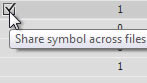
Efficient workflows for mobile development
Manage FLA project files that target multiple devices. Share code and assets across documents and device targets to efficiently create, test, package, and deploy content for a wide range of screens and devices.
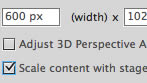
Content scaling when resizing stage
Save time when sharing symbols and motion paths across documents that are optimized for different screen sizes.
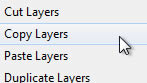
Enhanced layer control
Preserve important document structure when copying layers across multiple files and projects.
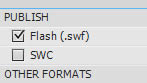
Streamlined Publish Settings dialog box
Publish content quickly and more efficiently with a redesigned Publish Settings dialog box.

Mobile content development
Use Adobe Device Central to plan, preview, and test content for a wide array of mobile and consumer devices.

Cross-platform support
Work on your operating system of choice: Mac OS or Windows.
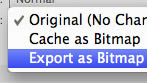
Symbol rasterization and better performance
Use new tooling options, on-stage symbol rasterization, and the Property Inspector to improve CPU, battery, and rendering performance on mobile devices.
Integration with CS Live online services
Work more efficiently through integration with Adobe CS Live online services 1, 2, including Acrobat.com, Adobe CS Review, and SiteCatalyst NetAverages.
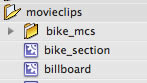
Incremental compilation
Use asset caching to reduce the compile time of documents that use embedded fonts and sound files, and deploy rich content faster.
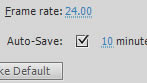
Auto-save and file recovery
Ensure consistency and integrity of your files, even after computer crashes or power outages.
Design with expression
To the top
Clearly communicate your creative vision and exceed expectations with typographic precision, layout fidelity, and expressive motion-editing capabilities in Adobe Flash Professional CS5.5 software.

Advanced drawing tools
Design artwork precisely and efficiently with smart shapes and powerful design tools.

Industry-leading animation tools
Create and edit motion tweens using the Timeline and Motion Editor, and use inverse kinematics to create natural motion for character animation.
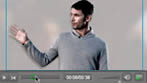
Professional video tools
Easily incorporate video into your projects, and convert video clips efficiently with the included Adobe Media Encoder application.
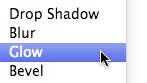
Filter and Blend effects
Add interesting visual effects to text, buttons, and movie clips to create expressive content.

Object-based animation
Gain control over individual animation attributes, and apply tweens directly to objects instead of to keyframes. Easily make changes to motion with Bezier handles.
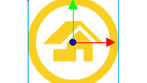
3D transformation
Animate 2D objects through 3D space with exciting new 3D translation and rotation tools, which allow you to animate along the x, y, and z axes. Apply local or global transformations to any object.

Spring for the Bone tool
Add expressive, lifelike animation properties like spring and bounce with motion attributes for the Bone tool. An improved inverse kinematics engine provides more realistic and complex physics movements within a simple, familiar interface.

Deco drawing brushes
Add advanced animation effects with a comprehensive set of brushes for the Deco tool. Quickly create movement for particle phenomena like clouds or rain, and draw stylized lines or patterns with multiple objects.

Easy video integration
Streamline video embedding and encoding processes with on-stage video scrubbing and the cue points property inspector. See and play back FLV components directly on the stage.
Advanced text engine
Get global bidirectional language support and advanced print-quality typography APIs via the Text Layout Framework. Format text in columns and maintain layout with greater fidelity when importing content from other Adobe products.
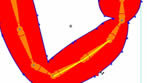
Inverse kinematics pinning support
Lock inverse kinematics bones to the stage and set stage level movement restrictions to selected bones. Create multiple spans per layer, and define more complex movement of armatures, such as walk cycles.
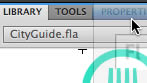
Unified Creative Suite interface
Boost your efficiency with intuitive panel docking and spring-loaded behaviors that streamline your interaction with tools throughout the Adobe Creative Suite editions.
Creative Suite integration
Perform roundtrip edits of bitmap images with Adobe Photoshop CS5, import FLA files directly from Adobe InDesign CS5.5, and integrate closely with Adobe Flash Builder 4.5.
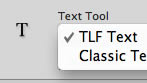
Customer-inspired enhancements
Benefit from numerous user-requested improvements, including improved controls for the Text Layout Framework.
Write code quickly and easily
To the top
Quickly and efficiently write code with powerful authoring tools and integration with Adobe Flash Builder 4.5 software. Visually inject extensible code snippets optimized for mobile.
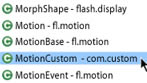
ActionScript editor
Speed up development with the built-in ActionScript editor that features custom class code hinting and code completion. Quickly grasp the fundamentals of ActionScript, and efficiently reference your own or external code libraries.

Seamless mobile testing
Perform source-level debugging on Adobe AIR enabled devices that are connected with a USB cable, running content directly on the device.
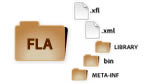
XML-based FLA source files
Collaborate on projects more easily with a new XML-based implementation of the FLA file format. Uncompressed projects appear and act like folders, allowing you to quickly manage and modify assets such as images.
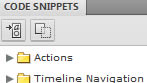
Code Snippets panel
Speed up project completion by using convenient prewritten code snippets for common actions, animation, multitouch gestures, and more. Also discover an easier way to learn the ActionScript 3.0 language.
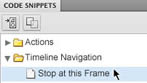
Enhanced code snippets handling
Use the new pick whip to preview and visually add more than 20 new code snippets, including ones for creating mobile and AIR applications, use of the accelerometer, and multitouch gestures.
Flash Builder integration
Work more closely with developers who can use your Flash project files with Flash Builder to test, debug, and publish your content more efficiently.
|


|
|
|
31/05
|
Adobe Flash Pro CS5.5 - Windows, Student Edition Only Serial Number is given by Post Verification from Adobe
Warning : Before Purchase Please Check OS Compatibility
What is Flash Professional?
Adobe Flash Professional CS5.5 software is the industry-leading authoring environment for producing expressive interactive content. Create immersive experiences that present consistently to audiences across desktops, smartphones, tablets, and televisions.
Create once, deploy virtually anywhere
Efficiently manage multiple FLA files that target various devices and platforms. Use Adobe Flash Professional CS5 software to create content for desktops, smartphones, tablets, and televisions.
Expanded platform and device support
Reach audiences on the latest Adobe Flash Player and Adobe AIR runtimes and on Android and iOS devices.
Efficient workflows for mobile development
Manage FLA project files that target multiple devices. Share code and assets across documents and device targets to efficiently create, test, package, and deploy content for a wide range of screens and devices.
Content scaling when resizing stage
Save time when sharing symbols and motion paths across documents that are optimized for different screen sizes.
Enhanced layer control
Preserve important document structure when copying layers across multiple files and projects.
Streamlined Publish Settings dialog box
Publish content quickly and more efficiently with a redesigned Publish Settings dialog box.
Mobile content development
Use Adobe Device Central to plan, preview, and test content for a wide array of mobile and consumer devices.
Cross-platform support
Work on your operating system of choice: Mac OS or Windows.
Symbol rasterization and better performance
Use new tooling options, on-stage symbol rasterization, and the Property Inspector to improve CPU, battery, and rendering performance on mobile devices.
Integration with CS Live online services
Work more efficiently through integration with Adobe CS Live online services 1, 2, including Acrobat.com, Adobe CS Review, and SiteCatalyst NetAverages.
Incremental compilation
Use asset caching to reduce the compile time of documents that use embedded fonts and sound files, and deploy rich content faster.
Auto-save and file recovery
Ensure consistency and integrity of your files, even after computer crashes or power outages.
Design with expression
To the top
Clearly communicate your creative vision and exceed expectations with typographic precision, layout fidelity, and expressive motion-editing capabilities in Adobe Flash Professional CS5.5 software.
Advanced drawing tools
Design artwork precisely and efficiently with smart shapes and powerful design tools.
Industry-leading animation tools
Create and edit motion tweens using the Timeline and Motion Editor, and use inverse kinematics to create natural motion for character animation.
Professional video tools
Easily incorporate video into your projects, and convert video clips efficiently with the included Adobe Media Encoder application.
Filter and Blend effects
Add interesting visual effects to text, buttons, and movie clips to create expressive content.
Object-based animation
Gain control over individual animation attributes, and apply tweens directly to objects instead of to keyframes. Easily make changes to motion with Bezier handles.
3D transformation
Animate 2D objects through 3D space with exciting new 3D translation and rotation tools, which allow you to animate along the x, y, and z axes. Apply local or global transformations to any object.
Spring for the Bone tool
Add expressive, lifelike animation properties like spring and bounce with motion attributes for the Bone tool. An improved inverse kinematics engine provides more realistic and complex physics movements within a simple, familiar interface.
Deco drawing brushes
Add advanced animation effects with a comprehensive set of brushes for the Deco tool. Quickly create movement for particle phenomena like clouds or rain, and draw stylized lines or patterns with multiple objects.
Easy video integration
Streamline video embedding and encoding processes with on-stage video scrubbing and the cue points property inspector. See and play back FLV components directly on the stage.
Advanced text engine
Get global bidirectional language support and advanced print-quality typography APIs via the Text Layout Framework. Format text in columns and maintain layout with greater fidelity when importing content from other Adobe products.
Inverse kinematics pinning support
Lock inverse kinematics bones to the stage and set stage level movement restrictions to selected bones. Create multiple spans per layer, and define more complex movement of armatures, such as walk cycles.
Unified Creative Suite interface
Boost your efficiency with intuitive panel docking and spring-loaded behaviors that streamline your interaction with tools throughout the Adobe Creative Suite editions.
Creative Suite integration
Perform roundtrip edits of bitmap images with Adobe Photoshop CS5, import FLA files directly from Adobe InDesign CS5.5, and integrate closely with Adobe Flash Builder 4.5.
Customer-inspired enhancements
Benefit from numerous user-requested improvements, including improved controls for the Text Layout Framework.
Write code quickly and easily
To the top
Quickly and efficiently write code with powerful authoring tools and integration with Adobe Flash Builder 4.5 software. Visually inject extensible code snippets optimized for mobile.
ActionScript editor
Speed up development with the built-in ActionScript editor that features custom class code hinting and code completion. Quickly grasp the fundamentals of ActionScript, and efficiently reference your own or external code libraries.
Seamless mobile testing
Perform source-level debugging on Adobe AIR enabled devices that are connected with a USB cable, running content directly on the device.
XML-based FLA source files
Collaborate on projects more easily with a new XML-based implementation of the FLA file format. Uncompressed projects appear and act like folders, allowing you to quickly manage and modify assets such as images.
Code Snippets panel
Speed up project completion by using convenient prewritten code snippets for common actions, animation, multitouch gestures, and more. Also discover an easier way to learn the ActionScript 3.0 language.
Enhanced code snippets handling
Use the new pick whip to preview and visually add more than 20 new code snippets, including ones for creating mobile and AIR applications, use of the accelerometer, and multitouch gestures.
Flash Builder integration
Work more closely with developers who can use your Flash project files with Flash Builder to test, debug, and publish your content more efficiently.
|
|
|
|
31/05
|
Synology VS60 Monitoring Solution - To Suit up to 9xIP Cameras, Managed with the Synology DiskStation, 5.2W on Operation, 1xVGA, 2xUSB2.0, 1xLAN VS60
Synology VS60 provides a power-saving and easy-to-use solution on for monitoring up to 9 IP cameras managed with the Synology DiskStation.
- No PC Required
- 5.2W on Operation
- 9 Channels Live-viewing
- USB Mouse for Snapshot & PTZ
- Timeline Event Playback
- US Patent Pending, application#12/356,071
Setup only takes a few steps to pair the VS60 with the Synology DiskStation and quickly start monitoring the IP cameras on the LCD monitor or TV connected to VS60. For large-scale deployments, the VS60 offers the convenience of camera live-view in a multi-screen wall format.
The VS60's built-in DSP (Digital Signal Processor) efficiently processes images, lowering power usage down to only 5.2 Watts for the entire re system. Over long-term use, the low power requirements of the VS60 can be a signifi cant cost savings.
Connect a USB mouse to the VS60 and manipulating PTZ on a specific IP camera becomes as easy as a click of the mouse. Double-clicking on an IP camera will maximize the image to full-screen for a clearer view. In addition on, you can save an IP camera snapshot in the connected USB storage, or use Timeline event player for easy playback of archived videos.
Hardware
- USB: 1 port in front, 1 port in rear (For USB disk and mouse)
- Video Output: VGA x1
- 3.5mm Stereo Audio Jack x1
- Size (HxWxD) (mm) : 160x63x218 mm
- Weight: 0.78Kg
- LAN: 10/100BaseT
- AC Input Power Voltage: 100V to 240V AC
- Power Frequency: 50 / 60Hz, Single Phase
- Operating Temperature: 40 to 95F (5 to 35C)
- Storage Temperature: 15 to 155F (-10 to 70C)
- Relative Humidity: 5% to 95% RH
- Maximum Operating Altitude: 10,000 feet
- Certification: FCC Class B, CE Class B
Software
- Channel #: 4,6, or 9
- Display Mode: 2x2, 3x2 or 3x3 panels
- Compression Formats: MJPEG, MPEG-4, H.264
- Decoding Throughput [MJPEG]
- 4,6 channel: 60FPS, D1
- 9 channel: 60 FPS, CIF
- Decoding Throughput [MPEG4]
- 4,6 channel: 60FPS, D1
- 9 channel: 60 FPS, CIF
- Decoding Throughput [H.264]
- 4,6 channel: 45FPS, D1
- 9 channel: 60 FPS, CIF
- Maximum Camera Resolution on:
- 4,6 channel D1: (640x480 in VGA, 720x480 in NTSC, 720x576 in PAL)
- 9 channel CIF: (320x240 in VGA, 352x240 in NTSC, 352x288 in PAL)
- Snapshot: Yes (Save to USB disk)
- PTZ: Yes (for PTZ cameras only)
- layback: Event Timeline
- Firmware Upgrade: Yes (via USB disk)
- Resolution: 1280x768, 1024x768, 800x600
Environment and Packaging
- Environment:
-RoHS Compliant
- Package Contents:
-Main Unit: X 1
-User's Guide: X 1
-AC Power Adapter: X 1
-2M RJ-45 LAN Cable: X 1
|
|
|
|
31/05
|
BenQ 3D Active Glasses - 1.7ms, 1000:1, 3D Ready - For DLP BenQ 3D Projectors Only 3D Glasses
Enjoy the Fantastic New World of 3D!
The BenQ 3D Goggles
Open your eyes to the fantastical world of 3D visualization and let your imagination work its magic! The BenQ 3D goggles are exceptionally designed to provide an immersive 3D viewing experience with BenQ’s DLP® LinkTM-enabled projectors. Supported by Front Project 3D DLP Link technology, these projectors require only one projector to deliver the stunning stereoscopic 3D effects you get in 3D movies – making them the perfect choice for education and home entertainment use. Just put on your BenQ 3D goggles, throw in the 3D content and get the show ready for the road!
Minimum computer system requirements for playing 3D content on a BenQ projector
Hardware requirements:
For Computer
- BenQ projector with 3D ready
- BenQ 3D glasses
- Processor: Intel Pentium, Intel Core2 Duo, Intel i3/i5/i7 Core, AMD AthlonX2 CPU or higher.
- Recommended OS: Microsoft Windows Vista 32/64 bit or Microsoft Windows 7 32/64 bit
- Graphic card (512MB VRAM Recommended): NVIDIA 240/250/Quadro series or higher, ATI 4000 series or higher, or Intel GMA 4500 series.
- At least 1GB memory
For DVD player
- BenQ projector with 3D ready
- BenQ 3D glasses
- Set-top DVD player must support NTSC format.
- Only set-top DVD players support 3D content playback. Computer optical disc drives are not supported.
Software requirements:
To play 3D files by computers
- Software compatible for playing 3D content (You can download Stereoscopic Player at http://www.3DTV.at)
- Have 3D content ready. Please check the content format before purchase (The sample files are available for download at http://www.3DTV.at)
- If the content format is side-by-side, please set the refresh rate at 120Hz.
- If the content format is over/under, please set the refresh rate at 60Hz.
To play 3D DVD disk by set-top DVD player.
Make sure 3D DVD disk is HQFS format.
Specifications
| Dimensions(W x H x D) |
45.9 x 168.8 x 165.2(mm) |
| Response Time |
1.7ms |
| Contrast ratio (On/Off) |
1000:1(typical) |
| View Angle (Left/ Right) |
50 degree (typical) |
| Viewing Distance |
~8M |
| Detect Type |
DLP Link (Photo Sensor) |
| Storage Temperature |
-10~60C |
| Storage Temperature |
0~50C |
| Operation Humidity |
20~85% |
| Power Consumption |
4 mW (operation) / ~55hrs |
| Batteries |
CR2032 x 2 (pcs) |
| Accessories |
Quick start guide (paper) / Nose pad x 2 (Big/small) |
|
|
|
|
31/05
|
BenQ Replacement Lamp - To Suit BenQ MX711/MX660 ProjectorReplacement Lamp - To Suit BenQ MX711/MX660 Projector
|
|
|
|
Previous Page
|
Next Page
|
|