Camerafarm product archive #40394
| Image |
Date |
Product description |
Price |
Buy |
|
06/08
|
LG BS275 Business DLP Projector - SVGA, 800x600, 2700 Lumens, 2200;1, 3500Hrs, 1xVGA, 1xDVI, 1xUSB, Remote ControlBS275
Show your ability with perfect presentation
Business Projector - BS 275
BS 275 is a SVGA business projector which comes with Digital keystone Correction, Auto Source Detection,Sleep Time & Auto Color temperature Control which makes it an ideal for small & large businesses.
Key Features
- Digital Keystone Correction
- Auto Power Off
- Expert Color Management
- 2200:1 Contrast Ratio
- 2700 ANSI Lumens Brightness
- SVGA (800x600)
Auto Power Off
When there's no signal, it automatically turns off the power. This prevents the reduction of lamp life and electricity consumption
- Expert Color Management
This function allows the user to saperately control the Gain (contrast), saturation, and the color tone of Red, Blue, Cyan, Mgt and Yellow.
Highlights
- Projection System
- DLP
- Native Resolution
- SVGA(800x600)
- Brightness(ANSI-Lumens)
- 2700
- Contrast Ratio(FIFO)
- 2200:1
Projection Lens
- Focus
- Manual
- Zoom
- Manual 1.1 x
Projection Image
- Standard
- 100" @ 3.96 m
- Throw Ratio(Wide/Tele)
- 1.95/2.15
Lamp
- Wattage
- 180 W
- Life High Brightness(hrs)
- 3500
- Life Economic(hrs)
- 4000
Noise
- High Brightness
- 36dB
- Economic
- 32dB
- Uniformorty(min)JBMA
- > 80%
- Color wheel
- 6 segment (RGBWYC)
General Specification
- Menu Language
- English / Korean / French/ Spanish/ German/Italian/ Swedish /Portuguese / Chinese Simplified/polski/ Brazilian / Portuguese
- Aspect Ratio Control
- 4:3/16:9I/16:9II/Native/Auto
- Dimension (mm)
- 287 X 192 X 88
- Weight (kg)
- 2.31Kg
- Power Consumption
- 255W
- Power Supply
- AC 100~240V/ 50/60Hz
Input Signal Compatibility
- RGB
- up to UXGA(1600x1200@60Hz)
- Component Video
- 1080p / 1080i / 720p / 576p / 576i / 480p / 480i
- Composite Video (incl. S-Video)
- NTPC / PAL / SECAM / NTSC4.43 / PAL-M / PAL-N/ SECAM
INPUT/OUTPUT Terminals
- INPUT/OUTPUT Terminals 1
- 1*RGB in/1*RGB out/1*S Video/1*Composite/1*Component(thru RGB)/1*DVI/1*USB(Type B/SVC)1*RS-232C
Special Features
- INPUT/OUTPUT Terminals 2
- Divx (MP3, JPEG, MPEG4)/Digital Keystone Correction/Picture Still/Quick Power on/off/Auto Off/Auto Power/Expert Control
|


|
|
|
06/08
|
Samsung SPF-87H - 8" LED Slim Photo Frame - 800x480, 500:1, 200cd/m2, 1xUSB
- Includes 1GB Internal Memory
|
|

|
|
06/08
|
Samsung SPF-71ES - 7" Photo Frame - 480x234, 500:1, 200cd/m2, 1xUSB2.0, SmartClock
- Includes 1GB Internal Memory
|
|
|
|
06/08
|
Kingston 32GB SDHC Ultimate - Class 6 Secure Digital Cards - High-Capacity Performance and capacity redefined with Kingston's SD High-Capacity memory cards.
Kingston Technology's Secure Digital High-Capacity (SDHC) memory cards are fully compliant with the new Secure Digital Association 2.00 specification. They are a new performance class of SD memory cards designed to meet the storage demands of high-quality digital still and video cameras and other high-resolution image recording devices.
Starting at 4GB, SDHC cards offer larger-volume data storage and optimized recording performance with support for FAT 32 file formats. In addition, Kingstons SDHC cards use new speed "class" ratings known as Class 4, 6 & 10 that deliver a minimum data transfer rate for optimum performance with SDHC devices.
Although identical in size to todays standard SD card, the new SDHC cards are designed differently and are only recognized by SDHC host devices. To ensure compatibility, look for the SDHC logo on cards and host devices (cameras, camcorders, etc.).
For added reliability and durability, our solid-state SDHC memory cards are built of nonvolatile memory components and have no moving parts that could wear out or break. All cards are 100-percent tested and are backed by a lifetime warranty and free live technical support.
Features/benefits
- Capacity* 4GB, 8GB, 16GB**, 32GB**
- Dimensions 0.94" x 1.26" x 0.08" (24mm X 32mm X 2.1mm)
- Weight 0.09 ozs (2.5 g)
- High-Speed Class Rating Class 4: 4MB/sec minimum data transfer rate
Class 6: 6MB/sec minimum data transfer rate
Class 10: 10MB/sec minimum data transfer rate
- Operating Temperature -13 F to 185 F (-25 C to 85 C)
- Storage Temperature -40 F to 185 F (-40 C to 85 C)
- Voltage 3.3v
- Compliant with the SD Card Association card 2.00 specification (Class 4 & Class 6) and with the SD Card Association card 3.00 specification (Class 10)
- Secure built-in write-protect switch prevents accidental data loss
- Compatible with SDHC host devices; not compatible with standard SD-enabled devices/readers
- File Format SDHC File Format - FAT32 (only for capacities 4GB and above)
- Reliable lifetime warranty
- Simple as easy as plug-and-play
|
|
|
|
06/08
|
Kingston 64GB SDXC Card - Class 10, Read 104MB/s, 300MB/s Secure Digital Extended Capacity (SDXC) Massive storage, incredible speed.
The SD standard is the leading choice for consumers and has earned nearly 80 percent share of the memory card market with its reliable interoperability and easy-to-use format. As the next generation of SD Memory Card, the SDXC (Secure Digital Extended Capacity) format will dramatically improve digital lifestyles by combining high bandwidth and portable storage needed to store content-rich applications such as high-definition video, photo collections and music.
The new SDXC memory card standard provides up to 2 terabytes of storage and enhanced SD interface read/write speeds to a maximum transfer rate of 104 MB/sec. today and 300 MB/sec. in the future. With expanded storage capacity and improved interface speed, SDXC can help realize the full potential of digital cameras and camcorders with continuous shooting and higher resolution movie recordings. It will also facilitate high-speed transfers of data to and from cards.
The Kingston SDXC card is based on the SDA (Secure Digital Association) Memory Card Standard Version 3.01 and is compliant with Ultra High Speed bus (UHS-1) and Class 10 rating. UHS-1 bus controls the ultra-fast read/write functions. The Class 10 rating guarantees a minimum data transfer speed of 10MB/sec to address the demands of recording data to the SDXC card for applications such as video recording, where uninterrupted writing of data is critical. Featured in a massive 64GB capacity and with speeds up to 60MB/sec. read and 35MB/sec. write, this card is ideal for storing and recording HD high-definition video, highresolution, or RAW still photos with SDXC-supported host devices.
The SDXC UHS 1 Class 10 is covered by a lifetime warranty, 24/7 tech support and legendary Kingston reliability.
Features/benefits
- Capacities** 64GB
- Dimensions 0.94" x 1.26" x 0.08" (24mm x 32mm x 2.1mm)
- Weight 0.09 oz. (2.5 g)
- Class Rating Class 10: 10 MB/sec. minimum data transfer rate
- Bus Interface Mode Version 1, SDR104, up to 104MB/sec.
- Operating Temperature -13 F to 185 F (-25 C to 85 C)
- Storage Temperature -40 F to 185 F (-40 C to 85 C)
- Compliant with the SD Card Association card 3.01 specification
- Copy Protection Support for CPRM (Content Protection for Recordable Media)
- Secure built-in write-protect switch prevents accidental data loss
- Compatible with SDXC host devices; not compatible with SDHC and standard SD-enabled devices/readers
- File System exFAT
- Reliable lifetime warranty
- Operating System Support Windows 7, Windows Vista (SP1 or later), Windows XP (SP2 or later) with exFAT update
|
|
|
|
06/08
|
Kingston 8GB SDHC Card - Ultimate Class 10, Read 18MB/s, Speed 22MB/s SD10/8GB
Secure Digital Cards - High-Capacity
Faster speeds to capture more continuous shots and HD video.
Kingston's SDHC Ultimate Class 10 is designed for amateur and professional photographers who need faster speeds to keep pace with their evolving equipment. It allows users to easily capture sequential shots that used to be a challenge due to the speed limitations of memory cards.
With speeds up to 22MB/sec. read and 18MB/sec. write, the SDHC Ultimate Class 10 is ideal for anyone who uses their digital equipment for serious photography or video and makes it easy to capture HD video. It's available in 8GB, 16GB and 32GB capacities to capture up to 252 minutes* of HD video.
Use Kingston's SDHC Ultimate Class 10 with your digital camera and you'll never miss a shot, whether you're photographing your favorite musician in concert or taking photos on vacation in the Caribbean.
The SDHC Ultimate Class 10 is covered by a lifetime warranty, 24/7 tech support and legendary Kingston reliability.
Features/Benefits
- Capacity* 8GB**, 16GB**, 32GB**
- Dimensions 0.94" x 1.26" x 0.08" (24mm X 32mm X 2.1mm)
- Weight 0.09 ozs (2.5 g)
- High-Speed Class Rating Class 10: 10 MB/sec minimum data transfer rate
- Operating Temperature -13 F to 185 F (-25 C to 85 C)
- Storage Temperature -40 F to 185 F (-40 C to 85 C)
- Voltage 3.3v
- Compliant with the SD Card Association card 3.00 specification
- Secure built-in write-protect switch prevents accidental data loss
- Compatible with SDHC host devices; not compatible with standard SD-enabled devices/readers
- File Format SDHC File Format - FAT32 (only for capacities 4GB and above)
- Reliable lifetime warranty
- Simple as easy as plug-and-play
|
|
|
|
06/08
|
Adobe Flash Pro CS5 - Mac, Student Edition Only Serial Number is given by Post Verification from Adobe
Warning : Before Purchase Please Check OS Compatibility
What is Flash Professional?
Create and deliver rich interactive content
Adobe Flash Professional CS5 software is the industry standard for interactive authoring and delivery of immersive experiences that present consistently across personal computers, mobile devices, and screens of virtually any size and resolution.

Create interactive experiences
Express your creative vision and attention to detail and design pixel-perfect interactive content with exceptional typography, flexible layouts, and incredibly smooth animation.

Build web applications
Develop cross-platform web applications and content with an integrated development environment that offers intelligent ActionScript coding tools.

Embed video
Wow your audience and produce engaging rich video content and interactivity that contains expressive, lifelike motion and animation.
Import your design from Adobe Photoshop CS5 Extended, Illustrator CS5, or InDesign CS5, and then add interactivity with Flash Professional CS5 to bring your work to life.
Use Adobe Flash Builder software as your primary ActionScript editor for Flash Professional projects. Streamline your workflow by testing, debugging, and publishing content in Flash Professional while editing code in Flash Builder.
Easily edit, add effects and animation, encode, and deliver high-quality video with Adobe Premiere Pro and After Effects. Share concepts with clients, promote finished projects, or extend your story with FLV video.
Flash Professional features

Text engine new
Take complete control over your text with print-quality typography via the new Text Layout Framework. Work with columns and bidirectional text, and maintain layout and formatting with greater fidelity when importing from other Adobe products.

Creative Suite integration enhanced
Enhance productivity when working with Adobe Creative Suite components such as Adobe Photoshop, Illustrator, InDesign, and Flash Builder.

ActionScript editing enhanced
Increase development speed with an improved ActionScript editor, including custom class code hinting and code completion. Use Flash Builder as your primary ActionScript editor for Adobe Flash Professional projects.
Inverse kinematics enhanced
Take advantage of advanced motion capabilities and visually add realistic physics effects with new Strength and Damping settings for the Bones tool. Create natural, chainlike motion with a simple, familiar interface.

Video improvements enhanced
Streamline video embedding and encoding processes with on-stage video scrubbing and a new cue points property inspector. See and playback FLV components directly on the stage.

XML-based FLA source files new
Manage and modify projects using source control systems and collaborate on files more easily. An XML-based nonbinary implementation of the FLA format allows projects and associated assets to function as items in a directory or folder.

Code Snippets panel new
Reduce the ActionScript 3.0 learning curve and enable greater creativity by injecting prebuilt code into projects. Quickly include functional code for things like timeline navigation, actions, animation, audio and video, and event handlers.
Object-based animation model enhanced
Use object-based animation and visually achieve granular control over motion attributes with the Motion Editor. Develop interactive content more efficiently with the Motion Preset panel that offers prebuilt motion effects and lets you create, save, and share your own.
Advanced native drawing tools
Author expressive interactive content with easy-to-use tools. Draw stylized shapes and transform them into complex patterns and effects, and animate 2D objects through 3D space with 3D transformation tools.

Support for an extensive number of device runtimes
Deliver interactive content consistently for more runtimes across personal computers, mobile devices including the iPhone*, and screens of virtually any size and resolution, and leverage integration with Adobe Device Central for enhanced testing and debugging.
*Subject to Apple's current requirements and approval.
System requirements
Mac OS
- Multicore Intel processor
- Mac OS X v10.5.7 or v10.6
- 1GB of RAM
- 4GB of available hard-disk space for installation; additional free space required during installation (cannot install on a volume that uses a case-sensitive file system or on removable flash-based storage devices)
- 1024x768 display (1280x800 recommended) with 16-bit video card
- DVD-ROM drive
- QuickTime 7.6.2 software required for multimedia features
- Broadband Internet connection required for online services*
|
|
|
|
06/08
|
Adobe Flash Pro CS5 - Windows, Student Edition Only Serial Number is given by Post Verification from Adobe
Warning : Before Purchase Please Check OS Compatibility
What is Flash Professional?
Create and deliver rich interactive content
Adobe Flash Professional CS5 software is the industry standard for interactive authoring and delivery of immersive experiences that present consistently across personal computers, mobile devices, and screens of virtually any size and resolution.
Create interactive experiences
Express your creative vision and attention to detail and design pixel-perfect interactive content with exceptional typography, flexible layouts, and incredibly smooth animation.
Build web applications
Develop cross-platform web applications and content with an integrated development environment that offers intelligent ActionScript coding tools.
Embed video
Wow your audience and produce engaging rich video content and interactivity that contains expressive, lifelike motion and animation.
Import your design from Adobe Photoshop CS5 Extended, Illustrator CS5, or InDesign CS5, and then add interactivity with Flash Professional CS5 to bring your work to life.
Use Adobe Flash Builder software as your primary ActionScript editor for Flash Professional projects. Streamline your workflow by testing, debugging, and publishing content in Flash Professional while editing code in Flash Builder.
Easily edit, add effects and animation, encode, and deliver high-quality video with Adobe Premiere Pro and After Effects. Share concepts with clients, promote finished projects, or extend your story with FLV video.
Flash Professional features
Text engine new
Take complete control over your text with print-quality typography via the new Text Layout Framework. Work with columns and bidirectional text, and maintain layout and formatting with greater fidelity when importing from other Adobe products.
Creative Suite integration enhanced
Enhance productivity when working with Adobe Creative Suite components such as Adobe Photoshop, Illustrator, InDesign, and Flash Builder.
ActionScript editing enhanced
Increase development speed with an improved ActionScript editor, including custom class code hinting and code completion. Use Flash Builder as your primary ActionScript editor for Adobe Flash Professional projects.
Inverse kinematics enhanced
Take advantage of advanced motion capabilities and visually add realistic physics effects with new Strength and Damping settings for the Bones tool. Create natural, chainlike motion with a simple, familiar interface.
Video improvements enhanced
Streamline video embedding and encoding processes with on-stage video scrubbing and a new cue points property inspector. See and playback FLV components directly on the stage.
XML-based FLA source files new
Manage and modify projects using source control systems and collaborate on files more easily. An XML-based nonbinary implementation of the FLA format allows projects and associated assets to function as items in a directory or folder.
Code Snippets panel new
Reduce the ActionScript 3.0 learning curve and enable greater creativity by injecting prebuilt code into projects. Quickly include functional code for things like timeline navigation, actions, animation, audio and video, and event handlers.
Object-based animation model enhanced
Use object-based animation and visually achieve granular control over motion attributes with the Motion Editor. Develop interactive content more efficiently with the Motion Preset panel that offers prebuilt motion effects and lets you create, save, and share your own.
Advanced native drawing tools
Author expressive interactive content with easy-to-use tools. Draw stylized shapes and transform them into complex patterns and effects, and animate 2D objects through 3D space with 3D transformation tools.
Support for an extensive number of device runtimes
Deliver interactive content consistently for more runtimes across personal computers, mobile devices including the iPhone*, and screens of virtually any size and resolution, and leverage integration with Adobe Device Central for enhanced testing and debugging.
*Subject to Apple's current requirements and approval.
System requirements
Windows
- Intel Pentium 4 or AMD Athlon 64 processor
- Microsoft Windows XP with Service Pack 2 (Service Pack 3 recommended); Windows Vista Home Premium, Business, Ultimate, or Enterprise with Service Pack 1; or Windows 7
- 1GB of RAM
- 3.5GB of available hard-disk space for installation; additional free space required during installation (cannot install on removable flash-based storage devices)
- 1024x768 display (1280x800 recommended) with 16-bit video card
- DVD-ROM drive
- QuickTime 7.6.2 software required for multimedia features
- Broadband Internet connection required for online services*
|
|
|
|
06/08
|
Lexar Media 4GB SDHC Card - 60X Speed, Up to 1080p HD VideoSDHC™
Full-HD Video Memory Card
Capture Life in Action with Full-HD Video Memory
Lexar offers a comprehensive line of award-winning memory cards in
various speeds, formats, and capacities. With so many options, it’s easy to
find the right Lexar® memory card to fit your needs and lifestyle.
The Lexar Secure Digital High Capacity (SDHC™) Full-HD Video memory
card is a high-performance, high-capacity card designed for capturing
stunning, high-definition video at 1080 resolution with your SDHCcompatible
digital camcorder or point-and-shoot camera.* The card is
available in 4GB, 8GB, and 16GB capacities.
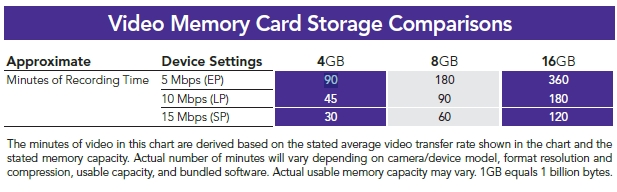
High-Performance, High-Capacity SolutionMaximize Your Video-Taking Experience. Created specifically for video enthusiasts, the high-performance Lexar SDHC Full-HD Video memory card lets you fully leverage the video capabilities of your SDHCcompatible digital camcorder or point-and-shoot digital camera. Available in large capacity options that allow you to record up to 6 hours of full-HD video (16GB), the card gives you the ability to reliably capture and store more of the videos that matter—and the freedom to do it all on a single card.
Maximize Your Video-Taking Experience. Created specifically for video enthusiasts, the high-performance Lexar SDHC Full-HD Video memory card lets you fully leverage the video capabilities of your SDHCcompatible digital camcorder or point-and-shoot digital camera. Available in large capacity options that allow you to record up to 6 hours of full-HD video (16GB), the card gives you the ability to reliably capture and store more of the videos that matter—and the freedom to do it all on a single card.
Maximize Your Video-Taking Experience. Created specifically for video enthusiasts, the high-performance Lexar SDHC Full-HD Video memory card lets you fully leverage the video capabilities of your SDHCcompatible digital camcorder or point-and-shoot digital camera. Available in large capacity options that allow you to record up to 6 hours of full-HD video (16GB), the card gives you the ability to reliably capture and store more of the videos that matter—and the freedom to do it all on a single card.
Capture Life in Action. Looking to capture the fast-action excitement of the kids’ sporting events? Want to preserve fun moments with family and friends? Or simply want to catch impromptu moments for posting on your favorite sharing sites? The card gives you the performance, capacity, and reliability to capture it all, and allows you to quickly transfer those files to your PC or the Web, making the Lexar SDHC Full-HD Video memory card a smart, high-performance solution for all your video-capture needs. Lexar. When Memory Matters.™
Video Memory Card Storage Comparisons
|
|
|
|
06/08
|
Pure VL-6114 ChargePAK B1 - Rechargeable Battery Pack - Lithium-ion 3.7V, 4200mAh ChargePAK B1
Rechargeable battery pack
Add a ChargePAK B1 rechargeable battery pack and listen to your PURE radio wherever you go. ChargePAKs are much more economical than regular batteries and significantly kinder to the environment, reducing the quantity of batteries that end up in landfill.
ChargePAK B1 features include:
- Easy to install can be fitted in seconds
- Easy to use just fit and forget
- Charges inside the radio, no separate charging unit required
Specification: lithium-ion 3.7V 4200mAh.
|
|
|
|
06/08
|
Adobe Photoshop Extended CS5 - Mac, Student Edition OnlySerial Number is given by Post Verification from Adobe
Warning : Before Purchase Please Check OS Compatibility
What is Photoshop Extended?
Discover new dimensions in digital imaging
Adobe Photoshop CS5 Extended software is the ultimate solution for advanced digital imaging, delivering all the editing and compositing capabilities of Photoshop CS5 plus breakthrough tools that let you create and edit 3D and motion-based content.

DESIGN AMAZING IMAGES
Keep pushing creative boundaries with world-class 2D and 3D design. Use powerful new selection, painting, and warping capabilities to create standout images.

Make your web pages pop
Get just the right look for each client's site. Easily select intricate image elements for placing in layout. Create 3D artwork for logos and buttons.

Enhance 3D for video
Create and enhance 3D and motion-based content and prepare still images and text for all your projects. Work fast with cross-platform 64-bit support, and create stunning HDR images for video backdrops.

CREATE RICH INTERACTIVE EXPERIENCES
Design cutting-edge looks for interactive web content and experiences. Create 3D artwork, warped graphics, and realistic painting effects for all your projects.
Enhance Adobe Illustrator vector art in Photoshop Extended, or combine it with Photoshop imagery for delivery via a variety of media.
Bring PSD files into Adobe Dreamweaver to create image Smart Objects that are updated automatically whenever you change the source image.
 
Export video layers from Adobe Premiere Pro and enhance them in Photoshop Extended. Or import PSD layers into Adobe After Effects, with 3D edits intact, for final effects creation.
Bring your Photoshop Extended images to life in immersive, interactive experiences with Adobe Flash Professional.
Photoshop Extended features
Innovate in 3D
Go beyond traditional image editing by bringing 3D elements to your 2D artwork directly within your favorite digital imaging application, which now offers an easy on-ramp to 3D image creation.
- 3D editing
-
3D extrusions with Adobe Repouss new
Create stunning 3D logos and artwork from any text layer, selection, path, or layer mask with Adobe Repouss technology. Then twist, rotate, extrude, bevel, and inflate these designs to get the look you want.
Rich 3D materials library and picker new
Explore different looks for your 3D objects by applying materials like chrome and gemstones from a rich materials library. Select and apply materials using intuitive tools, and add to your library by downloading materials from the web.
Ability to wrap 2D data around 3D geometry
Use convenient presets to wrap 2D images around common 3D geometric shapes, such as cylinders and spheres.
3D mesh creation enhanced
Quickly generate 3D objects from grayscale depth maps.
Depth of field for 3D new
Experiment with different focus points in your 3D scene by previewing and adjusting the range for depth of field.
Easy shadow creation new
Enhance the realism of your 3D designs by generating shadows in a few clicks with the shadow catcher.
Image-based lighting new
Use HDR images or panoramas to light your 3D scene.
Better 3D performance and workflow enhanced
Take advantage of a new ray tracer for immediate progressive feedback on rendering states. And experience superior 3D performance with improved import, interaction speeds, and merging of 3D objects into a single scene.
OBJ file import enhanced
Import Object (OBJ) files up to 50% faster.
3D object painting
Paint directly on 3D models or their unwrapped textures. Edit your textures directly using all the power of Adobe Photoshop, and even view UV overlays on flattened textures for guidance.
3D object and property editing enhanced
Edit, enhance, and manipulate 3D scenes in a streamlined interface without dialog boxes. Enjoy a single, easy-to-use panel that contains all your 3D controls for meshes, materials, and lights.
Volume rendering
Add depth to pixel layers, text, 2D shapes, and DICOM frames with volume rendering.
3D and 2D image compositing enhanced
Combine 3D layers into a single scene, or incorporate 3D content into 2D composites. Support for popular 3D formats lets you import and export Collada, OBJ, U3D, and KMZ models, as well as import 3DS models.
Navigating and moving 3D objects enhanced
Use the new 3D axis to position objects, cameras, lights, and meshes. Use bounding overlays to easily identify which material or mesh is targeted, and toggle these on or off along with the ground plane and lights.
3D animation
Create 3D animations by mapping object movement, camera position, render settings, and cross sections to keyframes in your timeline. Take this further by using video layers to animate your textures, and include image-based lights.
File roundtripping
Roundtrip common 3D file formats, including COLLADA, OBJ, U3D, and KMZ. Import 3DS.
Integration with Adobe Acrobat 9 Pro and After Effects
Collaborate on 3D content easily through tight integration with Adobe Acrobat 9 Pro Extended and After Effects. Convert to the robust COLLADA interchange format, enhance models, and embed 3D models into PDF files for review. Use 3D layers from Photoshop Extended in After Effects projects.
Vanishing Point with 3D support
Edit in perspective on multiple surfaces even those connected at angles other than 90 degrees with Vanishing Point. Measure in perspective; wrap graphics, images, and text around multiple planes; and output planes as 3D models to use in After Effects projects.
32-bit file support enhanced
Create a layer mask directly from the transparency in your 32-bit file.
Maximize creative impact
Explore new creative possibilities with tremendous precision and freedom. Easily select intricate image elements, such as hair. Create realistic painting effects. Remove any image element and see the space fill in almost magically.
- Intelligent image editing and enhancement
-
Better selections with Truer Edge new
Get better edge detection and masking results in less time with the Quick Selection tool even when you're selecting the trickiest image elements, such as hair.
Color decontamination new
Eliminate background color around the edges of your selection with the Quick Selection tool's automatic color decontamination capabilities.
Selection and mask refinement tools new
Automatically vary selection edges and perfect masks using new refinement tools.
Content-Aware Fill new
Remove any image detail or object and watch as Content-Aware Fill magically fills in the space left behind. This breakthrough technology matches lighting, tone, and noise so it looks as if the removed content never existed.
Puppet Warp new
Precisely reposition or warp any image element. Swing a raised arm to a person's side in a photo, stretch text to create new effects, and more.
Content-Aware Scaling
Automatically recompose an image as you resize it, smartly preserving vital areas as the image adapts to the new dimensions. Get the perfect image in one step without time-intensive cropping and retouching.
Expert retouching
Retouch images easily and precisely by previewing source pixels within the cursor of the Clone Stamp and the Healing Brush. Set multiple source points, scale, and rotate in the Clone Source palette.
Perspective-based editing
Create packaging mockups and more with Vanishing Point, which lets you create multiple planes in an image; connect them at any angle; and then wrap graphics, text, and images around them.
Smart Filters
Experiment by adding, adjusting, and removing filters from an image without resaving the image or starting over to preserve quality. Nondestructive Smart Filters allow you to see the changes without altering original pixel data.
Smart Objects
Perform nondestructive scaling, rotating, and warping of raster and vector graphics with Smart Objects. Even preserve the editability of vector data from Adobe Illustrator software.
- Extraordinary painting and drawing toolset
-
Mixer Brush new
Define multiple colors on a single Mixer Brush tip to paint with realistic color blends. Or use a dry Mixer Brush to blend a photo's colors and transform it into a beautiful painting.
Bristle Tips new
Easily paint with lifelike, naturally textured brush strokes using defined bristle properties like shape, length, and stiffness, and experiment away by adding Bristle Tips to a variety of Photoshop brush tools.
GPU-accelerated painting tools new
Click to smoothly resize brushes; adjust bristle hardness; or choose your color hue, saturation, or brightness from an onscreen color picker.
Rich drawing toolset
Create or modify images with a wide assortment of professional, fully customizable drawing tools.
- Advanced compositing
-
Paste in place new
Paste an element into a Photoshop file in the same position it held in the original file, for example, when you create something on the wrong layer and need to move it to the exact same place on a new layer.
Multi-layer Opacity new
Save time with the ability to adjust the opacity of many layers at once.
Multi-layer Fill new
Save time with the ability to adjust the fill of many layers at once.
Sticky layer styles new
Save your individual layer-style settings as defaults.
Auto-blending of images
Combine a range of images, each with a different exposure, color, and focal point with options to preserve tones and colors into a single, color-corrected image.
Easier layer management enhanced
Drag and drop a file onto an open PSD document to create a layer; nest up to ten layers; move a selection while the active layer is hidden; and delete all empty layers with one command.
360-degree panoramas
Count on Photomerge technology to automatically stitch horizontal or vertical photos to create amazing panoramas and even wrap them around 360-degree spheres.
Auto-alignment of layers
Create accurate composites with the Auto-Align Layers command, which lets you move, rotate, or warp layers to align them accurately. Or use spherical alignment to create breathtaking spherical panoramas.
Extended depth of field
Create an image from a series of shots that have different focal points with the Auto-Blend Layers command, which smoothly blends color and shading and even extends your depth of field, automatically correcting vignettes and lens distortion.
- State-of-the-art photography tools
-
Noise removal enhanced
Remove the noise common to high-ISO images and consumer-camera shots while preserving color and detail. You won't need more than this reengineered noise removal technology to maintain a photo's natural look, avoiding an oversharpened feel as you maximize quality.
Additive grain new
Make a digital photo look more organic or film-like by using a simple slider to add grain. Save grain settings as presets that you can apply to other photos to achieve a consistent look.
Post-crop vignetting enhanced
Enjoy more control when performing post-crop vignetting, and save favorite vignette effects as presets.
Better conversions with new demosaicing new
Process raw images with the industry-leading Adobe Photoshop Camera Raw 6 plug-in, which offers new demosaicing technology for unmatched conversion quality.
Support for more cameras and Adobe Photoshop Lightroom enhanced
Enjoy tight integration with Adobe Photoshop Lightroom software as well as support for over 275 camera models.
Automatic lens correction new
Save time with automatic correction of lens distortions, chromatic aberration, and vignetting. Photoshop CS5 uses an image file's EXIF data to make precise adjustments based on the type of camera and lens you used.
Lens Correction filter improvements enhanced
Work more intuitively with the Lens Correction filter. The Grid display is now off by default; chromatic aberration correction sliders allow decimal point adjustments; a third slider has been added to correct common green/magenta aberrations; and more.
Straighten Image tool new
Quickly straighten any crooked image. Simply drag a straight line from the Ruler tool onto your image, and the image will snap to the line.
Gradient tool preset for neutral density new
Use the Neutral Density preset to emulate a neutral density filter, clicking once to have the Gradient tool darken an overexposed patch of a photo while leaving the rest unaltered.
- Professional color and tone control
-
HDR Pro enhanced
Create either photo-realistic or wildly surreal high dynamic range (HDR) images with unprecedented speed, control, and accuracy. Get stunning results thanks to automatic ghost removal and greater control with tone mapping and adjustments.
HDR Toning new
Give any single-exposure image the photo-realistic or wildly surreal look of an HDR image. The HDR Toning feature offers an easy way to bring the rich aesthetic of high dynamic range to your 8-bit images.
Black-and-white conversion enhanced
Explore an endless variety of black-and-white looks. Use the integrated Lab B&W Action to interactively convert color images; create gorgeous HDR black-and-whites with greater ease and speed; and experiment with new presets.
Industry-leading color correction
Use Dodge, Burn, and Sponge tools that intelligently preserve color and tone details, Curves controls that let you make automatic adjustments with included presets or those you create, a histogram, color channel lines, and more.
- Video and animation design
-
Preview and export of audio content and frame comments
Move through and edit video layers quickly and precisely using single-key shortcuts, and preview and export audio tracks in addition to exporting frame comments.
Single-key shortcuts
Edit motion graphics on video layers efficiently with single-key shortcuts.
Movie Paint
Paint, add text, and clone over multiple frames of an imported video sequence using Movie Paint.
Smooth animation workflow
Easily create animations from a series of still images or video frames with the Animation panel, which enables onion skinning.
Broad video file format support
Work with video files thanks to support for 3G, FLC, MOV, AVI, DV Stream, Image Sequence, MPEG-4, and FLV formats.
Video color management
Create and edit images for video with maximum quality and a broad range of color models. Edit and enhance grayscale, RGB, CMYK, and LAB models at 8-, 16-, and 32-bit depths with color management.
Familiar editing workflow
Edit video images quickly using familiar frame- and timeline-based editing tools.
- Creative tools and content
-
New shapes, swatches, and gradients new
Give your images and designs fresh looks using a variety of custom shapes, color swatches, styles, gradients, and 3D meshes.
New Actions and brushes new
Quickly try out different editing effects and techniques using new Actions for black-and-white conversion and surreal Stars effects, and paint with a new set of brushes.
Boost productivity
Accelerate your workflow with fast performance on 64-bit Windows and Mac hardware systems, smoother interactions thanks to more GPU-accelerated features, and dozens of time-savers requested by Photoshop users.
- Easy access to core editing power
-
Adjustments panel enhanced
Use the convenient Adjustments panel to easily access every tool you need to nondestructively adjust and enhance color and tone. Open the On-image Adjustment tool with a keyboard shortcut.
Masks panel
Quickly create and edit masks from the Masks panel. This panel offers all the tools you need to create editable pixel- and vector-based masks, adjust mask density and feathering, easily select noncontiguous objects, and more.
- Efficient and flexible work environment
-
Faster performance across platforms enhanced
Speed up day-to-day imaging tasks and process very large images up to ten times faster by taking advantage of cross-platform 64-bit support. (Requires a 64-bit-capable computer with a 64-bit version of Mac OS, Microsoft Windows 7, or Windows Vista. Actual performance varies depending on amount of RAM, driver types, and other factors.)
Efficient tile sizing and caching
Easily control tile size, and use presets for simultaneously setting cache and tile size based on whether your output is for print or web.
Adobe Bridge CS5 and Adobe Mini Bridge enhanced
Easily manage media with more flexible batch renaming, and access your assets in the context of what you're working on by using the customizable Adobe Mini Bridge panel in Photoshop.
Workspace Switcher new
Use the new, collapsible Workspace Switcher to quickly navigate and choose among your favorite user interface configurations.
Live workspaces new
Let Photoshop automatically record changes you make to a task-specific user interface so that if you switch to a different configuration and then switch back, your panels will be exactly where you left them.
Powerful printing options enhanced
Get outstanding prints in less time with automation, scripting, and a print dialog box that's easier to navigate.
Better crop guides new
Use Rule of Thirds or Grid layouts for better guides while cropping.
Fluid canvas rotation
Just click to smoothly turn your canvas for nondestructive viewing at any desired angle no more tilting your head when painting and drawing.
Smooth panning and zooming enhanced
Experience ultrasmooth zooming and panning, maintaining clarity as you zoom to individual pixels. Click an image and drag left or right to zoom in or out, and edit at the highest magnification using the Pixel Grid.
Panel management
Maximize screen space while keeping essential tools accessible. Arrange panels in convenient, self-adjusting docks that can be widened to full size or narrowed to icons or even a thin strip at the edge of your monitor.
File display options
Easily work with multiple open files by using tabbed document display or n-up views.
Onscreen color picker new
Easily adjust the hue, saturation, or brightness of your foreground color without having to jump into the Color Picker dialog box.
Customized workspaces
Set up and save custom menus, keyboard shortcuts, and workspaces for quick access to exactly what you need.
One-click color adjustments
Make sophisticated color adjustments instantly with one-click presets in Curves and the Channel Mixer.
Multi-Touch support on Mac laptops enhanced
Pinch, swipe, and rotate images using the Multi-Touch trackpad on newer MacBook Pro and MacBook Air laptops (requires Mac OS X v10.5 or later). And now, easily turn off Multi-Touch support if you wish.
Profiles to support the color-blind
Design with sensitivity for color-blind individuals by creating soft proofs of your images using built-in Color Universal Design Organization profiles.
- Streamlined workflow
-
Streamlined creative reviews new
Use Adobe CS Review, part of new Adobe CS Live online services,* to initiate a more secure review without leaving Photoshop Extended. Reviewers can add comments to your images from their browsers, and you see the comments appear automatically on your screen. CS Live services are complimentary for a limited time.
Adobe PDF file support
Precisely control the size of PDF pages opened in Photoshop; add security controls and metadata, such as copyright and exposure details, to images within PDF presentations; and create a rich image display in PDF presentations and documents.
Adobe Photoshop Lightroom integration enhanced
Enjoy tight integration with Photoshop Lightroom (sold separately), easily moving files from Lightroom to Photoshop CS5 to create HDR images, panoramas, and multilayered Photoshop documents. Roundtrip your files back to Lightroom.
Automated production
Automate routine production tasks in a variety of ways. Set up event-based scripts, record a series of steps as an Action for efficient batch processing, and design repetitive graphics faster with Variables.
History panel
Undo and redo any set of editing steps in an open image with the History panel.
Edit History log
Let Photoshop track all editing steps within your files with the Edit History log. Export steps to a text file or save them as part of image metadata for easier documentation, file audits, and more.
Image file format support
Import and export hundreds of image file formats, including PSD, AI, PDF, NEF, CRW, TIFF, BMP, Cineon, JPEG, JPEG2000, FXG, OpenEXR, PNG, and Targa.
Video file format support enhanced
Work with video files thanks to support for 3G, FLC, MOV, AVI, DV Stream, Image Sequence, MPEG-4, and FLV formats.
Mobile device support
Create compelling mobile content, such as wallpapers and screen savers, and then preview how it will render on mobile devices using built-in Adobe Device Central CS5. Tune your designs for mobile screen sizes and lighting conditions.
High-resolution web display
Take advantage of Adobe Flash and Zoomify technology to export high-resolution images to the web for viewing with the Adobe Flash Player runtime. Flash Player displays images quickly and efficiently, letting viewers zoom in with minimal delay.
Paste in place new
Paste an element into a Photoshop file in the same position it held in the original file, for example, when you create something on the wrong layer and need to move it to the exact same place on a new layer.
- New time-savers
-
16-bit to JPEG conversion new
Let Photoshop CS5 automatically downsample your 16-bit image files so you can save them as 8-bit JPEGs.
File closing enhancement new
Save clicks with the ability to close all open images without saving.
Saving shortcut new
Add a preference that helps ensure you'll save all open images to the last folder to which you saved an image.
Easy reversing of clone source images new
Clone any image element, and then click once to reverse the cloned element so it faces in the opposite direction.
Shadow/Highlight default change new
Get more natural-looking results from the Shadow/Highlight command's default setting, which now decreases shadows by 35% instead of 50%.
Maximize Compatibility dialog box improvement new
Check the "Dont show this message again" box to avoid repeat appearances of the Maximize Compatibility dialog box.
- Powerful extensibility
-
Adobe Configurator new
Get and share custom panels that developers create to accomplish specific tasks and easily create your own panels of tools, menu items, actions, and more with Adobe Configurator software.
DNG Profile Editor new
Create your own color profiles using the publicly available DNG Profile Editor.
Adobe Pixel Bender new
Develop and/or share filters with publicly available, GPU-accelerated Adobe Pixel Bender technology.
Adobe Photoshop Marketplace new
Explore Adobe Photoshop Marketplace for a huge range of third-party plug-ins and resources.
Adobe Community Help
Access the power of an online search engine from within Photoshop, but with more targeted results. Searchable content includes the in-depth Photoshop Help, plus additional Adobe and third-party content chosen by Adobe and community experts.
Adobe ConnectNow from Acrobat.com
Share ideas and discuss project details with clients and colleagues all online using Adobe ConnectNow, an Acrobat.com web conferencing service. Acrobat.com is part of new Adobe CS Live online services.*
Analyze images with precision
Work with specialized images for architecture, manufacturing, engineering, science, and medicine. Extract quantitative data from images, and experience support for DICOM images and MATLAB processing routines.
- Measurement, counting, and edit-tracking tools
-
Quantitative data extraction
Easily calibrate or set the scale of an image, and even set measurements to the scale information in the header of DICOM files. Use selection tools to define and calculate distance, perimeter, area, and many other measurements. Record data points in a Measurement Log and then export the data including histogram data to a spreadsheet for further quantitative analysis.
Scale markers
Easily add scale markers to any image or series of images for presentations or publication.
Count tool
Easily and accurately tally objects or features in any image with the Count tool, which eliminates the need to perform manual calculations or rely on visual assessments of changes from image to image. Save time by performing multiple counts in a single image. Use separate colors for each count and save your counts in the PSD file.
Edit tracking
Let Photoshop track all editing steps within your files with the Edit History log. Export steps to a text file or save them as part of image metadata for easier documentation of your work, file audits, and more.
- Support for manufacturing, medical, and scientific workflows
-
Image Stacks
Quickly render a stack of related images into a single view using a variety of rendering calculations, such as median and maximum. Adobe Photoshop Extended automatically analyzes and combines the images while preserving the originals. Image Stacks are extensible, so third parties can write their own render modes.
DICOM image support
Import, correct, annotate, analyze, and create animations from DICOM images. Have confidential patient data automatically removed from DICOM metadata, and batch save JPEG files for presentations.
DICOM volume rendering
Volume render a DICOM image stack into a 3D anatomical image that can be viewed and explored from all angles and depths.
MATLAB support
Pass image data directly between Photoshop Extended and MATLAB with the ability to call Photoshop Extended directly from the MATLAB command line. Visualize results of MATLAB algorithms in the software, and combine MATLAB processing with Photoshop Extended image editing to render, test, and refine algorithms for image processing, analysis, and more.
-
Mac OS
- Multicore Intel processor
- Mac OS X v10.5.7 or v10.6
- 1GB of RAM
- 2GB of available hard-disk space for installation; additional free space required during installation (cannot install on a volume that uses a case-sensitive file system or on removable flash-based storage devices)
- 1024x768 display (1280x800 recommended) with qualified hardware-accelerated OpenGL graphics card, 16-bit color, and 256MB of VRAM
- Some GPU-accelerated features require graphics support for Shader Model 3.0 and OpenGL 2.0
- DVD-ROM drive
- QuickTime 7.6.2 software required for multimedia features
- Broadband Internet connection required for online services*
|
|
|
|
06/08
|
Adobe Photoshop Extended CS5 - Windows, Student Edition Only Serial Number is given by Post Verification from Adobe
Warning : Before Purchase Please Check OS Compatibility
What is Photoshop Extended?
Discover new dimensions in digital imaging
Adobe Photoshop CS5 Extended software is the ultimate solution for advanced digital imaging, delivering all the editing and compositing capabilities of Photoshop CS5 plus breakthrough tools that let you create and edit 3D and motion-based content.
DESIGN AMAZING IMAGES
Keep pushing creative boundaries with world-class 2D and 3D design. Use powerful new selection, painting, and warping capabilities to create standout images.
Make your web pages pop
Get just the right look for each client's site. Easily select intricate image elements for placing in layout. Create 3D artwork for logos and buttons.
Enhance 3D for video
Create and enhance 3D and motion-based content and prepare still images and text for all your projects. Work fast with cross-platform 64-bit support, and create stunning HDR images for video backdrops.
CREATE RICH INTERACTIVE EXPERIENCES
Design cutting-edge looks for interactive web content and experiences. Create 3D artwork, warped graphics, and realistic painting effects for all your projects.
Enhance Adobe Illustrator vector art in Photoshop Extended, or combine it with Photoshop imagery for delivery via a variety of media.
Bring PSD files into Adobe Dreamweaver to create image Smart Objects that are updated automatically whenever you change the source image.
Export video layers from Adobe Premiere Pro and enhance them in Photoshop Extended. Or import PSD layers into Adobe After Effects, with 3D edits intact, for final effects creation.
Bring your Photoshop Extended images to life in immersive, interactive experiences with Adobe Flash Professional.
Photoshop Extended features
Innovate in 3D
Go beyond traditional image editing by bringing 3D elements to your 2D artwork directly within your favorite digital imaging application, which now offers an easy on-ramp to 3D image creation.
- 3D editing
-
3D extrusions with Adobe Repouss new
Create stunning 3D logos and artwork from any text layer, selection, path, or layer mask with Adobe Repouss technology. Then twist, rotate, extrude, bevel, and inflate these designs to get the look you want.
Rich 3D materials library and picker new
Explore different looks for your 3D objects by applying materials like chrome and gemstones from a rich materials library. Select and apply materials using intuitive tools, and add to your library by downloading materials from the web.
Ability to wrap 2D data around 3D geometry
Use convenient presets to wrap 2D images around common 3D geometric shapes, such as cylinders and spheres.
3D mesh creation enhanced
Quickly generate 3D objects from grayscale depth maps.
Depth of field for 3D new
Experiment with different focus points in your 3D scene by previewing and adjusting the range for depth of field.
Easy shadow creation new
Enhance the realism of your 3D designs by generating shadows in a few clicks with the shadow catcher.
Image-based lighting new
Use HDR images or panoramas to light your 3D scene.
Better 3D performance and workflow enhanced
Take advantage of a new ray tracer for immediate progressive feedback on rendering states. And experience superior 3D performance with improved import, interaction speeds, and merging of 3D objects into a single scene.
OBJ file import enhanced
Import Object (OBJ) files up to 50% faster.
3D object painting
Paint directly on 3D models or their unwrapped textures. Edit your textures directly using all the power of Adobe Photoshop, and even view UV overlays on flattened textures for guidance.
3D object and property editing enhanced
Edit, enhance, and manipulate 3D scenes in a streamlined interface without dialog boxes. Enjoy a single, easy-to-use panel that contains all your 3D controls for meshes, materials, and lights.
Volume rendering
Add depth to pixel layers, text, 2D shapes, and DICOM frames with volume rendering.
3D and 2D image compositing enhanced
Combine 3D layers into a single scene, or incorporate 3D content into 2D composites. Support for popular 3D formats lets you import and export Collada, OBJ, U3D, and KMZ models, as well as import 3DS models.
Navigating and moving 3D objects enhanced
Use the new 3D axis to position objects, cameras, lights, and meshes. Use bounding overlays to easily identify which material or mesh is targeted, and toggle these on or off along with the ground plane and lights.
3D animation
Create 3D animations by mapping object movement, camera position, render settings, and cross sections to keyframes in your timeline. Take this further by using video layers to animate your textures, and include image-based lights.
File roundtripping
Roundtrip common 3D file formats, including COLLADA, OBJ, U3D, and KMZ. Import 3DS.
Integration with Adobe Acrobat 9 Pro and After Effects
Collaborate on 3D content easily through tight integration with Adobe Acrobat 9 Pro Extended and After Effects. Convert to the robust COLLADA interchange format, enhance models, and embed 3D models into PDF files for review. Use 3D layers from Photoshop Extended in After Effects projects.
Vanishing Point with 3D support
Edit in perspective on multiple surfaces even those connected at angles other than 90 degrees with Vanishing Point. Measure in perspective; wrap graphics, images, and text around multiple planes; and output planes as 3D models to use in After Effects projects.
32-bit file support enhanced
Create a layer mask directly from the transparency in your 32-bit file.
Maximize creative impact
Explore new creative possibilities with tremendous precision and freedom. Easily select intricate image elements, such as hair. Create realistic painting effects. Remove any image element and see the space fill in almost magically.
- Intelligent image editing and enhancement
-
Better selections with Truer Edge new
Get better edge detection and masking results in less time with the Quick Selection tool even when you're selecting the trickiest image elements, such as hair.
Color decontamination new
Eliminate background color around the edges of your selection with the Quick Selection tool's automatic color decontamination capabilities.
Selection and mask refinement tools new
Automatically vary selection edges and perfect masks using new refinement tools.
Content-Aware Fill new
Remove any image detail or object and watch as Content-Aware Fill magically fills in the space left behind. This breakthrough technology matches lighting, tone, and noise so it looks as if the removed content never existed.
Puppet Warp new
Precisely reposition or warp any image element. Swing a raised arm to a person's side in a photo, stretch text to create new effects, and more.
Content-Aware Scaling
Automatically recompose an image as you resize it, smartly preserving vital areas as the image adapts to the new dimensions. Get the perfect image in one step without time-intensive cropping and retouching.
Expert retouching
Retouch images easily and precisely by previewing source pixels within the cursor of the Clone Stamp and the Healing Brush. Set multiple source points, scale, and rotate in the Clone Source palette.
Perspective-based editing
Create packaging mockups and more with Vanishing Point, which lets you create multiple planes in an image; connect them at any angle; and then wrap graphics, text, and images around them.
Smart Filters
Experiment by adding, adjusting, and removing filters from an image without resaving the image or starting over to preserve quality. Nondestructive Smart Filters allow you to see the changes without altering original pixel data.
Smart Objects
Perform nondestructive scaling, rotating, and warping of raster and vector graphics with Smart Objects. Even preserve the editability of vector data from Adobe Illustrator software.
- Extraordinary painting and drawing toolset
-
Mixer Brush new
Define multiple colors on a single Mixer Brush tip to paint with realistic color blends. Or use a dry Mixer Brush to blend a photo's colors and transform it into a beautiful painting.
Bristle Tips new
Easily paint with lifelike, naturally textured brush strokes using defined bristle properties like shape, length, and stiffness, and experiment away by adding Bristle Tips to a variety of Photoshop brush tools.
GPU-accelerated painting tools new
Click to smoothly resize brushes; adjust bristle hardness; or choose your color hue, saturation, or brightness from an onscreen color picker.
Rich drawing toolset
Create or modify images with a wide assortment of professional, fully customizable drawing tools.
- Advanced compositing
-
Paste in place new
Paste an element into a Photoshop file in the same position it held in the original file, for example, when you create something on the wrong layer and need to move it to the exact same place on a new layer.
Multi-layer Opacity new
Save time with the ability to adjust the opacity of many layers at once.
Multi-layer Fill new
Save time with the ability to adjust the fill of many layers at once.
Sticky layer styles new
Save your individual layer-style settings as defaults.
Auto-blending of images
Combine a range of images, each with a different exposure, color, and focal point with options to preserve tones and colors into a single, color-corrected image.
Easier layer management enhanced
Drag and drop a file onto an open PSD document to create a layer; nest up to ten layers; move a selection while the active layer is hidden; and delete all empty layers with one command.
360-degree panoramas
Count on Photomerge technology to automatically stitch horizontal or vertical photos to create amazing panoramas and even wrap them around 360-degree spheres.
Auto-alignment of layers
Create accurate composites with the Auto-Align Layers command, which lets you move, rotate, or warp layers to align them accurately. Or use spherical alignment to create breathtaking spherical panoramas.
Extended depth of field
Create an image from a series of shots that have different focal points with the Auto-Blend Layers command, which smoothly blends color and shading and even extends your depth of field, automatically correcting vignettes and lens distortion.
- State-of-the-art photography tools
-
Noise removal enhanced
Remove the noise common to high-ISO images and consumer-camera shots while preserving color and detail. You won't need more than this reengineered noise removal technology to maintain a photo's natural look, avoiding an oversharpened feel as you maximize quality.
Additive grain new
Make a digital photo look more organic or film-like by using a simple slider to add grain. Save grain settings as presets that you can apply to other photos to achieve a consistent look.
Post-crop vignetting enhanced
Enjoy more control when performing post-crop vignetting, and save favorite vignette effects as presets.
Better conversions with new demosaicing new
Process raw images with the industry-leading Adobe Photoshop Camera Raw 6 plug-in, which offers new demosaicing technology for unmatched conversion quality.
Support for more cameras and Adobe Photoshop Lightroom enhanced
Enjoy tight integration with Adobe Photoshop Lightroom software as well as support for over 275 camera models.
Automatic lens correction new
Save time with automatic correction of lens distortions, chromatic aberration, and vignetting. Photoshop CS5 uses an image file's EXIF data to make precise adjustments based on the type of camera and lens you used.
Lens Correction filter improvements enhanced
Work more intuitively with the Lens Correction filter. The Grid display is now off by default; chromatic aberration correction sliders allow decimal point adjustments; a third slider has been added to correct common green/magenta aberrations; and more.
Straighten Image tool new
Quickly straighten any crooked image. Simply drag a straight line from the Ruler tool onto your image, and the image will snap to the line.
Gradient tool preset for neutral density new
Use the Neutral Density preset to emulate a neutral density filter, clicking once to have the Gradient tool darken an overexposed patch of a photo while leaving the rest unaltered.
- Professional color and tone control
-
HDR Pro enhanced
Create either photo-realistic or wildly surreal high dynamic range (HDR) images with unprecedented speed, control, and accuracy. Get stunning results thanks to automatic ghost removal and greater control with tone mapping and adjustments.
HDR Toning new
Give any single-exposure image the photo-realistic or wildly surreal look of an HDR image. The HDR Toning feature offers an easy way to bring the rich aesthetic of high dynamic range to your 8-bit images.
Black-and-white conversion enhanced
Explore an endless variety of black-and-white looks. Use the integrated Lab B&W Action to interactively convert color images; create gorgeous HDR black-and-whites with greater ease and speed; and experiment with new presets.
Industry-leading color correction
Use Dodge, Burn, and Sponge tools that intelligently preserve color and tone details, Curves controls that let you make automatic adjustments with included presets or those you create, a histogram, color channel lines, and more.
- Video and animation design
-
Preview and export of audio content and frame comments
Move through and edit video layers quickly and precisely using single-key shortcuts, and preview and export audio tracks in addition to exporting frame comments.
Single-key shortcuts
Edit motion graphics on video layers efficiently with single-key shortcuts.
Movie Paint
Paint, add text, and clone over multiple frames of an imported video sequence using Movie Paint.
Smooth animation workflow
Easily create animations from a series of still images or video frames with the Animation panel, which enables onion skinning.
Broad video file format support
Work with video files thanks to support for 3G, FLC, MOV, AVI, DV Stream, Image Sequence, MPEG-4, and FLV formats.
Video color management
Create and edit images for video with maximum quality and a broad range of color models. Edit and enhance grayscale, RGB, CMYK, and LAB models at 8-, 16-, and 32-bit depths with color management.
Familiar editing workflow
Edit video images quickly using familiar frame- and timeline-based editing tools.
- Creative tools and content
-
New shapes, swatches, and gradients new
Give your images and designs fresh looks using a variety of custom shapes, color swatches, styles, gradients, and 3D meshes.
New Actions and brushes new
Quickly try out different editing effects and techniques using new Actions for black-and-white conversion and surreal Stars effects, and paint with a new set of brushes.
Boost productivity
Accelerate your workflow with fast performance on 64-bit Windows and Mac hardware systems, smoother interactions thanks to more GPU-accelerated features, and dozens of time-savers requested by Photoshop users.
- Easy access to core editing power
-
Adjustments panel enhanced
Use the convenient Adjustments panel to easily access every tool you need to nondestructively adjust and enhance color and tone. Open the On-image Adjustment tool with a keyboard shortcut.
Masks panel
Quickly create and edit masks from the Masks panel. This panel offers all the tools you need to create editable pixel- and vector-based masks, adjust mask density and feathering, easily select noncontiguous objects, and more.
- Efficient and flexible work environment
-
Faster performance across platforms enhanced
Speed up day-to-day imaging tasks and process very large images up to ten times faster by taking advantage of cross-platform 64-bit support. (Requires a 64-bit-capable computer with a 64-bit version of Mac OS, Microsoft Windows 7, or Windows Vista. Actual performance varies depending on amount of RAM, driver types, and other factors.)
Efficient tile sizing and caching
Easily control tile size, and use presets for simultaneously setting cache and tile size based on whether your output is for print or web.
Adobe Bridge CS5 and Adobe Mini Bridge enhanced
Easily manage media with more flexible batch renaming, and access your assets in the context of what you're working on by using the customizable Adobe Mini Bridge panel in Photoshop.
Workspace Switcher new
Use the new, collapsible Workspace Switcher to quickly navigate and choose among your favorite user interface configurations.
Live workspaces new
Let Photoshop automatically record changes you make to a task-specific user interface so that if you switch to a different configuration and then switch back, your panels will be exactly where you left them.
Powerful printing options enhanced
Get outstanding prints in less time with automation, scripting, and a print dialog box that's easier to navigate.
Better crop guides new
Use Rule of Thirds or Grid layouts for better guides while cropping.
Fluid canvas rotation
Just click to smoothly turn your canvas for nondestructive viewing at any desired angle no more tilting your head when painting and drawing.
Smooth panning and zooming enhanced
Experience ultrasmooth zooming and panning, maintaining clarity as you zoom to individual pixels. Click an image and drag left or right to zoom in or out, and edit at the highest magnification using the Pixel Grid.
Panel management
Maximize screen space while keeping essential tools accessible. Arrange panels in convenient, self-adjusting docks that can be widened to full size or narrowed to icons or even a thin strip at the edge of your monitor.
File display options
Easily work with multiple open files by using tabbed document display or n-up views.
Onscreen color picker new
Easily adjust the hue, saturation, or brightness of your foreground color without having to jump into the Color Picker dialog box.
Customized workspaces
Set up and save custom menus, keyboard shortcuts, and workspaces for quick access to exactly what you need.
One-click color adjustments
Make sophisticated color adjustments instantly with one-click presets in Curves and the Channel Mixer.
Multi-Touch support on Mac laptops enhanced
Pinch, swipe, and rotate images using the Multi-Touch trackpad on newer MacBook Pro and MacBook Air laptops (requires Mac OS X v10.5 or later). And now, easily turn off Multi-Touch support if you wish.
Profiles to support the color-blind
Design with sensitivity for color-blind individuals by creating soft proofs of your images using built-in Color Universal Design Organization profiles.
- Streamlined workflow
-
Streamlined creative reviews new
Use Adobe CS Review, part of new Adobe CS Live online services,* to initiate a more secure review without leaving Photoshop Extended. Reviewers can add comments to your images from their browsers, and you see the comments appear automatically on your screen. CS Live services are complimentary for a limited time.
Adobe PDF file support
Precisely control the size of PDF pages opened in Photoshop; add security controls and metadata, such as copyright and exposure details, to images within PDF presentations; and create a rich image display in PDF presentations and documents.
Adobe Photoshop Lightroom integration enhanced
Enjoy tight integration with Photoshop Lightroom (sold separately), easily moving files from Lightroom to Photoshop CS5 to create HDR images, panoramas, and multilayered Photoshop documents. Roundtrip your files back to Lightroom.
Automated production
Automate routine production tasks in a variety of ways. Set up event-based scripts, record a series of steps as an Action for efficient batch processing, and design repetitive graphics faster with Variables.
History panel
Undo and redo any set of editing steps in an open image with the History panel.
Edit History log
Let Photoshop track all editing steps within your files with the Edit History log. Export steps to a text file or save them as part of image metadata for easier documentation, file audits, and more.
Image file format support
Import and export hundreds of image file formats, including PSD, AI, PDF, NEF, CRW, TIFF, BMP, Cineon, JPEG, JPEG2000, FXG, OpenEXR, PNG, and Targa.
Video file format support enhanced
Work with video files thanks to support for 3G, FLC, MOV, AVI, DV Stream, Image Sequence, MPEG-4, and FLV formats.
Mobile device support
Create compelling mobile content, such as wallpapers and screen savers, and then preview how it will render on mobile devices using built-in Adobe Device Central CS5. Tune your designs for mobile screen sizes and lighting conditions.
High-resolution web display
Take advantage of Adobe Flash and Zoomify technology to export high-resolution images to the web for viewing with the Adobe Flash Player runtime. Flash Player displays images quickly and efficiently, letting viewers zoom in with minimal delay.
Paste in place new
Paste an element into a Photoshop file in the same position it held in the original file, for example, when you create something on the wrong layer and need to move it to the exact same place on a new layer.
- New time-savers
-
16-bit to JPEG conversion new
Let Photoshop CS5 automatically downsample your 16-bit image files so you can save them as 8-bit JPEGs.
File closing enhancement new
Save clicks with the ability to close all open images without saving.
Saving shortcut new
Add a preference that helps ensure you'll save all open images to the last folder to which you saved an image.
Easy reversing of clone source images new
Clone any image element, and then click once to reverse the cloned element so it faces in the opposite direction.
Shadow/Highlight default change new
Get more natural-looking results from the Shadow/Highlight command's default setting, which now decreases shadows by 35% instead of 50%.
Maximize Compatibility dialog box improvement new
Check the "Dont show this message again" box to avoid repeat appearances of the Maximize Compatibility dialog box.
- Powerful extensibility
-
Adobe Configurator new
Get and share custom panels that developers create to accomplish specific tasks and easily create your own panels of tools, menu items, actions, and more with Adobe Configurator software.
DNG Profile Editor new
Create your own color profiles using the publicly available DNG Profile Editor.
Adobe Pixel Bender new
Develop and/or share filters with publicly available, GPU-accelerated Adobe Pixel Bender technology.
Adobe Photoshop Marketplace new
Explore Adobe Photoshop Marketplace for a huge range of third-party plug-ins and resources.
Adobe Community Help
Access the power of an online search engine from within Photoshop, but with more targeted results. Searchable content includes the in-depth Photoshop Help, plus additional Adobe and third-party content chosen by Adobe and community experts.
Adobe ConnectNow from Acrobat.com
Share ideas and discuss project details with clients and colleagues all online using Adobe ConnectNow, an Acrobat.com web conferencing service. Acrobat.com is part of new Adobe CS Live online services.*
Analyze images with precision
Work with specialized images for architecture, manufacturing, engineering, science, and medicine. Extract quantitative data from images, and experience support for DICOM images and MATLAB processing routines.
- Measurement, counting, and edit-tracking tools
-
Quantitative data extraction
Easily calibrate or set the scale of an image, and even set measurements to the scale information in the header of DICOM files. Use selection tools to define and calculate distance, perimeter, area, and many other measurements. Record data points in a Measurement Log and then export the data including histogram data to a spreadsheet for further quantitative analysis.
Scale markers
Easily add scale markers to any image or series of images for presentations or publication.
Count tool
Easily and accurately tally objects or features in any image with the Count tool, which eliminates the need to perform manual calculations or rely on visual assessments of changes from image to image. Save time by performing multiple counts in a single image. Use separate colors for each count and save your counts in the PSD file.
Edit tracking
Let Photoshop track all editing steps within your files with the Edit History log. Export steps to a text file or save them as part of image metadata for easier documentation of your work, file audits, and more.
- Support for manufacturing, medical, and scientific workflows
-
Image Stacks
Quickly render a stack of related images into a single view using a variety of rendering calculations, such as median and maximum. Adobe Photoshop Extended automatically analyzes and combines the images while preserving the originals. Image Stacks are extensible, so third parties can write their own render modes.
DICOM image support
Import, correct, annotate, analyze, and create animations from DICOM images. Have confidential patient data automatically removed from DICOM metadata, and batch save JPEG files for presentations.
DICOM volume rendering
Volume render a DICOM image stack into a 3D anatomical image that can be viewed and explored from all angles and depths.
MATLAB support
Pass image data directly between Photoshop Extended and MATLAB with the ability to call Photoshop Extended directly from the MATLAB command line. Visualize results of MATLAB algorithms in the software, and combine MATLAB processing with Photoshop Extended image editing to render, test, and refine algorithms for image processing, analysis, and more.
-
System requirements
Windows
- Intel Pentium 4 or AMD Athlon 64 processor
- Microsoft Windows XP with Service Pack 3; Windows Vista Home Premium, Business, Ultimate, or Enterprise with Service Pack 1 (Service Pack 2 recommended); or Windows 7
- 1GB of RAM
- 1GB of available hard-disk space for installation; additional free space required during installation (cannot install on removable flash-based storage devices)
- 1024x768 display (1280x800 recommended) with qualified hardware-accelerated OpenGL graphics card, 16-bit color, and 256MB of VRAM
- Some GPU-accelerated features require graphics support for Shader Model 3.0 and OpenGL 2.0
- DVD-ROM drive
- QuickTime 7.6.2 software required for multimedia features
- Broadband Internet connection required for online services*
|
|
|
|
06/08
|
Lexar Media 2GB SD Card - Raliably Captures and Stores Photos Music & More Lexar
When Memory Matters
Reliable Storage for Photos and More
Lexar offers a comprehensive line of award-winning memory cards in various speeds, formats, and capacities. With so many options, it’s easy to find the right Lexar® memory card to fit your needs and lifestyle.
The Lexar Secure Digital (SD™) memory card increases the storage capacity of your point-and-shoot digital camera or other device, allowing you to reliably capture and store more photos and video. The standard Lexar SD card is available in 2GB capacity.
Do More with Your Digital Device
Enhance Your Digital Experience. The Lexar SD card is designed for use with a broad range of popular devices—digital cameras, MP3 players, PDAs, and more. It gives you the capacity and power to capture more of what matters, allowing you to save and store your vacation photos, favorite songs, and video clips from last weekend’s soccer game. For photo enthusiasts and those interested in safely storing precious memories, using a Lexar SD card in your digital camera means you can always capture that perfect moment
The Brand Trusted by Professionals. Lexar is the brand trusted by
professional photographers. This means you can snap and store photos
with confidence, knowing your Lexar memory card is delivering the
performance and reliability your memories deserve. The card also has a
built-in erasure prevention switch to ensure that your files can’t be
accidentally deleted or overwritten. With affordable performance and
reliability, the Lexar SD card is an excellent solution to your storage needs.
Lexar. When Memory Matters.™
Product Highlights:
• Reliably captures and stores photos,
music, and more
• Ideal for use in digital cameras, MP3
players, PDAs, and more
• Built-in erasure switch keeps data safe
• Five-year limited warranty
|
|
|
|
06/08
|
Imation YA-2001-0007-1 Wireless Presenter - 2.4GHzIMATION WIRELESS LASER PRESENTER
2.4GHz Wireless
|

|
|
|
Previous Page
|
Next Page
|
|