
Shop online for Digital Cameras and accessories | Camerafarm Australia
Camerafarm product archive #41168
|


NA
|
|
18/09
|
|
Corel PaintShop Pro X5 Ultimate - Mini-Box, UpgradePaintShop Pro X5 Ultimate - Upgrade
Powerful photo editing and creative design
Overview
The ultimate photo-editing software
With the photo-editing power of PaintShop® Pro X5 plus valuable creative extras, Corel® PaintShop® Pro X5 Ultimate gives you everything you need to create stunning and unforgettable photographs. New and improved photo-editing features, enhanced HDR tools and incredible new instant effects give you the power and flexibility you need to stay creative. Powerful editing and illustration tools allow you to merge photo and design, or create graphics for video, print and the web. Additional new tools include face recognition technology, the ability to map photos to real-world locations and enhanced social media tools. It's the perfect way to create, edit, enhance and share unforgettable photos and designs.
Quickly get the results you want
Now you can apply creative effects to your photos in just seconds. Use the Instant Effects palette to apply dozens of visually unique styles quickly and easily. Apply an old school lo-fi look with the Retro Lab or create your own effects for use in other photo projects. The new Graduated Filter effect also lets you apply colorful gradient effects to your photos with just a few simple clicks.
Design like a pro
Get the perfect image, focus and dimensions you want using the enhanced Crop tool. Achieve more precise results with new Layer Style controls which are now accessible directly from the Layers palette. Enjoy the enhanced Paint Brush tool that now includes added support for Adobe® Photoshop® brushes. Plus, use the new Run Multiple Scripts option to automate the editing process even further so you can spend less time working and more time focusing on your art.
Built-in learning resources
Get more out of your PaintShop® Pro experience using the all-new Corel Guide, which offers easy-to-follow video tutorials as well as extra FREE downloadable content. Enhanced Getting Started screens also offer the help you need to get up and running quickly and easily. The award-winning Learning Center adapts to the way you work, offering helpful tips and tricks that even the most seasoned PaintShop Pro user will appreciate.
Instantly share your creations
Harness the power of the most popular social media sites and share your images with the world. Use new face recognition technology to identify and tag individuals in your photos and link them with your Facebook and Flickr accounts. Map photos to real-world locations or create and share an interactive photo-map slideshow of your latest travel adventure. Plus, instantly upload your photos and designs to Facebook, Flickr and Google+.
More ways to create stunning and unforgettable photos
ULTIMATE BONUS PACK includes:
Features:
PaintShop® Pro X5 Ultimate combines the power of PaintShop Pro X5 with valuable creative extras to help you create, edit, enhance and share your images. You have access to more photo-editing features, more creative design tools, more built-in learning, more social media features and more creative extras than ever before. Take your photos and designs to the next level with PaintShop Pro X5 Ultimate, the award-winning photo-editing and creative design combo.
Photo Editing
Organize, edit and enhance your photos with powerful photo-editing tools:
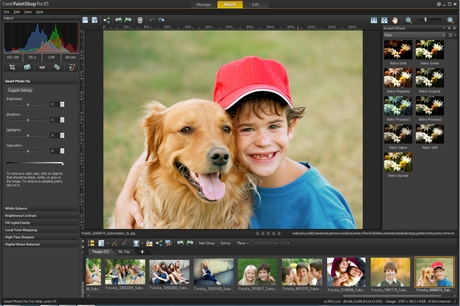 NEW! Instant Effects palette
Add creative effects to your photos in just seconds. Choose from a variety of preset effects which are organized into style categories such as Artistic, Film Styles, Black & White and Landscape. Thumbnails make it easy to select the effect you want or choose from your own custom made presets. You can also apply multiple effects to a single image to instantly create a unique photographic look.
 NEW! Retro Lab
Add old school color and contrast to your photos to achieve a distinctive look inspired by early lo-fi cameras. Plus, take advantage of a variety of control settings to create and tweak presets for use in other creative projects.
NEW! Graduated Filter effect
Apply semi-transparent color gradients to your photos to simulate the effect of using different camera lens filters. Enhanced gradient tools allow you to make quick and easy adjustments. A wide range of easy-to-use gradient controls also allows for more creativity and experimentation.
RAW Lab
RAW is a powerful photo format which contains more information and detail than the traditional JPEG format of most digital cameras. PaintShop Pro X5 features the Camera RAW Lab, a unique tool system which supports hundreds of camera models, allows for simple batch processing to convert RAW image files, and includes the ability to apply non-destructive adjustments to your RAW photos.
Enhanced! High Dynamic Range (HDR) tools
Create stunning photos with intense visual contrast using enhanced High Dynamic Range (HDR) tools, including the new ability to preview a photo's alignment and create Black & White HDR photos.
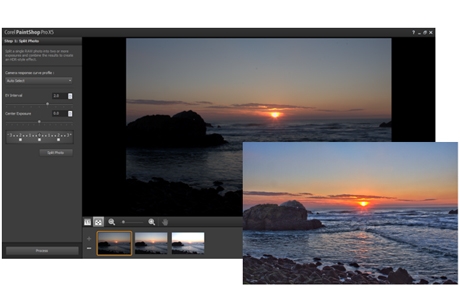 NEW! Single RAW Photo
Split an individual RAW photo into three exposures and then selectively recombine them to create a stunning and surreal HDR-style effect.
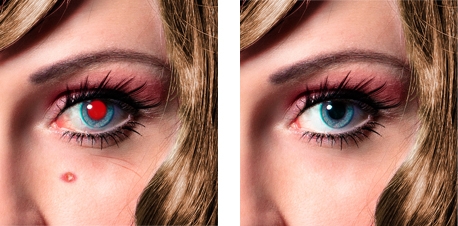 Makeover tools
Make sure the people in your photos look their best with Makeover tools that are fun and easy to use. Remove blemishes, smooth wrinkles, whiten bloodshot eyes, paint on tans and even help your subjects drop those extra few pounds the camera adds on. Advanced Warp tools allow you to distort faces to add a bizarre and humorous twist to your portraits, give your subjects a sculpted model makeover, and add new shape and perspective to your images.
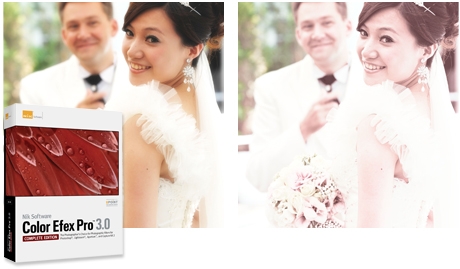 Bonus creative filters
Maximize your photo opportunities with NIK® Color Efex Pro™ 3.0, which includes over 250 effects and styles, and 30+ emulated film types in 52 easy-to-use filters. You get traditional and stylized filters that offer virtually endless possibilities to enhance and transform images quickly and easily.
Graphic Design
Create impressive graphic designs with dynamic design tools:
Enhanced! Text tool
Get the look you want with the enhanced Text tool which offers more intuitive text selection and editing, as well as improved interaction with the Pick tool.
Vector Editing tools
Draw and edit vector objects, and combine artistic elements with your photos to create digital designs that are as unique as your art style.
NEW! Run Multiple Scripts dialog box
Use built-in scripts to automate tasks such as resizing, adding effects and adjustments, allowing you to work faster, achieve more consistent results and experiment with different tools. Choose from dozens of easy-to-use pre-made scripts, create your own, or connect with other PaintShop® Pro users to share and exchange scripts. You can now also select multiple scripts as part of a single batch processing job, allowing you to get the perfect look while saving you time and effort.
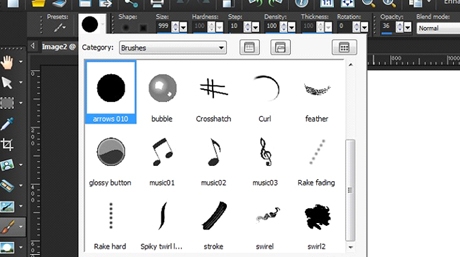 Enhanced! Paint Brush
Create and paint new styles and designs with the enhanced Paint Brush tool. Choose from a variety of built-in brushes or import Adobe Photoshop brushes, letting you enjoy even more ways to bring your digital artwork and creative designs to life.
Enhanced! Layer Styles
Get the perfect look you want using the enhanced Layer Styles feature. Now you can access styles - such as Drop Shadow, Glow and Reflections - directly from the Layers palette, while new input boxes allow for added precision and control over all of your creative design projects.
Enhanced! Art Media Tools
Go beyond photo editing with enhanced Art Media tools that allow you to create incredible digital works of art. Paint directly over top of your photos or use art media tools such as the enhanced water color brush to create a realistic hand painted effect.
Bonus creative collection
Do more with your photos with dozens of new brushes, textures and over 100 royalty-free backgrounds.
Makeover
Turn every photo into the perfect picture with easy-to-use makeover tools:
Makeover tools
Make sure the people in your photos look their best with Makeover tools that are fun and easy to use. Remove blemishes, smooth wrinkles, whiten bloodshot eyes, paint on tans and even help your subjects drop those extra few pounds the camera adds on. Advanced Warp tools allow you to distort faces to add a bizarre and humorous twist to your portraits, give your subjects a sculpted model makeover, and add new shape and perspective to your images.
Web Graphics
Create, edit and optimize your web graphics with a variety of versatile web tools:
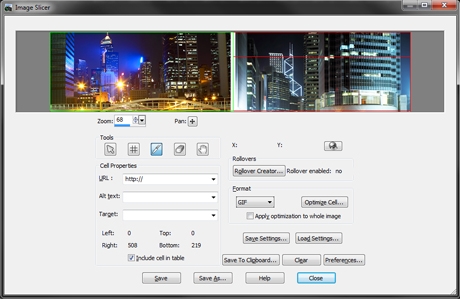 Web Tools
Use a variety of versatile web tools to save and optimize images that are perfect for online use. Work with image mapping to link HTML with your graphics, and use Slicing and Rollovers to create designs that work seamlessly with web pages.
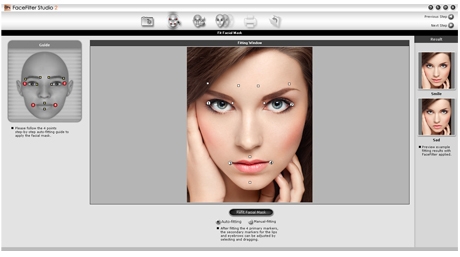 Bonus Portrait Enhancement tools
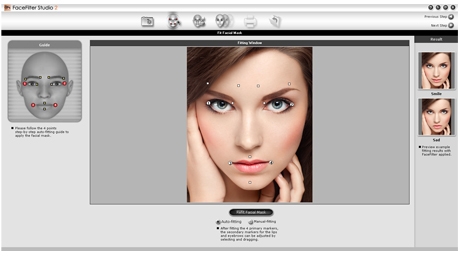
Revitalize the beauty in your photos with REALLUSION® FaceFilter Studio 2.0 portrait enhancement tools.
Photo Restoration & Repair
Bring your old family photos back to life with powerful photo restoration tools:
Scratch Remover Tool
The Scratch Remover tool is also perfect for repairing unsightly cracks and making tattered and faded photos look like new again.
Sophisticated cloning tools
Easily remove people and objects from your photos and seamlessly fill in the missing space with content from another area of your image.
Fade Correction
Make those old photos look new again by restoring the color and contrast of faded photos in one simple step.
Scrapbooking
Create unique designs for your photo projects with advanced editing and design tools:
Vector Editing tools
Draw and edit vector objects, and combine artistic elements with your photos to create digital designs that are as unique as your art style.
Enhanced! Paint Brush
Create and paint new styles and designs with the enhanced Paint Brush tool. Choose from a variety of built-in brushes or import brushes from Adobe Photoshop, letting you enjoy even more ways to bring your digital artwork and creative designs to life.
Enhanced! Layer Styles
Get the perfect look you want using the enhanced Layer Styles feature. Now you can access styles - such as Drop Shadow, Glow and Reflections - directly from the Layers palette, while new input boxes allow for added precision and control over all of your creative design projects.
Enhanced! Text tool
Get the look you want with the enhanced Text tool which offers more intuitive text selection and editing, as well as improved interaction with the Pick tool.
Specifications:
System Requirements
Import Formats Supported
Export Formats Supported
Cameras Supported
Please note: Certain cameras are only supported after Service Pack 1 is installed.
|
NA
|
|
18/09
|
|
Corel PaintShop Pro X5 Ultimate - Mini-BoxPaintShop Pro X5 UltimateThe Ultimate Photo Editor
Overview
The ultimate creative photo editor
Explore the ultimate in creativity. Corel® PaintShop® Pro X5 Ultimate combines the photo-editing power of PaintShop® Pro X5 with award-winning Nik® Color Efex Pro™ 3.0 photographic filters, REALLUSION FaceFilter Studio 2.0 portrait-enhancement tools, and a collection of creative extras. Experiment with a creative collection of new brushes, textures and over 100 royalty-free backgrounds. With so many photo-editing, design and creative tools and features at your fingertips, you'll be inspired to create, edit, enhance and share unforgettable photos and designs.
Organize, edit and enhance your photos
Create stunning photos in just seconds with powerful photo-editing and creative design tools. Enhance your photos with new High Dynamic Range (HDR) features, Instant Effects and the Retro Lab. Easily organize, navigate and tag your photos with a few simple clicks.
Create incredible graphic designs
Create dynamic digital works of art using new and enhanced design tools. Combine artistic elements with your photos or use new creative brush tools to create unique effects. Plus, enjoy a wide range of layer styles, and powerful image-adjustment, text and vector illustration tools to create graphics for print, video and the web.
Work faster and smarter
Easily find the help and information you need to complete any project with built-in video tutorials and exclusive access to FREE downloadable extras. Easy-to-follow instructions and Getting Started screens enable you to learn about new and existing features and work faster and smarter than ever before.
Share your images with others
Instantly share your photos and creative designs with built-in social media features. Tag people and places using the new Find People and Map View features, then link with your friend lists on Facebook and Flickr. Plus, instantly upload your creations to Facebook, Flickr and Google+.
More ways to create stunning and unforgettable photos
ULTIMATE BONUS PACK includes:
Features
PaintShop® Pro X5 Ultimate combines the power of PaintShop Pro X5 with valuable creative extras to help you create, edit, enhance and share your images. You have access to more photo-editing features, more creative design tools, more built-in learning, more social media features and more creative extras than ever before. Take your photos and designs to the next level with PaintShop Pro X5 Ultimate, the award-winning photo-editing and creative design combo.
Photo Editing
Organize, edit and enhance your photos with powerful photo-editing tools:
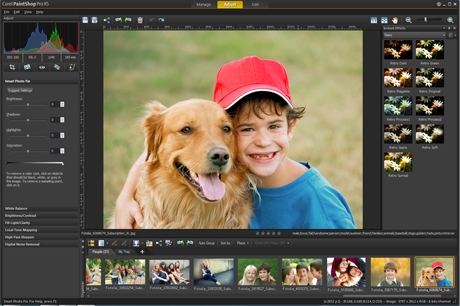 NEW! Instant Effects palette
Add creative effects to your photos in just seconds. Choose from a variety of preset effects which are organized into style categories such as Artistic, Film Styles, Black & White and Landscape. Thumbnails make it easy to select the effect you want or choose from your own custom made presets. You can also apply multiple effects to a single image to instantly create a unique photographic look.
 NEW! Retro Lab
Add old school color and contrast to your photos to achieve a distinctive look inspired by early lo-fi cameras. Plus, take advantage of a variety of control settings to create and tweak presets for use in other creative projects.
NEW! Graduated Filter effect
Apply semi-transparent color gradients to your photos to simulate the effect of using different camera lens filters. Enhanced gradient tools allow you to make quick and easy adjustments. A wide range of easy-to-use gradient controls also allows for more creativity and experimentation.
RAW Lab
RAW is a powerful photo format which contains more information and detail than the traditional JPEG format of most digital cameras. PaintShop Pro X5 features the Camera RAW Lab, a unique tool system which supports hundreds of camera models, allows for simple batch processing to convert RAW image files, and includes the ability to apply non-destructive adjustments to your RAW photos.
Enhanced! High Dynamic Range (HDR) tools
Create stunning photos with intense visual contrast using enhanced High Dynamic Range (HDR) tools, including the new ability to preview a photo's alignment and create Black & White HDR photos.
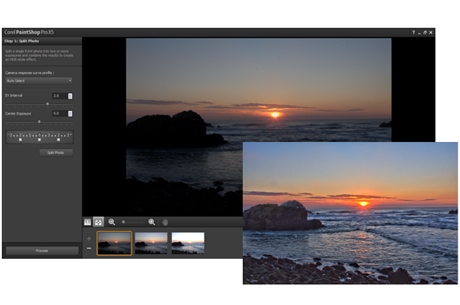 NEW! Single RAW Photo
Split an individual RAW photo into three exposures and then selectively recombine them to create a stunning and surreal HDR-style effect.
 Makeover tools
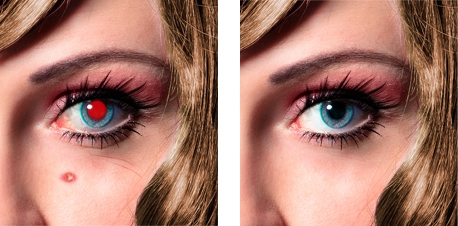
Make sure the people in your photos look their best with Makeover tools that are fun and easy to use. Remove blemishes, smooth wrinkles, whiten bloodshot eyes, paint on tans and even help your subjects drop those extra few pounds the camera adds on. Advanced Warp tools allow you to distort faces to add a bizarre and humorous twist to your portraits, give your subjects a sculpted model makeover, and add new shape and perspective to your images.
 Bonus creative filters
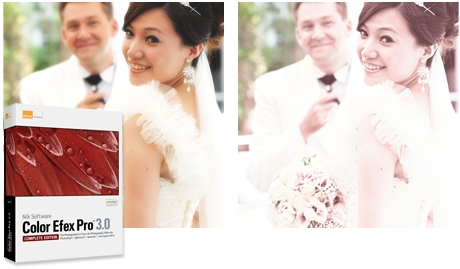
Maximize your photo opportunities with NIK® Color Efex Pro™ 3.0, which includes over 250 effects and styles, and 30+ emulated film types in 52 easy-to-use filters. You get traditional and stylized filters that offer virtually endless possibilities to enhance and transform images quickly and easily.
Graphic Design
Create impressive graphic designs with dynamic design tools:
Enhanced! Text tool
Get the look you want with the enhanced Text tool which offers more intuitive text selection and editing, as well as improved interaction with the Pick tool.
Vector Editing tools Draw and edit vector objects, and combine artistic elements with your photos to create digital designs that are as unique as your art style.
NEW! Run Multiple Scripts dialog box Use built-in scripts to automate tasks such as resizing, adding effects and adjustments, allowing you to work faster, achieve more consistent results and experiment with different tools. Choose from dozens of easy-to-use pre-made scripts, create your own, or connect with other PaintShop® Pro users to share and exchange scripts. You can now also select multiple scripts as part of a single batch processing job, allowing you to get the perfect look while saving you time and effort.
 Enhanced! Paint Brush
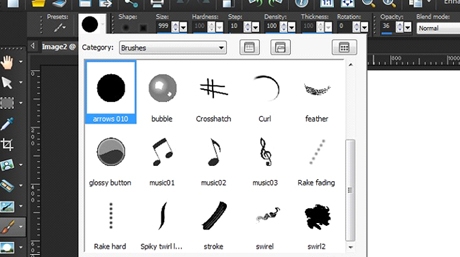
Create and paint new styles and designs with the enhanced Paint Brush tool. Choose from a variety of built-in brushes or import Adobe® Photoshop® brushes, letting you enjoy even more ways to bring your digital artwork and creative designs to life.
Enhanced! Layer Styles Get the perfect look you want using the enhanced Layer Styles feature. Now you can access styles - such as Drop Shadow, Glow and Reflections - directly from the Layers palette, while new input boxes allow for added precision and control over all of your creative design projects.
Enhanced! Art Media Tools Go beyond photo editing with enhanced Art Media tools that allow you to create incredible digital works of art. Paint directly over top of your photos or use art media tools such as the enhanced water color brush to create a realistic hand painted effect.
Bonus creative collection Do more with your photos with dozens of new brushes, textures and over 100 royalty-free backgrounds.
Makeover
Turn every photo into the perfect picture with easy-to-use makeover tools:
Makeover tools
Make sure the people in your photos look their best with Makeover tools that are fun and easy to use. Remove blemishes, smooth wrinkles, whiten bloodshot eyes, paint on tans and even help your subjects drop those extra few pounds the camera adds on. Advanced Warp tools allow you to distort faces to add a bizarre and humorous twist to your portraits, give your subjects a sculpted model makeover, and add new shape and perspective to your images.
 Web Graphics
Create, edit and optimize your web graphics with a variety of versatile web tools:
 Web Tools
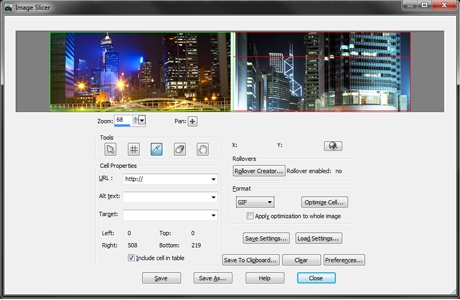
Use a variety of versatile web tools to save and optimize images that are perfect for online use. Work with image mapping to link HTML with your graphics, and use Slicing and Rollovers to create designs that work seamlessly with web pages.
Photo Restoration & Repair
Bring your old family photos back to life with powerful photo restoration tools:
Scratch Remover Tool The Scratch Remover tool is also perfect for repairing unsightly cracks and making tattered and faded photos look like new again.
Sophisticated cloning tools Easily remove people and objects from your photos and seamlessly fill in the missing space with content from another area of your image.
Fade Correction Make those old photos look new again by restoring the color and contrast of faded photos in one simple step.
Scrapbooking
Create unique designs for your photo projects with advanced editing and design tools:
Vector Editing tools Draw and edit vector objects, and combine artistic elements with your photos to create digital designs that are as unique as your art style.
Enhanced! Paint Brush Create and paint new styles and designs with the enhanced Paint Brush tool. Choose from a variety of built-in brushes or import brushes from Adobe® Photoshop®, letting you enjoy even more ways to bring your digital artwork and creative designs to life.
Enhanced! Layer Styles Get the perfect look you want using the enhanced Layer Styles feature. Now you can access styles - such as Drop Shadow, Glow and Reflections - directly from the Layers palette, while new input boxes allow for added precision and control over all of your creative design projects.
Enhanced! Text tool Get the look you want with the enhanced Text tool which offers more intuitive text selection and editing, as well as improved interaction with the Pick tool.
Specifications:
System Requirements
Import Formats Supported
Export Formats Supported
Cameras Supported
Please note: Certain cameras are only supported after Service Pack 1 is installed.
|
NA
|
|
18/09
|
|
Corel PaintShop Pro X5 - Mini-Box, UpgradePaintShop Pro X5
Powerful photo editing and creative design
Overview
Powerful photo-editing software
Discover a new way to create stunning and unforgettable photographs, with Corel PaintShop Pro X5. With new and improved photo-editing features, enhanced HDR and RAW tools, and incredible new instant effects, this release gives you the power and flexibility you need to stay creative. Powerful Vector and enhanced Layer tools allow you to merge photo and design together or create graphics for video, print and the web. Additional new tools include face recognition technology, the ability to map photos to real-world locations and enhanced social media tools. It's the perfect way to create, edit, enhance and share unforgettable photos and designs.
Faster and easier creative effects
Now you can apply creative effects to your photos in just seconds. Use the Instant Effects palette to apply dozens of visually unique styles quickly and easily. Apply an old school lo-fi look with the Retro Lab or create your own effects for use in other photo projects. The new Graduated Filter also lets you apply unique and colorful lens effects to your photos with just a few simple clicks.
Enhanced tools for creative designers
Get the perfect image, focus and dimensions you want using the enhanced Crop tool. Achieve more precise results with new Layer Style controls which are now accessible directly from the Layers palette. Enjoy the enhanced Paint Brush tool that now includes added support for Adobe® Photoshop® brushes. Plus, use the new Run Multiple Scripts option to automate the editing process even further so you can spend less time entering commands and more time focusing on your art.
Free content, training and tutorials
Get more out of your PaintShop Pro experience using the all-new Corel Guide, which offers easy-to-follow video tutorials as well as extra FREE downloadable content. Enhanced Getting Started screens also offer the help you need to get up and running quickly and easily. The award-winning Learning Center adapts to the way you work, offering helpful tips and tricks that even the most seasoned PaintShop Pro user will appreciate.
New ways to share your photos and designs
Harness the power of the most popular social media sites and share your images with the world. Use new face recognition technology to tag individuals in your photos and sync with your Facebook® and Flickr® accounts. Map photos to real-world locations or create and share an interactive photo-map slideshow of your latest travel adventure. Plus, instantly upload your photos and designs to Facebook, Flickr and Google+™.
More ways to create stunning and unforgettable photos
Features
PaintShop Pro X5 brings more photo-editing features, more creative design tools, more built-in learning, and more social media features to let you create, edit, enhance and share your images. Take your photos and designs to the next level with PaintShop Pro, the award-winning photo-editing and creative design combo.
Photo Editing
Organize, edit and enhance your photos with powerful photo-editing tools:
 NEW! Instant Effects palette
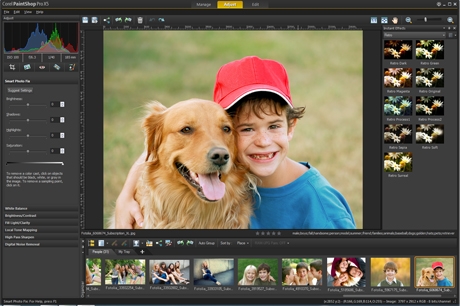
Add creative effects to your photos in just seconds. Choose from a variety of preset effects which are organized into style categories such as Artistic, Film Styles, Black & White and Landscape. Thumbnails make it easy to select the effect you want or choose from your own custom made presets. You can also apply multiple effects to a single image to instantly create a unique photographic look.
 NEW! Retro Lab
Add old school color and contrast to your photos to achieve a distinctive look inspired by early lo-fi cameras. Plus, take advantage of a variety of control settings to create and tweak presets for use in other creative projects.
NEW! Graduated Filter effect
Apply semi-transparent color gradients to your photos to simulate the effect of using different camera lens filters. Enhanced gradient tools allow you to make quick and easy adjustments. A wide range of easy-to-use gradient controls also allows for more creativity and experimentation.
RAW Lab Get a better look at your images with a larger preview area in the RAW Lab. The improved histogram lets you fine-tune images quickly and the new highlight recovery feature helps you restore detail in overexposed areas.
Enhanced! High Dynamic Range (HDR) tools Create stunning photos with intense visual contrast using enhanced High Dynamic Range (HDR) tools, including the new ability to preview a photo's alignment, add moving objects, and create Black & White HDR photos.
 NEW! Single RAW Photo
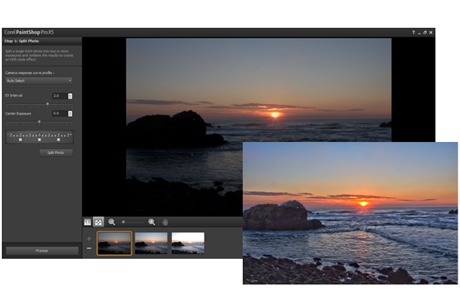
Split an individual RAW photo into three exposures and then selectively recombine them to create a stunning and surreal HDR-style effect.
 Makeover tools
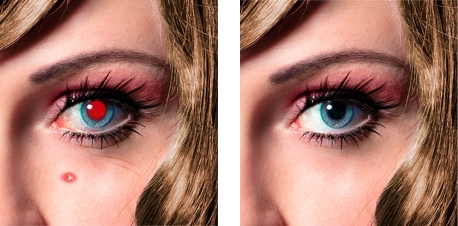
Make sure the people in your photos look their best with Makeover tools that are fun and easy to use. Remove blemishes, smooth wrinkles, whiten bloodshot eyes, paint on tans and even help your subjects drop those extra few pounds the camera adds on. Advanced Warp tools allow you to distort faces to add a bizarre and humorous twist to your portraits, give your subjects a sculpted model makeover, and add new shape and perspective to your images.
Graphic Design
Create impressive graphic designs with dynamic design tools:
Enhanced! Text tool Get the look you want with the enhanced Text tool which offers more intuitive text selection and editing, as well as improved interaction with the Pick tool.
Vector Editing tools Draw and edit vector objects, and combine artistic elements with your photos to create digital designs that are as unique as your art style.
Enhanced! Paint Brush
Create and paint new styles and designs with the enhanced Paint Brush tool. Choose from a variety of built-in brushes or import Adobe® Photoshop® brushes, letting you enjoy even more ways to bring your digital artwork and creative designs to life.
Enhanced! Layer Styles Get the perfect look you want using the enhanced Layer Styles feature. Now you can access styles - such as Drop Shadow, Glow and Reflections - directly from the Layers palette, while new input boxes allow for added precision and control over all of your creative design projects.
Enhanced! Art Media Tools Go beyond photo editing with enhanced Art Media tools that allow you to create incredible digital works of art. Paint directly over top of your photos or use art media tools such as the enhanced water color brush to create a realistic hand painted effect.
NEW! Run Multiple Scripts dialog box Use built-in scripts to automate tasks such as resizing, adding effects and adjustments, allowing you to work faster, achieve more consistent results and experiment with different tools. Choose from dozens of easy-to-use pre-made scripts, create your own, or connect with other PaintShop® Pro users to share and exchange scripts. You can now also select multiple scripts as part of a single batch processing job, allowing you to get the perfect look while saving you time and effort.
Makeover
Turn every photo into the perfect picture with easy-to-use makeover tools:
Makeover tools
Make sure the people in your photos look their best with Makeover tools that are fun and easy to use. Remove blemishes, smooth wrinkles, whiten bloodshot eyes, paint on tans and even help your subjects drop those extra few pounds the camera adds on. Advanced Warp tools allow you to distort faces to add a bizarre and humorous twist to your portraits, give your subjects a sculpted model makeover, and add new shape and perspective to your images.
Web Graphics
Create, edit and optimize your web graphics with a variety of versatile web tools:
 Web Tools
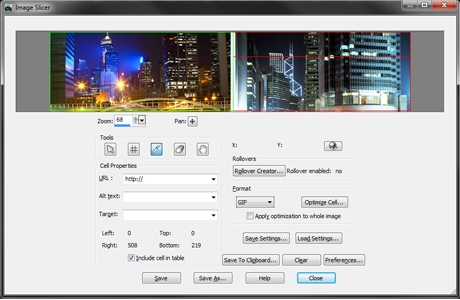
Use a variety of versatile web tools to save and optimize images that are perfect for online use. Work with image mapping to link HTML with your graphics, and use Slicing and Rollovers to create designs that work seamlessly with web pages.
Photo Restoration & Repair
Bring your old family photos back to life with powerful photo restoration tools:
Scratch Remover Tool
The Scratch Remover tool is also perfect for repairing unsightly cracks and making tattered and faded photos look like new again.
Sophisticated cloning tools Easily remove people and objects from your photos and seamlessly fill in the missing space with content from another area of your image.
Fade Correction Make those old photos look new again by restoring the color and contrast of faded photos in one simple step.
Scrapbooking
Create unique designs for your photo projects with advanced editing and design tools:
Vector Editing tools
Draw and edit vector objects, and combine artistic elements with your photos to create digital designs that are as unique as your art style.
Enhanced! Paint Brush Create and paint new styles and designs with the enhanced Paint Brush tool. Choose from a variety of built-in brushes or import Adobe® Photoshop® brushes, letting you enjoy even more ways to bring your digital artwork and creative designs to life.
Enhanced! Layer Styles Get the perfect look you want using the enhanced Layer Styles feature. Now you can access styles - such as Drop Shadow, Glow and Reflections - directly from the Layers palette, while new input boxes allow for added precision and control over all of your creative design projects.
Enhanced! Text tool Get the look you want with the enhanced Text tool which offers more intuitive text selection and editing, as well as improved interaction with the Pick tool.
System Requirements
Import Formats Supported
Export Formats Supported
Cameras SupportedPlease note: Certain cameras are only supported after Service Pack 1 is installed.
|
NA
|
|
18/09
|
|
Corel PaintShop Pro X5 - Mini-BoxPaintShop Pro X5
Creative Photo Editor
Overview
Creative photo editor
Passionate photographers can find even more ways to take photos to the next level, with Corel® PaintShop® Pro X5. With powerful photo-editing tools, incredible new instant effects, and enhanced HDR technology, creating stunning photos has never been easier. All-new tools include face recognition technology and the ability to map photos to real-world locations. Streamlined design tools let you blend images with photos and create high-quality graphics for print, video and the web. Plus, share your images online using new and enhanced social media features. It's all available in PaintShop Pro X5, the perfect way to create, edit, enhance and share unforgettable photos and designs.
Organize, edit and enhance your photos
Create stunning photos in just seconds with powerful photo-editing and creative design tools. Enhance your photos with new High Dynamic Range (HDR) features, Instant Effects and the Retro Lab. Easily organize, navigate and tag your photos with a few simple clicks.
Create incredible graphic designs
Create dynamic digital works of art using new and enhanced design tools. Combine artistic elements with your photos or use new creative brush tools to create unique effects. Plus, enjoy a wide range of layer styles, and powerful image-adjustment, text and vector illustration tools to create graphics for print, video and the web.
Work faster and smarter
Easily find the help and information you need to complete any project with built-in video tutorials and exclusive access to FREE downloadable extras. Easy-to-follow instructions and Getting Started screens help you learn about new and existing features, and work faster and smarter than ever before.
Share your images with others
Instantly share your photos and creative designs with built-in social media features. Tag people and places using the new Find People and Map View features, then link with your friend lists on Facebook and Flickr. Plus, instantly upload your creations to Facebook, Flickr and Google+.
Features
PaintShop Pro X5 brings more photo-editing features, more creative design tools, more built-in learning, and more social media features to let you create, edit, enhance and share your images. Take your photos and designs to the next level with PaintShop Pro, the award-winning photo-editing and creative design combo.
Photo Editing
Organize, edit and enhance your photos with powerful photo-editing tools:
 NEW! Instant Effects palette
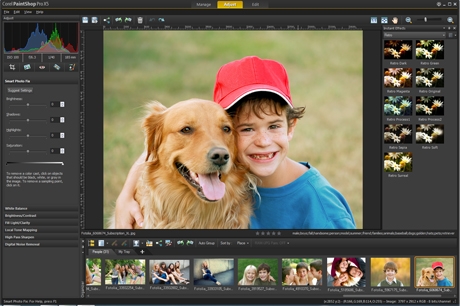
Add creative effects to your photos in just seconds. Choose from a variety of preset effects which are organized into style categories such as Artistic, Film Styles, Black & White and Landscape. Thumbnails make it easy to select the effect you want or choose from your own custom made presets. You can also apply multiple effects to a single image to instantly create a unique photographic look.
 NEW! Retro Lab
Add old school color and contrast to your photos to achieve a distinctive look inspired by early lo-fi cameras. Plus, take advantage of a variety of control settings to create and tweak presets for use in other creative projects.
NEW! Graduated Filter effect
Apply semi-transparent color gradients to your photos to simulate the effect of using different camera lens filters. Enhanced gradient tools allow you to make quick and easy adjustments. A wide range of easy-to-use gradient controls also allows for more creativity and experimentation.
RAW Lab Get a better look at your images with a larger preview area in the RAW Lab. The improved histogram lets you fine-tune images quickly and the new highlight recovery feature helps you restore detail in overexposed areas.
Enhanced! High Dynamic Range (HDR) tools Create stunning photos with intense visual contrast using enhanced High Dynamic Range (HDR) tools, including the new ability to preview a photo's alignment, add moving objects, and create Black & White HDR photos.
 NEW! Single RAW Photo
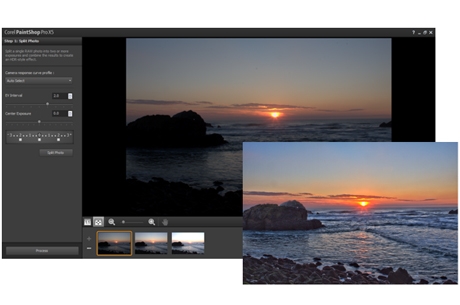
Split an individual RAW photo into three exposures and then selectively recombine them to create a stunning and surreal HDR-style effect.
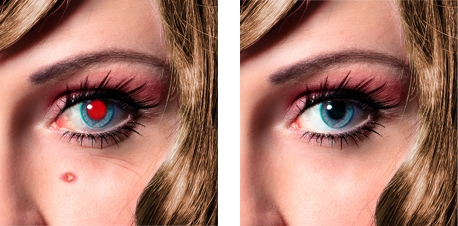 Makeover tools
Make sure the people in your photos look their best with Makeover tools that are fun and easy to use. Remove blemishes, smooth wrinkles, whiten bloodshot eyes, paint on tans and even help your subjects drop those extra few pounds the camera adds on. Advanced Warp tools allow you to distort faces to add a bizarre and humorous twist to your portraits, give your subjects a sculpted model makeover, and add new shape and perspective to your images.
Graphic Design
Create impressive graphic designs with dynamic design tools:
Enhanced! Text tool
Get the look you want with the enhanced Text tool which offers more intuitive text selection and editing, as well as improved interaction with the Pick tool.
Vector Editing tools
Draw and edit vector objects, and combine artistic elements with your photos to create digital designs that are as unique as your art style.
Enhanced! Paint Brush
Create and paint new styles and designs with the enhanced Paint Brush tool. Choose from a variety of built-in brushes or import Adobe® Photoshop® brushes, letting you enjoy even more ways to bring your digital artwork and creative designs to life.
Enhanced! Layer Styles Get the perfect look you want using the enhanced Layer Styles feature. Now you can access styles - such as Drop Shadow, Glow and Reflections - directly from the Layers palette, while new input boxes allow for added precision and control over all of your creative design projects.
Enhanced! Art Media Tools Go beyond photo editing with enhanced Art Media tools that allow you to create incredible digital works of art. Paint directly over top of your photos or use art media tools such as the enhanced water color brush to create a realistic hand painted effect.
NEW! Run Multiple Scripts dialog box Use built-in scripts to automate tasks such as resizing, adding effects and adjustments, allowing you to work faster, achieve more consistent results and experiment with different tools. Choose from dozens of easy-to-use pre-made scripts, create your own, or connect with other PaintShop® Pro users to share and exchange scripts. You can now also select multiple scripts as part of a single batch processing job, allowing you to get the perfect look while saving you time and effort.
Makeover
Turn every photo into the perfect picture with easy-to-use makeover tools:
Makeover tools
Make sure the people in your photos look their best with Makeover tools that are fun and easy to use. Remove blemishes, smooth wrinkles, whiten bloodshot eyes, paint on tans and even help your subjects drop those extra few pounds the camera adds on. Advanced Warp tools allow you to distort faces to add a bizarre and humorous twist to your portraits, give your subjects a sculpted model makeover, and add new shape and perspective to your images.
Web Graphics
Create, edit and optimize your web graphics with a variety of versatile web tools:
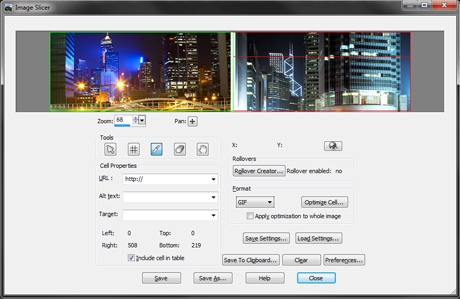 Web Tools
Use a variety of versatile web tools to save and optimize images that are perfect for online use. Work with image mapping to link HTML with your graphics, and use Slicing and Rollovers to create designs that work seamlessly with web pages.
Photo Restoration & Repair
Bring your old family photos back to life with powerful photo restoration tools:
Scratch Remover Tool
The Scratch Remover tool is also perfect for repairing unsightly cracks and making tattered and faded photos look like new again.
Sophisticated cloning tools
Easily remove people and objects from your photos and seamlessly fill in the missing space with content from another area of your image.
Fade Correction
Make those old photos look new again by restoring the color and contrast of faded photos in one simple step.
Scrapbooking
Create unique designs for your photo projects with advanced editing and design tools:
Vector Editing tools
Draw and edit vector objects, and combine artistic elements with your photos to create digital designs that are as unique as your art style.
Enhanced! Paint Brush
Create and paint new styles and designs with the enhanced Paint Brush tool. Choose from a variety of built-in brushes or import Adobe® Photoshop® brushes, letting you enjoy even more ways to bring your digital artwork and creative designs to life.
Enhanced! Layer Styles Get the perfect look you want using the enhanced Layer Styles feature. Now you can access styles - such as Drop Shadow, Glow and Reflections - directly from the Layers palette, while new input boxes allow for added precision and control over all of your creative design projects.
Enhanced! Text tool Get the look you want with the enhanced Text tool which offers more intuitive text selection and editing, as well as improved interaction with the Pick tool.
Specifications:
System Requirements
Import Formats Supported
Export Formats Supported
Cameras Supported
Please note: Certain cameras are only supported after Service Pack 1 is installed.
|
NA
|
|
18/09
|
|
View Sonic Replacement Lamp - To Suit ViewSonic PJD5113/5123/5133/5213/5223/5233/5353/5523W ProjectorRLC-072
Replacement Lamp Features
PJD5133, PJD5233, PJD5123, PJD5223, PJD5523W, and PJD5353 replacement lamp module
|
NA
|
|
18/09
|
|
View Sonic Replacement Lamp - To Suit ViewSonic PJD6253/6553W/6383/6683W ProjectorRLC-071
Replacement Lamp
Features
|
NA
|
|
18/09
|
|
View Sonic Replacement Lamp - To Suit ViewSonic PJD5126/PJD5226/PJD6223/PJD6353 ProjectorRLC-070
Replacement Lamp Features
PJD6223 replacement lamp module
|
NA
|
|
18/09
|
|
View Sonic Replacement Lamp - To Suit ViewSonic PJD5122/PJD5152/PJD5352 ProjectorReplacement Lamp - To Suit ViewSonic PJD5122/PJD5152/PJD5352 Projector
|

NA
|
|
18/09
|
|
View Sonic Replacement Lamp - To Suit ViewSonic PJD6251 ProjectorReplacement Lamp - To Suit Epson PJD6251 Projector
|
NA
|
|
Previous Page
|
Next Page
|
|
|||||||||||||||||||||||||||||||||||||||||||||||||||||||||||||||||||||||||||||||||||||||||||||||||||||||||||||||||||||||||||||||||||||||||||||||||||||||||||||||||||||||||||||||||||||||||||||||||||||||||||||||||||||||||||||||||||||||||||||||||||||||||||||||||||||||||||||||||||||||||||||||||||||||||||||||||||||||||||||||||||||||||||||||||||||||||||||||||||||||||||||||||||||||||||||||||||||||||||||||||||||||||||||||||||||||||||||||||||||||||||||||||||||||||||||||||||||||||||||||||||||||||||||||||||||||||||||||||||||||||||||||||||||||||||||||||||||||||||||||||||||||||||||||||||||||||||||||||||||||||||||||||||




All prices shown on camerafarm.com.au website are in $AUD and inclusive of GST.
Prices and availability are subject to change without prior notice. Images
displayed are accurate to the best of our knowledge and we will not be held
responsible for purchases based soley on these images. All brands and names
are trademarks of their respective companies.
We sell and ship to anywhere in Australia
.
© Techbuy Pty Ltd (camerafarm.com.au) 2026 All rights reserved. (site rev. 1.6b) For more
information, please see our usage policies.