Camerafarm product archive #40747
| Image |
Date |
Product description |
Price |
Buy |
|
25/07
|
Corel Upgrade Only - Upgrade to: Painter 12 - From: Painter 11/Painter X - Windows/Mac Warning: Before Purchase Please Check OS Compatibility
Please Note: This is an Upgrade Only
If you own Corel Painter 11 or Corel Painter X, you are eligible to purchase Corel Painter 12 at the upgrade . Your original serial number will be required.
Note: Academic, OEM and Not For Resale (NFR) versions of Painter 11 or Painter X do not qualify.
The worlds leading digital art software
Corel Painter 12 is the world's leading digital art software. Its combination of inventive drawing tools, Natural-Media brushes, image cloning capabilities and virtually unlimited customization options give you total freedom for creative expression. Internationally recognized for its RealBristle brushes, Painter offers the most realistic form of digital painting available in the digital art realm. And with the introduction of new Real Watercolor and Real Wet Oil brushes, plus exciting creative features exclusive to this version, Painter continues to change what's possible in art!
Overview
Designed for artists by artists, Corel Painter 12 opens up a world of creativity. With an impressive array of brushes, paper textures, paints, oils, watercolors and more, if you can dream it, you can create it in Painter! Thanks to extensive file support, you can also build upon projects you've started in other programs, making Painter a great complement to Adobe Photoshop. This latest version of the world's leading digital art software helps artists evolve their creative possibilities more than eversee it for yourself with a free trial!
Learn who uses Painter.
Painter rocks the art world
In honor of Painter's milestone 20th anniversary, artists from around the world have created video vignettes to share their favorite Painter tools and techniques. Dive into the heart of their art and discover just what makes Painter rock for them!
Most realistic digital painting experience
Painter's RealBristle brushes represent a major milestone for digital painting, reproducing the movement and feeling of traditional art on canvas when paired with a graphics tablet.
Progressive digital art capabilities
Exciting new Kaleidoscope and Mirror painting features let you create electrifying patterns and colors on canvas, leveraging the symmetry, speed and precision of mirrored planes. This Kaleidoscope painting capability is exclusive to Painter!
Designed for comfort
A new interface streamlines your brush selection, libraries, color controls and image set up. High-quality rendering gives you a clear view when zooming into the finer details.
Perfect complement to other software and hardware
Photoshop support lets you easily work with Photoshop files and correctly preserve colors and layers when transferring files from Photoshop to Painter. Support for the latest pen tablets from Wacom gives you exceptional freedom of movement.
More reasons to love Painter!
"The most realistic digital brushes on the planet just got better!"
- Mike Thompson - Illustrator, Designer & Painter Master
"Love it! By far the best yet! Congratulations to the Corel Painter team who have really thought through the user experience and workflow on this latest version."
- Jeremy Sutton - Portrait artist & Painter Master
"The redesigned interface in Painter 12 is streamlined and more efficient to use. If you like to paint, then Painter is the application for you; its natural media brushes and textures are not available using other programs."
- Cher Threinen-Pendarvis - Fine Artist & Painter Master
Features
What's included
Main Application
- Corel Painter 12 Mac OS and Windows versions
Content
- Libraries of unique gradients, nozzles, patterns, stock photos, paper textures and brushes
- Getting Started Guide (printed & PDF versions)
- Online videos and tutorials
- HTML Help files (Windows)
- Apple Help files (Mac)
- 7 Downloadable workspaces
Progressive digital art capabilities
New! Kaleidoscope painting
Create electrifying kaleidoscope effects on canvas with this exciting new tool that only exists in Painter 12! Use your choice of media to paint transfixing patterns and colors, using three to 12 mirrored planes. No other digital painting software in the world can produce such a 'wow' reaction!
New! Mirror Painting
Save time as you paint with perfect precision! This new tool copies every stroke you make onto the opposite side of your canvas. You choose whether it's mirrored horizontally, vertically or both. It's double the fun in half the time!
RealBristle Dry Media
Reproduce the movement and feeling of traditional art on canvas! Painter's RealBristle brushes represent a major milestone for digital painting, providing the most realistic painting experience when paired with a graphics tablet. Designed to work with a Wacom pen tablet, Painter's RealBristle Dry Media tools, such as Chalk, Marker, Pen and Pencil media, let you control opacity, color intensity, ink and shading simply by adjusting the pressure, angle and speed of your pen on tablet.
New! Real Watercolor
Achieve the most authentic results! This breakthrough tool blends and dries more realistically than any other watercolor brush. Control wind direction for drying, and watch colors interact with the paper grain and change pigmentation in the most lifelike way. Also customize your paper texture settings to influence how the watercolor paint flows and pools on the canvas.
New! Real Wet Oil
All of the fun, none of the mess or smell! With 12 new tools, the Real Wet Oil category offers the perfect solution for blending and painting flowing colors. Add solvents to the canvas for even more control. This new brush category gives artists that heightened sense of realism that only Painter 12 can deliver.
New! Clone source palette
Save time when working with photos. You can now create and manage numerous images for cloning within a single Painter file, using the new Clone Source palette. Simply create a library of objects that can easily be cloned and inserted into a painting.
Smart photo-painting tools
Transform photos into paintings by hand or let the Auto-Painting palette paint a photo for you, using your choice of brush and media. Painter contains sophisticated SmartStroke brush technology that follows the lines and contours in a picture just like a real artist would.
Customizable surface texturing
Give your art a level of texture and detail that no other digital painting software or photo-painting tools can produce. Choose paper textures for your canvas or create and customize your own texaftures to produce really unique artwork. The new Real Wet Oil and Real Watercolor palettes give you further options for controlling canvas texture.
Smart Blur effect
The Smart Blur effect lets you quickly apply a painterly effect to an image. By smoothing out colors and sharp details, the Smart Blur effect softens the appearance of an image with a result that is similar to applying soft brushstrokes.
System Requirements
Windows
- Microsoft Windows 7 or Windows Vista (32-bit or 64-bit editions), or Windows XP (32-bit edition), with the latest Service Packs installed
- 1 GHz processor or higher
- 1 GB RAM
- 600 MB hard disk space for application files*
- 1280 x 800 screen resolution
- Mouse or tablet
- DVD drive
- Microsoft Internet Explorer 7 or higher
*Additional space may be required for Microsoft .NET Framework 4.0
Macintosh
- Mac OS X 10.5 or 10.6 (with latest revision)
- Intel Core Duo
- 1 GB RAM
- 300 MB of HD space for application files
- 1280 x 800 screen resolution
- Mouse or tablet
|


|
|
|
25/07
|
Corel Painter 12 - Windows/Mac, Education Edition Only Warning: Before Purchase Please Check OS Compatibility
The worlds leading digital art software
Corel Painter 12 is the world's leading digital art software. Its combination of inventive drawing tools, Natural-Media brushes, image cloning capabilities and virtually unlimited customization options give you total freedom for creative expression. Internationally recognized for its RealBristle brushes, Painter offers the most realistic form of digital painting available in the digital art realm. And with the introduction of new Real Watercolor and Real Wet Oil brushes, plus exciting creative features exclusive to this version, Painter continues to change what's possible in art!
Overview
Designed for artists by artists, Corel Painter 12 opens up a world of creativity. With an impressive array of brushes, paper textures, paints, oils, watercolors and more, if you can dream it, you can create it in Painter! Thanks to extensive file support, you can also build upon projects you've started in other programs, making Painter a great complement to Adobe Photoshop. This latest version of the world's leading digital art software helps artists evolve their creative possibilities more than eversee it for yourself with a free trial!
Learn who uses Painter.
Painter rocks the art world
In honor of Painter's milestone 20th anniversary, artists from around the world have created video vignettes to share their favorite Painter tools and techniques. Dive into the heart of their art and discover just what makes Painter rock for them!
Most realistic digital painting experience
Painter's RealBristle brushes represent a major milestone for digital painting, reproducing the movement and feeling of traditional art on canvas when paired with a graphics tablet.
Progressive digital art capabilities
Exciting new Kaleidoscope and Mirror painting features let you create electrifying patterns and colors on canvas, leveraging the symmetry, speed and precision of mirrored planes. This Kaleidoscope painting capability is exclusive to Painter!
Designed for comfort
A new interface streamlines your brush selection, libraries, color controls and image set up. High-quality rendering gives you a clear view when zooming into the finer details.
Perfect complement to other software and hardware
Photoshop support lets you easily work with Photoshop files and correctly preserve colors and layers when transferring files from Photoshop to Painter. Support for the latest pen tablets from Wacom gives you exceptional freedom of movement.
More reasons to love Painter!
"The most realistic digital brushes on the planet just got better!"
- Mike Thompson - Illustrator, Designer & Painter Master
"Love it! By far the best yet! Congratulations to the Corel Painter team who have really thought through the user experience and workflow on this latest version."
- Jeremy Sutton - Portrait artist & Painter Master
"The redesigned interface in Painter 12 is streamlined and more efficient to use. If you like to paint, then Painter is the application for you; its natural media brushes and textures are not available using other programs."
- Cher Threinen-Pendarvis - Fine Artist & Painter Master
Features
What's included
Main Application
- Corel Painter 12 Mac OS and Windows versions
Content
- Libraries of unique gradients, nozzles, patterns, stock photos, paper textures and brushes
- Getting Started Guide (printed & PDF versions)
- Online videos and tutorials
- HTML Help files (Windows)
- Apple Help files (Mac)
- 7 Downloadable workspaces
Progressive digital art capabilities
New! Kaleidoscope painting
Create electrifying kaleidoscope effects on canvas with this exciting new tool that only exists in Painter 12! Use your choice of media to paint transfixing patterns and colors, using three to 12 mirrored planes. No other digital painting software in the world can produce such a 'wow' reaction!
New! Mirror Painting
Save time as you paint with perfect precision! This new tool copies every stroke you make onto the opposite side of your canvas. You choose whether it's mirrored horizontally, vertically or both. It's double the fun in half the time!
RealBristle Dry Media
Reproduce the movement and feeling of traditional art on canvas! Painter's RealBristle brushes represent a major milestone for digital painting, providing the most realistic painting experience when paired with a graphics tablet. Designed to work with a Wacom pen tablet, Painter's RealBristle Dry Media tools, such as Chalk, Marker, Pen and Pencil media, let you control opacity, color intensity, ink and shading simply by adjusting the pressure, angle and speed of your pen on tablet.
New! Real Watercolor
Achieve the most authentic results! This breakthrough tool blends and dries more realistically than any other watercolor brush. Control wind direction for drying, and watch colors interact with the paper grain and change pigmentation in the most lifelike way. Also customize your paper texture settings to influence how the watercolor paint flows and pools on the canvas.
New! Real Wet Oil
All of the fun, none of the mess or smell! With 12 new tools, the Real Wet Oil category offers the perfect solution for blending and painting flowing colors. Add solvents to the canvas for even more control. This new brush category gives artists that heightened sense of realism that only Painter 12 can deliver.
New! Clone source palette
Save time when working with photos. You can now create and manage numerous images for cloning within a single Painter file, using the new Clone Source palette. Simply create a library of objects that can easily be cloned and inserted into a painting.
Smart photo-painting tools
Transform photos into paintings by hand or let the Auto-Painting palette paint a photo for you, using your choice of brush and media. Painter contains sophisticated SmartStroke brush technology that follows the lines and contours in a picture just like a real artist would.
Customizable surface texturing
Give your art a level of texture and detail that no other digital painting software or photo-painting tools can produce. Choose paper textures for your canvas or create and customize your own texaftures to produce really unique artwork. The new Real Wet Oil and Real Watercolor palettes give you further options for controlling canvas texture.
Smart Blur effect
The Smart Blur effect lets you quickly apply a painterly effect to an image. By smoothing out colors and sharp details, the Smart Blur effect softens the appearance of an image with a result that is similar to applying soft brushstrokes.
System Requirements
Windows
- Microsoft Windows 7 or Windows Vista (32-bit or 64-bit editions), or Windows XP (32-bit edition), with the latest Service Packs installed
- 1 GHz processor or higher
- 1 GB RAM
- 600 MB hard disk space for application files*
- 1280 x 800 screen resolution
- Mouse or tablet
- DVD drive
- Microsoft Internet Explorer 7 or higher
*Additional space may be required for Microsoft .NET Framework 4.0
Macintosh
- Mac OS X 10.5 or 10.6 (with latest revision)
- Intel Core Duo
- 1 GB RAM
- 300 MB of HD space for application files
- 1280 x 800 screen resolution
- Mouse or tablet
|
|
|
|
25/07
|
Corel Painter 12 - Windows/Mac, Retail Edition Warning: Before Purchase Please Check OS Compatibility
The worlds leading digital art software
Corel Painter 12 is the world's leading digital art software. Its combination of inventive drawing tools, Natural-Media brushes, image cloning capabilities and virtually unlimited customization options give you total freedom for creative expression. Internationally recognized for its RealBristle brushes, Painter offers the most realistic form of digital painting available in the digital art realm. And with the introduction of new Real Watercolor and Real Wet Oil brushes, plus exciting creative features exclusive to this version, Painter continues to change what's possible in art!
Overview
Designed for artists by artists, Corel Painter 12 opens up a world of creativity. With an impressive array of brushes, paper textures, paints, oils, watercolors and more, if you can dream it, you can create it in Painter! Thanks to extensive file support, you can also build upon projects you've started in other programs, making Painter a great complement to Adobe Photoshop. This latest version of the world's leading digital art software helps artists evolve their creative possibilities more than eversee it for yourself with a free trial!
Learn who uses Painter.
Painter rocks the art world
In honor of Painter's milestone 20th anniversary, artists from around the world have created video vignettes to share their favorite Painter tools and techniques. Dive into the heart of their art and discover just what makes Painter rock for them!
Most realistic digital painting experience
Painter's RealBristle brushes represent a major milestone for digital painting, reproducing the movement and feeling of traditional art on canvas when paired with a graphics tablet.
Progressive digital art capabilities
Exciting new Kaleidoscope and Mirror painting features let you create electrifying patterns and colors on canvas, leveraging the symmetry, speed and precision of mirrored planes. This Kaleidoscope painting capability is exclusive to Painter!
Designed for comfort
A new interface streamlines your brush selection, libraries, color controls and image set up. High-quality rendering gives you a clear view when zooming into the finer details.
Perfect complement to other software and hardware
Photoshop support lets you easily work with Photoshop files and correctly preserve colors and layers when transferring files from Photoshop to Painter. Support for the latest pen tablets from Wacom gives you exceptional freedom of movement.
More reasons to love Painter!
"The most realistic digital brushes on the planet just got better!"
- Mike Thompson - Illustrator, Designer & Painter Master
"Love it! By far the best yet! Congratulations to the Corel Painter team who have really thought through the user experience and workflow on this latest version."
- Jeremy Sutton - Portrait artist & Painter Master
"The redesigned interface in Painter 12 is streamlined and more efficient to use. If you like to paint, then Painter is the application for you; its natural media brushes and textures are not available using other programs."
- Cher Threinen-Pendarvis - Fine Artist & Painter Master
Features
What's included
Main Application
- Corel Painter 12 Mac OS and Windows versions
Content
- Libraries of unique gradients, nozzles, patterns, stock photos, paper textures and brushes
- Getting Started Guide (printed & PDF versions)
- Online videos and tutorials
- HTML Help files (Windows)
- Apple Help files (Mac)
- 7 Downloadable workspaces
Progressive digital art capabilities
New! Kaleidoscope painting
Create electrifying kaleidoscope effects on canvas with this exciting new tool that only exists in Painter 12! Use your choice of media to paint transfixing patterns and colors, using three to 12 mirrored planes. No other digital painting software in the world can produce such a 'wow' reaction!
New! Mirror Painting
Save time as you paint with perfect precision! This new tool copies every stroke you make onto the opposite side of your canvas. You choose whether it's mirrored horizontally, vertically or both. It's double the fun in half the time!
RealBristle Dry Media
Reproduce the movement and feeling of traditional art on canvas! Painter's RealBristle brushes represent a major milestone for digital painting, providing the most realistic painting experience when paired with a graphics tablet. Designed to work with a Wacom pen tablet, Painter's RealBristle Dry Media tools, such as Chalk, Marker, Pen and Pencil media, let you control opacity, color intensity, ink and shading simply by adjusting the pressure, angle and speed of your pen on tablet.
New! Real Watercolor
Achieve the most authentic results! This breakthrough tool blends and dries more realistically than any other watercolor brush. Control wind direction for drying, and watch colors interact with the paper grain and change pigmentation in the most lifelike way. Also customize your paper texture settings to influence how the watercolor paint flows and pools on the canvas.
New! Real Wet Oil
All of the fun, none of the mess or smell! With 12 new tools, the Real Wet Oil category offers the perfect solution for blending and painting flowing colors. Add solvents to the canvas for even more control. This new brush category gives artists that heightened sense of realism that only Painter 12 can deliver.
New! Clone source palette
Save time when working with photos. You can now create and manage numerous images for cloning within a single Painter file, using the new Clone Source palette. Simply create a library of objects that can easily be cloned and inserted into a painting.
Smart photo-painting tools
Transform photos into paintings by hand or let the Auto-Painting palette paint a photo for you, using your choice of brush and media. Painter contains sophisticated SmartStroke brush technology that follows the lines and contours in a picture just like a real artist would.
Customizable surface texturing
Give your art a level of texture and detail that no other digital painting software or photo-painting tools can produce. Choose paper textures for your canvas or create and customize your own texaftures to produce really unique artwork. The new Real Wet Oil and Real Watercolor palettes give you further options for controlling canvas texture.
Smart Blur effect
The Smart Blur effect lets you quickly apply a painterly effect to an image. By smoothing out colors and sharp details, the Smart Blur effect softens the appearance of an image with a result that is similar to applying soft brushstrokes.
System Requirements
Windows
- Microsoft Windows 7 or Windows Vista (32-bit or 64-bit editions), or Windows XP (32-bit edition), with the latest Service Packs installed
- 1 GHz processor or higher
- 1 GB RAM
- 600 MB hard disk space for application files*
- 1280 x 800 screen resolution
- Mouse or tablet
- DVD drive
- Microsoft Internet Explorer 7 or higher
*Additional space may be required for Microsoft .NET Framework 4.0
Macintosh
- Mac OS X 10.5 or 10.6 (with latest revision)
- Intel Core Duo
- 1 GB RAM
- 300 MB of HD space for application files
- 1280 x 800 screen resolution
- Mouse or tablet
|
|
|
|
25/07
|
Epson EB-915W Portable Multimedia LCD Projector - 1280x800, 3200 Lumens, 2000;1, 6000Hrs, VGA, HDMI Epson EB-915W
Corporate Portable Multimedia Projectors
The Flexible Solution for Corporate and Education Environments
Overview
Epson is pleased to introduce the Epson EB915W 3LCD Multimedia Projector. Powerful and easy to use, this projector offers low cost of ownership, and ease of maintenance. Beautiful crisp, clear images make the EB915W is the ideal choice for use in a wide variety of Corporate and Education environments.
FEATURES AND BENEFITS:
- Powerful 3,200 Lumens Light + Colour Light Output The EB-915W is capable of being used in bright environments such as classrooms and offices.
- Wide Ranging Connectivity The projector has a high level of connectivity allowing you to input a wide range of devices including HDMI, LAN, mic and VGA.
- 1.6x Zoom Lens Enabling installation in a wide range of mount placements
- Network Functionality - Operate and monitor from a remote location
- Long Life Lamp Extends maintenance cycles and reduces the total cost of ownership
- Wireless Connections Free the room from complicated cables, allowing you to transmit both sound and images
Light + Colour Light Output of 3,200 lumens The Epson EB-915W is capable of producing a bright image of up to 3,200 Lumens Light + Colour Light Output. With this powerful projector you dont have to dim the lights or close the windows in order to see a bright, clear image.
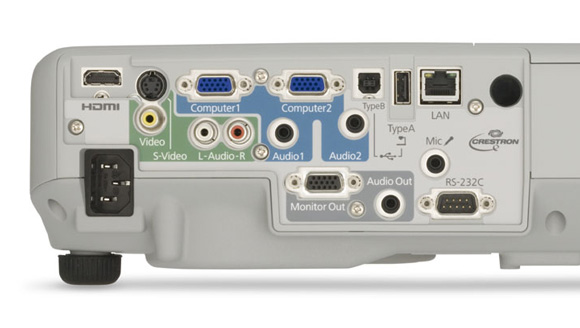
Wide Ranging Connectivity The EB-915W is very versatile in the classroom or office, featuring a host of input options. The units boast a HDMI, Video, S-Video, 2x VGA, USB A & B, Mic, RS232C, Monitor Out, Audio In + Out, and LAN inputs.
Easy integration and advanced connectivity features allow you to evolve your classroom or office as you incorporate additional technology. This projector can also be connected directly to the Epson DC06 to help facilitate effective presentations and lessons without the need for a PC.
1.6x Zoom Lens The high level zoom of the EB-915W provides installation flexibility, allowing the unit to be placed in a wide range of mount placements. This feature could allow you to mount the new projector unit in pre-existing mounts, avoiding the cost and time of setting up a new mount to suit the projector.
Network Functionality With Epson Network monitoring and control software (Easy MP monitor), a single PC allows you to see which projectors are available and if they are running efficiently, even across the largest of networks. This series can be configured remotely, and you can receive instant email alerts for pre-defined critical indicators such as non-functioning devices or overheating lamps. Using this feature you can be sure that all projectors are operating correctly and be certain that all units are turned off at the end of the day and in the process, save time, money and reduce drain on the environment.
Long Life Lamp - Lamp life for the EB-915W has an impressive 5,000 hours in high brightness mode or an amazing 6,000 hours in low brightness mode. We even back our lamps with a full 12 month, 750 hour* lamp warranty giving you the peace of mind. By the time you need to change the lamp in any of these products, you may have changed up to 2.5 lamps if you had used a competitors product from this category.
Maintaining the EB-915W is easy even when ceiling mounted. Changing the filter or lamp is a simple in-situ, end-user changeable operation meaning you dont require the additional expense of a visit from a service agent.
*Which ever comes first
Wireless Connectivity - With the addition of the ELPAP07 Wireless LAN Unit, the EB-915W becomes a part of your 802.11 b/g/n wireless network. For incredibly easy peer-to-peer wireless connection on the fly without the need for additional software, add the ELPAP08 Easy MP quick wireless connection USB key.
Connectivity Panel
Specifications
| PRODUCT TYPE |
Entry Level Multimedia Projectors |
| PRODUCT NAME |
Epson EB-915W |
| PRODUCT CODE |
V11H388053 |
| PROJECTION SYSTEM |
RGB Liquid Crystal Shutter Projection System |
| PROJECTION METHOD |
Front / Rear / Ceiling Mount |
| SPECIFICATION OF MAIN PARTS |
| LCD |
Size |
0.59 inches with MLA |
| |
Driving method |
Poly-Silicon TFT Active Matrix |
| |
Pixel number |
1,024,000 pixels (1280 x 800) x 3 |
| |
Native resolution |
WXGA |
| |
Aspect ratio |
16:10 |
| |
Pixel arrangement |
Stripe |
| |
Refresh Rate |
50Hz-60Hz |
| PROJECTION LENS |
Type |
Manual zoom / focus |
| |
F-number |
1.51 - 1.99 |
| |
Focal length |
18.2mm - 29.2mm |
| |
Zoom ratio |
1.0 ~ 1.6 Digital |
| LAMP |
Type |
230W UHE E-TORL |
| |
Life (estimated) |
4000Hr# (High bright), 6000Hr# (Low bright) |
| # Subject to operation and environmental conditions. |
| OPTICAL SYSTEM |
Dichroic Mirror Separation & Prism combine method |
| SCREEN SIZE (PROJECTED DISTANCE) |
29 to 280 inch [0.84 to 8.4m] (Zoom: Wide)
29 to 280 inch [1.36 to 13.9m] (Zoom: Tele), |
| BRIGHTNESS |
| |
High Brightness Mode |
3,200 Lumens Light Output
3,200 Lumens Colour Light Output
(Colour mode: Dynamic, Zoom: Wide) |
| |
Low Brightness Mode |
2,240 Lumens Light Output
2,240 Lumens Colour Light Output
(Colour mode: Dynamic, Zoom: Wide) |
| CONTRAST |
2,000:1 (Auto Iris On) |
| BRIGHTNESS UNIFORMITY |
89% (Typ.) |
| COLOUR REPRODUCTIVITY |
Full colour (16.77 million colours) |
| VIDEO QUALITY |
3D Y/C separation (NTSC only), Motion compensated Interlace-Progressive conversion (2-2, 3-2 film detection) |
| SOUND OUTPUT |
16W monaural |
| EFFECTIVE SCANNING FREQUENCY RANGE (ANALOG) |
| PIXEL CLOCK |
13.5MHz to 162MHz |
| HORIZONTAL |
15KHz to 92KHz |
| VERTICAL |
50Hz to 85Hz |
| ADJUSTMENT FUNCTION |
| PROJECTOR / REMOTE CONTROL |
Brightness / Contrast / Tint / Saturation / Sharpness / Input Signal
Colour Temperature / Tracking / Position / Sharpness / Volume e.t.c. |
| TILT ANGLE |
0 to 11 degrees |
| KEYSTONE CORRECTION |
Vertical: +/-30 degrees
Horizontal: +/-30 degrees |
| AUTO KEYSTONE CORRECTION |
Vertical: +/-30 degrees |
PASSWORD PROTECTED FUNCTION
(security function) |
Implemented |
| ANALOGUE RGB I/O |
| DISPLAY PERFORMANCE |
Native |
1,280 x 800 pixels |
| INPUT SIGNAL |
Signal type |
Separate signal |
| |
Video signal |
Analogue (0.7V p-p, 75ohm / Mac 0.714Vp-p, 75ohm) |
| |
Sync. signal |
Separate (positive & negative, bi-polarity 2-5 Vpp) / Composite (positive & negative, bi-polarity 2-5Vpp) / Sync-on-green (negative, 0.3Vpp) |
| |
Audio signal |
500mVrms / 47K-ohm |
| INPUT TERMINAL |
Video |
Video D-sub 15pin x 2 (Blue moulding) |
| |
Audio |
Stereo mini jack x 2 |
| OUTPUT SIGNAL |
Video |
Analog (0.7Vpp, 75ohm / Mac 0.714Vpp, 75ohm) |
| |
Sync. |
Separate (positive & negative,TTL) /
Composite (positive & negative,TTL) /
Sync. on green (negative 0.2 - 0.4Vpp) |
| OUTPUT TERMINAL |
Video |
D-sub 15pin x 1 (Black moulding) |
| VIDEO I/O |
| DISPLAY PERFORMANCE |
|
NTSC: 560 lines, PAL: 560 lines (Depends on observation of the multi burst pattern) |
| INPUT SIGNAL |
Video standard |
NTSC / NTSC4.43 / PAL / M-PAL / N-PAL / PAL60 / SECAM |
| |
Video signal |
Composite Video (1.0Vpp / Sync. negative, 75ohm) /
S-Video (Luminous 0.714Vpp, Chrominous 0.286Vpp, 75ohm) /
Component Video (Analog Y level 0.75V 75ohm / Cr Cb level
+/-0.35V 75ohm / sync. negative 0.3V or 3-state+/-0.3V on Y) /
Video-RGB (0.7Vpp, 75ohm / Mac 0.714Vpp, 75ohm |
| |
Audio signal |
500mVrms / 47k-ohm |
| INPUT TERMINAL |
Video |
Composite Video: RCA (Yellow) x1
S-Video: Mini DIN
Component Video: D-sub 15pin x 2 (Blue moulding) |
| MIC |
| Input Signal |
Audio |
-50dBV to -40dBV (0dB=1V/Pa,1kHz) (TBD) |
| Input Terminal |
Audio |
Stereo mini jack (Plug in power is available) |
| CONTROL I/O |
| SERIAL I/O |
Terminal |
D Sub 9 pin x 1 |
| |
Signal |
RS-232C |
| EASY MP |
| FUNCTION |
ESC/VP.net |
|
| |
E-mail notification |
|
| |
SNMP |
|
| |
Web control |
|
| |
PJ-Link |
|
| |
AMX Device Discovery |
|
| |
Crestron Room View |
|
| |
Message Broadcast |
|
| PC FREE |
File Browser |
|
| |
Still Image |
JPG; Thumbnail |
| |
Slideshow |
|
| WIRELESS Connectivity |
802.11 b/g/n |
With optional wireless adapter |
| SECURITY (Wireless LAN) |
WEP (64bit/128bit) |
|
| |
WPA-PSK (TKIP/AES) |
|
| |
WPA2-PSK(TKIP/AES) |
|
| SOFTWARE |
EMP Monitor (for Windows) |
Epson IP Link Projector Control (for Windows) |
| |
NS Connection |
For wireless connectivity (Win & Mac OSX) |
| OPERATING TEMPERATURE |
5C to 35C (41F to 95F) > (20%-80% Humidity ) |
| COOL-DOWN PERIOD |
"Instant off" |
| START-UP PERIOD |
Approx. 7 seconds (warm up 30 seconds) |
| DIRECT POWER ON |
Yes |
| DIRECT POWER OFF |
Yes |
| DIMENSION |
| EXCLUDE FEET |
263(D) x 345(W) x 93(H) mm |
| MAXIMUM DIMENSION |
263(D) x 345(W) x 106(H) mm |
| WEIGHT |
Approx. 3.13kg |
| FAN NOISE |
|
| HIGH BRIGHTNESS MODE |
33dB |
| LOW BRIGHTNESS MODE |
28dB |
| WARRANTY |
| STANDARD WARRANTY |
3 years*
*excluding lamp |
| * For more information visit Epson Projector Warranty Website |
| ACCESSORIES |
| POWER CORD |
3m |
| COMPUTER CABLE |
1.8m, D-sub 15pin (Male) - Mini D-sub 15pin (Male) |
| REMOTE CONTROL |
Included |
| PASSWORD PROTECT STICKER |
Included |
| AIR FILTER |
Included |
| OWNER'S MANUAL |
CD-ROM |
|
Epson is the registered trademark of Seiko Epson Corporation. Epson ESC/P2 and Epson Stylus are trademarks of Seiko Epson Corporation. MicroDot is a trademark of Epson Australia Pty Limited. All other product names and other company names used herein are for identification purposes only and may be the trademarks or registered trademarks of their respective owners. Epson disclaims any and all rights in those marks. Specifications are subject to change without notice.
|
Equipment supplied by Epson Australia is designed to function in conjunction with genuine Epson consumables and accessories specifically configured for it.
Usage Conditions
Epson products are designed and made to give highly reliable use and long life when used according to its specifications. With any system, product or device used in situations where human life may be involved or at risk, Epson advises that you should take all necessary steps to ensure the suitability of your Epson product for inclusion in your system, and recommends that you include fail-safe procedures and redundancy support or backup equipment in your system, to maintain the maximum safety margin and optimum system reliability. Examples include but are not limited to do not interfere with any electrical components within the device, do not use items supplied with the product for purposes other than as intended by Epson (ie mains cords, inks, CDs, plastic wrapping) and do not make modifications to the product.
|
|
|
|
25/07
|
GeoVision GV-SD010-S18X Outdoor IP Speed Dome - 1/4" Exview CCD, 18x Optical Zoom, 12x Digital Zoom, H.264, MPEG4 and MJPEG, 4x Digital In, 1x Digital Out, RJ-45 Connector - White
- Provide 18X, 23X, 36X
- CIF and D1 resolution
- H.264, MPEG4 and MJPEG
- 2 way audio
- Digital In x 4, Digital Out x 1
- Preset speed up to 400/sec
- Auto-calibration
- Digital image flip
- Minimum illumination 0.01 Lux (B/W)
- Wide dynamic range
- 16 languages on web interface
GV-SD010-S18X
The GV-IP Speed Dome provides variable pan/tilt speeds ranging from a fast patrol of 400 per second to a slow ramble of 5 per second with 0.225 pan accuracy for fast and accurate tracking ability. The 360 endless rotation and -10~190 tilt travel make tracking the object passing directly beneath the GV-IP Speed Dome. A maximum of 256 preset points can be programmed for precise location of target areas, and users can also define 8 sequences, 4 auto-pan modes and 4 cruise routes for the Dome to operate automatically.
The GV-IP Speed Dome provides 4 alarm inputs and 1 alarm relay output, and the alarm management can be done through the network as well.
Specification
| Model |
GV-SD010-S18X |
GV-SD010-S23X |
GV-SD010-S36X |
|
Camera
|
|
Image Sensor
|
1/4" Exview CCD
|
1/4" Progressive CCD |
1/4" Exview CCD |
|
Optical Zoom
|
18x |
23x |
36x |
|
Digital Zoom
|
12x
|
|
Effective Pixels
|
NTSC |
380k
|
| PAL |
440k
|
|
Horizontal Resolution
|
NTSC |
530 TVL
|
540 TVL |
530 TVL |
| PAL |
530 TVL
|
540 TVL |
530 TVL |
|
Scanning System
|
NTSC / PAL
|
|
Synchronization
|
Internal / Line Lock
|
|
Video Output
|
1.0 Vp-p / 75 , BNC
|
|
S/N Ratio
|
> 50 dB (AGC Off)
|
|
Minimum Illumination
|
0.07 lux ; 0.01 lux (B/W) |
0.1 lux ; 0.01 lux (B/W) |
0.1 lux ; 0.01 lux (B/W) |
|
Focal Length
|
4.1 ~ 73.8 mm |
3.6 ~ 82.8 mm |
3.4 ~ 122.4 mm |
|
Focus Mode
|
Auto / Manual
|
|
White Balance
|
Auto / Manual
|
|
Iris Control
|
Auto / Manual
|
|
Electronic Shutter
|
NTSC |
1/1 ~ 1/10k s
|
1/2 ~ 1/30k s |
1/1~ 1/10k s |
| PAL |
1/1 ~ 1/10k s
|
1/1.5 ~ 1/30k s |
1/1 ~ 1/10k s |
|
AGC Control
|
Auto / Manual
|
|
Back Light Compensation
|
On / Off
|
|
Video
|
|
Video Codec
|
H.264, MPEG4, MJPEG
|
|
Video Resolution
|
NTSC |
704 x 480, 704 x 480 De-interlace, 352 x 240
|
| PAL |
704 x 576, 704 x 576 De-interlace, 352 x 288
|
|
Frame Rate
|
30 fps (NTSC) / 25 fps (PAL) at D1
|
|
Audio
|
|
Audio input/output
|
2-way audio, stereo jack, 35 mm
|
|
Audio Codec
|
G.711
|
|
Network
|
|
Interface
|
10/100 Base-T Ethernet, RJ-45 connector
|
|
Protocol
|
HTTP, HTTPS, TCP, UDP, SMTP, FTP, DHCP, NTP, UPnP, DynDNS, 3GPP/ISMA, RTSP, PSIA, QoS (DSCP), SNMP
|
|
Web Interface
|
|
Installation & Management
|
Web-based configuration
|
|
Firmware Upgrade
|
Remote upgrade through Web Browser
IP Device Utility included in the Software DVD
|
|
Access from Web Browser
|
live view, video recording, PTZ control, preset setting, bandwidth control, image snapshot, digital I/O control, 2-way audio, Picture-in-Picture (PIP), PictureandPicture (PAP), Wide Angle Lens Dewarping (WALD)
|
|
Language
|
Czech / Danish / English / French / German / Hebrew / Hungarian / Italian / Japanese / Polish / Portuguese / Russian / Serbian / Simplified Chinese / Spanish / Traditional Chinese
|
|
Operation
|
|
Pan Travel
|
360 endless
|
|
Tilt Travel
|
-10 ~ 190
|
|
Manual Speed
|
0.5 ~ 90/s
|
|
Preset
|
256
|
|
Preset Accuracy
|
0.225
|
|
Preset Speed
|
5 ~ 400/s
|
|
Sequence
|
8
|
|
Auto Pan
|
4
|
|
Cruise
|
4
|
|
Privacy Mask
|
24 |
8 |
24 |
|
Proportional Pan & Tilt
|
On / Off (Pan and tilt speed proportional to zoom ratio)
|
|
Resume afterPower Loss
|
Yes
|
|
Home Function
|
Preset, Sequence, Auto pan, Cruise
|
|
Auto Flip
|
Digital / Mechanical / Off
|
|
Digital Slow Shutter
|
On / Off
|
|
Motion Detection
|
On / Off
|
|
Wide Dynamic Range
|
On / Off
|
|
Day/Night: Mechanical IR Cut Filter
|
On / Off
|
|
Image Inverse
|
On / Off
|
|
Image Freeze
|
On / Off
|
|
Sensor Input
|
4
|
|
Alarm Output
|
1
|
|
Alarm Reaction
|
Preset, Sequence, Auto pan, Cruise
|
|
General
|
|
Operating Temperature
|
-45C ~ 50C (-49F ~ 122F)
|
|
Humidity
|
20% ~ 90% (non-condensing)
|
|
Waterproof Standard
|
IP66 standard (Outdoor series)
|
|
Dimensions
|
172 x 302.5 mm (6.7 x 11.9 in) /
190 x 302.5 mm ( 7.5x 11.9 in) with sunshield
|
|
Weight
|
2.6 kg (5.7 lbs)
|
|
Power Source
|
NTSC |
Input |
100 / 115V AC, 1.6A, 50-60HZ |
| Output |
24V AC 10%, 3A |
| PAL |
Input |
220 / 230V AC, 50 / 60HZ, 0.4A |
| Output |
24V AC 10%, 3A |
|
Power Consumption
|
65 W (with Heater)
|
|
Fan
|
On: 35C / 95F
|
|
Heater
|
On: -7C / 19.4F ; Off: 3C / 37.4F
|
|
Regulatory
|
CE, FCC, RoHS
|
|
Applications
|
|
Network Storage
|
GV-NVR, GV-System
|
|
3G Mobile Phone
|
Built-in player for 3GPP / ISMA
|
|
Live Viewing
|
IE , GV-MultiView
|
|
CMS Server support
|
GV-Control Center, GV-Center V2, GV-VSM, GV-GIS
|
|
|
|
|
25/07
|
Sony LCSU10 Handycam Carry Case - To Suit Camcorder/Camera/Accessories - Black LCSU10
Carrying Case (Black)
Light and compact case protection for your camcorder or camera and accessories - ideal for travel.
- Space for camcorder or NEX camera plus additional lens, spare battery, filter and memory card
- Internal pocket stores spare Memory Stick or SD Card
- Comfortable shoulder strap
- Strong padding for optimal protection
Specification
| Dimensions (W x H x D) |
Approx. 170 x 130 x 100mm |
| Material |
Polyamide (Nylon) |
| Type of use |
3 ways (hand carry / shoulder strap / waist bag) |
|
|
|
|
25/07
|
Shintaro 2GB Pen Flash Drive - OEM, BlackUSB 2GB Pen - Black (OEM)
|

|
|
|
25/07
|
Creative Vado HD Pocket Video 3rd Gen Camcorder - Black
- 4GB Internal Memory, 30fps, HD 720p,2x Digital Zoom, 2.0" LCD Screen, Built-In Microphone, Built-In flexible USB Connector, One Button Record Vado HD
Pocket Video CAM HD 3rd Gen
Features
Capture life in HD
Your baby's first steps. The family pet scampering in the garden.
Capture life's beautifully candid moments with the Vado HD (3rd Gen) - the latest model in the award-winning Vado series of pocket video cameras! One light touch on the touch-sensitive buttons and you can start recording instantly in high-definition quality. Lightweight and extremely compact, enjoy up to 120 minutes of widescreen HD quality video on the move. Don't cramp your style with additional camera equipment as the Vado HD (3rd Gen) comes equipped with a photo feature that lets you shoot up to 7,000 of widescreen still shots.
The video enthusiast in you will be thrilled at how much more you can achieve with the multi-function jack and the improved Vado Central 3.0 software. With the multi-function port, you can connect a handy microphone to the Vado HD (3rd Gen) for better audio recording and come playback time, simply plug in your own headphones to listen to the videos at a desired volume level. Sporting a built-in flexible USB arm that connects easily to your computer or laptop, the Vado HD (3rd Gen) lets you view and edit your videos or pictures before posting them onto popular social media sites with the bundled Vado Central 3.0 software. Sharing your happy times with others truly does not come easier than this!
Cutting-edge design, high-quality video and simple ease of use in one small attractive package. The Vado HD (3rd Gen) is available in stylish black and immaculate white - get yours today.
Pint-sized dynamo
Power-packed with features such as touch-sensitive buttons, 2x digital zoom, manual exposure adjustments, and motion detection, the Vado HD (3rd Gen) is a must-have for those capturing action on the go.
One click to instant gratification
With the handy Vado HD (3rd Gen), you won't have to worry about missing any important action again. Record impromptu moments instantly with the one-click recording button and at a quick switch, change to photo mode to capture picture-perfect stills!
Significant moments in high-definition quality
Enjoy 2 hours of HD quality footage at a video resolution of up to 1280x720p. Alternatively, you can snap up to 7,000 picture-perfect still photos of your favorite camera subject.
Multiple connectivity options
The Vado HD (3rd Gen) is equipped with a multi-function port that gives you the flexibility to do more with your pocket camcorder. Plug in a stereo microphone for enhanced audio recording - an especially handy feature in news reporting, concert filming and more. You can also connect your headphones for private listening to your footage or output videos on non-HDMI displays via an analog AV cable.
Watch it on the big screen
Connect your Vado HD (3rd Gen) to a HDTV via a HDMI cable to enjoy big screen viewing and your videos in 720p HD quality. No need to hit the cinemas for the best theatre experience.
Wider scenes, more action
Capture wider scenes and more action in your videos and photos with the wide-angle lens. You can also get a close-up of the action with the 2x digital zoom feature.
Built-in flexible USB connector
Charge your pocket video camera easily via the built-in USB connector. It also helps you in posting your videos and pictures onto YouTube, Photobucket or Box.net with the built-in Vado Central 3.0 software. Absolutely no need for any additional cables!
Vado Central 3.0
Enhance your Vado experience with the Vado Central 3.0! The software allows you to playback, edit and take snapshots of your video easily! What's more, you can now upload your favorite Vado videos to popular social media and video-sharing sites such as Facebook, YouTube, Box.net and KinKast in one simple step!
Specifications
| Feature |
Description |
| Weight: |
93g (with battery) |
| Dimension (H x W x D): |
3.9" x 2.2" x 0.6" (98.8 mm x 57.6 mm x 15.8 mm) |
| Memory size: |
4GB1 |
| Sensor: |
HD CMOS (1280 x 720) |
| Video resolution: |
HD (1280 x 720p), VGA (640 x 480) |
| Low light performance: |
Extremely high sensitivity at 3.3V/lux-sec |
| LCD: |
50.8 mm (2") diagonal, 16 million colors |
| Screen resolution (pixels): |
640 x 240 |
| Zoom: |
2x Digital Zoom |
| Recording capacity: |
Up to: 1 hour (HD+ quality), 2 hours (HD quality), 4 hours (VGA quality) |
| Digital video file format: |
*.mp4 (H.264, AAC) |
| Video frame rate: |
30 frames per second |
| Speaker and microphone: |
Built-in |
| Software: |
Pre-loaded Vado Central 3.0 |
| TV out: |
RCA, HDMI (HDMI cable included) 4 |
| Exposure Adjustment: |
Auto or Manual |
| Picture Resolution: |
HD still picture at 1280 x 720 |
| Digital Picture File Format: |
*.JPEG |
| Wide-angle lens: |
Yes |
| Multiple connectivity earphone jack: |
Yes (for external microphone, AV cable and earphones) |
| Tripod mount: |
Yes |
| Power saver: |
Yes |
| Delete all, Play all: |
Yes |
| Set Date/Time: |
Yes |
| Set frequency: |
Yes (50Hz or 60Hz) |
| PC connection: |
Built-in flexi USB connector |
| Battery life: |
2 hours2 3 |
| Online sharing: |
YouTube, Photobucket, Box.net, Facebook, KinKast |
1 4GB memory includes built-in software.
2 Actual battery life will vary with use. Battery has limited recharge cycles and may eventually need to be replaced.
3 Vado battery and battery charger will not work with the Vado HD (3rd Gen).
4 Bundled HDMI cable is only for certain regions. Please check with your local representatives or offices for package content.
Requirements
| Minimum PC Requirements |
Minimum Mac Requirements |
| Intel Pentium 4 2.8GHz or faster |
|
| Microsoft Windows 7, Windows Vista or Windows XP(SP 2) |
Apple Mac OS X 10.4 or later |
| 512MB RAM |
Vado Central for Mac OS X |
| USB Port |
|
|
|
|
|
25/07
|
SanDisk 8GB Cruzer Flash Drive - Retractable Connector, SanDisk SecureAccess Software, USB2.0 - Red
SanDisk Cruzer USB flash drive
Experience reliable, portable storage with a SanDisk Cruzer USB Flash Drive...
Why leave your photos, videos and music at home when you can take them with you? Experience premium, reliable and secure storage with a SanDisk Cruzer USB flash drive.
- Premium, reliable and secure storage for your videos, music, photos, or other files.
- Includes SanDisk SecureAccess software to protect access to your personal files with a password-protected private vault.
- Also includes secure online backup (up to 2GB* optionally available) offered by YuuWaa
- Backed by the protection of a five-year limited** warranty
* 1 gigabyte (GB) = 1 billion bytes. Some capacity not available for data storage.
** Five-year warranty in regions not recognizing "limited" warranty.
Registration required. Terms and conditions apply.
Password protection uses 128-bit AES encryption and is supported by Windows XP, Windows Vista, Windows 7, and Mac OS X10.5+ (Software download required for Mac)
|
|
|
|
25/07
|
SanDisk 8GB Cruzer Flash Drive - Retractable Connector, SanDisk SecureAccess Software, USB2.0 - Blue
SanDisk Cruzer USB flash drive
Experience reliable, portable storage with a SanDisk Cruzer USB Flash Drive...
Why leave your photos, videos and music at home when you can take them with you? Experience premium, reliable and secure storage with a SanDisk Cruzer USB flash drive.
- Premium, reliable and secure storage for your videos, music, photos, or other files.
- Includes SanDisk SecureAccess software to protect access to your personal files with a password-protected private vault.
- Also includes secure online backup (up to 2GB* optionally available) offered by YuuWaa
- Backed by the protection of a five-year limited** warranty
* 1 gigabyte (GB) = 1 billion bytes. Some capacity not available for data storage.
** Five-year warranty in regions not recognizing "limited" warranty.
Registration required. Terms and conditions apply.
Password protection uses 128-bit AES encryption and is supported by Windows XP, Windows Vista, Windows 7, and Mac OS X10.5+ (Software download required for Mac)
|
|
|
|
25/07
|
SanDisk 8GB Cruzer Flash Drive - Retractable Connector, SanDisk SecureAccess Software, USB2.0 - Purple
SanDisk Cruzer USB flash drive
Experience reliable, portable storage with a SanDisk Cruzer USB Flash Drive...
Why leave your photos, videos and music at home when you can take them with you? Experience premium, reliable and secure storage with a SanDisk Cruzer USB flash drive.
- Premium, reliable and secure storage for your videos, music, photos, or other files.
- Includes SanDisk SecureAccess software to protect access to your personal files with a password-protected private vault.
- Also includes secure online backup (up to 2GB* optionally available) offered by YuuWaa
- Backed by the protection of a five-year limited** warranty
* 1 gigabyte (GB) = 1 billion bytes. Some capacity not available for data storage.
** Five-year warranty in regions not recognizing "limited" warranty.
Registration required. Terms and conditions apply.
Password protection uses 128-bit AES encryption and is supported by Windows XP, Windows Vista, Windows 7, and Mac OS X10.5+ (Software download required for Mac)
|
|
|
|
25/07
|
GeoVision GV-Joystick - Provides Full Control Of The PTZ Devices Connected To The GV-System - Silver GV-Joystick
The GV-Joystick provides full control of the PTZ devices connected to the GV-System. It faciliates functions such as tilt, pan, or zoom to achieve precision surveillance. When combined with the GV-Keyboard, it empowers GV-System operations.
Specifications
OS Supported
32-bit - Windows XP / Windows Vista / Windows 7 / Windows Server 2008
64-bit - Windows 7 / Windows Server 2008
Communication
USB - USB 2.0 / Type A Male to Type B Male
RJ-45 - Connects to GV-Keyboard
Power
DC IN - DC 5V 50mA
Environmental Conditions
Operation Temperature - 0~50C / 32F ~122F
Humidity - 5%~95% (non-condensing)
Dimensions (W x H x D) - 160 x 90 x 118 mm / 6.30 x 3.54 x 4.65 in
Installation Guide - GV-Joystick
|
|
|
|
25/07
|
GeoVision GV-SD010-18X Indoor IP Speed Dome - 1/4" Exview CCD, 18x Optical Zoom, 12x Digital Zoom, H.264, MPEG4, MJPEG, 2 Way Audio, RJ45 Connector - White GV-SD010-18X
GV-SD010 Indoor IP Speed Dome
- Provide 18X, 23X, 36X
- CIF and D1 resolution
- H.264, MPEG4 and MJPEG
- 2 way audio
- Digital In x 4, Digital Out x 1
- Preset speed up to 400/sec
- Auto-calibration
- Digital image flip
- Minimum illumination 0.01 Lux (B/W)
- Wide dynamic range
- 16 languages on web interface
INTRODUCTION
The GV-IP Speed Dome provides variable pan/tilt speeds ranging from a fast patrol of 400 per second to a slow ramble of 5 per second with 0.225 pan accuracy for fast and accurate tracking ability. The 360 endless rotation and -10~190 tilt travel make tracking the object passing directly beneath the GV-IP Speed Dome. A maximum of 256 preset points can be programmed for precise location of target areas, and users can also define 8 sequences, 4 auto-pan modes and 4 cruise routes for the Dome to operate automatically.
The GV-IP Speed Dome provides 4 alarm inputs and 1 alarm relay output, and the alarm management can be done through the network as well.
Specification
| Model |
GV-SD010-18X |
GV-SD010-23X |
GV-SD010-36X |
|
Camera
|
|
Image Sensor
|
1/4" Exview CCD
|
1/4" Progressive CCD |
1/4" Exview CCD |
|
Optical Zoom
|
18x |
23x |
36x |
|
Digital Zoom
|
12x
|
|
Effective Pixels
|
NTSC |
380k
|
| PAL |
440k
|
|
Horizontal Resolution
|
NTSC |
530 TVL
|
540 TVL |
530 TVL |
| PAL |
530 TVL
|
540 TVL |
530 TVL |
|
Scanning System
|
NTSC / PAL
|
|
Synchronization
|
Internal / Line Lock
|
|
Video Output
|
1.0 Vp-p / 75 , BNC
|
|
S/N Ratio
|
> 50 dB (AGC Off)
|
|
Minimum Illumination
|
0.07 lux ; 0.01 lux (B/W) |
0.1 lux ; 0.01 lux (B/W) |
0.1 lux ; 0.01 lux (B/W) |
|
Focal Length
|
4.1 ~ 73.8 mm |
3.6 ~ 82.8 mm |
3.4 ~ 122.4 mm |
|
Focus Mode
|
Auto / Manual
|
|
White Balance
|
Auto / Manual
|
|
Iris Control
|
Auto / Manual
|
|
Electronic Shutter
|
NTSC |
1/1 ~ 1/10k s
|
1/2 ~ 1/30k s |
1/1~ 1/10k s |
| PAL |
1/1 ~ 1/10k s
|
1/1.5 ~ 1/30k s |
1/1 ~ 1/10k s |
|
AGC Control
|
Auto / Manual
|
|
Back Light Compensation
|
On / Off
|
|
Video
|
|
Video Codec
|
H.264, MPEG4, MJPEG
|
|
Video Resolution
|
NTSC |
704 x 480, 704 x 480 De-interlace, 352 x 240
|
| PAL |
704 x 576, 704 x 576 De-interlace, 352 x 288
|
|
Frame Rate
|
30 fps (NTSC) / 25 fps (PAL) at D1
|
|
Audio
|
|
Audio input/output
|
2-way audio, stereo jack, 35 mm
|
|
Audio Codec
|
G.711
|
|
Network
|
|
Interface
|
10/100 Base-T Ethernet, RJ-45 connector
|
|
Protocol
|
HTTP, HTTPS, TCP, UDP, SMTP, FTP, DHCP, NTP, UPnP, DynDNS, 3GPP/ISMA, RTSP, PSIA, QoS (DSCP), SNMP
|
|
Web Interface
|
|
Installation & Management
|
Web-based configuration
|
|
Firmware Upgrade
|
Remote upgrade through Web Browser
IP Device Utility included in the Software DVD
|
|
Access from Web Browser
|
live view, video recording, PTZ control, preset setting, bandwidth control, image snapshot, digital I/O control, 2-way audio, Picture-in-Picture (PIP), PictureandPicture (PAP), Wide Angle Lens Dewarping (WALD)
|
|
Language
|
Czech / Danish / English / French / German / Hebrew / Hungarian / Italian / Japanese / Polish / Portuguese / Russian / Serbian / Simplified Chinese / Spanish / Traditional Chinese
|
|
Operation
|
|
Pan Travel
|
360 endless
|
|
Tilt Travel
|
-10 ~ 190
|
|
Manual Speed
|
0.5 ~ 90/s
|
|
Preset
|
256
|
|
Preset Accuracy
|
0.225
|
|
Preset Speed
|
5 ~ 400/s
|
|
Sequence
|
8
|
|
Auto Pan
|
4
|
|
Cruise
|
4
|
|
Privacy Mask
|
24 |
8 |
24 |
|
Proportional Pan & Tilt
|
On / Off (Pan and tilt speed proportional to zoom ratio)
|
|
Resume afterPower Loss
|
Yes
|
|
Home Function
|
Preset, Sequence, Auto pan, Cruise
|
|
Auto Flip
|
Digital / Mechanical / Off
|
|
Digital Slow Shutter
|
On / Off
|
|
Motion Detection
|
On / Off
|
|
Wide Dynamic Range
|
On / Off
|
|
Day/Night: Mechanical IR Cut Filter
|
On / Off
|
|
Image Inverse
|
On / Off
|
|
Image Freeze
|
On / Off
|
|
Sensor Input
|
4
|
|
Alarm Output
|
1
|
|
Alarm Reaction
|
Preset, Sequence, Auto pan, Cruise
|
|
General
|
|
Operating Temperature
|
0C ~ 40C (32F ~ 104F)
|
|
Humidity
|
20% ~ 90% (non-condensing)
|
|
Waterproof Standard
|
N/A
|
|
Dimensions
|
131 x 226 mm (5.2 x 8.9 in)
|
|
Weight
|
1.6 kg (3.5 lbs)
|
|
Power Source
|
NTSC |
Input |
100 / 115V AC, 0.63A, 50-60HZ |
| Output |
24V AC 10%, 1.5A |
| PAL |
Input |
220 / 230V AC, 50 / 60HZ, 0.2A |
| Output |
24V AC 10%, 1.5A |
|
Power Consumption
|
20 W
|
|
Fan
|
On: 35C / 95F
|
|
Regulatory
|
CE, FCC, RoHS
|
|
Applications
|
|
Network Storage
|
GV-NVR, GV-System
|
|
3G Mobile Phone
|
Built-in player for 3GPP / ISMA
|
|
Live Viewing
|
IE , GV-MultiView
|
|
CMS Server support
|
GV-Control Center, GV-Center V2, GV-VSM, GV-GIS
|
|
|
|
|
Previous Page
|
Next Page
|
|