Camerafarm product archive #40597
| Image |
Date |
Product description |
Price |
Buy |
|
25/02
|
Panasonic SDR-S71 Camcorder - Black
- SD Card Recording, 70xOptical Zoom, 2.7" LCD Screen, Image Stabilizer, Intelligent Auto, Youtube Uploader
Enhanced Optical 78x Zoom
and Advanced O.I.S.
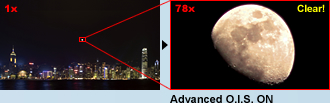
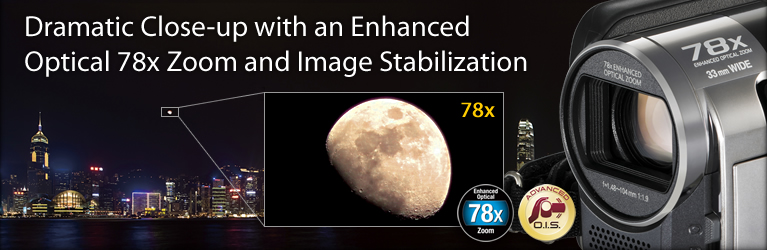
The Enhanced Optical 78x Zoom makes it easy to capture a wide range of dynamic images, from sweeping landscapes to close-ups of distant subjects, without having to worry about image degradation.
iA with AF/AE Tracking
The iA function automatically activates convenient functions during shooting. These include the AF/AE Tracking, which optimizes the focus and exposure for a selected subject to ensure beautiful results.
33mm wide-angle* setting

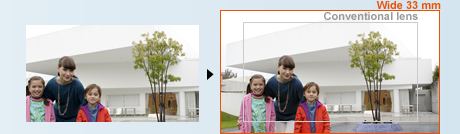
The 33mm wide-angle* setting on the Standard Series fits more people and more of the background into the frame. This is especially handy when you want to take a group photo in a small room.
New Zoom Mic and Wind Noise Canceller
The Zoom Mic function is more powerful than ever before. It now includes a Wind Noise Canceller, which records while suppressing wind noise, and lets you clearly record only the target sound
Takes dynamic close-ups of distant subjects!
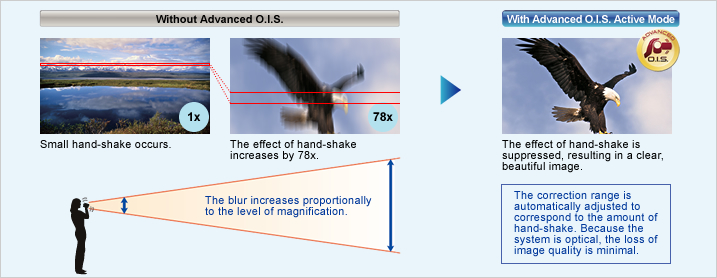
Enhanced Optical 78x Zoom and Advanced O.I.S. (Optical Image Stabilizer)
The compact, easy-to-carry camcorder has the Enhanced Optical 78x Zoom. By taking maximum advantage of the effective CCD area, the camera makes it easy to capture a wide range of dynamic images, from sweeping landscapes with the 33mm wide-angle scope to close-ups of distant subjects with the 78x zoom, without having to worry about image degradation. However, with long-distance zoom shots, even a tiny bit of hand-shake has a huge effect on picture quality. That's where Advanced O.I.S. (Optical Image Stabilizer) comes in. It shifts a corrective lens as you shoot to help eliminate the effects of hand-shake, so you get clear, sharp shots even at high zoom levels. It's an essential feature for getting the most out of this incredible zoom lens.
Captures large groups, even when shooting from up close.
33 mm Wide Angle* and Advanced O.I.S.
33 mm WideThe 33mm wide-angle* setting on the Standard Series fits more people and more of the background into the frame than conventional models. This is especially handy when you want to take a group photo in a small room. It fits your subjects in even when you shoot from up close, and makes it possible to pick up even small sounds with the mic.
* 35mm camera equivalent
Advanced O.I.S. with Active Mode
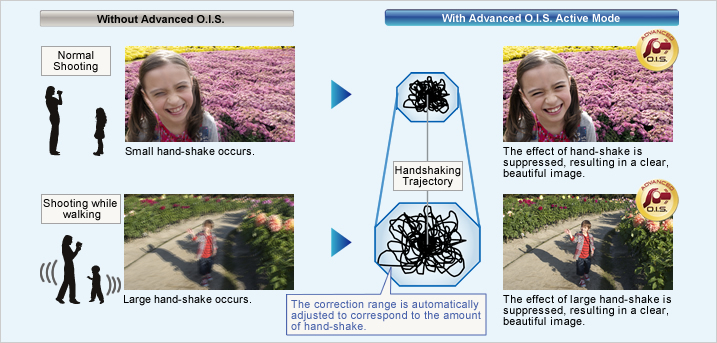
Advanced O.I.S. with Active Mode comes in handy when shooting while walking or playing with your children. The wide correction area corrects even wide-frame shots and relatively large hand-shake motion. It's especially good for active video shooting.
Zoom Shooting
Wide Shooting
High-performance image processing
Pure Color Engine
Pure Color EngineThe Pure Color Engine converts the CCD output signal from a complementary color signal into an RGB signal at an early stage and extracts the low-frequency luminance component from the RGB signal. This innovative engine also achieves truly superb color reproduction for high-zoomed pictures.
Clearly Catch Target Subject Sounds.
New Zoom Mic and Wind Noise Canceller
Zoom Mic
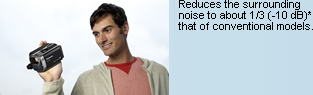
The Zoom Mic function that links with the camera's zoom action has evolved even further. Compared to previous models, the noise-reducing performance is improved by 1/3 (-10dB).* It lets you clearly record the sound of your target subject.
* Compared with the SDR-H95/H85, SDR-T55/T50, and SDR-S50/S45.
Wind Noise Canceller
The Wind Noise Canceller automatically detects and suppresses only wind noise. It lets you capture natural sounds with lifelike ambience even when shooting in windy conditions outdoors or by the sea.
Sets the optimal mode for each shooting situation.
Scene Mode
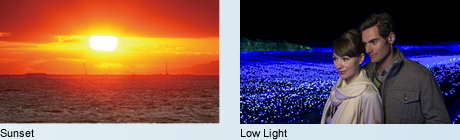
Automatically selects the most suitable shutter speed and aperture for the shooting location and situation.
Scene modes
- Sports
- Portrait
- Low Light
- Spot Light
- Snow
- Beach
- Sunset
- Fireworks
- Scenery
- Night Scenery
Give your subjects smoother looking skin
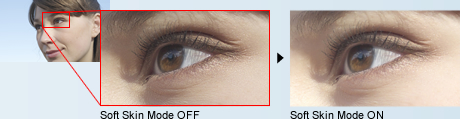
Soft Skin Mode
When this function detects skin tones, it softens the focus in that area. This has a skin beautifying effect, which makes wrinkles and lines appear less noticeable. When turned on, this function makes blemishes and moles look less conspicuous, while preserving resolution in areas of the picture outside of the skin.

Makes optimal settings automatically.
iA (Intelligent Auto)

This powerful function senses the shooting conditions and automatically makes the settings and activates functions that will deliver optimal results. With both motion and still images, iA does the bothersome settings for you and makes it easy to capture beautiful, well-focused images.
* The functions included in iA may not be applied when conditions do not call for them.
Locks on a subject and tracks it.
AF/AE Tracking
AF/AE Tracking optimizes the focus and exposure for a selected subject to ensure beautiful results. After you "lock on" to a subject at the center of the screen by pressing the AF/AE button, the camera follows it around, keeping it in sharp focus and properly exposed.
Suppresses the effects of hand shake
Advanced O.I.S.
Advanced O.I.S.When hand-shake is detected while shooting, the Advanced O.I.S. system is automatically activated to compensate for blurring and produce beautiful recorded images. A new Active Mode that further extends the hand-shake correction range, is also automatically activated. It significantly reduces any blurring that might occur when shooting on the move, and making it great for active shooting. Because the system is optical, there's only minimal loss of image quality even when viewed on a large-screen TV.
Helps suppress blown highlights and retains a natural contrast.
Intelligent Contrast Control
Intelligent ContrastBy detecting the intensity of the ambient light and adjusting the exposure accordingly, Intelligent Contrast Control prevents blown highlights and blocked shadows. This helps render natural-looking, highly nuanced images with proper contrast.
Detects the situation and switches the scene mode automatically.
Intelligent Scene Selector
Subject DetectionThe shooting conditions are detected, and the optimal Scene Mode is automatically selected. Even if the subject should change, there's no need to manually redo the settings, so you can concentrate entirely on your shot.
Portrait
Using the face as reference, the exposure is adjusted to capture faces beautifully. Focusing priority is also placed on the face, and the skin tone is smoothed.
Scenery
The exposure is optimized to give you clear images, without blown highlights in strongly lit areas like the sky.
Spotlight
For scenes with particularly strong contrast, such as when you're shooting a spotlit area on a darkened stage. It captures the well-lit subject perfectly and prevents washed-out areas.
Low Light
In dim lighting, the camcorder automatically switches to a slower shutter speed so that images across the entire frame are bright and easy to see.
Captures faces beautifully - even in dim or backlit scenes.
Face Detection
Face DetectionThis mode captures faces beautifully. Face Detection automatically senses the ambient lighting and adjusts the exposure accordingly, so faces are bright and easy to see. The focus also prioritizes the faces, and skin tones are smoothed. Faces in the center of the frame serve as the reference for adjustments, but the function can detect up to 15 faces in all.
Great for sudden photo opportunities, saves energy too
1.9-Sec Quick Power-On
1.9-Sec Quick Power-OnSwitch the power on and the camcorder is in standby mode in just 1.9 seconds*, ready to shoot when you are. This fast startup also helps reduce battery consumption.
* Depending on the recording conditions, start time may be longer than 1.9 seconds.
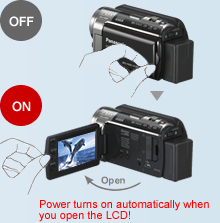
0.8-Sec Quick Start*
Use Quick Start mode. You simply flip open the LCD and you're ready to shoot in just 0.8 second. When Eco mode is also used, the power turns off whenever the camcorder has not been operated for 5 minutes. This reduces wasted power consumption, and enables a longer battery life.
* Depending on the recording conditions, start time may be longer than 0.8 seconds.
* This mode can be selected from the menu.
When the built-in memory fills up, recording automatically continues on an SD Memory Card.
  
Relay Recording
The Relay Recording mode automatically switches from the built-in flash memory (once it's full) to the SDXC/SDHC/SD Memory Card and continues recording. You don't have to worry about missing an important shot while switching media.
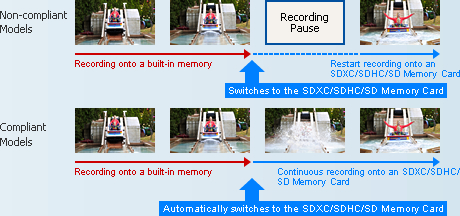
How to combine motion images that are split onto two types of media as a continuous scene.
Arrange the data that is split onto two types of media on an SDXC/SDHC/SD Memory Card.

If the SDXC/SDHC/SD Memory Card has sufficient capacity, it's possible to arrange all of the split data as a single continuous scene on the SDXC/SDHC/SD Memory Card.
Use the included software.
You can also use the editing software that is included with the camcorder to join the split data as a continuous scene.
Use a DVD burner to create a disc.
If the SDXC/SDHC/SD Memory Card is not big enough to hold all of the split data, use a DVD burner to create a disc with all the motion images as a single continuous scene.
Images are recorded even before you begin shooting
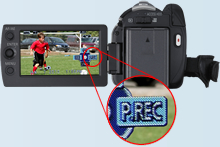
Pre-Rec Function

This clever function records three seconds of images even before you actually begin shooting. The images are held temporarily in the camcorder's internal memory, before recording begins. This helps ensure that you won't miss the start of a moment you want to record, such as when an event begins all of a sudden. For example, if you're waiting to snap a shot of a jumping dolphin, you can press the REC button after you've made sure that the dolphin has cleared the surface of the water. The camcorder will record the entire scene, from the instant of the dolphin's jump until it disappears again into the sea.
Stable long-time recording
H101H10080GB* HDD
The internal hard drive lets you record continuously for up to 74 hours 30 min* without changing a disc, SDXC/SDHC/SD Memory Card or other recording media.
*1 The 80GB hard drive utilizes a portion of the storage space for formatting, file management and other purposes. 80GB is /80 billion bytes. Usable capacity will be less.
 


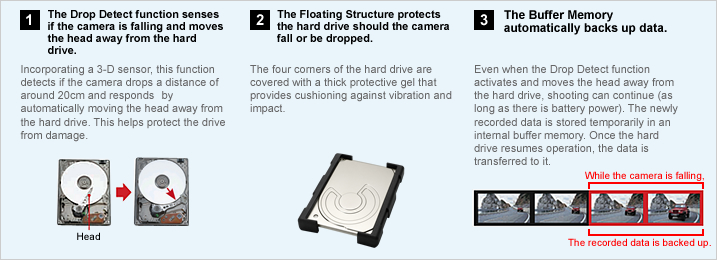
Anti-Shock Shield:
Protects recorded video data from damage due to jolts and impact
For easy, intuitive setting and shooting without taking you eyes off the subject
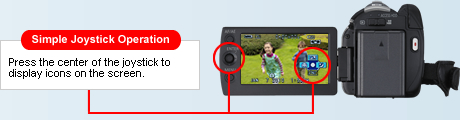
One-Touch Navigation & Joystick Control
The joystick makes the camera much easier to use, letting you control all basic operations quickly. As you shoot, just watch the image in the monitor and follow the instruction guide. You can handle a number of operations quickly and easily, without even taking your eye off the subject.
Help Mode
The joystick makes the camera much easier to use, letting you control all basic operations quickly. As you shoot, just watch the image in the monitor and follow the instruction guide. You can handle a number of operations quickly and easily, without even taking your eye off the subject.
Operation Icon Examples (H100)
Automatically lights up when darkness is detected.
LED Video Light
When the camera determines that the ambient lighting is insufficient, it automatically switches the light on. This illuminates your subject for shooting. The LED (light emitting diode) has low power consumption, a long service life, and the safety of a low operating temperature.
Inside or out, you can adjust the LCD brightness
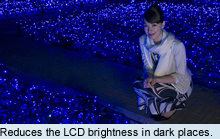
Auto Power LCD
The LCD brightness can be adjusted manually to suit the surroundings. In Auto Mode, the LCD brightness is adjusted automatically in 16 smooth steps depending on the surroundings. In darker rooms it adjusts to a lower brightness, making it easier to frame the shot. Outside, it adjusts to almost twice the brightness for easy viewing even on sunny days.
Capture crisp, vivid images-even in low lighting
Color Night Rec/Colour Night View
Leave the light off. Color Night Rec/Colour Night View gives you images with color even in dim lighting (2 lx).
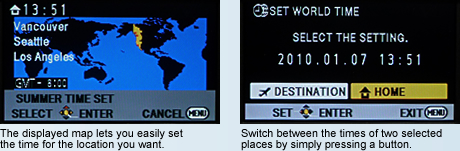
Easy time setting - Both on the destination and at home
World Time
Handy for travellers, this function makes it easy to set the camcorder time when you cross time zones and again when you return home. Simply select your destination from the displayed map, and the camcorder is automatically set for that time zone. The time for two different places can be set such as home and destination and you can switch between the times by simply pressing a button.
Change or delete sequences as you want
Easy Editing
You can do some polished editing using just the camera itself. For example, you can delete scenes right on the spot or change the scene sequence to create your own scenarios.
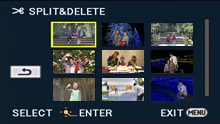
Split and Delete
This function makes it easy to split up the recorded scenes and delete the front half or back half.
Anyone can enjoy easy, video uploading! Easy Uploading to YouTube™ and Facebook – with the included software "VideoCam Suite 3.5"
Step 1 | Shoot
FacebookThe function-packed standard model lets you shoot in your own unique style. When you want to post videos onto YouTube™, it's convenient to shoot in Web mode, which has a 10-minute countdown system.
Step 2 | Connect
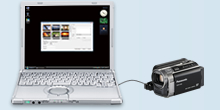
As soon as you connect the camcorder to a PC, a Smart Wizard is automatically activated. Then, select "Online Sharing."
Step 3 | Upload
The Online Sharing function lets you upload your videos onto YouTube™ or Facebook. VideoCam Suite makes it so easy to share your videos.
Edit images easily on a PC
Included Editing Software "VideoCam Suite 3.5"
VideoCam Suite editing software is just the tool you need to make polished, smartly finished productions. It lets you load images into your PC for putting scenes in a different order and delete the ones you don't want with simple operation. When you're finished with your video production, you can use VideoCam Suite to reserve the edited version onto an SD Card and a DVD disc.
About VideoCam Suite 3.5:
This software is not compatible with Microsoft Windows 3.1, Windows 95, Windows 98/98SE, Windows Me, Windows2000 and Windows NT.
Operation on an upgraded OS is not guaranteed.
Operation on an OS other than the one pre-installed is not guaranteed.
Supplied CD-ROM(VideoCam Suite 3.5) is available for Windows only.
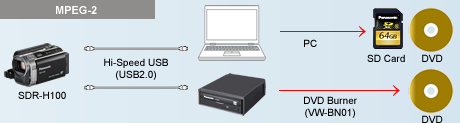
Use a DVD burner or PC to create a DVD.
Easy Archiving
Recorded image data can be saved onto a DVD by simply connecting the camcorder to a DVD burner (purchased separately) with a USB cable and pressing a button. You can also use the included software and a Windows PC to save data onto an SD card or a DVD.
Just insert the SDXC/SDHC/SD Memory Card into the SD Memory Card Slot
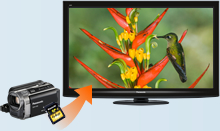
VIERA Image Viewer
if your VIERA TV has an SD Memory Card Slot and can play MPEG-2 files, you're equipped for spectacular viewing. Just slip your card into the slot and get ready to watch beautiful motion pictures on VIERA's large screen. You get all the fun of seeing your images on the big screen, with none of the hassle of connecting cables.
High speed transfer to a DVD recorder
Storing on a DIGA
If you have an MPEG-2-compatible DIGA with an internal hard disk and SD Memory Card Slot, saving your images on the hard disk is as easy as inserting an SDXC/SDHC/SD Memory Card into the slot. This saves space you'd otherwise need for storing the recording media, and makes playback easier. And once the data is on the hard disk, it's easy to copy it to a DVD disc.
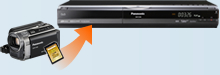

SDR-H101 / SDR-H100 / SDR-T76 / SDR-T71 / SDR-T70 / SDR-S71 / SDR-S70
| |
NTSC |
PAL |
| GENERAL |
| Power Supply (Battery / AC Adapter) |
DC3.6 V / 5.0 V |
DC3.6 V / 5.0 V |
| Power Consumption |
[SDR-H101] Max. 3.8 W (Recording)
[SDR-H100] Max. 3.6 W (Recording)
[SDR-T71/S71] Max. 3.1 W (Recording)
[SDR-T70/S70] Max. 2.9 W (Recording) |
[SDR-H101] Max. 3.8 W (Recording)
[SDR-H100] Max. 3.6 W (Recording)
[SDR-T76/T71/S71] Max. 3.1 W (Recording)
[SDR-T70/S70] Max. 2.9 W (Recording) |
| Weight (w/o Battery) |
[SDR-H101/H100] Approx. 273 g (0.60lb)
[SDR-T71/T70] Approx. 213 g (0.47lb)
[SDR-S71/S70] Approx. 212 g (0.47lb) |
[SDR-H101/H100] Approx. 273 g
[SDR-T76/T70] Approx. 213 g
[SDR-S71/S70] Approx. 212 g |
| Dimensions (W x H x D) |
[SDR-H101/H100] 55.1 x 64 x 107.3 mm (2.17 x 2.52 x 4.22 [inch])
[SDR-T71/T70/S71/S70] 54.9 x 64 x 107.3 mm (2.16 x 2.52 x 4.22 [inch]) |
[SDR-H101/H100] 55.1 x 64 x 107.3 mm
[SDR-T76/T70/S71/S70] 54.9 x 64 x 107.3 mm |
| Media |
[SDR-H101/H100] 80 GB HDD, SD/SDHC/SDXC Memory Card
[SDR-T71/T70] 4 GB Built-in Memory, SD/SDHC/SDXC Memory Card
[SDR-S71/S70] SD/SDHC/SDXC Memory Card |
[SDR-H101/H100] 80 GB HDD, SD/SDHC/SDXC Memory Card
[SDR-T76] 8 GB Built-in Memory, SD/SDHC/SDXC Memory Card
[SDR-T70] 4 GB Built-in Memory, SD/SDHC/SDXC Memory Card
[SDR-S71/S70] SD/SDHC/SDXC Memory Card |
| OSD Language |
 |
|
| LENS SECTION |
| Image Sensor |
1/8" CCD
Total Pixels : 0.8 megapixels
Effective Pixels :
<Motion Image & Still Image>
0.41 megapixels (Tele) - 0.52 megapixels (Wide) [4:3]
0.38 megapixels (Tele) - 0.47megapixels (Wide) [16:9] |
1/8-type CCD (For Europe)
1/8" CCD (For Asia)
Total Pixels : 0.8 megapixels
Effective Pixels :
<Motion Image & Still Image>
0.41 megapixels (Tele) - 0.52 megapixels (Wide) [4:3]
0.38 megapixels (Tele) - 0.47megapixels (Wide) [16:9] |
| F Value |
F 1.9 (WIDE) / 5.7 (TELE) |
F 1.9 (WIDE) / 5.7 (TELE) |
| Optical Zoom |
70 x |
70 x |
| Enhanced Optical Zoom |
78 x |
78 x |
| Digital Zoom |
100 x / 3500 x (The maximum value of zoom magnification) |
100 x / 3500 x (The maximum value of zoom magnification) |
| Focal Length |
1.48 - 104 mm |
1.48 - 104 mm |
| 35 mm Film Camera Equivalent |
<Enhanced Optical Zoom ON>
37.4-2625 mm (4:3), 36.5-2571 mm (16:9)
<Enhanced Optical Zoom OFF>
33.5-2625 mm (4:3), 32.8-2571mm (16:9) |
<Enhanced Optical Zoom ON>
37.4-2625 mm (4:3), 36.5-2571 mm (16:9)
<Enhanced Optical Zoom OFF>
33.5-2625 mm (4:3), 32.8-2571mm (16:9) |
| Lens Brand |
Panasonic Lens |
Panasonic Lens |
| CAMERA SECTION |
| Minimum Illumination |
5 lx (1/30 low light mode), 2 lx (Color Night Rec. mode) |
5 lx (1/25 low light mode), 2 lx (Colour Night View mode) |
| Focus |
Auto / Manual |
Auto / Manual |
| White Balance |
Auto / Indoor1 / Indoor2 / Sunny / Cloudy / White set |
Auto / Indoor1 / Indoor2 / Sunny / Cloudy / White set |
| Shutter Speed |
<Motion Image & Still Image>
Auto Slow Shutter ON : 1/30-1/8000
Auto Slow Shutter OFF : 1/60-1/8000 |
<Motion Image & Still Image>
Auto Slow Shutter ON : 1/25-1/8000
Auto Slow Shutter OFF : 1/50-1/8000 |
| Iris |
Auto / Manual |
Auto / Manual |
| Backlight Compensation |
Yes |
Yes |
| Image Stabilizer |
Advanced O.I.S. (Optical Image Stabilizer) |
Advanced O.I.S. (Optical Image Stabilizer) |
| Quick Start |
0.8-sec |
0.8-sec |
| MONITOR |
| LCD |
2.7" Wide LCD (123,200 pixels) |
6.7cm (2.7") Wide LCD (123,200 dots) (For Europe)
2.7" Wide LCD (123,200 dots) (For Asia) |
| STILL IMAGE SECTION |
| Recording Format |
JPEG |
JPEG |
Recording Image Size
|
<Still Image>
0.3 megapixels (640 x 480) [4:3]
0.2 megapixels (640 x 360) [16:9]
<Simultaneous Recording>
0.3 megapixels (640 x 480) [4:3]
0.2 megapixels (640 x 360) [16:9] |
<Still Image>
0.3 megapixels (640 x 480) [4:3]
0.2 megapixels (640 x 360) [16:9]
<Simultaneous Recording>
0.3 megapixels (640 x 480) [4:3]
0.2 megapixels (640 x 360) [16:9] |
| DPOF |
Max. 999 stills |
Max. 999 stills |
| PictBridge |
Yes |
Yes |
| RECORDING SECTION |
| Signal System |
525/60i |
625/50i |
| Recording Format |
MPEG2, H.264/AVC [Motion Image] |
MPEG2, H.264/AVC [Motion Image] |
Recording / Playback Mode
(704 x 480) |
XP: 10 Mbps/VBR,
SP: 5 Mbps/VBR,
LP: 2.5 Mbps/VBR |
XP: 10 Mbps/VBR,
SP: 5 Mbps/VBR,
LP: 2.5 Mbps/VBR |
| Audio Recording System |
<XP / SP / LP>
[SDR-H101/H100]
HDD: Dolby Digital (2 ch)
SD Card ; Dolby Digital (2ch), MPEG1 AudioLayer 2
[SDR-T71/T70]
Buil-in Memory: Dolby Digital (2 ch)
SD Card ; Dolby Digital (2 ch), MPEG1 AudioLayer 2
[SDR-S71/S70]
Dolby Digital (2 ch) , MPEG1 AudioLayer 2 |
<XP / SP / LP>
[SDR-H101/H100]
HDD / SD Card ; MPEG1 AudioLayer 2
[SDR-T76/T70]
Built-in Memory/ SD Card ; MPEG1 AudioLayer 2
[SDR-S71/S70]
MPEG1 AudioLayer 2 |
| Media Remaining Indication |
Yes |
Yes |
| Microphone |
Stereo mic. / Zoom mic. |
Stereo mic. / Zoom mic. |
| Speaker |
Dynamic Type |
Dynamic Type |
| INTERFACES |
| AV |
Out |
Out |
| USB |
2.0 High Speed (mini AB) |
2.0 High Speed (mini AB) |
| STANDARD ACCESSORIES |
| AC Adaptor |
Yes |
Yes |
| AC Cable |
Yes |
Yes |
| DC Cable |
Included AC Adaptor |
Included AC Adaptor |
| Battery Pack |
[SDR-H101/H100] min. 1790 mAh/Lithium-ion
[SDR-T71/T70/S71/S70] min. 895 mAh/Lithium-ion |
[SDR-H101/H100] min. 1790 mAh/Lithium-ion
[SDR-T76/T70/S71/S70] min. 895 mAh/Lithium-ion |
| AV Cable |
Yes |
Yes |
| USB Cable |
Yes |
Yes |
| CD-ROM |
VideoCam Suite 3.5 |
VideoCam Suite 3.5 |
SDXC/SDHC/SD Memory Card Compatibility for Motion Picture Recording
| Capacity |
Gold |
Silver |
| SDXC Memory Card*1 |
64 GB*3 |
RP-SDW64G *3
(Class 10, up to 22 MB/sec *4*5) |
- |
| 48 GB*3 |
RP-SDW48G *3
(Class 10, up to 22 MB/sec *4*5) |
- |
| SDHC Memory Card*2 |
32 GB*3 |
RP-SDW32G
(Class 10, up to 22 MB/sec *4*5) |
- |
| 16 GB*3 |
RP-SDW16G
(Class 10, up to 22 MB/sec *4*5) |
RP-SDP16G
(Class 4, up to 20 MB/sec *4*5) |
| 8 GB*3 |
RP-SDW08G
(Class 10, up to 22 MB/sec *4*5) |
RP-SDP08G
(Class 4, up to 20 MB/sec *4*5) |
| 4 GB*3 |
RP-SDW04G
(Class 10, up to 22 MB/sec *4*5) |
RP-SDP04G
(Class 4, up to 20 MB/sec *4*5) |
As of January 5, 2011
An SDXC/SDHC/SD Memory Card utilises a portion of the storage space for formatting and other purposes.
We recommend using SD Memory Cards and SDHC Memory Cards conforming to class 4 or higher of the SD Speed Class Rating or the following SD Memory Cards made by Panasonic for motion picture recording.
Please confirm the latest information about SDXC/SDHC/SD Memory Cards that can be used for motion picture recording on the following website.
Camcorder information (This website is in English only.)
*1 SDXC Memory Cards can only be used in SDXC host devices, which support the SDXC format.
*2 SDHC Memory Cards can only be used in SDXC and SDHC host devices, which support the SDHC/SDXC format.
*3 1 GB means 1 billion bytes. Usable capacity will be less.
*4 The data transfer rate is a theoretical value and is anot a guarantee of performance. The transfer rate may vary depending on the conditions and equipment used.
*5 This card complies with SD Memory Card Physical Layer Specification Ver.3.0 (SDHC)/Ver.1.10 (SD). When using this card with SD-enabled products that comply with the specification, a speed performance of up to 20MB/sec. can be realized. When using it with SD-enabled products that comply with the conventional specification Ver. 1.01, the speed performance will be up to 10MB/sec.
*6 Available in North America.
Motion Image Recording Time (Approx.)
| |
Image Quality |
XP
(10 Mbps) |
SP
(5 Mbps) |
LP
(5 Mbps) |
| HDD |
80 GB* (H101/H100) |
18 h 30 min |
37 h |
74 h 30 min |
| Built-in Memory |
8 GB* (T76) |
1 h 45 min |
3 h 30 min |
7 h |
| 4 GB* (T71/T70) |
50 min |
1 h 40 min |
3 h 20 min |
SDXC/SDHC
Memory Card |
64 GB* |
15 h |
30 h |
60 h 30 min |
| 48 GB* |
11 h |
22 h 10 min |
44 h 50 min |
| 32 GB* |
7 h 30 min |
15 h |
30 h |
| 16 GB* |
3 h 30 min |
7 h |
14 h |
| 8 GB* |
1 h 45 min |
3 h 30 min |
7 h |
| 4 GB* |
50 min |
1 h 40 min |
3 h 20 min |
These figures vary depending on the pictures being recorded.
We recommend using SD Memory Cards and SDHC Memory cards conforming to class 4 or higher of the SD Speed Class Rating or the following SD Memory Cards made by Panasonic for motion-image recording.
Please confirm the latest information about SDHC/SD Memory Cards that can be used for motion-image recording, on the following website.
Camcorder Information (This website is in English only.)
* 1 GB means 1 billion bytes. Usable capacity will be less.
Number of Recordable Still Pictures (Approx.)
| Image Quality |
HDD |
Built-in
Memory |
SDXC/SDHC Memory Card |
80 GB*
(H101/H100) |
8 GB*
(T76) |
4 GB*
(T71/T70) |
64 GB* |
48 GB* |
32 GB* |
16 GB* |
8 GB* |
4 GB* |
| 640 x 480 pixels (16:9) 0.2 M |
610000 |
60500 |
30000 |
492000 |
364000 |
246000 |
122000 |
60500 |
30000 |
| 640 x 480 pixels (4:3) 0.3 M |
610000 |
60500 |
30000 |
492000 |
364000 |
246000 |
122000 |
60500 |
30000 |
These figure vary depending on the pictures being recorded.
We recommend using SDXC/SDHC/SD Memory cards conforming to class 2 or higher of the SD Speed Class Rating or the following SD Memory Cards made by Panasonic for motion-image recording.
Please confirm the latest information about SDXC/SDHC/SD Memory Cards that can be used for motion-image recording, on the following website.
Camcorder Information (This website is in English only.)
* 1 GB means 1 billion bytes. Usable capacity will be less.
Battery Life (Approx.)
| |
Capacity |
| Continuous Recording Time |
Actual Recording Time |
| VW-VBK360 |
H101/H100 |
HDD |
5 h 10 min (LP Mode),
5 h (XP Mode), 5 h 5 min (SP Mode) |
2 h 45 min (LP Mode),
2 h 40 min (XP/SP Mode) |
| SDXC/SDHC/SD Memory Card |
5 h 25 min (LP Mode),
5 h 15 min (XP Mode),
5 h 20 min (SP Mode) |
2 h 50 min (SP/LP Mode),
2 h 45 min (XP Mode) |
| T76/T71/T70 |
Built-in Memory |
6 h (All Mode) |
3 h 10 min (All Mode) |
| SDXC/SDHC/SD Memory Card |
| S71/S70 |
SDXC/SDHC/SD Memory Card
|
6 h (All Mode) |
3 h 10 min (All Mode) |
| VW-VBK180 |
H101/H100 |
HDD |
2 h 30 min (All Mode) |
1 h 20 min (SP/LP Mode),
1 h 15 min (XP Mode) |
| SDXC/SDHC/SD Memory Card |
2 h 40 min (LP Mode),
2 h 35 min (XP/ SP Mode) |
1 h 25 min ( LP Mode),
1 h 20 min (XP/SP Mode) |
| T76/T71/T70 |
Built-in Memory |
2 h 55 min (All Mode) |
1 h 30 min (All Mode) |
| SDXC/SDHC/SD Memory Card |
| S71/S70 |
SDXC/SDHC/SD Memory Card
|
2 h 55 min (All Mode) |
1 h 30 min (All Mode) |
| VW-VBL90 |
T76/T71/T70 |
HDD |
1 h 20 min (All Mode) |
40 min (All Mode) |
| SDXC/SDHC/SD Memory Card |
| S71/S70 |
SDXC/SDHC/SD Memory Card
|
1 h 20 min (All Mode) |
40 min (All Mode) |
This is a guideline that includes time for operations such as starting and stopping the recording, turning the power on and off, and zooming. The actual time is shorter.
System Requirements
| |
VideoCam Suite 3.5
|
iMovie '11 (not supplied) |
| Interface |
USB port (Hi-Speed USB(USB 2.0)recommended) |
USB port (Hi-Speed USB(USB 2.0)recommended) |
| OS |
Windows 7 (32 bit/64 bit):
Starter/Home Basic/Home Premium/Professional/Ultimate
Windows Vista (32 bit):
Home Basic/Home
Premium/Business/Ultimate SP1/SP2
Windows XP (32 bit): SP3 |
Mac OS X 10.6.3 |
| CPU |
Intel Pentium 4
2.0 GHz or higher
When using playback function and MPEG2 conversion function,
Intel Core2 Duo 1.8 GHz or higher |
Intel Core Duo or higher |
About VideoCam Suite 3.5:
This software is not compatible with Microsoft Windows 3.1, Windows 95, Windows 98/98SE, Windows Me, Windows2000 and Windows NT. Operation on an upgraded OS is not guaranteed. Operation on an OS other than the one pre-installed is not guaranteed. Supplied CD-ROMVideoCam Suite 3.5 is available for Windows only.
|


|
|
|
25/02
|
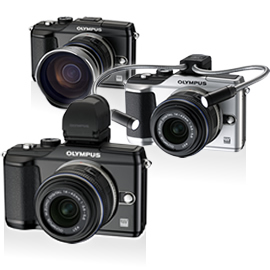
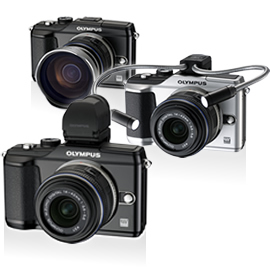
Olympus Pen E-PL2 Digital SLR Camera - 12.3MP Black
- 3.0" HyperCrystal LCD, Image Stabilization, Live View, Live MOS Sensor, HD Movie with Mono Sound
- Includes Zoom 14-150mm Lens Olympus Pen E-PL2 Compact SLR - Black
Zoom Kit
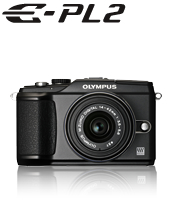
OLYMPUS PEN E-PL2 Makes Shooting Still and Moving Images Easier and More Enjoyable Than Ever
In addition to creative functions such as Art Filters, the E-PL2 is equipped with an intuitive interface called Live Guide. Live Guide offers tips and tricks that will help you enjoy SLR-quality photography.
Enjoy SLR quality with intuitive operation
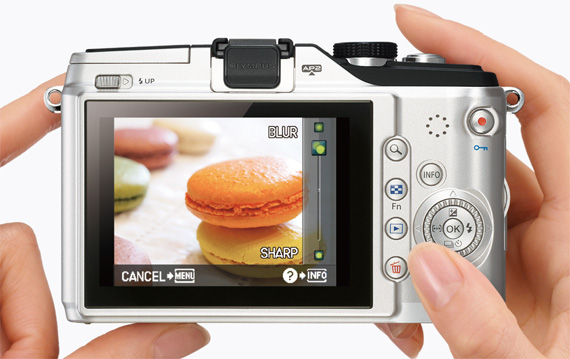
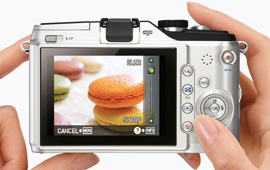
Operation is a breeze thanks to Live Guide, which enables simple control of background defocusing and other operations. The big 3-inch monitor gives you a sharp, clear view.
- Live Guide
- 3.0-inch 460,000-dot LCD monitor
- HD Movie
Live Guide
Unleash the visionary within
Enjoy the rich expressive power of exclusive Olympus functions such as Art Filters and Multi-Aspect Ratios.
- Art Filters
- Art Effect function
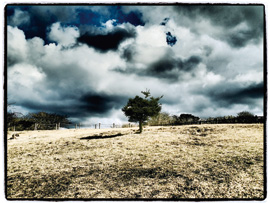
Dramatic Tone
Expand your photography with optional accessories
Unique accessories extend the joy of photography.
- Communication unit PENPAL
- Converter lenses
- MAL-1 Macro Arm Light
Enhanced Shooting Functions
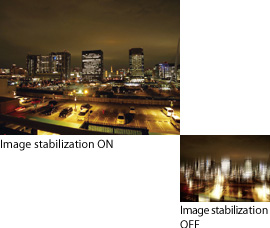
- Built-in image stabilization
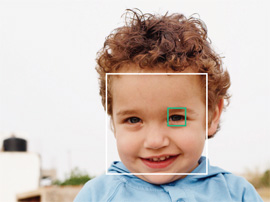
- Eye Detect AF
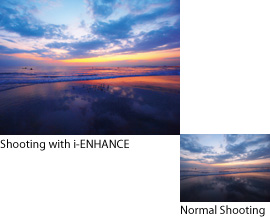
- i-ENHANCE
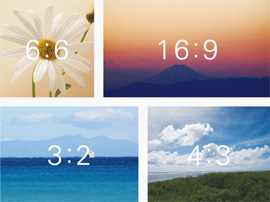
- Multi-Aspect
- e-Portrait
- Built-in flash
- Other Features
Enjoy SLR quality with intuitive operation
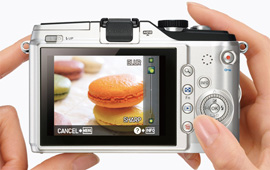
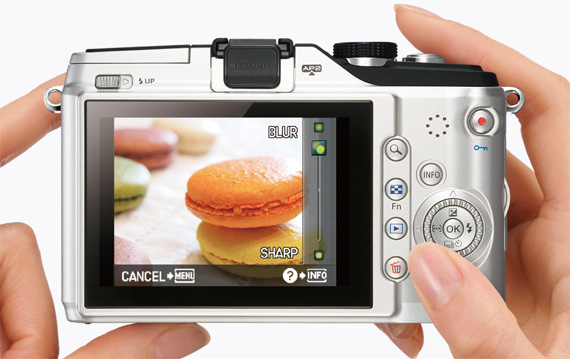
The Live Guide interface allows you to create highly original photographs just by following a series of simple steps. You'll be able to easily and intuitively adjust five parameters critical to advanced SLR photography including defocusing, while viewing the LCD.
Live Guide
With the iAUTO function that sets the optimum picture mode when you point the camera at the subject, Olympus made sure that every picture turned out just right. Now, with Live Guide, you'll be able to manipulate various photographic parameters like a pro and take unique pictures that truly reflect your vision. All you have to do is select one of the five parameters ("color vividness", "color balance", "image brightness", "depth of field" and "subject in motion") and adjust the selected parameter by turning the control dial, while observing changes on the LCD monitor screen. Plus, Live Guide is supplemented by "Shooting Tips", which explains in clear, simple language how to take advantage of advanced shooting techniques such as the selection of the angle and composition according to each subject. It helps you take advantage of advanced photographic techniques and get the kind of amazing results you've always dreamed of.
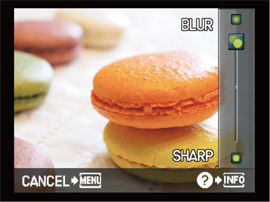
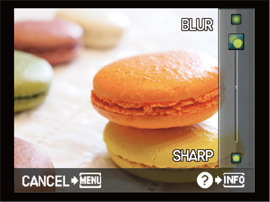
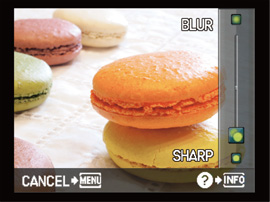
Blur background
Select "Depth of field" from the menu, and rotate the control dial to the "Blur" position for the desired blurring point.
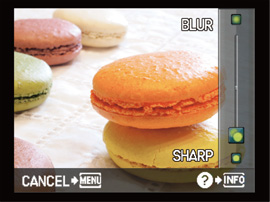
Sharp background
Rotate the control dial to the "Sharp" position to get sharp focus throughout the depth of field.
Movie compatibility
With the E-PL2, the Live Guide can be used in movie recording as well as in still image shooting. Sophisticated SLR-style imaging is now also available with movies.
3.0-inch 460,000-dot LCD monitor
The 3.0-inch HyperCrystal LCD monitor has a definition of 460,000 dots, which allows you to clearly see delicate gradations in images, as well as text readouts.
HD Movie
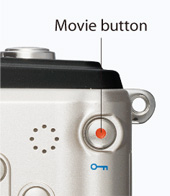
In addition to SLR-quality movies, the E-PL2 lets you create artistic photographs using Art Filters. Sound is recorded in the high-quality linear PCM format. When an optional SEMA-1 Microphone Set 1 is used, stereo recording is also possible. And when connected to HDMI-equipped TV set*1 via a commercially available HDMI mini-cable, you can control the camera's playback operation using your TV's remote control unit*2.
- *1 Only when used with an HDMI-CEC compatible TV set.
- *2 Some operations may not be available depending on the TV set used.
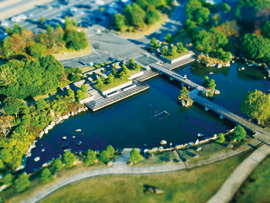
- * The frame rate varies according to the Art Filter used. With the "Diorama" Art Filter, the subject is recorded at a slower frame rate and played back at a higher rate, so sound recording is not possible.
- * For movie recording, it is recommended to use an SD/SDHC/SDXC card compatible with a speed class of 6 or higher.
Unleash the visionary within
The camera is more than just a tool for recording images, it's also a means of self-expression. If you're the kind of person who wants to express their creativity through photography, the E-PL2 is the camera for you. It incorporates six Art Filters with Art Filter variations and three Art Effects that give you the kind of creative power previously only possible using special lenses or computer processing.
Art Filters
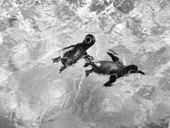
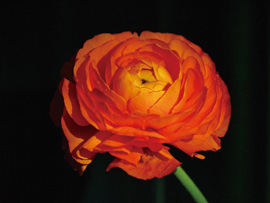
Olympus-original Art Filters were developed to put the power of special lenses and sophisticated computer image processing at your fingertips. Now you can take unique, artistic photographs at the touch of a button. Plus, the E-PL2 also comes with Art Filter variations* that expand the range of filter effects and an Art Effect function that adds various composition effects to the picture. You can check out the results on the LCD monitor before you shoot. It's never been easier to express yourself.
* The variations include Pop Art II, Grainy Film II and Pin Hole II and III.
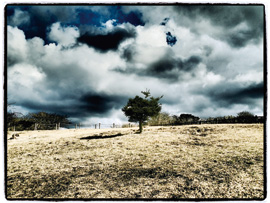
Art Filter : Diorama
Art Effect function
The E-PL2 incorporates the new Art Effect function that lets you add various picture composition effects to each Art Filter. Three effects are provided, including the Art Frame effect*1 to add a stylish frame, the Pin Hole effect*2 to reduce the brightness of the peripheral area and the Soft Focus effect*2 to blur the focus while preserving the essence of the image.
*1. Applicable to Pop Art, Grainy Film, Pin Hole and Dramatic Tone.
*2. Applicable to Pop Art.

Art Filter : Soft Focus 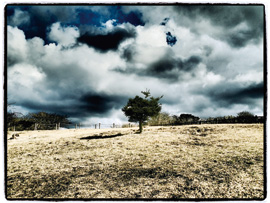
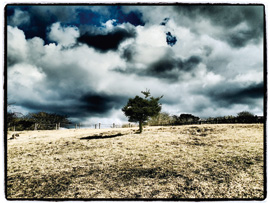
Art Filter: Dramatic Tone x Art Frame Effect

Normal shooting

Pop Art I

Pop Art II

Normal shooting
Grainy Film I
Grainy Film II

Normal shooting

Pin Hole II

Pin Hole II
Pin Hole III
Expand your photography style
"Shoot & Share" - New communication style.
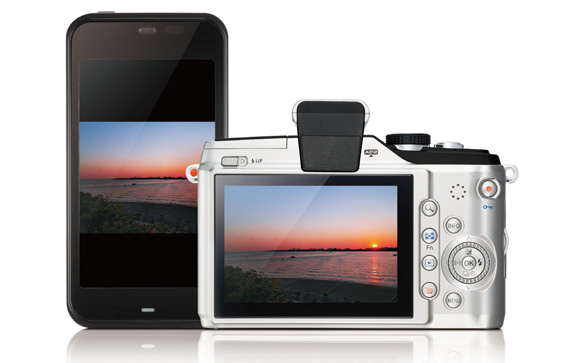
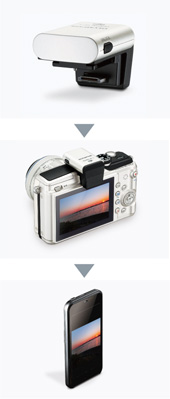
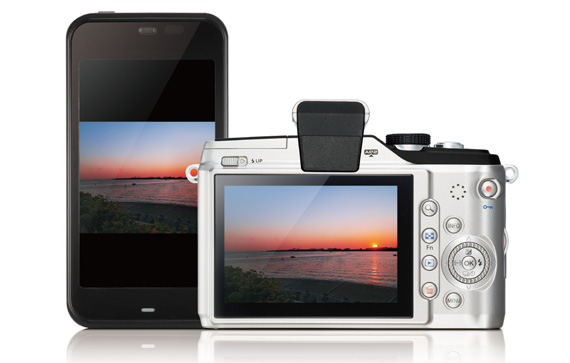
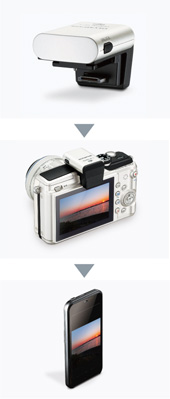
The Olympus PENPAL option provides the E-PL2 with the ability to transfer recorded pictures to a smartphone. As soon as you take a picture, you can send it to friends and family to share and enjoy.
It's a new to communicate and a great way to share the joy of photography.
PENPAL
Connect the optional OLYMPUS PENPAL PP-1 Communication Unit to the camera's Accessory Port 2 and you'll be able to transfer recorded SLR-quality pictures to a Bluetooth-equipped smartphone or another PENPAL unit installed on a camera. Instead of having to upload a recorded picture to a computer and then attaching it to an email, you'll be able to immediately share the impressions you captured in a picture with friends around you. The E-PL2 makes sharing your images a real-time event. The PENPAL is also convenient for those who want to upload pictures from a smartphone to the Internet because you won't need a computer. As the PENPAL also incorporates a large-capacity memory able to store more than 2600 pictures (image size of 1920 x 1440 pixels), it can also serve as an album of favorite pictures.
* * Pictures in the JPEG format can be transferred. The pictures are resized into 640 x 480, 1280 x 960 or 1920 x 1440 pixels.
* * Functions may not be available depending on the sales area.
Expand your photography style with optional accessories.
If you wish to try more advanced shooting techniques, check our list of optional accessories. We offer a wide range of accessories including converter lenses and a macro arm light that will increase your flexibility and support your creativity, making it easy to enjoy advanced photography.
Converter lenses
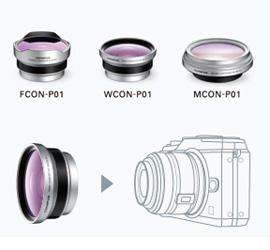
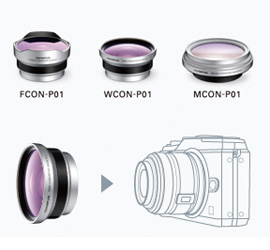
These converter lenses are designed to be mounted on the M.ZUIKO DIGITAL 14-42mm f3.5-5.6 II standard zoom lens* and provide the same flexibility as an interchangeable lens. Three converter lenses are available: MCON-P01 Macro Converter that changes maximum magnification to 0.28x (equivalent to 0.56x in 35mm camera), WCON-P01 Wide Converter that changes focal length to 11mm (equivalent to 22mm in 35mm camera) and FCON-01 Fisheye Converter that changes angle of view to 120°.
Image taken with MCON-P01 Macro Converter
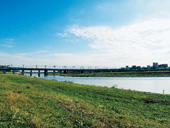
Image taken with WCON-P01 Wide Converter
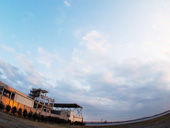
Image taken with FCON-P01 Fisheye Converter
MAL-1 Macro Arm Light
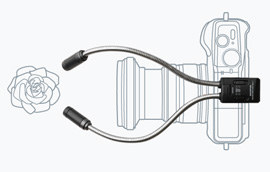
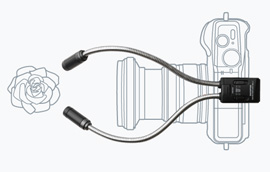
The macro arm light is optimized for close-up shooting of a small subject. It consists of two flexible arms, each of which has a white LED light on the distal end. The angle of each light can be precisely adjusted so that you can easily achieve the desired lighting effect.
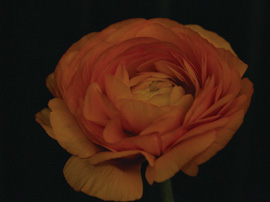
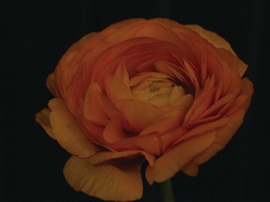
Image taken with MAL-1 Macro Arm Light
Enhanced Shooting Functions
Built-in image stabilization
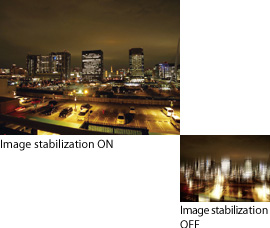
A reliable image stabilization system is built into the E-PL2's camera body. Since it can function with any lens combination from wide-angle to telephoto, you can enjoy the convenience of digital camera shooting with the flexibility of SLR-style interchangeable lenses.
Eye Detect AF
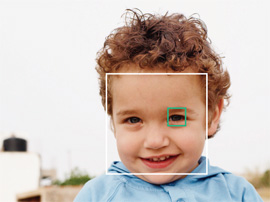
The E-PL2 incorporates the Eye Detect AF, which adjusts the focus on the subject's eye closest to the camera when the subject is the upper part of a human body. This ensures that the eyes — the most important factor determining human facial expressions — are captured clearly.
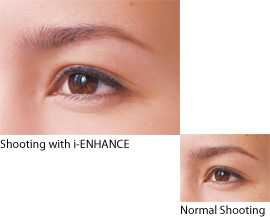
i-ENHANCE
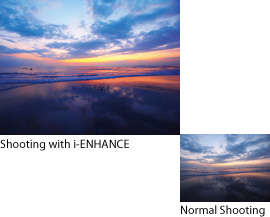
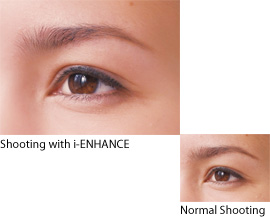
The i-ENHANCE mode is set automatically when the iAUTO function is selected, and the camera determines the optimum color and contrast conditions to emphasize the subject.
Multi-Aspect
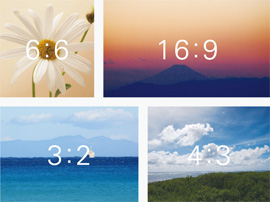
This function makes it possible to select the aspect ratio of the picture. In addition to the standard 4:3 aspect ratio, 6:6 for regular square format, 16:9 aspect ratio for cinematic-style images, and 3:2 which is equivalent to the 35mm film size are available. You can select the aspect ratio that best suits your creative requirements.
e-Portrait
The "e-Portrait" scene mode smoothes out skin tones and texture. The camera saves the same image before and after compensation*.
* * The size of the compensated image is saved at 2560 x 1920 pixels.
* * The compensation effect may not be obtained with certain subjects.
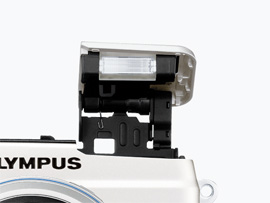
Built-in flash
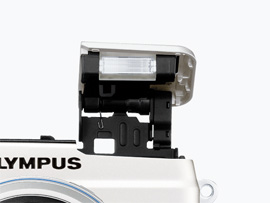
The E-PL2 incorporates a built-in flash that makes it easy to take advantage of the flash in any situation, such as when shooting portraits with a night scene background. There's also a commander function for wireless control of optional external flashes. Now you can easily take advantage of high-quality flash shooting.
Other Features
* 12.3-megapixel high-speed Live MOS Sensor & TruePicV image processing engine
* Magnified-frame AF for easier framing and focusing
* High-precision 324-zone metering system
* P/A/S/M shooting modes for advanced shooting
* Multi-exposure function with simultaneous LCD monitor display
* Reliable Dust Reduction System
* Easy-to-choose 22 scene modes
* High sensitivity of ISO6400
* Tracking AF that locks onto subject and tracks movement in the frame
* Simplified operation with large buttons and enhanced customizability
* Multi-Mix Slideshow playback with background music
* Face & Background Control for balanced exposure of foreground subjects and background scenery
* One-touch Enlarge button for easy detail confirmation
* MF Assist* function for manual focusing with auto image magnification
* Shadow Adjustment Technology to prevent blown highlights and blocked-in shadows
* * Only with lenses that have communication capability.
Specifications
| Product Type |
Product type |
Micro Four Thirds interchangeable lens system camera |
| Memory |
SD Memory Card (SDHC/SDXC compatible)*
* Class 6 is recommended for Movie shooting |
| Screen size |
17.3 mm (H) x 13.0 mm (V) |
| Lens mount |
Micro Four Thirds Mount |
| Image Pickup Element |
Product type |
4/3" High-Speed Live MOS Sensor |
| No. of pixels |
No. of effective pixels: 12.3 million pixels, |
| Total no. of pixels: Approx. 13.1 million pixels |
| Aspect ratio |
1.33 (4:3) |
| Dust reduction |
Supersonic Wave Filter (dust reduction system for image sensor) |
| Recording (Still) |
Recording format |
DCF, DPOF compatible/Exif, PRINT Image Matching III |
| File format |
RAW (12-bit lossless compression), JPEG, JPEG+RAW |
| Recording image size |
[RAW] 4032 x 3024 pixels |
| [JPEG] 4032 x 3024 pixels - 640 x 480 pixels |
| Recording (Movie) |
Recording format |
AVI Motion JPEG (30 fps)
* Except for some of the Art Filters |
| Movie mode |
HD: 1280 (H) x 720 (V) Aspect 16:9, SD: 640 (H) x 480 (V) Aspect 4:3 (VGA) |
| Maximum recording time |
HD: Approx. 7 min., SD: Approx. 14 min.
* Except for some of the Art Filters |
| Recording (Sound) |
Recording format |
WAVE Format, Stereo Linear PCM/16-bit, Sampling Frequency 44.1 kHz |
| Live View |
Display mode |
100% field of view, Exposure compensation preview, White balance adjustment preview, Gradation auto preview, Face detection preview (up to 8 faces), Grid line, Histogram, 7x/10x/14x magnification display, Perfect shot preview, Off |
Compatible Electronic Viewfinder (EVF) (Optical viewfinder not provided)
* Cannot be used with an accessory mounted on the hot shoe. |
External electronic viewfinder |
VF-2 |
| No. of display dots |
Approx. 1.44 million dots |
| Field of view / Magnification |
100% / 1.15x magnification (-1m-1, 50 mm at infinity) |
| Eye point |
Approx. 18 mm (-1 m-1)- |
| Diopter adjustment range |
-3.0 - +1.0m-1 |
| Brightness / Colour temperature control |
7 levels / 7 levels |
| Image Stabilization |
System |
Built in (Image sensor shift type), 3 modes (I.S.1, I.S.2, I.S.3) |
| Focal length setting |
Available |
| IS for movie |
Digital image stabilization |
| Monitor |
LCD monitor |
3.0-inch HyperCrystal LCD, Approx. 460,000 dots, 100% field of view |
| Brightness / Colour temperature control |
7 levels / 7 levels |
| Focusing |
AF system |
High-Speed Imager AF |
| Focus mode |
Single AF (S-AF) / Continuous AF (C-AF) / Manual Focus (MF) / S-AF + MF / AF Tracking (C-AF + TR)
* When a Four Thirds System lens (including high-speed imager AF compatible lenses) is used, it works as S-AF in C-AF mode. |
| Enlarge select AF |
Available |
| Focusing point |
11-area multiple AF (Auto target, Single target) |
| AF lock |
Locked at first position of Shutter button in Single AF mode |
| Manual focus assist |
Live View image is magnified when the focus ring is rotated(S-AF+MF or MF mode) |
| Exposure Control |
Metering system
(TTL image sensor metering) |
(1) Digital ESP metering (324-area multi pattern metering)
(2) Centre-weighted average metering
(3) Spot metering
(4) Spot with Highlight control
(5) Spot with Shadow control |
| Metering range |
EV 0 - 20 (at normal temperature, 17mm f2.8, ISO 100) |
| Exposure mode |
(1) iAUTO
(2) P: Programme AE (Programme shift can be performed)
(3) A: Aperture priority AE
(4) S: Shutter priority AE
(5) M: Manual
(6) Scene select AE
(7) Art Filter |
| Scene select AE |
Portrait, e-Portrait, Landscape, Landscape + Portrait, Sport, Night, Night + Portrait, Children, High Key, Low Key, DIS mode, Macro, Nature Macro, Candle, Sunset, Documents, Panorama, Fireworks, Beach & Snow, Fisheye Converter, Wide Converter, Macro Converter |
| ISO sensitivity |
AUTO: ISO 200 - 6400 (customizable, Default 200-1600) / Manual: ISO 200 - 6400, 1/3 or 1 EV steps |
| Exposure compensation |
3 EV in 1/3, 1/2, 1 EV steps selectable |
| AE lock |
Locked at first position of Shutter button |
| Exposure bracketing |
2, 3 or 5 frames in 0.3/0.5/0.7/1 EV steps selectable, 7 frames in 0.3/0.5/0.7 EV steps selectable |
| ISO bracketing |
3 frames in 0.3, 0.7, 1 EV steps selectable |
| White Balance |
White balance mode |
Auto WB, 7 Preset WBs, Custom WB (colour temperature registerable), One-touch WB |
| WB compensation |
7 steps in each A-B/G-M axis (in Auto / Preset / One-touch WB mode) |
| WB bracketing |
3 frames in 2, 4, 6 steps selectable in each A-B/G-M axis. |
| Colour Mode |
Colour matrix |
sRGB, Adobe RGB |
| Picture Mode |
Mode |
i-ENHANCE, Vivid, Natural, Muted, Portrait, Monotone, Custom |
| Gradation |
4 levels (Auto, High Key, Normal, Low Key) |
| Shutter |
Product type |
Computerized focal-plane shutter |
| Shutter speed |
60 - 1/4000 sec., Bulb: up to 8 min. (default) (1/3, 1/2 or1 EV steps selectable) |
| Self-timer |
Operation time: 12 sec., 2 sec. (cancel available) |
| Drive |
Drive mode |
Available (with optional RM-UC1 Remote cable.) |
| Sequential Shooting |
Sequential shooting speed |
Single-frame shooting, Sequential shooting, Self-timer |
| Max. recordable pictures on sequential shooting |
RAW mode: Max. 10 frames. JPEG mode: Depends on compression ratio and no. of pixels (LN mode: 17 frames with TOSHIBA Super High Speed Class 6 SDHC 4GB Card, under Olympus's standard testing conditions) |
| Integrated Flash |
Flash control mode |
TTL Auto (TTL pre-flash mode), Auto*, Manual
* Available on the external flash |
| Built-in flash |
Retractable flash, GN=10 (ISO200), GN=7 (ISO100) |
| Flash mode |
Auto, Red-eye reduction, Red-eye reduction slow sync. (1st curtain), Slow sync. (1st curtain), Slow sync. (2nd curtain), Manual (Full, 1/4, 1/16, 1/64), Fill-in, Off |
| Synchronization speed |
1/180 sec. or less (Super FP: 1/125 - 1/4000 sec.)*
* Available on the external flash |
| Flash intensity control |
Up to 3 EV in 0.3, 0.5 or 1 EV steps selectable |
| Flash bracketing |
3 frames in 0.3, 0.5, 0.7, 1EV steps selectable |
| Wireless Flash Control |
Compatible external flash |
FL-50R, FL-36 |
| Control method / Flash control mode |
Triggered and controlled by built-in flash light (Olympus Wireless RC Flash system compatible) / TTL Auto, Auto, Manual, FP TTL Auto, FP Manual |
| Number of channel |
4 channels / 3 groups |
| Art Filter |
Mode |
Pop Art, Soft Focus, Grainy Film, Pin Hole, Diorama, Dramatic Tone |
| Multi-Exposure |
No. of pictures / Functions |
2 pictures/ Auto gain, Exposing on Recorded picture |
| Multi-Aspect |
Aspect Ratio |
4:3 / 3:2 / 16:9 / 6:6 |
| Sound |
Microphone / Speaker |
Mono*/mono (Mute, Volume control available)
* Stereo sound recording is available when optional SEMA-1 Microphone Set 1 is attached. |
| Playback |
Playback modes
* Customize function |
Single-frame, Information display, Index (4/9/25/100 frames), Calendar, Close-up (2 - 14X), Picture rotation (manual), Movie (with sound, FF/REW/Pause), Slideshow (with BGM/BGM + Sound/Sound available) |
Information display
* Customize function |
Histogram (independent luminance/RGB available), Highlight/Shadow point warning, AF frame, Photographic information, Off |
| Menu |
Languages |
Available from 34 languages including English, Korean, Simplified Chinese, Traditional Chinese |
| Custome Setting |
My Set |
4 settings can be registered |
| Image Editing |
Editing function |
RAW development, Gradation auto, Monotone, Sepia, Red-eye fix, Saturation, Resize (1280 x 960, 640 x 480, 320 x 240), Trimming, Aspect, e-Portrait, Image composition |
| Post-recording |
Audio dubbing possible for still images (up to 30 sec.) |
| Print |
Print function |
Print reservation (DPOF), Direct print (PictBridge compatible) |
| Input/Output |
PC interface |
USB 2.0 Hi-Speed |
| TV interface |
HDMI-OUT (HD/Stereo), VIDEO-OUT (SD/Mono) |
| USB/AV connector |
Dedicated multi-connector (Video: NTSC/PAL selectable), Optional RM-UC1 Remote Cable |
| HDMI connector |
Mini HDMI type-C |
| Flash attachment |
Hot shoe |
| Accessory port |
Dedicated multi-connector (Available for VF-2 Electronic Viewfinder, SEMA-1 Microphone Set 1, Macro Arm Lighr MAL-1, Communication Unit OLYMPUS PENPAL PP-1) |
| Power Requirements |
Battery |
BLS-5 Li-ion battery (included) |
| Sleep mode |
Available (1, 3, 5, 10 min., off selectable) |
| No. of recordable pictures |
Approx. 280 shots (with BLS-5 and TOSHIBA Super High Speed Class 6 (4GB) SDHC card under CIPA testing standard |
Dimensions /
Weight |
Dimensions |
115.4 mm (W) x 72.7 mm (H) x 42 mm (D) (excluding protrusions) |
| Weight |
Approx. 317 g (body only), Approx. 362g (CIPA guideline compliant, with BLS-1 battery and SDHC memory card) |
| Operating Environment |
Temperature |
0 - 40 (operation) / -20 - 60 (storage) |
| Humidity |
30 - 90% (operation) / 10 - 90% (storage) |
- * Specifications and appearances are subject to change without any notice or obligation on the part of the manufacturer.
- * HDMI, the HDMI logo and High-Definition Multimedia Interface are trademarks or registered trademarks of HDMI Licensing LLC.

|
|
|
|
25/02
|
Olympus Pen E-PL2 Digital SLR Camera - 12.3MP Silver
- 3.0" HyperCrystal LCD, Image Stabilization, Live View, Live MOS Sensor, HD Move with Mono Sound
- Includes 14-42mm & 40-150mm Lens Olympus Pen E-PL2 Compact SLR - Silver
Twin Pack Kit
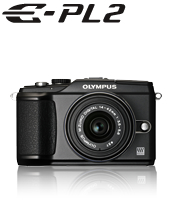
OLYMPUS PEN E-PL2 Makes Shooting Still and Moving Images Easier and More Enjoyable Than Ever
In addition to creative functions such as Art Filters, the E-PL2 is equipped with an intuitive interface called Live Guide. Live Guide offers tips and tricks that will help you enjoy SLR-quality photography.
Enjoy SLR quality with intuitive operation
Operation is a breeze thanks to Live Guide, which enables simple control of background defocusing and other operations. The big 3-inch monitor gives you a sharp, clear view.
- Live Guide
- 3.0-inch 460,000-dot LCD monitor
- HD Movie
Live Guide
Unleash the visionary within
Enjoy the rich expressive power of exclusive Olympus functions such as Art Filters and Multi-Aspect Ratios.
- Art Filters
- Art Effect function
Dramatic Tone
Expand your photography with optional accessories
Unique accessories extend the joy of photography.
- Communication unit PENPAL
- Converter lenses
- MAL-1 Macro Arm Light
Enhanced Shooting Functions
- Built-in image stabilization
- Eye Detect AF
- i-ENHANCE
- Multi-Aspect
- e-Portrait
- Built-in flash
- Other Features
Enjoy SLR quality with intuitive operation
The Live Guide interface allows you to create highly original photographs just by following a series of simple steps. You'll be able to easily and intuitively adjust five parameters critical to advanced SLR photography including defocusing, while viewing the LCD.
Live Guide
With the iAUTO function that sets the optimum picture mode when you point the camera at the subject, Olympus made sure that every picture turned out just right. Now, with Live Guide, you'll be able to manipulate various photographic parameters like a pro and take unique pictures that truly reflect your vision. All you have to do is select one of the five parameters ("color vividness", "color balance", "image brightness", "depth of field" and "subject in motion") and adjust the selected parameter by turning the control dial, while observing changes on the LCD monitor screen. Plus, Live Guide is supplemented by "Shooting Tips", which explains in clear, simple language how to take advantage of advanced shooting techniques such as the selection of the angle and composition according to each subject. It helps you take advantage of advanced photographic techniques and get the kind of amazing results you've always dreamed of.
Blur background
Select "Depth of field" from the menu, and rotate the control dial to the "Blur" position for the desired blurring point.
Sharp background
Rotate the control dial to the "Sharp" position to get sharp focus throughout the depth of field.
Movie compatibility
With the E-PL2, the Live Guide can be used in movie recording as well as in still image shooting. Sophisticated SLR-style imaging is now also available with movies.
3.0-inch 460,000-dot LCD monitor
The 3.0-inch HyperCrystal LCD monitor has a definition of 460,000 dots, which allows you to clearly see delicate gradations in images, as well as text readouts.
HD Movie
In addition to SLR-quality movies, the E-PL2 lets you create artistic photographs using Art Filters. Sound is recorded in the high-quality linear PCM format. When an optional SEMA-1 Microphone Set 1 is used, stereo recording is also possible. And when connected to HDMI-equipped TV set*1 via a commercially available HDMI mini-cable, you can control the camera's playback operation using your TV's remote control unit*2.
- *1 Only when used with an HDMI-CEC compatible TV set.
- *2 Some operations may not be available depending on the TV set used.
- * The frame rate varies according to the Art Filter used. With the "Diorama" Art Filter, the subject is recorded at a slower frame rate and played back at a higher rate, so sound recording is not possible.
- * For movie recording, it is recommended to use an SD/SDHC/SDXC card compatible with a speed class of 6 or higher.
Unleash the visionary within
The camera is more than just a tool for recording images, it's also a means of self-expression. If you're the kind of person who wants to express their creativity through photography, the E-PL2 is the camera for you. It incorporates six Art Filters with Art Filter variations and three Art Effects that give you the kind of creative power previously only possible using special lenses or computer processing.
Art Filters
Olympus-original Art Filters were developed to put the power of special lenses and sophisticated computer image processing at your fingertips. Now you can take unique, artistic photographs at the touch of a button. Plus, the E-PL2 also comes with Art Filter variations* that expand the range of filter effects and an Art Effect function that adds various composition effects to the picture. You can check out the results on the LCD monitor before you shoot. It's never been easier to express yourself.
* The variations include Pop Art II, Grainy Film II and Pin Hole II and III.
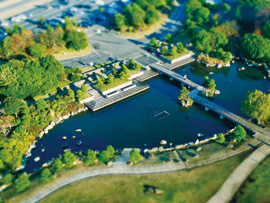
Art Filter : Diorama
Art Effect function
The E-PL2 incorporates the new Art Effect function that lets you add various picture composition effects to each Art Filter. Three effects are provided, including the Art Frame effect*1 to add a stylish frame, the Pin Hole effect*2 to reduce the brightness of the peripheral area and the Soft Focus effect*2 to blur the focus while preserving the essence of the image.
*1. Applicable to Pop Art, Grainy Film, Pin Hole and Dramatic Tone.
*2. Applicable to Pop Art.

Art Filter : Soft Focus
Art Filter: Dramatic Tone x Art Frame Effect

Normal shooting

Pop Art I

Pop Art II

Normal shooting
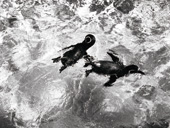
Grainy Film I
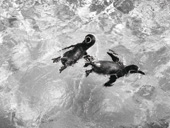
Grainy Film II

Normal shooting

Pin Hole II

Pin Hole II
Pin Hole III
Expand your photography style
"Shoot & Share" - New communication style.
The Olympus PENPAL option provides the E-PL2 with the ability to transfer recorded pictures to a smartphone. As soon as you take a picture, you can send it to friends and family to share and enjoy.
It's a new to communicate and a great way to share the joy of photography.
PENPAL
Connect the optional OLYMPUS PENPAL PP-1 Communication Unit to the camera's Accessory Port 2 and you'll be able to transfer recorded SLR-quality pictures to a Bluetooth-equipped smartphone or another PENPAL unit installed on a camera. Instead of having to upload a recorded picture to a computer and then attaching it to an email, you'll be able to immediately share the impressions you captured in a picture with friends around you. The E-PL2 makes sharing your images a real-time event. The PENPAL is also convenient for those who want to upload pictures from a smartphone to the Internet because you won't need a computer. As the PENPAL also incorporates a large-capacity memory able to store more than 2600 pictures (image size of 1920 x 1440 pixels), it can also serve as an album of favorite pictures.
* * Pictures in the JPEG format can be transferred. The pictures are resized into 640 x 480, 1280 x 960 or 1920 x 1440 pixels.
* * Functions may not be available depending on the sales area.
Expand your photography style with optional accessories.
If you wish to try more advanced shooting techniques, check our list of optional accessories. We offer a wide range of accessories including converter lenses and a macro arm light that will increase your flexibility and support your creativity, making it easy to enjoy advanced photography.
Converter lenses
These converter lenses are designed to be mounted on the M.ZUIKO DIGITAL 14-42mm f3.5-5.6 II standard zoom lens* and provide the same flexibility as an interchangeable lens. Three converter lenses are available: MCON-P01 Macro Converter that changes maximum magnification to 0.28x (equivalent to 0.56x in 35mm camera), WCON-P01 Wide Converter that changes focal length to 11mm (equivalent to 22mm in 35mm camera) and FCON-01 Fisheye Converter that changes angle of view to 120°.
Image taken with MCON-P01 Macro Converter
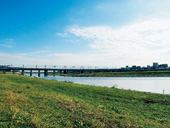
Image taken with WCON-P01 Wide Converter
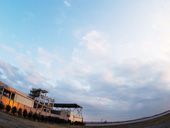
Image taken with FCON-P01 Fisheye Converter
* * The MCON-P01 can also be mounted on the M.ZUIKO DIGITAL ED 40-150mm f4.0-5.6 or M.ZUIKO DIGITAL ED14-150mm f4.0-5.6 lens by removing the MA-P01 macro adapter.
MAL-1 Macro Arm Light
The macro arm light is optimized for close-up shooting of a small subject. It consists of two flexible arms, each of which has a white LED light on the distal end. The angle of each light can be precisely adjusted so that you can easily achieve the desired lighting effect.
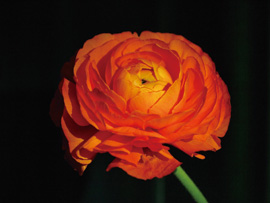
Image taken with MAL-1 Macro Arm Light
Enhanced Shooting Functions
Built-in image stabilization
A reliable image stabilization system is built into the E-PL2's camera body. Since it can function with any lens combination from wide-angle to telephoto, you can enjoy the convenience of digital camera shooting with the flexibility of SLR-style interchangeable lenses.
Eye Detect AF
The E-PL2 incorporates the Eye Detect AF, which adjusts the focus on the subject's eye closest to the camera when the subject is the upper part of a human body. This ensures that the eyes — the most important factor determining human facial expressions — are captured clearly.
i-ENHANCE
The i-ENHANCE mode is set automatically when the iAUTO function is selected, and the camera determines the optimum color and contrast conditions to emphasize the subject.
Multi-Aspect
This function makes it possible to select the aspect ratio of the picture. In addition to the standard 4:3 aspect ratio, 6:6 for regular square format, 16:9 aspect ratio for cinematic-style images, and 3:2 which is equivalent to the 35mm film size are available. You can select the aspect ratio that best suits your creative requirements.
e-Portrait
The "e-Portrait" scene mode smoothes out skin tones and texture. The camera saves the same image before and after compensation*.
* * The size of the compensated image is saved at 2560 x 1920 pixels.
* * The compensation effect may not be obtained with certain subjects.
Built-in flash
The E-PL2 incorporates a built-in flash that makes it easy to take advantage of the flash in any situation, such as when shooting portraits with a night scene background. There's also a commander function for wireless control of optional external flashes. Now you can easily take advantage of high-quality flash shooting.
Other Features
* 12.3-megapixel high-speed Live MOS Sensor & TruePicV image processing engine
* Magnified-frame AF for easier framing and focusing
* High-precision 324-zone metering system
* P/A/S/M shooting modes for advanced shooting
* Multi-exposure function with simultaneous LCD monitor display
* Reliable Dust Reduction System
* Easy-to-choose 22 scene modes
* High sensitivity of ISO6400
* Tracking AF that locks onto subject and tracks movement in the frame
* Simplified operation with large buttons and enhanced customizability
* Multi-Mix Slideshow playback with background music
* Face & Background Control for balanced exposure of foreground subjects and background scenery
* One-touch Enlarge button for easy detail confirmation
* MF Assist* function for manual focusing with auto image magnification
* Shadow Adjustment Technology to prevent blown highlights and blocked-in shadows
* * Only with lenses that have communication capability.
Specifications
| Product Type |
Product type |
Micro Four Thirds interchangeable lens system camera |
| Memory |
SD Memory Card (SDHC/SDXC compatible)*
* Class 6 is recommended for Movie shooting |
| Screen size |
17.3 mm (H) x 13.0 mm (V) |
| Lens mount |
Micro Four Thirds Mount |
| Image Pickup Element |
Product type |
4/3" High-Speed Live MOS Sensor |
| No. of pixels |
No. of effective pixels: 12.3 million pixels, |
| Total no. of pixels: Approx. 13.1 million pixels |
| Aspect ratio |
1.33 (4:3) |
| Dust reduction |
Supersonic Wave Filter (dust reduction system for image sensor) |
| Recording (Still) |
Recording format |
DCF, DPOF compatible/Exif, PRINT Image Matching III |
| File format |
RAW (12-bit lossless compression), JPEG, JPEG+RAW |
| Recording image size |
[RAW] 4032 x 3024 pixels |
| [JPEG] 4032 x 3024 pixels - 640 x 480 pixels |
| Recording (Movie) |
Recording format |
AVI Motion JPEG (30 fps)
* Except for some of the Art Filters |
| Movie mode |
HD: 1280 (H) x 720 (V) Aspect 16:9, SD: 640 (H) x 480 (V) Aspect 4:3 (VGA) |
| Maximum recording time |
HD: Approx. 7 min., SD: Approx. 14 min.
* Except for some of the Art Filters |
| Recording (Sound) |
Recording format |
WAVE Format, Stereo Linear PCM/16-bit, Sampling Frequency 44.1 kHz |
| Live View |
Display mode |
100% field of view, Exposure compensation preview, White balance adjustment preview, Gradation auto preview, Face detection preview (up to 8 faces), Grid line, Histogram, 7x/10x/14x magnification display, Perfect shot preview, Off |
Compatible Electronic Viewfinder (EVF) (Optical viewfinder not provided)
* Cannot be used with an accessory mounted on the hot shoe. |
External electronic viewfinder |
VF-2 |
| No. of display dots |
Approx. 1.44 million dots |
| Field of view / Magnification |
100% / 1.15x magnification (-1m-1, 50 mm at infinity) |
| Eye point |
Approx. 18 mm (-1 m-1)- |
| Diopter adjustment range |
-3.0 - +1.0m-1 |
| Brightness / Colour temperature control |
7 levels / 7 levels |
| Image Stabilization |
System |
Built in (Image sensor shift type), 3 modes (I.S.1, I.S.2, I.S.3) |
| Focal length setting |
Available |
| IS for movie |
Digital image stabilization |
| Monitor |
LCD monitor |
3.0-inch HyperCrystal LCD, Approx. 460,000 dots, 100% field of view |
| Brightness / Colour temperature control |
7 levels / 7 levels |
| Focusing |
AF system |
High-Speed Imager AF |
| Focus mode |
Single AF (S-AF) / Continuous AF (C-AF) / Manual Focus (MF) / S-AF + MF / AF Tracking (C-AF + TR)
* When a Four Thirds System lens (including high-speed imager AF compatible lenses) is used, it works as S-AF in C-AF mode. |
| Enlarge select AF |
Available |
| Focusing point |
11-area multiple AF (Auto target, Single target) |
| AF lock |
Locked at first position of Shutter button in Single AF mode |
| Manual focus assist |
Live View image is magnified when the focus ring is rotated(S-AF+MF or MF mode) |
| Exposure Control |
Metering system
(TTL image sensor metering) |
(1) Digital ESP metering (324-area multi pattern metering)
(2) Centre-weighted average metering
(3) Spot metering
(4) Spot with Highlight control
(5) Spot with Shadow control |
| Metering range |
EV 0 - 20 (at normal temperature, 17mm f2.8, ISO 100) |
| Exposure mode |
(1) iAUTO
(2) P: Programme AE (Programme shift can be performed)
(3) A: Aperture priority AE
(4) S: Shutter priority AE
(5) M: Manual
(6) Scene select AE
(7) Art Filter |
| Scene select AE |
Portrait, e-Portrait, Landscape, Landscape + Portrait, Sport, Night, Night + Portrait, Children, High Key, Low Key, DIS mode, Macro, Nature Macro, Candle, Sunset, Documents, Panorama, Fireworks, Beach & Snow, Fisheye Converter, Wide Converter, Macro Converter |
| ISO sensitivity |
AUTO: ISO 200 - 6400 (customizable, Default 200-1600) / Manual: ISO 200 - 6400, 1/3 or 1 EV steps |
| Exposure compensation |
3 EV in 1/3, 1/2, 1 EV steps selectable |
| AE lock |
Locked at first position of Shutter button |
| Exposure bracketing |
2, 3 or 5 frames in 0.3/0.5/0.7/1 EV steps selectable, 7 frames in 0.3/0.5/0.7 EV steps selectable |
| ISO bracketing |
3 frames in 0.3, 0.7, 1 EV steps selectable |
| White Balance |
White balance mode |
Auto WB, 7 Preset WBs, Custom WB (colour temperature registerable), One-touch WB |
| WB compensation |
7 steps in each A-B/G-M axis (in Auto / Preset / One-touch WB mode) |
| WB bracketing |
3 frames in 2, 4, 6 steps selectable in each A-B/G-M axis. |
| Colour Mode |
Colour matrix |
sRGB, Adobe RGB |
| Picture Mode |
Mode |
i-ENHANCE, Vivid, Natural, Muted, Portrait, Monotone, Custom |
| Gradation |
4 levels (Auto, High Key, Normal, Low Key) |
| Shutter |
Product type |
Computerized focal-plane shutter |
| Shutter speed |
60 - 1/4000 sec., Bulb: up to 8 min. (default) (1/3, 1/2 or1 EV steps selectable) |
| Self-timer |
Operation time: 12 sec., 2 sec. (cancel available) |
| Drive |
Drive mode |
Available (with optional RM-UC1 Remote cable.) |
| Sequential Shooting |
Sequential shooting speed |
Single-frame shooting, Sequential shooting, Self-timer |
| Max. recordable pictures on sequential shooting |
RAW mode: Max. 10 frames. JPEG mode: Depends on compression ratio and no. of pixels (LN mode: 17 frames with TOSHIBA Super High Speed Class 6 SDHC 4GB Card, under Olympus's standard testing conditions) |
| Integrated Flash |
Flash control mode |
TTL Auto (TTL pre-flash mode), Auto*, Manual
* Available on the external flash |
| Built-in flash |
Retractable flash, GN=10 (ISO200), GN=7 (ISO100) |
| Flash mode |
Auto, Red-eye reduction, Red-eye reduction slow sync. (1st curtain), Slow sync. (1st curtain), Slow sync. (2nd curtain), Manual (Full, 1/4, 1/16, 1/64), Fill-in, Off |
| Synchronization speed |
1/180 sec. or less (Super FP: 1/125 - 1/4000 sec.)*
* Available on the external flash |
| Flash intensity control |
Up to 3 EV in 0.3, 0.5 or 1 EV steps selectable |
| Flash bracketing |
3 frames in 0.3, 0.5, 0.7, 1EV steps selectable |
| Wireless Flash Control |
Compatible external flash |
FL-50R, FL-36 |
| Control method / Flash control mode |
Triggered and controlled by built-in flash light (Olympus Wireless RC Flash system compatible) / TTL Auto, Auto, Manual, FP TTL Auto, FP Manual |
| Number of channel |
4 channels / 3 groups |
| Art Filter |
Mode |
Pop Art, Soft Focus, Grainy Film, Pin Hole, Diorama, Dramatic Tone |
| Multi-Exposure |
No. of pictures / Functions |
2 pictures/ Auto gain, Exposing on Recorded picture |
| Multi-Aspect |
Aspect Ratio |
4:3 / 3:2 / 16:9 / 6:6 |
| Sound |
Microphone / Speaker |
Mono*/mono (Mute, Volume control available)
* Stereo sound recording is available when optional SEMA-1 Microphone Set 1 is attached. |
| Playback |
Playback modes
* Customize function |
Single-frame, Information display, Index (4/9/25/100 frames), Calendar, Close-up (2 - 14X), Picture rotation (manual), Movie (with sound, FF/REW/Pause), Slideshow (with BGM/BGM + Sound/Sound available) |
Information display
* Customize function |
Histogram (independent luminance/RGB available), Highlight/Shadow point warning, AF frame, Photographic information, Off |
| Menu |
Languages |
Available from 34 languages including English, Korean, Simplified Chinese, Traditional Chinese |
| Custome Setting |
My Set |
4 settings can be registered |
| Image Editing |
Editing function |
RAW development, Gradation auto, Monotone, Sepia, Red-eye fix, Saturation, Resize (1280 x 960, 640 x 480, 320 x 240), Trimming, Aspect, e-Portrait, Image composition |
| Post-recording |
Audio dubbing possible for still images (up to 30 sec.) |
| Print |
Print function |
Print reservation (DPOF), Direct print (PictBridge compatible) |
| Input/Output |
PC interface |
USB 2.0 Hi-Speed |
| TV interface |
HDMI-OUT (HD/Stereo), VIDEO-OUT (SD/Mono) |
| USB/AV connector |
Dedicated multi-connector (Video: NTSC/PAL selectable), Optional RM-UC1 Remote Cable |
| HDMI connector |
Mini HDMI type-C |
| Flash attachment |
Hot shoe |
| Accessory port |
Dedicated multi-connector (Available for VF-2 Electronic Viewfinder, SEMA-1 Microphone Set 1, Macro Arm Lighr MAL-1, Communication Unit OLYMPUS PENPAL PP-1) |
| Power Requirements |
Battery |
BLS-5 Li-ion battery (included) |
| Sleep mode |
Available (1, 3, 5, 10 min., off selectable) |
| No. of recordable pictures |
Approx. 280 shots (with BLS-5 and TOSHIBA Super High Speed Class 6 (4GB) SDHC card under CIPA testing standard |
Dimensions /
Weight |
Dimensions |
115.4 mm (W) x 72.7 mm (H) x 42 mm (D) (excluding protrusions) |
| Weight |
Approx. 317 g (body only), Approx. 362g (CIPA guideline compliant, with BLS-1 battery and SDHC memory card) |
| Operating Environment |
Temperature |
0 - 40 (operation) / -20 - 60 (storage) |
| Humidity |
30 - 90% (operation) / 10 - 90% (storage) |
- * Specifications and appearances are subject to change without any notice or obligation on the part of the manufacturer.
- * HDMI, the HDMI logo and High-Definition Multimedia Interface are trademarks or registered trademarks of HDMI Licensing LLC.
|
|
|
|
Previous Page
|
Next Page
|
|