Shop online for Digital Cameras and accessories | Camerafarm Australia
Camerafarm product archive #40446
Image
Date
Product description
Price
Buy
27/09
Pinnacle Video Capture - For Mac PC
- Import Video Directly Into iTunes, Record From any Analog Video Source, Hardware Video Encoding Frees up to Macs Processor
Pinnacle Video Capture for Mac
Import video directly into iTunes
Record from any analog video source
Hardware video encoding frees up the Macs processor
Simple USB connection
Bring home videos and TV recordings to your Mac
A fast, simple way to transfer analog video from a camcorder or any other source to your Mac in an iPod-native format. Macintosh video capture has never been so easy.
You can record video from any analog source, including a camcorder, set-top box, game console or VCR. The hardware MPEG-4 encoder frees up your Macs processor for other tasks.
Videos are added automatically to iTunes, ready to sync with an iPod or Apple TV.
Connects to your Mac via a USB 2.0 or 1.1 port for fast Macintosh video capture.
Bring home videos and TV recordings to your Mac
Easy connection Just plug it into a USB 2.0 or 1.1 port on your Mac
Flexible recording Record video from any analog source: camcorder, set-top box, game console or VCR
Video for iTunes Videos automatically added to iTunes, ready to sync with iPod or Apple TV
Hardware encoding Built-in MPEG-4 encoder frees up the Macs processor for other tasks
Capture Formats Hardware compressed MPEG-4
Technical Specifications
Minimum System Requirements:
Mac OS X, version 10.4 or later
A Macintosh computer with a Power PC G4 (500MHz or faster), G5 or Intel Core processor
256MB of RAM, 512MB recommended
Internet connection for registration
Hardware Specifications:
Video inputs: Composite video (RCA), S-Video (mini-DIN)
Audio inputs: Stereo audio (RCA x2)
On-board MPEG-4 compression hardware
Connection: Hi-Speed USB 2.0 or USB 1.1
Software Specifications:
Capture from any video source with composite (RCA) or S-Video output
Package content:
USB video capture device with MPEG-4 compression hardware
Pinnacle Video Capture software
NA
27/09
Kingston 32GB Data Traveler Flash Drive - Read 10MB/s, Write 5MB/s, USB2.0 - Red
DTIG3/32GB | 32GB Kingston Data Traveler Gen3 32GB USB
32GB Kingston Data Traveler Gen3 32GB USB
Available in five fun colors by capacity, it's a perfect fit for the office, home, school and wherever you travel. A well-built cap protects the USB plug and your data. DataTraveler G3 also makes a great promotional item for your organization; it's simple to add your logo to increase brand recognition.
DataTraveler G3 is backed by legendary Kingston reliability plus a five-year warranty and free tech support.
Kingston DataTraveler I G3 Part Numbers: DTIG3/2GB, DTIG3/4GB, DTIG3/8GB, DTIG3/16GB, DTIG3/32GB
Features/Specifications:
Speed1 16GB, 32GB: 10MB/sec. read, 5MB/sec. write
Convenient sturdy loop supports most key rings
Simple just plug into a USB port
Practical cap protects the USB plug
Guaranteed five-year warranty
Fashionable available in multiple colors by capacity: DTIG3/2GB white & orange, DTIG3/4GB white & gray, DTIG3/8GB white & yellow, DTIG3/16GB white & blue, DTIG3/32GB white & red
Customizable co-logo program available2
Dimensions 2.59" x 0.42" x 0.88" (65.68mm x 10.66mm x 22.37mm)
- Full HD 3MOS With 3D Lens, 1080p, 12x Optical Zoom, 3.0" Touchscreen LCD, Image Stabilisaton, 5.1 Channel Surround Sound System
HDC-SDT750-K - Full High Def 3MOS with 3D lens [Model No: HDC-SDT750-K]
World's first Consumer 3D Camcorder
3D lens in the box to film in 3D
1/4.1"MOS x3 Sensor
8x Intelligent Zoom with New Hybrid Optical Image Stabilisation (O.I.S.)
35mm Wide-angle LEICA Dicomar Lens
Intelligent Auto: Face Detection, Intelligent Scene Selector, Intelligent Contrast Control, Advanced O.I.S., and AF/AE Tracking
Features & Benefits
12x Optical Zoom with18 x with Hybrid Zoom
You can zoom close to catch dynamic shots of distant objects. And because the zoom is optical, there's limited image degradation. Also, Panasonic's Hybrid O.I.S. (Optical Image Stabilisation) helps prevent blurring - typically a big concern when shooting with a zoom. This combination of optical zoom andHybrid O.I.S. gives you the ability to take fantastic zoom shots.
Advanced Intelligent Auto
Intelligent Scene Selector
This function analyses the shooting situation and automatically switches the camcorder to the Scene mode that will give you optimal results.
Face Detection
Face Detection automatically senses the ambient lighting and adjusts the exposure accordingly, so faces are bright and easy to see. The focus also prioritises the faces, and skin tones are smoothed. Faces in the center of the frame serve as the reference for adjustments, but the function can detect up to 15 faces in all.
Intelligent Contrast Control
Detects the ambient light level and adjusts the exposure accordingly, helping to prevent blown highlights and blocked shadows. You capture natural-looking, highly nuanced images with proper contrast.
AF/AE Tracking
Touch the LCD screen to indicate the subject, such as a person or an animal, that you want to focus on,and let AF/AE Tracking do the rest. The camera locks on the subject and follows it around, keeping it in sharp focus and properly exposed. It keeps tracking even if the subject turns to the side. This advanced function makes it easy to get a continually clear, beautiful shot of the subject in the scene you care most about.
Pre-Recording Feature
Don't worry about the sudden shooting chance! With many camcorders it is easy to miss capturing a critical moment, such as a goal being scored. The Pre-Rec function eliminates this problem. When this feature is activated, the camcorder continuously records three seconds of images onto an internal buffer memory. Then when the record button is pressed, the three seconds immediately prior are added at the beginning of the clip recorded.
Quick Power On in 1.0 sec
Switch the power on and the smart HDC-SD60 is in standby mode in just 1.0 seconds, ready to shoot when you are. This fast start -up also helps reduce battery consumption.
New Wind Noise Cancelling feature
A new feature in 2010, Wind Noise Canceller automatically isolates and suppresses wind noise only, so natural ambient sounds and voices are still recorded. This is ideal for recording in locations such as a beach, and in a wider variety of weather conditions.
Leica Dicomar Lens
Photographers around the world know Leica Camera AG as a maker of superb cameras and lenses. This company's advanced optical technology has been fused with Panasonic's leading-edge digital technology to create the Leica Dicomar lens. The Leica Dicomar lens provided in the HDC-SD60features10 lens elements in8 groups and uses Extra low-dispersion optical glass to reduce colour blurring. A special multi-coating process is applied lens element surfaces to minimise chromatic aberration, so images are crisp, clear, and free of flare and ghosting.
*Leica is a registered trademark of Leica Microsystems IR GmbH, and Dicomar is a registered trademark of Leica Camera AG.
5.1-Channel Surround Sound System
Only Panasonic offers a 5.1-channel sound system that uses five microphones. When voices recorded from the front, right, left and back are played on a 5.1-channel home cinema system, viewers are surrounded by clear, detailed sound that makes them feel as if they are right in the middle of the action.
Touch-Screen Operation
Touch-screen icons displayed on the LCD lets the user operate a variety of functions intuitively without taking their eyes off of the subject they are recording.
Auto Power LCD
The Auto Power LCD automatically adjusts the brightness of the LCD screen according to the shooting environment. In dark places, the screen brightness is automatically reduced to 1/3 the normal level. In bright outdoor places, the screen brightness is double the normal level, to make the screen easier to see.
New Crystal Engine Pro
The new Crystal Engine Pro at the heart of Panasonic's FHD camcorders instantly processes the huge amount of FHD image data, and produces clear, crisp motion images. It produces smooth, high-resolution zoom shots when 18x zoom is used. Crystal Engine Pro clearly delineates even the tiniest details of your subject, with true-to-life beauty. New Noise Reduction (NR) Technology minimises noise when recording in low lighting conditions, while Intelligent Resolution Technology ensures sharp, bright, beautifully coloured motion images. Advances in the new imaging engine also provide Full-HD 1920 x 1080/50p recording in all recording modes, including HE mode.
Switch the power on and the SD700/HS700 is in recording standby and ready to shoot in just 1.0 seconds. When combined with Quick Start mode, the camcorder can start up in just 0.6 second[ii]. In addition, with Eco Mode, the power automatically turns off when the camcorder is not operated for five minutes, reducing energy wastage and conserving battery power.
[i]Recording onto an SDXC/SDHC/SD Memory Card. Depending on the recording conditions, start time may be longer than 1.0 seconds in still picture recording mode.
[ii]This mode can be selected from the menu. Set to ON when shipped from the factory. Depending on the recording conditions, start time may be longer than 0.6 seconds in still picture recording mode.
Please note there are some limitations when the 3D lens is attached : Resolution limited to 960 X 540 / Focal length (58mm fixed zoom) / No iA/ Normal O.I.S
Specifications
DVC
Yes
Colour
Yes
3.00
3
1/4
TBC
TBC
Yes
12
700
4.0
Yes
Yes
Yes
Yes
No
TBC
TBC
66
69
138
375
NA
27/09
Corel VideoStudio Pro X3
- Complete HD workflow, GPU acceleration, Professional content, Express moving making, Real-time effects, Blu-ray authoring & burning, Online sharing
HD video-editing software with DVD and Blu-ray authoring
Work as fast as your creativity moves you with Corel VideoStudio Pro X3HD video-editing software for serious movie making fun. Now twice as fast, it has everything you need to import, edit and share standard or HD movies and DVDs. Start with an amazing new collection of professionally designed templates from RevoStock and real-time, studio-quality effects. Stay on the creative track with a huge palette of intuitive and powerful video-editing tools. Then share your story everywhere, from YouTube to Blu-ray and everything in between.
Overview
VideoStudio Pro X3 kicks the movie making process into high gear, giving you the ultimate playground for creativity. Your complete HD video-editing program, it gives you a rapid head start with professionally designed templates, real-time, studio-quality effects, polished titles and smooth transitions. Super-charge your workflow with GPU acceleration and multi-core Intel CPU support for faster editing and rendering. Quickly assemble video clips in new Express Edit mode or go deep with advanced video-editing tools. Then share your videos on YouTube, Facebook, Vimeo, DVD, AVCHD and Blu-ray discs, iPod, PSP and more.
Complete HD workflow import, edit, burn and share standard or HD video
GPU acceleration edit and render twice as fast, especially with HD video
Professional content get $500 US worth of studio-quality RevoStock templates
Express movie making create movies in minutes, then fine-tune with advanced editing tools
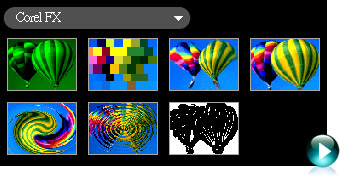
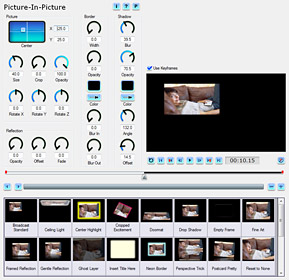
Real-time effects work fast with live previews of special effects like RotoSketch
Blu-ray authoring & burning author with Hollywood-style DVD menus
Online sharing send directly to YouTube, Vimeo, Facebook and mobile device
Bonus!
VideoStudio Pro X3 now includes DVD Factory Pro and DVD MovieFactory 7 SE. Whether you want an easy tool for integrated DVD and Blu-ray authoring and burning, or an app with more advanced and robust authoring capabilities, the choice is yours!
Start with professional content
New! Professionally designed HD templates from RevoStockworth over $500 US
Enhanced! Studio-quality music, titles, transitions and real-time effects
New! Customizable audio tracks with SmartSound and Dolby Digital 5.1 Surround Sound
New! NewBlue Effects Pack, including 3D movement
Speed up your entire workflow
Enhanced! NVIDIA CUDA GPU acceleration and Intel Core i7 CPU optimization
Enhanced! Smart Proxy for faster and smoother HD editing
New! Express Edit mode make movies in minutes to share everywhere!
Enhanced! Redesigned interface for a faster video-editing workflow
Get the best in HD video editing
Enhanced! Import from HDV, AVCHD, Blu-ray Disc and JVC HD camcorders
New! Save videos as HD MPEG-4 files for the Web with H.264 compression
New! Output HD movies on either DVD, or Blu-ray Disc with BD-J activation
Share everywherefrom Blu-ray to the Web
Enhanced! Upload directly to YouTube, Vimeo, Facebook and Flickr. Now also in HD!
Burn CDs, DVDs, Blu-ray and AVCHD discs
New! Burn HD video to standard DVD media to play on a DVD or Blu-ray player
Take your movies to go on iPod, iPhone, PSP and other mobile devices
What's New
Create, edit, render and share faster than ever with VideoStudio Pro X3the best video-editing software for making HD movies. Now two times faster, it simplifies your entire workflow so you can focus on the creative aspects of movie making, without your software getting in the way.
Dramatically enhanced speed and performance
New! Hardware acceleration for Intel Corei7, NVIDIA CUDA and AMD
New! Launcher quick access to express or advanced editing modes
New! Express Edit mode make movies in minutes!
Enhanced! Smart Proxy for faster previewing and more responsive HD editing
Enhanced! All-new interface for a faster video-editing workflow
Studio-quality effects and templates
New! Professionally designed templates from RevoStockworth over $500 US!
New! Real-time effects, including NewBlueFX filters with key framing
New! Effects for compositing and video animation, including RotoSketch and AutoSketch
New! Multi-track filters that let you add effects to each of your tracks
New! GPU-accelerated high-speed filters with real-time preview
New! Customizable, royalty-free audio tracks from SmartSound
Enhanced! Title effects for easy compositing
HD enhancements
New! Blu-ray authoring with Hollywood-style menus, titles, transitions and effects
New! HD authoring to standard DVD media
New! Web-ready files save HD MPEG-4 files for the Web with H.264 compression
More sharing options
New! Upload directly to Vimeo, Facebook, YouTube and Flickr in standard or HD
Enhanced! DVD authoring output to CD, DVD or Blu-ray Disc
Enhanced! Save to more file formats, including AVI, FLV, MP3 encode, AC3 5.1, AVCHD, HD MPEG-2 and MPEG-4
Enhanced! Send to more devices, including iPod, iPhone and PSP
VideoStudio Pro X3high-speed HD video-editing software for creating your best-ever movies.
Features
VideoStudio Pro X3 gives you the processing power you need to spend less time waiting and more time creating. Professional video-editing sofauare with end-to-end HD support, it offers a huge palette of features, effects and options that indulge the imagination. Get ready to create your best-ever movies!
On this page:
More speed across the board
Studio-quality content and effects
End-to-end HD video production
Unlimited video sharing
More speed across the board
Don't get tripped up by technical delayscreate, edit, render and share auice as fast with this new version!
New! Launcher
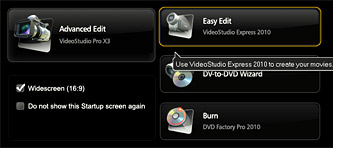
VideoStudio Pro X3 gets you right to the task at hand with the new Launcher. From one convenient location, you can start express editing, more advanced video editing, the DV-to-DVD wizard, or DVD Movie Factory 2010 for DVD and Blu-ray Disc authoring and burning.
New! GPU and CPU Acceleration
Dramatically speed up your entire movie making process with NVIDIA CUDA and Intel Core i7 optimization.
New! VideoStudio Express
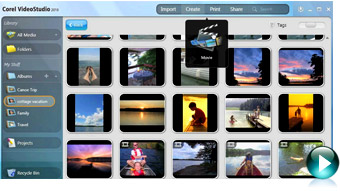
Make quick edits, or combine video clips, photos, music and voiceover to create a professional-looking video project in minutes.
Enhanced! User Interface
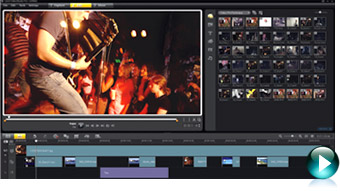
The redesigned interface keeps all your tools within easy reach so you never have to interrupt your creative flow.
New!High-Speed Filters
Accelerate the video-editing process by previewing your effects in real time. Less time waiting means more time creating!
Smart Proxy Editing
Edit HD content faster, even on basic PCs. Smart Proxy lets you work quickly in a lower resolution until you're ready to render your project in HD.
Studio-quality templates and effects
Studio-quality templates and effects
Get a creative head start with professionally designed templates from RevoStock, polished titles, and studio-quality audio and video effects.
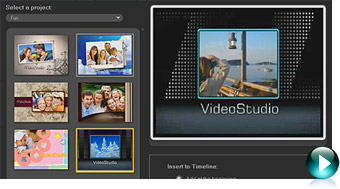
New! Movie Templates
VideoStudio Pro X3 offers the best-quality movie templates in its class, including over $500 US worth of templates from RevoStock. Turn video clips into polished movies in an instant, with Hollywood-style titles, transitions, pans and zooms, credits and more.
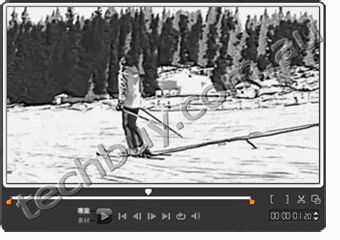
New! RotoSketch
Transform videos, video frames and photos into animated clips and hand-sketched drawings in a few clicks. By simply applying a filter, you can turn media assets into realistic animations or digital art.
Enhanced! Title Effects
Create stunning titles in seconds by adding multiple title tracks and effects, then customize your work to get the perfect look.
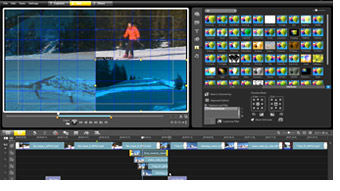
New!Multi-track Overlay Effects
Apply filters on overlay tracks, including titles and images. This professional video-editing software makes it easier than ever!
New! NewBlueFX Filters
The NewBlueFX Pack includes a variety of animated effects, including the Detail Enhancer for strengthening edges and bringing out detail in a dull or foggy scene, and the Active Camera for simulating every variety of camera jitter.
New! Mood Music from SmartSound
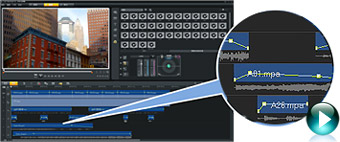
Load a multi-layered audio track as background to a video, then fine-tune individual instruments to ensure that the music complements your movie, not distracts from it. Add even more music and sound effects with two new audio tracks.
Enhanced! Creative Content
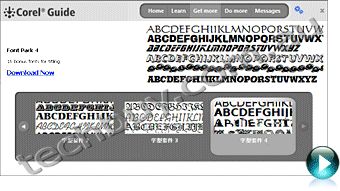
By clicking the Get More button, you can access new content to use in your movie projects, such as title and movie templates, music and effects. Content is updated regularly, giving you a never-ending series of creative options.
End-to-end HD video production
Import, edit and share HD video.
Enhanced! HD Capture and Import
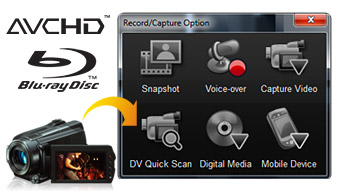
Import HD video from anywhere, including HDV, AVCHD, Blu-ray Disc and JVC HD camcorders. Import standard video from DV and analog camcorders, and Web, USB and still image cameras.
Enhanced! Blu-ray Authoring and Burning
Create your own Blu-ray titles, and author menus for DVDs and Blu-ray Discs, including BD-J menus.
New! H.264 Compression
Get incredible HD quality in smaller files by creating HD MPEG-4 files with the H.264 codec. This makes it easier to share videos on a variety of devices ranging from low-powered cell phones to high-powered Blu-ray devices.
Unlimited video sharing
Upload, burn, copy and share any way you want.
Enhanced! Online sharing
Share your movies with your own personal network or with the entire world in a few simple clicks. Upload your videos and slideshows directly to YouTube, Vimeo, Facebook and Flickr.
Enhanced! Format Flexibility
Save your movies to AVI, FLV, MP3 encode, AC3 5.1, AVCHD, HD MPEG-2, MPEG-4 and more.
Enhanced! Copy, Convert and Burn
Copy movies to your device of choice, including iPod, iPhone, MP3 players (USB) and PlayStation Portable (PSP). Burn CDs, DVDs, Blu-ray and AVCHD discs. You can even burn HD video to standard DVD media to play on a DVD or Blu-ray player.
VideoStudio Pro X3professional video-editing software with DVD and Blu-ray authoring
System Requirements
Microsoft Windows 7, Windows Vista or Windows XP with latest service packs installed (32-bit or 64-bit editions)
Intel Core Duo 1.83 GHz, AMD Dual-Core 2.0 GHz or higher recommended
1 GB RAM (2 GB or higher recommended)
128 MB VGA VRAM or higher (256 MB or higher recommended)
3 GB of free hard drive space
Minimum display resolution: 1024 x 768
Windows-compatible sound card
Windows-compatible DVD-ROM drive for installation
Recordable DVD required for creating DVDs
Recordable Blu-ray drive required for creating Blu-ray discs
Internet connection required for online features
Input/Output Device Support:
1394 FireWire cards for use with DV/D8/HDV camcorders
Support for OHCI Compliant IEEE-1394
USB Video Class (UVC) DV cameras
Analog capture cards for analog camcorders (VFW WDM support for Windows XP and Broadcast Driver Architecture support for Windows Vista/Windows 7)
Analog and Digital TV capture devices (Broadcast Driver Architecture support)
USB capture devices: Web cameras and disc/memory/hard drive camcorders
AVCHD, AVCHD Lite and BD camcorders
DV, HDV and DVD camcorders
Flip Video camcorders
Digital still cameras
Windows-compatible Blu-ray, DVD-R/RW, DVD+R/RW, DVD-RAM or CD-R/RW drive
Apple iPhone, iPod Classic with video, iPod Touch, Sony PSP, Pocket PC, Smartphones
Input Format Support:
Video: AVI, MPEG-1, MPEG-2, AVCHD, MPEG-4, H.264, BDMV, DV, HDV, DivX, QuickTime, RealVideo, Windows Media Format, MOD (JVC MOD File Format), M2TS, M2T, TOD, 3GPP, 3GPP2
Audio: Dolby Digital Stereo, Dolby Digital 5.1, MP3, MPA, WAV, QuickTime, Windows Media Audio
Pinnacle Dazzle Video Creator Plus HD - Save, Enhance and Share your Video External, Capture Video from Camcorder, Digital Cameras, and Phones
Dazzle Video Creator Plus HD
Capture video from camcorders, digital cameras, phones, DVDs, and game systems
Create animations, titles, and effects in HD
Share your movies on YouTube, DVD, and more
Save, Enhance, and Share Video
Dazzle Video Creator Plus HD combines a high-quality video capture device with the easy-to-use HD video editing software. It has never been easier to wow friends and family, anytime, anywhere, with great looking videos. The included Pinnacle Studio HD software gets you up and running fast with Hollywood-style animated graphics, multi-layered effects, and titles designed by professional producers and artists. Quickly and easily import standard-definition video from a variety of analog sourcesor edit HD video from an HD camcorder. The user-friendly Pinnacle Studio HD drag-and-drop interface makes it a breeze to create your own high-quality HD movies with music, montage themes, transitions, animations and effects. Then, share your masterpiece on DVD, the web, or upload to YouTube in widescreen.
Save, Enhance, and Share Video
Dazzle Video Creator Plus HD combines a high-quality video capture device with easy-to-use HD video editing software. Its never been simpler or faster to impress your friends and family with great looking videos - anytime, anywhere.
Turn home movies into DVDs
Protect your priceless home video memories by transferring them to DVD - then share them with friends and family.
Create movies, slideshows, and more
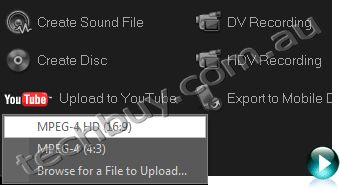
Import standard-definition video from a variety of analog sources - or edit HD video from an HD camcorder. Create HD photo slideshows with pictures from your digital camera. Simply transfer your photos and videos to your computer and use the included Studio HD software to create your masterpiece.
Polished results with Pinnacle Studio HD
Studio HD software gets you up and running fast with Hollywood-style animated graphics, multi-layered effects, and titles designed by professional producers and artists.
Sharing options as limitless as your creativity
Save your masterpiece straight to DVD, upload directly to YouTube, or output to Flash, QuickTime, PS3, Wii, Xbox, and more.
Technical Specifications
Minimum System Requirements
Windows 7, Windows Vista (SP2), Windows XP (SP3)
Intel Pentium or AMD Athlon 1.8 GHz (2.4 GHz or higher recommended)
Intel Core2 Duo 2.4 GHz required for AVCHD*, Intel Core2 Quad 2.66 GHz or Intel Core i7 required for AVCHD* 1920
1 GB system memory recommended, 2 GB required for AVCHD*
DirectX 9 or 10 compatible graphics card with 64 MB (128 MB or higher recommended)
256 MB required for HD and AVCHD*
DirectX 9 or higher compatible sound card
3.2 GB of disk space
DVD-ROM drive to install software
Optional
CD burner for creating Video CDs or Super Video CDs (S-VCDs)
DVD burner for creating DVD and AVCHD* discs
Hardware Specifications
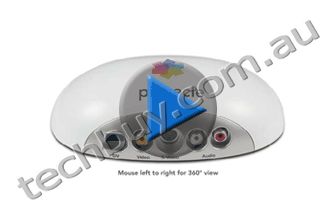
Video inputs: Composite video (RCA), S-Video (mini-DIN)
Audio inputs: Stereo audio (RCA x2)
PC connection: High-speed USB 2.0
Software Specifications
Capture from any video source with composite (RCA) or S-Video output
Output Format
AVCHD*, DVD (DVD-R, DVD-RW, DVD+R or DVD+RW, dual layer), S-VCD, Video CD (VCD)
Apple iPod, Sony PSP/PS3, Nintendo Wii, Microsoft Xbox compatible formats*
*Requires free online product activation. Product specifications are subject to change without notice or obligation
NA
27/09
Pinnacle Studio Ultimate Collection Movie Box Plus - Capture/Edit/Burn, Share your Story with Pinnacle Studio MovieBox
- Includes External USB Capture & Box Studio Plus v14
Studio
Ultimate Collection
Studio Ultimate editing software
Chroma-key Green Screen*
Red Giant Plug-ins: ToonIt, Knoll Light Factory, Magic Bullet Looks, Trapcode Shine, 3D Stroke, Particular
*Not included on upgrade versions
The complete package of everything you need to make amazing movies.
Boost your story with our top-tier release from the Pinnacle Studio Family, Pinnacle Studio Ultimate Collection. The collection includes a complete set of plug-ins and a Chroma-key green screen for advanced effects, editing and production, in addition to feature-rich Studio Ultimate software. With a new, simpler interface, create top-quality movies in high-definition video, include stunning effects, transitions, animation, and incredible Dolby Digital 5.1 sound, empowered by new tools from Avids professional lines of film-editing products. Then, dazzle your audience when you share your sensations in widescreen format. Sharing options are as limitless as your creativity: from Blu-ray and AVCHD to YouTube, iPod, Nintendo Wii, and more.
Exclusive Feature (*New to Studio)
Motion titling, plus exciting new title designs, DVD menus, effects and over 80 Montage templates*
Stop-motion capture for amazing animations and fast-motion effects*
Fluid image stabilization technology from Avid used in major motion pictures*
Dolby Digital 5.1 sound
Share straight to Blu-ray, HD DVD, DVD, YouTube (with wide-screen export)*, the web, MP3 sound files and more
Export movies for Flash, QuickTime, improved AVCHD*, PS3, Nintendo Wii, Xbox and more
Add Hollywood-style animations, transitions and effects with Pinnacle Studio Ultimate and a complete set of Red Giant plug-ins
System Requirements
Windows 7, Windows Vista(SP2),Windows XP (SP3)
IntelPentiumor AMD Athlon1.8 GHz (2.4 GHz or higher recommended) - Intel Core2 Duo 2.4 GHz required for AVCHD* - Intel Core2 Quad 2.66 GHz or Intel Corei7 required for AVCHD* 1920
1 GB system memory recommended, 2 GB required for AVCHD*
DirectX 9 or 10 compatible graphics card with 64 MB (128 MB or higher recommended) - 128 MB required for Red Giant Magic Bullet Looks Plug-in: Pixelshader 2 required, Intel GMA integrated graphics not supported. - 256 MB required for HD and AVCHD*
DirectX 9 or higher compatible sound card
3,6 GB of disk space
DVD-ROM drive to install software
Accessory:
CD burner for creating Video CDs or Super Video CDs (S-VCDs)
DVD burner for creating DVD and AVCHD* discs
Blu-ray burner for creating Blu-ray discs*
Sound card with surround sound output required for preview of surround sound mixes*
Input Options
Capture from DV, HDV and Digital8 camcorders or VCRs (requires a FireWire port)Capture from analog camcorders, 8 mm, HI 8, VHS, SVHS, VHS-C, SVHS-C, or VCRs (NTSC/PAL/SECAM). (requires Pinnacle or Dazzle video hardware)
Import from AVCHD* and other file based Camcorders, Digital Still Cameras, Mobile Devices and Webcams via USB
Output Options
Output to DV, HDV or Digital8 tape (requires camcorder with FireWire Input port and a PC with a DV/FireWire port)
Output to analog videotape (requires DirectShow compatible device with video output)
* Requires free product activation via the Internet Product specifications are subject to change without notice or obligation.
NA
27/09
Pinnacle Studio MovieBox Plus - Capture/Edit/Burn, Share your Story with Pinnancle Studio MovieBox
- Includes External USB Capture Box & Studio Plus v14
StudioMovieBox Plus
Capture. Edit. Burn.
Feel the Power. Maintain ease of use.
Enjoy on DVDs, the Web and more
Your Life in Movies. Captured and Enhanced.
With Pinnacle Studio MovieBox Plus capture HD video, create beautiful movies, and publish them on YouTube or burn them on DVD.
Combining power and simplicity, Pinnacle Studio MovieBox Plus unlocks the latest HD video technologies, including Blu-Ray and AVCHD. Capture HD and SD video from with the high-speed USB 2.0 device. New Pinnacle Montage theme-based editing puts incredible creative power at your fingertips. Simply drag and drop your video and stills to preview your show complete with Hollywood style multi-layered effects, animated graphics, titles and Hi-Fi audio. Edit and polish to your hearts content with the sleek new interface. When you are finished, archive your video memories, publish them on YouTube or enjoy on DVDs and portable devices.
Exclusive Feature
Complete HD workflow
Your Story Now in Dazzling HD
Pinnacle Studio Plus works natively with HDV and AVCHD footage. Native HD support means youll get the same pristine quality from your original source all the way to final output without transcoding and in real-time. You can even combine projects that mix standard and high definition video and photos for a final result in full HD resolution.
Built-in HD Disc Burning
Burn your Hollywood-style movies on DVD and HD DVD format discs on standard DVD media. Natively author Blu-ray format discs with full motion menus. Or make AVCHD format discs on standard DVDs to play on Blu-ray players.
NEW Pinnacle Montage
Watch your memories come alive
Enjoy multi-track power without the complexity
Thanks to fantastic pre-built templates designed by professional producers and artists, Pinnacle Montage automatically generates all the necessary titles, effects and animations.
Create multi-layer effects
Access to Picture-in-Picture, Chroma Key or A/B editing with two video tracks at the tip of your fingers.
Mix your media together
Use all your media - photos, video, music - to create a Hollywood-like movie.
11 themes with +80 templates including Video Wall, Album, Seasons and more
Power and simplicity for better movie-making
Pinnacle Studio Plus version 12 is a stunning leap forward in workflow refinement and ease of use. Directly import your digital videos, photos and audio from a wide range of devices including DV, HDV and AVCHD camcorders, and digital still cameras. Automatic scene detection and clip creation gets your project off to a fast start!
Everything you need to make great home movies.
Optimized for performance
Takes full advantage of the power of your computer for a faster, smoother experience.
Real-time multi-track editing
Create advanced effects like Chroma Key, graphics overlay and Picture-in-Picture (PIP).
Key frame-able 2D/3D motion graphics
Pick from hundreds of effects and transitions, and preview them in full quality, even in HD.
Pinnacle Scorefitter music generator
Automatically generate a rich soundtrack to match the length of your movie.
Web publishing simplified
Direct upload to video sharing sites like YouTube and Yahoo! Video.
Refined audio editing
New digital controls and monitors to add a dimension in sound to your movie.
Output movies to Sony PSP, Apple iPod, DivX certified players and even 3GP mobile phones. Export to Flash video too.
Built-in HD Disc Burning
Burn DVD, HD DVD and AVCHD* format discs on standard DVD media. Natively author Blu-ray format discs.
Windows XP SP2 (SP3), Windows Vista (SP1)
Intel Pentium or AMD Athlon 1.8 GHz (2.4 GHz or higher recommended)
Intel Pentium HT or AMD Athlon 2.4 GHz or 1.6 GHz Dual core required for Windows Vista
Intel Core2 Duo 2.4 GHz or higher required for 1440x1080 AVCHD editing Intel Core2 Quad 2.66 GHz or higher required for 1920x1080 AVCHD editing
1 GB system memory recommended
2 GB required for AVCHD*, recommended for HD and/or Windows Vista
DirectX 9 or 10 compatible graphics card with 64 MB (128 MB or higher recommended)
128 MB required on Windows Vista (256 MB or higher recommended)
256 MB required for HD and AVCHD*
DirectX 9 or higher compatible sound card
2 GB of disk space
DVD-ROM drive to install software
Optional:
CD burner for creating Video CDs or Super Video CDs (S-VCDs)
DVD burner for creating DVD, HD-DVD and AVCHD discs on standard media*
Blu-ray burner for creating Blu-ray discs*
Sound card with surround sound output required for preview of surround sound mixes**
Capture Options
Capture from DV, HDV and Digital8 camcorders or VCRs (requires a FireWire port)
Capture from analog camcorders, 8 mm, HI 8, VHS, SVHS, VHS-C, SVHS-C, or VCRs (NTSC/PAL/SECAM). Requires DirectShow compatible graphic board or TV tuner board with analog (Composite or S-Video) inputs
Import from AVCHD* camcorders (requires USB 2.0 and a UDF driver)
Output Options
Output to DV, HDV or Digital8 tape (requires camcorder with FireWire Input port and a PC with a DV/FireWire port)
Output to analog videotape (requires DirectShow compatible video device or video card with TV-output)
Eco-friendly, Good TCO, and Easy Operation The VPL-E Series is an Excellent Choice for Education or Business
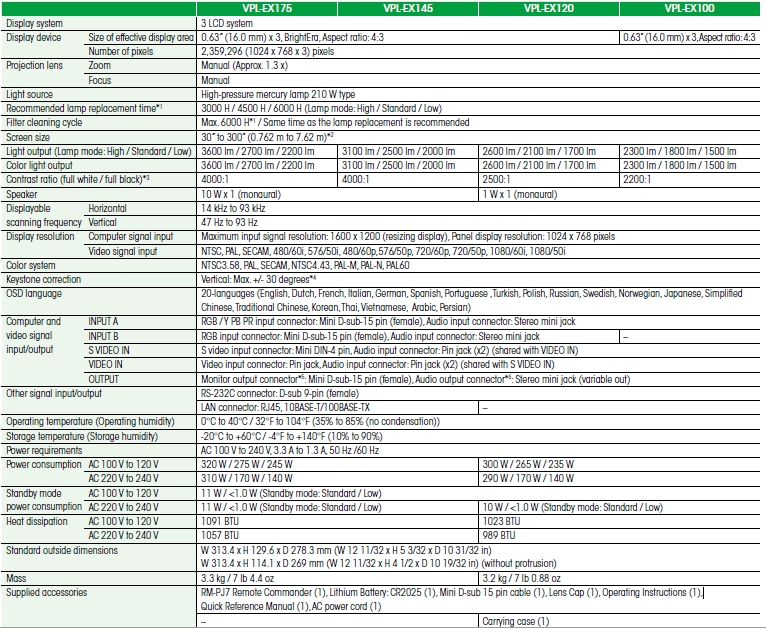
Sony’s VPL-E Series data projectors are designed to deliver a low total cost of ownership, and include eco-friendly features, thanks to a long-lasting lamp design and low power consumption. These projectors are not only stylish but also offer native XGA resolution for high image quality with a high brightness of 3600 lumens (VPL-EX175), 3100 lumens (VPL-EX145), 2600 lumens (VPL-EX120), or 2300 lumens (VPL-EX100). Delivering superb images and simple operation, Sony's VPL-E Series projectors provide an excellent balance between quality and cost, ideal for use in education or business.
FEATURES
Cost-efficient, Energy-efficient Design
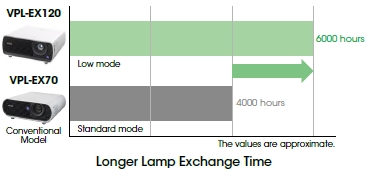
Long-lasting Lamp
By incorporating a newly developed high-performance lamp and advanced lamp-control technology, VPL-E Series projectors deliver an extremely long lamp replacement time of 6,000 hours*.
* Approximate recommended period, in low mode.
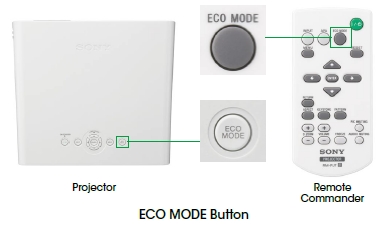
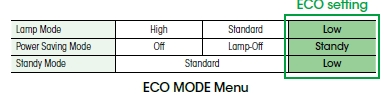
ECO MODE Button
With a single push of the ECO MODE button on either the projector or the supplied Remote Commander™ unit, users can switch to the ECO setting.
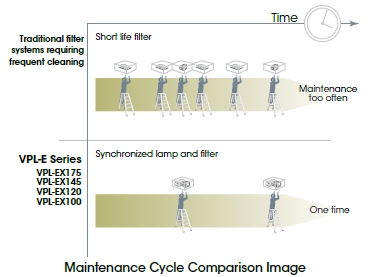
Lamp and Filter Synchronized Maintenance When it’s time to clean the air filter, a reminder message is clearly displayed on screen. Like the lamp, the air filter has an approximate 6,000-hour cleaning cycle. Users can therefore replace both the lamp and the filter at the same time, saving maintenance effort and cost.
Power Saving Mode If no signal is input for 10 minutes, the projector lamp will automatically turn off.
LowPower Consumption The VPL-E Series offers remarkably low power consumption, allowing users to make significant savings on their electricity expenses.
Simple Projector Replacement The standard 1.3x zoom lens enables installation flexibility when replacing an existing projector with the VPL-E Series. There's no need to change ceiling mount positions.
High Picture Quality High Picture Quality and Bright Images By combining a new generation of inorganic LCD panels that utilize Sony’s BrightEra™ technology with a 3LCD projection system, the VPL-EX175, VPL-EX145, and VPL-EX120 offer high picture quality and brightness.
3LCD Projection Offers Brilliant Color Performance The VPL-E Series adopts a 3LCD projection system incorporating three LCD panels. This system enables each projector to present bright and natural images.
12-bit 3D Gamma Correction The VPL-E Series incorporates 12-bit 3D Gamma Correction circuitry to perform highly accurate gamma correction, achieving smoother gradations and a richer gray scale.
I/P Conversion and Film Mode The video signal processing technology that Sony has incorporated in the VPL-E Series offers I/P conversion and 2-3 pull-down to generate high-quality images with outstanding clarity.
XGA Resolution XGA resolution of 1024 x 768 contains 60% more pixels compared to SVGA resolution of 800 x 600. As a result, XGA resolution delivers much greater detail and finer images.
Off and Go Once a presentation is complete, a VPL-E Series projector can be immediately moved to the next location, simply by turning it off and unplugging the AC power cord – there’s no need to wait for the fan to stop.
Front Exhaust Users can run an optimum presentation even in a quiet environment, and participants seated to the side of the projector are not bothered by hot air and noise.
Unique Functional Design
Other Features Auto Keystone Adjustment Corrects any trapezoidal distortion automatically
Picture (Audio) Muting Mutes the image/audio
6 Picture Modes Selectable six picture modes according to the picture source
Security Pack Security lock (password and mechanical), security bar, and panel key lock
Direct Power On/Off Direct power control using a circuit breaker on the switch board
High Altitude Mode For reliable projector operation at high altitude
Closed Captioning Official teletext broadcasting, developed by the NCI, USA
Network and Control Controls and monitors projector status Compatible with various control systems
NA
27/09
HP SmartStart - For EVA Storage - V3.1 Media Kit
HP SmartStart for EVA Storage
Overview
Wouldnt it be invaluable to have a simple tool that walks you through set-up of a new storage area network (SAN) advanced disk array that saves provisioning and set-up time? HP SmartStart for EVA Storage is a configuration utility that simplifies the installation for the HP StorageWorks 4x00 Enterprise Virtual Array family. Installing both HP StorageWorks Command View EVA Software and HP StorageWorks Command View EVAperf Software. SmartStart for EVA Storage then assists you in the first provisioning of your new storage. Easy to follow instructions with on-screen help to set-up your storage in a few mouse clicks, also helping with the installation of HBA drivers, Multi-pathing I/O (MPIO) drivers and the Storage System Scripting Utility (SSSU) in a Windows environment. The EVA family is known for its array management ease of use. HP SmartStart for EVA Storage continues in that tradition, adding simplified set-up for new users of the EVA4x00 family of storage arrays.
Features
Comprehensive on-screen directions and help at every step of the installation and set up process for HP Command View EVA Software and HP Command View EVAperf Software, all in just a few mouse clicks.
Technical specifications
Supported hardware environment -
EVA4x00 family
Version -
V3.2
Warranty standard statement
HP warrants only that the software media will be free of physical defects for a period of ninety (90) days from delivery. For more information about HPs Global Limited Warranty and Technical Support, visit: www.hp.com/products/storageworks/warranty.
NA
27/09
Lexar Media 4GB JumpDrive VE Flash Drive - Twin Pack, USB2.0 - White
Lexar JumpDrive VE 4GB Twin Pack - White
NA
27/09
Kodak 8GB Flash Drive - Cap Connector, USB2.0 - Charcoal
KODAK USB Flash Drive
Industry leaders Lexar and Kodak have joined forces to deliver a comprehensive selection of memory cards and USB flash drives in various formats, speeds, and capacities. These products deliver the brand quality that Kodak customers have come to expect, teamed with the advanced performance of Lexar technology.
Works with digital picture frames
Great for photos, music, video, and more
Easily transfer, store, and share important files
Ultra small, ultra portable design fits on a keychain
Large storage capacities
Compatible with both PC and Mac systems
Tail light blinks when it writes
Two-year limited warranty
The KODAK USB Flash Drive is an ultra-portable USB flash drive that provides a convenient solution for storing, transferring, and sharing multimedia and more. It's ideal for storing lots of great pictures, your favorite music, and important files. The KODAK USB Flash Drive is available in 2GB, 4GB, 8GB, 16GB and 32GB capacities.
More Than Just Good Looks
Serious Storage and Versatility. The KODAK USB Flash Drive uses powerful, hi-speed USB technology, which allows you to quickly and easily transfer and store digital documents, photos, MP3 files, and video clips. Large capacity options let you choose the right one for your storage needs. And with a simple plug-and-play design, your information goes with you wherever you go. The drive is also ideal for use with digital picture framesjust plug it into a frame and instantly view your photos!
Great Features. In addition to its attractive design, the KODAK USB Flash Drive also has a protective cap for security and a cool blue LED tail light that blinks during data transfer so you have confidence in knowing when the job is done. The KODAK USB Flash Drive also works across platforms, giving you complete flexibility and ease of use.
Pick One to Meet Your Needs. The KODAK USB Flash Drive is available in a wide range of large capacitiesup to a whopping 32GB of storage. It also serves as a fashionable accessory and comes with a key chain hole so it can be easily tethered onto a key ring, attached to a backpack, or hooked to a purse or briefcase. With great features, digital picture frame compatibility, and a range of capacity options, the KODAK USB Flash Drive is an ideal solution for easily storing and transferring all your files, photos, video, and more.
The Best of Both Worlds. Enjoy the combined benefits that KODAK brand quality and Lexar technology deliver. And you can keep it Kodak by adding the KODAK USB Flash Drive to your existing line-up of other trusted KODAK products, while enjoying the advanced, innovative memory card technology provided by Lexar.
Some of the listed storage capacity is used for formatting and other purposes and is not available for data storage. 1GB equals 1 billion bytes.