Camerafarm product archive #40250
| Image |
Date |
Product description |
Price |
Buy |
|
15/03
|
Memorex CD/DVD File-n-Store Box - Double Sided Sleeves - KhakiMEMOREX FILE BOX
CD/DVD File-n-Store Box -
40 double-sided sleeves Khaki
|


|
|
|
15/03
|
Memorex CD/DVD File-n-Store Drawer - 40 Double Sided Sleeve - Black MEMOREX FILE DRAWER CD/DVD File-n-Store Drawer - 40 double-sided sleeves Black
PRODUCT : CD/DVD File-N-Store Drawer
COLOR : Black
FEATURES:
* Fashionable contemporary design
* Sturdy construction for durability
* Box system: Hinged top opening lid, covered in durable nylon canvas
* Drawer system: Polystyrene plastic with a sliding drawer
* Stores 80 discs in the space saving double sided sleeves
* Sleeves sit and run along a sturdy aluminium track
|
|
|
|
15/03
|
Memorex DVD Twin Video Case - 10 Pack Black StandardMEMOREX DVD TWIN VIDEO CASE 10PK
DVD Twin Video Cases 10 Pk Black Standard
|

|
|
|
15/03
|
Memorex DVD Video Case - 10 Pack Black Standard MEMOREX DVD VIDEO CASES 10PK
Organise & Store
If you have CDs and DVDs filling every corner of your home or office, let Imation help. We have innovative accessories to meet your demand for convenient organisation and storage of your media. Our products are colorful, portable, and leave you time to do what you do bestmaking music, sharing photos, or keeping your business data current. Check back soon for more new products.
|
|
|
|
15/03
|
Memorex DVD Video Case - 25 Pack Colour Slim MEMOREX DVD VIDEO CASES 25PK
Organise & Store
If you have CDs and DVDs filling every corner of your home or office, let Imation help. We have innovative accessories to meet your demand for convenient organisation and storage of your media. Our products are colorful, portable, and leave you time to do what you do bestmaking music, sharing photos, or keeping your business data current. Check back soon for more new products.
|
|
|
|
15/03
|
Memorex CD/DVD Travel Case - Koskin 72MEMOREX TRAVEL CASE 72
Travel Case CD/DVD Koskin 72
|
|
|
|
15/03
|
Memorex CD/DVD Travel Case - Koskin 32MEMOREX TRAVEL CASE 32
Travel Case CD/DVD Koskin 32
|
|
|
|
15/03
|
Imation 8GB Nanopro Flash Drive - Swivel Connector, Password Protection Software, USB2.0 - Black/RedImation Nano Flash Drive
The Imation Nano Flash Drive is the smallest of the Imation USB drive family and combines a professional design with the performance and storage capacity needed to easily manage and transfer digital files. Available in capacities from 512MB to 8GB, the Nano Drives compact, lightweight and capless design allows it to easily slip into your pocket, onto a keychain, or even your mobile phone.
Combined with password protection and drive partitioning software, the Nano Flash Drive is an affordable way to safely transfer data, music, photos or video.
Features:
- Compact Size Compact and lightweight form factor, provides a simple way for mobile consumers and business professionals to transport files such as presentations, emails, audio, and video files.
- Professional Design a 360 rotating swivel cap allows for easy accessibility to USB ports in tight spaces. No need for a separate USB cable.
- Affordable Price Packed with the capacity of other flash drives, the Nano Drive is the high-value and affordable solution for portable data storage.
- Size - 44mm x 15mm x 10mm.
System and Software Requirements:
- Hardware Compatibility: Windows 98SE/2000/ME/XP/VISTA, Mac OS 9.x and above
Linux 2.4 and above.
- Windows 98SE - Driver required
- Software Compatibility: Windows 2000/ME/XP/VISTA
- Interface: High Speed USB 2.0 or 1.1.
- Warranty: 5 Years Limited.
|
|
|
|
15/03
|
Imation 4GB Nanopro Flash Drive - Swivel Connector, Password Protection Software, USB2.0 - Black/RedImation Nano Flash Drive
The Imation Nano Flash Drive is the smallest of the Imation USB drive family and combines a professional design with the performance and storage capacity needed to easily manage and transfer digital files. Available in capacities from 512MB to 8GB, the Nano Drives compact, lightweight and capless design allows it to easily slip into your pocket, onto a keychain, or even your mobile phone.
Combined with password protection and drive partitioning software, the Nano Flash Drive is an affordable way to safely transfer data, music, photos or video.
Features:
- Compact Size Compact and lightweight form factor, provides a simple way for mobile consumers and business professionals to transport files such as presentations, emails, audio, and video files.
- Professional Design a 360 rotating swivel cap allows for easy accessibility to USB ports in tight spaces. No need for a separate USB cable.
- Affordable Price Packed with the capacity of other flash drives, the Nano Drive is the high-value and affordable solution for portable data storage.
- Size - 44mm x 15mm x 10mm.
System and Software Requirements:
- Hardware Compatibility: Windows 98SE/2000/ME/XP/VISTA, Mac OS 9.x and above
Linux 2.4 and above.
- Windows 98SE - Driver required
- Software Compatibility: Windows 2000/ME/XP/VISTA
- Interface: High Speed USB 2.0 or 1.1.
- Warranty: 5 Years Limited.
|
|
|
|
15/03
|
Memorex CD/DVD Keepers - 25 Pack Color PolypropyleneMEMOREX CD/DVD KEEPERS 25PK
CD/DVD Keepers 25 Pk Color Polypropylene
|
|
|
|
15/03
|
Memorex CD/DVD Jewel Case - 25 Pack Black StandardMEMOREX CD/DVD CASES 25PK
CD/DVD Jewel Cases 25 Pk Black Standard
|
|
|
|
15/03
|
Memorex CD/DVD Jewel Case - 10 Pack Clear StandardMEMOREX CD/DVD CASES 10PK
CD/DVD Jewel Cases 10 Pk Clear Standard
|
|
|
|
15/03
|
Memorex CD/DVD Jewel Case - 30 Pack Color SlimMEMOREX CD/DVD CASES 30PK
CD/DVD Jewel Cases 30 Pk Color Slim
|
|
|
|
15/03
|
Memorex CD/DVD Jewel Case - 10 Pack Color SlimMEMOREX CD/DVD CASES 10PK
CD/DVD Jewel Cases
10 Pk Color Slim
|
|
|
|
15/03
|
Epson EB-450WI LCD Desktop Projector - WXGA, 2500 Lumens, 2000;1, 1280x800, 1xLAN, Ultra Short Throw Epson EB-450WI Ultra Short Throw
Epson is pleased to introduce the Epson EB-450Wi Interactive Ultra Short Throw 3LCD Multimedia Projector. Stylish and discreet, The EB-450Wi projector enables users to turn any hard flat wall into an interactive workspace.
KEY FEATURES:
- Interactive Model Turn any hard flat wall into an interactive workspace
- Ultra Short Throw Projection Minimised glare and shadows
- Powerful Brightness up to 2,500 Lumens No need to close the curtains or dim the lights
- Low Power Consumption and Long Lamp Life Low Total Cost of Ownership
- Integrated Wall Mount Included Stylish, unobtrusive modern design
- Network Functionality Operate and monitor from a remote location
- 3 Year Projector / 1 Year Lamp Warranty Peace of mind protection for your investment
- Direct Connect to ELP-DC06 View images directly from Document Camera / Visualiser
With stylish, modern design and cutting edge technology, the Epson EB-450Wi sets a new standard for Ultra Short Throw projection. Offering interactivity, a sharp, square-edged image, and a brightness of up to 2,500 lumens Light Output and 2,500 lumens Colour Light Output, the EB450Wi is ideal for the modern classroom environment. Interactive lesson content has never looked so good!
FEATURES AND BENEFITS:
Interactive Feature
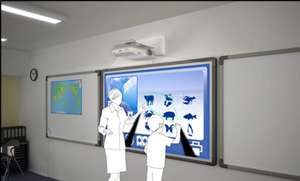 In the past, you needed a projector and an interactive whiteboard to create an interactive environment in a meeting room or class room. Now, you can make almost any wall interactive with the EB-450Wi. In the past, you needed a projector and an interactive whiteboard to create an interactive environment in a meeting room or class room. Now, you can make almost any wall interactive with the EB-450Wi.
This high performance projector and interactive-pen combination integrates interactive functionality into one machine. With no requirement for an interactive whiteboard, you can utilise an existing pen-based whiteboard or even a flat wall for full colour presentations, interactive brainstorming sessions, annotation on-the-fly and much more. With the EB-450Wi and its easy to use software (via download from www.epson.com.au) you can turn your whiteboard into a fully interactive business or teaching tool. At the end of your meeting, simply save the file for printing or emailing to attendees.
Ultra Short Throw Projection
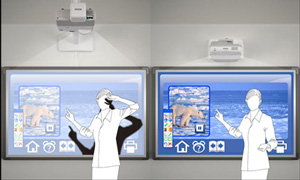 Capable of producing an interactive image size anywhere from 59 up to 96 diagonal (native WXGA) on nearly any wall, the Epson EB-450Wi delivers an amazing interactive work environment. Thanks to this Ultra Short Throw distance, presenters are able to deliver rich multimedia content without the distraction of glare in the eyes, or shadows on the board disrupting vision. With the added benefit of 3LCD Technology, presentations will feature rich, vibrant colours that bring content to life. Plus, with up to 2,500 lumens Light Output, there is no need to dim the lights or draw the curtains, so meetings or lessons can start straight away without interruption. Capable of producing an interactive image size anywhere from 59 up to 96 diagonal (native WXGA) on nearly any wall, the Epson EB-450Wi delivers an amazing interactive work environment. Thanks to this Ultra Short Throw distance, presenters are able to deliver rich multimedia content without the distraction of glare in the eyes, or shadows on the board disrupting vision. With the added benefit of 3LCD Technology, presentations will feature rich, vibrant colours that bring content to life. Plus, with up to 2,500 lumens Light Output, there is no need to dim the lights or draw the curtains, so meetings or lessons can start straight away without interruption.
Low Power Consumption and Long Lamp Life
At Epson, we know that planning for the future requires a strong commitment to the environment. Thats why these products conform to the new European Directive on Eco-Design of energy using products. The main objective of this directive is to ensure energy efficiency throughout a products lifecycle. The EB-450Wi conforms to the criteria of this directive.
As with all Epson products, ease of use and low cost of ownership were paramount in the design process used to create the EB-450Wi. Lamp life is estimated at up to 3,500 hours in ECO mode, making it one of the longest lasting lamps in this category. We even back these lamps with a full 12 month, 750 hour lamp warranty to give you peace of mind.
Integrated Wall Mount Included
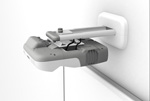 In keeping with the sleek, unobtrusive design of these projectors is the integrated wall mount that ships with the product. No additional purchase is required for install, and being Epson designed and manufactured, you know that the quality is second to none. In keeping with the sleek, unobtrusive design of these projectors is the integrated wall mount that ships with the product. No additional purchase is required for install, and being Epson designed and manufactured, you know that the quality is second to none.
With the Epson mount, installation and set up is a breeze. The projector ships with the mounting plate already attached, ready to slide onto the mount arm. Featuring micro adjustment capabilities for tilt, pitch and yawl means that installers are able to get a perfect picture quickly and easily. That means less down time for each classroom and less cost to the school.
Network Functionality
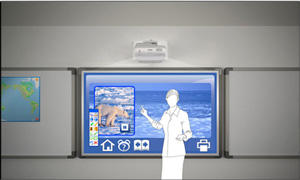 With the EB-450Wi, monitoring and operation can be carried out from a remote PC via network connection. System Administrators can turn the projector off, switch between sources, as well as control and monitor lamp and temperature conditions. Using this feature you can be sure that all projectors are operating correctly and be certain that all units are turned off at the end of the day and in the process, save time, money and reduce drain on the environment. With the EB-450Wi, monitoring and operation can be carried out from a remote PC via network connection. System Administrators can turn the projector off, switch between sources, as well as control and monitor lamp and temperature conditions. Using this feature you can be sure that all projectors are operating correctly and be certain that all units are turned off at the end of the day and in the process, save time, money and reduce drain on the environment.
Direct Connect to ELP-DC06
Further enhancing suitability to the modern classroom is the ability for the EB-450Wi to connect directly to the Epson ELP-DC06 document camera / visualiser. These Epson products feature unique technology enabling them to connect via USB and provide full operation without the need for a PC.
Wireless Connectivity
With the addition of the ELPAP03 Wireless LAN Unit, the EB-450Wi projector becomes a part of your 802.11a/b/g wireless network. For incredibly easy peer-to-peer wireless connection on the fly without the need for additional software, add the ELPAP05 Easy MP quick wireless connection USB key.
Specifications:
| PRODUCT TYPE
| Entry Level Multimedia Projectors |
| PRODUCT NAME |
EB-450Wi |
| PRODUCT CODE |
V11H317053 |
| PROJECTION SYSTEM
| RGB Liquid Crystal Shutter Projection System |
| PROJECTION METHOD
| Ceiling Mount Front / Ceiling Mount Rear |
| SPECIFICATION OF MAIN PARTS
|
| LCD |
Size |
0.56 inches with MLA |
| |
Driving method |
Poly-Silicon TFT Active Matrix |
| |
Pixel number |
1,024,000 pixels (1280 x 800) x 3 |
| |
Native resolution |
WXGA |
| |
Aspect ratio |
16:10 (which covers 16:9 and 4:3) |
| |
Pixel arrangement |
Stripe |
| |
Refresh Rate |
50Hz-60Hz |
| PROJECTION LENS |
Type |
Digital zoom / Manual focus |
| |
F-number |
1.8 |
| |
Focal length |
4.68mm |
| |
Zoom ratio |
1.0 - 1.35 (Digital) |
| LAMP |
Type |
230W UHE E-TORL |
| |
Life (estimated) |
3500Hr (Normal Mode) # 2500Hr (ECO Mode) #
#Subject to operation & environmental conditions. |
| OPTICAL SYSTEM
| Dichroic Mirror Separation & Prism combine method |
| SCREEN SIZE (PROJECTED DISTANCE)
| 59 to 97 inch [0.465 to 0.766 m] |
| BRIGHTNESS
|
| |
Normal Mode |
2,500 Lumens
(Colour mode: Dynamic, Zoom, Wide) |
| |
ECO Mode |
2,500 Lumens
(Colour mode: Dynamic, Zoom, Wide) |
| CONTRAST
| 2,000:1 (Color mode: Dynamic, High brightness mode, Zoom: Wide, Auto iris: On) |
| BRIGHTNESS UNIFORMITY
| 90% (Typ.) |
| COLOUR REPRODUCTIVITY
| Full colour (16.77 million colours) |
| VIDEO QUALITY
| 3D Y/C separation, Noise Reduction Motion compensated Interlace-Progressive conversion (2-2,3-2 film detection) |
| SOUND OUTPUT
| 10W monaural |
| EFFECTIVE SCANNING FREQUENCY RANGE (ANALOG)
|
| PIXEL CLOCK |
13.5MHz to 162MHz |
| HORIZONTAL |
15KHz to 92KHz |
| VERTICAL |
50Hz to 85Hz |
| ADJUSTMENT FUNCTION
|
| PROJECTOR / REMOTE CONTROL |
Brightness / Contrast / Tint / Saturation / Sharpness / Input Signal
Colour Temperature / Tracking / Position / Sharpness / Volume etc... / |
| COLOR MODE |
Dynamic, Presentation, Theatre, Photo, Sports, sRGB, Blackboard, Whiteboard, |
| FOOT ADJUSTER |
Front-centre |
| TILT ANGLE |
0 to 13 degrees |
| KEYSTONE CORRECTION |
Vertical: +/- 5 degrees |
| PASSWORD PROTECTED FUNCTION (security function) |
Implemented |
| MICROPHONE VOLUME/MIX |
Yes |
| EASY INTERACTIVE FUNCTION |
Yes |
| ANALOGUE RGB I/O
|
| DISPLAY PERFORMANCE |
Native |
1280 x 800 pixels |
| INPUT SIGNAL |
Signal type |
Separate signal |
| |
Video signal |
Analogue (0.7V p-p, 75ohm / Mac 0.714Vp-p, 75ohm) |
| |
Sync. signal |
Separate (positive & negative, bi-polarity 2-5 Vpp) / Composite (positive & negative, bi-polarity 2-5Vpp) / Sync-on-green (negative, 0.3Vpp) |
| |
Audio signal |
500mVrms / 47k-ohm |
| INPUT TERMINAL |
Video |
D-sub 15pin x 1 Blue moulding |
| |
Audio |
Stereo mini jack x 1 |
| OUTPUT SIGNAL |
Video |
Analog (0.7Vpp, 75ohm / Mac 0.714Vpp, 75ohm) |
| |
Sync. |
Separate (positive & negative,TTL) /
Composite (positive & negative,TTL) /
Sync. on green (negative 0.2 - 0.4Vpp) |
| OUTPUT TERMINAL |
Video |
D-sub 15pin x 1 (Black moulding) |
| VIDEO I/O
|
| DISPLAY PERFORMANCE |
|
NTSC: 560 line PAL: 560 lines (Depends on observation of the multi burst pattern) |
| INPUT SIGNAL |
Video standard |
NTSC / NTSC4.43 / PAL / M-PAL / N-PAL / PAL60 / SECAM |
| |
Video signal |
Composite Video (1.0Vpp / Sync. negative, 75ohm) /
S-Video (Luminous 0.714Vpp, Chrominous 0.286Vpp, 75ohm) /
Component Video (Analog Y level 0.75V 75ohm / Cr Cb level
+/-0.35V 75ohm / sync. negative 0.3V or 3-state+/-0.3V on Y) /
Video-RGB (0.7Vpp, 75ohm / Mac 0.714Vpp, 75ohm |
| |
Audio signal |
500mVrms / 47k-ohm |
| INPUT TERMINAL |
Video |
Composite Video: RCA (Yellow) x1
S-Video: Mini DIN
Component Video: D-sub 15pin Blue molding |
| |
Audio |
RCA x 2 (White/Red ) |
| USB DISPLAY |
Display Performance |
1280 x 800 |
| |
Video |
Yes |
| |
Audio |
No |
| CONTROL I/O
|
| SERIAL I/O |
Terminal |
D Sub 9 pin x 1 |
| |
Signal |
RS-232C |
| USB I/O |
Terminal |
USB Type B x1 Ver. 2.0 (USB Display, mouse, K/B) |
| MICROPHONE |
Terminal |
Stereo mini jack 3.5 mm |
| MEMORY I/O
|
| USB I/O |
Terminal |
USB Type A x1 Ver. 2.0 (USB Memory / document camera) |
| NETWORK I/O
|
| |
Network Interface |
RJ45 x 1 |
| USB I/O |
Terminal |
Type A x 1 (Optional wireless LAN unit I/O) |
| EASY MP
|
| FUNCTION |
E-mail notification |
| |
SNMP |
| |
Web control |
| |
PJ-Link |
| |
AMX Device Discovery compatible |
| |
Slideshow (photo) |
| |
Network Presentation |
| |
Message Broadcasting |
| SOFTWARE |
EasyMP Network Projection Ver.2.61
EasyMP Monitor Ver.4.40 |
| WIRELESS SECURITY |
WEP, WPA-PSK(TKIP/AES), WPA2-PSK(TKIP/AES) |
| OPERATING TEMPERATURE
| 5C to 35C (41F to 95F) > (20%-80% Humidity ) |
| COOL-DOWN PERIOD
| "Instant Off" |
| START-UP PERIOD
| Approx. 9 seconds (warm up 30 seconds) |
| DIRECT POWER ON
| Yes |
| DIRECT POWER OFF
| Yes |
| POWER SUPPLY VOLTAGE
| 100-240V AC10% 50/60Hz |
| POWER CONSUMPTION
| 240VAC 2.7-1.1A 50/60Hz Lamp
338W (Lamp on) 1W (standby, network off) |
| EXHAUST DIRECTION
| Side |
| DIMENSION
|
| EXCLUDE FEET |
369(D) x 481(W) x 115(H) mm |
| MAXIMUM DIMENSION |
369(D) x 483(W) x 115(H) mm |
| WEIGHT |
Approx. 6.2kg (with mounting plate) |
| FAN NOISE
| |
| HIGH BRIGHTNESS MODE |
35dB |
| LOW BRIGHTNESS MODE |
28dB |
| WARRANTY
|
| STANDARD WARRANTY |
3 years*
*excluding lamp |
| * For more information visit Epson Projector Warranty Website |
| ACCESSORIES
|
| POWER CORD |
5m |
| USB CABLE |
5 m, USB A / USB B |
| REMOTE CONTROL |
Included |
| BATTERY |
Manganese dry cell AA x 2 (for Remote) & Alkaline AAA x 2 (for Easy Interactive Pen) |
| EASY INTERACTIVE PEN |
Included |
| PASSWORD PROTECT STICKER |
Included |
| EPSON PROJECTOR SOFTWARE |
Meeting & Monitoring Ver.1.11 & Easy Interactive Function Ver.1.00 (CDROM) |
| OWNER'S MANUAL |
CD-ROM |
| PROJECTOR MOUNT |
Included (Wall mount with adjustable arm) |
| #Subject to operation and environmental conditions. |
| Epson is the registered trademark of Seiko Epson Corporation. Epson ESC/P2 and Epson Stylus are trademarks of Seiko Epson Corporation. MicroDot is a trademark of Epson Australia Pty Limited. All other product names and other company names used herein are for identification purposes only and may be the trademarks or registered trademarks of their respective owners. Epson disclaims any and all rights in those marks. Specifications are subject to change without notice. |
Equipment supplied by Epson Australia is designed to function in conjunction with genuine Epson consumables and accessories specifically configured for it.
Usage Conditions
Epson products are designed and made to give highly reliable use and long life when used according to its specifications. With any system, product or device used in situations where human life may be involved or at risk, Epson advises that you should take all necessary steps to ensure the suitability of your Epson product for inclusion in your system, and recommends that you include fail-safe procedures and redundancy support or backup equipment in your system, to maintain the maximum safety margin and optimum system reliability. Examples include but are not limited to do not interfere with any electrical components within the device, do not use items supplied with the product for purposes other than as intended by Epson (ie mains cords, inks, CDs, plastic wrapping) and do not make modifications to the product.
|
|
|
|
15/03
|
Corel Photo & Video Pro Bundle - The Complete Digital Photo And Video-Editing Solution PHOTO & VIDEO PRO BUNDLE Photo & Video Pro Bundle

Photo and video software
Get two great products at one great price! Corel Paint Shop Pro Photo X2 Ultimate is dynamic photo-editing software that's loaded with easy, automatic photo fixing tools and professional editing controls. Corel VideoStudio Pro X2 is powerful video-editing software for creating standard and HD movies to share on DVD, Blu-ray Disc, iPod and YouTube.
|
|
|
|
15/03
|
Corel CorelDRAW Graphics Suite X5 - Upgrade CORELDRAW GRAPHICS SUITE X5 UPGRADE

Graphic design software for striking visual communication
Put the power of CorelDRAW Graphics Suite X5 behind your ideas and make a bold impact across any media. This versatile graphic design software has it allvector illustration, page layout, photo editing, tracing, Web graphics and animation in one tightly integrated suite. Designed for professional and aspiring designers alike, it offers a quick, intuitive workflow, high-value digital content, market-leading file compatibility and graphic design tools that let you do more than you thought possible!
Overview
Creativity and power come together in CorelDRAW Graphics Suite X5. With increased speed, more accurate color control, enhanced vector illustration tools and new Web capabilities, its a must-have for any designer. Get going quickly with new professionally designed templates and learning materials. Find graphics, fonts and images on your computer faster than ever with new Corel CONNECT. Re-purpose and share your creations anywhere with expanded file compatibility. Then output everywhere, from Web banners and animations, to logos, custom signs and more.
- More speed with new multi-core support
- More rich content and professional templates
- More learning tools, video tutorials and expert tips
- More compatibility, with support for over 100 file formats
- More color control and consistency
- More Web capabilities, including Flash animation support
- More output options for print, Web, digital signs and more
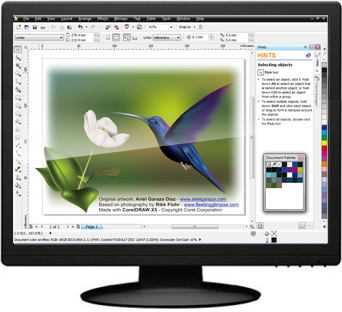
All-in-one professional graphics suite
Find everything you need for professional graphics illustration, layout, tracing, photo editing, Web graphics and animation in one complete suite of integrated applications that is easy to learn and use.
Easy to learn and use
Start smoothly and learn quickly with built-in learning tools, valuable video tutorials, design insights from experts and a visually rich, online guidebook. (A hard cover, full-color, printed guidebook is included with the box version.)
High-value digital content
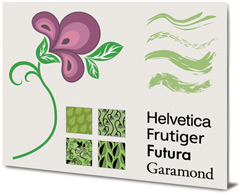
Enrich your designs with over 1,000 professional fonts, including Helvetica, Garamond and Frutiger fonts for the first time ever. Plus, take advantage of high-value digital content, such as premium clipart, royalty-free photos and vehicle templates.
Precise control and easy sharing
Output to a broad variety of media, from distinctive logos and signs, to striking marketing materials, Web graphics, billboards and car wraps. Export options let you compare file formats before export, so you can optimize your settings to achieve the highest file quality.
Market-leading file compatibility
Re-purpose and share your creations anywhere with market-leading file compatibility. Import and export files quickly and easily with dozens of supported file formats, including PDF, JPG, PNG, EPS, AI, TIFF, PSD and DOCX.
What's New
This is the upgrade youve been waiting for! CorelDRAW Graphics Suite X5 makes everyday tasks faster and easier, delivering new time-savers that help you create with confidence. Check out the 10 most compelling reasons to upgrade your graphics software today.
New! Built-in Content Organizer
Speed up your workflow with Corel CONNECT, a built-in content organizer that helps you find graphics, templates, fonts and images instantly on your computer. Your selected content is stored in the tray that is synchronized between CorelDRAW and Corel PHOTO-PAINT, giving you instant access to your content.
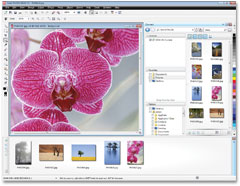
New & Enhanced! Web Graphics and Animation Tools
Create Web graphics and animations more efficiently than ever with new features, such as a Pixels mode that shows exactly how your content will display online, and a new Web animation tool. Plus, a new Export Dialog box now lets you compare file formats before export, so you can optimize your settings to achieve the highest file quality.
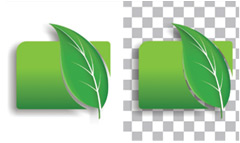
Enhanced! Corel PowerTRACE
Convert your bitmap images into high-quality vector objects with even more precision and smoothness, thanks to the greatly enhanced Corel PowerTRACE. This version of PowerTRACE provides the best tracing results yet.

Enhanced! Optimal Speed and Performance
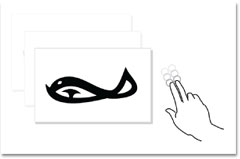
Complete your tasks faster with powerful performance enhancements that leverage multi-core processing to maximize your computers power. This latest edition is optimized for Windows 7 and offers new touch-screen support, as well as support for Windows Vista and Windows XP.
New! Completely Re-designed Color Management Engine
Control color consistency across different media and generate a distinct color palette for each document. A new color management engine introduces greater color accuracy, plus support for new color profiles from PANTONE. Minimize your ecological footprint and reduce costly reprints by knowing that your colors are accurate before you print.
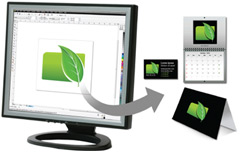
New & Enhanced! Visual Communication Tools
Create compelling print and online materials with a powerful set of new and enhanced drawing, bitmap-to-vector tracing, diagramming, artistic media and text tools. Its all the graphics software you need for effective visual communication.

Enhanced! Market-leading File Compatibility
Re-purpose and share your creations anywhere with broad file compatibility. Dozens of supported file formats, including PDF, JPG, PNG, EPS, AI, TIFF, PSD and DOCX, let you import and export files with other graphics software efficiently.
New & Enhanced! Responsive Drawing Tools
In response to user feedback, weve introduced the option to lock toolbars in place, expanded your printing options, and made improvements to the Eyedropper, Mesh Fill and other popular drawing tools.
New & Enhanced! Expert Insights and Engaging
Learning Materials
Get more design insights with new and updated video tutorials, engaging learning materials and a visually rich, online guidebook that contains new articles from experts. (A hard cover, full-color, printed guidebook is available with the box version.) Be inspired to do more than you thought possible!
New & Enhanced! High-value Digital Content
Enrich your designs with over 1,000 professional fonts, including Helvetica, Garamond and Frutiger fonts for the first time ever. Plus, take advantage of high-value digital content, such as premium clipart, royalty-free photos and vehicle templates. Give your work a professional finish without spending extra time and money youll find all the graphics software and resources you need right here!
Features
When inspiration strikes and you feel the creative buzz, CorelDRAW Graphics Suite X5 gives you the speed and control you need to deliver stellar results. Powerful graphic design tools save you time every day, providing shortcuts that were designed to optimize your workflow.
What's Included
CorelDRAW X5
Intuitive vector illustration and page layout software
Corel PHOTO-PAINT X5
Professional image-editing application specifically designed for use in a graphics workflow
Corel PowerTRACE X5
Bitmap-to-vector file conversion tool
Corel CAPTURE X5
One-click screen capture utility
Corel CONNECT
Full-screen browser that lets you search digital content from the suite, your PC or your local network
Supporting applications
Barcode wizard, Duplexing wizard, Bitstream Font Navigator, SWiSH miniMax 2*, PhotoZoom Pro 2*
Content
10,000 high-quality clipart and digital images, 2,000 vehicle templates, 1,000 high-resolution digital photos, 1,000 OpenType fonts, including 75 Windows Glyph List 4 (WGL4) fonts and 10 engraving fonts, 350 professionally designed templates
Documentation
Online guidebook (hard cover, full-color, printed Guidebook available with the box version), Quick-reference card, Help files
Training
2 hours of training videos on DVD
Connect to your content
From fonts, clipart and photos to previously created designs or customer files, content is a central piece of any creative design. CorelDRAW Graphics Suite X5 lets you quickly find and re-purpose content to speed your design process. Gather your design assets from every source and swiftly prepare yourself to begin your next project.
New! Built-in Content Organizer (Corel CONNECT)
Quickly find the perfect content for any design with Corel CONNECT, a full-screen browser that gives you instant access to graphics, templates, fonts and images anywhere on your computer.
Enhanced! Market-Leading File Compatibility
Open, edit and save as more than 100 industry-standard formats, including AI, PSD, DOCX, ODF, EPS (with enhanced support for PostScript 3) and DXF files.
Enhanced! Color Profiles
Maintain color profiles when importing files from external applications for a smoother design process. The default setting matches colors on import automatically, while advanced users can explore more options within the default settings.
Enhanced! Support for Adobe Products
Import and export PSD files using the latest Photoshop CS 4 file format. CorelDRAW X5 will preserve the appearance of adjustment layers and Masks palette effects, while Corel PHOTO-PAINT X5 will preserve editable Vibrance, Grayscale and camera filter lenses.
Welcome Screen
Begin with the Welcome Screen, a great starting point for finding your content, starting projects, accessing recently used documents, getting instructional information and viewing inspiring designs from other users around the world.
Get going quickly
Whether youre a first-time user or an experienced pro, CorelDRAW makes it easy from the moment you begin. Youll find all the learning tools you need to start smoothly and learn quickly, including built-in learning tools, valuable video tutorials, design insights from the experts and a visually rich, online guidebook.
Enhanced! Templates & Tutorials
Get high-quality results quickly with 350 professionally designed templates. Ready-made layouts and designs help you find the right look for any job. Youll also enjoy access to new graphic design tools, industry-specific design tips and step-by-step project creation in newly updated tutorials for CorelDRAW and Corel PHOTO-PAINT.
New! Video Tutorials
Learn from new video tutorials that demonstrate how to successfully complete popular design tasks.
New & Enhanced! High-Value Digital Content
Enrich your graphic designs with more than 1,000 professional fonts, including Helvetica, Garamond and Frutiger fonts for the first time ever. Plus, take advantage of over 2,000 vehicle templates and 10,000 premium clipart images, bitmap and full-color fills, royalty-free photos, vehicle templates, new artistic media presets, and new brush nibs of different shapes and sizes for more versatility when painting.
New! Guidebook
Learn from other users and experts, and get inspired by visually rich overviews of each application workspace. A hard cover, full color, printed guidebook is available with the box version.
Enhanced! Corel PowerTRACE: Bitmap-to-Vector Conversion
Convert your bitmap images into high-quality vector objects with even more precision and smoothness, thanks to the greatly enhanced Corel PowerTRACE. This version of PowerTRACE provides the best tracing results yet.
Hints Docker
View interactive hints that get you started quickly and provide step-by-step help on the suite's powerful tools.
New! Customizable Workspace
Customize the applications command bars and button arrangements to suit your workflow, or use preset workspaces similar to Adobe Illustrator, Adobe Photoshop or Microsoft Office.
Create with confidence
When it comes to graphic design, confidence in your software is paramount. CorelDRAW Graphics Suite X5 provides new and enhanced graphic design tools to help you achieve the quality you need in the shortest amount of time. With a legacy in design innovation, this trusted graphics suite offers all the support you need to create with confidence.
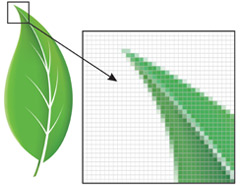
Enhanced! Drawing Tools
Draw and design intuitively with enhanced artistic media and drawing tools that respond to the pressure, tilt and bearing of your pen on drawing tablet.
Improvements include:
- New! Lock Toolbars prevent toolbars from moving or closing while
you draw
- Enhanced! Artistic Media create more graceful and accurate curves that better reproduce the look and feel of traditional drawing tools
- Enhanced! Mesh Fill design multi-colored filled objects that display more fluid color transitions, etc.
- Enhanced! Join Curves specify the amount of space between joined curves
- Enhanced! Snapping have objects snap to a pixel grid for more accuracy
- Enhanced! Dimension Tools find all dimension tools together in one convenient drop-down menu
- New! Diagramming dynamically update diagrams and charts so lines remain connected when you reposition boxes
Enhanced! Corel PHOTO-PAINT: Powerful Photo Editing
Experiment with exciting new photo effects, such as Vibrance, Grayscale and Photo Filter. These filters are preserved when you import and export PSD files using the Adobe Photoshop CS 4 file format. Corel PHOTO-PAINT X5 also supports RAW format for over 300 types of cameras, giving you greater artistic control and flexibility.
Also includes:
- PhotoZoom Pro 2: Plug-in that preserves photo quality when enlarging digital images in Corel PHOTO-PAINT
- Image Adjustment Lab easily and efficiently adjust photos with all options in one lab
- Photo Touch-up remove defects in images and see the results in real time
- Histogram Feedback preview changes and compare results as you adjust image tones, apply effects or process RAW camera files
- Spot Color Channels create and modify images that contain spot colors
- Cut Out Lab cut out elements of a picture from its background and maintain fine details
New & Enhanced! Web Graphics and Animation
Create Web graphics and animations more efficiently than ever. Optimized filters produce consistent, high-quality Web formats with proper transparency, cropping and browser compatibility. Create your designs in CorelDRAW, then open in new SWiSH miniMax 2* to animate your images. Control motion, draw shapes, edit text and more. The new Pixels mode shows exactly how your content will display online. Plus, a new Export Dialog box now lets you compare file formats before export, so you can optimize your settings to achieve the highest file quality.
Interactive Table Tool
Create and import tables to provide structured layouts for text and graphics.
CorelDRAW ConceptShare
Get quality feedback on design projects without costly meetings! ConceptShare lets you quickly and easily collaborate online with colleagues and clients in a secure environment. Its packed with tools that let you share, mark up and review designs with others, on your own time.
Live Text Formatting
Preview text formatting changes in real time before applying them to the document.
Smart Fill
Apply fills to any enclosed object area, such as the loops of a freehand line that crosses over itself.
Image Slicing
Slice an image into several smaller files for Web page optimization.
Output to any media
Today, you need the export flexibility to output designs to any media: Web banners, Web sites, print ads, brochures, even multiple types of media, such as T-shirts, billboards and digital signs. CorelDRAW Graphics Suite X5 provides extensive file support so you can send your work anywhere.
New! Completely Redesigned Color Management Engine
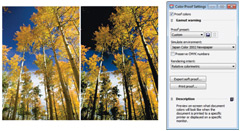
Control color consistency across different media and generate a distinct color palette for each document. A new color management engine introduces greater color accuracy, plus support for new color profiles from PANTONE.
- New! Custom Color Palettes get quick access to previously used colors with the ability to create and save for a design
- New! Default Color Management Settings Dialog Box set application color policies to help you achieve accurate color representation with greater control
- New! Primary Color Mode while continuing to support RGB, CMYK and Grayscale objects within the same document, CorelDRAW X5 provides a new primary Color Mode setting, which governs the default color mode on export and the default palette colors (RGB or CMYK)
- New! Import Color Palettes easily add third-party color palettes to your workflow, to maintain color consistency
- New! Document Color Settings adjust color settings that apply only to the current document
- Enhanced! PANTONE Color Profiles get accurate color representation every step of the way with the latest color profiles from PANTONE, including Fashion+Home and the PANTONE Goe system
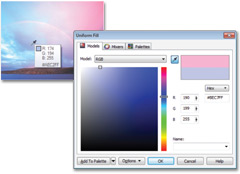
- Enhanced! Eyedropper Tools sample and match color from a document without first having to close dialog boxes
- Enhanced! Hex Color Support choose colors by using their hexadecimal (hex) value and view hex color values from multiple locations
Enhanced! File Compatibility and PDF Support
Re-purpose and share your creations anywhere with support for more than 60 file formats, including PDF, JPG, PNG, EPS, AI, TIFF, PSD, DOCX and PPT. Password-protect your PDF files to control security and user access when they are viewed, edited and printed by third-parties.
New! Collect for Output
Gather fonts, color profiles and other file information with this new output option that makes it easier to share your work with a print service provider.
Print Merge
Combine text from a data source with a drawing to quickly create personalized invitations, labels and other personalized projects.
Work faster and more efficiently
Complete your tasks faster with powerful performance enhancements that maximize your computers power. Plus, enjoy more options for recording macros and automating time-consuming tasks.
New! Multi-core Support
Work faster with multi-core processing that maximizes the power available in your computer to process your commands more quickly.
Enhanced! Optimized for Latest Windows Platforms
Work with ease, whatever your PC operating system. This latest version is optimized for Windows 7 and offers new touch-screen support, as well as support for Windows Vista and Windows XP. Take advantage of the touch technology of Windows 7 to pan, zoom and scroll with your fingertips for a more intuitive design experience.
New! Automation Technology
Enjoy more options for recording macros and automating time-consuming tasks. Microsofts Visual Studio for Applications (VSTA) technology lets you record macros and create third-party add-in solutions to enhance the existing functionality of CorelDRAW.
System Requirements
- Microsoft Windows 7, Windows Vista, Windows XP, with latest service packs installed (32-bit or 64-bit editions)
- Intel Pentium 4, AMD Athlon 64 or AMD Opteron
- 512 MB RAM (1 GB recommended)
- 750 MB hard disk space (1 GB for typical installation without content). Up to 6GB needed to install extra content
- Mouse or tablet
- 1024 x 768 screen resolution (768 x 1024 on a Tablet PC)
- DVD drive
- Microsoft Internet Explorer 7 or higher
|
|
|
|
15/03
|
Corel CorelDRAW Graphics Suite X5 - Retail, Windows CORELDRAW GRAPHICS SUITE X5
Graphic design software for striking visual communication
Put the power of CorelDRAW Graphics Suite X5 behind your ideas and make a bold impact across any media. This versatile graphic design software has it allvector illustration, page layout, photo editing, tracing, Web graphics and animation in one tightly integrated suite. Designed for professional and aspiring designers alike, it offers a quick, intuitive workflow, high-value digital content, market-leading file compatibility and graphic design tools that let you do more than you thought possible!
Overview
Creativity and power come together in CorelDRAW Graphics Suite X5. With increased speed, more accurate color control, enhanced vector illustration tools and new Web capabilities, its a must-have for any designer. Get going quickly with new professionally designed templates and learning materials. Find graphics, fonts and images on your computer faster than ever with new Corel CONNECT. Re-purpose and share your creations anywhere with expanded file compatibility. Then output everywhere, from Web banners and animations, to logos, custom signs and more.
- More speed with new multi-core support
- More rich content and professional templates
- More learning tools, video tutorials and expert tips
- More compatibility, with support for over 100 file formats
- More color control and consistency
- More Web capabilities, including Flash animation support
- More output options for print, Web, digital signs and more
All-in-one professional graphics suite
Find everything you need for professional graphics illustration, layout, tracing, photo editing, Web graphics and animation in one complete suite of integrated applications that is easy to learn and use.
Easy to learn and use
Start smoothly and learn quickly with built-in learning tools, valuable video tutorials, design insights from experts and a visually rich, online guidebook. (A hard cover, full-color, printed guidebook is included with the box version.)
High-value digital content
Enrich your designs with over 1,000 professional fonts, including Helvetica, Garamond and Frutiger fonts for the first time ever. Plus, take advantage of high-value digital content, such as premium clipart, royalty-free photos and vehicle templates.
Precise control and easy sharing
Output to a broad variety of media, from distinctive logos and signs, to striking marketing materials, Web graphics, billboards and car wraps. Export options let you compare file formats before export, so you can optimize your settings to achieve the highest file quality.
Market-leading file compatibility
Re-purpose and share your creations anywhere with market-leading file compatibility. Import and export files quickly and easily with dozens of supported file formats, including PDF, JPG, PNG, EPS, AI, TIFF, PSD and DOCX.
What's New
This is the upgrade youve been waiting for! CorelDRAW Graphics Suite X5 makes everyday tasks faster and easier, delivering new time-savers that help you create with confidence. Check out the 10 most compelling reasons to upgrade your graphics software today.
New! Built-in Content Organizer
Speed up your workflow with Corel CONNECT, a built-in content organizer that helps you find graphics, templates, fonts and images instantly on your computer. Your selected content is stored in the tray that is synchronized between CorelDRAW and Corel PHOTO-PAINT, giving you instant access to your content.
New & Enhanced! Web Graphics and Animation Tools
Create Web graphics and animations more efficiently than ever with new features, such as a Pixels mode that shows exactly how your content will display online, and a new Web animation tool. Plus, a new Export Dialog box now lets you compare file formats before export, so you can optimize your settings to achieve the highest file quality.
Enhanced! Corel PowerTRACE
Convert your bitmap images into high-quality vector objects with even more precision and smoothness, thanks to the greatly enhanced Corel PowerTRACE. This version of PowerTRACE provides the best tracing results yet.
Enhanced! Optimal Speed and Performance
Complete your tasks faster with powerful performance enhancements that leverage multi-core processing to maximize your computers power. This latest edition is optimized for Windows 7 and offers new touch-screen support, as well as support for Windows Vista and Windows XP.
New! Completely Re-designed Color Management Engine
Control color consistency across different media and generate a distinct color palette for each document. A new color management engine introduces greater color accuracy, plus support for new color profiles from PANTONE. Minimize your ecological footprint and reduce costly reprints by knowing that your colors are accurate before you print.
New & Enhanced! Visual Communication Tools
Create compelling print and online materials with a powerful set of new and enhanced drawing, bitmap-to-vector tracing, diagramming, artistic media and text tools. Its all the graphics software you need for effective visual communication.
Enhanced! Market-leading File Compatibility
Re-purpose and share your creations anywhere with broad file compatibility. Dozens of supported file formats, including PDF, JPG, PNG, EPS, AI, TIFF, PSD and DOCX, let you import and export files with other graphics software efficiently.
New & Enhanced! Responsive Drawing Tools
In response to user feedback, weve introduced the option to lock toolbars in place, expanded your printing options, and made improvements to the Eyedropper, Mesh Fill and other popular drawing tools.
New & Enhanced! Expert Insights and Engaging
Learning Materials
Get more design insights with new and updated video tutorials, engaging learning materials and a visually rich, online guidebook that contains new articles from experts. (A hard cover, full-color, printed guidebook is available with the box version.) Be inspired to do more than you thought possible!
New & Enhanced! High-value Digital Content
Enrich your designs with over 1,000 professional fonts, including Helvetica, Garamond and Frutiger fonts for the first time ever. Plus, take advantage of high-value digital content, such as premium clipart, royalty-free photos and vehicle templates. Give your work a professional finish without spending extra time and money youll find all the graphics software and resources you need right here!
Features
When inspiration strikes and you feel the creative buzz, CorelDRAW Graphics Suite X5 gives you the speed and control you need to deliver stellar results. Powerful graphic design tools save you time every day, providing shortcuts that were designed to optimize your workflow.
What's Included
CorelDRAW X5
Intuitive vector illustration and page layout software
Corel PHOTO-PAINT X5
Professional image-editing application specifically designed for use in a graphics workflow
Corel PowerTRACE X5
Bitmap-to-vector file conversion tool
Corel CAPTURE X5
One-click screen capture utility
Corel CONNECT
Full-screen browser that lets you search digital content from the suite, your PC or your local network
Supporting applications
Barcode wizard, Duplexing wizard, Bitstream Font Navigator, SWiSH miniMax 2*, PhotoZoom Pro 2*
Content
10,000 high-quality clipart and digital images, 2,000 vehicle templates, 1,000 high-resolution digital photos, 1,000 OpenType fonts, including 75 Windows Glyph List 4 (WGL4) fonts and 10 engraving fonts, 350 professionally designed templates
Documentation
Online guidebook (hard cover, full-color, printed Guidebook available with the box version), Quick-reference card, Help files
Training
2 hours of training videos on DVD
Connect to your content
From fonts, clipart and photos to previously created designs or customer files, content is a central piece of any creative design. CorelDRAW Graphics Suite X5 lets you quickly find and re-purpose content to speed your design process. Gather your design assets from every source and swiftly prepare yourself to begin your next project.
New! Built-in Content Organizer (Corel CONNECT)
Quickly find the perfect content for any design with Corel CONNECT, a full-screen browser that gives you instant access to graphics, templates, fonts and images anywhere on your computer.
Enhanced! Market-Leading File Compatibility
Open, edit and save as more than 100 industry-standard formats, including AI, PSD, DOCX, ODF, EPS (with enhanced support for PostScript 3) and DXF files.
Enhanced! Color Profiles
Maintain color profiles when importing files from external applications for a smoother design process. The default setting matches colors on import automatically, while advanced users can explore more options within the default settings.
Enhanced! Support for Adobe Products
Import and export PSD files using the latest Photoshop CS 4 file format. CorelDRAW X5 will preserve the appearance of adjustment layers and Masks palette effects, while Corel PHOTO-PAINT X5 will preserve editable Vibrance, Grayscale and camera filter lenses.
Welcome Screen
Begin with the Welcome Screen, a great starting point for finding your content, starting projects, accessing recently used documents, getting instructional information and viewing inspiring designs from other users around the world.
Get going quickly
Whether youre a first-time user or an experienced pro, CorelDRAW makes it easy from the moment you begin. Youll find all the learning tools you need to start smoothly and learn quickly, including built-in learning tools, valuable video tutorials, design insights from the experts and a visually rich, online guidebook.
Enhanced! Templates & Tutorials
Get high-quality results quickly with 350 professionally designed templates. Ready-made layouts and designs help you find the right look for any job. Youll also enjoy access to new graphic design tools, industry-specific design tips and step-by-step project creation in newly updated tutorials for CorelDRAW and Corel PHOTO-PAINT.
New! Video Tutorials
Learn from new video tutorials that demonstrate how to successfully complete popular design tasks.
New & Enhanced! High-Value Digital Content
Enrich your graphic designs with more than 1,000 professional fonts, including Helvetica, Garamond and Frutiger fonts for the first time ever. Plus, take advantage of over 2,000 vehicle templates and 10,000 premium clipart images, bitmap and full-color fills, royalty-free photos, vehicle templates, new artistic media presets, and new brush nibs of different shapes and sizes for more versatility when painting.
New! Guidebook
Learn from other users and experts, and get inspired by visually rich overviews of each application workspace. A hard cover, full color, printed guidebook is available with the box version.
Enhanced! Corel PowerTRACE: Bitmap-to-Vector Conversion
Convert your bitmap images into high-quality vector objects with even more precision and smoothness, thanks to the greatly enhanced Corel PowerTRACE. This version of PowerTRACE provides the best tracing results yet.
Hints Docker
View interactive hints that get you started quickly and provide step-by-step help on the suite's powerful tools.
New! Customizable Workspace
Customize the applications command bars and button arrangements to suit your workflow, or use preset workspaces similar to Adobe Illustrator, Adobe Photoshop or Microsoft Office.
Create with confidence
When it comes to graphic design, confidence in your software is paramount. CorelDRAW Graphics Suite X5 provides new and enhanced graphic design tools to help you achieve the quality you need in the shortest amount of time. With a legacy in design innovation, this trusted graphics suite offers all the support you need to create with confidence.
Enhanced! Drawing Tools
Draw and design intuitively with enhanced artistic media and drawing tools that respond to the pressure, tilt and bearing of your pen on drawing tablet.
Improvements include:
- New! Lock Toolbars prevent toolbars from moving or closing while
you draw
- Enhanced! Artistic Media create more graceful and accurate curves that better reproduce the look and feel of traditional drawing tools
- Enhanced! Mesh Fill design multi-colored filled objects that display more fluid color transitions, etc.
- Enhanced! Join Curves specify the amount of space between joined curves
- Enhanced! Snapping have objects snap to a pixel grid for more accuracy
- Enhanced! Dimension Tools find all dimension tools together in one convenient drop-down menu
- New! Diagramming dynamically update diagrams and charts so lines remain connected when you reposition boxes
Enhanced! Corel PHOTO-PAINT: Powerful Photo Editing
Experiment with exciting new photo effects, such as Vibrance, Grayscale and Photo Filter. These filters are preserved when you import and export PSD files using the Adobe Photoshop CS 4 file format. Corel PHOTO-PAINT X5 also supports RAW format for over 300 types of cameras, giving you greater artistic control and flexibility.
Also includes:
- PhotoZoom Pro 2: Plug-in that preserves photo quality when enlarging digital images in Corel PHOTO-PAINT
- Image Adjustment Lab easily and efficiently adjust photos with all options in one lab
- Photo Touch-up remove defects in images and see the results in real time
- Histogram Feedback preview changes and compare results as you adjust image tones, apply effects or process RAW camera files
- Spot Color Channels create and modify images that contain spot colors
- Cut Out Lab cut out elements of a picture from its background and maintain fine details
New & Enhanced! Web Graphics and Animation
Create Web graphics and animations more efficiently than ever. Optimized filters produce consistent, high-quality Web formats with proper transparency, cropping and browser compatibility. Create your designs in CorelDRAW, then open in new SWiSH miniMax 2* to animate your images. Control motion, draw shapes, edit text and more. The new Pixels mode shows exactly how your content will display online. Plus, a new Export Dialog box now lets you compare file formats before export, so you can optimize your settings to achieve the highest file quality.
Interactive Table Tool
Create and import tables to provide structured layouts for text and graphics.
CorelDRAW ConceptShare
Get quality feedback on design projects without costly meetings! ConceptShare lets you quickly and easily collaborate online with colleagues and clients in a secure environment. Its packed with tools that let you share, mark up and review designs with others, on your own time.
Live Text Formatting
Preview text formatting changes in real time before applying them to the document.
Smart Fill
Apply fills to any enclosed object area, such as the loops of a freehand line that crosses over itself.
Image Slicing
Slice an image into several smaller files for Web page optimization.
Output to any media
Today, you need the export flexibility to output designs to any media: Web banners, Web sites, print ads, brochures, even multiple types of media, such as T-shirts, billboards and digital signs. CorelDRAW Graphics Suite X5 provides extensive file support so you can send your work anywhere.
New! Completely Redesigned Color Management Engine
Control color consistency across different media and generate a distinct color palette for each document. A new color management engine introduces greater color accuracy, plus support for new color profiles from PANTONE.
- New! Custom Color Palettes get quick access to previously used colors with the ability to create and save for a design
- New! Default Color Management Settings Dialog Box set application color policies to help you achieve accurate color representation with greater control
- New! Primary Color Mode while continuing to support RGB, CMYK and Grayscale objects within the same document, CorelDRAW X5 provides a new primary Color Mode setting, which governs the default color mode on export and the default palette colors (RGB or CMYK)
- New! Import Color Palettes easily add third-party color palettes to your workflow, to maintain color consistency
- New! Document Color Settings adjust color settings that apply only to the current document
- Enhanced! PANTONE Color Profiles get accurate color representation every step of the way with the latest color profiles from PANTONE, including Fashion+Home and the PANTONE Goe system
- Enhanced! Eyedropper Tools sample and match color from a document without first having to close dialog boxes
- Enhanced! Hex Color Support choose colors by using their hexadecimal (hex) value and view hex color values from multiple locations
Enhanced! File Compatibility and PDF Support
Re-purpose and share your creations anywhere with support for more than 60 file formats, including PDF, JPG, PNG, EPS, AI, TIFF, PSD, DOCX and PPT. Password-protect your PDF files to control security and user access when they are viewed, edited and printed by third-parties.
New! Collect for Output
Gather fonts, color profiles and other file information with this new output option that makes it easier to share your work with a print service provider.
Print Merge
Combine text from a data source with a drawing to quickly create personalized invitations, labels and other personalized projects.
Work faster and more efficiently
Complete your tasks faster with powerful performance enhancements that maximize your computers power. Plus, enjoy more options for recording macros and automating time-consuming tasks.
New! Multi-core Support
Work faster with multi-core processing that maximizes the power available in your computer to process your commands more quickly.
Enhanced! Optimized for Latest Windows Platforms
Work with ease, whatever your PC operating system. This latest version is optimized for Windows 7 and offers new touch-screen support, as well as support for Windows Vista and Windows XP. Take advantage of the touch technology of Windows 7 to pan, zoom and scroll with your fingertips for a more intuitive design experience.
New! Automation Technology
Enjoy more options for recording macros and automating time-consuming tasks. Microsofts Visual Studio for Applications (VSTA) technology lets you record macros and create third-party add-in solutions to enhance the existing functionality of CorelDRAW.
System Requirements
- Microsoft Windows 7, Windows Vista, Windows XP, with latest service packs installed (32-bit or 64-bit editions)
- Intel Pentium 4, AMD Athlon 64 or AMD Opteron
- 512 MB RAM (1 GB recommended)
- 750 MB hard disk space (1 GB for typical installation without content). Up to 6GB needed to install extra content
- Mouse or tablet
- 1024 x 768 screen resolution (768 x 1024 on a Tablet PC)
- DVD drive
- Microsoft Internet Explorer 7 or higher
|
|
|
|
15/03
|
Canon LPE8 Li-Ion Battery Pack - To Suit Canon EOS 550D Digital SLR Canon LPE8 Li-Ion Battery Pack - To Suit Canon EOS 550D Digital SLR
|
|
|
|
15/03
|
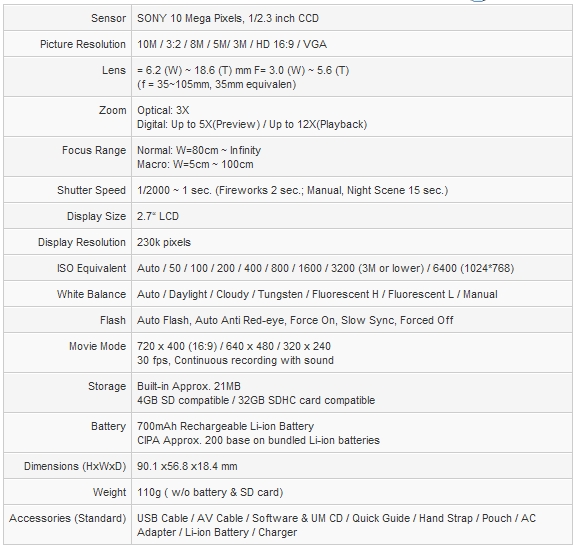
BenQ E1030 Digital Camera - Silver
- 10MP, 3x Optical Zoom, 2.7"LCD, Smart Scene Mode Automatically, 20MB Internal Storage E1030 Digital Camera
Features:
Smart Scene Mode Automatically detects 8 different types of scenes and chooses an appropriate one out of the following 8 scene modes: Landscape, Portrait, Backlight, Backlight Portrait, Night Scene, Night Portrait, Macro, and Sunset. All you have to do is press the shutter and the Auto Scene Mode will do the rest for you.  5cm Macro With 5cm Macro, it will automatically scan and switch to the Macro mode when you are taking close-up photos of flowers or small objects. So every photo is in focus.

| Love Portrait: |
Want to take a good photo when there are just two of you? Love Portrait mode will take a shot when detecting at least two faces.
|
Specifications:
|
|
|
|
15/03
|
Redleaf Tripod Screen (RLTP07519B)
- 1147x1530 - 4;3 Video Format, White Surface, Height Adjustable Tripod Screen
Video 4:3 - Matt White Surface
This portable projection screen has a flexible operation that can be adjusted as necessary by utilising a unique Tripod mechanism and locking device. Comes with intergrated carry handle and is perfect for those presentation's on the go.
* Portable Projection Screen.
* Integrated Carry Handle.
* Height Adjustable.
* Black Headbox.
|
|
|
|
Previous Page
|
Next Page
|
|