Camerafarm product archive #40079
| Image |
Date |
Product description |
Price |
Buy |
|
25/09
|
Vivotek NR7401 9-Chl PoE Gateway Supported Network Video Recorder - 9 Channels Monitoring and Recording VIVOTEK's NR7401 network video recorder provides an elegant recording solution for VIVOTEK network cameras and allows users to perform real-time monitoring and recording at the same time. Supporting up to 9 channels in both MPEG-4 and MJPEG formats, the NR7401 provides several recording options, including alarm recording, scheduled recording, and manual recording. As the NR7401 can automatically detect and install VIVOTEK cameras without any configuration, installation is very simple. In addition, the NR7401 offers a user-friendly interface where users can configure network settings as well as control camera movement.
The integrated 802.3af compliant PoE (Power-over-Ethernet) function reduces cabling problems, making NR7401 a cost-effective recording system. With a large-volume hard disk drive, users can record high-definition video streams from megapixel cameras for long periods without worrying about running out of storage capacity. The NR7401 also features a built-in gateway that separates network cameras from the regular data network so that the influence of video recording on bandwidth is minimized.
The NR7401 also comes with four digital inputs and one digital output interfaces to allow for connections with external sensors and alarms. In addition, the NR7401 can be connected with external USB storage devices for video backup.
Features
- Simultaneous Monitoring and Recording on 9 channels
- Gateway Between VIVOTEK Network Cameras and Data Network
- Supports VIVOTEK 6000- and 7000-series Network Cameras
- Built-in 802.3af Compliant PoE
- Local Video Recording with Minimal Bandwidth Impact
- Camera Management with Automatic Camera Installation and Configuration
- Video Proxy Server for Live and Recorded Video
- External USB Storage for Video Backup
| System |
CPU: Intel IXP425ABD
Flash: 16MB
RAM: 128MB
Embedded OS: Linux |
| Pan/Tilt/Zoom |
Pan/tilt/zoom control of VIVOTEK cameras |
| Recording Policy |
Alarm recording
Scheduled recording
Manual recording
|
| Connectors |
5 x Ethernet 10/100 BaseT ( 5x WAN 4x LAN )
1 x RJ45
USB socket for backup
Terminal block:
4x digital input
4x relay output
4x poweroutput ( 12V 1A ) |
| History Playback |
Playback of recorded media with time navigationsNetwork Cameras |
| Networking |
Protocols: IPv4, TCP/IP, HTTP, UPnP, RTSP/RTP/RTCP, IGMP, SMTP, FTP, DHCP, NTP, DNS, DDNS |
| Alarm and Event Management |
Four D/I and one D/O for external sensor and alarm
Event notification using HTTP, SMTP, or FTP
|
| Security |
Multi-level user access with password protection
IP address filtering
|
| Users |
10clients on-line monitoring at the same time |
| Dimensions |
Depth: 360mm
Width: 280mm
Height: 43.8mm
|
| Weight |
Net: 3,100 g |
| LED Indicator |
System power and status indicator
System activity and network link indicator
|
| Power |
802.3af compliant Power-over-Ethernet |
| Approvals |
CBCEC-TickFCCVCCI |
| Operating Environments |
Temperature: 0 ~ 50 C (32 ~ 122 F)
Humidity: 20% ~ 80%
|
| Viewing System Requirements |
OS: Microsoft Windows 2000/XP/Vista
Browser: Mozilla Firefox, Internet Explorer 6.x or above
Cell phone: 3GPP player
Real Player: 10.5 or above
Quick Time: 6.5 or above |
| Installation, Management, and Maintenance |
Installation Wizard 2
32-CH central management software
Supports firmware upgrade
|
| Applications |
SDK available for application development and system integration |
| Warranty |
24 months |
|


|
|
|
25/09
|
Lexmark 14N0820A #100 Ink Cartridge - Black, 170 Pages, Standard Yield - For Lexmark S301/S305/S605/S505/PRO901/PRO905 Printers
- Return Program Cartridge Because Quality Matters
Individual ink cartridges allow for more control over the ink you use- replace only the colour you need
Lab Quality Photos
Print brilliant photos with precise, consistent drop placement
Vizix Ink
|
|
|
|
25/09
|
Microsoft Expression Web 3.0 - Windows DVD - Academic Edition
Includes:
Expression Web 3 + SuperPreview
Expression Encode 3
Expression Design 3
Deliver visually compelling, standards-compliant Web experiences with Expression Web 3
Whether you're an expert or just getting started, building standards-based Web sites is faster and easier with Microsoft Expression Web 3.
Create compelling Web sites visually
If you think and create visually, use the state-of-the-art design surface to layout your Web page. You can make design decisions on the fly, knowing that you're seeing a faithful representation of the final browser-rendered page.
Drag and drop controls simplify adding rich media, such as Silverlight from Microsoft Expression Blend, Silverlight video, Adobe Flash, and Windows Media. And advanced Adobe Photoshop file import gives you complete control over imported layers and transparency.
Create standards-based Web sites more quickly and easily
If you think and breathe code, Expression Web has you covered there too with flexible support for a wide range of essential technologies: PHP, HTML/XHTML, XML/XSLT, CSS, JavaScript, ASP.NET and ASP.NET AJAX, Silverlight, Flash, Photoshop files, and video/audio for webcasting.
Expression Web speeds the essential task of cross-browser debugging. With SuperPreview, you dont need a Web service to debug your pages on the same machine that you use for development. SuperPreview not only shows a high-fidelity rendering of how pages will look on different browsers, but it also identifies the elements tag, size and position, applied styles, and location in the DOM (Document Object Model) tree so you can quickly fix the error.
Once youve identified an error, Snapshot Preview helps you fix it faster. By displaying a high-fidelity browser rendering that updates as you edit your code, Snapshot Preview saves you the time and effort of loading the page in a browser for each code change.
If you're a designer or developer, use Expression Web to do what you do best. And if you're part of a diverse team, sharing an Expression Web project has never been easier thanks to seamless integration with Expression Studio and Visual Studio.
Expression Web 3 also includes the following full applications:
Microsoft Expression Design 3 is the perfect companion to Expression Web. Leverage existing artwork, or use intuitive drawing tools to quickly build sophisticated vector assets. Seamlessly transfer them to your Expression Web projects knowing that their fidelity will be maintained throughout the entire designer-developer workflow. For more information about Expression Design 3, click here.
Microsoft Expression Encoder 3 encodes a wide array of video file formats so you can stream live video from webcams and camcorders or screen capture your PC. Make simple edits to video files and enhance your media with overlays and advertising. Choose encoding settings, choose from a range of player templates and publish rich media experiences with Microsoft Silverlight.
-
Professional Code Editor
IntelliSense and color-coding for HTML, CSS, JavaScript, and PHP make your editing and debugging more productive. And, real-time standards validation provides instant feedback on standards violations so you can make corrections as you code. 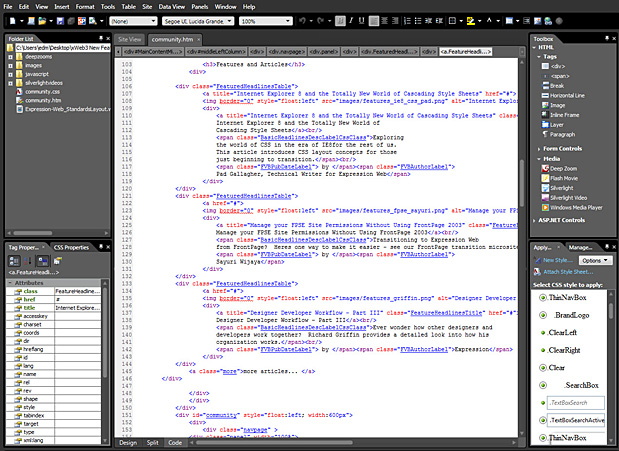
-
Professional Design Surface
Generate elegant, modern CSS layouts with state-of-the-art design surface and the ability to directly manipulate positioning, sizing, margins and padding. With Expression Webs sophisticated CSS rendering engine, you can make design decisions on the fly and see a faithful representation of the final browser-rendered page. 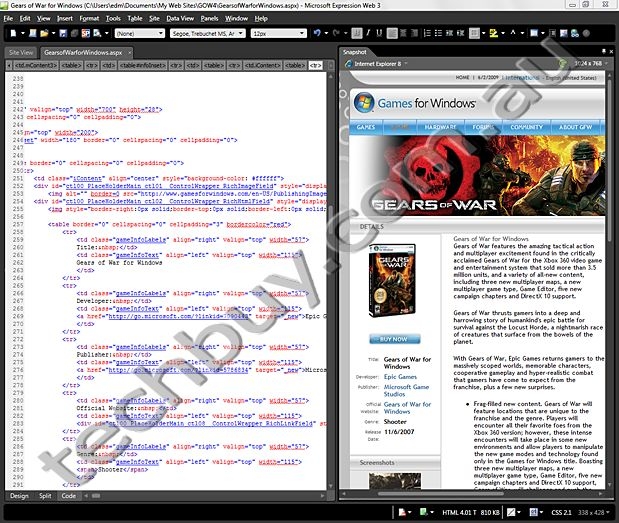
-
Visual Diagnostics
Debug your pages in multiple browsers on the same machine that you use for development with SuperPreview. And Snapshot Preview provides a high-fidelity browser preview that updates live as you edit your code, saving you the time and effort of loading the page in a browser for each code change. The CSS properties palette visually displays the CSS cascade, enabling you to quickly see all of the styles that the current selection in your web page uses, the order of precedence of those styles, and all of the properties and values of those styles. 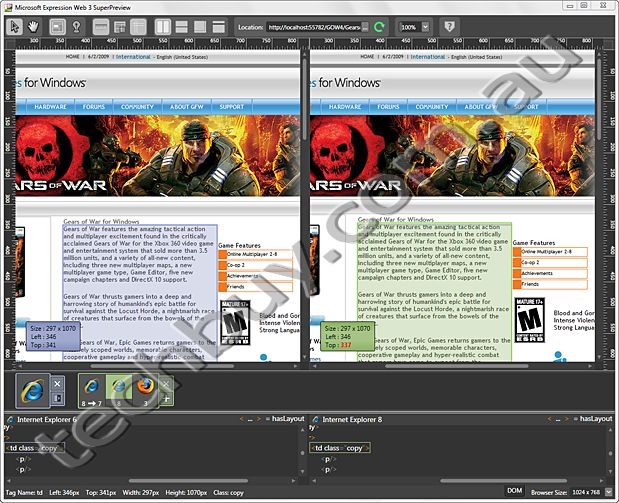
-
Broad support for Industry-Standard Technologies
With support for a broad range of scripting and server-side technologies, Expression Web provides the flexibility you need. Expression Web supports PHP, HTML/XHTML, XML/XSLT, CSS, JavaScript, ASP.NET or ASP.NET AJAX, Silverlight, Flash, Windows Media, and Photoshop as well as integration with Microsoft Visual Studio and Expression Studio.
-
Broad Web Standards Support
Built-in support for today's modern Web standards makes it easy to optimize your sites for accessibility and cross-browser compatibility. Choose any schema you want HTML, XHTML, Strict/Transitional/Frameset and CSS 1.0, 2.0, or 2.1 - Expression Web 3 will help you build appropriate code with a compatibility checker that highlights non-conforming elements.
-
Build Dynamic Interactive Sites
Whether youre building a site rich with video, audio, or animation, Expression Web makes it easy. You can easily add Silverlight, Flash, Deep Zoom or Windows Media files with drag-and-drop controls.
-
Create Professional Graphics for Your Site
Powerful vector drawing and editing tools in the included copy of Expression Design let you explore new artistic possibilities and create compelling graphic designs and illustrations. Integrate vector artwork and bitmap images in the same document to create hybrid compositions that you can import in part or in whole into Expression Web. Use Expression Designs sophisticated slicing capabilities to create web-ready graphics.
-
Encode Silverlight video for Web streaming
Quickly encode and insert high-quality WMV, VC-1 and H.264 Silverlight video into your Web site with a wide range of encoding and transcoding features with the included copy of Expression Encoder.
-
Publishing Flexibility
Choose the FTP method for publishing your site, whether FTP, SFTP, or FTPS, depending on what your Web server requires. When you click Publish, Expression Web automatically transfers several files at a time, instead of transferring them one by one, and it transfers them faster. You can easily manage multiple sites and remote locations and you can publish a site to multiple destinations. Also, Expression Web can do live on-server edits via FTP, which saves time and cost, while also reducing errors.
-
Import Photoshop files
Expression Web can import Photoshop files directly with complete control over transparency, the layers imported and the converted image format (PNG, GIF, and JPEG). Expression Web remembers your layer and format settings so that you can quickly reimport to reflect any changes to the Photoshop original.
System Requirements
To use Microsoft Expression Web 3, you need:
- Microsoft Windows XP with Service Pack 2, Windows Vista or Windows 7 operating system.
- PC with 1 GHz or faster processor
- 1 GB of RAM or more
- 1.5 GB or more of available hard-disk space
- .NET Framework 3.5 with Service Pack 1
- Support for Microsoft DirectX 9.0 graphics with Windows Vista Display Driver Model (WDDM) Driver, 128 MB of graphics RAM or more, Pixel Shader 2.0 in hardware, 32-bits per pixel
- DVD compatible drive
- 1024 x 768 or higher-resolution monitor
- Internet access (for Internet functionality; additional fees may apply)
- Some product features require Silverlight 2.0, Firefox 3.0, Internet Explorer 7 and AJAX Suite
Actual requirements and product functionality may vary based on your system configuration and operating system and assumes non-concurrent product use.
|
|
|
|
25/09
|
Microsoft Expression Web 3.0 - Windows DVD - Upgrade
Includes:
Expression Web 3 + SuperPreview
Expression Encode 3
Expression Design 3
Deliver visually compelling, standards-compliant Web experiences with Expression Web 3
Whether you're an expert or just getting started, building standards-based Web sites is faster and easier with Microsoft Expression Web 3.
Create compelling Web sites visually
If you think and create visually, use the state-of-the-art design surface to layout your Web page. You can make design decisions on the fly, knowing that you're seeing a faithful representation of the final browser-rendered page.
Drag and drop controls simplify adding rich media, such as Silverlight from Microsoft Expression Blend, Silverlight video, Adobe Flash, and Windows Media. And advanced Adobe Photoshop file import gives you complete control over imported layers and transparency.
Create standards-based Web sites more quickly and easily
If you think and breathe code, Expression Web has you covered there too with flexible support for a wide range of essential technologies: PHP, HTML/XHTML, XML/XSLT, CSS, JavaScript, ASP.NET and ASP.NET AJAX, Silverlight, Flash, Photoshop files, and video/audio for webcasting.
Expression Web speeds the essential task of cross-browser debugging. With SuperPreview, you dont need a Web service to debug your pages on the same machine that you use for development. SuperPreview not only shows a high-fidelity rendering of how pages will look on different browsers, but it also identifies the elements tag, size and position, applied styles, and location in the DOM (Document Object Model) tree so you can quickly fix the error.
Once youve identified an error, Snapshot Preview helps you fix it faster. By displaying a high-fidelity browser rendering that updates as you edit your code, Snapshot Preview saves you the time and effort of loading the page in a browser for each code change.
If you're a designer or developer, use Expression Web to do what you do best. And if you're part of a diverse team, sharing an Expression Web project has never been easier thanks to seamless integration with Expression Studio and Visual Studio.
Expression Web 3 also includes the following full applications:
Microsoft Expression Design 3 is the perfect companion to Expression Web. Leverage existing artwork, or use intuitive drawing tools to quickly build sophisticated vector assets. Seamlessly transfer them to your Expression Web projects knowing that their fidelity will be maintained throughout the entire designer-developer workflow. For more information about Expression Design 3, click here.
Microsoft Expression Encoder 3 encodes a wide array of video file formats so you can stream live video from webcams and camcorders or screen capture your PC. Make simple edits to video files and enhance your media with overlays and advertising. Choose encoding settings, choose from a range of player templates and publish rich media experiences with Microsoft Silverlight.
-
Professional Code Editor
IntelliSense and color-coding for HTML, CSS, JavaScript, and PHP make your editing and debugging more productive. And, real-time standards validation provides instant feedback on standards violations so you can make corrections as you code.
-
Professional Design Surface
Generate elegant, modern CSS layouts with state-of-the-art design surface and the ability to directly manipulate positioning, sizing, margins and padding. With Expression Webs sophisticated CSS rendering engine, you can make design decisions on the fly and see a faithful representation of the final browser-rendered page.
-
Visual Diagnostics
Debug your pages in multiple browsers on the same machine that you use for development with SuperPreview. And Snapshot Preview provides a high-fidelity browser preview that updates live as you edit your code, saving you the time and effort of loading the page in a browser for each code change. The CSS properties palette visually displays the CSS cascade, enabling you to quickly see all of the styles that the current selection in your web page uses, the order of precedence of those styles, and all of the properties and values of those styles.
-
Broad support for Industry-Standard Technologies
With support for a broad range of scripting and server-side technologies, Expression Web provides the flexibility you need. Expression Web supports PHP, HTML/XHTML, XML/XSLT, CSS, JavaScript, ASP.NET or ASP.NET AJAX, Silverlight, Flash, Windows Media, and Photoshop as well as integration with Microsoft Visual Studio and Expression Studio.
-
Broad Web Standards Support
Built-in support for today's modern Web standards makes it easy to optimize your sites for accessibility and cross-browser compatibility. Choose any schema you want HTML, XHTML, Strict/Transitional/Frameset and CSS 1.0, 2.0, or 2.1 - Expression Web 3 will help you build appropriate code with a compatibility checker that highlights non-conforming elements.
-
Build Dynamic Interactive Sites
Whether youre building a site rich with video, audio, or animation, Expression Web makes it easy. You can easily add Silverlight, Flash, Deep Zoom or Windows Media files with drag-and-drop controls.
-
Create Professional Graphics for Your Site
Powerful vector drawing and editing tools in the included copy of Expression Design let you explore new artistic possibilities and create compelling graphic designs and illustrations. Integrate vector artwork and bitmap images in the same document to create hybrid compositions that you can import in part or in whole into Expression Web. Use Expression Designs sophisticated slicing capabilities to create web-ready graphics.
-
Encode Silverlight video for Web streaming
Quickly encode and insert high-quality WMV, VC-1 and H.264 Silverlight video into your Web site with a wide range of encoding and transcoding features with the included copy of Expression Encoder.
-
Publishing Flexibility
Choose the FTP method for publishing your site, whether FTP, SFTP, or FTPS, depending on what your Web server requires. When you click Publish, Expression Web automatically transfers several files at a time, instead of transferring them one by one, and it transfers them faster. You can easily manage multiple sites and remote locations and you can publish a site to multiple destinations. Also, Expression Web can do live on-server edits via FTP, which saves time and cost, while also reducing errors.
-
Import Photoshop files
Expression Web can import Photoshop files directly with complete control over transparency, the layers imported and the converted image format (PNG, GIF, and JPEG). Expression Web remembers your layer and format settings so that you can quickly reimport to reflect any changes to the Photoshop original.
System Requirements
To use Microsoft Expression Web 3, you need:
- Microsoft Windows XP with Service Pack 2, Windows Vista or Windows 7 operating system.
- PC with 1 GHz or faster processor
- 1 GB of RAM or more
- 1.5 GB or more of available hard-disk space
- .NET Framework 3.5 with Service Pack 1
- Support for Microsoft DirectX 9.0 graphics with Windows Vista Display Driver Model (WDDM) Driver, 128 MB of graphics RAM or more, Pixel Shader 2.0 in hardware, 32-bits per pixel
- DVD compatible drive
- 1024 x 768 or higher-resolution monitor
- Internet access (for Internet functionality; additional fees may apply)
- Some product features require Silverlight 2.0, Firefox 3.0, Internet Explorer 7 and AJAX Suite
Actual requirements and product functionality may vary based on your system configuration and operating system and assumes non-concurrent product use.
|
|
|
|
25/09
|
Microsoft Expression Web 3.0 - Windows DVD
Includes:
Expression Web 3 + SuperPreview
Expression Encode 3
Expression Design 3
Deliver visually compelling, standards-compliant Web experiences with Expression Web 3
Whether you're an expert or just getting started, building standards-based Web sites is faster and easier with Microsoft Expression Web 3.
Create compelling Web sites visually
If you think and create visually, use the state-of-the-art design surface to layout your Web page. You can make design decisions on the fly, knowing that you're seeing a faithful representation of the final browser-rendered page.
Drag and drop controls simplify adding rich media, such as Silverlight from Microsoft Expression Blend, Silverlight video, Adobe Flash, and Windows Media. And advanced Adobe Photoshop file import gives you complete control over imported layers and transparency.
Create standards-based Web sites more quickly and easily
If you think and breathe code, Expression Web has you covered there too with flexible support for a wide range of essential technologies: PHP, HTML/XHTML, XML/XSLT, CSS, JavaScript, ASP.NET and ASP.NET AJAX, Silverlight, Flash, Photoshop files, and video/audio for webcasting.
Expression Web speeds the essential task of cross-browser debugging. With SuperPreview, you dont need a Web service to debug your pages on the same machine that you use for development. SuperPreview not only shows a high-fidelity rendering of how pages will look on different browsers, but it also identifies the elements tag, size and position, applied styles, and location in the DOM (Document Object Model) tree so you can quickly fix the error.
Once youve identified an error, Snapshot Preview helps you fix it faster. By displaying a high-fidelity browser rendering that updates as you edit your code, Snapshot Preview saves you the time and effort of loading the page in a browser for each code change.
If you're a designer or developer, use Expression Web to do what you do best. And if you're part of a diverse team, sharing an Expression Web project has never been easier thanks to seamless integration with Expression Studio and Visual Studio.
Expression Web 3 also includes the following full applications:
Microsoft Expression Design 3 is the perfect companion to Expression Web. Leverage existing artwork, or use intuitive drawing tools to quickly build sophisticated vector assets. Seamlessly transfer them to your Expression Web projects knowing that their fidelity will be maintained throughout the entire designer-developer workflow. For more information about Expression Design 3, click here.
Microsoft Expression Encoder 3 encodes a wide array of video file formats so you can stream live video from webcams and camcorders or screen capture your PC. Make simple edits to video files and enhance your media with overlays and advertising. Choose encoding settings, choose from a range of player templates and publish rich media experiences with Microsoft Silverlight.
-
Professional Code Editor
IntelliSense and color-coding for HTML, CSS, JavaScript, and PHP make your editing and debugging more productive. And, real-time standards validation provides instant feedback on standards violations so you can make corrections as you code.
-
Professional Design Surface
Generate elegant, modern CSS layouts with state-of-the-art design surface and the ability to directly manipulate positioning, sizing, margins and padding. With Expression Webs sophisticated CSS rendering engine, you can make design decisions on the fly and see a faithful representation of the final browser-rendered page.
-
Visual Diagnostics
Debug your pages in multiple browsers on the same machine that you use for development with SuperPreview. And Snapshot Preview provides a high-fidelity browser preview that updates live as you edit your code, saving you the time and effort of loading the page in a browser for each code change. The CSS properties palette visually displays the CSS cascade, enabling you to quickly see all of the styles that the current selection in your web page uses, the order of precedence of those styles, and all of the properties and values of those styles.
-
Broad support for Industry-Standard Technologies
With support for a broad range of scripting and server-side technologies, Expression Web provides the flexibility you need. Expression Web supports PHP, HTML/XHTML, XML/XSLT, CSS, JavaScript, ASP.NET or ASP.NET AJAX, Silverlight, Flash, Windows Media, and Photoshop as well as integration with Microsoft Visual Studio and Expression Studio.
-
Broad Web Standards Support
Built-in support for today's modern Web standards makes it easy to optimize your sites for accessibility and cross-browser compatibility. Choose any schema you want HTML, XHTML, Strict/Transitional/Frameset and CSS 1.0, 2.0, or 2.1 - Expression Web 3 will help you build appropriate code with a compatibility checker that highlights non-conforming elements.
-
Build Dynamic Interactive Sites
Whether youre building a site rich with video, audio, or animation, Expression Web makes it easy. You can easily add Silverlight, Flash, Deep Zoom or Windows Media files with drag-and-drop controls.
-
Create Professional Graphics for Your Site
Powerful vector drawing and editing tools in the included copy of Expression Design let you explore new artistic possibilities and create compelling graphic designs and illustrations. Integrate vector artwork and bitmap images in the same document to create hybrid compositions that you can import in part or in whole into Expression Web. Use Expression Designs sophisticated slicing capabilities to create web-ready graphics.
-
Encode Silverlight video for Web streaming
Quickly encode and insert high-quality WMV, VC-1 and H.264 Silverlight video into your Web site with a wide range of encoding and transcoding features with the included copy of Expression Encoder.
-
Publishing Flexibility
Choose the FTP method for publishing your site, whether FTP, SFTP, or FTPS, depending on what your Web server requires. When you click Publish, Expression Web automatically transfers several files at a time, instead of transferring them one by one, and it transfers them faster. You can easily manage multiple sites and remote locations and you can publish a site to multiple destinations. Also, Expression Web can do live on-server edits via FTP, which saves time and cost, while also reducing errors.
-
Import Photoshop files
Expression Web can import Photoshop files directly with complete control over transparency, the layers imported and the converted image format (PNG, GIF, and JPEG). Expression Web remembers your layer and format settings so that you can quickly reimport to reflect any changes to the Photoshop original.
System Requirements
To use Microsoft Expression Web 3, you need:
- Microsoft Windows XP with Service Pack 2, Windows Vista or Windows 7 operating system.
- PC with 1 GHz or faster processor
- 1 GB of RAM or more
- 1.5 GB or more of available hard-disk space
- .NET Framework 3.5 with Service Pack 1
- Support for Microsoft DirectX 9.0 graphics with Windows Vista Display Driver Model (WDDM) Driver, 128 MB of graphics RAM or more, Pixel Shader 2.0 in hardware, 32-bits per pixel
- DVD compatible drive
- 1024 x 768 or higher-resolution monitor
- Internet access (for Internet functionality; additional fees may apply)
- Some product features require Silverlight 2.0, Firefox 3.0, Internet Explorer 7 and AJAX Suite
Actual requirements and product functionality may vary based on your system configuration and operating system and assumes non-concurrent product use.
|
|
|
|
25/09
|
Microsoft Expression Studio 3.0 - Windows DVD - Upgrade
Includes:
Expression Blend 3
SketchFlow
Expression Web 3
Expression Design 3
Expression Encoder 3
Realize your creative vision with Microsoft Expression Studio.
Microsoft Expression Studio opens up a new world of creative possibility. Its professional design tools give you the freedom to make your vision realwhether youre designing for standards-based Web sites, rich desktop experiences, or Silverlight. Includes Expression Web, Expression Blend, Expression Design and Expression Encoder.
Design Tools for Silverlight & .NET
Design compelling user interfaces for the Web and desktop using Microsoft Expression, tools purpose built to compliment the industry leading development tool Visual Studio.
From Concept to Completion
Prototype your ideas rapidly, engage and interact with your customers and get your projects off to a flying start, then immediately bring your prototypes to life without throwing anything away.
Top 10 Features
-
SketchFlow revolutionizes the speed and efficiency with which you can prototype a vision for an application
Rapidly demonstrate and iterate on ideas, application flows, screen layouts and functionality with your client using a SketchFlow prototype.
-
Enable interactivity without writing code
Bring an Expression Blend project to life by adding interactivity, animation and transitions using drag and drop Behaviors, powerful building blocks of interactivity, without writing code.
-
Accelerate the design of effective UI with design time data
Increases the speed and flexibility you can envision a user interface in Expression Blend through the effective use of sample data. Sample data can be seamlessly switched to a live data feed at any time.
-
Streamlined design and development workflow
Share projects, code, and designs for better productivity and quality. The smooth workflow between Expression Blend and Visual Studio help the delivery of superior results to your client, who today more than ever expect; compelling, cutting edge solutions to be delivered in rapid time and on budget.
-
Professional tools save time creating Web sites that deliver results
Expression Web features an advanced code editor with IntelliSense, an editable design surface, and includes Expression Design and Expression Encoder for creating graphics and encoding Silverlight video for Web streaming or podcast download.
-
Advanced visual diagnostics speed debugging
Debug Web pages with Snapshot Preview, which shows rendered page changes while you code, and SuperPreview, which displays your page on multiple browsers on your development machine.
-
Rich standards-based Web design with the essential technologies
Expression Web supports PHP, CSS, HTML/XHTML, XML, XSLT, JavaScript, ASP.NET, ASP.NET AJAX, Silverlight (video, animation, and Deep Zoom), Windows Media, Adobe Flash, and Adobe Photoshop files.
-
Prepare video for Silverlight
Encode a wide array of video file formats, stream live from webcams and camcorders or screen capture your PC with Expression Encoder. Make simple edits to video files and enhance your media with overlays and advertising. Choose encoding settings including IIS Smooth Streaming, choose from a range of player templates and publish rich media experiences with Microsoft Silverlight.
-
Team Foundation Server Integration
Share your Expression Studio project files with those of your colleagues by using check in and check out functionality with Microsoft Team Foundation Server integration.
-
Adobe Photoshop Importer
Import your Adobe Photoshop files with full control over layers and objects straight onto the design surface of all Expression products to ensure maximum compatibility with any original artwork you need to integrate.
System Requirements
To use Microsoft Expression Studio 3, you need:
- Microsoft Windows XP with Service Pack 2, Windows Vista or Windows 7 operating system.
- Windows Media Player 11 (Windows XP only)
- PC with 1 GHz or faster processor
- 1 GB of RAM or more
- 2 GB or more of available hard-disk space
- .NET Framework 3.5 with Service Pack 1
- Support for Microsoft DirectX 9.0 graphics with Windows Vista Display Driver Model (WDDM) Driver, 128 MB of graphics RAM or more, Pixel Shader 2.0 in hardware, 32-bits per pixel
- DVD-ROM drive
- 1024 x 768 or higher-resolution monitor with 24-bit color
- Internet access (for Internet functionality; additional fees may apply)
- Some product features require Silverlight 2.0, Firefox 3.0, Internet Explorer 7 and AJAX Suite
Actual requirements and product functionality may vary based on your system configuration and operating system and assumes non-concurrent product use.
|
|
|
|
25/09
|
Microsoft Expression Studio 3.0 - Windows DVD
Includes:
Expression Blend 3
SketchFlow
Expression Web 3
Expression Design 3
Expression Encoder 3
Realize your creative vision with Microsoft Expression Studio.
Microsoft Expression Studio opens up a new world of creative possibility. Its professional design tools give you the freedom to make your vision realwhether youre designing for standards-based Web sites, rich desktop experiences, or Silverlight. Includes Expression Web, Expression Blend, Expression Design and Expression Encoder.
Design Tools for Silverlight & .NET
Design compelling user interfaces for the Web and desktop using Microsoft Expression, tools purpose built to compliment the industry leading development tool Visual Studio.
From Concept to Completion
Prototype your ideas rapidly, engage and interact with your customers and get your projects off to a flying start, then immediately bring your prototypes to life without throwing anything away.
Top 10 Features
-
SketchFlow revolutionizes the speed and efficiency with which you can prototype a vision for an application
Rapidly demonstrate and iterate on ideas, application flows, screen layouts and functionality with your client using a SketchFlow prototype.
-
Enable interactivity without writing code
Bring an Expression Blend project to life by adding interactivity, animation and transitions using drag and drop Behaviors, powerful building blocks of interactivity, without writing code.
-
Accelerate the design of effective UI with design time data
Increases the speed and flexibility you can envision a user interface in Expression Blend through the effective use of sample data. Sample data can be seamlessly switched to a live data feed at any time.
-
Streamlined design and development workflow
Share projects, code, and designs for better productivity and quality. The smooth workflow between Expression Blend and Visual Studio help the delivery of superior results to your client, who today more than ever expect; compelling, cutting edge solutions to be delivered in rapid time and on budget.
-
Professional tools save time creating Web sites that deliver results
Expression Web features an advanced code editor with IntelliSense, an editable design surface, and includes Expression Design and Expression Encoder for creating graphics and encoding Silverlight video for Web streaming or podcast download.
-
Advanced visual diagnostics speed debugging
Debug Web pages with Snapshot Preview, which shows rendered page changes while you code, and SuperPreview, which displays your page on multiple browsers on your development machine.
-
Rich standards-based Web design with the essential technologies
Expression Web supports PHP, CSS, HTML/XHTML, XML, XSLT, JavaScript, ASP.NET, ASP.NET AJAX, Silverlight (video, animation, and Deep Zoom), Windows Media, Adobe Flash, and Adobe Photoshop files.
-
Prepare video for Silverlight
Encode a wide array of video file formats, stream live from webcams and camcorders or screen capture your PC with Expression Encoder. Make simple edits to video files and enhance your media with overlays and advertising. Choose encoding settings including IIS Smooth Streaming, choose from a range of player templates and publish rich media experiences with Microsoft Silverlight.
-
Team Foundation Server Integration
Share your Expression Studio project files with those of your colleagues by using check in and check out functionality with Microsoft Team Foundation Server integration.
-
Adobe Photoshop Importer
Import your Adobe Photoshop files with full control over layers and objects straight onto the design surface of all Expression products to ensure maximum compatibility with any original artwork you need to integrate.
System Requirements
To use Microsoft Expression Studio 3, you need:
- Microsoft Windows XP with Service Pack 2, Windows Vista or Windows 7 operating system.
- Windows Media Player 11 (Windows XP only)
- PC with 1 GHz or faster processor
- 1 GB of RAM or more
- 2 GB or more of available hard-disk space
- .NET Framework 3.5 with Service Pack 1
- Support for Microsoft DirectX 9.0 graphics with Windows Vista Display Driver Model (WDDM) Driver, 128 MB of graphics RAM or more, Pixel Shader 2.0 in hardware, 32-bits per pixel
- DVD-ROM drive
- 1024 x 768 or higher-resolution monitor with 24-bit color
- Internet access (for Internet functionality; additional fees may apply)
- Some product features require Silverlight 2.0, Firefox 3.0, Internet Explorer 7 and AJAX Suite
Actual requirements and product functionality may vary based on your system configuration and operating system and assumes non-concurrent product use.
|
|
|
|
25/09
|
View Sonic PJD6381 DLP Portable Projector - XGA, 2500 Lumens, 2400;1, 1024x768The powerful PJD6381 120Hz 3D ready projector combines powerful features with RJ45 network capability.
- 2,500 lumens and a 2400:1 contrast ratio
- Offers an extreme short throw ratio - producing a 50" image at a distance of only 27" away
- The short throw lens saves space by allowing you to place at the front of your table and still display large, crisp images
- Images look great in a classroom, boardroom or virtually any setting
- Multiple presentation modes and an increased 40 degree vertical keystone and digital zoom ensure the best possible image in any setting
Choose the PJD6381 for up to 6,000 hours of lamp life*, low cost replacement lamps, filter-less design and non-degrading DLP light engine for the best warranty and low total cost of ownership.
Bright in virtually any setting with 2,500 lumensPacks 2,500 ANSI lumens in just 5.9lbs (2.68kg), and with a high 2400:1 contrast ratio (typ.), your presentations are guaranteed to be vibrant in the brightest of settings
BrilliantColor technology Latest BrilliantColor Technology delivers stunning all-digital clarity with life-like color, sharp graphics and outstanding video. The sophisticated 5-segment color wheel enriches the yellow color performance that is key to accurate and vivid color reproduction.
Eco-mode extends lamp lifeExtend the life of your lamp up to 6,000 hours and reduce noise output
Network control through RJ-45 Remotely schedule, manage and monitor the projector and its lamp status. Use the unique integrated clock to perform commands even when the host PC is powered down.
Off-to-Go featureAllows the busy presenter to simply unplug the projector and go without waiting for the usual cool down phase. This also protects lamp life from sudden power blackout.
Short-throw lens for large, stunning images in small spaces The short throw lens enables large images to be projected from short distances in small rooms with short throw distances. A screen size of 50" is possible from just 5.2 ft.
Specifications
DISPLAY
|
|
|
| |
Type |
0.55" Digital Micromirror Device(DLP) |
| |
Resolution |
XGA 1024768(Native) / SXGA 12801024 (compressed) |
| |
Lens |
Fixed len / Digital zoom / Manual focus |
| |
Keystone |
Vertical digital keystone correction:+/- 40 degrees |
| |
Display size |
30"-300" |
| |
Throw Distance |
15.7"~181" |
| |
Throw Ratio |
0.68:1 |
| |
Lamp type |
230watt(RLC-049) |
| |
Lamp life (normal/eco-mode) |
4000 / 6000(hours) |
| |
Brightness |
2500 Lumens |
| |
Contrast Ratio |
2400:1(with DCR) |
| |
Aspect Ratio |
4:3(native) & 16:9 |
| |
Color Wheel |
6 segment (RGB RGB) |
| |
Color Gamut |
85% NTSC 1931 CIE |
| |
Color Depth |
6-Seg RGBCYW / 7200rpm |
COMPATIBILITY
|
|
|
| |
PC |
VGA TO SXGA |
| |
Mac |
Up to 1024x768 (may require Mac Adapter) |
AUDIO
|
|
|
| |
Speaker |
5W x 2 |
INPUT SIGNAL
|
|
|
| |
Computer and Video |
NTSC M(3.58MHz), 4.43MHz, PAL(B, D, G, H, I, M, N, 60), SD 480i and 576i(24fps, 25fps and 30fps), ED 480p and 576p(24fps, 25fps and 30fps), HD 720p, 1080i(24fps, 25pfs and 30fps) |
| |
Frequency |
Fh:31-100KHz, Fv:50-120Hz |
CONNECTOR
|
|
|
| |
Audio Input |
2 x 3.5mm mini jack |
| |
Audio Out |
1 x 3.5mm mini jack |
| |
RGB Input |
2 x 15-pin D-sub |
| |
Composite Input |
1 x RCA jack |
| |
S-Video Input |
1 x 4-pin mini-DIN |
| |
RGB Output |
1 x 15-pin D-sub |
| |
Control |
1 x RS-232(9 Pin D-sub) |
POWER
|
|
|
| |
Voltage |
90~240VAC(Auto Switching) , 50 / 60Hz (universal) |
| |
Consumption |
305W |
LANGUAGE
|
|
|
| |
|
English/ Dutch/ French/ Spanish/ Italian/ Korean/ Thai/ Portuguese/ T. Chines/ S. Chinese/ Japanese/ Russian/ German/ Swedish/ Turkish/ Finnish/ Polish |
CONTROLS
|
|
|
| |
Basic |
POWER, Keystone/ Arrow keys, Left/ BLANK, MENU/ EXIT, Right/ Panel key lock, AUTO, MODE/ ENTER, SOURCE |
| |
OSD |
Picture: Brightness, contrast, color setting, keystone, aspect ratio, image, white intensity, gamma, 3D sync, 3D sync Invert. Computer Image Picture: Brightness, contrast, color setting, keystone, aspect ratio, image, white intensity, gamma, 3D sync, 3D sync invert Computer Image: Frequency, tracking, H position, V position. Video Image: Saturation, sharpnes, tint. Setting: Menu Position, projection, signal type, lamp hour, lamp hour reset, filter mode, filter hours, filter hours reset, power saving, auto source, ECO mode, high altitude, OSD timeout. Advance: Blank screen, password word, screen capture, start up screen, text shot Digital zoom, DCR, close captions, brilliant color. |
OPERATING CONDITIONS
|
|
|
| |
Temperature |
32F-104F(0C-40C) |
| |
Humidity |
10%-90%(non-condensing) |
| |
Altitude |
0~6000ft(1800m), operational up to 10,000 ft(3048m)at reduced reliability and performance |
NOISE LEVEL
|
|
|
| |
Normal |
30dB |
| |
Eco-mode |
29dB |
DIMENSIONS
|
|
|
| |
Physical (WxHxD) |
114.58.58(in) / 280x114x218(mm) |
WEIGHT
|
|
|
| |
Net |
5.9lb / 2.68kg |
REGULATIONS
|
|
|
| |
|
CB, ROHS, WEEE, UL / cUL, FCC-B, ICES-003, IRAM(Argentina), NOM, PSB, C-tick, EK, CE, TUV / GS, GOST-R, Hygienic, SASO UKrSEPRO, CCC |
PACKAGE CONTENTS
|
|
|
| |
|
ViewSonic projector, power cable, VGA cable, remote control with batteries, lens cap, Soft case, Quick Start Guide, ViewSonic Wizard CD(with User Guide) |
|
|
|
|
25/09
|
Epson PictureMate PM235 Photo Printer - PC/Mac - USB2.0 The Epson PictureMate PM235 small photo inkjet printer delivers long lasting, high definition photos in as little as 37 seconds. Photo management is easy thanks to a 2.5 LCD viewer, a multi-format memory card reader and PictBridge. Epson Claria high definition photographic ink ensures prints look their best and last longer.
- Ultra high definition Epson Claria Photographic ink
- 4 x 6 photo prints from 37 seconds
- 2.5 LCD viewer for effortless photo viewing, editing and printing
- Multi-format card reader
- PictBridge
- Epson PhotoEnhance
- Up to 5760 dpi print resolution
- Micro Piezo print head technology
- Easy grip handle for seamless portability
- USB cable included
| PRINTER TYPE |
| PRODUCT NAME |
Epson PictureMate PM235 |
| PRODUCT CODE |
C11CA56401 |
| PRINTING METHOD |
On-demand Inkjet (piezoelectric) |
| NOZZLE CONFIGURATION |
4 x 90 nozzles for each colour (Black, Cyan, Magenta, Yellow) |
| PRINT SPEED |
| Photo 10 x 15cm |
37 seconds (draft, borderless) |
| RESOLUTION |
5760 dpi with Variable-Sized Droplet Technology |
Print Speed Data Printout Pattern The thumbnail image below show the printout pattern used to determine print speed specifications.
 |
*"Second" rating refers to the time taken to print one page. The computer environment we test under is as follows: CPU: Pentium 4, 2.4GHz; RAM: 512MB; OS: Windows XP professional; Interface/Connectivity: USB2.0 HighSpeed; SOFTWARE: Word XP/PhotoShop7.0; PAPER: Epson Premium Glossy Photo Paper or Plain Paper
+ When printed on Epson PictureMate Photo Paper |
| PRODUCT DIMENSIONS |
231mm (W) x 169mm (D) x 149 mm (H) |
| WEIGHT |
2.2kg |
| INTERFACES |
| CONNECTIVITY |
High Speed USB - Compatible with USB 2.0 Specification (cable included)
|
| LCD SCREEN |
2.5 with tilt adjustment |
| CARD SLOTS |
CF Type II, Memory Stick, SC/MMC, XD-Picture card |
| PICTBRIDGE |
Yes |
| PAPER HANDLING |
| PAPER FEED METHOD |
Friction Feed |
| PAPER SIZE |
Epson PictureMate Photo Paper - 10 x 15cm/4" x 6", Epson Premium Glossy Photo Paper - 10 x 15cm / 4" x 6", Epson Glossy Photo Paper - 10 x 15cm / 4"x6" |
| CAPACITY |
20 Sheets |
| PRINTER SOFTWARE |
| PRINTER DRIVERS |
Provided on CD |
| OPERATING SYSTEMS |
Windows 7/7x64/Vista/Vista64/XP/XPx64/2000, Mac OS 10.3.9 or later with USB* |
| APPLICATIONS (PRINTER SOFTWARE) |
| Epson Creativity Suite |
Epson Easy Photo Print
Online Guide |
| ELECTRICAL SPECIFICATIONS |
| AC ADAPTOR RATED VOLTAGE |
AC 100 ~ 240v |
| RATED FREQUENCY |
50 ~ 60 Hz |
POWER CONSUMPTION
|
Approx 11.5W (print mode)
Approx 3.0W (sleep mode)
Approx 0.2W (power off mode)
|
| OPTIONS |
| Bluetooth adaptor |
C12C824384 |
| WARRANTY |
| |
12 months return to base |
Standard |
| |
Optional Additional 2 Year Warranty |
3YWPM235 |
| |
Epson Warranty |
| DURABILITY |
| Dark storage: |
200 years album storage |
| GENUINE Epson PAPER + INK |
PictureMate PicturePack
(with 150 sheets of paper and 1 x 4 colour photo cartridge) |
T5852 |
| *True BorderFree printing is available for the following media sizes: 10 x 15cm / 4" x 6". |
|
PAPER & INK
This printer ships with a full set of ink cartridges and some ink from the first set is used for priming the printer. Yields will vary considerably based on images printed, print settings, paper type, frequency of use and ambient temperature.
When an ink cartridge needs replacing, you cannot continue copying or printing without replacing the relevant cartridge, even if other cartridges dont need replacing.
You should leave a cartridge needing replacement installed in the printer until you have obtained a replacement. Doing otherwise may cause ink remaining in the print head nozzles to dry out and affect printer operation.
To ensure ongoing print quality and trouble-free operation, a variable amount of ink will be present in a cartridge that is low on ink after the Replace Cartridge indicator comes on.
This printer will use a quantity of ink from each cartridge for print-head cleaning and maintenance and will use ink from all cartridges for both black and colour printing.
Warning to Epson printer owners. Many well known third party companies claim their inkjet printing papers are compatible with all Epson inkjet printers. Epson has reports from many customers who have used third party paper and have been very disappointed with the results. When the same customers have changed to genuine Epson paper, they have been amazed and pleased with the colour and quality of their prints. Epson recommends that you do not use any non genuine printing papers if you want to get the best results from your Epson printer. Epson printers are very carefully tuned to ensure Epson inks and Epson's patented MicroPiezo printhead produce the best quality prints using carefully selected Epson paper.
All other brands of printing papers are not wholly compatible with the printer.
Link to more information and independent studies on media durability by Wilhelm Research
Equipment supplied by Epson Australia is designed to function in conjunction with genuine Epson consumables and accessories specifically configured for it. The Epson Intellidge Ink System is designed to work perfectly in harmony with the printer and your choice of media to ensure you get:
- the very best of print quality every print, every time
- and trouble-free, peace-of-mind printing every print, every time
The Epson Intellidge Ink System brings maximum benefits, maximum ink usage and the interchange of Epson cartridges suitable for this model. The Epson Intellidge Ink System gives you easy-to-see, readily available information about all your ink levels.
This printer is designed to be used only with Genuine Epson Intellidge ink cartridges
Intellidge Ink cartridges are not designed for refill.
 It's now easier for you to identify Genuine Epson cartridges. It's now easier for you to identify Genuine Epson cartridges.
Epson is gradually replacing the current hologram with the new anti-counterfeit Color Shifting Label.
|
Epson is the registered trademark of Seiko Epson Corporation. Epson trademarks of Seiko Epson Corporation. All other names and company names used herein are for identification purpose only and may be the trademarks or registered trademarks of their respective owners. Epson disclaims any and all rights in those marks. All print samples shown herein are simulations. Specifications are subject to change without notice.
|
Usage Conditions
Epson products are designed and made to give highly reliable use and long life when used according to its specifications. With any system, product or device used in situations where human life may be involved or at risk, Epson advises that you should take all necessary steps to ensure the suitability of your Epson product for inclusion in your system, and recommends that you include fail-safe procedures and redundancy support or backup equipment in your system, to maintain the maximum safety margin and optimum system reliability. Examples include but are not limited to do not interfere with any electrical components within the device, do not use items supplied with the product for purposes other than as intended by Epson (ie mains cords, inks, CDs, plastic wrapping) and do not make modifications to the product
|
|
|
|
Previous Page
|
Next Page
|
|






 Lexmark Impact S301
 Lexmark Impact S305
 Lexmark Interact S605
 Lexmark Interpret S405
 Lexmark Intuition S505
 Lexmark Pinnacle Pro901
 Lexmark Platinum Pro905
 Lexmark Prestige Pro805
 Lexmark Prevail Pro705
 Lexmark Prospect Pro205
 Lexmark S815 Genesis
 Lexmark S816 Genesis


